Listed from the MCP registry; nobody on Odel publishes it.

Cybersec Toolkit
MCP server that catalogs 670+ security tools and runs installed ones under a scope and audit policy.
Runs on your machine from its package; the steps are below.
What it does
- Reads
- Writes
- High impact
At most: moves money, runs code or commands, deletes data, or sends messages for you.
What it costs
FreeOdel charges nothing per call. The publisher may charge for its own service.
Runs locally over stdio
This server isn't hosted — your MCP client launches it from a package registry. Use one of the commands below, or drop the config into your client (e.g. Claude Desktop).
Run
docker run -i --rm ghcr.io/26zl/cybersec-toolkit:1.5.0
MCP client config
{
  "mcpServers": {
    "cybersec-toolkit": {
      "command": "docker",
      "args": [
        "run",
        "-i",
        "--rm",
        "ghcr.io/26zl/cybersec-toolkit:1.5.0"
      ]
    }
  }
}






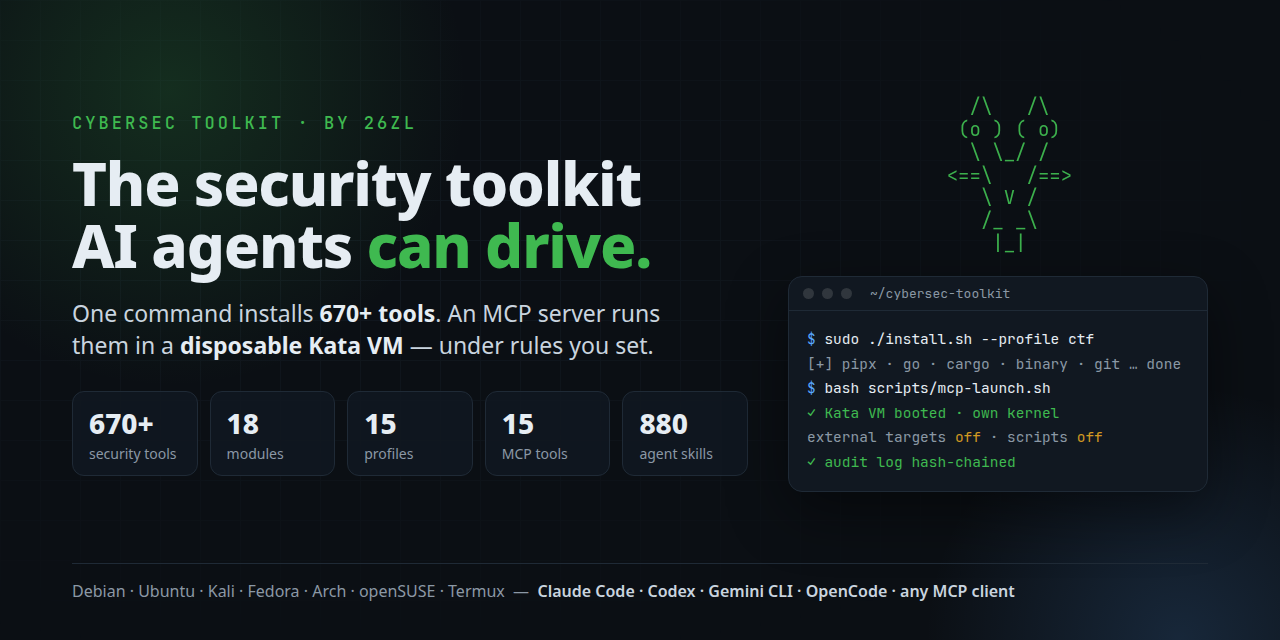
A security toolkit that AI agents can drive, under rules you set. One command installs 670+ security tools on Linux or Termux. An MCP (Model Context Protocol) server lets Claude Code, Codex, Gemini CLI, OpenCode, and other MCP clients discover, recommend, and run those tools through a governed execution path, inside a disposable Kata Containers VM by default. 880 Agent Skills supply the methodology for CTF, pentest, bug bounty, DFIR, and blue-team work.
| Component | What you get |
|---|---|
| Installer | 670+ tools in 18 modules, 15 profiles, and 12 install methods for Debian/Ubuntu/Kali/Parrot, Fedora/RHEL, Arch, openSUSE, and Termux |
| MCP server | 15 tools for discovery, advice, and governed execution; external targets and script execution are off by default |
| Sandbox | One Kata Containers VM per session by default; --local runs the server on the host |
| Agent Skills | 880 skills (31 project-authored, 849 curated), also installable as a Claude Code plugin |
What makes it different: most toolkits stop at installing tools. Here an AI can also drive them: infer the problem type, pick tools from every module and profile, and work through the problem with you step by step. When you explicitly authorize it, the same toolchain runs an autonomous solver loop. Companion by default; autonomous only when you ask. It complements Kali, Parrot, or BlackArch rather than replacing them: it runs on the machine you already have, Termux included.
Quick start · How it works · Trust & safety · Installer · MCP server · Agent Skills · Development · License
Quick start
1. Install the tools on a supported Linux distro or on Termux:
git clone --depth 1 --branch v1.5.0 https://github.com/26zl/cybersec-toolkit.git && cd cybersec-toolkit
./install.sh --doctor             # read-only preflight: distro, prerequisites, MCP server, sandbox
sudo ./install.sh --profile ctf   # one profile; with no flags, all 18 modules
2. Connect an AI client. The tracked configs for Claude Code (.mcp.json, also read by the GitHub Copilot CLI), Codex, Gemini CLI, and OpenCode start the server through scripts/mcp-launch.sh, with external targets and script execution disabled. Choose where the tools run:
| Mode | Tools run | Host needs | One-time setup |
|---|---|---|---|
| Sandbox (default) | In a disposable Kata VM, from the sandbox image | Linux with KVM, Docker 23+ with a Kata runtime, Node.js 22+ | make sandbox-image, then npm --prefix sandbox ci --ignore-scripts |
Host (--local) | As your user, with the tools install.sh installed | uv | Add --local to the launcher, or set CYBERSEC_SANDBOX_MODE=local in the client's env |
Kata needs KVM: on macOS, on Windows, and in VMs without nested virtualization, use host mode.
3. Restart the client. The 15 tools appear (/mcp in Claude Code). Then ask for what you need, for example "triage this binary" or "map the attack surface of my lab at 10.10.0.0/24".
How it works
Two entry points share one tool registry. An operator runs the bash installer to put tools on disk: on the host, or into the sandbox image at build time. An AI agent talks to the MCP server, which runs inside a Kata VM by default, to discover, recommend, and execute those tools through one governed path. tools_config.json is the registry: the MCP server reads it, and CI validators keep it in step with the module arrays the installer works from, along with the rest of the Python and bash sides.
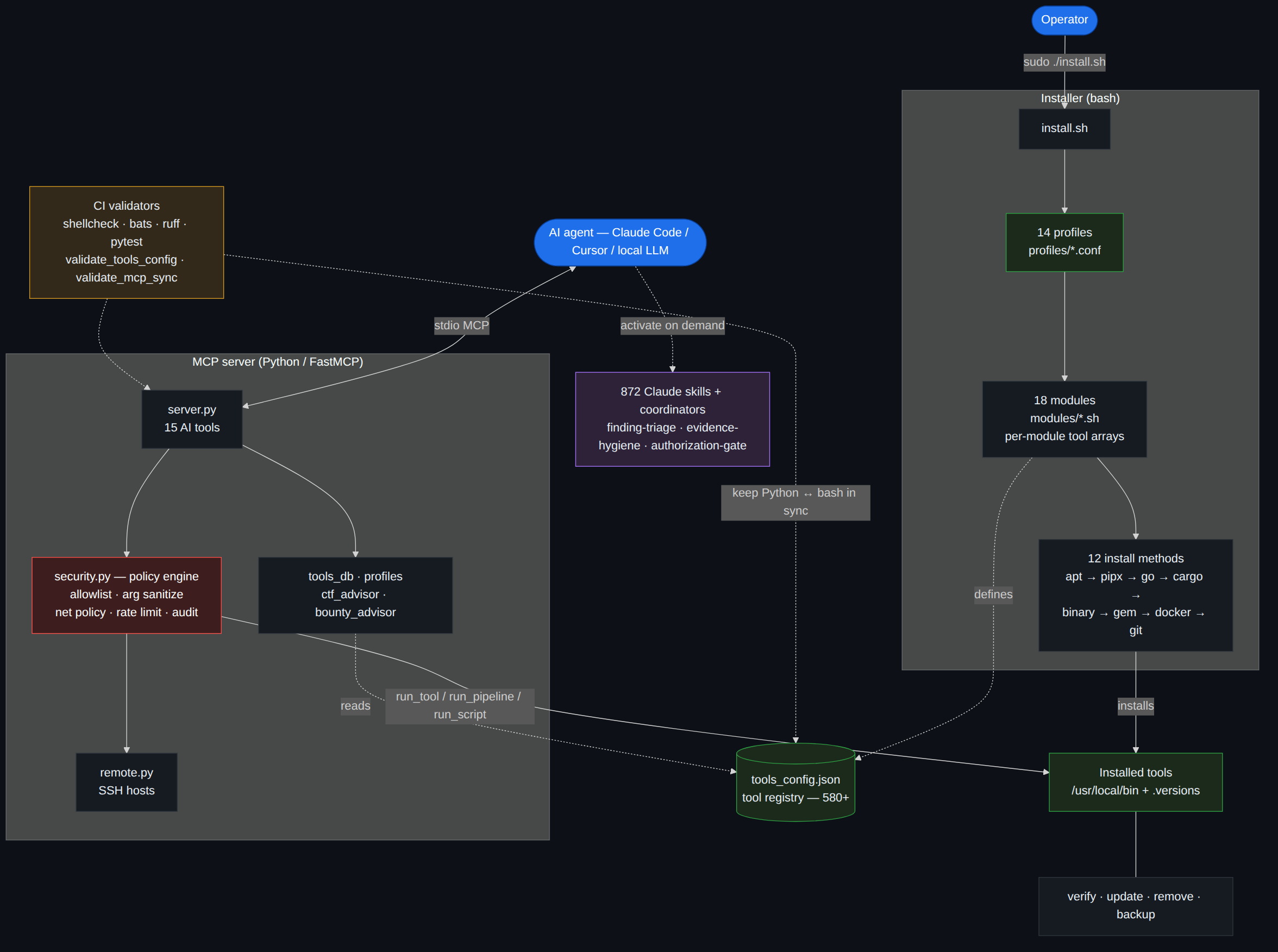
Solid arrows are runtime or installation actions; dashed lines are validation and context relationships. Client configurations enter through the root-aware launcher. By default it starts sandbox/mcp.mjs, which boots a disposable VM through a Sandcastle Kata provider (sandbox/kata.mjs) and bridges the client's stdio to the server inside; with --local it starts the server on the host. Two boundaries are opt-in: a scope file makes the VM a network boundary, and CYBERSEC_LOCAL_SANDBOX=1 starts every host-mode tool and script inside bubblewrap. security.py governs run_tool and run_pipeline through the allowlist, argument checks, and network policy without invoking a shell. run_script is a separate, disabled-by-default capability that runs arbitrary code. Every call is recorded in a hash-chained audit log on the host, and scripts/agent-guard.sh, a client-side hook, reads that log to send target work through an advisor before a security tool is run from the client's own shell. Agent Skills stay outside the execution path: .claude/skills/ is canonical, and scripts/sync-skills.sh generates .agents/skills/ for clients that read the portable mirror. Target work ends in a local, git-ignored writeup under writeups/. Mermaid source: assets/how-it-works.mmd.
Trust & safety
What runs, and what is gated:
- Default-safe MCP.
CYBERSEC_MCP_ALLOW_EXTERNAL=0rejects network targets that do not resolve to private or loopback ranges, andCYBERSEC_MCP_ALLOW_SCRIPTS=0disablesrun_script. External scopes and scripting are explicit opt-ins. - One gate for governed execution (
mcp_server/security.py): registry allowlist, no shell (create_subprocess_exec, nevershell=True), argument sanitization, a per-tool blocked-flag denylist (e.g.sqlmap --os-shell,nmap -iL, file-list and target-injection flags), target and network policy, rate limiting, output caps, and timeouts. The policy knows enough CLI grammar to tell a target from a header, wordlist, output path, or target-list flag. Tool output reaches the model without terminal escape sequences or LLM control markers, and lines addressed to an AI reader are flagged. - Tools run in a disposable VM by default. The launcher boots a Kata Containers VM with its own kernel, no host filesystem beyond an optional
CYBERSEC_SANDBOX_WORKSPACEmount, no Docker socket, a non-root user with every capability dropped, and memory, CPU, and process limits. It is destroyed when the client disconnects. Startup fails closed instead of falling back to the host;--localis the explicit opt-out. - A scope file makes the VM a network boundary.
CYBERSEC_SANDBOX_SCOPEnames a file listing the addresses, ranges, names and ports of the engagement. The launcher loads it as a default-deny firewall inside the VM before the server starts, and refuses to start if it cannot; tools, their child processes andrun_scriptbodies all sit behind it and cannot change it (details and limits). - Know the limits. Without a scope file the VM reaches whatever its Docker network reaches, and
CYBERSEC_MCP_ALLOW_EXTERNALis a preflight check on resolved addresses, not a firewall (CYBERSEC_SANDBOX_NETWORK=noneremoves the network). Inside the VM, and on your host in--localmode, allowed tools run with the server user's permissions, and some of them spawn child processes or load plugins.--localmode has no firewall of its own;CYBERSEC_LOCAL_SANDBOX=1at least starts its tools inside bubblewrap, without your credential stores, the agent client's configuration or other processes (what it covers). - Tool output goes to your model provider. Whatever a tool prints — scan results, page content, and any credential or personal data it finds on a target — is returned to the AI client and sent to the model it uses. By default only the local audit log is redacted; set
CYBERSEC_MCP_REDACT_OUTPUT=1to also redact credential-shaped strings from what the client receives. If an engagement's rules forbid sharing client data with a third party, drive the server from a local model (see AI clients). - Repository hooks run automatically. Opening this repository in Claude Code runs the tracked hooks in
.claude/settings.json:scripts/agent-guard.shat session start and before each Bash command. They only emit routing context or a deny decision, make no network calls, and fail open; setCYBERSEC_AGENT_GUARD=0to disable them. - Audit trail without leaks. Actions are logged as JSON lines to an owner-only (
0600), rotating log under the user's state directory (~/.local/state/cybersec-tools-mcp/audit.logby default). Script bodies are never stored, only their SHA256 and length, and credential-shaped strings are redacted from tool arguments. A sandboxed server mirrors its records to the same host log, and records are hash-chained, so an edited or deleted record inside a chain shows up inmake audit-verify(limits). - Least privilege in the installer. It runs as root but drops to the invoking user (
$SUDO_USER) for cloned-repo builds,go/cargo/gembuilds, and project setup steps (theHarvester, pwndbg); binary releases are SHA256-verified when checksums are published.pipxinstalls (into the shared/opt/pipx) and globalnpminstalls still run as root, so their build and install scripts execute with root privileges — see the supply chain model. Go binaries are copied into/usr/local/binas root-owned files; cargo, gem, cloned-repo, source-build, patator and Foundry tools are exposed there as links or wrappers into trees the invoking user owns, so that user can change what those commands run. - Dual-use tooling is gated. C2 and phishing frameworks (Sliver, Caldera, gophish, evilginx, wifiphisher, BeEF, …) are off by default and install only with
--include-c2(theredteamandfullprofiles set it); the MCP layer reflects this and never auto-runs them. The gate covers frameworks built to phish or to run implants. Exploitation and auditing suites that can also do those things, such as Metasploit, airgeddon and hostapd-mana, are in the default set. - Authorized use only. See
SECURITY.md, the supply chain model, and the disclaimer.
Installer
Requirements
A supported Linux distro (Debian/Ubuntu/Kali/Parrot, Fedora/RHEL, Arch, openSUSE) or Termux. Runtimes (Python, Go, Ruby, Java, Rust, Node.js), dev libraries, pipx, and build tools are installed automatically. The installer does not run on macOS or native Windows; use WSL or Docker.
- Docker is needed for
--enable-docker(C2 frameworks, MobSF, BeEF, BloodHound, TheHive, Cortex) and for theblueteam,redteam,blockchain, andmobileprofiles, which enable Docker images by default (see Profiles). Install it yourself: Docker Engine docs. - GitHub authentication is recommended. The installer downloads ~50 release binaries and makes ~50+ GitHub API calls; unauthenticated requests are limited to 60 per hour, authenticated ones to 5,000. It uses your
gh auth loginsession automatically, also undersudo. Alternatively, pass a personal access token (no scopes needed) throughsudo, which otherwise drops it:sudo --preserve-env=GITHUB_TOKEN ./install.sh.
Install
From the latest release (pinned; recommended):
git clone --depth 1 --branch v1.5.0 https://github.com/26zl/cybersec-toolkit.git && cd cybersec-toolkit && sudo ./install.sh
From main (newest tools and fixes, including unreleased work):
git clone https://github.com/26zl/cybersec-toolkit.git && cd cybersec-toolkit && sudo ./install.sh
With no flags, the installer covers the standard tools of all 18 modules. C2/phishing tools and Docker images stay opt-in unless a profile enables them (the Docker and C2 columns under Profiles); --profile full --enable-docker installs everything the current platform supports. To install a subset:
sudo ./install.sh --profile ctf                      # CTF tools only
sudo ./install.sh --profile redteam --enable-docker  # Red team + Docker C2
sudo ./install.sh --module web --module recon        # Specific modules
sudo ./install.sh --tool sqlmap --tool nmap          # Individual tools
./install.sh --dry-run --profile ctf                 # Preview without installing; no root needed
./install.sh --doctor                                # Read-only preflight; no root needed
All flags
./install.sh --help                     # Full help
./install.sh --list-profiles            # Show profiles
./install.sh --list-modules             # Show modules
sudo ./install.sh --skip-heavy          # Skip the large SDR packages (gnuradio, gqrx-sdr)
sudo ./install.sh --skip-pipx           # Skip all pipx (Python) installs
sudo ./install.sh --skip-go             # Skip all Go tool installs
sudo ./install.sh --skip-cargo          # Skip all Cargo (Rust) installs
sudo ./install.sh --skip-gems           # Skip all Ruby gem installs
sudo ./install.sh --skip-git            # Skip all git clone installs
sudo ./install.sh --skip-binary         # Skip all binary release downloads
sudo ./install.sh --skip-source         # Skip build-from-source, snap, npm, and curl-pipe installs
sudo ./install.sh --fast                # Skip checksum verification (see Supply chain model)
sudo ./install.sh --require-checksums   # Fail if a binary release has no checksum file
sudo ./install.sh --production          # Strict checksum preset for release downloads
sudo ./install.sh --upgrade-system      # Upgrade system packages before installing
./install.sh --list-sessions            # List install sessions and exit
sudo ./install.sh --rollback <id|last>  # Roll back a session's tools (add --yes when not on a terminal)
./install.sh --version                  # Show installer version and exit
sudo ./install.sh --enable-docker       # Pull Docker images
sudo ./install.sh --include-c2          # Include C2/phishing frameworks (Empire and BeEF also need --enable-docker)
sudo ./install.sh -j 8                  # 8 parallel install jobs (default: 4)
sudo ./install.sh -v                    # Verbose / debug output
--tool installs only the named tool, without the full dependency setup, and logs to cybersec_tool.log in the checkout. --skip-heavy skips only the wireless module's gnuradio and gqrx-sdr packages. Dry-run time estimates count install entries across methods, so they can exceed the de-duplicated 670+ tool registry.
Tuning variables (environment): GITHUB_TOOL_DIR (default /opt, ~/tools on Termux) sets where repositories are cloned; GO_MIN_VERSION (default 1.21), PYTHON_MIN_VERSION / PYTHON_TRY_MAX (3.11 / 3.13) and NODE_MIN_VERSION (22) set the runtime versions the bootstrap accepts; ZYPPER_REFRESH_ATTEMPTS / ZYPPER_REFRESH_DELAY (3 / 15 seconds, doubling) tune openSUSE metadata retries; CYBERSEC_ZYPPER_AUTO_IMPORT_KEYS=1 trusts new repository keys on refresh (see the supply chain model); CYBERSEC_ALLOW_PPA=0 stops the installer from adding the third-party deadsnakes PPA on Ubuntu (see the supply chain model); PKG_AUTOREMOVE=1 adds apt-get autoremove to package removal (remove.sh --remove-deps sets it).
Why a full install takes 15-45 minutes
The time goes to I/O-bound work that no scripting language can speed up:
| What takes time | Why |
|---|---|
| System packages (apt/dnf) | Downloading and unpacking .deb/.rpm packages and resolving dependencies |
| Go tools | Downloading modules and compiling each binary |
| pipx (Python) | Creating one isolated venv per tool and downloading wheels |
| Cargo (Rust) crates | Compiling from source |
| Git clones | Cloning each repository |
| Binary releases | Downloading pre-built binaries from GitHub |
./install.sh --dry-run prints the live per-method breakdown. System packages install first, in one transaction. The pipx, Go, Cargo, gem, npm, git, and binary batches then run side by side: pipx, Go, git, and binary releases install up to -j tools at once (4 by default), while Cargo, gem, and npm work through their lists one tool at a time. Source builds run last, one after another. To go faster: install a profile or --module instead of everything, --skip-cargo to avoid Rust compilation, -j 8 for more parallel jobs, and an apt-cacher-ng proxy for repeated installs.
Docker and Podman
The prebuilt image is the installer on Ubuntu, not a sandbox. Its default command is a dry run of the full profile:
docker run --rm ghcr.io/26zl/cybersec-toolkit                                  # preview only
docker run -it --name cybersec --entrypoint bash ghcr.io/26zl/cybersec-toolkit  # keep a container
sudo ./install.sh --profile ctf                                                # inside it; reattach with: docker start -ai cybersec
Build it yourself with docker build -t cybersec-toolkit ., or run a throwaway install through the bundled Compose file with docker compose run --rm installer --profile ctf. On Apple silicon, add --platform linux/amd64 to docker build and docker run. Podman works as a drop-in replacement (podman compose needs a compose provider). The image grants the toolkit user passwordless sudo so the installer can manage packages; treat code inside it as root-capable.
Every published image carries a signed build-provenance attestation. To check that the one you pulled was built by this repository's release workflow, run gh attestation verify oci://ghcr.io/26zl/cybersec-toolkit:<version> --repo 26zl/cybersec-toolkit (needs the GitHub CLI).
Termux (Android)
pkg install git
git clone https://github.com/26zl/cybersec-toolkit.git && cd cybersec-toolkit
./install.sh --profile lightweight
Profiles
| Profile | Modules | Docker | C2 | Description |
|---|---|---|---|---|
full | All 18 | — | yes | Complete security toolkit |
ctf | misc, crypto, pwn, reversing, stego, forensics, cracking, web, mobile, blockchain, networking, recon | — | — | CTF competitions, including PCAP and OSINT challenges; LLM tooling is in web |
redteam | misc, networking, recon, web, enterprise, pwn, mobile, cracking, cloud, wireless, reversing, crypto | yes | yes | Offensive security |
web | misc, networking, recon, web, llm | — | — | Web application testing |
osint | misc, recon | — | — | OSINT gathering |
forensics | misc, forensics, blueteam, reversing, stego, cracking | — | — | Digital forensics and incident response |
pwn | misc, pwn, reversing, crypto | — | — | Binary exploitation and reverse engineering |
mobile | misc, mobile, web, reversing, networking | yes | — | Mobile application security testing, with an intercepting proxy |
cloud | misc, cloud, containers, networking, recon | — | — | Cloud and container security auditing |
blockchain | misc, blockchain, web, crypto | yes | — | Smart contract auditing and blockchain security |
wireless | misc, wireless, networking | — | — | WiFi, Bluetooth, and SDR security |
iot | misc, networking, wireless, reversing, pwn, cracking | — | — | IoT and embedded devices: firmware, network protocols and radio |
lightweight | misc, networking, recon, web, cracking | — | — | Hobby ethical hacking essentials (HTB, THM, bug bounty) |
crackstation | misc, cracking, crypto | — | — | Hash cracking tools; no wordlist is downloaded |
blueteam | misc, blueteam, forensics, reversing, mobile, containers, networking, cloud, recon | yes | — | Defensive security, IR, malware analysis |
Docker and C2 show what each profile enables by default. A profile that enables Docker stops with an error when Docker is not installed; install Docker first, or select the same modules with --module instead of the profile.
Modules
| Module | Tools | Description |
|---|---|---|
misc | 40 | Post-exploitation, social engineering, wordlists, resources, C2 (Docker + Loki) |
networking | 58 | Port scanning, packet capture, tunneling, MITM, protocol tools |
recon | 82 | Subdomain enumeration, OSINT, DNS, automated recon frameworks |
web | 60 | Vulnerability scanning, fuzzing, SQLi, XSS, CMS scanners, API testing |
crypto | 15 | RSA attacks, cipher analysis, hash attacks, constraint solving |
pwn | 36 | Exploit frameworks, binary exploitation, fuzzing, payload generation |
reversing | 35 | Disassemblers, debuggers, emulation, Java/Python reversing |
forensics | 62 | Disk/memory forensics, file carving, timeline analysis, log analysis, hardware/serial |
enterprise | 81 | Active Directory, Kerberos, Azure AD, credential harvesting, lateral movement |
wireless | 41 | WiFi cracking, Bluetooth, SDR, rogue AP |
cracking | 34 | Hash cracking (john, hashcat), brute force, wordlist generation |
stego | 15 | Image/audio steganography, detection, StegCracker |
cloud | 22 | AWS/Azure/GCP security auditing, Checkov |
containers | 15 | Docker/Kubernetes security (Grype, Syft, Kubescape, kubeaudit) |
blueteam | 40 | IDS/IPS, SIEM, incident response, threat intelligence, hardening, malware analysis (YARA, ClamAV, FLOSS, Capa, Loki) |
mobile | 18 | Android/iOS app testing, APK analysis, MobSF (Docker) |
blockchain | 15 | Smart contract auditing (Slither, Mythril, Foundry, Aderyn), blockchain forensics, Echidna (Docker) |
llm | 14 | LLM red teaming, prompt injection, jailbreak testing, AI vulnerability scanning |
Install methods — preferred order: apt > pipx > go > cargo > binary > gem > Docker > git clone > source
| Method | Count | Examples |
|---|---|---|
| Git clone | 193 | GitHub repos with auto-setup, resources, wordlists |
| System packages (apt/dnf/pacman/zypper) | 172 | nmap, wireshark, john, hashcat |
| pipx | 137 | sqlmap, impacket, bloodhound, volatility3 |
| Go install | 63 | nuclei, subfinder, ffuf, httpx |
| Binary release | 54 | gitleaks, chainsaw, findomain, FLOSS, Capa, Loki, Syft, Kubescape |
| Build from source | 25 | massdns, duplicut, AFLplusplus, honggfuzz |
| Docker | 13 | Empire, MobSF, BeEF, BloodHound, TheHive, Cortex, PentAGI |
| Cargo (Rust) | 8 | feroxbuster, RustScan, pwninit, yara-x-cli |
| Ruby gem | 6 | wpscan, evil-winrm, brakeman |
| npm | 6 | promptfoo, apk-mitm, surya, solgraph, rea-agents |
| Special | 5 | Metasploit, Foundry, Steampipe, patator (curl-pipe installers), crypto venv bootstrap |
| Snap | 1 | zaproxy |
Post-install scripts
All scripts support --help and --version. On Linux, update.sh and remove.sh need root (sudo), as do backup.sh schedule and unschedule; verify.sh and the other backup.sh commands run as your user. Termux needs no root. Without a terminal, pass --yes to remove.sh (and to install.sh --rollback).
| Script | Purpose | Example |
|---|---|---|
scripts/verify.sh | Check which tools are installed | ./scripts/verify.sh --module web --skip-heavy |
scripts/update.sh | Update the tools this toolkit installed | sudo ./scripts/update.sh --skip-system |
scripts/remove.sh | Remove tools by module | sudo ./scripts/remove.sh --module enterprise --yes |
scripts/remove.sh --dry-run | Print what would be removed; changes nothing and needs no root | ./scripts/remove.sh --module web --dry-run |
scripts/remove.sh --deep-clean | Remove all toolkit tools, then purge caches and build artifacts | sudo ./scripts/remove.sh --deep-clean --yes |
scripts/backup.sh | Back up and restore tool configs | ./scripts/backup.sh backup |
After a full removal, --deep-clean removes the Go module/build cache, the Cargo registry, pip/pipx/npm/gem caches, leftover venvs of the pipx tools it installed, dangling symlinks into its own trees, and the checkout's log files (including cybersec_tool.log). Toolkit symlinks are matched by canonical path, so links behind a symlinked home or prefix are still removed. Venvs that other tools keep in the same pipx home (for example pipx install --global) stay, and so do symlinks that point anywhere else. Add --remove-deps to also purge Rustup toolchains.
verify.sh --installed-only checks only the tools .versions records and --summary prints counts without per-tool lines. update.sh --skip-docker skips the Docker image update and --skip-special skips Metasploit, promptfoo, ZAP, Foundry, the ctf-crypto venv and Steampipe. remove.sh refuses to run without a .versions install record; --force-unrecorded overrides that and removes every listed tool found on the system, including copies this toolkit did not install.
--dry-run (-n) prints Would remove ... lines and exits 0 without root, the lock, a log file or the confirmation prompt.
install.sh (before its install stages) and a full remove.sh run delete artefacts that an install-method change left behind (the commix and manspider pipx venvs, the apktool git clone) when .versions records the tool with the old method, then drop that row (a git clone with uncommitted changes is kept, with a warning); update.sh leaves them alone. The list lives in scripts/stale_artefacts.sh, which both scripts source.
update.sh and remove.sh act on what .versions records as installed by this toolkit: a tool that was already on the system is recorded as existing and left alone. A record started by a release before 1.1.0 lists the host's own system packages as installed by the toolkit; remove.sh keeps every system package for such a record and says so.
Tool locations
Non-system tools land in /usr/local/bin/ on Linux and $PREFIX/bin on Termux; system packages use their default location (/usr/bin/).
| Method | Binary location (Linux) | Binary location (Termux) | Data location |
|---|---|---|---|
| pipx | /usr/local/bin/ | $PREFIX/bin/ | /opt/pipx/ or ~/.local/pipx/ |
| Go | /usr/local/bin/ | $PREFIX/bin/ | /opt/go/ or ~/.go/ |
| Cargo | /usr/local/bin/ (symlinked) | $PREFIX/bin/ (symlinked) | ~/.cargo/ |
| Git repos | /usr/local/bin/ (symlinked) | $PREFIX/bin/ (symlinked) | /opt/<repo>/ or ~/tools/<repo>/ |
| Binary releases | /usr/local/bin/ | Skipped (glibc incompatible with Bionic) | -- |
The .versions file records what was installed, how, and when. A release directory under /opt that this toolkit did not create is never written to.
Optional Docker images (--enable-docker)
If --enable-docker is set and Docker is missing, the installer stops and asks you to install Docker first.
| Image | Module | Flag | Description |
|---|---|---|---|
bcsecurity/empire | misc | --enable-docker --include-c2 | Empire C2 |
beefproject/beef | web | --enable-docker --include-c2 | BeEF browser exploitation |
opensecurity/mobile-security-framework-mobsf | mobile | --enable-docker | MobSF |
specterops/bloodhound | enterprise | --enable-docker | BloodHound CE |
trailofbits/echidna | blockchain | --enable-docker | Echidna smart contract fuzzer |
checkmarx/kics:latest | cloud | --enable-docker | KICS infrastructure-as-code scanner |
sagemath/sagemath:latest | crypto | --enable-docker | SageMath (Coppersmith, Groebner bases, curve arithmetic) |
strangebee/thehive:latest | blueteam | --enable-docker | TheHive IR platform |
thehiveproject/cortex:latest | blueteam | --enable-docker | Cortex analysis |
zeek/zeek:latest | blueteam | --enable-docker | Zeek network analysis |
wagga40/zircolite:latest | blueteam | --enable-docker | Zircolite EVTX detection |
vxcontrol/pentagi:latest | llm | --enable-docker | PentAGI autonomous pentesting |
Distro support
Debian/Ubuntu/Kali is the primary target and has the strongest test coverage: Kali and Parrot get the full apt set, while plain Debian/Ubuntu skip a handful of Kali-only packages. Fedora, Arch, and openSUSE skip the packages their repositories do not carry (the - entries in lib/distro_compat.tsv, several dozen per distro) and run in the integration workflow.
| Platform | Status |
|---|---|
| WSL | Supported for installs and MCP use; the wireless module and kernel-level packages are skipped. No dedicated CI job, so validate release-critical changes in a local WSL distro. See Windows Defender false positives if the repo lives on a Windows-mounted path. |
| ARM (aarch64/armv7) | Supported, with automatic skips for x86-only binary releases and x86-only build-from-source tools. No dedicated CI job. |
| Termux (Android) | Supported without sudo. Docker, snap, binary releases, and build-from-source are skipped (Bionic incompatible). No dedicated CI job. |
| Windows (native) | Not supported. Use WSL. |
| macOS | The installer is not supported; use the Docker image. The MCP server runs on macOS in host mode (--local), and CI runs its tests and the repository tooling tests on a macOS runner. |
| Other Linux distros | Distros without apt/dnf/pacman/zypper (NixOS, Gentoo, Void, Alpine, Slackware, …) are detected and blocked with a clear error. Use the Docker image. |
What the installer changes
Beyond installing packages, an install can change the system in ways remove.sh does not undo:
- apt sources: the Metasploit repository (
/etc/apt/sources.list.d/metasploit-framework.list, key in/usr/share/keyrings/metasploit-framework.gpg), whichremove.shdeletes again when it removes a Metasploit this toolkit installed; and, through NodeSource's setup script, a NodeSource repository and key, which stay. apt keeps trusting NodeSource after removal; delete its source by hand if you no longer want that. - Arch:
ParallelDownloadsis enabled in/etc/pacman.conf. - snapd on apt-based distros, for snap-only tools.
- Runtimes: the Go SDK in
/usr/local/go; rustup, cargo, and uv in the invoking user's home. - Tools in
/opt,/opt/pipx, and/usr/local/bin.
Data the toolkit keeps, stored only on this machine:
.versions,.install_sessions/, and*.login the checkout: install provenance and logs.~/.local/state/cybersec-tools-mcp/: the MCP audit log and its rotations,remote_hosts.json, and the agent guard'sguard-session*markers andguard-denials.log.~/cybersec_tools_backup/: encrypted configuration backups.writeups/in the checkout (git-ignored).
remove.sh --deep-clean clears caches and the checkout's logs, but not the MCP state directory, backups, or writeups; delete those yourself when you no longer need them.
Supply chain model
The installer downloads and runs code from the internet. On Linux it runs as root (sudo); on Termux it runs in the app's user sandbox.
- System packages: signed by your distro's repositories (apt, dnf, pacman, zypper, pkg). On openSUSE,
zypper refreshtrusts new or rotated repository keys automatically only whenCI=trueorCYBERSEC_ZYPPER_AUTO_IMPORT_KEYS=1is set. - pipx/Go/Cargo/Gem/npm: fetched from their registries without signature verification; pipx tools are isolated in venvs. Go, Cargo, and Gem builds run as the invoking user; pipx and global npm installs run as root, so package build backends and npm lifecycle scripts execute with root privileges.
- Binary releases: SHA256-verified using upstream checksum files, exact-asset GitHub release digests, or reviewed repository/tag/asset checksums in
lib/release_checksums.tsv. A mismatch always fails;--require-checksumsor--productionalso fails when verification data is unavailable. These checks establish download integrity, not independent publisher authentication.--fastskips ordinary release verification and cannot be combined with strict flags; private runtime dependencies always require verification. - Runtime bootstraps: the rustup, uv, and cargo-binstall installers and NodeSource's setup script (run as root) are fetched over HTTPS and sanity-checked before they run, but not signature-verified; in strict mode (
--production/--require-checksums) the rustup, uv, and cargo-binstall installers are skipped when they would run as root (i.e. withoutsudofrom a normal user), and NodeSource's script is always skipped in favour of the distro's signednodejs/npm. cargo-binstall then downloads prebuilt Rust binaries where available;--skip-sourceskips its installer on a fresh host, so Rust tools compile from crates.io. - Go SDK: installed only when the system Go is older than
GO_MIN_VERSION, and then kept until go.dev publishes a newer release. The tarball is SHA256-verified against go.dev, or against checksums embedded for the fallback release when go.dev's API cannot be reached; strict mode fails when neither is available. - Git repos: cloned at HEAD; the repo's own
setup.pyis never run.requirements.txtinstalls into a per-repo venv as the invoking user, where dependency sdists can still build, and outside strict mode (--productionor--require-checksums) a failed pinned install is retried with==relaxed to>=. - deadsnakes PPA: on Ubuntu the installer may add the third-party deadsnakes PPA (as root) to get a newer Python for pipx. It is never added on other distros or in strict mode (
--production/--require-checksums);CYBERSEC_ALLOW_PPA=0opts out and pipx then uses the system Python. - Build from source: runs
makeas the invoking user, not root. Review what you build. - MCP Python dependencies: resolved by
uvwith a 5-dayexclude-newerwindow, and Dependabot waits the same 5 days. This does not apply to the security tools themselves, which follow their upstream release channels. - Toolkit Docker images: Ubuntu and uv are digest-pinned; apt packages resolve from the current signed Ubuntu repositories, so rebuilds are not bit-for-bit reproducible.
- Optional tool images: pulled by mutable tags, several of them
latest.--productiondoes not pin or verify them.
--production does not pin Git clones, language-package registries, or build-from-source tools; those track their upstream release channels.
Windows Defender false positives
On a Windows-mounted path (e.g. C:\Users\<you>\..., or any folder visible from Windows while you work in WSL), Microsoft Defender and other AV products may quarantine individual files. IOC tables, sample obfuscated PowerShell, malware-analysis snippets, and exploit strings in .claude/skills/, writeups/, and parts of mcp_server/ contain the same byte patterns real attackers use. Common verdicts include Trojan:Script/Wacatac.B!ml, HackTool:*, and generic Heur.*. These are false positives for a security toolkit.
Workarounds
-
Exclude the repo folder (recommended on a personal dev box), from an elevated PowerShell:
powershellAdd-MpPreference -ExclusionPath "C:\path\to\cybersec-toolkit" -
Restore files from quarantine via Windows Security → Virus & threat protection → Protection history → "Allow on device". This is per file and does not prevent re-detection.
-
Keep the repo inside the WSL filesystem (e.g.
~/cybersec-toolkit). Defender does not scan WSL2's virtual disk by default.scripts/sync-wsl.shdoes this for the MCP server.
Files removed by Defender show up as D in git status; restore them with git checkout -- <path> once the exclusion is in place.
MCP server
The server gives MCP-capable clients read access to the 670+ tool registry, install status and recommendations, and governed execution of installed tools. The agent knows every tool, which ones are available, and how to chain them.
Supported clients
Claude Code, Codex, Gemini CLI, OpenCode and the GitHub Copilot CLI pick up the tracked configs automatically; Claude Desktop, Copilot in VS Code, Hermes Agent, OpenClaw, DeepSeek Harness, Cursor, Cline, Goose, Continue and LM Studio connect through their own MCP settings, and Ollama or Open WebUI through an MCP host or bridge. The support matrix, with skill discovery and test status per client, lives in docs/AI_CLIENTS.md.
Coordinating several agents across any MCP client is in docs/ORCHESTRATION.md.
The server is published to the official MCP Registry as io.github.26zl/cybersec-toolkit and listed on Glama:
What the AI can do
| Tool | What it does |
|---|---|
list_tools | List/filter all 670+ tools by module, method, or install status (includes URLs) |
check_installed | Check if a tool is installed (6 detection strategies) |
get_tool_info | Full details: method, module, URL, install/update/remove commands |
get_module_info | Deep-dive a module: all tools, install status, which profiles use it |
get_profile_tools | See every tool a profile installs, grouped by module |
suggest_for_ctf | Curated tool recommendations for 14 CTF challenge categories |
suggest_for_bounty | Bug bounty tool recommendations for 7 target types with methodology and common vulns |
guided_assessment | Companion-first solve assistant for an authorized target: classifies the target/finding, returns triage gates, recommends skills, picks tools from all modules/profiles, and guides step by step; opt-in autonomous starts an auto-solver loop over run_tool, run_pipeline, and the separately gated run_script |
get_cve_info | Map a CVE id or nickname (e.g. log4shell) to curated skills, registry tools, modules, and live NVD/KEV/EPSS lookup commands |
recommend_install | Natural-language → profile/module/tool recommendation |
list_profiles | All 15 profiles with tool counts and install commands |
run_tool | Execute installed tools safely (sanitized args, network policy, rate limiting, audit logging); supports remote execution over SSH |
run_pipeline | Pipe tools together without a shell (strings binary | grep flag) |
run_script | Explicit opt-in Python/Bash execution, with per-script venv selection |
manage_remote_hosts | Add, remove, list, and test SSH remote hosts for remote tool execution |
Usage examples — full workflows, offense to defense
The agent can query every tool and its install state, chain governed tool calls, parse the output, and pivot on what it finds. Script execution requires a separate opt-in.
External recon → attack surface (needs CYBERSEC_MCP_ALLOW_EXTERNAL=1, authorized scope only)
- "Enumerate the attack surface for target.com and flag anything exploitable" — fans out
amass/subfinder→ resolves and probes withhttpx→ fingerprints withwhatweb→ runsnucleitemplates → content discovery withffuf, then ranks hosts by exposure and proposes next steps - "Found an open redirect on
/go?url=— weaponize it" — verifies withcurl, then builds an SSRF / OAuth-token-theft PoC and probes for an exploitable callback
Web exploitation
- "Confirm and exploit the SQLi on the login endpoint" —
sqlmapto confirm and dump (destructive--os-shell/--os-cmdare policy-blocked), thenrun_scriptto automate the auth bypass and pull just enough for a PoC - "GraphQL introspection is on — map it and hunt IDOR" — pulls the schema, generates queries, fuzzes object IDs, and diffs authenticated vs unauthenticated responses
Active Directory / internal
- "Low-priv creds on 10.10.0.0/24 — find a path to Domain Admin" — collects with
bloodhound, kerberoasts withnetexec(--kerberoasting), cracks the TGS inhashcat, then validates lateral movement withnetexec, all on a Kali box over SSH (manage_remote_hosts, host mode) - "Check for DCSync rights and dump if the path exists" — enumerates replication ACLs, then runs secretsdump (the
impackettool) against the DC
Binary exploitation & reversing
- "Build a ret2libc exploit for this 64-bit binary" — triages with
checksec/readelf, finds gadgets withROPgadget, leaks libc via aputs@pltcall, then writes the fullpwntoolschain invenv="pwntools"and pops a shell locally - "Recover the algorithm from this stripped binary" —
objdump/radare2disassembly piped into targeted analysis, then arun_scriptreimplementation to verify behavior
Crypto
- "Break this RSA — small
e, several ciphertexts" — detects the attack (Håstad / common modulus / Wiener) and solves it withpycryptodome+sympyin a venv, returning plaintext - "This JWT is HS256 with a weak key" — cracks the signing secret and forges an admin token
Blue team · detection engineering
- "Write a Sigma rule for this technique and convert it to my SIEM" — authors the rule and renders it for the target backend (Splunk / Elastic) via
sigma-cli - "Hunt these Windows event logs for lateral movement" — runs
chainsawover the EVTX with Sigma rules, then summarizes hits by host and timeline - "Build YARA rules from these samples and scan the tree" — generates
yarasignatures and runs them recursively
DFIR · malware triage
- "Timeline this memory dump" — sweeps
volatility3plugins (pslist,netscan,malfind) and chains them into one narrative - "Hunt for C2 beaconing in this pcap" —
tshark/tcpdumpextraction →suricatarules → flags periodic callbacks - "Statically triage this suspicious file" —
file→strings→capa/yara, then extracts IOCs for enrichment
Cloud · containers · ops
- "Audit this AWS account for public S3 and risky IAM" — runs
prowler/scoutsuiteand surfaces only the high-severity findings - "Scan this image and k8s manifests before deploy" —
grypeimage scan pluskubescapeconfig checks - "What's my redteam coverage — and fix the gaps" — diffs
get_profile_tools("redteam")against install status and emits the exact install commands
Mobile · wireless · blockchain
- "Static-analyze this APK for secrets and insecure storage" —
apktool/jadxdecompile → MobSF-style checks, then greps for keys and endpoints - "Audit this Wi-Fi capture" — parses the handshake and runs
aircrack-ng/hashcatagainst it - "Review this Solidity contract for reentrancy" — runs
slither-analyzer/mythriland explains the findings
run_tool and run_pipeline are argument-sanitized, network-policed, rate-limited, and audit-logged, and destructive flags (--os-shell, -rf, --exploit, …) are blocked. run_script is off by default: enabling it runs arbitrary code with the server user's filesystem and network permissions (inside the VM by default, on your host with --local), and the external-target policy does not constrain it. Use only against systems you are authorized to test.
Sandbox and host mode
scripts/mcp-launch.sh starts the server inside a Kata Containers VM unless you pass --local or set CYBERSEC_SANDBOX_MODE=local. The VM is created by a Sandcastle isolated-sandbox provider (sandbox/kata.mjs) that pins the Kata runtime; the same provider can also back a Sandcastle agent-orchestration loop instead of an MCP client. Startup fails closed: a missing runtime, sandbox image, KVM device, Node.js, or launcher dependency, an image built from older server sources, or a scope that cannot be enforced stops the server with the reason instead of falling back to the host. ./install.sh --doctor reports sandbox readiness. Setup, tuning, and the threat model are in docs/SANDBOX.md.
-
The VM has its own tool set. The sandbox image ships the MCP server plus
file,git,binutils,nmap,curl, and Python. Tools installed on the host are not visible inside it, andcheck_installedand the advisors report the guest's tools. Bake a profile into the image instead, and rebuild after pulling server changes, because the image carries its own copy of the server:bashmake sandbox-image TOOLKIT_PROFILE=ctf -
Files: the VM sees no host path unless
CYBERSEC_SANDBOX_WORKSPACEnames an absolute directory, which appears as/workspace(read-only withCYBERSEC_SANDBOX_WORKSPACE_RO=1). Use a case directory outside this checkout; one inside it is refused, because the client reads instruction files and skills from the project tree. Pass guest paths torun_tool. -
Network: the VM uses Docker's default bridge. Set
CYBERSEC_SANDBOX_SCOPEto a scope file to limit it to the engagement's destinations, orCYBERSEC_SANDBOX_NETWORK=nonefor offline analysis. -
Privileges: uid 10001, all capabilities dropped,
no-new-privileges, and 2 GB / 2 vCPUs / 512 processes by default. Raw-socket scans (nmap -sS,-sU, OS detection) are not available in the sandbox: the guest user is unprivileged andno-new-privilegesis set, so an addedNET_RAWcapability never becomes effective. Use connect scans (-sT) or--localmode. -
Host mode only: remote execution over SSH (
manage_remote_hosts) and venvs under~/.ctf-venvs/that you created on the host. -
Audit: records leave the VM on a stderr side channel and are appended to the host log, so the trail outlives the VM.
Client setup
Claude Code reads the tracked .mcp.json:
{
  "mcpServers": {
    "cybersec-tools": {
      "command": "bash",
      "args": [
        "-lc",
        "cd \"$(git rev-parse --show-toplevel)\" && exec bash scripts/mcp-launch.sh"
      ],
      "env": {
        "CYBERSEC_MCP_ALLOW_EXTERNAL": "0",
        "CYBERSEC_MCP_ALLOW_SCRIPTS": "0"
      }
    }
  }
}
The login shell (bash -lc) picks up node and uv from your profile, so profile scripts must not print to stdout, which carries the MCP protocol. Other clients use the same launcher; from any directory:
bash /path/to/cybersec-toolkit/scripts/mcp-launch.sh           # Kata VM (default)
bash /path/to/cybersec-toolkit/scripts/mcp-launch.sh --local   # host, no VM boundary
- Codex: the project
.codex/config.tomlresolves the Git root first, so it works from any subdirectory. If Codex ignores project config, copy the[mcp_servers.cybersec-tools]block into~/.codex/config.toml. - Cursor / Continue / Cline / Goose: add the launch command in the client's MCP settings, with an absolute path if the client's working directory is not the repo root.
- LM Studio (≥0.3.17): an MCP host itself. Add the server to its
mcp.json(samemcpServersshape as.mcp.json) with an absolute path. MCP over LM Studio's API needs ≥0.4.0 and an MCP-capable endpoint such as/api/v1/chator/v1/responses. - Ollama and other local models: a model runtime does not speak MCP. Put an MCP-capable host in front of it (OpenCode, Hermes, OpenClaw, Kit, LM Studio, Cline, Continue, Goose, or Open WebUI through an MCP→OpenAPI bridge such as
mcpo) and point that host at the launcher.
Start with this one server and keep scripts and external targets off unless you have an authorized scope; prefer hosts with human-in-the-loop tool approval. Vendor-neutral repository instructions live in AGENTS.md; Claude Code reads CLAUDE.md, Gemini CLI reads GEMINI.md.
Connect from WSL (e.g. Kali Linux)
The server speaks stdio, so a Windows client can launch it inside WSL. This runs it directly in WSL, without the Kata VM (the equivalent of --local):
{
  "mcpServers": {
    "cybersec-tools": {
      "command": "wsl",
      "args": [
        "-d", "kali-linux",
        "bash", "-lc",
        "cd ~/cybersec-toolkit/mcp_server && uv run fastmcp run server.py --transport stdio --no-banner"
      ]
    }
  }
}
Use a clone inside the WSL filesystem, or run scripts/sync-wsl.sh from a Windows checkout to copy the server to ~/cybersec-toolkit in WSL (uv cannot create a venv on NTFS). Passing CYBERSEC_MCP_* variables from Windows needs WSLENV; see mcp_server/README.md.
Connect from Docker
Runs the server in the installer image. This is an ordinary container, not the Kata VM, and its user has passwordless sudo:
{
  "mcpServers": {
    "cybersec-tools": {
      "command": "docker",
      "args": [
        "run", "-i", "--rm",
        "-e", "CYBERSEC_MCP_ALLOW_EXTERNAL=0", "-e", "CYBERSEC_MCP_ALLOW_SCRIPTS=0",
        "--entrypoint", "bash", "cybersec-toolkit",
        "-c",
        "cd /opt/cybersec-toolkit/mcp_server && uv run fastmcp run server.py --transport stdio --no-banner"
      ]
    }
  }
}
Script execution
run_script lets the agent write and run Python or Bash. Enable it with "CYBERSEC_MCP_ALLOW_SCRIPTS": "1" in the client's env block. Scripts get the server process's filesystem and network permissions (the VM by default, your user in --local mode), and CYBERSEC_MCP_ALLOW_EXTERNAL does not constrain them. Review generated code and scope before opting in.
Python libraries without console scripts live in named venvs under ~/.ctf-venvs/ (override with CYBERSEC_MCP_VENVS_DIR), selected per script with the venv parameter. ./install.sh --module crypto creates ~/.ctf-venvs/crypto with pycryptodome, sympy, gmpy2, numpy, z3, fpylll (+ cysignals, which fpylll needs at import time but does not declare), and cypari2, so the agent can call run_script(code, venv="crypto"). In the sandbox, venvs are guest paths: build the image with TOOLKIT_PROFILE=ctf to get crypto. Some packages need an older Python, for example pwntools:
python3.12 -m venv ~/.ctf-venvs/pwntools
~/.ctf-venvs/pwntools/bin/pip install pwntools z3-solver
Without a named venv, scripts see FastMCP and the standard library; cd mcp_server && uv sync --extra ctf-core adds requests, pycryptodome, beautifulsoup4, Pillow, and NumPy.
Reusable helpers the agent writes for you (exploits, multi-step solvers, parsers, protocol helpers) are saved under manual_scripts/. In companion mode the agent proposes a script and runs it only after you approve; in autonomous mode it writes and runs scoped helpers when tools and pipelines stop making progress. Plain recon and HTTP requests stay run_tool calls.
Test the server
cd mcp_server && uv run fastmcp dev inspector server.py
This opens the MCP Inspector for exercising each tool interactively. mcp_server/README.md covers Claude Desktop setup and the full server reference.
Agent Skills
880 Agent Skills live in .claude/skills/, the canonical tree that Claude Code discovers directly. Skills load on demand for the task at hand instead of occupying context permanently. 31 are project-authored and 849 are curated from open-source projects, each attributed in THIRD_PARTY_NOTICES.md:
- 10 project developer skills (
add-tool,validate-all,module-scaffold,writeup-template,mcp-sync-check,security-wordlists,security-payloads,guided-assessment,skill-dependency-audit,skill-curation-router) - 4 cross-skill coordinators (
finding-triage,security-comms,authorization-gate,evidence-hygiene) that route findings, communication, authorization checks, and evidence sanitization - 7 coverage-gap anchors (GRC/privacy, AI/LLM security, IoT/embedded/hardware, mainframe, telecom/5G, SAP/ERP, supply-chain/product security)
- 6 CTF methodology skills (
ctf-crypto,ctf-pwn,ctf-web,ctf-rev,ctf-forensics,ctf-stego) and 4 bug bounty methodology skills (bounty-recon,bounty-web,bounty-api,bounty-mobile) - 754 operational how-tos from mukul975/Anthropic-Cybersecurity-Skills (Apache 2.0)
- 58 offensive methodology skills from SnailSploit Claude-Red (MIT)
- 14 code audit skills from Trail of Bits (CC-BY-SA 4.0)
- 10 bug bounty workflow skills from BugHunter (Agentic-Bug-Hunter) (MIT)
- 4 high-level workflows from Transilience (MIT)
- 1 coding-agent workflow skill from multica-ai/andrej-karpathy-skills (MIT)
- 8 CTF solving skills from ljagiello/ctf-skills (MIT), led by the
solve-challengedispatcher
Source and category index: .claude/skills/SKILLS.md. Ranking and curation: .claude/skills/CURATION.md and curation.json, regenerated with python3 scripts/curate_claude_skills.py --write.
As a Claude Code plugin. The repo doubles as a plugin marketplace, so any project can pull in the skill library without cloning:
/plugin marketplace add 26zl/cybersec-toolkit
/plugin install cybersec-toolkit@cybersec-toolkit
The plugin carries the skills only; the MCP server is configured separately (see MCP server).
In other clients. OpenCode, Codex, Gemini CLI, GitHub Copilot, Cursor, Cline, Goose, Hermes, OpenClaw, and DeepSeek Harness support Agent Skills through their own paths. scripts/sync-skills.sh mirrors .claude/skills/ into the git-ignored .agents/skills/ for clients that read that location (--check reports drift; make setup runs it). Continue and LM Studio do not document automatic skill discovery; give them selected skill content as rules or context instead. Details: docs/AI_CLIENTS.md.
Helper-script dependencies. Some vendored skills include helper scripts with optional Python imports, declared in .claude/skills/requirements.txt and generated from the import inventory. scripts/validate_claude_skills.py checks skill metadata, index counts, curation freshness, and helper-script syntax.
python3 scripts/audit_skill_dependencies.py --check-declared   # verify declarations
python3 -m pip install -r .claude/skills/requirements.txt      # optional, ideally in a venv
Development
Contributions are welcome: testing installs on different distros, adding missing tools, fixing package mappings, improving MCP workflows, writing example use cases, and reporting rough edges from real CTF, lab, bug bounty, pentest, DFIR, or defensive work. Open an issue for bigger changes or send a focused PR for small fixes; CONTRIBUTING.md has the validation checklist.
git clone https://github.com/26zl/cybersec-toolkit.git && cd cybersec-toolkit
make setup    # submodules, MCP deps, sandbox deps, skill mirror
make check    # lint, validators, bats, pytest, sandbox tests
make help lists every target; the raw commands are in AGENTS.md. The MCP Python project resolves dependencies with uv and exclude-newer = "5 days", so fresh releases are ignored for five days to limit the blast radius of a compromised upload; Dependabot and the weekly uv update workflow use the same cooldown. The shell tests run on Linux, WSL and macOS (a few skip where flock or /proc is missing); native Windows checkouts can rewrite the Bats submodules with CRLF and fail with $'\r'.
Release notes for every version, including security fixes and upgrade steps, are on the GitHub Releases page; git log $(git describe --tags --abbrev=0).. shows what has landed since the latest release.
Star History
License
MIT License. See LICENSE.
The repository also redistributes third-party components under their own terms, including some under CC-BY-SA-4.0 (ShareAlike, not relicensable to MIT). If you redistribute or adapt bundled content, follow those terms; see THIRD_PARTY_NOTICES.md.
Contribution workflow: CONTRIBUTING.md. Community expectations: CODE_OF_CONDUCT.md. Vulnerability reporting: SECURITY.md.
Disclaimer
This project is provided for educational, defensive, and explicitly authorized security testing only. Use it only on systems you own or have written permission to assess, and follow all applicable laws, rules of engagement, third-party tool licenses, and service terms.
The toolkit includes dual-use offensive and defensive tools. Some commands can scan networks, execute exploits, modify systems, or trigger security alerts. MCP/AI integrations are guarded by safety policies, but users remain responsible for reviewing scope, prompts, commands, and outputs before running actions.
This repository does not redistribute the security tools themselves; it installs publicly available, open-source projects from their official upstream sources at install time. It is intended for lawful, authorized use only.
The project is provided "as is", without warranty. Maintainers are not responsible for misuse, damage, data loss, service disruption, or legal consequences from using this toolkit.
Third-party content is bundled under its original license — see
THIRD_PARTY_NOTICES.md.