Listed from the MCP registry; nobody on Odel publishes it.

极科研 jikeyan
Official 极科研 MCP server: manage research projects, deadlines, reviews, submissions.
Runs on your machine from its package; the steps are below.
What it does
- Reads
- Writes
- High impact
At most: creates or changes data: records, files, settings.
What it costs
FreeOdel charges nothing per call. The publisher may charge for its own service.
Runs locally over stdio
This server isn't hosted — your MCP client launches it from a package registry. Use one of the commands below, or drop the config into your client (e.g. Claude Desktop).
Run
docker run -i --rm ghcr.io/871922384/jikeyan-mcp:0.2.1
MCP client config
{
  "mcpServers": {
    "jikeyan": {
      "command": "docker",
      "args": [
        "run",
        "-i",
        "--rm",
        "ghcr.io/871922384/jikeyan-mcp:0.2.1"
      ]
    }
  }
}

jikeyan-agent-skill
Give your AI agent a research dashboard: projects, deadlines, waiting items, submissions, reviews.
让 AI 智能体替你管项目、盯截止、跟等待项——科研项目管理,一句话直达。
Website ·
App Store ·
Agent guide ·
中文




Official agent skills + MCP server for 极科研 (jikeyan), a local-first iOS kanban app for research project management. Two installable skills and a standalone MCP server, all speaking to the same documented Agent API (online guide). 中文说明见 README.zh-CN.md(含国内 agent 平台配置:CodeBuddy、Qwen Code、通义灵码、百炼、Trae、Coze 等)。
How it works
flowchart LR
    A["Your agent\n(skill / MCP)"] <--> B["Agent API\napi.jikeyan.cn"]
    B <--> C["📱 极科研 App\n(your data, local-first)"]
    style B fill:#e8f4f8,stroke:#57c4d9
Your data stays on your device and the 极科研 backend in China (api.jikeyan.cn, no proxy needed).
The agent only sees what your Agent Key permits (read-only or project-scoped), and drafts — never sends —
follow-ups on your behalf.
Screenshots
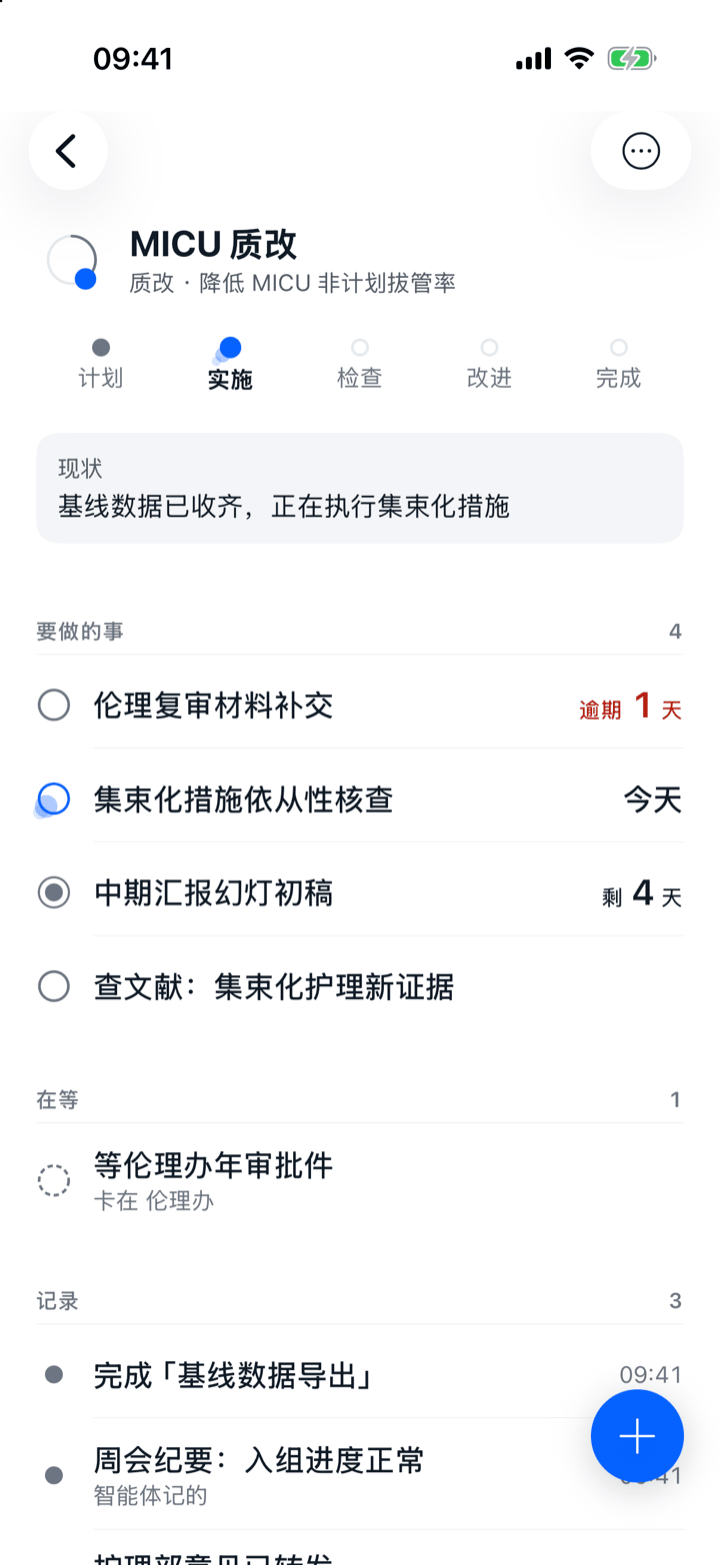
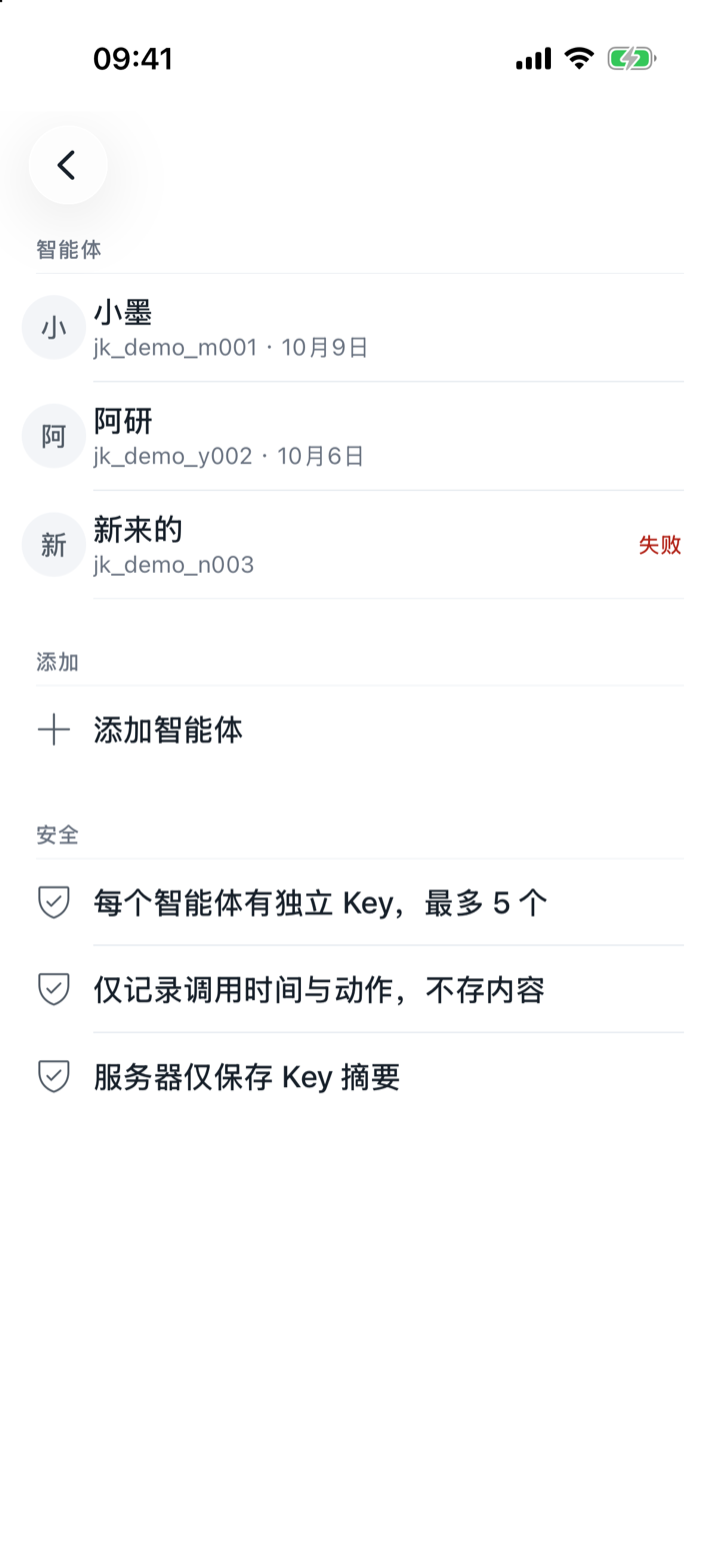
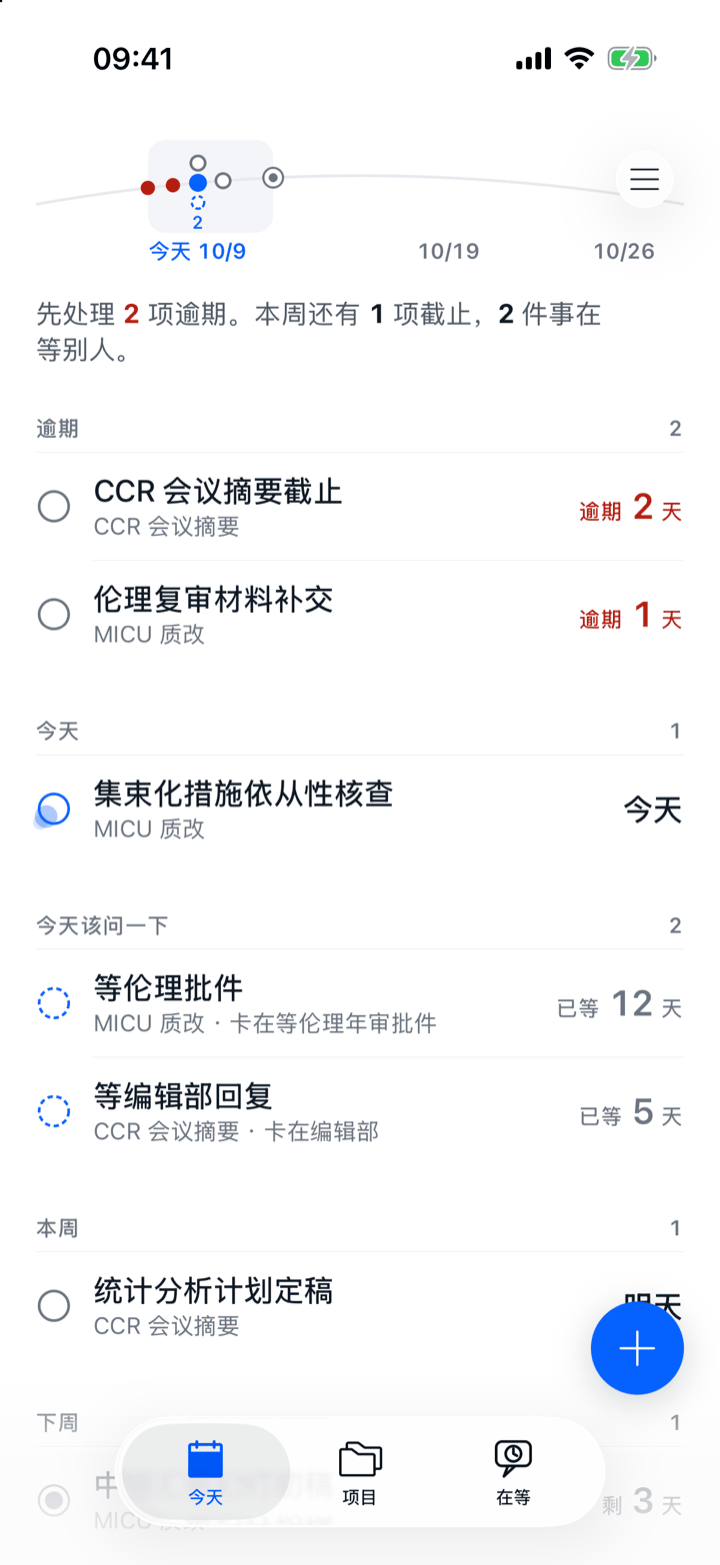
Today · Project · Connect agent — all shots use built-in demo data, no real projects.
What your agent can do
| Ask your agent to… | What happens under the hood |
|---|---|
| ☀️ Brief me this morning | Overdue nodes, items due in 7 days, waiting items to re-check today, last 48h of updates (get_today + daily-review workflow) |
| ⏳ Chase what's stuck | Find stalled "waiting on someone" items and draft bilingual follow-up messages (you send them; the agent never contacts anyone) |
| 📦 Import my projects | Create projects idempotently via your own external_ref, then add nodes in one versioned patch |
| 📝 Split reviewer comments | Break review comments into numbered actions, draft a point-by-point response letter, record the round (add_review_round) |
| ✅ Pre-submission check | Journal requirements, ethics, authorship, references, figures, cover letter — one item at a time |
| 📅 Count down to a deadline | Plan backwards from a hard date with buffers for external feedback and co-author confirmation |
| 🔍 Verify references & screen topics | Check BibTeX metadata against Crossref/PubMed; screen ClinicalTrials.gov + PubMed reviews (runs locally, never touches the jikeyan server) |
| 🔄 Weekly review | What got done, what's due next, what's stalled, what needs your decision |
What the first conversation looks like
The agent greets you with a live summary of your board (demo data below — not real projects), then waits for your pick. No endpoints, no keys, just the work:
Agent: Hi! I've taken over your Jikeyan project board, and every change will show up on your phone. You have 3 active projects, 1 of them overdue and worth tackling first, plus 2 waiting items due for a follow-up today. Where should we start? I can update stages and deadlines, chase ethics approvals and collaborator replies, log submissions and review rounds — for example: ① add your breast-cancer prognosis study (first draft due next Friday), ② check what's waiting on replies today, ③ log the major-revision round that just came back.
You: Let's do ② — what's waiting on replies today?
Agent: Two things: the ethics approval has been with the committee for 12 days (I drafted a polite chase note — say the word and I'll finalize the wording for you to send), and Dr. Li's pathology feedback was due yesterday. Want me to set both to re-check tomorrow morning?
You: Yes, and log the major revision as round two while you're at it.
Agent: Done — both waiting items will resurface in tomorrow's brief, and round two is logged with a response deadline 4 weeks out. Anything else to push forward today?
Quickstart
1. Generate a key — in the 极科研 app: 设置 → 连接智能体 (Settings → Connect Agent).
2. Export it — the key lives only in your environment, never in a repo:
export JIKEYAN_AGENT_KEY='<your agent key>'
3. Install the skill or the MCP server — pick one row, details in <details> below:
| Client | Skill | MCP server |
|---|---|---|
| Claude Code | /plugin marketplace add 871922384/jikeyan-agent-skill then /plugin install jikeyan@jikeyan | .mcp.json snippet |
| Codex | copy plugins/jikeyan/skills/* to ~/.codex/skills/ | codex mcp add … snippet |
| Cursor / Windsurf / other MCP clients | copy plugins/jikeyan/skills/* to the client's skills dir | generic stdio config |
Then ask your agent to "use the jikeyan skill and run get_schema first".
Claude Code
Skill (recommended):
/plugin marketplace add 871922384/jikeyan-agent-skill
/plugin install jikeyan@jikeyan
Portable fallback: copy plugins/jikeyan/skills/* to ~/.claude/skills/.
MCP server (.mcp.json, project-level — keep uncommitted if it holds your key;
no PyPI needed, pick the uvx line or the docker line):
{
  "mcpServers": {
    "jikeyan": {
      "command": "uvx",
      "args": [
        "--from",
        "git+https://github.com/871922384/jikeyan-agent-skill#subdirectory=mcp",
        "jikeyan-mcp"
      ],
      "env": {
        "JIKEYAN_AGENT_KEY": "${JIKEYAN_AGENT_KEY}",
        "JIKEYAN_API_BASE_URL": "https://api.jikeyan.cn"
      }
    }
  }
}
Docker alternative (no local Python needed; pin a version tag from
server.json, latest also works):
{
  "mcpServers": {
    "jikeyan": {
      "command": "docker",
      "args": [
        "run",
        "-i",
        "--rm",
        "-e",
        "JIKEYAN_AGENT_KEY",
        "-e",
        "JIKEYAN_API_BASE_URL=https://api.jikeyan.cn",
        "ghcr.io/871922384/jikeyan-mcp:latest"
      ]
    }
  }
}
Codex
Skill: copy plugins/jikeyan/skills/* to ~/.codex/skills/.
MCP server (no PyPI needed):
codex mcp add jikeyan \
  --env JIKEYAN_AGENT_KEY="$JIKEYAN_AGENT_KEY" \
  --env JIKEYAN_API_BASE_URL=https://api.jikeyan.cn \
  -- uvx --from "git+https://github.com/871922384/jikeyan-agent-skill#subdirectory=mcp" jikeyan-mcp
Docker alternative:
codex mcp add jikeyan \
  -- docker run -i --rm -e JIKEYAN_AGENT_KEY -e JIKEYAN_API_BASE_URL=https://api.jikeyan.cn ghcr.io/871922384/jikeyan-mcp:latest
Cursor / Windsurf / Gemini CLI / other MCP clients
Add a stdio server with environment variables
JIKEYAN_AGENT_KEY + JIKEYAN_API_BASE_URL=https://api.jikeyan.cn.
No PyPI needed — pick one launch command:
uvx --from "git+https://github.com/871922384/jikeyan-agent-skill#subdirectory=mcp" jikeyan-mcp
docker run -i --rm -e JIKEYAN_AGENT_KEY ghcr.io/871922384/jikeyan-mcp:latest
Plain-HTTP alternative (no MCP): plugins/jikeyan/skills/jikeyan-agent/scripts/jikeyan.sh
is a curl wrapper around the same API — JIKEYAN_AGENT_KEY + get/post/patch.
China: domestic agents & mirrors (国内平台)
Full copy-paste configs live in README.zh-CN.md — CodeBuddy & WorkBuddy (腾讯), Qwen Code CLI, 通义灵码/Qoder, 百炼智能体应用, Trae, 扣子 Coze, ModelScope MCP 广场, Kimi & 智谱托管智能体(远程 MCP)。
Mainland mirrors (only needed after the PyPI release; the API itself needs no proxy).
Until then use the git uvx --from … or the GHCR docker image above:
# uv / pip via Tsinghua or Aliyun mirror
export UV_INDEX_URL='https://pypi.tuna.tsinghua.edu.cn/simple'
pip install -i https://pypi.tuna.tsinghua.edu.cn/simple jikeyan-mcp
# or: https://mirrors.aliyun.com/pypi/simple/
Contents
| Path | What it is |
|---|---|
plugins/jikeyan/skills/jikeyan-agent/ | Skill: Agent API cookbook + jikeyan.sh curl wrapper + endpoint table |
plugins/jikeyan/skills/jikeyan-academic-colleague/ | Skill: research-management workflows (daily/weekly review, stalled detection, waiting-item follow-up, review response, pre-submission, backward planning) |
mcp/ | Standalone Python package jikeyan-mcp (17 MCP tools, stdio). See mcp/README.md |
assets/ | Logo, App screenshots (demo data only), social preview image |
.claude-plugin/marketplace.json | Claude Code plugin marketplace manifest |
server.json | Official MCP Registry manifest (prepared, not yet submitted) |
smithery.yaml | Smithery deploy config (prepared, not yet submitted) |
llms.txt | LLM-readable repo summary |
docs/distribution.md | Format sources, repo metadata, manual submission checklist, China listing tracker |
Security & privacy
- The Agent Key is read from the environment (
JIKEYAN_AGENT_KEY) only. Never hard-code it, never commit it, never paste it into chat logs. - Never send patient names, hospital IDs, diagnoses, or follow-up text. The API has no fields for them and rejects unknown fields — keep it that way. Personal notes stay on your device and are never synced.
- The MCP server runs on your own machine; it logs only tool names and HTTP status codes — no keys, no content.
- Key permissions (read-only, project-scoped) are enforced server-side. A revoked key returns
401: regenerate it in the app.
Links
- 极科研: https://jikeyan.cn · App Store · Privacy
- Agent API online guide: https://api.jikeyan.cn/agent.md
- MCP package: mcp/README.md
License
MIT, see LICENSE.







