Listed from the MCP registry; nobody on Odel publishes it.

Jidr
See and drive Android emulators on a Mac: screenshot, tap, type, UI tree, logs, root.
Runs on your machine from its package; the steps are below.
What it does
- Reads
- Writes
- High impact
At most: moves money, runs code or commands, deletes data, or sends messages for you.
What it costs
FreeOdel charges nothing per call. The publisher may charge for its own service.
Runs locally over stdio
This server isn't hosted — your MCP client launches it from a package registry. Use one of the commands below, or drop the config into your client (e.g. Claude Desktop).
Distributed as an MCP bundle (`https://github.com/AbdurahmanAlmehdi/jidr/releases/download/v0.5.0/jidr-mcp-0.5.0-darwin-arm64.mcpb`) — download it and import the bundle in your MCP client.
Jidr (جذر)
Android on your Mac, rooted in a minute.


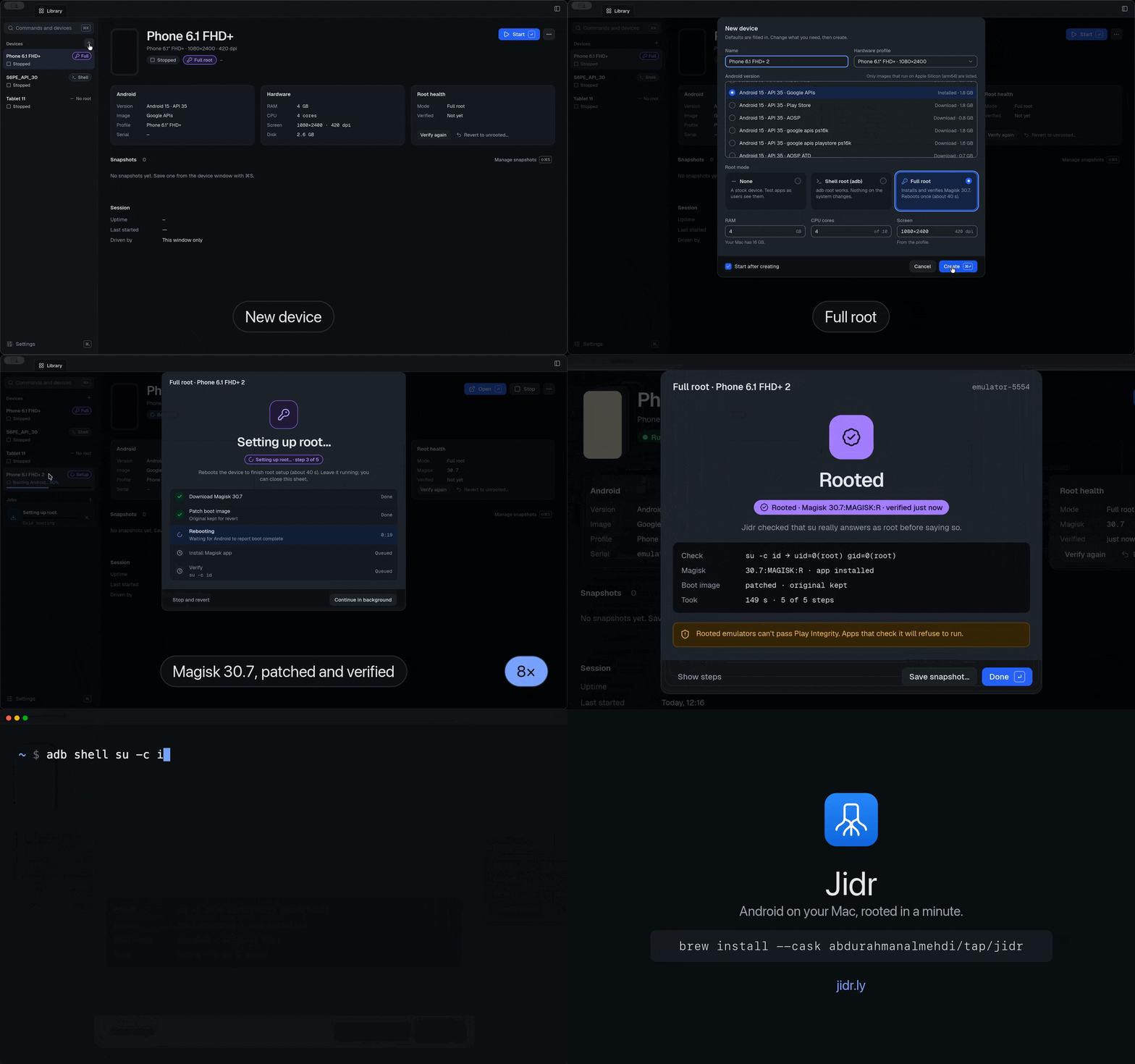
Jidr creates and runs virtual Android phones and tablets on Apple Silicon Macs. Pick Full root and Magisk is patched in and verified for you; pick Shell root for adb root; or keep the device stock. It's a free, open-source alternative to Genymotion Desktop, written in Rust, with a desktop app, a CLI and an MCP server for AI agents.
brew install --cask abdurahmanalmehdi/tap/jidr
Or download the DMG. Site: jidr.ly. News: @Jidr_ly on X.
Features
- Devices: create, clone, start, stop and delete virtual devices from Google's emulator images (API 29–36, arm64). Jidr keeps its own SDK and never modifies Android Studio's SDK or AVDs.
- One-click root: None, Shell root (
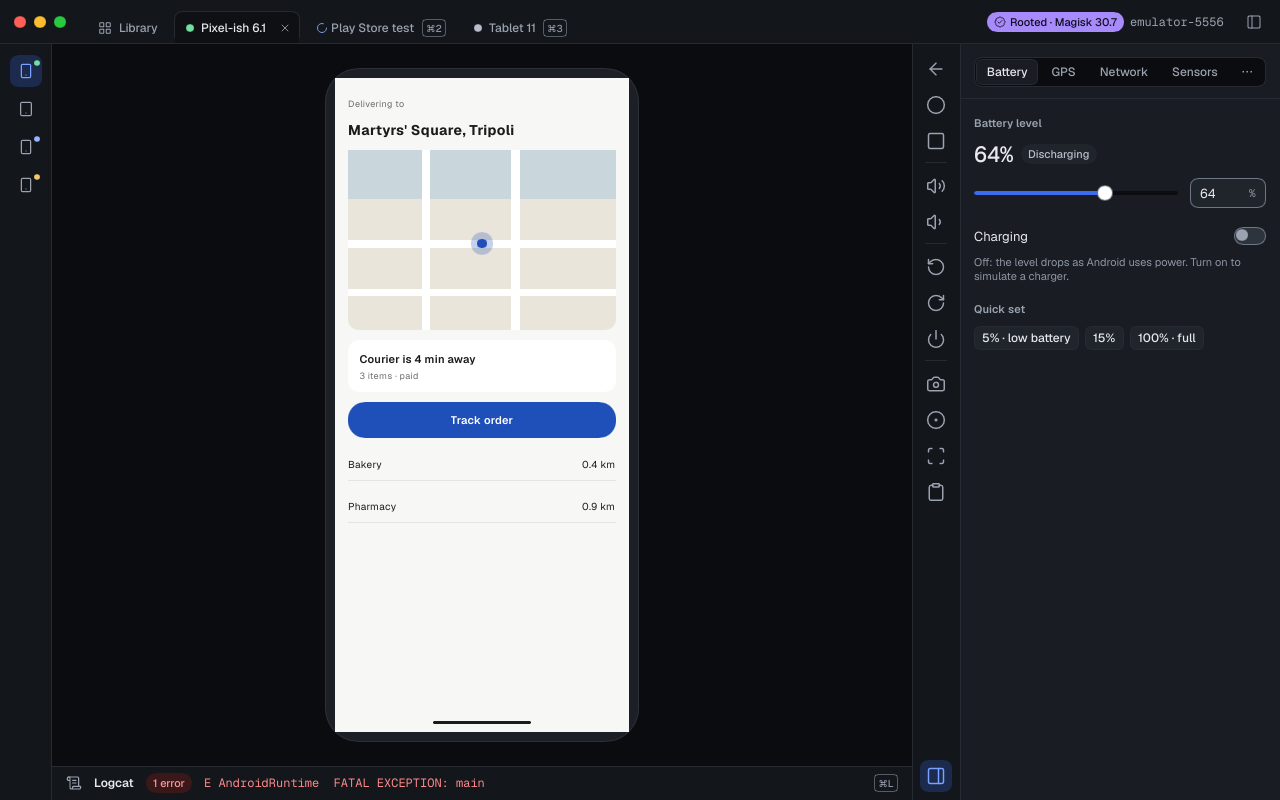
adb root) or Full root (Magisk, patched into a per-device copy of the ramdisk and verified withsu -c id). Revert at any time. Play Store images get a guided beta. - Player window: the device screen with mouse and keyboard input, drag-and-drop for APKs and files, and logcat.
- Widgets: battery, rotation and motion sensors, network (Wi-Fi, mobile data, speed and delay profiles), calls, SMS and signal bars, GPS with GPX/KML route replay on an OpenStreetMap map, fingerprint, the host webcam as the camera, clipboard and developer toggles.
- Media and state: PNG screenshots, MP4 recordings, and snapshots tagged with the root mode they were taken in.
- Build identity: set build properties (model, brand, fingerprint…) on Full-root devices.
- CLI: every action is a
jidrcommand, with--jsonoutput and stable exit codes for CI. - MCP server:
jidr mcplets Claude and other MCP clients see and drive a device: screenshot, tap, type, UI tree, logs. - iOS simulators (macOS with Xcode): list, boot and drive the simulators Xcode has, preview them in the app, and give each agent session a fresh simulator of its own (
jidr sim lease, or thesimulator_leaseMCP tool) that's deleted when the session ends. - Languages: the app is in English, العربية (right to left), Español, 简体中文 and Português (Brasil). It follows your Mac's preferred languages, or pick one in Settings › General. The CLI and MCP stay in English.
No accounts, no telemetry, no paid tier.
Install
You need macOS 14 or later on Apple Silicon, and about 10 GB of free disk space for the SDK and one system image.
- Homebrew:
brew install --cask abdurahmanalmehdi/tap/jidrinstallsJidr.appand puts thejidrCLI on yourPATH. Update withbrew upgrade --cask jidr. - DMG: download
Jidr-<version>-arm64.dmgfrom the latest release and drag Jidr to Applications. The CLI is at/Applications/Jidr.app/Contents/Helpers/jidr.
On first launch the app finds or downloads the Android SDK and a system image, after you accept Google's license.
Linux (headless)
On x86_64 Linux with KVM, Jidr ships as the jidr binary: the CLI, the daemon and the MCP server, with x86_64 system images. Download jidr-<version>-x86_64-unknown-linux-gnu.tar.gz from the latest release, unpack it and link jidr onto your PATH. The desktop app is macOS-only for now, and screen recording of a device isn't available on Linux yet. docs/cli.md has the steps, the KVM setup and what differs from the Mac. Windows is tracked in #50.
Quick start (CLI)
jidr image install 35 --accept-licenses   # download an API 35 image; you accept Google's license
jidr device create Phone --image 35       # create a device
jidr device start Phone                   # boot it and wait until it's ready
jidr root set Phone magisk                # Full root with Magisk, verified
Use it from an AI agent
Add Jidr to Claude Code as an MCP server:
claude mcp add jidr -- jidr mcp
On Linux it's the same command, with jidr on your PATH. For Claude Desktop on a Mac, open jidr-mcp-<version>-darwin-arm64.mcpb from the latest release. Jidr is also in the MCP Registry as io.github.jidr-dev/jidr. docs/mcp.md lists the tools.
Agent skills teach Claude Code, Cursor, Codex and other agents to create and drive Jidr devices with the CLI (jidr), to test an app on them (jidr-app-testing), to get devices and iOS simulators of their own without crowding the machine (jidr-agent-devices) and to root them, install Magisk modules and intercept HTTPS (jidr-root). Install them with the open skills CLI:
npx skills add jidr-dev/jidr
They live in skills/.
Documentation
- CLI reference
- MCP tools
- Root modes
- Control protocol: the JSON-RPC protocol the app, the CLI and the MCP server share
- Design system
- Decisions and architecture decision records
- Feature parity with Genymotion Desktop
- Clean-room policy
- Changelog
Build from source
git clone https://github.com/jidr-dev/jidr
cd jidr
cargo build --release -p jidr -p jidr-gui
You need rustup (it installs the toolchain pinned in rust-toolchain.toml) and protoc (brew install protobuf). CONTRIBUTING.md has the full setup and how to run the tests.
Licensing
Jidr is split-licensed. The desktop app (crates/jidr-ui, apps/jidr-gui) is GPL-3.0-only because it links Slint. Everything else (CLI, daemon, MCP server, libraries, site) is Apache-2.0. See LICENSE-APACHE, the LICENSE-GPL files in the two GUI crates, and NOTICE.
Jidr downloads the Android Emulator and system images from Google under the Android SDK License, which you accept in the app. It downloads Magisk (GPL-3.0) only when you choose Full root. None of these are bundled.
Questions and contributing
Questions, ideas and setups you want to share go in Discussions; bugs go in Issues.
Contributions are welcome: read CONTRIBUTING.md. Report security issues as described in SECURITY.md. If you work with an AI coding agent, point it at AGENTS.md.
Trademarks
Android is a trademark of Google LLC. Genymotion is a trademark of its owner. Jidr is not affiliated with Google or Genymotion.






