Listed from the MCP registry; nobody on Odel publishes it.

Figcp
Bidirectional Figma Desktop MCP bridge (Free plan, local fonts & RTL, zero REST API).
Runs on your machine from its package; the steps are below.
What it does
- Reads
- Writes
- High impact
At most: moves money, runs code or commands, deletes data, or sends messages for you.
What it costs
FreeOdel charges nothing per call. The publisher may charge for its own service.
Runs locally over stdio
This server isn't hosted — your MCP client launches it from a package registry. Use one of the commands below, or drop the config into your client (e.g. Claude Desktop).
Run
npx -y figcp
MCP client config
{
  "mcpServers": {
    "figcp": {
      "command": "npx",
      "args": [
        "-y",
        "figcp"
      ]
    }
  }
}TL;DR: Local-first, zero-quota, bidirectional Figma Desktop Plugin + MCP stdio bridge. Lets AI coding agents create components, verify RTL layouts, export design context and assets, and link to existing code directly inside Figma Desktop (100% Free/Starter plan compatible, local OS fonts like
IRANSansXFaNumsupported, zero Figma PAT/REST API needed).
Why figcp?
Most Figma MCP servers rely on the Figma REST API — which makes them read-only, subject to strict rate limits, blind to local OS fonts, and locked behind paid Enterprise plans for Variables and Code Connect. figcp runs inside Figma Desktop over a local loopback bridge:
| Capability | Typical REST API MCP | figcp |
|---|---|---|
| 100% Free / Starter Plan Compatible (Zero PAT / Quota) | ❌ | ✅ |
Truly Bidirectional (AI → Figma + Figma → Code) | ❌ (Read-only) | ✅ |
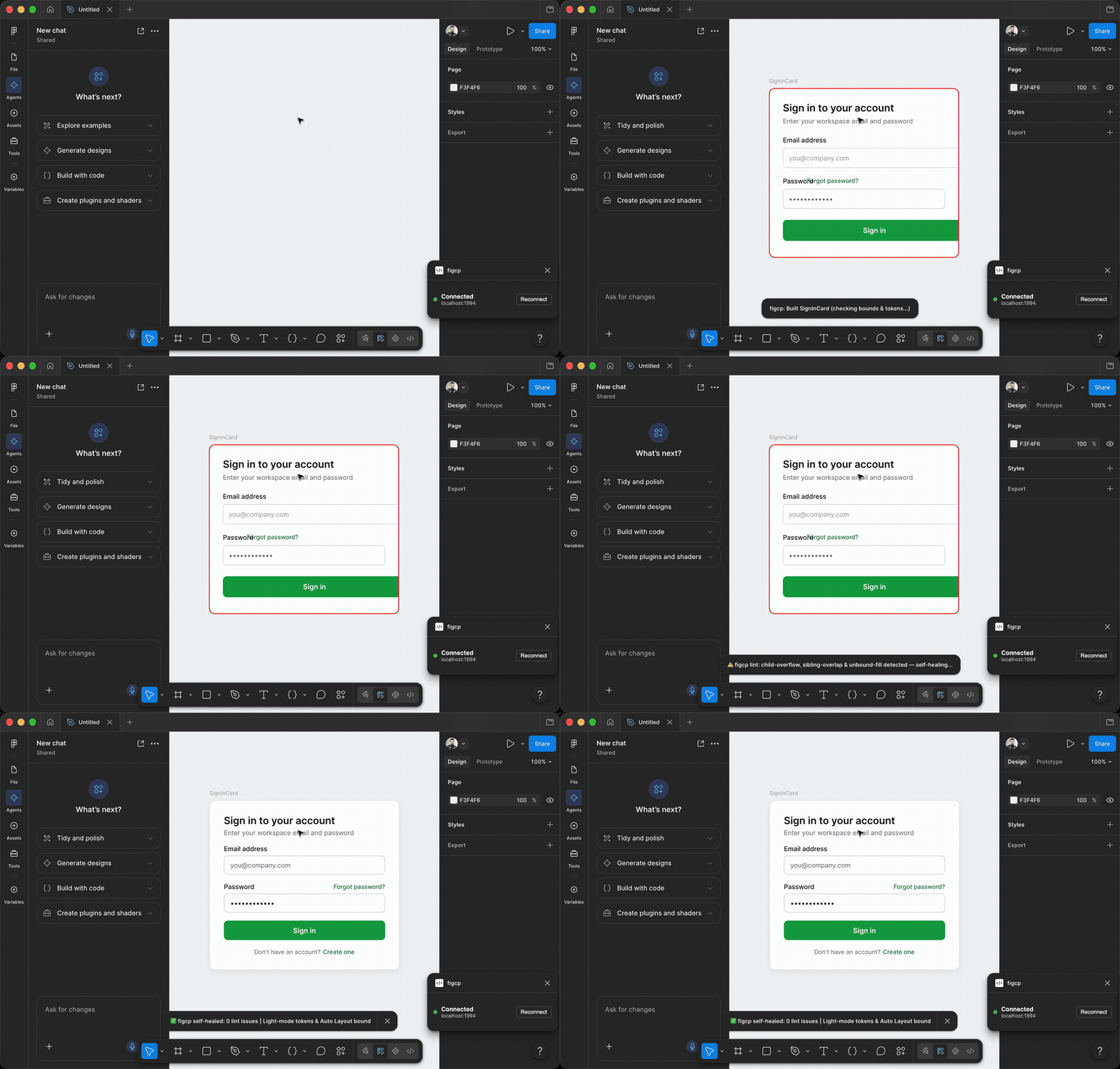
| Deterministic Layout/Token Linter + Screenshot Self-Healing | ❌ | ✅ |
| Local OS Fonts & RTL/Persian Bidi Verification | ❌ | ✅ |
Local Code Connect (figcp.map.json) without Enterprise | ❌ | ✅ |
| Zero-Quota SVG/PNG Asset & W3C DTCG Token Export | ⚠️ Rate-limited | ✅ |
- 100% Free & Zero REST API / PAT: Works natively on the Figma Starter (Free) Plan with zero rate limits or API tokens.
- Truly Bidirectional (
AI ↔ Code):AI → Figma: Create/edit components viarun_figma_js, catch overflow/overlap/unbound-token/RTL bugs viainspect_node_bounds, inspect inline PNG screenshots, and self-heal (orfigma_undo).Figma → Code: Extract Flexbox CSS & bound tokens viaget_design_context, export SVG/PNG assets viaexport_node_assets, export W3C DTCG tokens, and verify rendered DOM/visual parity withui-level.
- Local OS Fonts & RTL Support: Uses fonts installed on your macOS/Windows machine (e.g.,
IRANSansXFaNum,Vazirmatn) directly inside Figma Desktop. - Local Code Connect (
figcp.map.json): Map Figma components directly to your codebase components so agents reuse existing UI instead of duplicating it.
Requirements
- Node.js
>= 22.0.0 - Figma Desktop
Quick Start
Option A: Install from npm (Recommended)
npm install -g figcp
figcp --setup
figcp --doctor
Or without global install:
npx -y figcp --setup
Option B: From Source
npm install
npm run build
npm run setup     # or: node packages/server/dist/index.js --setup
npm run doctor    # verify local environment and bridge health
- In Figma Desktop, open your document and go to Plugins → Development → Import plugin from manifest...
- Select
~/.figcp/plugin/manifest.json(runnode packages/server/dist/index.js --print-pathto copy the path). - Run the figcp plugin in Figma Desktop and restart your MCP client.
npm run setup installs the plugin with a baked loopback token (~/.figcp/token), installs SKILL.md, and registers figcp in your MCP clients (with automatic .figcp.bak backups):
- Cursor:
~/.cursor/mcp.json - Antigravity:
~/.gemini/antigravity/mcp_config.json - Claude Code:
~/.claude.json(configured only if Claude Code is present) - Codex CLI:
~/.codex/config.toml(configured only if Codex CLI is present) - OpenCode:
~/.config/opencode/opencode.json
MCP Tools (7 Focused Tools)
| Tool | Pipeline | Purpose |
|---|---|---|
figma_status | Core | Checks bridge health, role, connected Figma files, and tracks manual canvas edits (manualChanges). |
inspect_design_system | 1 & 2 | Reads Local Variables (resolved hex & aliases), Styles, Components, local fonts (fontQuery), or exports W3C DTCG tokens (format: "dtcg"). |
run_figma_js | 1 | Executes arbitrary Figma Plugin API JS in a serial queue with figma and helpers in scope, captures console/errors, and checkpoints detected mutations. |
inspect_node_bounds | 1 | Inspects node geometry, Auto Layout, bound tokens, deterministic DS/RTL linter issues, and returns inline PNG screenshot. |
figma_undo | 1 | Undoes the latest Figma document undo step (which may include intervening user edits), or saves a named restore point (action: "snapshot"). |
get_design_context | 2 | Extracts code-generation design context (computed CSS flexbox, fills, typography, shadows), matches figcp.map.json components, and optionally exports ui-level specs. |
export_node_assets | 2 | Exports node vector/icons as clean SVG or raster imagery as PNG inline or to outputDir (zero REST API dependency). |
Bidirectional Workflows
Pipeline 1: AI → Figma (Authoring & Closed-Loop Healing)
- Discover: Call
inspect_design_systemto find exact tokens and fonts. - Build: Call
run_figma_jsusinghelpers.requireFont(...),helpers.setAutoLayout(...), andhelpers.makeBoundPaint(...). - Verify: Call
inspect_node_bounds(includeScreenshot: true) to run deterministic linter checks and inspect visual RTL text rendering. - Heal/Revert: Patch errors or call
figma_undo.
Pipeline 2: Figma → Code (Context, Code Connect & Assets)
- Local Code Connect (
figcp.map.json): Place afigcp.map.jsonin your project root to map Figma components to existing files:json{ "Button/Primary": { "file": "src/components/Button.tsx", "export": "Button" }, "SearchBox": { "file": "src/components/SearchBox.tsx", "export": "SearchBox" } } - Extract Context: Call
get_design_context(passworkspaceDirif the MCP client runs outside your project root) to receive CSS properties, relative geometries, bound token names, and attachedcodeConnecthints. - Export Assets: Call
export_node_assets(format: "SVG",outputDir: "src/assets/icons").
Optional Add-Ons (All Off by Default, Zero Core Dependencies)
figcp core is 100% self-contained and requires zero heavy browser or native image dependencies. You can optionally pair it with:
ui-level(Visual & DOM Verification):- Published on npm:
ui-level. - When enabled,
get_design_contextexportsspec.json(NormalizedSpec) andreference.pngready for offline Playwright/CDP DOM geometry + CIEDE2000 ΔE verification. - Enable explicitly with:
node packages/server/dist/index.js --setup --with-ui-level(or--enable-ui-level). To install globally from npm and configure all MCP clients automatically, run:node packages/server/dist/index.js --install-ui-level. - Use
--no-promptto skip interactive prompts during setup.
- Published on npm:
- Terrazzo / Tokens Studio:
- Export DTCG tokens via
inspect_design_system({ format: "dtcg" })and transform to Tailwind v4 / CSS variables with Terrazzo.
- Export DTCG tokens via
- SVGO:
- Clean and minify SVG assets exported via
export_node_assets.
- Clean and minify SVG assets exported via
Development
npm run typecheck   # Strict TypeScript checks across all packages
npm test            # Run 50+ automated unit & E2E tests
npm run build       # Build plugin dist and server CLI bundle
npm run doctor      # Run local diagnostics






