Listed from the MCP registry; nobody on Odel publishes it.
Android Viewer
Drive Android emulators: screenshots, taps, swipes, keys, text, rotation and foldable postures.
Runs on your machine from its package; the steps are below.
What it does
- Reads
- Writes
- High impact
At most: moves money, runs code or commands, deletes data, or sends messages for you.
What it costs
FreeOdel charges nothing per call. The publisher may charge for its own service.
Runs locally over stdio
This server isn't hosted — your MCP client launches it from a package registry. Use one of the commands below, or drop the config into your client (e.g. Claude Desktop).
Run
npx -y @acertijosapps/android-viewer
MCP client config
{
  "mcpServers": {
    "android-viewer": {
      "command": "npx",
      "args": [
        "-y",
        "@acertijosapps/android-viewer"
      ]
    }
  }
}@acertijosapps/android-viewer
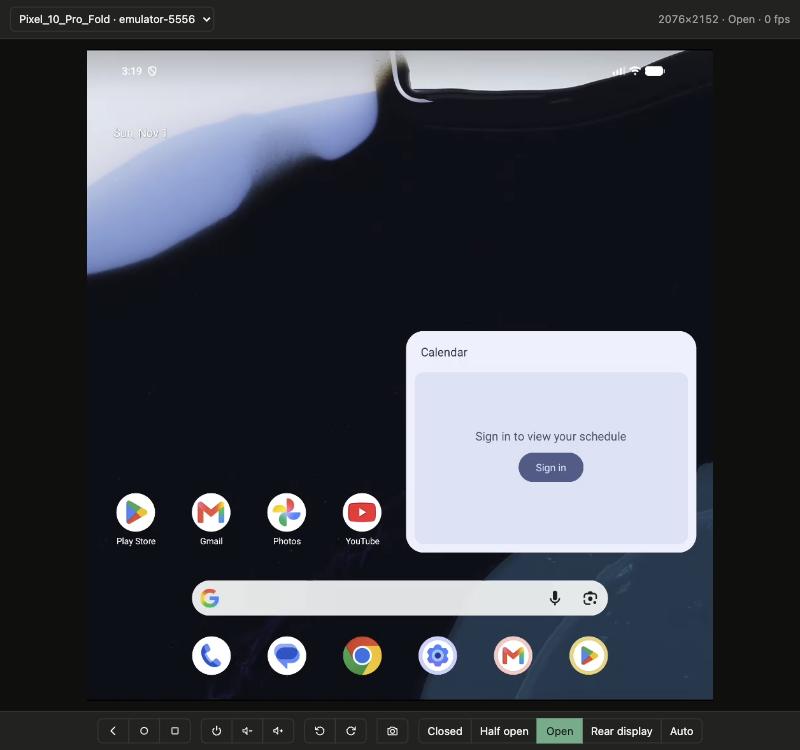
Live Android emulator viewer for the browser, plus an MCP server so an AI agent can drive it. Built for the browser pane of AI coding tools (such as Claude Code): you and the agent watch and control the same emulator, in real time, including foldable postures.
- Live video:
adb exec-out screenrecord(H.264) over WebSocket, decoded in the browser with WebCodecs. - Input: click, drag, long press and scroll become
adb shell inputcommands. - Every AVD on your machine: pick a running emulator or start a stopped one from the viewer.
- Emulator controls: Back, Home, Recents, Power, Volume, Rotate, full-resolution screenshot.
- Foldables: Closed / Half-opened / Opened / Rear display. On emulators they move the simulated hinge, like the emulator's own controls; the stream follows the active display when you fold or rotate.
- MCP server: the same actions as tools, so the agent's taps show up live in the viewer.
- Nothing to install on the device: no APK, no server push; only
adb.
Requirements
- Node.js 18 or later.
- Android SDK platform tools (
adb) and, to list and start AVDs, the emulator. Found throughANDROID_HOME,ANDROID_SDK_ROOTor the default SDK location; override withADBandEMULATOR. - A browser with WebCodecs (Chromium-based browsers, Safari 16.4+, Firefox 130+).
- Works on macOS, Linux and Windows.
Quick start
npx @acertijosapps/android-viewer
Open http://localhost:8093 and pick a device. Deep links: ?avd=Pixel_10 or ?serial=emulator-5554.
android-viewer [options]        Start the viewer
android-viewer mcp [options]    Start the MCP server on stdio

  -p, --port <port>      Viewer port (default 8093, env PORT)
      --host <host>      Interface to bind (default 127.0.0.1, env HOST)
      --viewer-url <url> Viewer the MCP talks to (default http://localhost:8093)
Other environment variables: MAX_DIM (longest side of the encoded video, default 1024),
BIT_RATE (default 6M), SCREENSHOT_MAX (longest side of MCP screenshots, default 1024) and
DEBUG=1 (logs every input command).
Use it with an AI agent (MCP)
Claude Code:
claude mcp add android-viewer -- npx -y @acertijosapps/android-viewer mcp
Any other MCP client:
{
  "mcpServers": {
    "android-viewer": {
      "command": "npx",
      "args": ["-y", "@acertijosapps/android-viewer", "mcp"]
    }
  }
}
Also listed in the official MCP Registry as
io.github.acertijosapps/android-viewer.
Keep the viewer running (npx @acertijosapps/android-viewer) to watch what the agent does. Without
it, the MCP drives the device through adb directly.
| Tool | What it does |
|---|---|
list_devices | AVDs on the machine (with serial and booted when running) and other adb devices |
launch_avd | Start an AVD by name |
get_state | Display size, rotation, current posture, available postures and the viewer URL |
screenshot | PNG of the active display, longest side ≤ 1024 px |
tap | input tap |
swipe | input swipe; same start and end with ≥ 500 ms is a long press |
press_key | back, home, recents, power, wakeup, volup, voldown, enter, delete, tab, escape |
type_text | input text (printable ASCII) |
rotate | Rotate 90° left or right (emulators) |
set_posture | closed, half_opened, opened, rear_display, a state id, or reset; returns the new state |
Coordinates are normalized to 0–1 over the screenshot (x = pixel_x / image_width), so they hold
in any posture or orientation. serial is optional when only one device is connected.
In the Claude Code browser pane
Add the viewer to .claude/launch.json and open it with preview_start android-viewer:
{
  "version": "0.0.1",
  "configurations": [
    {
      "name": "android-viewer",
      "runtimeExecutable": "npx",
      "runtimeArgs": ["-y", "@acertijosapps/android-viewer"],
      "port": 8093,
      "autoPort": false
    }
  ]
}
HTTP API
The MCP uses the viewer's API; you can call it too. serial goes in the query string or the body
and is optional with a single device. POST requests require content-type: application/json and a
local origin, so other websites can't drive your devices.
| Endpoint | |
|---|---|
GET /api/devices | [{ avd, serial, booted, model }]: serial: null = stopped, booted: null = didn't answer in time |
GET /api/state | Display size, rotation, displayId, posture and available postures |
GET /api/screenshot?max=<px> | PNG; real screen size in X-Screen-Width / X-Screen-Height |
POST /api/tap | { x, y } |
POST /api/swipe | { x1, y1, x2, y2, ms } |
POST /api/key | { key } |
POST /api/text | { text } |
POST /api/posture | { posture } |
POST /api/rotate | { direction: "left" | "right" } |
POST /api/launch | { avd } |
When a viewer tab is watching the device, actions go through its live session: the viewer updates at once and a watchdog restarts the stream if a gesture produces no frames.
How it works
- One session per device, shared by every tab, stopped when the last one closes.
- Every second it reads
dumpsys display(size, rotation and the physical display behind logical display 0) andcmd device_state state. When the display changes, it waits for it to settle and restartsscreenrecordwith--display-idof the new panel: folding a device switches panels. screenrecordonly emits frames when the screen changes, so the viewer keeps the GOP since the last IDR for late joiners and sends a screenshot while there is no video.- Only one
screenrecordruns per device at a time: two of them exhaust the emulator's software encoder (err=-38). Restarts requested by clients are rate-limited. - Screenshots use raw
screencap(compressing PNG inside the emulator is slow under load), are scaled down by area averaging and encoded as PNG withnode:zlib, with no native dependencies.
Limitations
- Drags are sent on release (one
input swipewith the real duration), not live. - No keyboard passthrough or audio yet; use
type_textandpress_key. - Higher latency than a native client such as scrcpy.
- The software encoder slows down with several emulators recording at once; with little free RAM
(emulators paged out to swap) every
adb shellcall can take seconds. - If an app requests its own posture (
DeviceStateManager.requestState), it wins overset_posturewhile it is in the foreground. Flip_Horizontal_Foldstyle AVDs with a single physical display change state when closed, but the picture stays the same.
Why not ws-scrcpy?
ws-scrcpy was tried first: streaming and input work, but the video freezes on a posture change until you reload (its scrcpy 1.19 server stays bound to the previous display), and it has no posture controls.
Contributing
Branching model (main · beta), Conventional Commits and releases are described in
CONTRIBUTING.md; changes are listed in CHANGELOG.md.
Author
Made by AcertijosApps. See the rest of our libraries at acertijosapps.com/librerias.
Questions or proposals: acertijos.contacto@gmail.com or open an issue.
License
MIT






