Listed from the MCP registry; nobody on Odel publishes it.
Is this yours? Claim it
Google Ads MCP Server by AdKit
Google Ads MCP server: run Search, Display, Demand Gen and PMax campaigns from AI.
One address for any MCP client. You sign in at mcp.adkit.so once, after adding it.
What it does
- Reads
- Writes
- High impact
At most: moves money, runs code or commands, deletes data, or sends messages for you.
What it costs
FreeOdel charges nothing per call. The publisher may charge for its own service.
What it asks for at sign-in
| Access to | Read | Change |
|---|---|---|
| Mcp | Not stated: mcp | |
From the sign-in at mcp.adkit.so, as the endpoint publishes it. You approve it there.
Tools
None listed · checked 13 Nov 2026Odel could not list its tools without signing in.
Google Ads MCP Server



Connect Google Ads to Claude, ChatGPT, Cursor, Codex or any AI app that supports MCP. AdKit hosts the server, so you only add an address to your AI app.
- MCP address:
https://mcp.adkit.so/google-ads - Website: AdKit
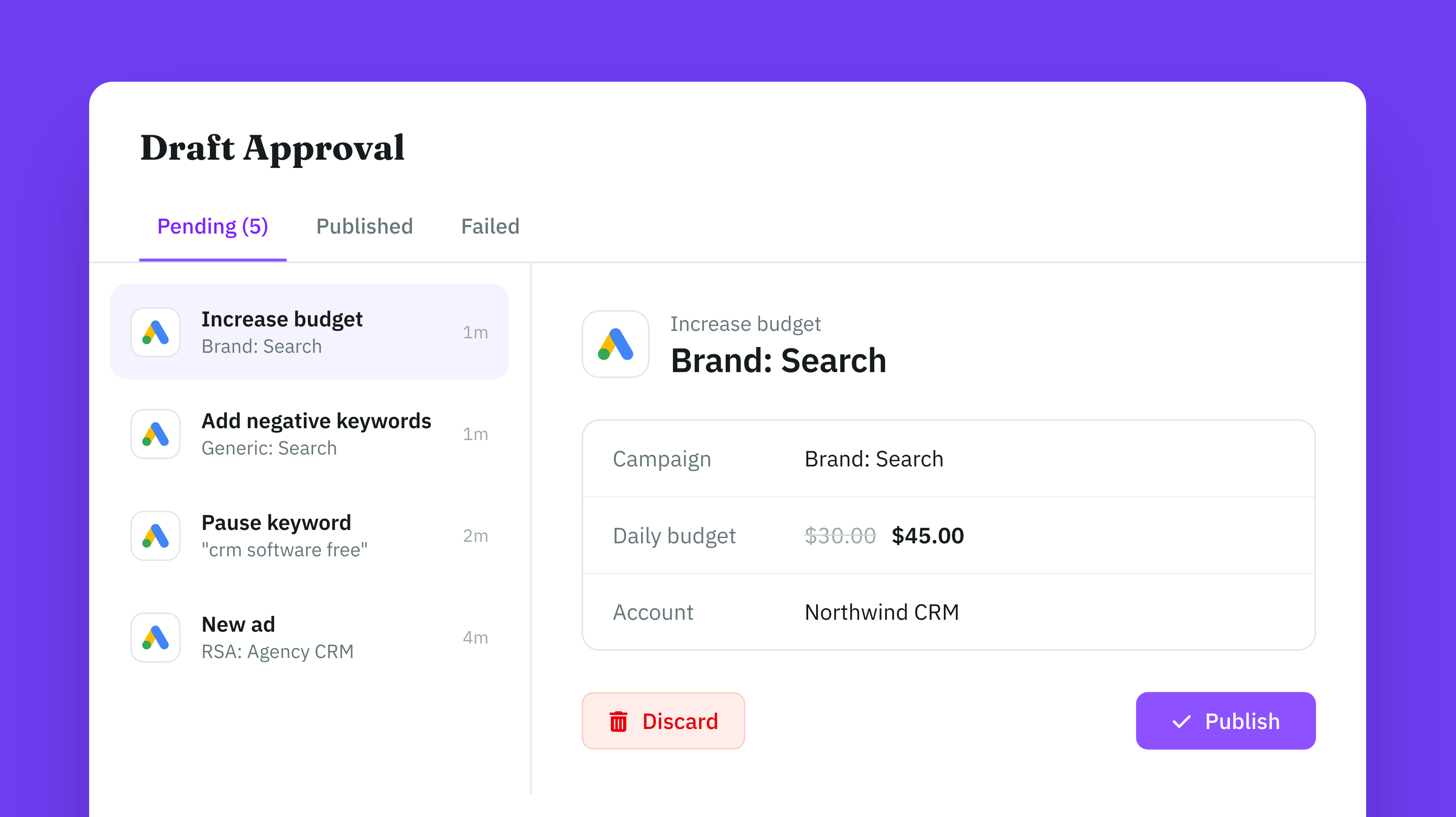
Every change is saved as a draft first, so your AI can't spend money on its own. Nothing goes live on Google Ads until you approve it.
What you can do
- Create and edit Search, Display, Demand Gen and Performance Max campaigns
- Manage keywords, negative keywords and shared negative keyword lists
- Read search terms, placements, change history and performance results
- Find keyword ideas, set up conversion actions and upload offline click conversions
Example prompts
- "Which search terms spent money last month without a conversion? Add them as negative keywords."
- "Create a Search campaign for ‘crm for agencies’, $30 a day, US and Canada. Save it as a draft."
- "Find 20 keyword ideas for our project management landing page."
- "What changed in the account in the last 14 days?"
Set up
You need an AdKit account. On first use, you sign in to AdKit and connect your Google Ads account.
There are two ways to connect:
- All platforms: the main AdKit connector. One connection for Google, Meta, TikTok, LinkedIn, Microsoft, Reddit, X and Pinterest. Pick this if you run ads on more than Google Ads.
- Google Ads only: the address above. Your AI only sees the Google Ads tools.
Claude (web and desktop)
- All platforms: install AdKit from the Claude directory, in one click.
- Google Ads only: Settings → Connectors → Add custom connector → paste
https://mcp.adkit.so/google-ads.
ChatGPT
- All platforms: add the AdKit app, in one click.
- Google Ads only: Settings → Connectors → Add custom connector → paste
https://mcp.adkit.so/google-ads.
Claude Code
As a plugin:
/plugin marketplace add adkit/google-ads-mcp
/plugin install google-ads@adkit-google-ads
Or as an MCP server only:
claude mcp add --transport http adkit-google-ads https://mcp.adkit.so/google-ads
Gemini CLI
gemini extensions install https://github.com/adkit/google-ads-mcp
Cursor
Add to ~/.cursor/mcp.json:
{
  "mcpServers": {
    "adkit-google-ads": {
      "url": "https://mcp.adkit.so/google-ads"
    }
  }
}
Codex
Add to ~/.codex/config.toml:
[mcp_servers.adkit-google-ads]
url = "https://mcp.adkit.so/google-ads"
In Claude Code, Gemini CLI, Cursor and Codex, use https://mcp.adkit.so instead to connect all platforms.
Tools
| What | Tools |
|---|---|
| Ad accounts | google_ads_accounts_connect, google_ads_accounts_disconnect, google_ads_accounts_read |
| Campaigns | google_ads_campaigns_create, google_ads_campaigns_delete, google_ads_campaigns_read, google_ads_campaigns_update |
| Ad groups | google_ads_ad_groups_create, google_ads_ad_groups_delete, google_ads_ad_groups_read, google_ads_ad_groups_update |
| Ads | google_ads_ads_create, google_ads_ads_delete, google_ads_ads_read, google_ads_ads_update |
| Asset groups (Performance Max) | google_ads_asset_groups_create, google_ads_asset_groups_delete, google_ads_asset_groups_read, google_ads_asset_groups_update |
| Assets | google_ads_assets_attach, google_ads_assets_create, google_ads_assets_detach, google_ads_assets_read, google_ads_assets_update |
| Keywords | google_ads_keywords_create, google_ads_keywords_delete, google_ads_keywords_read, google_ads_keywords_update |
| Negative keywords | google_ads_negative_keywords_create, google_ads_negative_keywords_delete, google_ads_negative_keywords_read |
| Negative keyword lists | google_ads_negative_lists_attach, google_ads_negative_lists_create, google_ads_negative_lists_delete, google_ads_negative_lists_detach, google_ads_negative_lists_read |
| Search terms report | google_ads_search_terms_read |
| Placements report | google_ads_placements_read |
| Keyword and audience ideas | google_ads_research_read |
| Location targeting | google_ads_geo_locations_read |
| Conversions | google_ads_conversions_create, google_ads_conversions_delete, google_ads_conversions_read, google_ads_conversions_update, google_ads_conversions_upload |
| Change history | google_ads_change_history_read |
| Results and reporting | google_ads_results_read |
| Media upload | google_ads_upload |
| Direct API requests | google_ads_platform_api_request_mutate |
Every AdKit connector also has these tools:
| Tool | What it does |
|---|---|
adkit_projects | List your AdKit projects and pick one |
adkit_status | Show the connected ad accounts |
adkit_setup | Get the link to connect an ad account |
adkit_drafts_read | List saved drafts, or read one |
adkit_drafts_update | Edit a draft before it goes live |
adkit_drafts_delete | Delete a draft |
adkit_drafts_publish | Publish drafts after you approve them |
adkit_help | Look up fields, limits and examples |
adkit_feedback | Report a bug or a missing feature |
FAQ
What is the Google Ads MCP server?
A hosted MCP server from AdKit. It lets Claude, ChatGPT, Cursor, Codex and other AI apps work on your Google Ads account: Search, Display, Demand Gen and Performance Max campaigns, keywords, negative keywords, search terms and reports.
Is the Google Ads MCP server free?
It is included in every AdKit plan. Plans start at $29 a month, with a 7-day free trial. See pricing.
Can my AI change my Google Ads without asking me?
No. Every create, edit or pause is saved as a draft. It goes live only after you approve it, on AdKit's Draft Approval page or by telling your AI to publish it.
Do I need an API key or a developer token?
No. You sign in to AdKit in your browser and connect your Google Ads account there.
Can I manage several Google Ads accounts?
Yes. Connect several accounts and keep each client in its own AdKit project. How many projects you get depends on your plan.
Which AI apps does it work with?
Claude, ChatGPT, Claude Code, Gemini CLI, Cursor, Codex and any app that supports remote MCP servers with OAuth sign-in.
Other ad platforms
- Meta Ads MCP Server
- TikTok Ads MCP Server
- LinkedIn Ads MCP Server
- Microsoft Ads MCP Server
- Reddit Ads MCP Server
- X Ads MCP Server
- Pinterest Ads MCP Server
- All platforms in one connector
Support and policies
- Help: adkit.so/support or contact@adkit.so
- Privacy, Terms, Security, Support
Docs server
docs-server/ is a small local MCP server that answers questions about AdKit from this README: setup per AI app, hosted tools, ad platforms, example prompts and the FAQ. It needs no login and does not manage ads; for that, connect the hosted server above. Run it with npm start or the Dockerfile.
License
MIT