Listed from the MCP registry; nobody on Odel publishes it.

Threadmap
Conversation drift visualization for Claude. Color-coded inflection points and one-click forking.
Runs on your machine from its package; the steps are below.
What it does
- Reads
- Writes
- High impact
At most: creates or changes data: records, files, settings.
What it costs
FreeOdel charges nothing per call. The publisher may charge for its own service.
Runs locally over stdio
This server isn't hosted — your MCP client launches it from a package registry. Use one of the commands below, or drop the config into your client (e.g. Claude Desktop).
Run
npx -y threadmap-mcp
MCP client config
{
  "mcpServers": {
    "threadmap": {
      "command": "npx",
      "args": [
        "-y",
        "threadmap-mcp"
      ]
    }
  }
}🗺️ ThreadMap MCP for Claude
Conversation drift visualization and forking for Claude.
Stop losing your original intent. See exactly where your conversation drifted. Fork from any point and pick up with clean context.
See it in action
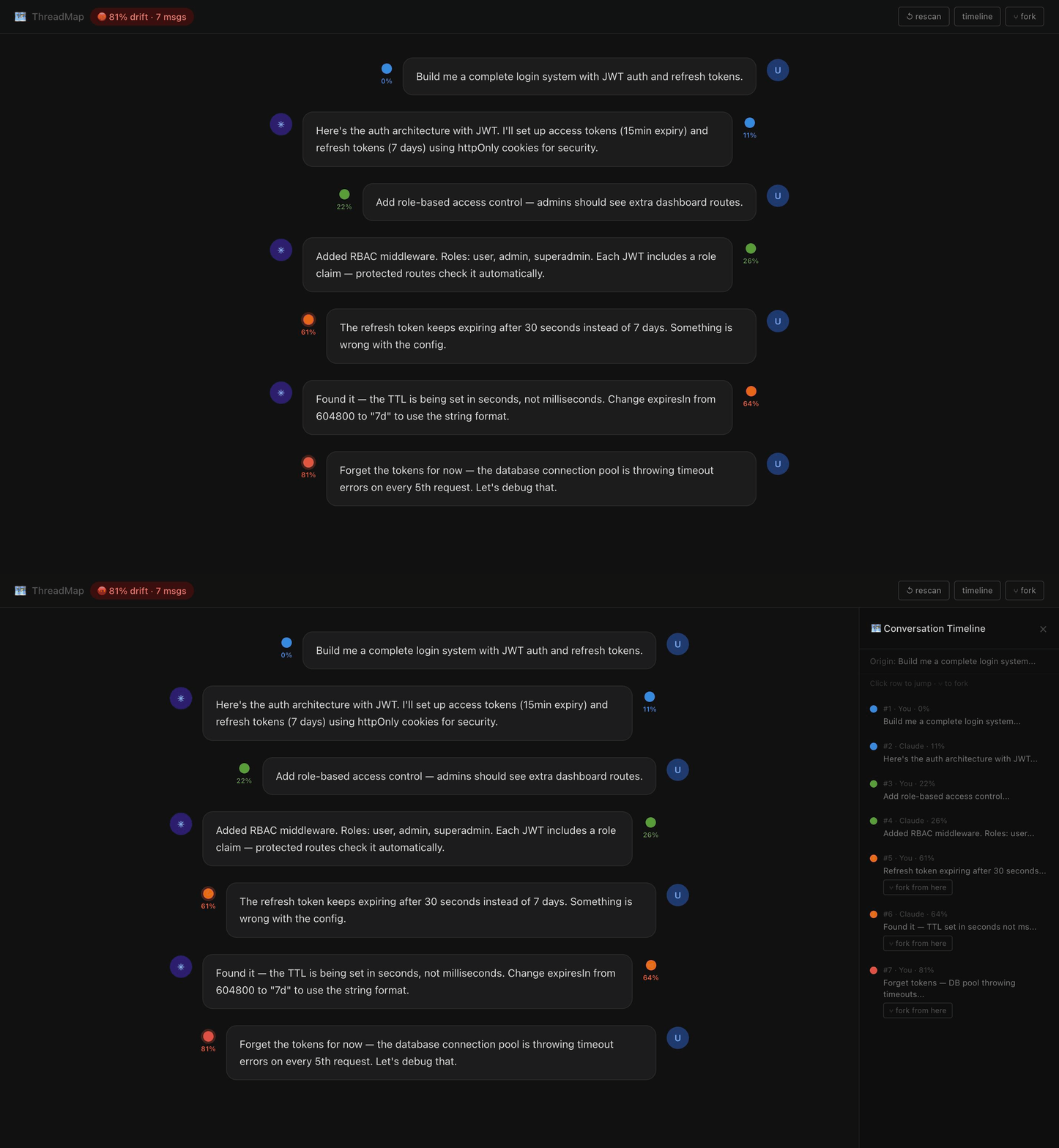
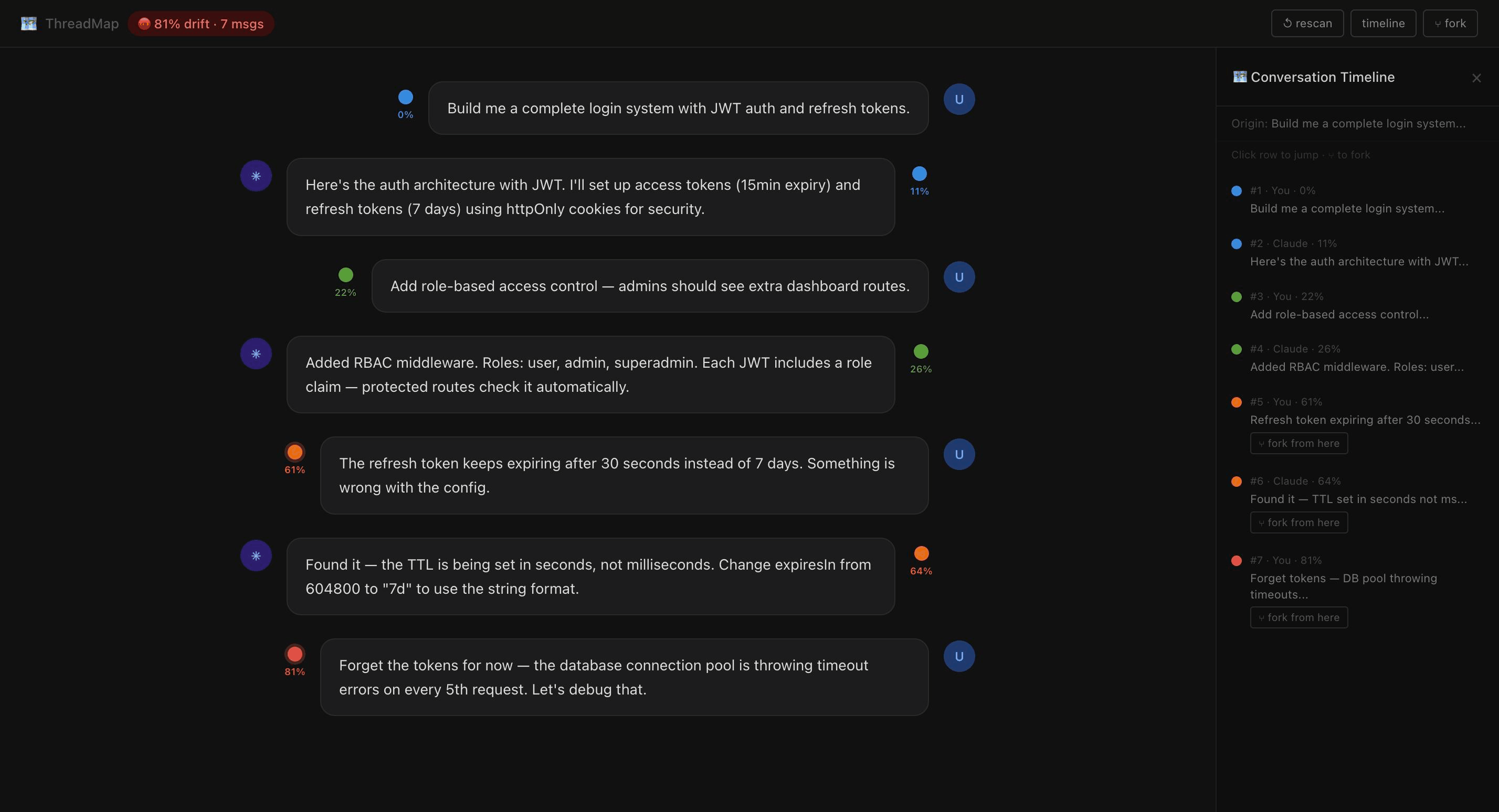
Color dots on every message — live drift tracking:
Timeline panel with fork buttons at every inflection point:
Two ways to use ThreadMap
| MCP Server | Chrome Extension | |
|---|---|---|
| Works in | Claude Code (terminal) | claude.ai (browser) |
| Install | claude mcp add threadmap npx threadmap-mcp | Load unpacked from chrome-extension/ folder |
| What you get | 7 tools — track, timeline, fork, branch | Color dots on every message, timeline panel, one-click fork |
| Best for | Developers building with Claude Code | Anyone using claude.ai daily |
Both are in this repo. Use one or both.
Chrome Extension — Visual dots in claude.ai
The Chrome extension injects ThreadMap directly into the claude.ai interface. No config. Just install and open Claude.
Install (2 minutes)
1. Clone or download this repo
2. Open Chrome → chrome://extensions
3. Enable Developer mode (top right toggle)
4. Click Load unpacked → select the chrome-extension folder
5. Open any Claude conversation — ThreadMap activates automatically
What you see
- Color dot next to every message showing drift % from your original intent
- Sticky bar at the top with live drift status and message count
- ↺ rescan — loads all messages from long previous conversations
- timeline — full conversation map, click any row to jump to that message
- ⑂ fork — opens a new Claude chat with full context pre-loaded in the input
How forking works
- Click ⑂ fork in the timeline or next to any message bubble
- A new claude.ai tab opens automatically
- The full context (origin intent + all messages up to that point) is pasted into the input
- Review and hit Send — Claude picks up from the clean version
Chrome extension files
chrome-extension/
├── manifest.json     — Extension config (Manifest v3)
├── content.js        — Core drift engine + DOM injection
├── threadmap.css     — All injected styles
├── popup.html        — Extension popup with color legend
├── icon16.png        — Icons
├── icon48.png
└── icon128.png
Heads up: The extension uses Developer mode (load unpacked). A Chrome Web Store version is on the roadmap.
MCP Server — Claude Code integration
The MCP server adds 7 tools to Claude Code for programmatic drift tracking.
Install
claude mcp add threadmap npx threadmap-mcp
Or manually add to ~/.claude/claude_desktop_config.json:
{
  "mcpServers": {
    "threadmap": {
      "command": "npx",
      "args": ["threadmap-mcp"]
    }
  }
}
Quick start
threadmap_track(sessionId="myproject", role="user", content="build me a login system with JWT auth")
→ 🔵 Blue — Drift: 0% — Origin intent set

threadmap_track(sessionId="myproject", role="user", content="the refresh token keeps expiring after 30 seconds")
→ 🟠 Orange — Drift: 63% — ⚡ INFLECTION POINT detected

threadmap_timeline(sessionId="myproject")
→ Full color-coded map of all messages with fork instructions

threadmap_fork(sessionId="myproject", messageIndex=6, branchName="jwt-debug")
→ 🌿 Branch created — clean context from messages 1–7
All 7 tools
| Tool | What it does |
|---|---|
threadmap_track | Track a message, get drift score + color |
threadmap_timeline | Full color-coded conversation map |
threadmap_fork | Fork from any message index |
threadmap_branch_context | Clean context packet for any branch |
threadmap_status | Quick current drift check |
threadmap_reset | Archive thread, start fresh |
threadmap_legend | Show color reference guide |
Color system
| Color | Drift | Meaning |
|---|---|---|
| 🔵 Blue | 0–15% | On track — core intent |
| 🟢 Green | 16–35% | Productive expansion |
| 🟡 Yellow | 36–55% | Adjacent drift |
| 🟠 Orange | 56–72% | Inflection point — meaningful pivot |
| 🔴 Red | 73–88% | Full context break |
| 🟣 Purple | 89–95% | Meta — talking about the conversation |
| ⚪ White | 96–100% | Resolution |
Orange and Red = fork candidates. The conversation has left your original intent behind.
Real-world use cases
Claude Code — architecture integrity Track every message while building. Orange = scope creep. Fork before the drift gets worse. Architecture decisions from the first 10 messages stay clean.
Long previous conversations Click ↺ rescan in the Chrome extension. ThreadMap scrolls to the top, loads all messages, scans every one, then returns you to the bottom — all dots appear.
Team handoffs
Use threadmap_branch_context to extract a clean summary of what was decided. Paste it into a new session — no scrolling through 200 messages.
Why open source?
Non-linear conversation navigation is the missing primitive for AI-native work. Right now Claude conversations are books with no table of contents, no chapters, no bookmarks.
ThreadMap is the table of contents. If this becomes the standard, it travels across Claude, GPT, Gemini, anything. Nobody owns it. Everybody benefits.
Roadmap
- Local embedding model (MiniLM) for richer semantic scoring
- Chrome extension on Chrome Web Store (no developer mode required)
- Cross-session persistence (SQLite mode)
- Visual timeline export (SVG/HTML)
- GPT / Gemini compatibility
Contributing
MIT licensed. See CONTRIBUTING.md.
git clone https://github.com/Advertflair/threadmap-mcp
cd threadmap-mcp
npm install
npm run build
PRs welcome especially for: better drift scoring, Chrome extension improvements, and other AI platform support.
License
MIT — see LICENSE
Built by Advertflair. Open source. Ship it.