Listed from the MCP registry; nobody on Odel publishes it.
Windows Management
Local Windows management, diagnostics, security, cleanup, and optimization MCP server.
Runs on your machine from its package; the steps are below.
What it does
- Reads
- Writes
- High impact
At most: moves money, runs code or commands, deletes data, or sends messages for you.
What it costs
FreeOdel charges nothing per call. The publisher may charge for its own service.
Runs locally over stdio
This server isn't hosted — your MCP client launches it from a package registry. Use one of the commands below, or drop the config into your client (e.g. Claude Desktop).
Run
uvx windows-management-mcp-server
MCP client config
{
  "mcpServers": {
    "windows-management": {
      "command": "uvx",
      "args": [
        "windows-management-mcp-server"
      ]
    }
  }
}Windows Management MCP Server
Windows Management MCP Server is a Python-based Model Context Protocol server for local Windows diagnostics, task management, cleanup, hardware inspection, security checks, and administrative workflows.
It exposes 96 tools over stdio and is designed for local assistants such as Claude Desktop, Cursor, VS Code extension hosts, and other MCP-compatible clients.
Important: This server runs with the privileges of the user account that starts it. Several tools can change system state, delete files, edit the Registry, manage services, install updates, or execute PowerShell. Use the read-only and dry-run tools first, and only enable destructive actions after reviewing the target paths and commands.
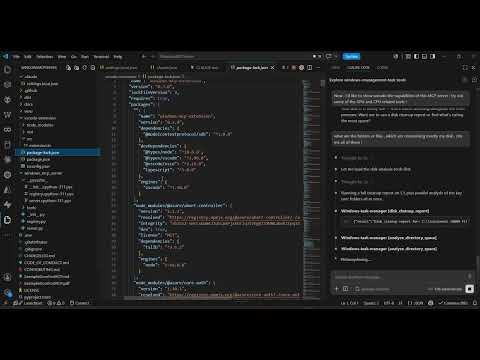
Demo
Watch the demo: https://youtu.be/1GNk_GYYkww
What It Can Do
- Task manager: CPU, GPU, memory, disk usage, top processes, process trees, process details, suspend/resume/kill.
- Storage cleanup: disk usage, largest folders/files, duplicate detection, old files, media discovery, Recycle Bin deletion, temp cleanup.
- Hardware and drivers: GPU details, NVIDIA
nvidia-smiprobes, display configuration, installed drivers, problem devices, driver update candidates. - Windows security: Defender status/scans, firewall rules, BitLocker, Secure Boot, UAC, Windows Update status.
- System administration: services, startup apps, scheduled tasks, event logs, crash diagnostics, restore points.
- Network diagnostics: interfaces, active sockets, listening ports, firewall correlation, ping latency.
- Developer environment: Python/Node discovery, environment variables, common dev ports.
- Shell helpers: Explorer open/select, screenshots, clipboard, visible windows.
- Peripherals and virtualization: printers, print queues, audio, Bluetooth, WSL, Hyper-V, optional Windows features.
For the complete tool catalog, see docs/TOOLS.md.
Requirements
- Windows 10/11 or Windows Server with PowerShell available.
- Python 3.10 or newer.
- Some tools require Administrator privileges or Windows features/modules that may not be installed on every machine.
- Optional vendor data, such as NVIDIA GPU telemetry, requires vendor tools like
nvidia-smionPATH.
Installation
From PyPI:
pip install windows-management-mcp-server
Create a virtual environment and install the package in editable mode:
python -m venv venv
.\venv\Scripts\Activate.ps1
pip install -e .
Both install paths register the windows-mcp-server command in the active environment.
MCP Client Configuration
For clients that can launch a stdio MCP server, use:
{
  "mcpServers": {
    "windows-management": {
      "command": "windows-mcp-server",
      "args": []
    }
  }
}
If the command is not on PATH, point directly at the local virtual environment:
{
  "mcpServers": {
    "windows-management": {
      "command": "C:\\path\\to\\WindowsMCPServer\\venv\\Scripts\\python.exe",
      "args": ["-m", "windows_mcp_server.server"],
      "env": {
        "PYTHONPATH": "C:\\path\\to\\WindowsMCPServer"
      }
    }
  }
}
Running Locally
windows-mcp-server
Or:
python -m windows_mcp_server.server
The server uses stdio transport and is normally launched by an MCP client rather than run interactively.
VS Code Extension
The vscode-extension/ folder contains a small VS Code extension that launches this MCP server from the repo-local virtual environment first, then falls back to a global windows-mcp-server.
cd vscode-extension
npm install
npm run compile
Open vscode-extension/ in VS Code and press F5 to start an Extension Development Host.
Safety Model
Tools are intentionally mixed across read-only, safer mutation, and sharp mutation categories.
- Prefer report tools first:
disk_cleanup_report,get_security_status,get_windows_update_status,list_scheduled_tasks,get_process_details. - Prefer safe deletion:
safe_delete_to_recycle_bin,safe_delete_many_to_recycle_bin,safe_delete_by_patternwithdry_run=true. - Treat these as sharp tools:
execute_powershell, Registry writes/deletes, permanent file deletion, service changes, update installation, process termination, restore point creation.
See docs/SECURITY_MODEL.md before exposing this server to an assistant you do not fully trust.
Development
Compile-check the Python package:
.\venv\Scripts\python.exe -m compileall windows_mcp_server
Check the registered tool count:
.\venv\Scripts\python.exe -c "from windows_mcp_server.registry import register_all_tools, registered_tools; Dummy=type('Dummy',(),{'tool':lambda self: (lambda f:f)}); register_all_tools(Dummy()); print(len(registered_tools))"
Compile the VS Code extension:
cd vscode-extension
npm run compile
Repository Structure
windows_mcp_server/        Python MCP server package
windows_mcp_server/tools/  Tool modules grouped by Windows domain
vscode-extension/          Optional VS Code extension wrapper
docs/                      Tool catalog, security model, publishing guide
server.json                MCP Registry metadata
pyproject.toml             Python package metadata
Publishing
This repository includes server.json for the MCP Registry and PyPI-compatible package metadata.
See docs/PUBLISHING.md for the full GitHub, PyPI, and MCP Registry release flow.
License
MIT. See LICENSE.






