Listed from the MCP registry; nobody on Odel publishes it.

Godot MCP Loop
Drive a live Godot 4 editor: edit scenes and scripts, run and test the game, record GIFs.
Runs on your machine from its package; the steps are below.
What it does
- Reads
- Writes
- High impact
At most: moves money, runs code or commands, deletes data, or sends messages for you.
What it costs
FreeOdel charges nothing per call. The publisher may charge for its own service.
Runs locally over stdio
This server isn't hosted — your MCP client launches it from a package registry. Use one of the commands below, or drop the config into your client (e.g. Claude Desktop).
Run
npx -y godot-mcp-loop
MCP client config
{
  "mcpServers": {
    "godot-mcp-loop": {
      "command": "npx",
      "args": [
        "-y",
        "godot-mcp-loop"
      ]
    }
  }
}Edit, run, inspect and test Godot 4 projects from an MCP client. A TypeScript MCP server and a Godot editor addon let an AI coding agent change scenes/scripts, send gameplay input, inspect live state and replay checks. Work remains in normal Godot projects and resources.
日本語 · Get started · Architecture · Samples · Sample changes
The development loop
- Edit: inspect a scene, change nodes, scripts or input settings.
- Run: launch that project and send Godot action/key/mouse events.
- Observe: read state, capture frames, inspect UI, physics and logs.
- Check: compare expected values or replay YAML/JSON scenarios before making the next change.
The agent chooses and calls the tools; this is not a hosted service that automatically finishes a game. Game rules, artwork, sound, level design and playtesting remain authored work. Supported edits offer preview and undo; scene saving and file-backed operations have separate behavior.
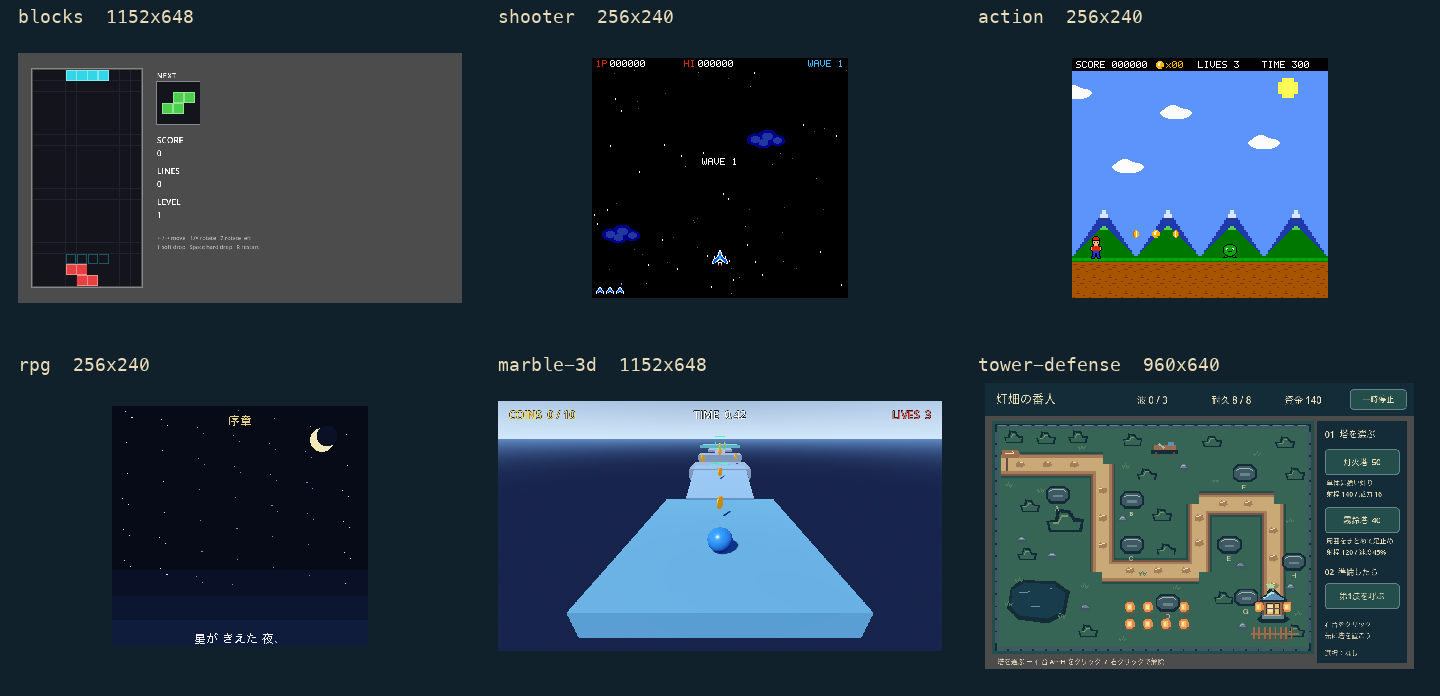
Six sample games
Native Godot captures from standalone projects, without the addon installed. The RPG frame is the prologue. Controls, project paths and original images.
| Sample | Game | What to inspect |
|---|---|---|
blocks | Falling Blocks | Rotation, board state and scoring |
shooter | Vertical Shooter | Movement/fire, waves and boss transitions |
action | Side-scroller | Variable jumps, platforms and collision |
rpg | Luka of the Star Sword | Dialogue, battles and state transitions |
marble-3d | Marble Run | Rolling, jumps, checkpoints and contacts |
tower-defense | 灯畑の番人 | Tower placement, pause, victory/defeat and retry |
All six run without an AI account or MCP setup. They show different uses of the same editing/observation tools; a fixture check is not a claim that an agent completed every game through ordinary play.
Try a sample
Use Node.js 20+ for the copy command and Godot 4.7 (tested with 4.7.2) to play. From a working folder, choose one of the six IDs above and a new/empty destination:
npx -y godot-mcp-loop@0.12.0 sample shooter ./my-shooter
godot --headless --path ./my-shooter --import
godot --path ./my-shooter
For agent editing/testing, explicitly install the addon from the same selected distribution and configure your client. Play alone does not need either step. The installer supplies its actual server executable; it does not register a client or restart an existing connection for you. Full setup guide.
How the pieces fit
server/src/exposes MCP tools, validates their input, connects to the selected project and runs scenarios.addons/mcp_loop/edits through the Godot editor and forwards runtime requests through Godot's debugger.- The game's runtime agent provides input, state, frame stepping, screenshots and logs. It adds no separate game-control listener.
- Optional
server/authoring/helpers process PNGs. Original image generation uses the client's separately authorized producer.
MCP client → stdio server → authenticated loopback WebSocket → Godot editor → debugger → running game
Architecture explains the two process layers, repository layout, data flow and persistence.
Capabilities and distribution status
| Area | Use |
|---|---|
| Scene and code | Inspect/create scenes, edit nodes and GDScript, configure input and selected project settings |
| Runtime observation | Input, state queries, per-frame records, waits, physics stepping, UI audit, images and logs |
| Repeatable checks | Scenario assertions, evidence, recordings, installed GUT/GdUnit4 suites and preset-based exports |
| Artwork support | Brief/request/PNG receipts, deterministic processing, previews, change detection and standard 2D placement |
| Bounded construction | node_add_tree (since 0.12.0): one new 2D/UI subtree in an eligible empty scene, up to 64 nodes/depth 8; save separately |
| Distribution | Tools and availability |
|---|---|
| Current 0.12.0 | 49 MCP tools, including node_add_tree; six showcased games and a retained internal compatibility fixture |
| Previous 0.11.0 | 48 tools; static doctor CLI since 0.11.0; artwork tools since 0.10.0 |
Use the same selected distribution for the server and addon. Version labels alone do not prove equal contents;
source checkouts can differ from published packages. doctor is a static CLI, not an MCP tool or runtime connection test.
Tool reference · Artwork · Subtree construction.
Tools
All 49 tools in 0.12.0 (previous 0.11.0 has 48)
| Area | Tools |
|---|---|
| Status | godot_status, project_info, project_list, project_connect (switch projects) |
| Editor | editor_launch (finds Godot, opens the project), editor_quit |
| Scenes | scene_open, scene_create, scene_save, scene_tree |
| Nodes | node_add, node_add_tree (development: one bounded native 2D/UI subtree), node_delete, node_get, node_set |
| Scripts | script_read, script_write, script_edit, script_attach |
| Artwork production (0.10.0+) | production_plan, art_request, art_register, asset_build, asset_preview, asset_verify, asset_scene_add |
| Files & assets | file_write (YAML/JSON/text), image_write (pixel-art PNG), input_action_set, project_setting_set (main scene, viewport, stretch) |
| Undo | edit_undo |
| Run & observe | game_run, game_stop, game_query, game_ui_audit, game_in_view, game_ray, game_contacts, game_input, game_wait_for, game_set, game_call, game_pause, game_step, logs_read, screenshot |
| Build | project_export (release export from a preset into res://build/ only, no shell) |
| Judge | scenario_run (evidence folder, movie → GIF + contact sheet), test_run (GUT / GdUnit4 unit tests) |
Complete reference · Scenarios · Clients · Protocol.
Requirements and trust
- Node.js 20+ for the server; Godot 4.7 is the qualified target (tested with 4.7.2). The Logger API was introduced in 4.5; that does not qualify 4.5–4.6 for this distribution.
- Claude Code, Codex, Cursor, Claude Desktop, Hermes or another MCP client for agent control; none is needed just to play.
- Python 3.11+ / Pillow 13.0.0 only for optional PNG processing, not normal editing/play or
node_add_tree. Dependencies are not installed automatically. C# script validation is not supported. - One authenticated active MCP client per editor. Client setup/reconnection is explicit, not a side effect of copying a sample.
Loopback authentication and project-path guards are not an OS sandbox. Opening, validating or running a project can execute its code/plugins. Use trusted projects and client-side approvals. Undo is not a cross-file transaction; a missing response after dispatch does not prove that nothing changed. Inspect actual state before retrying. Security model.
Development
scripts/test-godot-unit.sh
cd server && npm ci
npm run typecheck && npm test
npm run build && npm run test:e2e
E2E_SAMPLES=1 npm run test:e2e
Windowed Linux checks need xvfb and E2E_GAME_WINDOW=1. Source authorities and generated copies are documented in
sample changes; do not edit both independently. The default platformer scene remains an
internal compatibility/test fixture and is not in the showcase. Release procedure.
License
MIT © OSHO