LibKa
Write accessible documents: one Markdown file to checked, signed web pages, PDFs, slides, Word.
Runs on your machine from its package; the steps are below.
What it does
- Reads
- Writes
- High impact
At most: creates or changes data: records, files, settings.
What it costs
FreeOdel charges nothing per call. The publisher may charge for its own service.
Runs locally over stdio
This server isn't hosted — your MCP client launches it from a package registry. Use one of the commands below, or drop the config into your client (e.g. Claude Desktop).
Run
npx -y @libka/mcp
MCP client config
{
  "mcpServers": {
    "libka": {
      "command": "npx",
      "args": [
        "-y",
        "@libka/mcp"
      ]
    }
  }
}LibKa Design Platform



Write a document once in Markdown. Get a web page, an A4 PDF, 16:9 slides and an editable Word file, each checked for accessibility, with a signed record of what was checked.
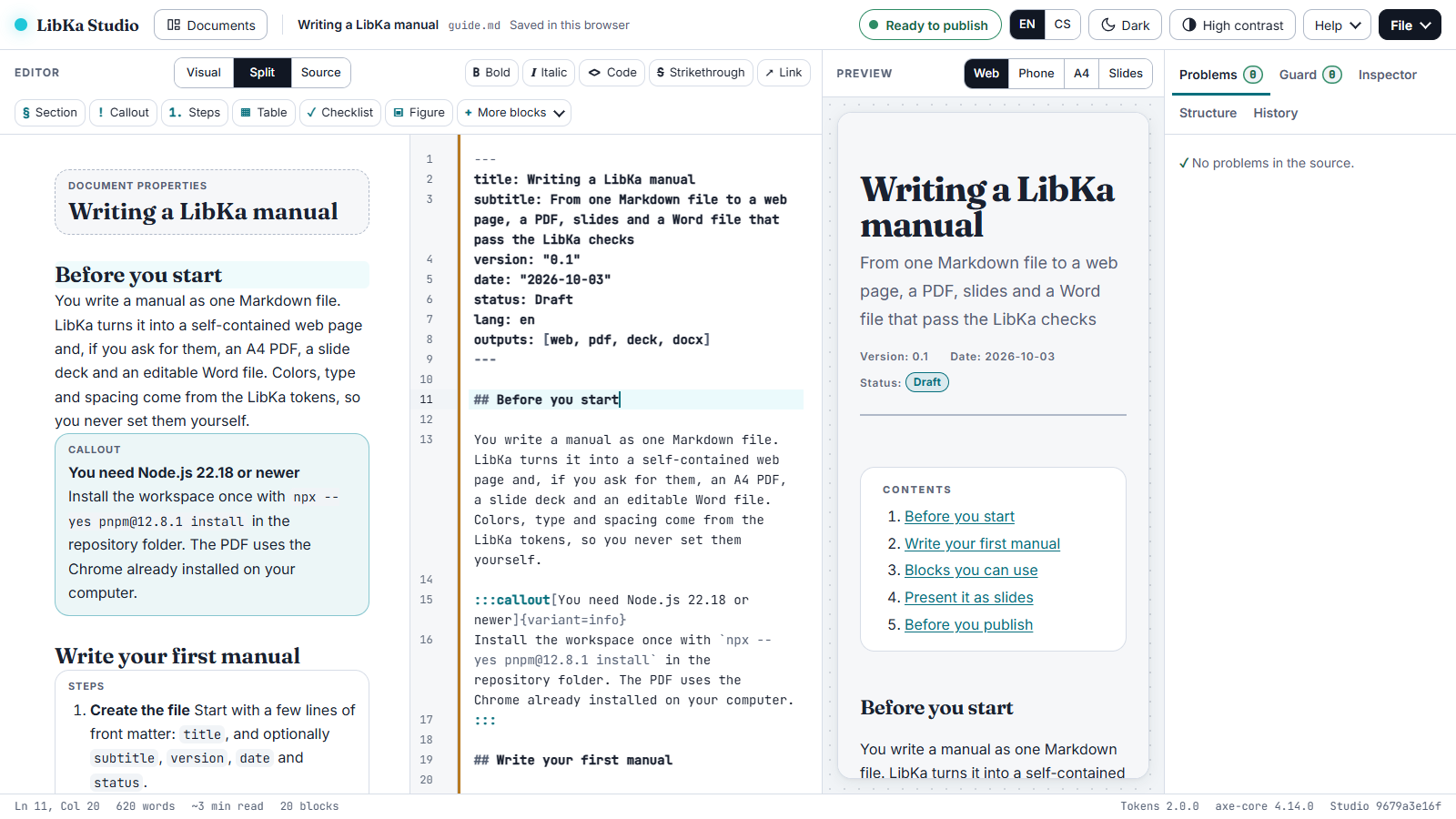
LibKa is a design system (W3C DTCG design tokens) and a document platform. You write one Markdown file with LibKa blocks: steps, callouts, tables, charts, diagrams, timelines, comparisons, release notes and more (35 block types in all). The build renders the outputs the document asks for. Guard then checks each one, the pages in a real browser, and signs a manifest of the checks for the outputs that pass. LibKa Studio lets anyone write the same documents visually, without touching Markdown.

- Website: https://libka.aivigator.ai/
- Try LibKa Studio in your browser: https://libka-studio.aivigator.ai/
- Documentation:
docs/, starting with getting started and the block catalog
Status: version 2.0.1. Developed and tested on Windows; CI runs the full test suite on Linux (Ubuntu) and the health check on Windows; macOS is not tested.
Why LibKa
Markdown publishing tools already turn one source into web pages, PDFs and slides. LibKa's difference is that it checks every output and says exactly what it checked:
- The rules that can be automated are enforced; the rest is listed for a person: blocks carry their accessibility rules (an image cannot go in without alternative text), the build stops on problems with
file:linemessages, Guard measures the rendered result in Chrome, not the source, and the conformance report names what a person still has to review. - The PDF is repaired and validated: Chrome's tagged PDFs are repaired for PDF/UA-1 and validated by veraPDF, the PDF Association's reference validator, on every rule a machine can check (the rest of PDF/UA, such as a meaningful reading order, needs a person).
- Every output gets a record: a signed manifest of the checks and a WCAG 2.2 / EN 301 549 conformance report per build.
- A design system, not a theme: colours, type and spacing come from DTCG tokens whose contrast the token build gates, in light, dark and high contrast.
- Visual editing for people who never touch Markdown, with the same checks live in LibKa Studio, while the Markdown stays the single source.
LibKa is a good fit for manuals, guides, policies, reports and decks that must be accessible and consistent. It is not a page-layout tool: you choose blocks, not positions.
LibKa Studio
An installable web app that keeps documents on your own device: a visual editor, a source editor, or both side by side; a live preview of the web page, phone, A4 and slides; the same Guard checks while you type, with one-click fixes where a fix is safe and plain-word explanations otherwise; versions, a command palette, English and Czech, light, dark and high contrast, offline once opened. The Studio has its own accessibility self-audit (docs/acr/studio.md), tested with the keyboard alone, NVDA, forced colours, reflow and touch emulation.
Run it locally: npx -y @libka/cli studio, and open the address it prints.
Quick start
| You need | For |
|---|---|
| Node.js 22.18 or newer, Google Chrome | Building and checking documents (libka doctor says what your computer has) |
| Java 21 and veraPDF (install without administrator rights) | Validating PDFs against PDF/UA-1 (optional for building: without them a PDF is built, and its manifest, its conformance report and verify say it was not validated; required by check.py) |
| Python 3.12 or newer | Working on LibKa itself (check.py) |
Start a project:
npm create libka@latest my-docs        # add -- --lang cs for the example in Czech
cd my-docs
npm install
npm run build                          # web page, PDF, slides and Word file in dist/, checked and signed
npm run verify                         # the files (the slides too) are the ones that were checked and signed
The starter has an example document, npm run check (the source only, in a couple of seconds, without a browser), a GitHub Actions workflow that checks every push and pull request with the LibKa Guard action, marking each problem on its line, and a README of next steps. A document chooses its outputs in its front matter, outputs: [web, pdf, deck, docx]; without that line it gets the web page and the PDF. Each project signs with its own key, made by its first build in .libka/ and trusted in .libka/trusted-keys.json (signing keys).
From a clone of this repository:
git clone https://github.com/aivigator-ai/open-libka-design-platform.git && cd open-libka-design-platform
npx --yes pnpm@12.8.1 install
node packages/cli/src/libka.ts build examples/manual/guide.md     # the outputs land in examples/manual/dist/
Writing documents
A document is Markdown with front matter and blocks:
---
title: Setting up the router
lang: en
outputs: [web, pdf, docx]
---

## Connect it

:::steps
1. **Plug in the power** The light turns orange.
2. **Connect the cable** Use the yellow port.
:::

:::callout[Before you start]{variant=important}
Keep the box: the Wi-Fi password is on its label.
:::
examples/manual/guide.mdis a short example that explains the syntax;examples/open-source-guide/guide.mdis a real, long guide: two of GitHub's Open Source Guides (CC BY 4.0) as a manual and a deck.- Every block is defined once, in
packages/blocks: syntax, attributes, a JSON schema, accessibility rules, anti-patterns, and what the web page, PDF, slides and Word file do with it. - Slides come from the same file: every
##and###is a slide,:::notesholds speaker notes, and overfull slides are shrunk a little or continued. - Czech documents (
lang: cs) get Czech labels and Czech typography.
What every output gets
- Checks in a real browser: axe-core with the WCAG 2.2 A and AA rules; the contrast of every visible text against its real background, 4.5:1 and 7:1 when the reader asks for more contrast; LibKa's structure rules; a page that fits a 320-pixel-wide screen without scrolling sideways (reflow); slides that must fit; a strict Content Security Policy.
- A PDF validated against PDF/UA-1 (ISO 14289-1) by veraPDF: every rule a machine can check.
- A Word file with real structure: headings, lists, footnotes, tables whose header row repeats, pictures with alternative text, the document language; Guard checks its structure and contrast.
- A signed manifest: the source, the LibKa version, the hashes of every output and every check result. It proves the files are the ones that were checked and which checks ran; what it does not prove is written down too.
- A conformance report listing all 55 WCAG 2.2 A/AA success criteria with their EN 301 549 clauses: checked automatically, failed, needs a person, or not applicable.
- Byte-identical builds: the same source gives the same web page and Word file, and the same PDF with the same Chrome version.
What LibKa does not claim. Automated checks cover part of accessibility. An output that passes is "checked by these tests", not "accessible" or "compliant": the conformance report says what a person still has to review. The draft report for LibKa's outputs is docs/acr/libka-outputs.md.
AI authoring
- Agent Skill in
.claude/skills/libka-author/: the workflow, and the exact syntax of every block (generated from the registry). - MCP server
@libka/mcp(inpackages/mcp): list and describe blocks, check a document, build it. - For Claude Code, both come as one plugin:
/plugin marketplace add aivigator-ai/open-libka-design-platform, then/plugin install libka@libka. Claude Desktop, claude.ai, the API and other MCP clients:docs/ai-tools.md. - Whatever an AI writes goes through the same checks. Content the document declares as AI-written (an AI summary with its reviewer, an AI badge) is listed in the signed manifest.
Repository map
| Path | What it is |
|---|---|
tokens/, libka.resolver.json, generate.py | The DTCG design tokens and their build: CSS, SCSS, Tailwind (docs/tokens.md, the design-system manual) |
packages/blocks | The block registry, the catalog and skill-reference generators |
packages/model | Markdown to typed blocks, with problems by line, each with a code and safe fixes (docs/problem-codes.md) |
packages/render | Web page, slides, charts, slide fitting, Content Security Policy, typography, the block styles |
packages/guard | The browser checks, the Word file checks, the WCAG / EN 301 549 mapping, the signed manifest |
packages/pdf, packages/docx | PDF/UA repair and veraPDF validation; the Word file |
packages/editor | Visual editing: the ProseMirror schema, the lossless round-trip with Markdown, the block commands |
packages/cli, packages/mcp | libka build | lint | check | verify | studio | doctor; the MCP server |
packages/create-libka | The starter, npm create libka |
npm/, plugins/libka, .claude-plugin/ | The npm packages' build and the quick-start test; the Claude Code plugin and its marketplace file |
apps/studio | LibKa Studio |
examples/, docs/ | Examples; the documentation and the maintainer guide |
Contributing
Issues and pull requests are welcome: read CONTRIBUTING.md first; AI coding agents start from AGENTS.md. Questions and ideas go to Discussions (SUPPORT.md says what to expect); new blocks and features are listed in CHANGELOG.md when they ship. Two things to know up front:
- This repository is published from the maintainers' development repository. An accepted pull request is applied there and comes back with the next release, with you credited as co-author of the release commit and thanked in the changelog.
- Sign off every commit (
git commit -s). TheSigned-off-byline certifies the Developer Certificate of Origin: that you may contribute the change under the project's licence. A check on the pull request asks for it; there is no separate agreement to sign.
check.py runs everything a pull request must pass: the Python tests, the strict TypeScript type check, every test (Chrome tests included), the token build and a check that no generated file is stale.
Licence
Apache License 2.0 (LICENSE); third-party material is listed in NOTICE. The fonts are under the SIL Open Font License. LibKa, LibKa Design Platform and LibKa Studio are the publisher's product names, which the licence does not grant: a modified version you publish needs its own name (NOTICE).
Created by aivigator.ai