Listed from the MCP registry; nobody on Odel publishes it.
Is this yours? Claim it
Meridian
Persistent memory, task coordination, and HITL queue for AI coding sessions.
One address for any MCP client. You sign in at usemeridian.us once, after adding it.
What it does
- Reads
- Writes
- High impact
At most: creates or changes data: records, files, settings.
What it costs
FreeOdel charges nothing per call. The publisher may charge for its own service.
What it asks for at sign-in
| Access to | Read | Change |
|---|---|---|
| Mcp | Not stated: mcp | |
From the sign-in at usemeridian.us, as the endpoint publishes it. You approve it there.
Tools
None listed · checked 20 Nov 2026Odel could not list its tools without signing in.

Meridian
Shared, structured project state for long-running AI coding work.
Source-available MCP server for persistent project state — shared task log, pinned decisions, human-in-the-loop queue, and tiered handoffs. Works with Claude Code, Cursor, Cline, Claude Desktop, or any MCP client.
Built-in agent memory (for example Claude Code's CLAUDE.md files and auto memory)
keeps notes as files for that agent. Meridian adds a shared, queryable project
record that several sessions and different MCP clients can read and update. It
works alongside built-in memory rather than replacing it.









Why Meridian
Every AI coding session boots blind. You re-explain the architecture, re-describe the constraints, re-list what's been tried. When context fills up mid-task, detail is lost. This is context debt — and it compounds.
Meridian gives your sessions shared memory. They see the same task log, the same pinned decisions, the same goal state. When context fills up, a new session resumes from a compressed handoff. No copy-paste, no re-explaining from scratch.
What it is, in 30 seconds
A local MCP server every AI session connects to. They share goal state, see each other's task log, and resume from a compressed handoff when context fills up.
Two ways to run Meridian:
- Self-host — free forever, any team size. Clone and run in 2 commands.
- Hosted at usemeridian.us — 30 days free (no card), then $20/mo Standard.
Quickstart
Option 1 — binary release (recommended)
Prebuilt downloads are attached to every GitHub release.
They are unsigned; each release includes a SHA256SUMS file to check downloads against.
- Meridian Desktop (
MeridianDesktop-0.2.0.zip, Windows): the desktop app, with its own Settings and hosted sign-in. Download it from the Meridian Desktop releases and check it against that release'sSHA256SUMS. - Windows tray app (
meridian-tray.exe): a system-tray icon that runs the dashboard server. Choose Open Dashboard from the tray menu, which opens http://127.0.0.1:7878. - macOS tray app (
meridian-tray-mac.zip): the same tray app. Unzip it. The app is not notarized, so the first launch needs right-click > Open. - Linux: there is no tray app yet. Use the uv install below.
meridian.exe,meridian-linux,meridian-mac-arm64: the tunnel client only (meridian --tunnel --repo ., Pro plan and API token required). They do not serve the dashboard.
Dashboard via uv (Linux, macOS, Windows):
uv tool install meridian-server
meridian
Dashboard opens at http://localhost:7878. The data directory defaults to ./data; set MERIDIAN_DATA_DIR to change it.
Pro tunnel client (optional):
meridian --tunnel --repo .
Linux / macOS (installer script, uses uv):
curl -fsSL https://usemeridian.us/install.sh | sh
Windows (PowerShell, installs the tunnel client meridian.exe):
irm https://usemeridian.us/install-windows.ps1 | iex
Option 2 — from source (dev setup / self-host)
Linux / macOS:
git clone https://github.com/meridianmcp/Meridian
cd Meridian
./install.sh
pixi run start
Windows (PowerShell):
git clone https://github.com/meridianmcp/Meridian
cd Meridian
.\install.ps1
pixi run start
Dashboard opens at http://localhost:7878. Data persists in ./data/meridian.db.
Wire it into your AI client
Claude Code
Drop a .mcp.json at your project root.
Hosted (no install) — generate an API key at usemeridian.us/settings:
{
  "mcpServers": {
    "meridian": {
      "type": "http",
      "url": "https://usemeridian.us/mcp",
      "headers": { "Authorization": "Bearer sk_meridian_YOUR_KEY_HERE" }
    }
  }
}
Self-host (from source):
{
  "mcpServers": {
    "meridian": {
      "command": "pixi",
      "args": ["run", "python", "-m", "meridian", "--mcp"],
      "cwd": "/absolute/path/to/Meridian"
    }
  }
}
Self-host (tray app or uv install already running on port 7878):
{
  "mcpServers": {
    "meridian": {
      "type": "http",
      "url": "http://127.0.0.1:7878/mcp"
    }
  }
}
Use the same mcpServers key in ~/.claude.json to make it available in every project. A self-hosted server needs no API key. If you set MERIDIAN_PORT, change the port in the URL to match.
Cursor / Windsurf
Same JSON snippet — both clients read .mcp.json from the project root.
Claude Desktop
Add the same mcpServers block to:
- Windows:
%APPDATA%\Claude\claude_desktop_config.json - macOS:
~/Library/Application Support/Claude/claude_desktop_config.json
Restart Claude Desktop. New chats have Meridian tools. If a newly deployed tool is still missing, follow the MCP tool-surface freshness guide before editing any client cache.
claude.ai web (recommended for planning chat)
A claude.ai connector cannot reach http://localhost. Pick one of these:
- Hosted (no install): in claude.ai go to Customize > Connectors > Add custom connector, set the URL to
https://usemeridian.us/mcp, and complete the OAuth prompt. - Self-hosted, Chrome bridge: use dnakov/claude-mcp, included as a submodule:
Openbash
git clone --recurse-submodules https://github.com/meridianmcp/Meridianchrome://extensions, enable Developer mode, click Load unpacked, and selectextensions/claude-mcp. Set the bridge URL tohttp://localhost:7878/mcp/sse. - Self-hosted, public URL: expose your server over HTTPS and add
https://<your-host>/mcpas the connector.
Full steps are in the browser connector guide.
Hosted tier (no install)
Sign in at usemeridian.us → Settings → MCP client setup → Generate API key → Copy config.
Or manually:
{"mcpServers":{"meridian":{"type":"http","url":"https://usemeridian.us/mcp","headers":{"Authorization":"Bearer sk_meridian_YOUR_KEY_HERE"}}}}
claude.ai (browser) users: no extension is needed for hosted Meridian. Add https://usemeridian.us/mcp under Customize > Connectors. See the browser connector guide.
Get your API key at usemeridian.us/settings after sign-in. Free tier: 30 days, no card, full features.
What you get
- Dashboard at
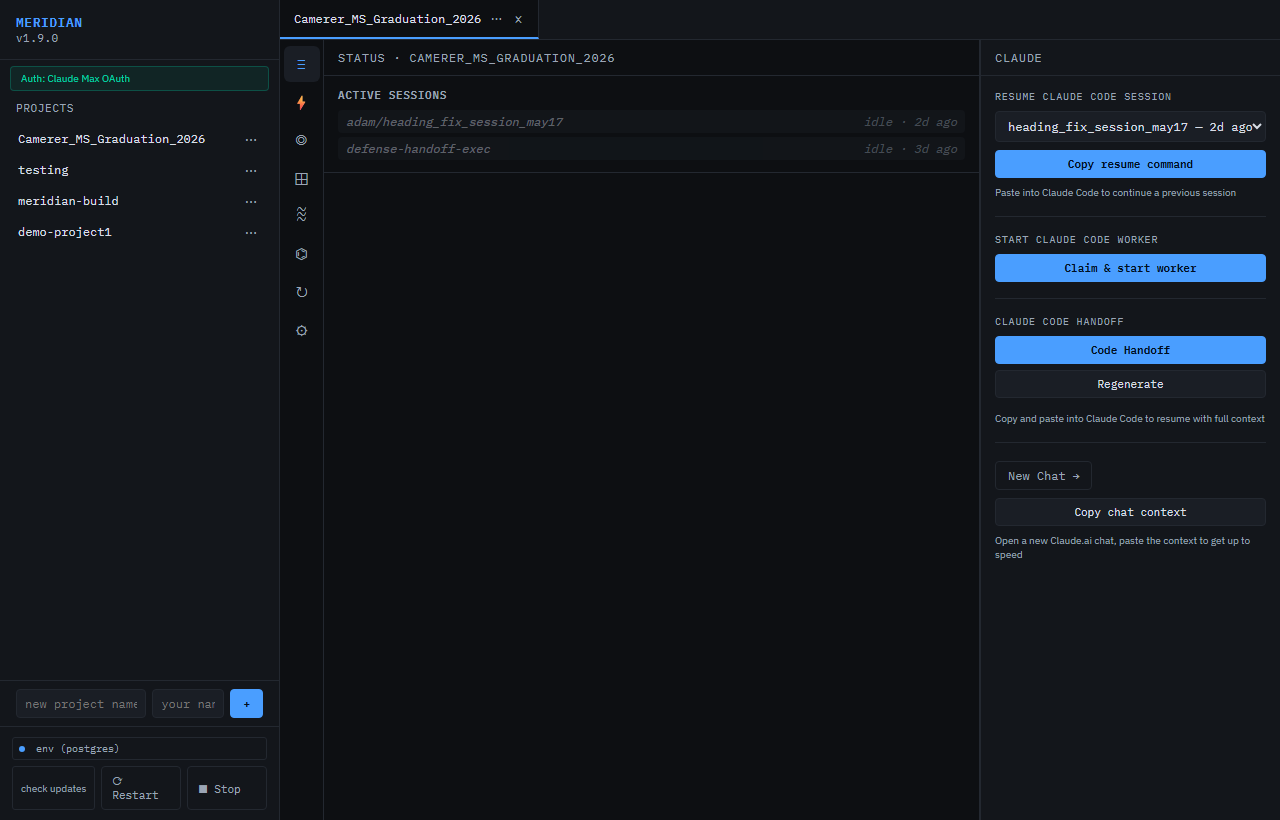
http://localhost:7878— sessions, tasks, sprint board, swimlane timeline, HITL queue, pinned decisions. - MCP tools —
start_session,log_task,claim_task,set_decision,pin_decision,request_hitl,generate_handoff, and ~50 more. - Symbol-level parallel safety —
claim_filecan claim a single class or function (parsed withast/ tree-sitter) so two sessions edit the same file safely; an overlapping claim is blocked with the free symbols listed. - Live work queue — planners inject sprint items mid-run; executors pick them
up at the next item boundary via a
board_changesignal, no interruption. - HITL recommended option —
request_hitlcan flag a safe-default option the dashboard highlights; Enter submits it, number keys pick others. - GitHub hub (hosted) — connect your repo once in Settings; sessions get
read_file,list_files,meridian_github_search_code,git_log, andmeridian_github_get_commitinjected automatically. No extra install. - Tiered handoffs — L0/L1/L2 compression so a fresh session can pick up where the last one stopped.
- Webhook intake — push events from LangGraph / Autogen / custom agents into the same dashboard.
- Works everywhere — Claude Code, Claude Desktop, Cursor, Windsurf, LangGraph, custom.
How it works
> start_session(project_id="meridian", session_name="feature-x")
  ✓ session registered · sprint loaded · 12 active tasks

> get_tasks(project_id="meridian", limit=5)
  [DONE]    backend / wire decisions_pinned table
  [PENDING] frontend / add notes vtab (claimed by session-2)

> claim_task(task_id="a1f3...")
  ✓ claimed — other sessions skip this one
State lives in data/meridian.db (SQLite) or a Postgres URL via MERIDIAN_DB_URL.
No cloud required for local use.
Team coordination
Point MERIDIAN_DB_URL at a shared Postgres (Neon free tier works great). Every
teammate runs their own local Meridian against the same DB — instant shared
sessions, no Meridian server in the cloud.
Auto-checkpoint with hooks
One command wires Claude Code and Codex to Meridian. Every session start injects your project context automatically. Every session end snapshots completed work and writes a delta handoff.
Mac/Linux:
curl -fsSL https://usemeridian.us/hooks.sh | bash
Windows:
irm https://usemeridian.us/hooks.ps1 | iex
Prompts for your Meridian server URL (default http://localhost:7878), then opens
your browser to connect this machine — no project ID or API token to paste. Writes
to ~/.claude/settings.json (Claude Code) or ~/.codex/config.toml (Codex). After
setup, every session automatically:
- On start — calls
POST /hooks/session-start→ injects goal, sprint items, recent tasks, and pinned decisions into the session context viaadditionalContext. - On stop — calls
POST /hooks/stop→ runsauto_captureand writes a delta handoff so the next session resumes from where this one ended.
No more manual start_session() calls. No lost work when context fills.
Hosted tier
| Standard | Pro | |
|---|---|---|
| Price | $20/mo | $49/mo (waitlist) |
| Storage | 1 GB included | 10 GB included |
| Compute | 2 CU · 100 hrs/mo | 4 CU · 300 hrs/mo |
| Bring your own Postgres | ✓ | ✓ |
| OAuth + email magic link | ✓ | ✓ |
| Extra storage | $0.50 / GB-month | $0.50 / GB-month |
| Support | Priority |
30-day free trial · no card required
License
MSL-1.0 — free for local and internal use at any team size. Paid license required if you host Meridian as a service for others. Converts to MIT after 6 years.
For licensing questions: hello@usemeridian.us
Contributors
Built by @ajc3xc








