Listed from the MCP registry; nobody on Odel publishes it.
Akev
Search, inspect, mock and replay HTTP(S) traffic captured by the Akev debugging proxy.
Runs on your machine from its package; the steps are below.
What it does
- Reads
- Writes
- High impact
At most: creates or changes data: records, files, settings.
What it costs
FreeOdel charges nothing per call. The publisher may charge for its own service.
Runs locally over stdio
This server isn't hosted — your MCP client launches it from a package registry. Use one of the commands below, or drop the config into your client (e.g. Claude Desktop).
Run
docker run -i --rm ghcr.io/akevdev/akev:0.1.1
MCP client config
{
  "mcpServers": {
    "akev": {
      "command": "docker",
      "args": [
        "run",
        "-i",
        "--rm",
        "ghcr.io/akevdev/akev:0.1.1"
      ]
    }
  }
}
Akev
Intercept, inspect, mock and debug HTTP(S) traffic — fast, light, and free.
A modern, open-source alternative to HTTP Toolkit, Charles and Proxyman. Written in Rust.
akev.dev
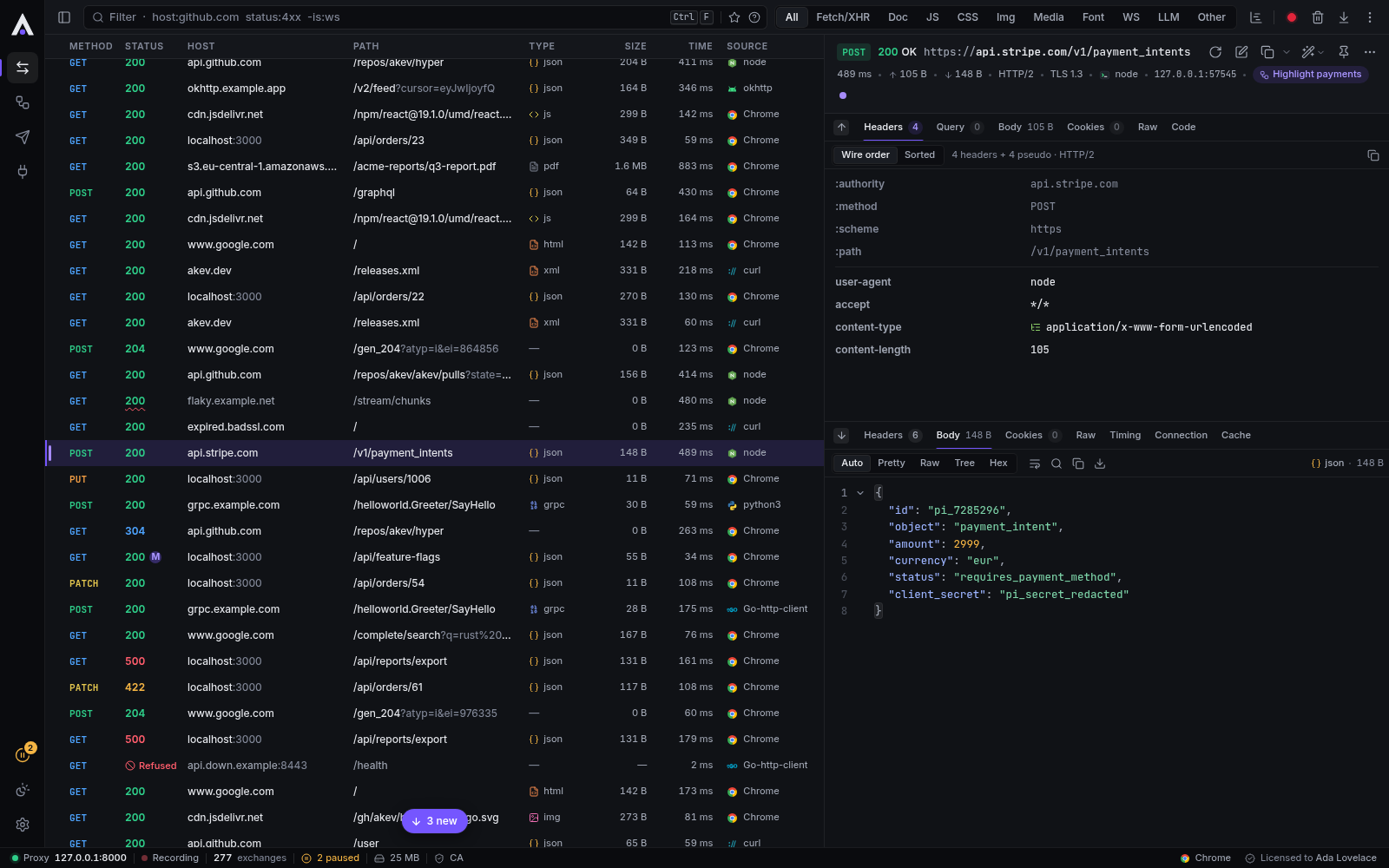
Akev is a debugging proxy for developers, testers and security engineers. Launch a browser, terminal, Android device or container with one click and every request it makes shows up instantly — headers, bodies, timings, TLS details and the app that sent it. Then change anything: mock responses, rewrite requests, map to local files, throttle the network, pause at breakpoints, or script it in JavaScript.
Why Akev
- Fast, small, bounded. A single Rust process with the UI embedded, no Electron. Measured on a busy 2015 quad-core desktop: ~17k req/s (p99 14 ms) through the full capture pipeline, 100k exchanges in ~360 MB, and long sessions level off at the default cap of 200,000 exchanges (numbers and method). Captured bodies spill to disk past a memory budget, the UI is virtualised and filtering runs in Rust.
- Bit-exact traffic. A custom HTTP/1 codec preserves header case, order and duplicates in both directions, paths are never normalised, and replays send exactly what you see.
- Free where others charge. Mocking, rewriting, breakpoints, rules that persist, HAR/session import & export, Compose and replay, code snippets, upstream proxies, themes, settings — free, with no account and no telemetry (the only request Akev makes on its own is an optional daily update check). Akev Pro ($49 once, no subscription) adds scripting, TLS impersonation, WireGuard, transparent capture, JVM attach, protobuf schemas, the LLM lens and MCP write tools; licence keys are checked offline.
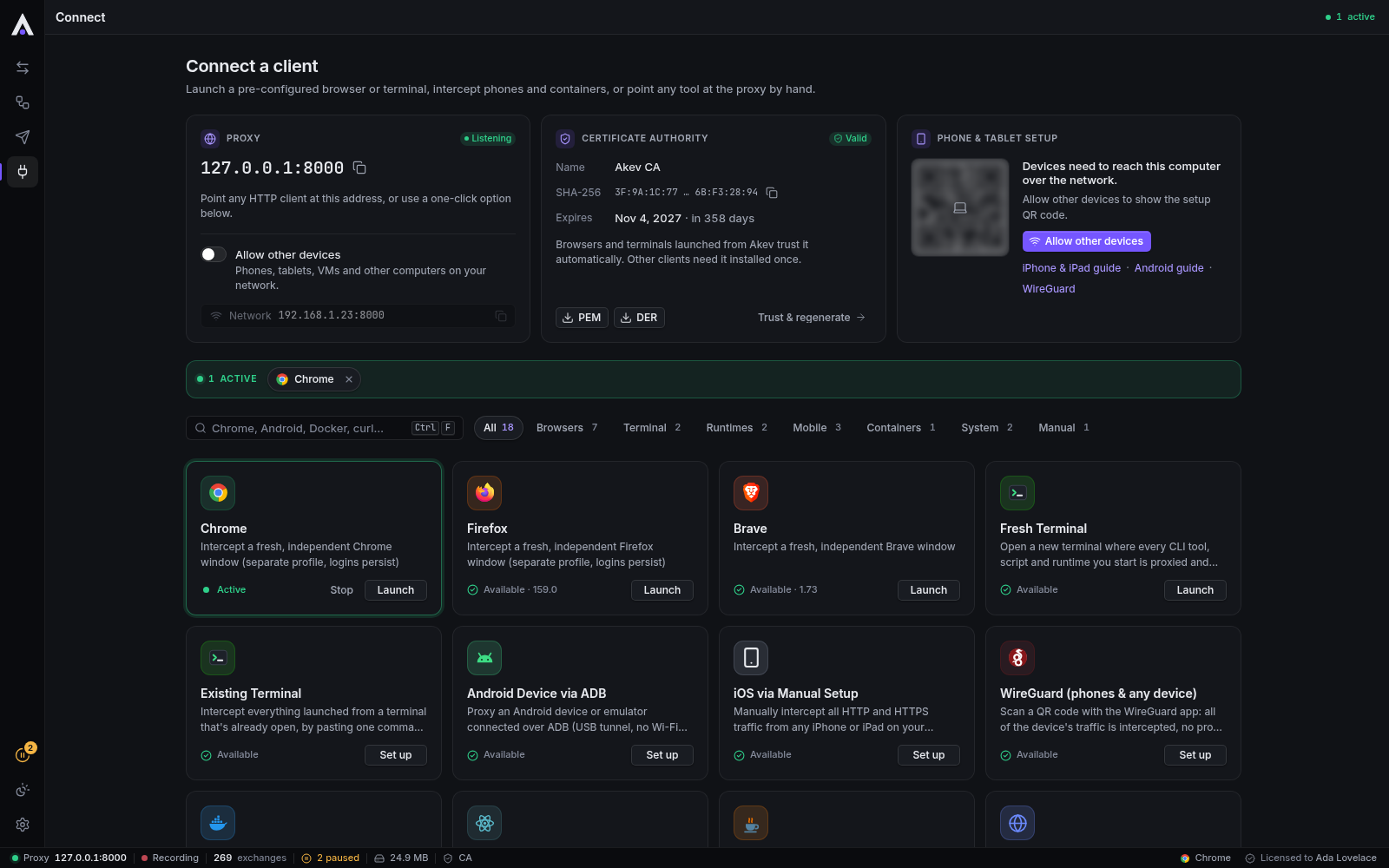
- One-click interception for Chrome, Brave, Edge, Firefox and other browsers, new or existing terminals (Node, Python, Ruby, Go, Rust, Java, curl, git… via env vars & CA bundles), Android over ADB (system-wide trust on rooted devices and emulators), the iOS Simulator, Docker, Electron apps, the OS-wide system proxy (with crash-safe restore), and any device via a setup page with QR code.
- One-click CA trust. Akev shows whether this computer trusts its certificate and adds it to the macOS keychain, the Windows certificate store or the Linux system store (and Chrome's) when you click Trust; the system asks you to confirm, and Remove undoes it.
- WireGuard mode for phones. Scan one QR code with the official WireGuard app (iOS, Android, macOS, Windows, Linux) and all of the device's traffic flows through Akev — every app, no proxy settings. An embedded userspace WireGuard server (no root) terminates each TCP connection and hands it to the proxy with its original destination.
- Transparent capture (Linux) for apps that ignore proxy settings: the kernel redirects their connections to Akev, per app (cgroup v2), per user or machine-wide. Akev generates the nftables / iptables commands and shows when redirected traffic arrives — it never runs root commands itself.
- Attach to running JVMs — no restart. Pick a running Java, Kotlin or Scala app and Akev loads a small Java agent into it: its HTTP clients (HttpURLConnection, java.net.http, and OkHttp/Apache/Netty clients created afterwards) go through the proxy and trust the Akev CA alongside the JVM's own roots. One click restores its original settings (guide).
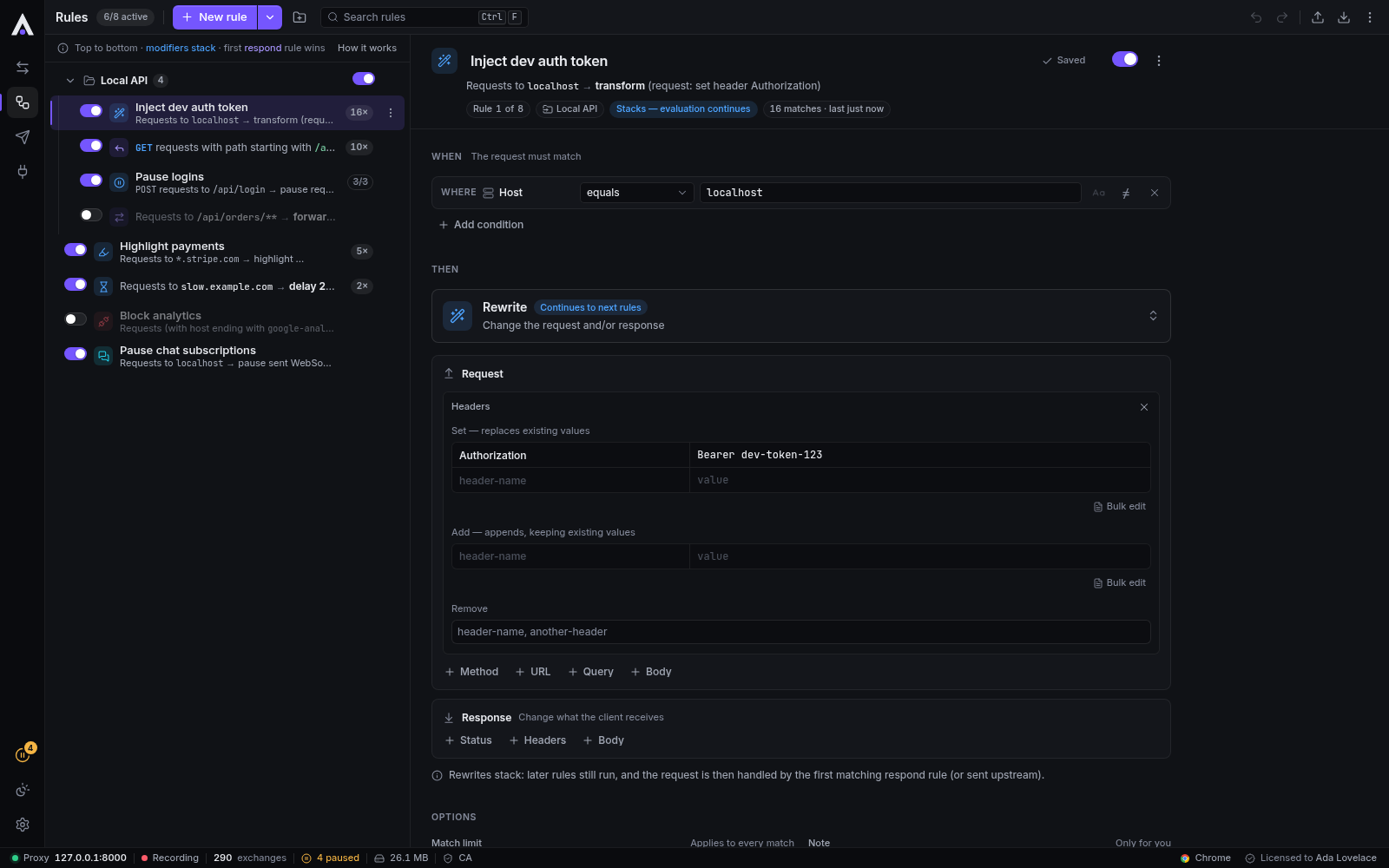
- Powerful rules. Matchers for method, host, path, URL, query, headers, cookies, body, JSON, forms, GraphQL operation, source process and more — stackable modifiers (rewrite, delay, throttle, breakpoint, highlight, script, TLS fingerprint) plus terminal actions (mock, map local, map remote, passthrough, close/reset/timeout). Live hit counters, undo/redo, HTTP Toolkit rule import.
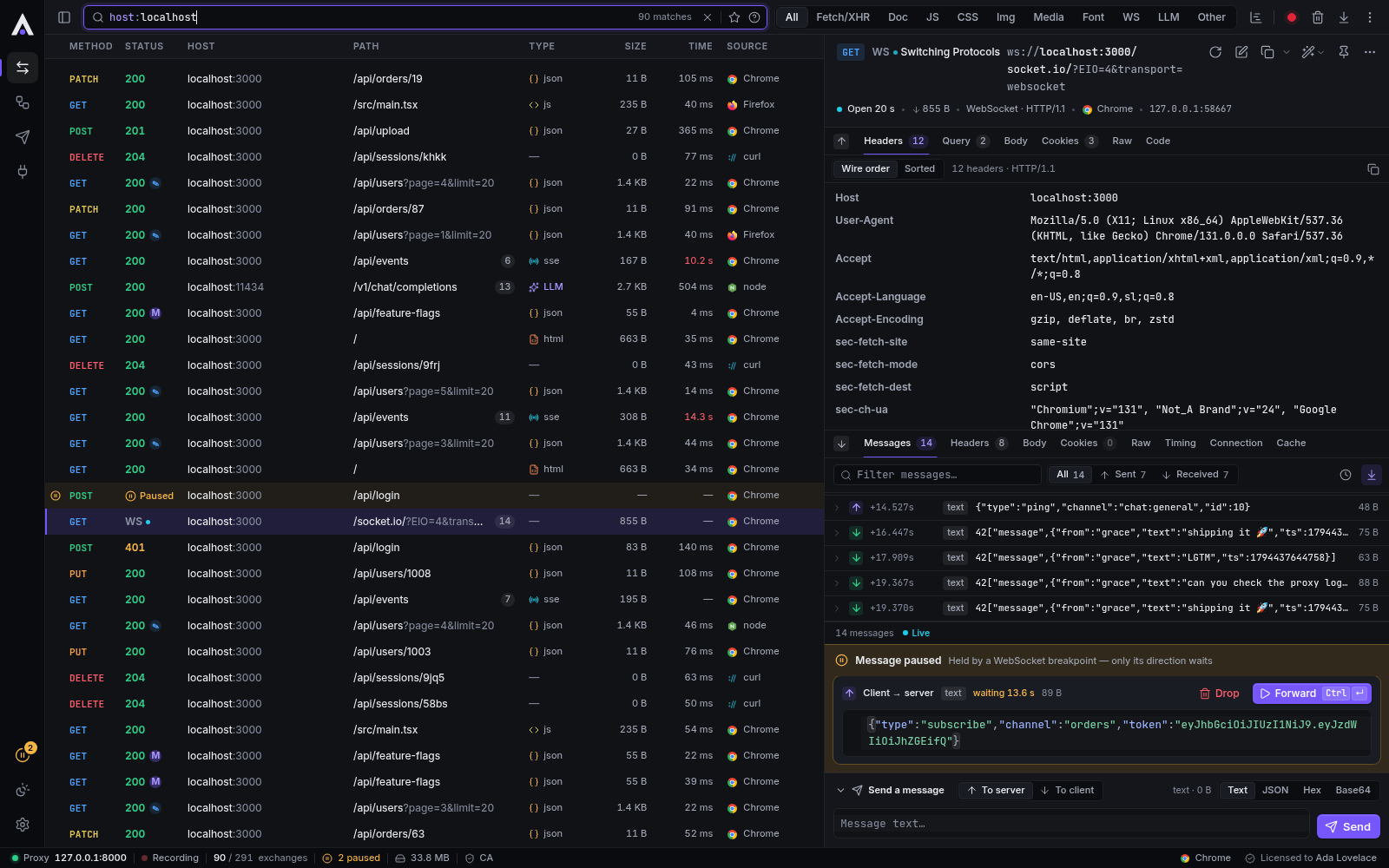
- Deep inspection. HTTP/1.1, HTTP/2, WebSockets and SSE as live message streams, gRPC,
gRPC-Web, protobuf (with field names from imported
.protofiles or descriptor sets), MessagePack and CBOR decoding, JWT decoding, image/HTML/Markdown previews, hex viewer, timing waterfall, client TLS fingerprints (JA3/JA4), upstream certificates, cache analysis, and the process that made each request. - Look like a browser upstream. Optional TLS fingerprint impersonation: Akev's own connections can present Chrome's, Firefox's, Safari's or Edge's ClientHello (JA3/JA4) and HTTP/2 preface — globally, per host, per rule, or mirroring the intercepted browser — so sites behind Cloudflare or Datadome stop blocking proxied traffic. Every exchange shows the fingerprint actually sent. Included in every official build (BoringSSL).
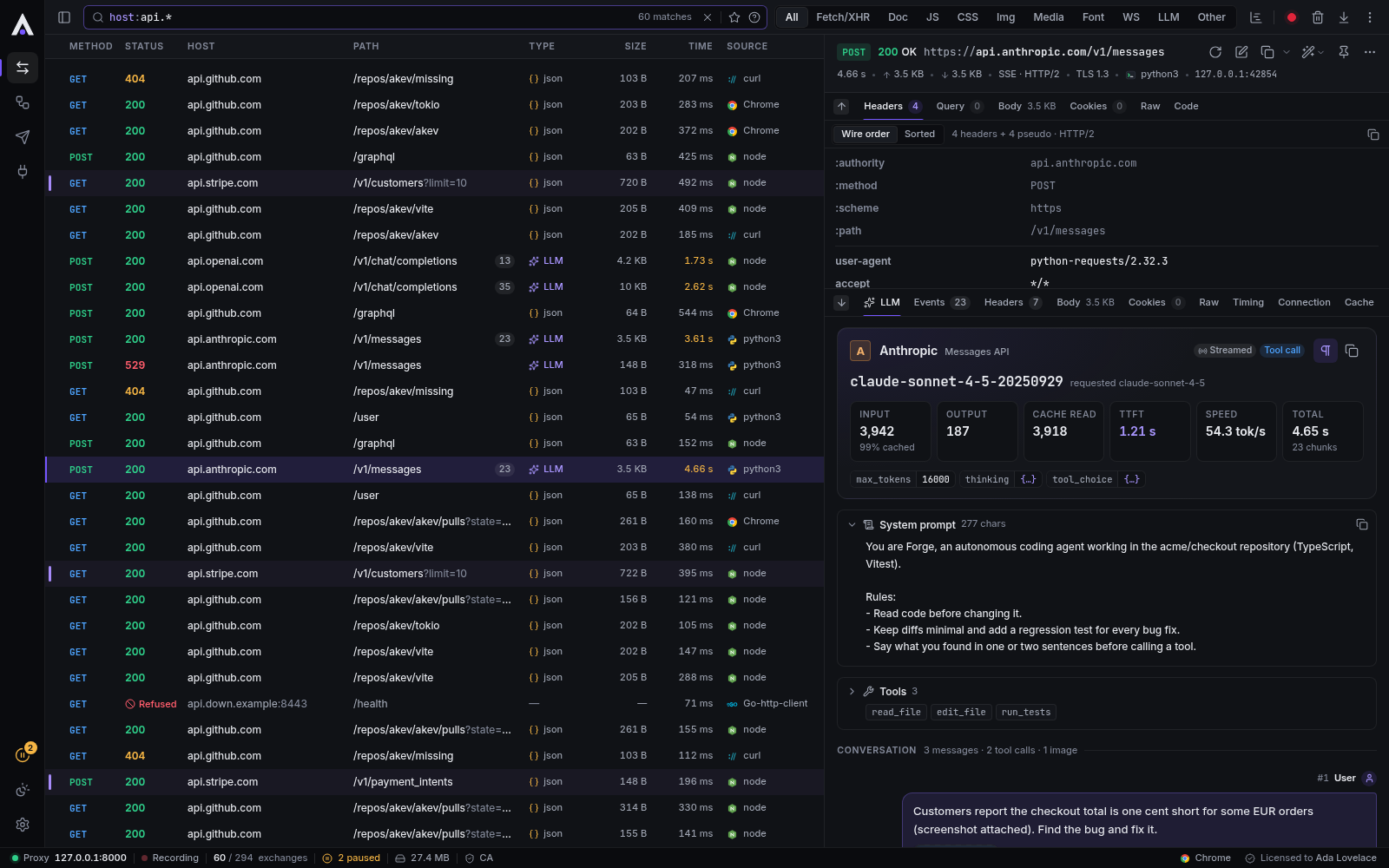
- LLM traffic lens. Calls to OpenAI, Anthropic, Gemini, Amazon Bedrock, Ollama and any
OpenAI-compatible API show up as a conversation instead of raw JSON: system prompt, messages, tool calls and
results, thinking, images, and the streamed reply reassembled — with token usage (cache and
reasoning included), time to first token and tokens/s. Filter with
is:llm,model:,provider:; agents get it over MCP too. - HTTP/3. Akev talks HTTP/3 over QUIC to servers that advertise it (
Alt-Svc), to every HTTPS server, or per Compose request — falling back to TCP when QUIC fails — and can accept HTTP/3 from clients on a QUIC listener, recording those exchanges as HTTP/3 through the same rules, breakpoints and inspection. - Compose & replay with tabs, history, saved requests, cURL paste, an HTTP version choice
(HTTP/1.1, HTTP/2, HTTP/3), and code export to 20 languages. Import HAR, Charles, mitmproxy
and Fiddler (
.saz) captures; double-click a.haror.akevfile to open it. - Built for automation. A token-secured REST/WebSocket API,
akev capture -- npm testfor CI (runs your tests through the proxy and writes a HAR), and a built-in MCP server so AI coding agents can inspect and mock traffic, with secrets redacted and file access confined by default. - Safe on a network. Proxy access is limited to this machine and private networks by default, with optional credentials and a block list; the API is served over HTTPS to other machines. Exports can redact tokens, cookies and keys.
Screenshots
| LLM traffic lens | Live WebSocket messages |
|---|---|
 |  |
| One-click connect | Rules editor |
|---|---|
 |  |
Install
Download from Releases. SHA256SUMS lists every
file's checksum; it is signed with Sigstore (cosign verify-blob --bundle SHA256SUMS.sigstore.json --certificate-identity-regexp 'github.com/akevdev/akev' --certificate-oidc-issuer https://token.actions.githubusercontent.com SHA256SUMS).
| Platform | Get it |
|---|---|
| macOS (Apple Silicon & Intel) | Akev_<version>_universal.dmg |
| Windows 10/11 (x64, Arm64) | Akev_<version>_x64-setup.exe / _arm64-setup.exe, or .msi |
| Linux (x64, Arm64) | .AppImage, .deb or .rpm |
| Command line only | akev-<version>-<platform>.tar.gz / .zip |
| Docker (headless, amd64 and arm64) | docker run -v akev-data:/data -p 127.0.0.1:8000:8000 -p 127.0.0.1:45456:45456 -e AKEV_TOKEN="$(openssl rand -hex 24)" ghcr.io/akevdev/akev |
With a package manager:
# Homebrew (macOS and Linux): the command line, and the macOS app
brew install akevdev/tap/akev
brew install --cask akevdev/tap/akev-desktop

# Scoop (Windows): the command line
scoop bucket add akev https://github.com/akevdev/scoop-bucket
scoop install akev/akev
The macOS app isn't notarized by Apple yet, so macOS asks before the first launch: open Akev once, then click Open Anyway in System Settings → Privacy & Security.
Building from source: make ui && cargo install --path crates/akev-cli (add
--features impersonate for TLS fingerprint impersonation; needs cmake and clang).
Maintainers: see docs/RELEASING.md.
Quick start
akev # starts the proxy on :8000 and opens the UI in your browser
- Open Connect and click a client (e.g. Chrome or New terminal).
- Use it — requests stream into Traffic.
- Right-click any request → Create rule → Mock this response, or Edit in Compose.
Headless capture for CI:
# Runs the tests through the proxy (proxy and CA variables set), writes the HAR when they
# finish, and exits with their status.
akev capture --output traffic.har -- npm test
Each capture uses a fresh CA: --ca-out ca.pem writes it for clients started another way.
Shell completions (Homebrew and the AUR package install them for you):
akev completions zsh > "${fpath[1]}/_akev" # or bash, fish, powershell, elvish
Documentation
The user guides and the HTTP API reference live on the website, akev.dev/docs:
- Getting started
- Filter language
- Rules and scripting
- Intercepting running JVMs: attach to Java, Kotlin and Scala apps without a restart
- Protobuf & gRPC schemas
- WebSockets: sending messages and message breakpoints
- HTTP/3: QUIC to servers (Alt-Svc / prefer / per request) and the QUIC listener
- LLM traffic lens: OpenAI, Anthropic, Gemini and Ollama calls as conversations
- Upstream TLS fingerprints: impersonating Chrome, Firefox, Safari and Edge
- CLI reference and MCP for AI agents
- Sessions, autosave and Charles / mitmproxy import
- WireGuard mode: intercept a whole phone with one QR code
- Transparent capture (Linux): per-app, per-user or machine-wide redirect rules
- HTTP API: the token-secured REST and WebSocket API
For contributors: ARCHITECTURE.md, the UI design system in DESIGN.md, TESTING.md and RELEASING.md.
Building from source
Requirements: Rust (stable), Bun, and for the desktop app the Tauri prerequisites (webkit2gtk-4.1 on Linux).
make ui          # build the web UI (embedded into the binaries)
make release     # target/release/akev
make release-impersonate  # …with browser TLS fingerprints (BoringSSL; needs cmake + clang)
make desktop     # desktop bundles via Tauri
make dev         # daemon + UI dev server with hot reload
make test        # Rust tests + UI type checks
License
AGPL-3.0-or-later. Akev Pro features are part of this source; the licence check runs offline (see akev.dev/docs/licensing). Buying Pro is how the project is funded. Akev is an independent project and is not affiliated with HTTP Toolkit; its cache analysis and forgiving JSON formatter are adapted from HTTP Toolkit's UI (Tim Perry, AGPL-3.0-or-later).