Listed from the MCP registry; nobody on Odel publishes it.

AKQuant
Write and backtest trading strategies with AKQuant: API lookup, strategy checks, backtest runs
Runs on your machine from its package; the steps are below.
What it does
- Reads
- Writes
- High impact
At most: moves money, runs code or commands, deletes data, or sends messages for you.
What it costs
FreeOdel charges nothing per call. The publisher may charge for its own service.
Runs locally over stdio
This server isn't hosted — your MCP client launches it from a package registry. Use one of the commands below, or drop the config into your client (e.g. Claude Desktop).
Run
uvx akquant
MCP client config
{
  "mcpServers": {
    "akquant": {
      "command": "uvx",
      "args": [
        "akquant"
      ]
    }
  }
}





AKQuant 是一款专为量化投研设计的下一代高性能混合框架。核心引擎采用 Rust 编写以确保极致的执行效率,同时提供优雅的 Python 接口以维持灵活的策略开发体验。
🚀 核心亮点:
- 高性能内核:得益于 Rust 的零开销抽象与 Zero-Copy 数据导入(
add_arrays借用 NumPy 缓冲入引擎;策略侧get_history等读取则返回安全快照拷贝),AKQuant 在部分回测场景下可显著降低 Python 层开销;实际运行速度取决于策略逻辑、数据规模、回调频率与运行环境。 - 原生 ML 支持:内置 Walk-forward Validation(滚动训练)框架,无缝集成 PyTorch/Scikit-learn,让 AI 策略开发从实验到回测一气呵成。
- TA-Lib 指标生态:内置
akquant.talib双后端(python/rust)兼容能力,支持 104 个指标。 - 因子表达式引擎:内置 Polars 驱动的高性能因子计算引擎,支持
Rank(Ts_Mean(Close, 5))等 Alpha101 风格公式,自动处理并行计算与数据对齐。 - 参数优化:内置多进程网格搜索(Grid Search)框架,支持策略参数的高效并行优化。
- 专业级风控:内置完善的订单流管理与即时风控模块,支持多资产组合回测。
- AI 助手(MCP):自带 MCP 服务,在 WorkBuddy、DeepSeek Harness、Codex、Cursor、Claude 等 AI 助手中用自然语言写策略、跑回测,助手能读到结构化的结果和报错;已上架 MCP 官方注册表(
io.github.akfamily/akquant)。
👉 阅读完整文档 | English Documentation
安装说明
AKQuant 已发布至 PyPI,无需安装 Rust 环境即可直接使用。
pip install akquant
在 AI 助手中使用(MCP)
先安装 uv,然后在 WorkBuddy、DeepSeek Harness、Codex、Claude Code 等 AI 助手中说一句话就能装好:
安装 AKShare 和 AKQuant 的官方 MCP,项目目录用 /path/to/akquant-demo,运行一个示例策略并报告结果
助手会自己配置好两个服务,再下载数据、编写策略、运行回测并解读结果,不需要事先安装 AKQuant。助手没能自动安装,或者想手动配置时,--root 是项目目录(请先建好),策略和数据文件都放在里面:
claude mcp add akquant -- uvx --from "akquant[mcp]" akquant-mcp --root /path/to/akquant-demo
codex mcp add akquant -- uvx --from "akquant[mcp]" akquant-mcp --root /path/to/akquant-demo
WorkBuddy、Cursor、Claude Desktop 等使用 JSON 配置的客户端:
{
  "mcpServers": {
    "akquant": {
      "command": "uvx",
      "args": ["--from", "akquant[mcp]", "akquant-mcp", "--root", "/path/to/akquant-demo"]
    }
  }
}
DeepSeek Harness 不读 JSON,要把同样的命令写进 ~/.dsh/profiles/web/cordis.patch.yml,写法见 MCP 服务文档。
接入后可以直接说“用平安银行近三年的日线跑一个均线交叉策略,报告收益和最大回撤”。和 AKTools(AKShare 的官方 MCP)一起接入,助手可以自己查数据、写策略、跑回测。各客户端的配置、工具清单与注意事项见 MCP 服务文档。
快速开始
以下是一个简单的策略示例:
import akquant as aq
import akshare as ak
from akquant import Strategy

# 1. 准备数据
# 使用 akshare 获取 A 股历史数据 (需安装: pip install akshare)
df = ak.stock_zh_a_daily(symbol="sh600000", start_date="20250212", end_date="20260212")
# 交易日历: 不传时按工作日推算, 节假日会被当作交易日
trade_dates = ak.tool_trade_date_hist_sina()["trade_date"]


class MyStrategy(Strategy):
    def on_bar(self, bar):
        # 简单策略示例:
        # 当收盘价 > 开盘价 (阳线) -> 买入
        # 当收盘价 < 开盘价 (阴线) -> 卖出

        # 获取当前持仓
        current_pos = self.get_position(bar.symbol)

        if current_pos == 0 and bar.close > bar.open:
            self.buy(symbol=bar.symbol, quantity=100)
            print(f"[{bar.timestamp_iso}] Buy 100 at {bar.close:.2f}")  # UTC ISO 8601

        elif current_pos > 0 and bar.close < bar.open:
            self.close_position(symbol=bar.symbol)
            print(f"[{bar.timestamp_iso}] Sell 100 at {bar.close:.2f}")  # UTC ISO 8601


# 运行回测
result = aq.run_backtest(
    data=df,
    strategy=MyStrategy,
    initial_cash=100000.0,
    symbols="sh600000",
    broker_profile="cn_stock_t1_low_fee",  # A 股佣金/印花税/过户费、T+1、一手 100 股
    trading_calendar=trade_dates,
)

# 打印回测结果
print("\n=== Backtest Result ===")
print(result)

# 生成最小基准对比报告
benchmark_returns = (
    df.set_index("date")["close"].pct_change().fillna(0.0).rename("SIMPLE_BENCH")
)
result.viz.report(
    filename="quickstart_report.html",
    show=False,
    benchmark=benchmark_returns,
)
调用 result.viz.report(..., benchmark=...) 后,报告会新增“基准对比 (Benchmark Comparison)”区块,展示策略/基准/超额累计收益曲线,以及累计超额收益、年化超额收益、跟踪误差、信息比率、Beta、Alpha 等相对指标。
注意:
run_backtest默认不计交易成本、不开 T+1。 不传broker_profile也不传费率时,佣金、印花税、过户费都是 0,可以当日买卖,最小交易单位是 1 股——这样得到的是理想化的结果,换手越高越偏乐观。A 股回测请像上面这样传broker_profile(内置cn_stock_miniqmt、cn_stock_t1_low_fee、cn_stock_sim_high_slippage),或者显式传commission_rate、stamp_tax_rate、transfer_fee_rate、min_commission、t_plus_one=True、lot_size=100。模板的印花税按 2023-08-28 起的现行税率 0.05% 计,回测此前的行情请显式传stamp_tax_rate=0.001。
运行结果示例:
=== Backtest Result ===
BacktestResult:
                                            Value
name
start_time              2025-02-12 15:00:00+08:00
end_time                2026-02-12 15:00:00+08:00
duration                        365 days, 0:00:00
total_bars                                    249
closed_trade_count                           62.0
execution_count                             124.0
open_position_count                           0.0
initial_market_value                     100000.0
end_market_value                     99379.212386
total_pnl                             -620.787614
unrealized_pnl                                0.0
total_return_pct                        -0.620788
annualized_return                       -0.006208
volatility                               0.002456
total_profit                              544.624
total_loss                              -755.5086
total_commission                       409.903014
max_drawdown                             0.006234
max_drawdown_value                     623.409236
max_drawdown_pct                         0.623393
win_rate                                22.580645
loss_rate                               77.419355
winning_trades                               14.0
losing_trades                                48.0
avg_pnl                                 -3.401365
avg_return_pct                          -0.219536
avg_trade_bars                           1.967742
avg_profit                              38.901714
avg_profit_pct                           3.350484
avg_winning_trade_bars                        4.5
avg_loss                               -15.739762
avg_loss_pct                            -1.260791
avg_losing_trade_bars                    1.229167
largest_win                              119.7522
largest_win_pct                         10.156084
largest_win_bars                              7.0
largest_loss                             -70.2532
largest_loss_pct                        -5.399399
largest_loss_bars                             1.0
max_wins                                      2.0
max_losses                                    9.0
sharpe_ratio                            -2.574886
sortino_ratio                            -3.16692
profit_factor                            0.720871
ulcer_index                              0.003099
upi                                     -2.003008
equity_r2                                0.871776
std_error                               69.889352
calmar_ratio                            -0.995821
exposure_time_pct                       48.995984
var_95                                  -0.000262
var_99                                  -0.000623
cvar_95                                 -0.000427
cvar_99                                 -0.000702
sqn                                     -0.800105
kelly_criterion                         -0.087435
max_leverage                             0.014604
min_margin_level                        68.473617
复杂订单助手 (OCO / Bracket)
AKQuant 提供了两组复杂订单助手,减少手写订单联动逻辑:
place_oco(first_order_id, second_order_id, group_id=None):将两个订单绑定为 OCO,任一成交后自动撤销另一单。place_bracket(symbol, quantity, entry_price=None, stop_trigger_price=None, take_profit_price=None, ...):一次性提交 Bracket 结构;进场成交后自动挂出止损/止盈,并在双退出单场景下自动绑定 OCO。
from akquant import OrderStatus, Strategy

class BracketHelperStrategy(Strategy):
    def __init__(self):
        self.entry_order_id = ""

    def on_bar(self, bar):
        if self.get_position(bar.symbol) > 0 or self.entry_order_id:
            return

        self.entry_order_id = self.place_bracket(
            symbol=bar.symbol,
            quantity=100,
            stop_trigger_price=bar.close * 0.98,
            take_profit_price=bar.close * 1.04,
            entry_tag="entry",
            stop_tag="stop",
            take_profit_tag="take",
        )

    def on_order(self, order):
        if order.id == self.entry_order_id and order.status in (
            OrderStatus.Cancelled,
            OrderStatus.Rejected,
        ):
            self.entry_order_id = ""
可直接运行完整示例:
python examples/06_complex_orders.py
流式回测 (Streaming)
如果你希望在回测执行过程中实时消费事件,可直接使用 run_backtest 并传入 on_event:
def on_event(event):
    if event["event_type"] == "finished":
        payload = event["payload"]
        print("status:", payload.get("status"))
        print("callback_error_count:", payload.get("callback_error_count"))

result = aq.run_backtest(
    data=df,
    strategy=MyStrategy,
    symbols="sh600000",
    on_event=on_event,
    show_progress=False,
    stream_progress_interval=10,
    stream_equity_interval=10,
    stream_batch_size=32,
    stream_max_buffer=256,
    stream_error_mode="continue",
)
on_event 为可选参数:不传时保持传统阻塞语义,传入时可实时消费事件。
关键参数:
stream_progress_interval/stream_equity_interval: 进度与权益事件采样间隔stream_batch_size/stream_max_buffer: 缓冲与批量刷新控制stream_error_mode: 回调异常策略,支持"continue"与"fail_fast"
可视化 (Visualization)
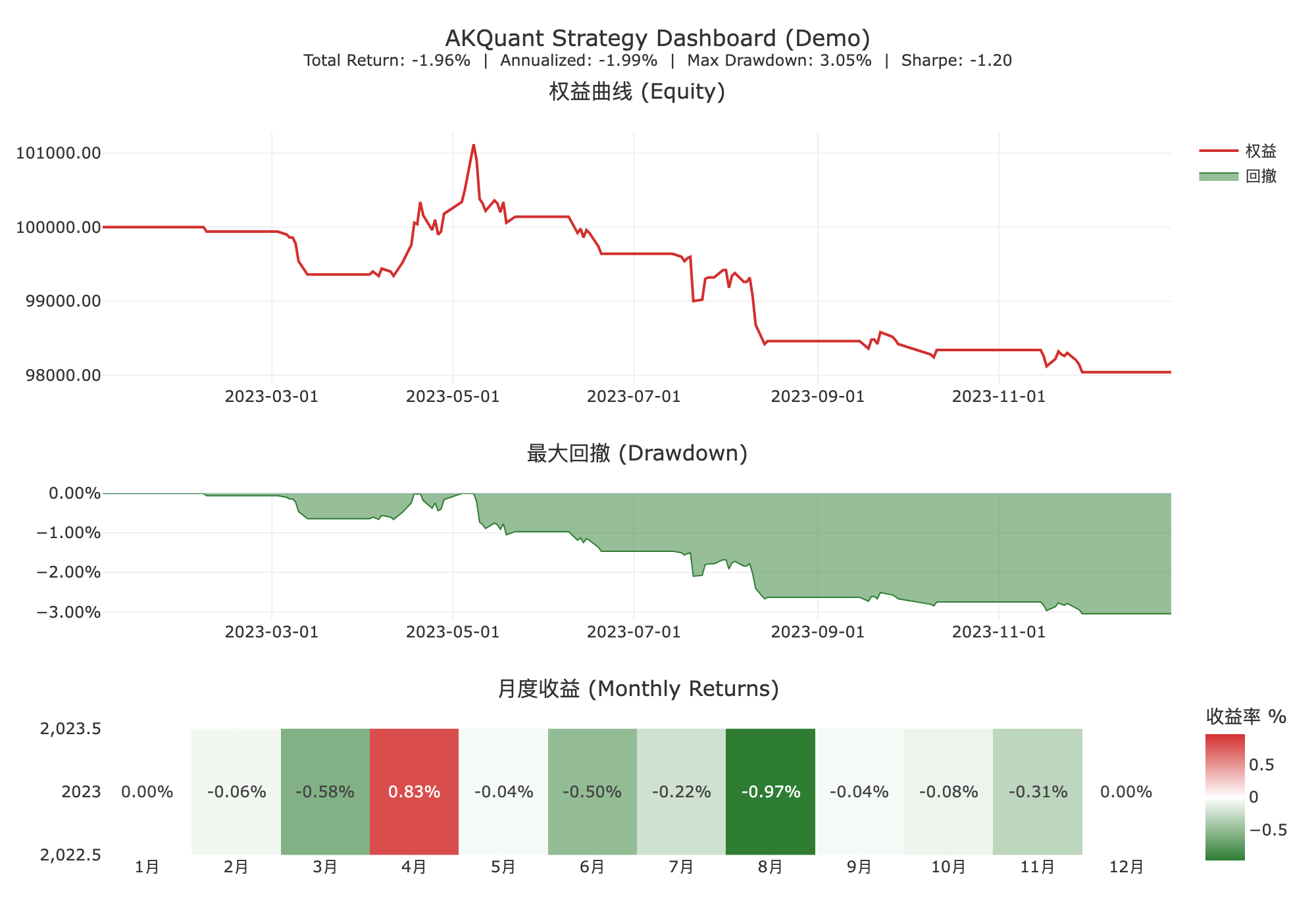
AKQuant 内置了基于 Plotly 的强大可视化模块,仅需一行代码即可生成包含权益曲线、回撤分析、月度热力图等详细指标的交互式 HTML 报告。
# 生成交互式 HTML 报告,自动在浏览器中打开
result.viz.report(
    show=True,
    compact_currency=True,  # 金额列按 K/M/B 紧凑显示(默认 True)
)

# 如果你希望金额列保留原始数值精度(不缩写),可关闭:
result.viz.report(
    show=False,
    filename="report_raw_amount.html",
    compact_currency=False,
)
你也可以直接复用结构化分析结果做二次研究:
exposure = result.exposure_df()             # 暴露分解(净暴露/总暴露/杠杆)
attr_by_symbol = result.attribution_df(by="symbol")
attr_by_tag = result.attribution_df(by="tag")
capacity = result.capacity_df()             # 容量代理(成交率/换手等)
orders_by_strategy = result.orders_by_strategy()         # 按策略归属聚合订单
executions_by_strategy = result.executions_by_strategy() # 按策略归属聚合成交
👉 点击查看交互式报表示例 (Interactive Demo)
文档索引
- 📖 核心特性与架构: 了解 AKQuant 的设计理念与性能优势。
- 🛠️ 安装指南: 详细的安装步骤(含源码编译)。
- 🚀 快速入门: 更多示例与基础用法。
- 🤖 机器学习指南: 如何使用内置的 ML 框架进行滚动训练。
- 📚 API 参考: 详细的类与函数文档。
- 🧩 MCP 服务: 让 WorkBuddy、DeepSeek Harness、Codex、Cursor、Claude 等 AI 助手查 API、写策略、跑回测、读结构化报错。
- 💻 贡献指南: 如何参与项目开发。
🧪 测试与质量保证
AKQuant 采用严格的测试流程以确保回测引擎的准确性:
- 单元测试: 覆盖核心 Rust 组件与 Python 接口。
- 黄金测试 (Golden Tests): 使用合成数据验证关键业务逻辑(如 T+1、涨跌停、保证金、期权希腊值),并与锁定的基线结果进行比对,防止算法回退。
运行测试:
# 1. 使用 uv 环境运行命令
uv sync

# 2. 构建并绑定 Rust 扩展
# 注意:不要使用 `uv run maturin develop`,它会先尝试安装当前项目,
# 对于以 maturin 作为 build backend 的仓库可能卡在 Preparing packages。
uvx maturin develop

# 3. 运行所有测试
uv run pytest

# 4. 运行 Rust 核心测试(自动处理 macOS + uv 环境动态库路径)
./scripts/cargo-test.sh -q

# 5. 仅运行黄金测试
uv run pytest tests/golden/test_golden.py
Citation
Please use this bibtex if you want to cite this repository in your publications:
@misc{akquant,
    author = {Albert King and Yaojie Zhang and Chao Liang},
    title = {AKQuant},
    year = {2026},
    publisher = {GitHub},
    journal = {GitHub repository},
    howpublished = {\url{https://github.com/akfamily/akquant}},
}
License
MIT License