Listed from the MCP registry; nobody on Odel publishes it.
Deprecated. Deprecated by the publisher: Renamed to io.github.AKzar1el/mcp-geo; use the new listing.




DigestSEO AI Visibility
Track how ChatGPT, Claude, Perplexity, Gemini, and Google AI Overviews cite your brand.
Runs on your machine from its package; the steps are below.
What it does
- Reads
- Writes
- High impact
At most: creates or changes data: records, files, settings.
What it costs
FreeOdel charges nothing per call. The publisher may charge for its own service.
Runs locally
This server runs on your machine over stdio, but its source registry didn't list a distribution package. Check the source repository for setup instructions.
DigestSEO — AI Visibility MCP for SEO & GEO











See your first result
mcp-geo is a free, self-hostable MCP server for measuring brand mentions and, where providers return them, source citations across supported AI answer surfaces. It helps SEO practitioners and agencies compare observations by engine and inspect the underlying evidence. A scan is a point-in-time sample, not a guaranteed ranking or citation outcome.

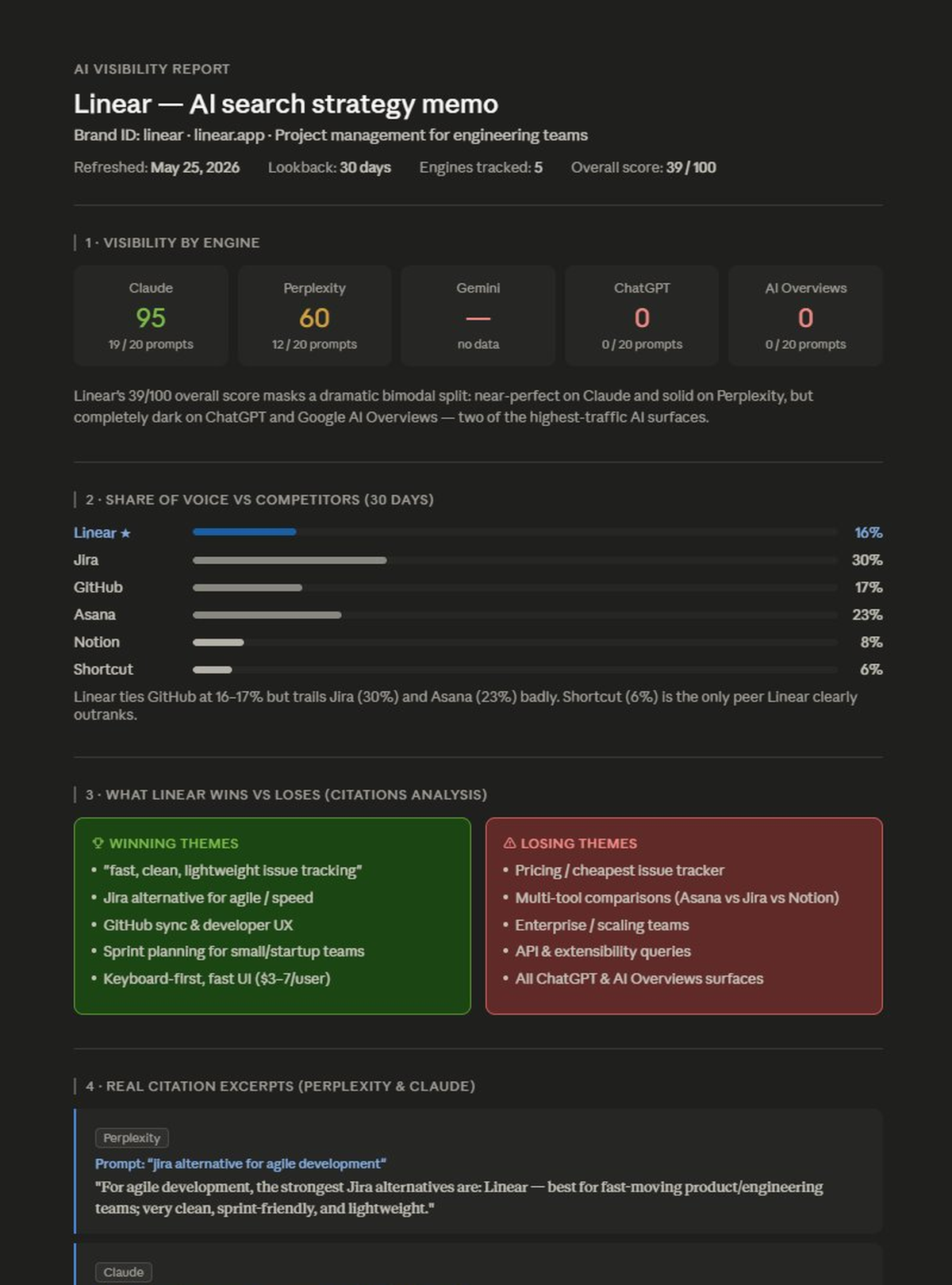
Open the full example report · How the methodology works. This is an example report generated through the MCP tools, not a customer testimonial or a promised result.
Your first local scan, after connecting the stdio MCP server:
- Track: ask your MCP client to run
track_brandwith your ownbrand_id, name, domain, and ideally a precisecategory. By default it creates three provider-free category-anchored starter questions, not a validated measurement sample. Without a category, its brand-name placeholders can bias scores: replace those prompts before scanning. The read-onlylist_prompts.prompt_reviewadvisory flags missing categories and prompts naming the tracked brand; it does not certify that other questions are representative. - Measure: after reviewing and, when needed, replacing the starter questions with representative independent buyer prompts, call
refresh_brandwithpreview_only=trueto inspect configured engines and planned prompt-engine pairs without provider requests. Even before setting API keys or activating prompts, the preview returnsready_to_refresh=falsewith actionablereadiness_warningsinstead of attempting a scan. An explicitly requested mix of configured and unconfigured engines produces a partial-scope warning;ready_to_refresh=truethen means only the configured subset can run, not that every requested engine is available. This scope preview is not a billing quote: actual requests, retries, token usage and charges may differ. Then runrefresh_brandwithout the preview flag when ready. Live scans use your provider API keys and may incur charges. Engines without keys are skipped; Google AI Mode requires a separate explicit opt-in. Retrying after a partial scan makes fresh provider requests for all active prompts on the selected engines, including ones that previously succeeded; old successful answers are not reused as new evidence. Review partial coverage withcheck_visibilitybefore choosing whether and when to retry. - Inspect: run
check_visibilitywith the samebrand_idto view available per-engine scores and evidence. Useget_citationsto inspect citation records where providers supply sources.
Winning prompts now distinguish engines_mentioned_in (brand named in the answer) from engines_with_brand_link (the answer or provider sources included a brand-domain link). The older engines_cited_in field is retained for compatibility but counts mentions, not verified citations. A linked source alone is not scored as an answer mention.
check_visibility.prompt_set_comparability warns when the latest scored observations include prompts no longer in the active prompt set, such as after replacing buyer-intent questions. Its engines_with_retired_prompt_evidence identifies affected engines without rewriting historical measurements. Missing or failed answers are handled separately by per-engine coverage, not misclassified as retired prompts. Rerun the affected engines when a current-prompt comparison is needed; this uses your configured providers and may incur charges.
For an audit with missing AI surfaces, check_visibility.unmeasured_engine_reasons associates each unmeasured engine with the observed limitation: incompatible request/run-mode selection, no eligible stored run, a run with no stored responses, stale brand identity, no successful responses for active buyer prompts, or no usable stored responses. This helps distinguish a filter/configuration mismatch from absent evidence before choosing a new scan. A missing eligible run does not prove that the provider was never configured or attempted; the reasons use stored data only and trigger no API calls.
check_visibility.score_uncertainty gives deterministic minimum/maximum possible overall scores over missing prompt slots in the engines that actually returned usable answers. For example, one positive answer out of five expected prompts still has a displayed observed score of 100, but a possible complete-sample range of 20 to 100. by_engine supplies each measured surface's observed score, possible minimum/maximum, and usable/expected prompt counts, so audit reviewers can identify which surface has an incomplete sample. by_measurement_mode separately aggregates the ranges for search-requested and model-only engines, without mixing the two kinds of evidence; a null mode has no measured engines, not a zero score. The bounds assume every missing answer would either mention or not mention the brand; they are not statistical confidence intervals or forecasts, do not include entirely unmeasured engines, and do not make historical prompt sets comparable. Calculating them uses only stored observations, with no new provider requests.
check_visibility.per_engine[].refreshed_at and freshness use the latest successful stored response capture time for the selected prompt cohort, rather than treating a delayed run-status completion as newly observed evidence. Older records without a usable capture timestamp fall back to the run completion/start time. These timestamps describe stored evidence, not proof of provider freshness or a successful scheduled refresh; inspecting them makes no provider requests.
compare_competitors uses the full historical response window by default, including observations of retired prompts. Set active_prompts_only=true to compare only responses to currently active buyer questions without buying a new scan; prompt_set_scope reports the selected cohort and the number of excluded observations. This does not make old responses fresh or establish that all active questions have been measured.
compare_competitors.mention_evidence_samples gives up to five newest stored response references for the tracked brand and each compared competitor, using the same engine, request-mode, identity, active-prompt and retry-deduplication filters as the reported mention counts. Each reference includes the buyer question, measurement mode, engine, run ID, response ID, prompt ID and capture time, without copying a model answer. The question and mode make each sample interpretable in a client audit without a separate ID lookup; they do not constitute source citations or replace the full-window counts. Empty samples mean no eligible mentions in the selected cohort, not proof of absence across all AI surfaces. This uses stored data only and makes no provider requests.
get_observation_evidence accepts brand_id, run_id and response_id from competitor or content-gap references and returns a short credential-redacted excerpt of that exact successful stored observation, with buyer question, request mode, capture time, active-prompt status and historical identity scope. Optionally pass focus_competitor using a domain from that observation's competitors_mentioned to prioritize a distant competitor reference over the default tracked-brand excerpt. The returned requested_competitor identifies the requested focus; matching is best effort, and its absence from the short excerpt does not negate the recorded mention. Unrecorded competitor guesses are rejected rather than used to inspect arbitrary response slices. It also exposes up to five distinct provider-native HTTP(S) source URLs from that response, with total eligible source count, truncation and URL-redaction indicators. Invalid, local and userinfo-bearing links are excluded; named credential query/fragment values are masked. The run must belong to the requested brand and the response to that run; foreign and failed observations are not disclosed. Excerpts and provider-returned URLs are not independently verified source citations or full provider answers, and may reflect retired prompts or previous brand identities. The lookup makes no provider requests.
get_visibility_history.prompt_set_comparability.current_active_roster compares the most recent stored run's prompt roster per engine against today's active buyer questions. matches confirms a complete latest roster used those IDs, differs flags an outdated measured cohort, and unverified means a partial or missing roster cannot prove either. Historical scores remain the default. Optional active_prompts_only=true reaggregates stored trends for current buyer questions, excluding retired-only runs as unmeasured; prompt_set_scope reports exclusions. This does not initiate a paid scan or prove current questions were comprehensively measured; a fresh scan may still be needed.
check_visibility.configuration_comparability separately identifies engines whose latest scans started before the tracked brand's most recent settings update. Its warning is conservative: a refresh-cadence-only edit can trigger it. For recorded name, domain, alias or exclusion changes, identity_attribution.stale_engines lists scans excluded from current-brand scoring. If no usable post-change evidence exists, check_visibility requests a fresh scan rather than returning an old-identity score. Historical runs remain available in get_visibility_history, with optional current_identity_only=true for a same-identity trend based on recorded run start times. identity_scope reports excluded and unknown-start runs. No recorded identity boundary means history is retained and older identity changes may be unknown. Filtering stored evidence requires no provider calls; rescanning uses your provider keys and may incur charges.
Choose your setup: Quick Install and client-specific instructions for local MCP hosts · Getting Started for provider keys and optional Cloudflare hosting · What the report contains · Privacy. Hosted remote MCP deployments manage brands through their protected admin routes rather than local track_brand.
Quick Install
Runs locally over stdio with your own API keys. Brands, scan history, and cached responses are stored on your machine; scan prompts are sent to the AI providers you configure (see Privacy Policy). Set at least one engine key (OPENAI_API_KEY, ANTHROPIC_API_KEY, GEMINI_API_KEY, PERPLEXITY_API_KEY, XAI_API_KEY, SERPAPI_API_KEY); engines without a key skip gracefully.
Runtime: Node.js 22.13+ (CI exercises Node 22 and 24).
Portable Agent Skill (optional): Assistants supporting Agent Skills can install this repository's GEO workflow guidance using npx skills add AKzar1el/mcp-geo --skill mcp-geo. This installs instructions only, not the MCP server or provider credentials; configure npx -y @digestseo/mcp-geo separately in your MCP host.
Claude Desktop / any MCP client (npx):
{
  "mcpServers": {
    "digestseo": {
      "command": "npx",
      "args": ["-y", "@digestseo/mcp-geo"],
      "env": {
        "OPENAI_API_KEY": "sk-...",
        "GEMINI_API_KEY": "your_key_here"
      }
    }
  }
}
ChatGPT (remote MCP): ChatGPT does not connect directly to local STDIO MCP servers. For ChatGPT, use the self-hosted remote MCP setup below, or the OpenAI Secure MCP Tunnel setup for a server running on a local/private machine. The public geo-mcp.digestseo.com/mcp endpoint is not a turnkey no-key fresh-scan service.
Perplexity Computer (remote MCP): Perplexity Computer supports custom remote MCP connectors on eligible plans. After self-hosting mcp-geo, open Account settings > Connectors > + Custom connector, choose Remote, name it digestseo, and enter your own deployment's https://<worker-host>/mcp URL. Use the connector's OAuth option for the Worker flow; configure the required CONNECT_SECRET in your Worker and enter it in the browser gate during connection. Do not use the public geo-mcp.digestseo.com/mcp endpoint as a turnkey no-key scan service. See Perplexity's current Computer connector guidance.
Perplexity Portable Computer (local STDIO): On supported hardware with a Perplexity Pro/Max local model, open Settings > MCP servers > Add server > Local (stdio) and name the server digestseo. Portable requires an absolute Command path: on Windows use C:\Windows\System32\cmd.exe with arguments /d, /s, /c, and npx -y @digestseo/mcp-geo (each on its own line); on Linux use the absolute npx path with -y and @digestseo/mcp-geo as separate arguments. Select Test, then Add. Node.js 22.13+ is required. No provider keys are needed for tool discovery; engine-backed scans can incur provider charges. Portable's local tools are distinct from cloud Computer's Remote/OAuth connector. See the local Portable setup guide and Perplexity's official instructions.
Replit Agent (remote MCP): after self-hosting mcp-geo, open Integrations -> MCP Servers for Replit Agent -> Add MCP server, name it digestseo, and enter your own deployment's https://<worker-host>/mcp URL. Choose the OAuth flow when prompted: Replit supports OAuth dynamic client registration (DCR), which the self-hosted Worker exposes through its standard discovery and registration endpoints. Select Test & Save, then complete the browser authorization step with the required CONNECT_SECRET. Replit supports remote HTTPS MCP servers rather than this package's local stdio process, so use your configured Worker URL and do not treat the public geo-mcp.digestseo.com/mcp endpoint as a turnkey provider-key service. See Replit's current MCP guide.
Claude Code:
claude mcp add --transport stdio digestseo -s user --env GEMINI_API_KEY=your_key_here -- npx -y @digestseo/mcp-geo
Or install the same local MCP integration through this repository's owner-controlled Claude Code marketplace:
/plugin marketplace add AKzar1el/mcp-geo
/plugin install digestseo-geo@digestseo-mcp
The marketplace plugin uses the repository's .mcp.json to launch npx -y @digestseo/mcp-geo. Zero provider keys are enough for tool discovery; for engine-backed scans, make only the provider keys you want available to the Claude Code process. The direct claude mcp add command above remains the simplest option when you want to attach provider keys explicitly to the server configuration.
Codex CLI:
codex mcp add digestseo -- npx -y @digestseo/mcp-geo
The zero-key command is enough for tool discovery. Add only the provider keys you want with repeated --env NAME=VALUE options before the -- when engine-backed scans are needed.
Amp CLI:
amp mcp add digestseo -- npx -y @digestseo/mcp-geo
Amp runs this as a local STDIO MCP server. The zero-key command is enough for tool discovery; before engine-backed scans, make only the provider keys you want available to the Amp process or configure them in Amp's local MCP env settings instead of committing secrets. See Amp's current MCP guide.
OpenCode v2:
opencode mcp add digestseo --global -- npx -y @digestseo/mcp-geo
OpenCode v2 runs this as a local STDIO server. Omit --global for project-only configuration. Zero keys are enough for MCP tool discovery. For engine-backed scans, edit the generated OpenCode v2 config and add only the provider variables you want under mcp.servers.digestseo.environment, mapping each to an environment reference such as "OPENAI_API_KEY": "{env:OPENAI_API_KEY}"; keep the actual secret value in the process environment rather than in the config file. Verify the connection with opencode mcp list. See the current OpenCode v2 MCP guide.
Mistral Vibe Code: add mcp-geo to the user-level ~/.vibe/config.toml or project-level ./.vibe/config.toml:
[[mcp_servers]]
name = "digestseo"
transport = "stdio"
command = "npx"
args = ["-y", "@digestseo/mcp-geo"]
The zero-key entry is enough for tool discovery. For engine-backed scans, pass only the provider keys you want through Vibe's STDIO environment configuration or the environment inherited by Vibe instead of committing secrets. Use /mcp digestseo (or /mcp) in Vibe to verify the server and tools. See Mistral's current MCP server guide and Vibe configuration reference.
LibreChat: add mcp-geo to librechat.yaml as a local STDIO server:
mcpServers:
  digestseo:
    type: stdio
    command: npx
    args:
      - -y
      - '@digestseo/mcp-geo'
Restart LibreChat after changing librechat.yaml. The zero-key entry is enough for MCP tool discovery. Before engine-backed scans, expose only the provider API keys you intend to use to the LibreChat process rather than committing secret values into the YAML file. See LibreChat's current MCP configuration guide and MCP feature guide.
AnythingLLM: add mcp-geo from Settings -> Agent Configuration -> MCP, or merge this entry into anythingllm_mcp_servers.json in AnythingLLM's storage plugins directory:
{
  "mcpServers": {
    "digestseo": {
      "command": "npx",
      "args": ["-y", "@digestseo/mcp-geo"]
    }
  }
}
AnythingLLM treats command-backed servers as local STDIO MCP servers and can start them when an agent needs their tools. The zero-key entry is enough for MCP discovery; before engine-backed scans, add only the provider environment variables you intend to use through AnythingLLM's MCP configuration or the process environment instead of committing raw secrets. See AnythingLLM's current MCP compatibility guide.
Langflow: open Settings -> MCP Servers (or the MCP sidebar -> Add MCP Server), choose STDIO, name the server digestseo, set Command to npx, and add Arguments -y and @digestseo/mcp-geo. The zero-key server is enough for MCP tool discovery; before engine-backed scans, add only the provider keys you intend to use in Langflow's MCP Environment Variables fields rather than storing raw secrets in a flow. Then select the saved server from an MCP Tools component and connect its tools to a Langflow Agent. If Langflow itself runs in Docker, its image must include Node.js before it can launch an npx server. See Langflow's current MCP client guide.
Flowise: for a local/self-hosted Flowise instance, add a Custom MCP tool to an Agent and use STDIO with {"command":"npx","args":["-y","@digestseo/mcp-geo"]}. Refresh Available Actions to load the thirteen mcp-geo tools. Zero provider keys are enough for discovery; before engine-backed scans, make only the provider keys you intend to use available to the Flowise process/service environment. Flowise explicitly recommends STDIO only when it is running locally rather than in a cloud service because the npx package is launched on the Flowise host. See Flowise's current Tools & MCP guide.
Kilo Code: open Settings -> Agent Behaviour -> MCP Servers, add a Local (stdio) server named digestseo, and launch npx with arguments -y and @digestseo/mcp-geo. The equivalent macOS/Linux kilo.jsonc entry is:
{
  "mcp": {
    "digestseo": {
      "type": "local",
      "command": ["npx", "-y", "@digestseo/mcp-geo"],
      "enabled": true
    }
  }
}
On Windows, Kilo's current guidance uses "command": ["cmd", "/c", "npx", "-y", "@digestseo/mcp-geo"]. Zero provider keys are enough for discovery. Before engine-backed scans, add only the provider keys you intend to use through Kilo's MCP environment settings or the local process environment, and keep raw secrets out of project-level kilo.jsonc. See Kilo Code's current MCP configuration guide and CLI MCP guide.
Google Antigravity: Antigravity 2.0, Antigravity CLI, and Antigravity IDE can launch custom local STDIO MCP servers. In the IDE, open the agent panel -> MCP Servers -> Manage MCP Servers -> View raw config; from the CLI, /mcp opens the interactive MCP manager. Add digestseo to the global ~/.gemini/config/mcp_config.json or a workspace .agents/mcp_config.json:
{
  "mcpServers": {
    "digestseo": {
      "command": "npx",
      "args": ["-y", "@digestseo/mcp-geo"]
    }
  }
}
The zero-key configuration is enough for MCP tool discovery. Before engine-backed scans, expose only the provider keys you intend to use through the local server environment; if you use workspace .agents/mcp_config.json, keep raw secrets out of any shared or committed copy. See Google's current Antigravity MCP guide.
Cherry Studio: open Settings -> MCP -> MCP Servers -> Add, choose STDIO, name the server digestseo, set Command to npx, and add Arguments -y and @digestseo/mcp-geo. The zero-key server is enough for MCP tool discovery. Before engine-backed scans, add only the provider keys you intend to use in Cherry Studio's MCP environment-variable fields rather than putting secrets in prompts or screenshots. Enable the server, inspect its Tools, then bind it to the intended Agent under Work -> Agent -> Edit -> MCP. See Cherry Studio's current official MCP configuration guide and MCP workflow guide.
Raycast AI: open Install MCP Server (or Manage MCP Servers -> Install New Server), choose Standard Input/Output, set Command to npx, and set Arguments to -y and @digestseo/mcp-geo. The zero-key install is enough for tool discovery. Before engine-backed scans, add only the provider keys you want in Raycast's MCP Environment fields rather than hard-coding them into shared project files. Restart Raycast if npx was added to PATH after Raycast started. See Raycast's current MCP manual.
Msty Studio: open Toolbox -> Add New Tool, choose STDIO / JSON, and use:
{
  "command": "npx",
  "args": ["-y", "@digestseo/mcp-geo"]
}
The zero-key tool is enough for MCP discovery. For engine-backed scans, define only the provider keys you want in Msty Studio Environments and attach them to the tool rather than storing raw secrets in shared files. Msty Studio Desktop can run the tool locally; Studio Web needs its documented Desktop/Sidecar connection for local MCP tools. See Msty Studio's current Toolbox MCP guide and environment guide.
Jan Desktop / Jan Agent: in Jan Desktop open Settings -> MCP Servers -> + Add MCP Server, choose STDIO, set Command to npx, and add Args -y and @digestseo/mcp-geo. The zero-key server is enough for tool discovery; add only the provider keys you intend to use through Jan's MCP Env fields. Jan Agent reads the same MCP configuration, or you can add it from the terminal with jan cli mcp add digestseo --command npx --arg -y --arg @digestseo/mcp-geo and then enable it. If you run Path B on your own Worker, Jan also supports HTTP MCP servers at https://<worker-host>/mcp and handles advertised OAuth with metadata discovery, dynamic client registration, and authorization-code + PKCE. Do not present the public DigestSEO endpoint as a turnkey provider-key service. See Jan's current MCP server guide and Agent MCP guide.
Zed: open Settings -> AI -> MCP Servers, choose Add Server -> Add Local Server, and configure digestseo with command npx and arguments -y, @digestseo/mcp-geo. The zero-key local server is enough for tool discovery; for engine-backed scans, add only the provider keys you intend to use in Zed's local MCP env map rather than committing secrets into shared project settings. If you run Path B on your own Worker instead, choose Add Remote Server and use https://<worker-host>/mcp; when no Authorization header is configured, Zed uses the standard MCP OAuth flow. Do not treat the public DigestSEO endpoint as a turnkey provider-key service. See Zed's current MCP guide.
TraeCode: open Settings -> MCP -> Add -> Manually add and paste this local STDIO configuration, or save the same mcpServers object as .trae/mcp.json in a trusted project:
{
  "mcpServers": {
    "digestseo": {
      "command": "npx",
      "args": ["-y", "@digestseo/mcp-geo"]
    }
  }
}
TraeCode recommends NPX/UVX for local MCP servers and supports env values when engine-backed scans need provider keys. The zero-key form is enough for discovery; keep raw provider secrets out of project-level .trae/mcp.json. TraeCode CLI can also load that project-level MCP file, or you can add an equivalent stdio entry through traecli config edit and inspect it with /mcp. See TraeCode's current IDE MCP setup and CLI MCP guide.
Qwen Code: this repository already ships the portable Agent Plugins v1 metadata that Qwen Code can load directly from GitHub:
qwen extensions install AKzar1el/mcp-geo
Or add only the local MCP server as a user-scoped STDIO entry:
qwen mcp add --scope user digestseo npx -y @digestseo/mcp-geo
qwen mcp list
Qwen Code natively supports Agent Plugins v1, including the repository's root plugin.json + mcp.json, so the extension path reuses the same npx -y @digestseo/mcp-geo server without another wrapper. Direct MCP configuration is stored in ~/.qwen/settings.json; project-scoped servers can instead live in .qwen/settings.json under mcpServers. The zero-key setup is enough for tool discovery. Before engine-backed scans, expose only the provider variables you intend to use to the Qwen process, or reference existing environment variables from the MCP env map instead of committing raw keys to project settings. Start Qwen Code and run /mcp to verify the server and tools. See Qwen Code's current extension guide and MCP server guide.
Augment Code / Auggie: in the Augment extension for VS Code or JetBrains, open Settings -> MCP servers and use Import from JSON with:
{
  "mcpServers": {
    "digestseo": {
      "command": "npx",
      "args": ["-y", "@digestseo/mcp-geo"]
    }
  }
}
For Auggie CLI, the equivalent user-level install is:
auggie mcp add digestseo -- npx -y @digestseo/mcp-geo
auggie mcp list
Auggie persists MCP servers in ~/.augment/settings.json; run /mcp in an Auggie session to inspect them. The zero-key setup is enough for tool discovery. Before engine-backed scans, add only the provider keys you intend to use through Augment's MCP environment fields or Auggie's --env NAME=VALUE option rather than committing raw secrets. If the thirteen local tools consume too much agent context, Augment's optional MCP Tool Search can load tool schemas on demand. See Augment's current MCP setup guide and Auggie integrations/MCP guide.
GitHub Copilot CLI:
copilot mcp add digestseo -- npx -y @digestseo/mcp-geo
The base install starts with zero provider keys so tool discovery works. Add only the engine keys you want with Copilot CLI's --env NAME=VALUE option before running scans.
GitHub Copilot cloud agent / code review: repository administrators can also add mcp-geo under Settings -> Copilot -> MCP servers. Use the local npm package rather than the hosted OAuth endpoint, because Copilot cloud agent and code review do not currently support remote MCP servers that rely on OAuth.
Start with a conservative read-only profile because repository MCP tools can run autonomously:
{
  "mcpServers": {
    "digestseo": {
      "type": "local",
      "command": "npx",
      "args": ["-y", "@digestseo/mcp-geo"],
      "tools": [
        "check_visibility",
        "get_visibility_history",
        "compare_competitors",
        "get_citations",
        "list_brands",
        "list_prompts"
      ]
    }
  }
}
Copilot code review only accepts tools whose MCP metadata marks them read-only; the tools above already publish readOnlyHint: true. This profile is useful when the task has access to an mcp-geo local database created during that run. For a task that should create/refresh visibility data, explicitly add only the mutating tools you intend to permit (for example track_brand and refresh_brand) and remember that refresh_brand can make billable provider calls.
Provider credentials belong in Copilot Agents secrets/variables, not in repository JSON. GitHub only exposes names prefixed COPILOT_MCP_; map a selected secret into mcp-geo with env, for example "OPENAI_API_KEY": "$COPILOT_MCP_OPENAI_API_KEY". See GitHub's current repository MCP configuration guide.
Portable Agent Plugin (GitHub Copilot / VS Code / Kiro and other Agent Plugins 1.0 clients): this repository now ships the standard root plugin.json + mcp.json pair. GitHub Copilot CLI can install it directly from GitHub:
copilot plugin install AKzar1el/mcp-geo
In VS Code, run Chat: Install Plugin from Source and enter https://github.com/AKzar1el/mcp-geo. In Kiro, use Powers -> Add Custom Power -> Import power from GitHub with the same repository URL. The portable plugin launches npx -y @digestseo/mcp-geo; zero provider keys are enough for discovery, while engine-backed scans inherit only the provider keys you intentionally make available to the host client. Existing native install paths above remain valid.
Qoder CLI:
qoder mcp add digestseo -- npx -y @digestseo/mcp-geo
qoder mcp list
Qoder launches this as a local STDIO MCP server. The zero-key command is enough for tool discovery; make only the provider keys you want available to the Qoder process before engine-backed scans. If Qoder is already running, use /mcp reload to rediscover the server and tools. See Qoder's current MCP server guide and MCP reference.
Docker Agent: Docker Agent can launch local STDIO MCP servers directly from agent YAML. Add this toolset to the agent that should use mcp-geo:
toolsets:
  - type: mcp
    command: npx
    args: ["-y", "@digestseo/mcp-geo"]
The zero-key form is enough for tool discovery. For engine-backed scans, add only the provider keys you need under the toolset's env: map (Docker Agent supports ${env.NAME} expansion) instead of committing secret values. See Docker's current local MCP tool documentation.
goose: add mcp-geo as a local STDIO extension in ~/.config/goose/config.yaml (macOS/Linux) or %APPDATA%\Block\goose\config\config.yaml (Windows):
extensions:
  digestseo-geo:
    type: stdio
    name: digestseo-geo
    enabled: true
    cmd: npx
    args: ["-y", "@digestseo/mcp-geo"]
    timeout: 300
The zero-key extension is enough for tool discovery. Before engine-backed scans, configure only the provider environment variables you want for this extension through goose's extension settings / secret storage instead of putting raw API keys in the YAML file. The same server can also be added interactively with goose configure -> Add Extension -> Command-Line Extension. See goose's current extension setup and configuration reference.
GitLab Duo CLI: current GitLab Duo CLI releases can consume Claude-compatible plugin marketplaces directly. Register this repository and install the existing digestseo-geo plugin:
glab duo plugin marketplace add https://github.com/AKzar1el/mcp-geo.git
glab duo plugin install digestseo-geo@digestseo-mcp
The installed plugin loads the same local npx -y @digestseo/mcp-geo MCP server from .mcp.json. Zero provider keys allow discovery; make only the provider keys you want available to the GitLab Duo CLI process before engine-backed scans.
Factory Droid:
droid mcp add digestseo "npx -y @digestseo/mcp-geo"
droid mcp list
Droid runs this as a local STDIO MCP server. The zero-key install is enough for tool discovery; add only the provider keys you choose in Droid's user-level MCP configuration before engine-backed scans. Keep provider secrets out of project-level .factory/mcp.json files.
Amazon Q Developer (IDE): open the Q Developer chat panel ? Tools ? +, choose STDIO, name the server digestseo, set Command to npx, and add Arguments -y and @digestseo/mcp-geo. Add only the provider environment variables you want before running scans; zero keys still allow MCP tool discovery.
Amazon Q Developer CLI: add the same local STDIO server through Q's native MCP manager:
q mcp add --name digestseo --command npx --args '["-y", "@digestseo/mcp-geo"]'
q mcp list
The zero-key server is enough for MCP tool discovery. Before engine-backed scans, add only the provider variables you intend to use to the Q CLI MCP configuration instead of committing secrets to the repository. Amazon Q Developer CLI supports local process-backed MCP servers and manages them through q mcp; use /tools inside a Q session to inspect the tools that loaded. See AWS's current Amazon Q Developer MCP guide and CLI MCP configuration reference.
JetBrains AI Assistant (IDE): open Settings > Tools > AI Assistant > Model Context Protocol (MCP) > Add, choose STDIO, and use:
{
  "mcpServers": {
    "digestseo": {
      "command": "npx",
      "args": ["-y", "@digestseo/mcp-geo"]
    }
  }
}
JetBrains AI Assistant supports local STDIO and NPX MCP servers. The zero-key form is enough for tool discovery; before engine-backed scans, make only the provider keys you want available to the IDE process, or import an already-configured Claude MCP server.
JetBrains Junie (CLI / IDE): run /mcp in Junie CLI to open the MCP Installation Assistant. You can search the Official MCP Registry for mcp-geo, or add the local server manually in .junie/mcp/mcp.json for one project or ~/.junie/mcp/mcp.json for your user:
{
  "mcpServers": {
    "digestseo": {
      "command": "npx",
      "args": ["-y", "@digestseo/mcp-geo"]
    }
  }
}
Junie CLI and the Junie IDE plugin use the same MCP configuration. The zero-key server is enough for tool discovery; before engine-backed scans, make only the provider keys you intend to use available to the Junie process and keep raw secrets out of a shared or committed project .junie/mcp/mcp.json. Use /mcp to verify the active server and tools. See JetBrains' current Junie CLI MCP guide and Junie IDE MCP settings.
JetBrains Air: this repository already ships the standard root .mcp.json that launches npx -y @digestseo/mcp-geo. In Air, open Settings > AI > MCP Servers, enable MCP support and Launch workspace MCP servers, then use the Workspace scope so Air reuses that checked-in file. The repository config contains no provider secrets and is sufficient for zero-key tool discovery. Engine-backed scans still require the selected provider keys in the local server process environment; keep them out of committed .mcp.json. See the JetBrains Air MCP server guide.
Visual Studio 2022 17.14+ / Visual Studio 2026: Visual Studio uses its own servers-shaped MCP configuration. Create %USERPROFILE%\.mcp.json for a user-wide install or <SOLUTIONDIR>\.mcp.json for one solution:
{
  "servers": {
    "digestseo": {
      "type": "stdio",
      "command": "npx",
      "args": ["-y", "@digestseo/mcp-geo"]
    }
  }
}
Open GitHub Copilot Chat in Agent mode and use the Tools menu to verify digestseo is available. Zero provider keys are enough for tool discovery; before engine-backed scans, make only the provider keys you want available to the Visual Studio process rather than committing secrets into the solution file. See Microsoft's current Visual Studio MCP setup.
Cursor:

Devin (cloud / CLI / Desktop plugin): install this repository's existing MCP plugin directly:
devin plugins install AKzar1el/mcp-geo
Alternatively, open Customize > Plugins > Add plugin > From repository in Devin and enter AKzar1el/mcp-geo at a scope you can manage. Devin recognizes this repository's Claude-compatible .claude-plugin/plugin.json and .mcp.json, which launch npx -y @digestseo/mcp-geo (no second server or package needed). Check digestseo-geo under Customize > MCPs and use a new Devin session to inspect its tools; STDIO servers are tested in a session, not with the remote Test tools control. CLI users can first check devin plugins list.
Zero provider keys allow tool discovery; engine-backed scans need only the selected provider keys supplied through Devin's supported secret/environment configuration, never committed to the plugin. The plugin uses local STDIO in Devin's session environment; it is not a turnkey connection to the public DigestSEO Worker. See Devin's plugin instructions and custom MCP guidance.
OpenHands CLI (local STDIO): OpenHands can run the existing npm package as a local MCP server without a wrapper:
openhands mcp add digestseo --transport stdio npx -- -y @digestseo/mcp-geo
openhands mcp list
Start a new openhands conversation and enter /mcp to verify the digestseo tools. On Windows, use npx.cmd if npx is not directly executable. Current OpenHands CLI stores server settings in ~/.openhands/mcp.json (JSON; pre-1.0 TOML configuration needs migration). No provider keys are needed for tool discovery. For engine-backed scans, configure only the required provider keys using OpenHands' --env option or a private environment, never a committed file; provider usage may incur costs. This local process is not the hosted DigestSEO OAuth Worker. See the OpenHands MCP instructions.
Kimi Code CLI (local STDIO): Add the existing npm server to ~/.kimi-code/mcp.json (user-wide) or .kimi-code/mcp.json in a trusted project:
{
  "mcpServers": {
    "digestseo": {
      "command": "npx",
      "args": ["-y", "@digestseo/mcp-geo"]
    }
  }
}
Start a new Kimi Code CLI session and use /mcp to inspect the digestseo tools; /mcp-config manages server entries. Node.js 22.13+ is required. No provider keys are needed for tool discovery. Before engine-backed scans, provide only the optional provider credentials you intend to use through a private environment or Kimi's local env configuration, never a committed project file; provider usage may incur charges. Kimi Code prompts for trust when project-level MCP configuration can launch local commands, so inspect it before enabling. This is local STDIO, not a turnkey connection to the hosted DigestSEO OAuth Worker. See the Kimi Code MCP guide.
Windsurf: open Manage MCPs → View raw config and add the local stdio package:
{
  "mcpServers": {
    "digestseo": {
      "command": "npx",
      "args": ["-y", "@digestseo/mcp-geo"],
      "env": {
        "OPENAI_API_KEY": "sk-..."
      }
    }
  }
}
Use only the provider keys you want; zero keys still allow MCP tool discovery.
Roo Code: open MCP Servers > Edit Global MCP, or create .roo/mcp.json for a project-scoped install, and add:
{
  "mcpServers": {
    "digestseo": {
      "command": "npx",
      "args": ["-y", "@digestseo/mcp-geo"]
    }
  }
}
Roo Code supports local STDIO MCP servers. The zero-key form is enough for tool discovery; add only the provider keys you want before scans. On Windows, if Roo cannot launch npx directly, use "command": "cmd" with "args": ["/c", "npx", "-y", "@digestseo/mcp-geo"], matching Roo's documented Windows fallback.
VS Code: Install the local stdio server in VS Code. The base install starts with no provider keys so tool discovery works; add only the API keys you want in your VS Code MCP user configuration before running scans.
LM Studio: Add the local stdio server to LM Studio. The base install starts with no provider keys so tool discovery works; add only the API keys you want in LM Studio's mcp.json before running scans.
Kiro:  for a one-click local install, or open the user MCP config (
~/.kiro/settings/mcp.json) / workspace config (.kiro/settings/mcp.json) and add the local stdio package manually:
{
  "mcpServers": {
    "digestseo": {
      "command": "npx",
      "args": ["-y", "@digestseo/mcp-geo"]
    }
  }
}
Kiro supports local STDIO MCP servers across its current surfaces. The zero-key form is enough for discovery; add only the provider environment variables you want before engine-backed scans. For remote use, self-host the Worker below and configure your own deployed /mcp URL instead. The public geo-mcp.digestseo.com/mcp endpoint is not a turnkey no-key fresh-scan service.
Claude Desktop extension (one-click): download the .mcpb bundle from the latest release and double-click it — Claude Desktop prompts for the API keys.
First run: ask your client to "track acme.com as brand acme in the project management software category, then review its prompts" — track_brand creates three provider-free starter prompts. Review list_prompts and customize with set_prompts for representative buyer queries before refresh_brand runs the first scan; check_visibility then shows scores. To opt in to token-billed Claude prompt generation, specify prompt_generation='anthropic'.
Reading combined scores: check_visibility reports each engine's observation time and a freshness range for the combined score. mixed_age_warning=true means at least one engine was measured 24 hours or more before the newest engine; older_engines identifies which. The overall score still averages available engine scores, not a synchronized new scan. Use refresh_brand to update old measurements before comparisons; this may incur configured provider API costs.
Current buyer-question scores without rescanning: check_visibility(active_prompts_only=true) scores only successful stored responses for the currently active prompt IDs. The default preserves historical scores, including retired buyer questions. prompt_set_scope identifies the selection and excluded successful response rows; engines without any observed active questions are unmeasured, not scored as zero. If none of the selected engines measured an active question, the tool explains that no current score can be established. Filtering stored data makes no provider requests, but missing questions still require an optional new scan to measure.
Historical evidence timestamps: get_visibility_history.series[].per_engine_evidence[].observed_at uses the latest successful, retry-deduplicated response capture time for the selected stored prompt cohort, not a potentially delayed scan completion time. With active_prompts_only=true, retired-prompt captures cannot make current buyer-question evidence appear fresh. Older records without capture provenance retain the legacy run completion/start fallback. Daily and weekly chart bucket dates remain completion-based for backward compatibility; they must not be interpreted as independent measurement dates. No extra provider requests or score changes are introduced.
Search evidence vs. model-only answers: check_visibility.measurement_scope separates the mean visibility score from engines whose live request uses search/SERP (search_requested) from engines without live search (model_only). The Claude and Gemini adapters currently use model-only generation; ChatGPT batch runs are also model-only. Each per_engine record carries its measurement_mode. mixed_modes=true means the legacy overall_score blends these unlike observations. Use optional check_visibility(measurement_mode='search_requested', engines=[...]) or measurement_mode='model_only' to select the latest eligible stored run per engine before calculating its headline score; measurement_scope.measurement_mode_filter discloses this choice. For example, an older ChatGPT live score can be selected despite a newer batch run. Missing selected-mode engines are unmeasured, not zero. Separately, run_mode='live' or run_mode='batch' filters dispatch mode; omission preserves latest across modes and live does not imply search (Claude/Gemini remain model-only). Combining filters narrows evidence to their intersection. Each get_citations.citations row also reports measurement_mode from its stored run and engine. Even search_requested does not prove that a response returned verifiable citations: inspect the actual url_source and evidence, and never present model-generated links as independently observed AI-search citations. No additional provider calls are made to calculate this disclosure.
Citation evidence after a brand identity change: By default get_citations preserves the requested historical window, including scans from before a tracked name/domain/alias/exclusion change. When an identity boundary exists, identity_attribution states the boundary, each citation row supplies identity_scope (current, historical, or unattributed), and top_sources[].identity_scopes discloses which evidence periods contributed to that domain's counts. Optional current_identity_only=true filters both citation pages and whole-window top sources to runs started on or after that boundary, before pagination limits are applied. identity_filter discloses whether filtering was applied; without a recorded boundary, the full window is returned with a limitation instead of claiming a current-only result. Attribution uses originating run start, not response capture time; missing provenance is never assumed current. Stored evidence is not a fresh scan and filtering incurs no provider calls.
Citation evidence for current buyer questions: Optional get_citations(active_prompts_only=true) filters both paginated citations and full-window top_sources to currently active prompt IDs before applying page limits and source counts. The default includes historical responses from retired prompts; prompt_set_scope discloses the selected cohort and active prompt count. If no prompts are active, the active-only result is empty rather than presenting old evidence as current. This selector can be combined with current_identity_only and engines=['claude','perplexity'] to match a selected audit surface set. engine_scope lists the requested engines and any without successful source observations in the window; such absence is not measured zero or proof a scan was configured or attempted. The legacy single engine parameter remains supported, but cannot be combined with nonempty engines. Active-only cursors are invalidated when the buyer-question roster changes, and selected-engine cursors reject a changed engine set; previously issued historical cursors remain supported. Stored observations of active questions may still be old and do not prove a fresh scan; the filters make no provider requests.
AI agents installing this server: follow llms-install.md. Prefer a remote server with cron auto-refresh? Self-host on Cloudflare Workers below.
mcp-geo is an open-source AI visibility tracker that measures how often your brand is cited by ChatGPT, Claude, Perplexity, Gemini, Grok, Google AI Overviews, and Google AI Mode. It's the GEO (Generative Engine Optimization) and AEO (Answer Engine Optimization) equivalent of Google Search Console — built as an MCP server so you can query your AI visibility data directly inside ChatGPT through a configured remote MCP app, Claude.ai, Claude Desktop, Claude Code, GitHub Copilot CLI, Cursor, Codex CLI, or any MCP-compatible client.
Canonical product page: DigestSEO mcp-geo — AI Visibility MCP Server
Engineering case study: DigestSEO MCP Suite — AI visibility, Search Console, web validation, and trend intelligence
Need a client-ready baseline without running the stack yourself? The mcp-geo AI Visibility Audit is EUR 99 one time: one brand, up to three competitors, 20 buyer-intent prompts, checks across up to five supported AI surfaces where configured providers return usable results, citation evidence, and a prioritized action memo. The open-source package remains free.
See proof first: Open the sample report generated through mcp-geo to see the output style and evidence depth before requesting the audit.
Ready to request it? Open a prefilled email with your brand/domain and up to three competitors. No subscription or sales call is required.
Payment handoff: After fit and scope are confirmed, I reply with the normal invoice/payment instructions.
Methodology: The same 20 buyer-intent prompts are run as a point-in-time diagnostic and reported per engine, with citation/source evidence where available. The audit is an observed snapshot, not a proprietary ranking promise or guaranteed forecast.
Want the protocol before buying? Read the AI Visibility Audit methodology, including scope, engine coverage, interpretation limits, and what the audit does not claim.
Prefer zero setup? Try the hosted version at digestseo.com — managed Cloudflare infra, no API keys to manage, multi-brand, scheduled refresh, web UI. Waitlist now open. Join waitlist →
What it produces
Connect via MCP and ask an assistant to "Run an AI visibility analysis on [my brand]" to synthesize a memo from the per-engine measurements actually available. Results depend on configured providers and successful scans; there is no fixed completion-time or citation guarantee. Preview the example report above.
View the full report including content gaps, engine recommendations, and synthesis →
Want to reproduce the same evidence-first structure with your own data? Use the reusable AI Visibility Audit report prompt.
The report above was generated by Claude through the digestseo-mcp MCP server. The conversation chained five hosted tools — visibility.check, visibility.compare, visibility.citations (Perplexity + Claude), and visibility.content_gaps — to produce a 4-engine analysis with citation excerpts and a 3-recommendation strategy memo.
What's New
[0.3.31] - October 30, 2026
- Correct brand counts in long AI responses: links appearing beyond the first 20 retained response-text citation hosts are still counted for brand visibility, without growing the evidence display.
- More reliable provider-native citations: brand links beyond the first 30 retained native citation URLs are still recognized across OpenAI, Grok, Perplexity, Google AI Mode, and AI Overviews, with strict host matching.
[0.3.30] - October 29, 2026
- More complete Gemini and Claude evidence: Gemini multipart non-thinking text and Anthropic multiple response text blocks are now aggregated for visibility analysis, with regression tests.
- Portable Agent Skill setup: guidance for compatible MCP agents reuses the existing local package and optional provider-key configuration.
- Safer repository defaults: root plaintext secret-copy files are ignored to reduce accidental commits; provider credentials remain user-managed.
[0.3.29] - October 26, 2026
- Complete OpenAI Batch audit results: incomplete provider result sets now fail explicitly instead of silently omitting requested prompts, while unknown-ID validation remains enforced.
- More accurate brand citation matching: citation URLs ending with sentence punctuation are recognized without counting punctuation as part of the URL.
[0.3.28] - October 25, 2026
- Reliable OpenAI Batch terminal status: failed, expired, and cancelled batches now stop indefinite polling, preserve available partial results where present, and account for missing prompts without claiming successful scans. The existing model and provider settings are unchanged.
- Broader native MCP onboarding: first-party instructions for Devin, Perplexity Portable, OpenHands CLI, and Kimi Code CLI reuse the existing local package, with safe optional provider-key guidance.
- Clearer data handling: local persistence and third-party API processing are described separately; offline Batch request regression tests protect the existing submission contract.
[0.3.27] - October 24, 2026
- MCP input-security hardening: patched affected MCP SDK dependencies, bounded hosted HTTP requests to 256 KiB across modern and legacy paths, and capped tool-input collection elements to mitigate request-driven memory exhaustion. Existing authenticated and local stdio workflows are preserved.
- More reliable cost guidance: Anthropic Haiku estimates are now token- and workload-based, with no assumption of fixed per-prompt cost or guaranteed trial credits.
[0.3.26] - September 24, 2026
- OAuth 1.0 resource correctness: self-hosted Workers now bind OAuth grants and tokens to the canonical
${SELF_URL}/mcpresource required by@cloudflare/workers-oauth-provider1.0.0, with deployment guidance that prevents resource-host mismatches. - Broader coding-agent onboarding: Google Antigravity, JetBrains Junie, GitHub Copilot cloud agent/code review, Qwen Code, and Augment Code / Auggie now have first-party-aligned local MCP setup paths using the published
npx -y @digestseo/mcp-geopackage.
[0.3.25] - September 24, 2026
- Complete hosted safety metadata: all six hosted visibility tools now explicitly declare read-only, destructive, and open-world behavior for stricter MCP clients and plugin validators.
- Broader native onboarding: Langflow, Cherry Studio, Flowise, and Kilo Code setup now reuse the published local/self-hosted mcp-geo paths with zero-key discovery and secret-safe provider configuration.
- Stronger audit fulfillment: the reusable report prompt now turns the existing
top_sourcescitation summary into recurring-source evidence before individual citation examples, without manufacturing derived metrics.
[0.3.24] - September 23, 2026
- Source-domain intelligence:
get_citations/visibility.citationsnow summarizes the most frequently cited engine-native source domains across the requested window, with prompt counts, contributing engines, representative URLs, and tracked-brand-domain flags. - Clear hosted MCP identity: modern SDK-v2 discovery now exposes the human-readable GEO Tracker title, concise description, and canonical product URL without changing the stateless transport contract.
- More native client onboarding: Replit Agent remote-MCP and Jan Desktop / Jan Agent setup now reuse the existing local or self-hosted mcp-geo paths without introducing another package or hosted turnkey-provider claim.
[0.3.23] - September 23, 2026
- Current Grok model: grounded Grok visibility scans now use xAI's current
grok-4.7model while preserving the existing Responses API, required Web Search grounding, and BYOK flow. - AnythingLLM onboarding: MCP Management /
anythingllm_mcp_servers.jsonsetup now covers the published local stdio package with zero-key discovery and secret-safe optional provider configuration. - Accurate Perplexity guidance: setup text now matches the already-shipped Agent API
fastpreset and points to live pricing instead of stale Sonar/fixed per-prompt wording.
[0.3.22] - September 23, 2026
- Perplexity retirement-safe: Perplexity scans now use the Agent API
fastpreset instead of the retiring fixed Sonar model selector, preserving grounded web-search visibility after the September 27 Sonar retirement. - Current plugin discovery truth: portable Agent Plugin and Claude marketplace metadata now include Google AI Mode alongside the other supported AI-search surfaces.
- Amazon Q Developer CLI: native
q mcponboarding now covers the existing local stdio package with zero-key discovery and secret-safe provider configuration. - Accurate self-hosting guidance: setup documentation now reflects the stateless SDK-v2 hosted MCP path and current manual-refresh scheduling behavior.
[0.3.21] - September 22, 2026
- Stateless hosted MCP: OAuth-protected
/mcptraffic now uses Cloudflare's SDK-v2createMcpHandlerpath with legacy stateless compatibility and explicit Host/Origin validation, while the old Durable Object binding remains only as a conservative migration hold. - Leaner tool context: all thirteen MCP tools now expose concise example-led descriptions and complete input-parameter guidance, reducing client context overhead and making tool selection clearer.
[0.3.20] - September 22, 2026
- Bounded provider requests: external AI-provider and SerpAPI calls now time out after 90 seconds instead of allowing a stalled upstream API to hang a scan indefinitely.
- Durable manual Worker scans: authenticated
/admin/run-liverequests can setwait_for_completion: trueso manual/operator refreshes remain attached until service-binding engine work finishes.
[0.3.19] - September 22, 2026
- Google AI Mode: opt in with
SERPAPI_AI_MODE_ENABLED=trueto measure Google AI Mode separately through SerpAPI, including citation/source evidence when returned. - Google sampling scope: Google AI Overviews and AI Mode searches currently use
gl=usandhl=en(US location, English interface).check_visibility.google_search_samplingexplicitly identifies this scope when those engines have stored results. Do not interpret these samples as worldwide or multilingual visibility measurements. - Safe tracked-brand corrections: local MCP users can call
update_brandto change identity, competitors, aliases, exclusions, or refresh cadence without replacing prompts or historical runs. - Manual scheduling: set
refresh_frequencytomanualto pause self-hosted scheduled scans while keeping explicitrefresh_brandavailable.
[0.3.18] - September 21, 2026
- Grok visibility coverage: opt in with XAI_API_KEY to measure grounded Grok answers via xAI Web Search alongside ChatGPT, Claude, Perplexity, Gemini, and Google AI Overviews.
[0.3.17] - September 21, 2026
- Exact user-defined measurement sets: local MCP users can now call
set_promptsto replace a brand's active prompts with 1-50 agreed buyer questions while preserving historical runs; repeated identical sets are a no-op.
[0.3.16] - September 21, 2026
- New-project Gemini compatibility: Gemini scans now default to
gemini-3.1-flash-lite, avoiding the Gemini 2.5 access restriction Google applies to some new projects while preserving the same GenerateContent integration.
[0.3.15] - September 20, 2026
- Clearer provider setup failures: an explicit refresh request for an unconfigured engine now names the unavailable engine and explains how to recover instead of reporting that no engines at all are available.
- Broader local-client onboarding: copy-paste setup now covers Roo Code, Codex CLI, and OpenCode v2 in addition to the existing MCP clients.
- Reliable installed README links: npm-package readers are routed to durable GitHub URLs for documentation and report assets that are intentionally excluded from the tarball.