Listed from the MCP registry; nobody on Odel publishes it.

Markasso
Let AI agents draw and edit Markasso diagrams, offline or live on a shared whiteboard.
Runs on your machine from its package; the steps are below.
What it does
- Reads
- Writes
- High impact
At most: creates or changes data: records, files, settings.
What it costs
FreeOdel charges nothing per call. The publisher may charge for its own service.
Runs locally over stdio
This server isn't hosted — your MCP client launches it from a package registry. Use one of the commands below, or drop the config into your client (e.g. Claude Desktop).
Run
npx -y @markasso/mcp
MCP client config
{
  "mcpServers": {
    "markasso": {
      "command": "npx",
      "args": [
        "-y",
        "@markasso/mcp"
      ]
    }
  }
}
MARKASSO
is a zero-latency, framework-agnostic whiteboard engine. Built with vanilla TypeScript and the Canvas 2D API, it delivers a high-performance drawing experience with a zero-dependency core and a keyboard-first workflow. It’s the "Vesper" of whiteboards: dark, fast, and focused.
Watch the 25-second agent demo · Drawing by hand (24 s) · Markasso for AI agents








User Manual · MCP for AI agents · Architecture · Contributing · Report an Issue
Featured in
TypeScript.fm, Episode 87 · October 29, 2026
Markasso was featured in Library Watch. Listen at 25:49.
Thanks to Erik Onarheim and Kamran Ayub for the shout-out!
Draw with AI agents (MCP)
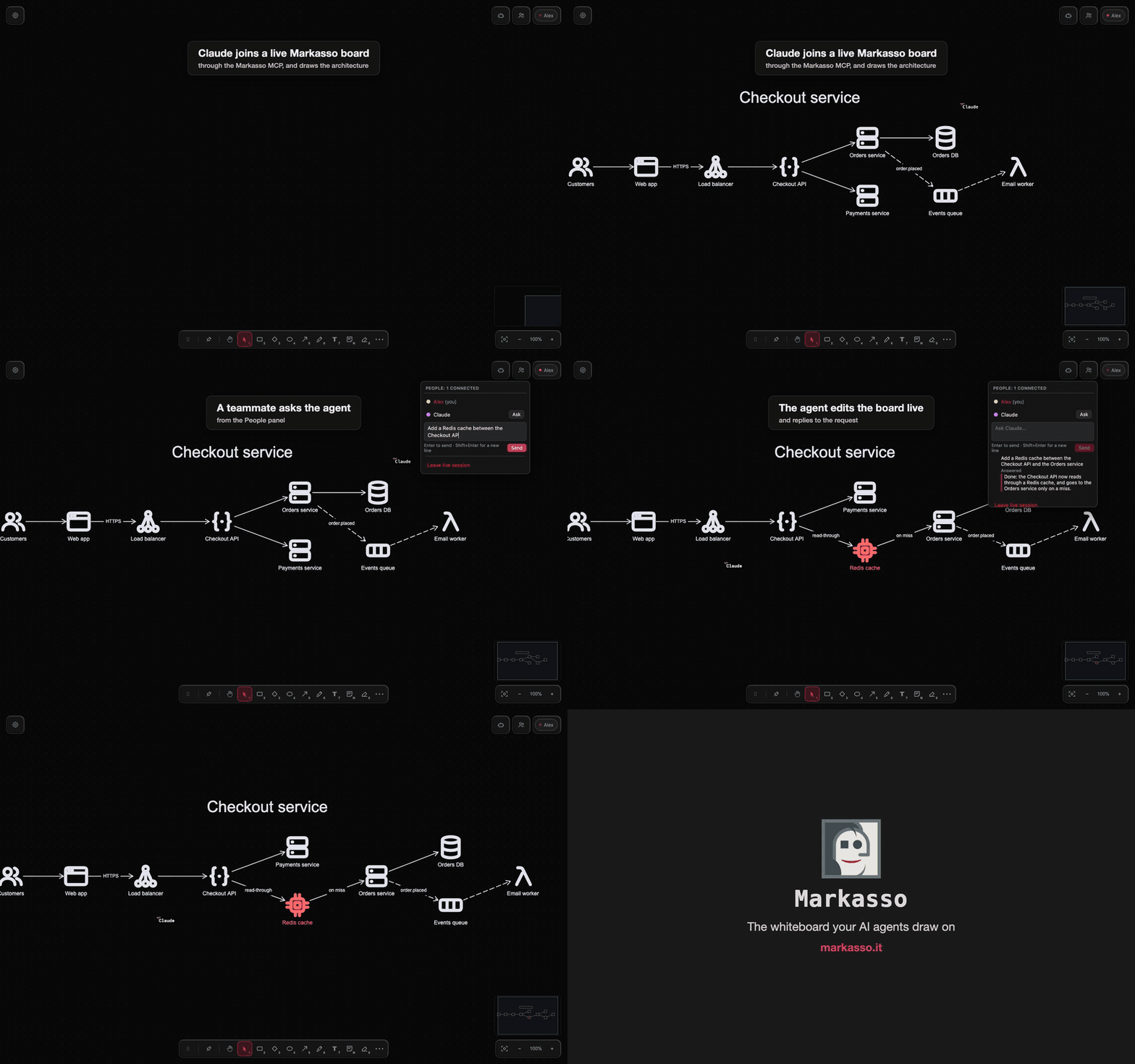
Markasso ships an MCP server: Claude, Codex, Gemini and local models (e.g. Gemma in LM Studio) can create, read and edit diagrams, and even draw live on a shared board.
1. Connect your agent (Node 22+):
# Claude Code: the plugin adds the server and a skill that knows when to draw
claude plugin marketplace add AlbertoBarrago/markasso-plugin
claude plugin install markasso@markasso

# Claude Code, server only
claude mcp add markasso -- npx -y @markasso/mcp@latest

# Codex CLI
codex mcp add markasso -- npx -y @markasso/mcp@latest
Claude Desktop, Gemini CLI and LM Studio use the same npx -y @markasso/mcp@latest command in their mcpServers config: see mcp/README.md for every client, the tool list, building from source and the security notes.
2. Ask for a diagram, for example: "Draw the architecture of a checkout service with icons, lay it out left to right and give me a share link". For live mode, start a session with Start live session at the top right in Markasso, then Invite AI agent, next to it, copies a prompt that brings the agent onto the board. Menu → Connect AI agent shows the setup for every client.
Project Status
Markasso is stable and actively developed. The core (scene, reducer, renderer, tools) stays small and dependency-free on purpose; new work goes into AI agents and live collaboration: the MCP server, agents drawing on shared boards, and Markasso Cloud. Bug fixes and refinements are welcome; for larger features, open an issue first to discuss.
Why Markasso
Excalidraw excels at freehand sketching and draw.io at comprehensive diagramming. Markasso occupies a different niche: smaller, faster, keyboard-first, with no sign-in, cookies or workspace to create. This repository is the source of truth for the production deployment.
It started as a game: a project small enough to finish and complex enough to be honest, to stay sharp with LLMs by actually using them. A whiteboard from scratch, vanilla TypeScript, zero dependencies. It didn't stay small. Colleagues started using it, then remote teammates, then people I've never met, to sketch ideas, run retrospectives and think out loud together.
The core (scene, reducer, renderer, tools) stays dependency-free. A dependency is fine only for an isolated, lazy-loaded feature where building it ourselves would mean re-solving someone else's solved problem, worse: Mermaid import runs on @excalidraw/mermaid-to-excalidraw and costs nothing until first use.
Features
- Drawing: rectangle, rhombus, ellipse, lines with UML-ready arrowheads, curves, freehand pen with stylus pressure, text, sticky notes, shape and connector labels
- Smart connections: arrows attach to shape borders and ports, follow moves, resizes and rotations, with elbow routing
- Diagram libraries: flowchart shapes, generic architecture icons, the Kubernetes icon set, and official AWS, Azure and Google Cloud packs imported from their ZIP (kept local, never redistributed)
- Realtime collaboration: live sessions over a Cloudflare Durable Object, with remote cursors and shared undo
- AI agents: an MCP server lets agents build diagrams or draw live on a shared board (see above)
- Markasso Cloud (optional, paid): cloud boards synced between web and Mac, AI agents invited into live sessions
- Mac app: a native macOS app with real
.markassodocuments (markasso.it/mac) - Import & export:
.markassofiles, Mermaid (flowchart, sequence, class, state, ER as native elements), images, PNG, SVG, standalone HTML, short share links - Keyboard-first: command palette (
Ctrl+K), element search (Ctrl+F), one-key tools, hide all panels with\ - Canvas: infinite pan and zoom, dot, line and millimeter grids, minimap, dark and light themes, auto-save to
localStorage
Every tool, option and shortcut is documented in the User Manual (see the keyboard shortcut reference).
Getting Started
Install
pnpm install
Develop
pnpm dev # Start dev server at http://localhost:5173
Build & Test
pnpm build      # Type-check and bundle into dist/
pnpm typecheck  # TypeScript validation
pnpm test       # Run Vitest unit tests
pnpm mcp:build  # Build the MCP server → mcp/dist/markasso-mcp.js
Local development needs no .env file, API key or container. Cloud boards and licensing are off unless VITE_CLOUD_ENABLED=true (set in .env.production for release builds). pnpm preview serves the production build together with the worker through wrangler dev.
pnpm coverage runs the suite and updates the coverage badge. UI and rendering modules need a browser and are excluded from Node tests by design. How the code is organized: AGENTS.md (repository and module map, conventions) and ARCHITECTURE.md (data flow, realtime, backend).
Contributing
See CONTRIBUTING.md for guidelines.
License
MIT · © 2026 Alberto Barrago. Bundled third-party material (Kubernetes icons, Apache-2.0) is listed in THIRD_PARTY_NOTICES.md.
Draw things. Ship things. Touch grass.







