Listed from the MCP registry; nobody on Odel publishes it.

KubeDrive
Your Kubernetes clusters for AI agents through the KubeDrive desktop app, without a kubeconfig.
Runs on your machine from its package; the steps are below.
What it does
- Reads
- Writes
- High impact
At most: moves money, runs code or commands, deletes data, or sends messages for you.
What it costs
FreeOdel charges nothing per call. The publisher may charge for its own service.
Runs locally over stdio
This server isn't hosted — your MCP client launches it from a package registry. Use one of the commands below, or drop the config into your client (e.g. Claude Desktop).
Distributed as an MCP bundle (`https://github.com/aleksskoz/kubedrive/releases/download/v0.6.6/kubedrive-0.6.6.mcpb`) — download it and import the bundle in your MCP client.


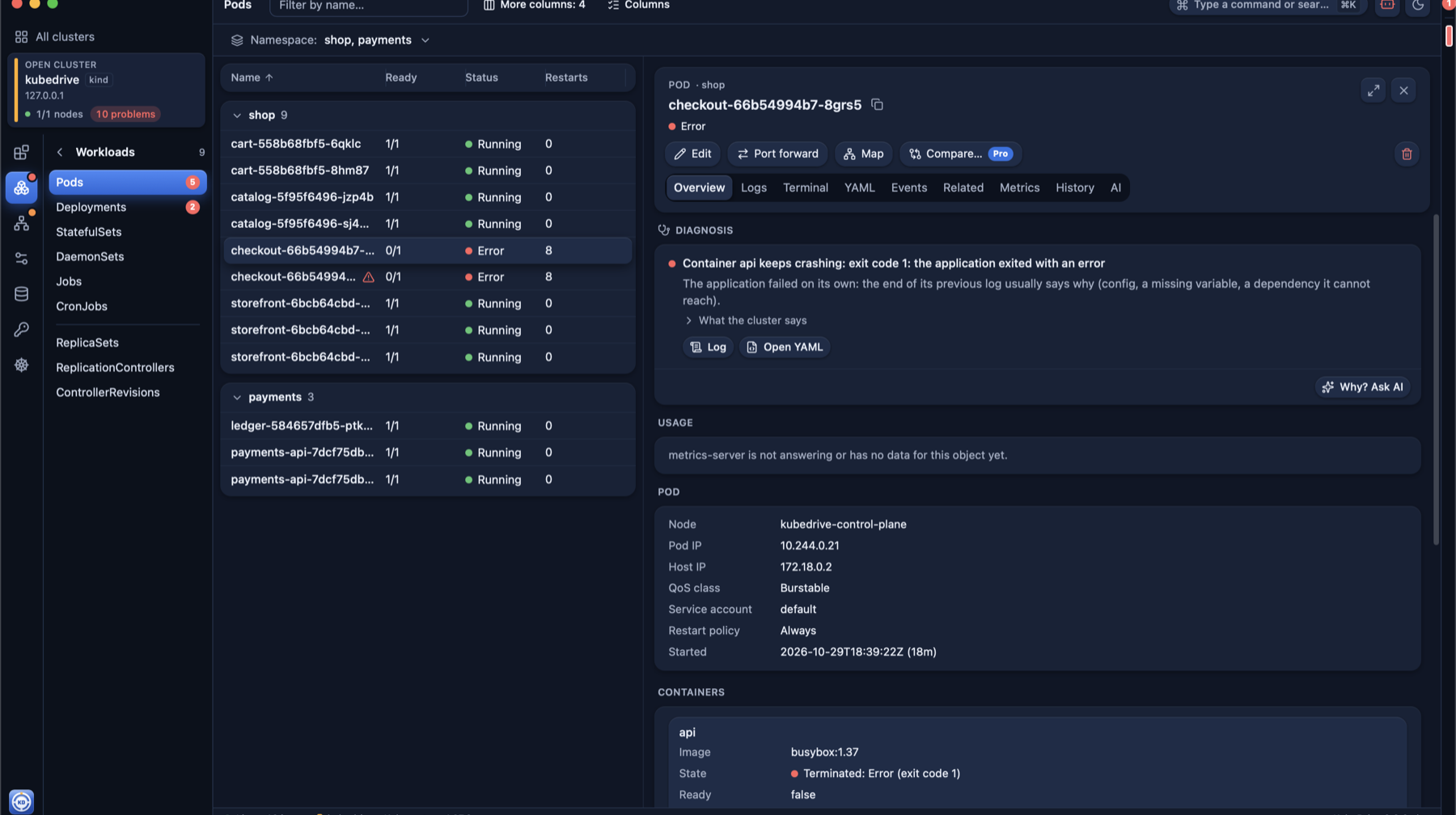
A fast, native desktop client for Kubernetes, for macOS, Windows and Linux: cluster health, live resources, logs, terminal, Helm and port-forwarding, driven from the keyboard, with an MCP server that lets AI agents work on your clusters without a kubeconfig.
Download · Website · Docs · Performance · AI agents · Pricing
This repository hosts KubeDrive releases, the issue tracker, the benchmarks and
the source of the MCP bridge (kubedrive-mcp, Apache-2.0), the one open part of
KubeDrive. The app itself is closed source.
Why KubeDrive
- Fast at production scale. 50,000 pods on 470 nodes: first rows in 3 s, the full list in
10 s, 428 MB of memory, where
kubectl get pods -Atakes 27 s on the same cluster. KubeDrive asks the API server for tables, not objects, and streams the first page while the rest loads. Numbers, method and the other clients on the performance page; scripts and raw results inbenchmarks/. - Safe on production, by default. A cluster whose context name looks like production is protected from the start: a red window frame, and every change asks you to type the object's name. Helm charts install with a dry run first. Actions your RBAC role does not allow are disabled, not hidden.
- Nothing to install in the cluster. KubeDrive reads the kubeconfig you already have, with your SSO sessions and your permissions, and talks to your API servers directly. Cluster data never reaches our servers.
- One screen for all clusters, with their health; diagnosis of crashing pods; metrics from the Prometheus you already run; an upgrade check that lists what the next Kubernetes version breaks; a map of a namespace; a browser extension that opens EKS, GKE, AKS, Argo CD, Grafana and Rancher pages in KubeDrive.
- Free for daily work with two clusters open. Pro adds unlimited clusters, full Helm, PromQL, aggregated logs, change history and more.
AI agents without a kubeconfig
KubeDrive serves your clusters to Claude Code, Codex, Cursor, Claude Desktop and any other
MCP client. The agent asks KubeDrive; KubeDrive answers with
the connections it already has. The agent never gets a kubeconfig or a cluster token, sees only
the clusters you tick, and the server listens on 127.0.0.1 only.
claude mcp add --transport http kubedrive http://127.0.0.1:47011/mcp \
  --header "Authorization: Bearer kd_…"
Reading is free. Changes by agents are part of Pro and every one of them waits for your Allow in a window with the diff; on a protected cluster you type the object's name. The AI agents guide has the setup for each client.
Install
Requirements: macOS 13 Ventura or later (Apple silicon or Intel); Windows 10 1809 or later or Windows 11 (x64 or Arm); Linux with GTK 4 and WebKitGTK 6.0: Debian 13, Ubuntu 24.04, Fedora 40 and newer (x64). The install guide has the details.
macOS
With Homebrew:
brew install --cask aleksskoz/tap/kubedrive
Or download KubeDrive-<version>.dmg from the latest release,
open it and drag KubeDrive to Applications. Each release lists the DMG's SHA-256:
shasum -a 256 -c KubeDrive-<version>.dmg.sha256
The app is signed with a Developer ID and notarized by Apple.
Windows
Download KubeDrive-<version>-x64-setup.exe from the latest release
(KubeDrive-<version>-arm64-setup.exe for Arm PCs) and run it. The installer is not code-signed
yet, so SmartScreen asks once: More info → Run anyway. The release notes carry each installer's
SHA-256. KubeDrive installs to C:\Program Files\AKStudio\KubeDrive and adds the WebView2 runtime if
the PC has none.
Linux
From KubeDrive's package repository, so that system updates bring new versions too. Debian 13, Ubuntu 24.04 and newer:
sudo install -d -m 0755 /etc/apt/keyrings
curl -fsSL https://kubedrive.com/kubedrive.gpg | sudo tee /etc/apt/keyrings/kubedrive.gpg >/dev/null
echo "deb [signed-by=/etc/apt/keyrings/kubedrive.gpg] https://kubedrive.com/apt stable main" |
  sudo tee /etc/apt/sources.list.d/kubedrive.list
sudo apt update && sudo apt install kubedrive
Fedora 40 and newer:
sudo tee /etc/yum.repos.d/kubedrive.repo <<'EOF'
[kubedrive]
name=KubeDrive
baseurl=https://kubedrive.com/rpm
enabled=1
gpgcheck=1
repo_gpgcheck=1
gpgkey=https://kubedrive.com/kubedrive.asc
EOF
sudo dnf install kubedrive
Or download kubedrive_<version>_amd64.deb or kubedrive-<version>.x86_64.rpm from the
latest release and install it with
sudo apt install ./… or sudo dnf install ./…. The repository and the RPMs are signed with
KubeDrive's key (kubedrive.asc, fingerprint
87AE 5682 0F7C 659C 28CF 91F8 9D49 8CCC F6E3 1831).
Getting started
KubeDrive reads your kubeconfig the same way kubectl does ($KUBECONFIG or ~/.kube/config)
and talks only to your clusters. The one exception is the update check below.
Updating
On its second launch KubeDrive asks whether to check for updates automatically; if you agree, it looks at this repository's latest release once a day, without sending any data about you or your clusters. You can also check by hand at any time: KubeDrive → Check for Updates… on macOS, File → Check for Updates… on Windows and Linux.
- macOS updates itself. Every update is signed, and KubeDrive refuses one whose signature
doesn't match. Version 0.1.0 can't update itself: download the new DMG once, or run
brew upgrade --cask kubedrive. - Windows: the update notice links the installer for your PC; run it over the old version, your settings stay.
- Linux: with the package repository,
sudo apt upgradeorsudo dnf upgradeupdates KubeDrive like any other package; otherwise the update notice links the new package.
Uninstalling
- macOS:
brew uninstall --cask kubedrive(add--zapto remove settings and caches too). Without Homebrew, move KubeDrive to the Trash; settings live in~/Library/Application Support/KubeDrive. - Windows: Settings → Apps → KubeDrive → Uninstall. Settings stay in
%AppData%\KubeDriveuntil you delete the folder. - Linux:
sudo apt remove kubedriveorsudo dnf remove kubedrive. Settings stay in~/.config/KubeDrive.
KubeDrive never changes your kubeconfig, so there is nothing to undo there.
Benchmarks
benchmarks/ holds the scripts and raw results behind
kubedrive.com/performance: how fast KubeDrive and other
Kubernetes clients open 50,000 pods. They are MIT-licensed, so you can rerun them yourself.
Feedback
Found a bug or missing something? Open an issue.
License
KubeDrive is free to use under the license.







