Listed from the MCP registry; nobody on Odel publishes it.

Context
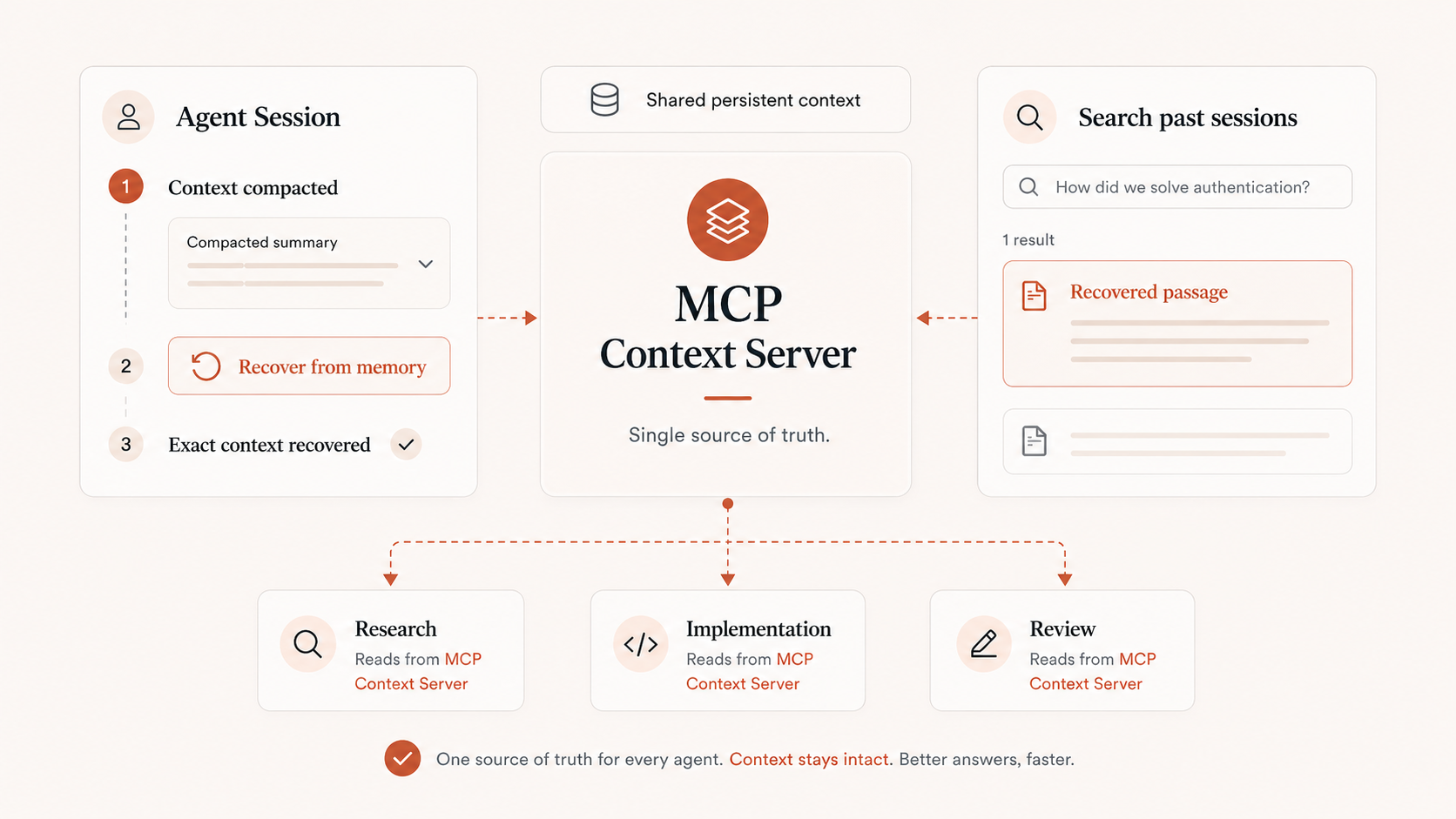
An MCP server that provides persistent multimodal context storage for LLM agents.
Runs on your machine from its package; the steps are below.
What it does
- Reads
- Writes
- High impact
At most: moves money, runs code or commands, deletes data, or sends messages for you.
What it costs
FreeOdel charges nothing per call. The publisher may charge for its own service.
Runs locally over stdio
This server isn't hosted — your MCP client launches it from a package registry. Use one of the commands below, or drop the config into your client (e.g. Claude Desktop).
Run
uvx mcp-context-server
MCP client config
{
  "mcpServers": {
    "context": {
      "command": "uvx",
      "args": [
        "mcp-context-server"
      ]
    }
  }
}Run
docker run -i --rm ghcr.io/alex-feel/mcp-context-server:2.2.2
MCP client config
{
  "mcpServers": {
    "context": {
      "command": "docker",
      "args": [
        "run",
        "-i",
        "--rm",
        "ghcr.io/alex-feel/mcp-context-server:2.2.2"
      ]
    }
  }
}MCP Context Server




A high-performance Model Context Protocol (MCP) server providing persistent multimodal context storage for LLM agents. Built with FastMCP, this server enables seamless context sharing across multiple agents working on the same task through thread-based scoping.
Warning
Upgrading from v2.x? Version 3.x.x uses a new database schema with UUIDv7 primary keys. Existing v2.x databases require a one-time data migration before they can be used with v3.x.x. The opt-in CLI mcp-context-server-migrate ships with the server.
See the Migration Guide before upgrading. Fresh installations are unaffected.
Key Features
- Multimodal Context Storage: Store and retrieve both text and images
- UUIDv7 Context Identifiers: Every context entry is identified by a 32-character lowercase hex UUIDv7 value, providing time-ordered, globally unique IDs with a stable lex-string ordering
- Thread-Based Scoping: Agents working on the same task share context through thread IDs
- Per-Record Access Control: Every entry has an owner, a
privateorpublicvisibility, and optional user or group grants, enforced on every read, update and delete on both SQLite and PostgreSQL. With IdP-issued JWTs, each caller finds, counts and changes only the entries it may access, the owner of an entry shares it with users or groups throughshare_context, and every returned entry reports itsvisibilityand whether the caller owns it. See the Access Model - Anonymous Read Access: Hand readers without an identity-provider account one shared token that reads
publicentries and can never write: the server refuses every write by the principalACCESS_CONTROL_ANONYMOUS_PRINCIPALnames, and the token must expire. See Anonymous Read Access - PostgreSQL Row-Level Security (optional): With
ENABLE_POSTGRESQL_RLS=true, PostgreSQL also enforces the access model in the database, so a defect in how a query applies the access rules cannot expose another principal's entries. Reads go through an owner-owned, role-gated view that keeps every search index in use. See Row-level security (PostgreSQL) - Flexible Metadata Filtering: Store custom structured data with any JSON-serializable fields and filter using 16 powerful operators
- Date Range Filtering: Filter context entries by creation timestamp using ISO 8601 format
- Tag-Based Organization: Efficient context retrieval with normalized, indexed tags
- Summary Generation: Optional automatic LLM-based summarization returned alongside truncated
text_contentin all search tool results for better agent context efficiency (enabled by default with Ollama) - Deferred Generation (opt-in): By default a store or a text update returns only after its embeddings and summaries are generated, and an embedding or summary failure stores nothing (a section summary that fails is left out). With
defer_generation: truethe entry is stored at once, readable and full-text searchable, while a background worker generates its embeddings, summary and section summaries; every store, update and read result reportsgeneration_status(ready,pendingorfailed), a job that fails every attempt is retried at the next server start or bymcp-context-server-migrate --embed-missing, andmcp-context-ingest --defer-generationsyncs a corpus the same way. See the Semantic Search Guide - Full-Text Search: Linguistic search with stemming, ranking, boolean queries (FTS5/tsvector), and cross-encoder reranking. Auto-enabled by default (
ENABLE_FTS=auto); needs no extra dependencies - Semantic Search: Vector similarity search for meaning-based retrieval with cross-encoder reranking. Auto-enabled by default (
ENABLE_SEMANTIC_SEARCH=auto) whenever an embedding provider is available (embedding generation is on by default) - Hybrid Search: Combined FTS + semantic search using Reciprocal Rank Fusion (RRF) with cross-encoder reranking. Auto-enabled by default (
ENABLE_HYBRID_SEARCH=auto) whenever at least one of full-text or semantic search is available - Server-Side Grep: Literal/regex, line-oriented, unranked pattern matching over stored records (
grep_context) — the precise-locate complement to full-text/semantic search, with ripgrep-style output modes and bounded results. Auto-enabled by default (ENABLE_GREP_CONTEXT=auto), pure-Python so it behaves identically on SQLite and PostgreSQL - Record Navigation (index_tree):
navigate_contextbuilds an on-demand Markdown-heading table of contents per record, with the entry summary as the root node; optional per-node LLM summaries (on by default) enrich each section. Pair withread_context_rangeto extract any section - Partial Reads:
read_context_rangereturns a slice of one record by character range, line range, or outlinenode_id— so an agent can read only the relevant span of a long record instead of the whole thing - Knowledge Base Sync: Host document corpora such as handbooks and runbooks in
kb:<corpus>threads that agents search and navigate like any other context. Themcp-context-ingestcommand uploads a directory of documents and keeps it in sync, storing new files, updating changed ones and removing deleted ones, planned by the read-onlyplan_context_synctool (ENABLE_CONTEXT_SYNC=auto). See the Knowledge Base Guide - Cross-Encoder Reranking: Automatic result refinement using FlashRank cross-encoder models for improved search precision (enabled by default)
- Embedding Compression (default ON): Reduces embedding storage by approximately 8x out of the box in v3.0.0. Bit-packed compressed vectors keep semantic and hybrid search working without changes to the tool surface, and the read path bypasses the pgvector >2000-dimension HNSW limit. Set
ENABLE_EMBEDDING_COMPRESSION=falseto opt out and keep fp32 storage. See the Embedding Compression Guide - Multiple Database Backends: Choose between SQLite (default, zero-config) or PostgreSQL (high-concurrency, production-grade)
- High Performance: WAL mode (SQLite) / MVCC (PostgreSQL), strategic indexing, and async operations
- MCP Standard Compliance: Works with Claude Code, LangGraph, and any MCP-compatible client
- Production Ready: Comprehensive test coverage, type safety, and robust error handling
Connecting to Your AI Assistant
The fastest way to connect the MCP Context Server to Claude Code is the one-command Docker bootstrap.
For step-by-step instructions, prerequisites, troubleshooting, and update/uninstall commands, see the Connecting to Your AI Assistant Guide.
Environment Configuration
The server is fully configured via environment variables, supporting core settings, transport, authentication, embedding providers, summary generation, search features, database tuning, and more. Variables can be set in your MCP client configuration, in a .env file, or directly in the shell.
For the complete reference of all environment variables with types, defaults, constraints, and descriptions, see the Environment Variables Reference.
Summary Generation
Summary generation automatically creates concise LLM-based summaries for each stored context entry. Summaries are returned in the summary field of all search tool results alongside truncated text_content, providing dense, informative summaries that help agents determine relevance without fetching full entries.
For detailed instructions including all providers (Ollama, OpenAI, Anthropic), model selection, and custom prompt configuration, see the Summary Generation Guide.
Semantic Search
Semantic search is auto-enabled by default (ENABLE_SEMANTIC_SEARCH=auto): the semantic_search_context tool registers automatically whenever an embedding provider is available (embedding generation is on by default), and skips quietly otherwise. For detailed instructions on the multiple embedding providers (Ollama, OpenAI, Azure, HuggingFace, Voyage) and how to control the toggle explicitly, see the Semantic Search Guide.
Full-Text Search
Full-text search is auto-enabled by default (ENABLE_FTS=auto) and needs no extra dependencies, using the built-in database FTS engine (FTS5 on SQLite, tsvector on PostgreSQL). For linguistic processing, stemming, ranking, and boolean queries, see the Full-Text Search Guide.
Hybrid Search
Hybrid search is auto-enabled by default (ENABLE_HYBRID_SEARCH=auto): the hybrid_search_context tool registers automatically whenever at least one of full-text or semantic search is available. For combined FTS + semantic search using Reciprocal Rank Fusion (RRF), see the Hybrid Search Guide.
Metadata Filtering
For comprehensive metadata filtering including 16 operators, nested JSON paths, and performance optimization, see the Metadata Guide.
Database Backends
The server supports multiple database backends, selectable via the STORAGE_BACKEND environment variable. SQLite (default) provides zero-configuration local storage perfect for single-user deployments. PostgreSQL offers high-performance capabilities with 10x+ write throughput for multi-user and high-traffic deployments.
For detailed configuration instructions including PostgreSQL setup with Docker, Supabase integration, connection methods, and troubleshooting, see the Database Backends Guide.
API Reference
The MCP Context Server exposes 21 MCP tools for context management:
Core Operations: store_context, search_context, get_context_by_ids, delete_context, update_context, list_threads, get_statistics
Search Tools: semantic_search_context, fts_search_context, hybrid_search_context
Navigation Tools (locate / navigate / extract): grep_context, navigate_context, read_context_range
Sync Tools: plan_context_sync, list_ingest_state
Sharing Tools: share_context, unshare_context, list_context_grants
Batch Operations: store_context_batch, update_context_batch, delete_context_batch
For complete tool documentation including parameters, return values, filtering options, and examples, see the API Reference. For when to use grep vs full-text vs semantic search, the index_tree, and partial reads, see Grep, Navigation & Partial Reads. For hosting and syncing document corpora, see the Knowledge Base Guide.
Docker Deployment
For production deployments with HTTP transport and container orchestration, Docker Compose configurations are available for SQLite, PostgreSQL, and external PostgreSQL (Supabase). See the Docker Deployment Guide for setup instructions and client connection details.
Kubernetes Deployment
For Kubernetes deployments, a Helm chart is provided with configurable values for different environments. See the Helm Deployment Guide for installation instructions, or the Kubernetes Deployment Guide for general Kubernetes concepts.
Authentication
For HTTP transport deployments requiring authentication, see the Authentication Guide for bearer token and IdP-issued JWT configuration, sharing entries with users and groups, and anonymous read access through an operator-minted token.
Getting Help
- Bug reports: Report a bug
- Feature requests: Suggest a feature
- Documentation issues: Report a docs issue
- Questions: Ask a question
License
MCP Context Server is licensed under the Elastic License 2.0 (ELv2).
In short: you may use, copy, modify, distribute, and run the software freely and at no cost — for personal projects, inside companies of any size, and as part of commercial work. The one thing you may not do without a commercial agreement is provide the software to third parties as a hosted or managed service that gives users access to any substantial set of its features or functionality (for example, a cloud "memory for agents" offering built on it).
See Commercial Licensing for plain-language examples of what is and is not permitted, and contact alexfeel@protonmail.com for commercial licensing, including hosted or managed service rights.
Releases up to and including v2.2.2 were published under the MIT License and remain available under it; the Elastic License 2.0 applies from v3.0.0 onward.







