Listed from the MCP registry; nobody on Odel publishes it.

Vault Cortex
Standalone MCP server for Obsidian vaults — hybrid search, notes & files, memory, tasks, OAuth 2.1
Runs on your machine from its package; the steps are below.
What it does
- Reads
- Writes
- High impact
At most: moves money, runs code or commands, deletes data, or sends messages for you.
What it costs
FreeOdel charges nothing per call. The publisher may charge for its own service.
Runs locally over stdio
This server isn't hosted — your MCP client launches it from a package registry. Use one of the commands below, or drop the config into your client (e.g. Claude Desktop).
Run
docker run -i --rm ghcr.io/aliasunder/vault-cortex:1.2.0
MCP client config
{
  "mcpServers": {
    "vault-cortex": {
      "command": "docker",
      "args": [
        "run",
        "-i",
        "--rm",
        "ghcr.io/aliasunder/vault-cortex:1.2.0"
      ]
    }
  }
}








Vault Cortex is a standalone MCP server that gives any AI agent hybrid search, task management, structured memory, and read/write access to your Obsidian vault. No plugins, no running Obsidian, no separate bridge. One Docker container, your vault folder, a full tool suite + guided prompts. Run it on a remote server with Obsidian Sync, and the same vault is accessible from your phone, claude.ai, or any remote MCP client, secured with OAuth 2.1. Deploy it with one click or self-host it; either way, the vault is always yours.
Contents — What you get · Quick Start · How It Works · Hybrid Search · Memory · Tasks · Files · Tools · Prompts · Properties · Config · Daily Notes · Data Integrity · Auth · Deployment · One-click Deploy · Community Deployments
What you get
| Search the vault | Reason over notes | Write back to Obsidian |
| 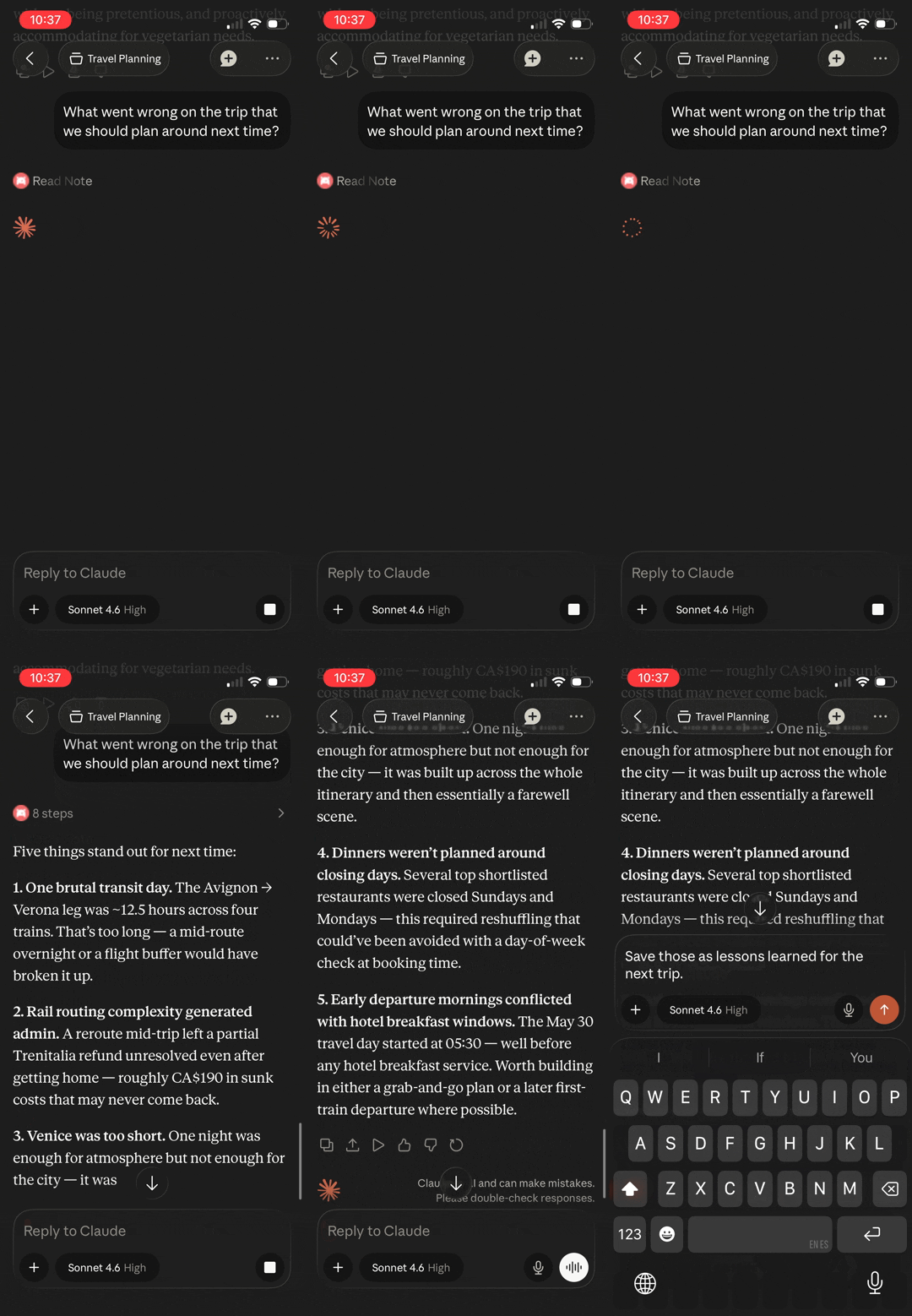 | 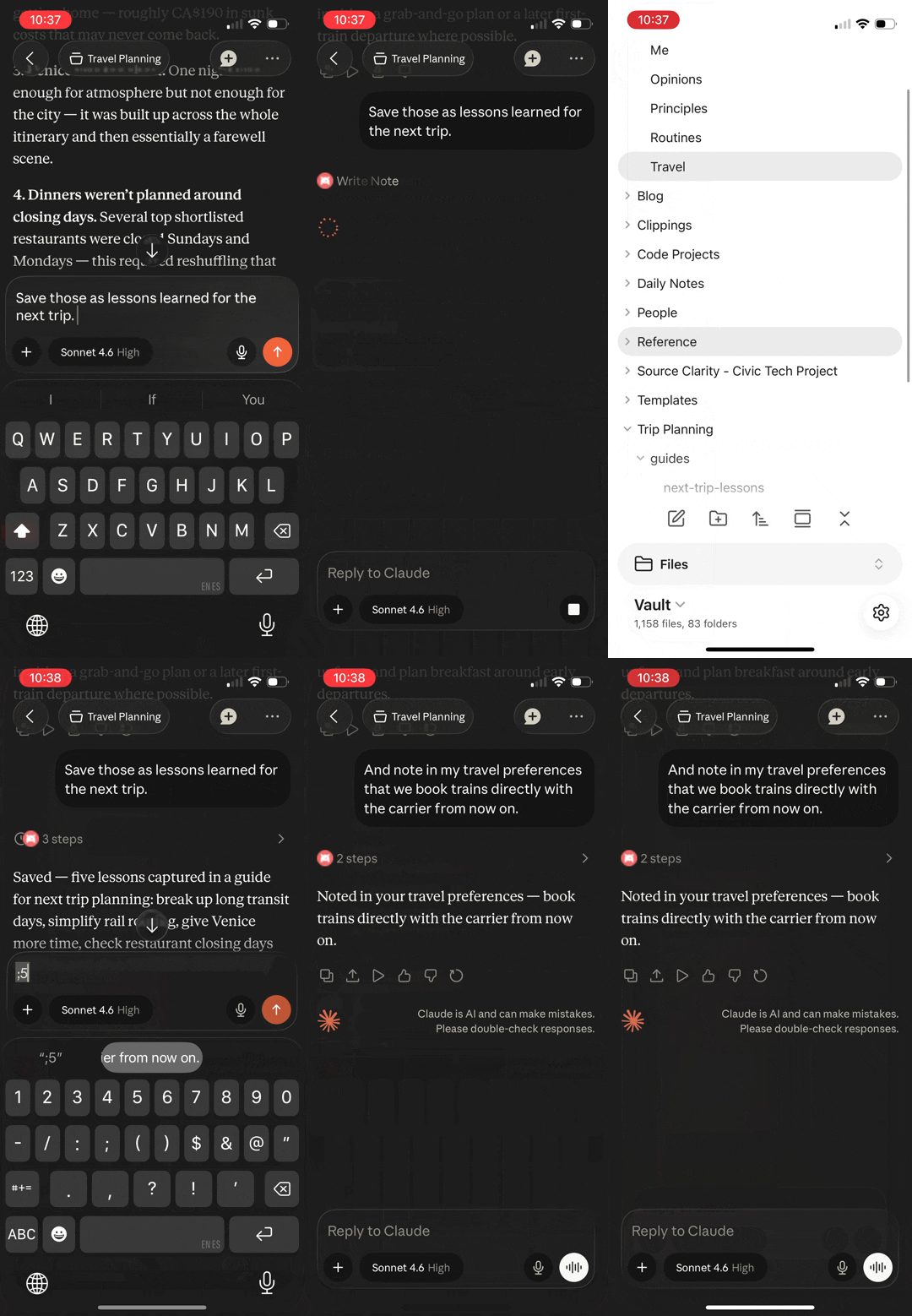 |
All three demos run on Claude mobile. The vault is on a remote server, not the phone.
- Remote access — works from your phone, a remote server, or any MCP client via OAuth 2.1. One click on Render or Railway gets you there with no server to manage; a VPS works too.
- Plugin-free — Obsidian doesn't need to be running. The server works directly with
.mdfiles on disk. Headless sync keeps the vault current. - Hybrid search — FTS5 keyword matching + vector semantic similarity via RRF fusion, refined by cross-encoder reranking for intent-heavy queries. Keywords stay precise on exact terms and jargon; vectors find notes even when your words differ from the vault's.
- Structured memory — dated, append-only entries accumulate into a personal knowledge layer, auto-initialized for AI personalization. Topic recall answers "what do I think about X?" with the current take and the dated history behind it — evolution included.
- Tasks — Kanban-aware task queries and updates: triage by status, dates, or priority, then complete, reprioritize, or move tasks between lanes in one call. Completing a recurring task spawns its next occurrence. Parses both Tasks plugin emoji and Dataview inline-field formats.
- Link graph — backlinks, outgoing links, and orphan detection across the vault
- Files — read the vault's non-markdown files too: images arrive as actual images (shrunk to fit when needed), PDFs as structured text or rendered pages, canvases as readable outlines, data files, HTML pages, and scripts as text. Canvases, Bases, and other text files can be written back, and any non-markdown file can be deleted
- Obsidian-native — understands frontmatter, wikilinks, tags, headings, and daily notes
- Guided workflows — built-in prompts for vault health, memory review, and daily reconciliation — assembled from live vault data each time
Tested across a 15-day trip through Europe. 30+ sessions from a phone, 216 tool calls, zero laptop access needed. Writes in one session were immediately available in the next, across cities and days.
Quick Start
Local (2 minutes — Docker + your vault folder)
Prerequisites: Docker (or a Docker-compatible runtime, e.g. OrbStack, Colima, Podman), Node.js >= 22.12 (only for the CLI — the server itself runs in Docker), and an Obsidian vault (or any folder of .md files).
npx vault-cortex@latest init
That's it — the CLI asks for your vault path, generates the auth token and config files, starts the server, and prints the connection details for your MCP client (CLI reference →).

Set up with the CLI? It manages the server from here on — configure, upgrade, start, restart, logs, down (CLI reference →).
Set up with Compose? Stick with Compose for updates too (docker compose pull && docker compose up -d) — the CLI and Compose manage the container independently.
Manual setup (no Node.js needed)
# 1. Get the quickstart files
curl -O https://raw.githubusercontent.com/aliasunder/vault-cortex/main/deploy/local/docker-compose.yml
curl -O https://raw.githubusercontent.com/aliasunder/vault-cortex/main/deploy/local/.env.example

# 2. Configure
cp .env.example .env
# Edit .env — set MCP_AUTH_TOKEN (openssl rand -hex 32) and VAULT_PATH

# 3. Start
docker compose up
Full local guide → (includes Windows setup)
Remote (access from anywhere)
Your vault on a server, kept current by Obsidian Sync, reachable from your phone, claude.ai, or any MCP client. The one-click options ask for your vault name and timezone (plus the vault password if your vault is encrypted), then handle HTTPS, restarts, a generated MCP token, and persistent storage. Once deployed, a setup page walks you through signing in to Obsidian Sync in your browser. On your own server the CLI asks for the public URL and vault name, captures the Sync token for you, and generates the MCP token; HTTPS is yours to set up.
| Railway | Render | Self-hosted | |
|---|---|---|---|
 |  | CLI setup → | |
| Account | Railway on the Hobby plan or higher — the 5 GB volume is included | Render with a card on file | A VPS with Docker |
| Cost | Usage-metered: typically $20–30 USD/mo for a personal vault — a little under Render for a quiet vault, a little over for a busy one | Flat: about $26 USD/mo for the Standard instance (2 GB) and 5 GB disk, billed by the second | Whatever your VPS costs |
| Pick it if | You want the easier start — the template lands you in a configured project | A predictable bill matters more than setup polish | You already run a server or want full control |
| Guide | Railway guide → | Render guide → | Remote guide → |
All three need an Obsidian Sync subscription. Whichever you pick, the server is replaceable and your vault isn't — it stays in plain Markdown in Obsidian Sync and on your devices; the container only holds a copy.
The setup page. Deploy without an Obsidian Sync token and the server starts in setup mode: opening its URL in a browser lands on a sign-in page at /setup. Enter your Obsidian account credentials once (two-factor supported) — you sign in with Obsidian directly; the server keeps only the Sync token from that sign-in, restarts, and downloads your vault.
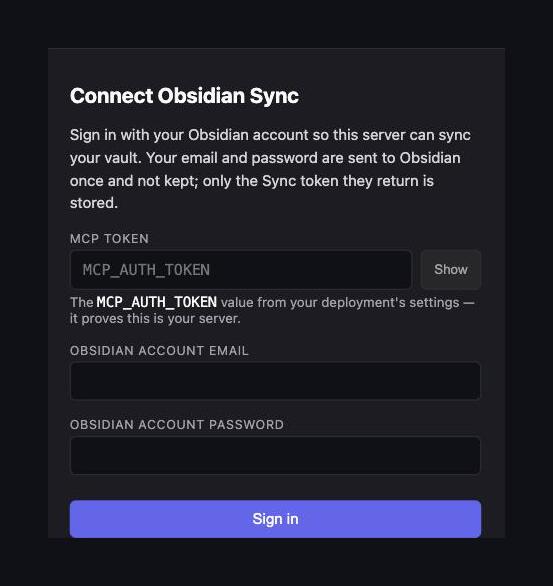
The sign-in page, gated by your MCP token. Each deploy guide walks through the full flow.
Self-hosted: your own VPS
The Vault Cortex CLI sets up the same container on any Linux box you run — you manage the server, the image, and updates. You need Node.js >= 22.12 for the CLI itself; the server runs in Docker.
# On your VPS:
npx vault-cortex@latest init --mode remote
That's it — the CLI walks through the public URL, Obsidian Sync token (it can run get-sync-token for you), vault name, the vault password for an encrypted vault, and auth config, then starts the server (CLI reference →).
Set up with the CLI? It manages the server from here on — configure, upgrade, start, restart, logs, down (CLI reference →).
Set up with Compose? Stick with Compose for updates too (docker compose pull && docker compose up -d) — the CLI and Compose manage the container independently.
Manual setup (no Node.js needed)
# On your VPS:
mkdir -p /opt/vault-cortex && cd /opt/vault-cortex
curl -O https://raw.githubusercontent.com/aliasunder/vault-cortex/main/deploy/remote/docker-compose.yml
curl -O https://raw.githubusercontent.com/aliasunder/vault-cortex/main/deploy/remote/.env.example
cp .env.example .env
# Edit .env — set MCP_AUTH_TOKEN, PUBLIC_URL, VAULT_NAME (OBSIDIAN_AUTH_TOKEN optional — /setup handles it)
docker compose up -d
Left OBSIDIAN_AUTH_TOKEN empty? Once the container is up, open
<PUBLIC_URL>/setup in your browser and sign in — set up
HTTPS first, since the page sends your
Obsidian password to the server
(full walkthrough →).
Connect your MCP client
| Setup | Server URL |
|---|---|
| Local | http://localhost:8000/mcp |
| Remote (one-click) | https://<host>/mcp — <host> is the domain Render or Railway shows on the service page |
| Remote (self-hosted) | <PUBLIC_URL>/mcp |
Add the server URL in any MCP client — Claude Code, Claude Desktop, Cursor, OpenCode, or any other. OAuth clients open a consent page in your browser — approve with your token, and the client handles token renewal from then on. Clients without OAuth (MCP Inspector, scripts) send the token directly as an Authorization: Bearer header.
Claude Code:
claude mcp add --scope user --transport http vault-cortex http://localhost:8000/mcp # local (or <PUBLIC_URL>/mcp)
--scope user registers the server for every project; omit it to scope it to the current directory only.
Claude Desktop (http URLs require the mcp-remote bridge)
A remote server with a publicly reachable https URL adds directly in Claude Desktop's "Add custom connector" dialog — no file editing. Any http URL — localhost included — is rejected by that dialog, so register it in claude_desktop_config.json instead (Claude Desktop → Settings → Developer → Edit Config opens the file) through the mcp-remote stdio bridge:
{
  "mcpServers": {
    "vault-cortex": {
      "command": "npx",
      "args": [
        "-y",
        "mcp-remote",
        "http://localhost:8000/mcp",
        "--header",
        "Authorization: Bearer <your MCP_AUTH_TOKEN>"
      ]
    }
  }
}
claude.ai (web and mobile) connects to the remote setup only — its connectors are fetched server-side and can never reach localhost.
"Remote MCP server" refers to the connection type (HTTP) — in the local setup the server still runs entirely on your machine.
See Authentication for both methods and token lifetimes.
How It Works
Everything runs in one Docker container, working directly with the .md files on disk:
- Your vault stays the source of truth — the server reads and writes the same plain Markdown files your Obsidian apps do.
- Search is derived data — a file watcher keeps the index (keywords + vectors) current as notes change, and it can be rebuilt from your notes at any time.
- The remote image adds a sync loop — a bundled Obsidian Sync service keeps the container's vault current with every device: edit a note on your phone and it's searchable moments later; an agent writes a note and it shows up in Obsidian.
graph LR
    subgraph container ["One Docker container"]
        Sync["sync service<br/>(remote image)"]
        Vault[("/vault<br/>.md files — source of truth")]
        Index[("search index<br/>keywords + vectors")]
        Server["MCP server"]
        Sync <-->|read/write| Vault
        Vault -->|file watcher| Index
        Server <-->|read/write| Vault
        Server -->|query| Index
    end
    Obsidian["Your Obsidian apps<br/>(phone, laptop)"] <-->|Obsidian Sync| Sync
    Client["Any MCP client<br/>(Claude, Cursor, claude.ai)"] -->|OAuth 2.1 / Bearer| Server
See ARCHITECTURE.md for the full design, auth flow diagrams, and component breakdown.
Hybrid Search
Keyword search alone fails when your vocabulary doesn't match the vault's — "aspirations" won't find a note about "targets", "coworkers" won't surface your "references" file. In testing against a real vault, 30% of natural-language queries returned zero or tangential results with keywords alone. Hybrid search eliminated those misses in the same test.
Hybrid search fuses the keyword and vector rankings via Reciprocal Rank Fusion, then the reranker refines the fused result:
- Keywords (FTS5) stay precise on exact terms, jargon, and property values
- Vectors (sqlite-vec) bridge the vocabulary gap by matching on meaning
- Reranker (cross-encoder) refines ordering by scoring each query-document pair jointly — rescues intent-heavy queries where keywords and vectors both miss
Search treats a note's aliases as names for it, so searching an alias finds the note the way searching its title does. A note whose title or alias matches your whole search ranks first among keyword matches.
All models run locally (~59MB total, no external API). Set EMBEDDING_ENABLED=false for keyword-only search, or RERANK_MODE=none to skip reranking for lower latency.
See ARCHITECTURE.md → Hybrid Search for model details, blend weights, and the full pipeline breakdown.
Memory
A memory layer that only grows is only useful if agents can retrieve the right entries without reading everything back every time. Once you have hundreds of dated entries across multiple files — preferences, principles, communication style, ongoing commitments — whole-file reads bury the signal in irrelevant material. The memory system is designed for targeted retrieval.
The layer is a folder of plain Markdown files (default: About Me/) holding dated entries under topic headings — auto-created with starter templates on first run, grown by agents through vault_update_memory. Three properties make it work:
- Append-only — the memory tools add dated entries and never rewrite one, so a changed view arrives as a new entry and the layer captures your current state and the evolution behind it.
vault_delete_memoryremoves an entry that was wrong when it was written - Topic recall —
vault_memory_recallretrieves every relevant entry across all memory files at once, matched by keyword and by meaning, oldest first. Ask "what do I think about X?" and get the current take plus the dated history of how it developed — no need to read entire files or guess which file holds what - Grows without degrading — capping results (
limit) drops the least-relevant entries, never a slice of the timeline. A memory layer with 500 entries serves a targeted query as well as one with 50
Files that describe what's current rather than what has been true (routines, active commitments) can declare entry-policy: living in frontmatter. Agents then also delete those files' expired entries with vault_delete_memory (the memory-review prompt proposes which ones), keeping the current-state picture accurate.
The whole layer is optional — set MEMORY_ENABLED=false to hide the memory tools and skip the folder auto-creation entirely.
See ARCHITECTURE.md → Memory for the recall pipeline, indexing model, auto-initialization, and opt-out behavior, and templates/memory for the file format, entry-policy convention, and starter templates.
Tasks
Task metadata lives in plain markdown — scattered across files, encoded in emoji signifiers or inline fields, organized under Kanban headings. An agent answering "what's overdue?" would need to parse every file and understand your chosen format; completing a task on a Kanban board means knowing the board's lane structure, the date syntax, and which heading is the done lane.
The task layer handles this so agents don't have to:
- Find — filter by status, six date fields (due, scheduled, start, created, done, cancelled), priority, folder, or Kanban lane. Each result carries its note path, line number, and nearest heading when the task sits under one (the lane on a Kanban board) — no follow-up reads needed to locate a task
- Create — add a correctly-formatted task in one step: description, priority, dates, recurrence, "On completion" action, dependencies, block ID (
^id), and checklist sub-items (text only, no dates), placed under a heading at the top, the bottom, or an exact position, or nested under a parent task as a sub-task with its own dates. On a Kanban board a sub-task gets no block ID, since the Kanban plugin copies it onto the card when it saves the board - Update — complete, reprioritize, edit the text, set or clear dates, recurrence, and the "On completion" action, add checklist items, move tasks between headings, and reorder within a lane in a single call
- Complete — marking a task done auto-detects the done lane and stamps the completion date, honoring the plugin's "Set done date" setting; reversing it removes the date. Completion also runs the Tasks plugin's own behaviors:
- a recurring task spawns its next occurrence, dates advanced the way the plugin computes them
- a task set to delete "On completion" disappears from the note
- Both formats — whichever format you use, Tasks plugin emoji signifiers or Dataview inline fields, the server reads both and writes in the format your Tasks plugin is configured for — read from the plugin's settings when your vault syncs
.obsidian/, with emoji signifiers as the default otherwise
See ARCHITECTURE.md → Tasks for the indexing model, date cascade sorting, and Kanban lane detection.
Files
Your notes embed screenshots, reference architecture diagrams, and link out to canvases and data files — but to an agent reading markdown, ![[diagram.png]] is just text. Vault Cortex treats files as part of the vault rather than clutter around it — linked, sized, readable, deletable, and for text formats writable, each in the form an agent can use:
- Images — the image itself, not the filename. Screenshots and diagrams are downscaled and recompressed server-side when they exceed what MCP clients accept, so even a phone session can look at a 5MB architecture diagram
- Canvases — a Canvas board arrives as a readable outline: its groups, each card's content in reading order, and the connections between them. Canvas content is full-text searchable, and both the links typed in its cards and the files placed on the board appear in the link graph — backlinks, outgoing links and orphans work just like note-to-note links. The exact JSON source is one flag away when full fidelity matters
- PDFs — text is extracted with heading hierarchy, code blocks, and hyperlinks preserved, and the first 100 KB of it (or the first 500 pages) is full-text searchable alongside your notes. Set
raw: trueto render pages as images instead, showing layout, diagrams, and tables that text extraction can't preserve — scanned and image-only PDFs work in this mode. A PDF whose text can't be extracted, or one larger thanMAX_FILE_BYTES, is searchable by its name - Text and data files — TXT, SVG, JSON, XML, CSV, YAML, logs, and Bases files return exactly as written, and their first 100 KB is full-text searchable. Big data files and logs can be read a line range at a time, with each page reporting where you are and how much file remains
- HTML pages and scripts — a saved page or generated report is searchable by the first 100 KB of the text a browser shows, never its tags or script code. Python, shell, and PowerShell scripts are searchable by keyword. Both must be UTF-8 text, and both read back as their source. A page or script over 16 MB is searchable by its name only
- Other text files — a file of any other type, such as a
.jsfile, a.tomlconfig or a file with no extension, reads back the way a text file does when its content is UTF-8. Search doesn't index these, so browse a folder to find them - Browse — list any visible folder's files with per-extension counts and file sizes; files a note links to report their size in the link graph too
- Write — create or replace a canvas, a Base, or any other text file from any client, so a board or a Bases view can change from your phone. A canvas or
.jsonfile must be valid JSON and a Base valid YAML before it is saved. PDFs, images other than SVG, and any existing file that holds binary data can't be written. An overwrite keeps no copy on the server; on an Obsidian Sync vault, Sync's version history keeps earlier versions of the files it syncs (attachments for two weeks) - Delete — remove a canvas, an image, a PDF, or any other file from any client. Links and embeds to it in your notes break, as they do when you delete a file in Obsidian, and files in the protected folders (
PROTECTED_PATHS) are refused. What happens to the file follows Obsidian's "Deleted files" setting (Settings → Files and links), as it does for notes:- "Move to system trash", the default, moves it to
.trash/forTRASH_RETENTION_DAYS(30 days by default) - "Move to Obsidian trash" moves it to
.trash/and keeps it there until you empty the folder - "Permanently delete" removes it for good
- With Obsidian Sync (the remote image), the server skips the setting: the delete is permanent, and Sync's version history keeps a deleted attachment for two weeks
- "Move to system trash", the default, moves it to
Set FILE_TOOLS_ENABLED=false to hide the file tools, or DISABLED_TOOLS=vault_write_file,vault_delete_file to keep reading files but turn off writing and deleting them.
See ARCHITECTURE.md → Files for the image pipeline, the dispatch model and the checks a write passes.
Tools
| Category | Tool | Description |
|---|---|---|
| Vault CRUD | vault_read_note | Read a note — full body, properties, outline, or a section |
vault_write_note | Create a note (fails if it already exists; set overwrite to replace) | |
vault_patch_note | Heading-targeted edit (append, prepend, replace with include_children guard, insert) | |
vault_replace_in_note | Find-and-replace text in a note (first match or replace_all_occurrences) | |
vault_delete_span | Delete a block of lines by short anchors, no full re-quote | |
vault_replace_span | Replace a block of lines by short anchors with new content | |
vault_insert_at_anchor | Insert content before or after a line identified by a short anchor | |
vault_list_notes | List notes with optional glob/folder filter | |
vault_delete_note | Delete a note — trashed per Obsidian's "Deleted files" setting, permanent under Sync (protected paths enforced) | |
vault_move_note | Move or rename a note, rewriting links across the vault | |
| Search | vault_search | Hybrid search with tag/folder/property/date filters |
vault_search_by_tag | Find notes by tag, including the tags nested under it | |
vault_search_by_folder | Browse notes in a folder with metadata | |
vault_recent_notes | Recently modified or created notes | |
vault_list_tags | All tags with usage counts | |
| Tasks | vault_list_tasks | Vault-wide task index with sub-task depth — Kanban-aware, date/priority/heading filters |
vault_create_task | Create a correctly-formatted task — dates, priority, recurrence, on_completion, sub-tasks, block_id | |
vault_update_task | Edit any task field in one call — completing a recurring task creates its next occurrence | |
| Memory | vault_get_memory | Read structured memory (file, section, or all) |
vault_update_memory | Append a dated entry to a memory section | |
vault_delete_memory | Remove a specific memory entry by date | |
vault_list_memory_files | Discover memory files, their sections, and each file's entry policy | |
vault_memory_recall | Entry-granular hybrid recall of a topic across memory files, oldest-first | |
| Properties | vault_list_property_keys | All property keys with sample values |
vault_list_property_values | Distinct values for a property key | |
vault_search_by_property | Find notes by property key-value | |
vault_update_properties | Add, update, or replace properties without touching the body | |
| Links | vault_get_backlinks | Notes linking to a given path |
vault_get_outgoing_links | Links from a given note | |
vault_find_orphans | Notes with no incoming links | |
| Files | vault_read_file | Read a non-markdown file — images delivered as images, canvases as readable outlines |
vault_write_file | Create or replace a canvas, Base, or other text file, checked for valid JSON or YAML first | |
vault_delete_file | Delete a non-markdown file — trashed per Obsidian's "Deleted files" setting, permanent under Sync (protected paths enforced) | |
vault_list_files | Browse the vault's non-markdown files with sizes and per-extension counts | |
| Daily Notes | vault_get_daily_note | Today's (or any date's) daily note |
Prompts
Tools are model-driven — the assistant calls them. Prompts are workflows you trigger. Each one queries the search index, link graph, and memory layer at invocation time, then assembles the results with guided instructions — so the session starts grounded in your vault's actual state, not assumptions.
| Prompt | Arguments | What it does |
|---|---|---|
vault-orientation | — | Surveys vault stats, folder distribution, property adoption rates (flags low adoption), orphans, broken link count, tags, recent notes, and the memory layer — with contextual tool suggestions |
memory-review | file?, max_chars? | Structural overview (scope callouts, section entry counts) + dated content as a timeline. Guided reflection: evolution narrative, scope-fit, backfill gaps, and coverage analysis — append-only by default, pruning proposed only for entry-policy: living files. Hidden when MEMORY_ENABLED=false, READONLY_MODE=true, or DISABLED_TOOLS includes vault_update_memory. |
daily-review | date?, max_chars? | Reconciles a day — daily note, vault-wide task status (due/overdue, scheduled), modified notes, outgoing links (broken-link detection), and backlinks — surfaces what happened, what's open, and what needs follow-up |
Prompts adapt to your configuration (MEMORY_DIR, daily-notes settings) and work for any vault out of the box. Pass max_chars to cap embedded content if your client has payload limits.
Client support: Prompts work in Claude Desktop (Chat and Cowork — via the + menu under your connector), Claude Code (slash commands), and OpenCode. Support in other clients (Cursor, Windsurf) varies — see the MCP clients matrix for the latest.
Properties
Vault Cortex indexes every property in your notes, but five get promoted treatment — dedicated columns for fast filtering, and top-level fields in every search and discovery result:
| Property | What you can do |
|---|---|
title | Display name in search results; falls back to the filename when missing |
tags | Search and filter by tag, in the property or written as #tag in a note (project matches project/a) |
type | Filter by note type — meeting, person, session-log, or any value your vault uses |
created | Sort by creation date and see when each note was created alongside every search result |
related | Filter for notes that cross-reference a specific link — surfaces connections invisible without a graph query |
All other properties are still fully queryable — use vault_search with filters.properties for combined text + metadata queries, or vault_search_by_property for metadata-only lookups. vault_list_property_keys and vault_list_property_values discover what properties exist across your vault.
These are conventions, not requirements — Vault Cortex works with any property schema. Promoted properties give you richer filtering and cleaner results out of the box.
Leading callouts get the same treatment. When a note's first body content is an Obsidian callout (> [!type]) — either right after frontmatter or right after the title heading — it's indexed and surfaced alongside every discovery result (on vault_search, ask for it with include_leading_callout). This makes notes self-describing: an agent scanning results can see what each note is for before deciding which to read. The memory templates use > [!info] Scope of this file callouts for this, and any note in your vault can use the same pattern.
Configuration
All settings are environment variables with sensible defaults. Some defaults derive from other settings — the Default column shows each derivation, and a value you set replaces the whole derived default. Remote deployments also forward Obsidian Sync's own settings — DEVICE_NAME, SYNC_MODE, CONFLICT_STRATEGY, SYNC_CONFIGS, SYNC_EXCLUDED_FOLDERS, SYNC_FILE_TYPES — documented in the remote guide's configuration table.
| Variable | Required for | Default | Description |
|---|---|---|---|
MCP_AUTH_TOKEN | All | — | Bearer token for authentication (also the JWT signing key) |
VAULT_PATH | Local | — | Host path to your vault (bind mount source; remote uses a named volume). Must not contain *, ?, or [ — rejected at startup. |
PUBLIC_URL | Remote | — | Public URL for OAuth discovery metadata. Filled in automatically on Render and Railway (from RENDER_EXTERNAL_URL or RAILWAY_PUBLIC_DOMAIN) when left unset |
OBSIDIAN_AUTH_TOKEN | — | — | Obsidian Sync auth token. Leave empty to sign in through the /setup page after deploy; or the CLI's get-sync-token captures it for you |
VAULT_NAME | Remote | — | Exact name of your Obsidian vault (case-sensitive) |
VAULT_PASSWORD | — | — | End-to-end encryption password, if your vault has one. Leave empty otherwise. |
STORAGE_ROOT | — | — | One directory for everything that must persist — the vault, the search index and its models, and Obsidian Sync state — for container hosting platforms that allow a single persistent volume (Railway, Render). Mount the volume there and set this to the same path. Must not contain *, ?, or [ — rejected at startup. |
EMBEDDING_ENABLED | — | true | Set false to disable the embedding pipeline — skips model download, vector tables, embedding passes, and hybrid search. Search falls back to FTS5 keyword matching. |
RERANK_MODE | — | blended | Cross-encoder reranking mode: blended applies position-aware score blending after RRF fusion (~200ms added latency), none skips reranking. Only takes effect when EMBEDDING_ENABLED is true. |
MEMORY_ENABLED | — | true | Set false to fully disable the memory layer — hides memory tools, skips bootstrap, omits memory from server metadata. MEMORY_DIR still supplies the defaults for PROTECTED_PATHS and ORPHAN_EXCLUDE_FOLDERS when false. |
FILE_TOOLS_ENABLED | — | true | Set false to hide file tools (vault_read_file, vault_write_file, vault_delete_file, vault_list_files). To keep reading files but turn off writing and deleting them, set DISABLED_TOOLS=vault_write_file,vault_delete_file instead. |
READONLY_MODE | — | false | Set true to hide every tool that changes the vault and skip memory folder auto-creation — connected clients can read and search but never edit. |
DISABLED_TOOLS | — | — | Hide individual tools by name, comma-separated (e.g. vault_delete_note,vault_move_note). Names match the Tool column in the tools table. Subtractive only — it cannot re-enable a tool another setting hides. An unknown tool name stops the server at startup, so typos surface immediately. |
MEMORY_DIR | — | About Me | Vault folder for structured memory files |
PROTECTED_PATHS | — | MEMORY_DIR, daily notes folder | Folders whose notes and files can't be deleted, whose notes can't be moved, and that no note can be moved into; their notes stay editable. The default daily notes folder is read from DAILY_NOTES_FOLDER or .obsidian/daily-notes.json (default Daily Notes); see Daily notes for root and empty settings. A value you set replaces both default folders. |
ORPHAN_EXCLUDE_FOLDERS | — | daily notes folder, Templates, MEMORY_DIR | Folders excluded from orphan detection. The daily notes folder is read from DAILY_NOTES_FOLDER or .obsidian/daily-notes.json (default Daily Notes); see Daily notes for root and empty settings. Set a list to replace all defaults, or ORPHAN_EXCLUDE_FOLDERS=, to exclude nothing. An empty value uses the defaults. |
DAILY_NOTES_FOLDER | — | from daily-notes.json | Sets the folder your daily notes live in. When unset, read from .obsidian/daily-notes.json; Daily Notes when that file is missing or unreadable. See Daily notes. |
DAILY_NOTES_FORMAT | — | from daily-notes.json | Sets the daily note filename format — same tokens as Obsidian's daily note date format setting. When unset, read from .obsidian/daily-notes.json, falling back to YYYY-MM-DD. See Daily notes. |
TZ | — | UTC | IANA timezone for timestamps and daily note resolution |
SERVICE_DOCUMENTATION_URL | — | GitHub repo URL | URL returned in OAuth discovery metadata |
LOG_LEVEL | — | info | Logging verbosity: debug, info, warn, error |
LOG_DIR | — | /data/logs (remote), $STORAGE_ROOT/data/logs (single-volume), none (local) | Directory for log files that survive container re-creation. The container's own log (what docker logs shows) is always written, but Docker discards it whenever the container is recreated — on image updates or config changes. Date-stamped files under LOG_DIR live on the data volume and survive. none keeps only the container log. |
LOG_RETENTION_DAYS | — | 90 | Days kept; startup and daily cleanup. Digits only; 0 keeps today. Invalid values warn and use 90. |
LOG_MAX_DAILY_MB | — | 25 | Daily file cap in whole MB ≥1 or none; resets at midnight in TZ (default UTC). Console continues. |
WINDOWS_MODE | — | false | On Windows? Set true. Switches the file watcher to polling, and note moves and new files from vault_write_file to rename-based writes, so a vault on a C: drive works through Docker Desktop. Safe to leave on for any Windows setup; unneeded on macOS/Linux/WSL2. |
MAX_FILE_BYTES | — | 52428800 (50 MiB) | Maximum file size vault_read_file will read (in bytes). Files exceeding this are rejected before reading, and a larger PDF is searchable by its name only. Raise for vaults with very large individual files. |
MAX_IMAGE_OUTPUT_BYTES | — | 49152 (48 KiB) | Byte budget for images delivered by vault_read_file, in binary bytes before base64 encoding. Images exceeding this are downscaled and recompressed to fit. Sized for the tightest mainstream MCP client cap; raise for clients that accept larger responses. |
MAX_PDF_RENDER_PAGES | — | 5 | Maximum PDF pages to render as images when raw: true is set on vault_read_file. The per-page byte budget is MAX_IMAGE_OUTPUT_BYTES divided evenly across the rendered pages — fewer pages means higher quality each. |
TRASH_RETENTION_DAYS | — | 30 | Days a note or file deleted under Obsidian's default "Move to system trash" setting stays in .trash/ before the server cleans it up. Set none to keep them forever. Only the notes and files the server itself moved there are cleaned up. Unused with Obsidian Sync (the remote image), whose deletes are permanent and recoverable from Sync's version history. |
TRUST_PROXY_HOPS | — | 0 | Number of trusted reverse-proxy hops used to derive the client IP from X-Forwarded-For (OAuth rate limiting, request logs). Set 1 when exactly one proxy you control sits in front of the server (Caddy, nginx, Cloudflare Tunnel) and nothing else can reach the server's port. With 0, injected forwarding headers are ignored. |
TRUST_FORWARDED_HOPS | — | 0 | How many trailing for= entries in the RFC 7239 Forwarded header belong to proxies you control. 0 ignores the header; 1 when the proxy in front writes it (e.g. AWS API Gateway) and is the only way to reach the server; 2 when a CDN fronts that proxy and is the only way to reach it. |
See templates/memory/ for memory file examples and the dated-entry design philosophy.
Daily notes
vault_get_daily_note and the daily-review prompt find your daily notes using the folder and filename date format configured in Obsidian, read from your vault's .obsidian/daily-notes.json:
- Local mode reads the file straight from your bind-mounted vault — nothing to set up.
- Remote mode receives it through Obsidian Sync's vault configuration syncing. The server pulls it by default (the
SYNC_CONFIGSsetting in.env), but your devices must also send it: turn on Obsidian Settings → Sync → Vault configuration sync on each device. Details: the remote guide's Daily notes section.
When the file isn't available — or if you use the Periodic Notes plugin, whose settings daily-notes.json doesn't hold — set the values yourself:
DAILY_NOTES_FOLDER— any vault-relative path:Journal,Planner/Daily, or/for the vault rootDAILY_NOTES_FORMAT— same tokens as Obsidian's date format setting:YYYY-MM-DD-dddd,YYYY/MM/DD,MMM D, YYYY, …
You can set one or both — a set value always wins over the config file. A value you leave unset comes from daily-notes.json; when that file is missing or unreadable, the server uses Daily Notes and YYYY-MM-DD.
- Changes in Obsidian apply on the next call when
.obsidian/daily-notes.jsonis available in the server's vault. - Apply environment changes with the CLI's
restartcommand, recreate the Compose container, or redeploy on your hosting platform. - If you leave the folder empty in Obsidian's Daily notes options, the server follows Obsidian's Default location for new notes setting (Settings → Files and links), read from
.obsidian/app.json. Same folder as current file counts as the vault root, because Obsidian creates a daily note without reference to an open note and so has no folder to follow. Whenapp.jsonisn't in the server's vault, as in remote mode until Main settings is synced, the server uses the vault root. - If your daily notes live in the vault root, or in the new-note folder because the folder setting is empty, delete and move don't protect them and orphan results can include them. Protecting or excluding that folder would also cover every other note in it.
Note: A few date format tokens are unsupported — ordinals (
Do,Mo,DDDo,wo),dd(2-letter weekday),d(weekday number),e,k/kk,w(week number),Q(quarter),Z/ZZ(UTC offset), and the localized formats (L–LLLL,LT,LTS). The server can't reproduce the filenames Obsidian creates with these tokens, so it could never find the notes. If your format uses any of them,vault_get_daily_notereturns a clear error — change the format in Obsidian or setDAILY_NOTES_FORMATto a supported alternative.
Data Integrity
Vault Cortex writes to personal notes — the file safety layer is built to prevent corruption, not just errors.
- Atomic writes — every file write stages to a temp file, then renames. Readers never see a partial or 0-byte note. Exclusive creates use
link()(POSIX no-clobber) to close the TOCTOU window on note moves. - Per-file mutex — concurrent MCP tool calls serialize or fail-fast per file. Moves lock the source, destination, and every backlink source as one unit.
- Body edits keep properties as written — editing a note's body leaves its properties (the
---block Obsidian shows as Properties) as they were, comments included. - Property rewrites refuse what they can't keep —
vault_update_properties, avault_write_noteoverwrite, the task tools and a move that changes a link inside the block rewrite the block: every property and value stays, YAML comments are dropped, and the formatting may change. A rewrite is refused, leaving the note unchanged, when the block is invalid YAML, is a list or a single value instead ofkey: valueproperties, or holds a value with an explicit tag such as!!str; the error says how to repair it. - Notes with broken properties stay usable — search treats a note whose properties are invalid YAML as having none, as Obsidian does. The note still shows in search and task lists, its body links still count as backlinks, and you can read, edit and move it with the block left as written. The server log flags it for repair.
- Path traversal blocked —
resolveSafePath()resolves then prefix-checks every path. Protected-path deletion is refused after normalization. Memory file names reject separators at the boundary. - Hidden paths are off-limits — files and folders starting with a dot (
.obsidian/,.trash/) never appear in listings or search, and any tool call that targets one directly is rejected, matching Obsidian. Plugin configs and their API keys stay out of reach. - Without Obsidian Sync, deletes honor Obsidian's trash setting — with "Deleted files" at Obsidian's default "Move to system trash" or at "Move to Obsidian trash", a deleted note or file moves to
.trash/inside the vault instead of being removed (a container has no system trash;.trash/is Obsidian's own fallback for that). "Permanently delete" removes it for good. - With Obsidian Sync, deletes are permanent — the server skips the trash setting because
.trash/never syncs; the delete reaches every device, and recovery is Sync's version history. - Bounded trash with a retention sweep — notes and files the server moves to
.trash/under the system-default setting are cleaned up afterTRASH_RETENTION_DAYS(default 30 days;nonekeeps them forever). The sweep removes only what it recorded — notes and files Obsidian itself trashed, and "Move to Obsidian trash" deletes, are never touched. - Injection prevention — search queries are parameterized and FTS5-sanitized; prompt content is wrapped in XML data markers with closing-tag escaping to prevent tag-breakout injection.
- Container hardening — non-root user, PID 1 init, no package managers in the runtime image, digest-pinned base, graceful shutdown.
- Read-only mode —
READONLY_MODE=truehides every tool that edits the vault, so a connected client can read and search but never change a note or file.
See ARCHITECTURE.md → Data Integrity for mechanism details and SECURITY.md → Runtime Hardening for how each part of the server is hardened.
Authentication
For a server with read/write access to personal notes, authentication is not optional. Vault Cortex implements the full OAuth 2.1 specification, including PKCE and refresh-token rotation. The AWS (SST) deployment adds defense-in-depth: requests are validated at two independent layers (API Gateway Lambda authorizer + Express middleware). Per BlueRock's 2026 MCP security analysis, only 8.5% of MCP servers implement OAuth; 41% have no authentication at all.
Two methods:
| Method | Used by | Token format |
|---|---|---|
| OAuth 2.1 | Claude Desktop, Claude Code, claude.ai, any OAuth client | JWT (HS256, 6h) |
| Static bearer | Claude Code, MCP Inspector, curl | Raw MCP_AUTH_TOKEN |
The method follows from your client — OAuth when it supports it, the raw token in a header otherwise (Connect your MCP client shows both).
OAuth uses dynamic client registration — no manual Client ID or Secret needed:
- Your client registers automatically and receives a client ID and secret.
- Enter your
MCP_AUTH_TOKENon the browser consent page to approve access. - Your client includes the issued secret in subsequent token requests automatically.
Refresh tokens have a 60-day sliding expiry. Access tokens are bound to your server's URL, so a token minted for one deployment is never accepted by another. Rotating MCP_AUTH_TOKEN ends every session — each client re-authorizes through the consent page.
See ARCHITECTURE.md → Auth for the full flow diagram.
Deployment Options
Local runs on your machine. Remote deployments run on a VPS or a hosted container platform — your vault is accessible even when your laptop is closed.
Whichever path you pick, the server is replaceable and your vault isn't. Your notes are plain Markdown files, synced by Obsidian to every device you own; the container holds a copy and an index it can rebuild from scratch. Shut down the VPS, delete the Render or Railway service, switch hosts — the same files are still on your machine and in Obsidian Sync, readable by anything. That's the difference from an AI notebook whose real home is the vendor's database: here the host is a convenience, not a custodian.
| Path | What | Guide | | ---------







