Listed from the MCP registry; nobody on Odel publishes it.

PressIt
Compress, resize and convert images (JPG, PNG, WebP, GIF) locally. No API key, no uploads.
Runs on your machine from its package; the steps are below.
What it does
- Reads
- Writes
- High impact
At most: creates or changes data: records, files, settings.
What it costs
FreeOdel charges nothing per call. The publisher may charge for its own service.
Runs locally over stdio
This server isn't hosted — your MCP client launches it from a package registry. Use one of the commands below, or drop the config into your client (e.g. Claude Desktop).
Run
npx -y pressit-mcp
MCP client config
{
  "mcpServers": {
    "pressit": {
      "command": "npx",
      "args": [
        "-y",
        "pressit-mcp"
      ]
    }
  }
}

PressIt
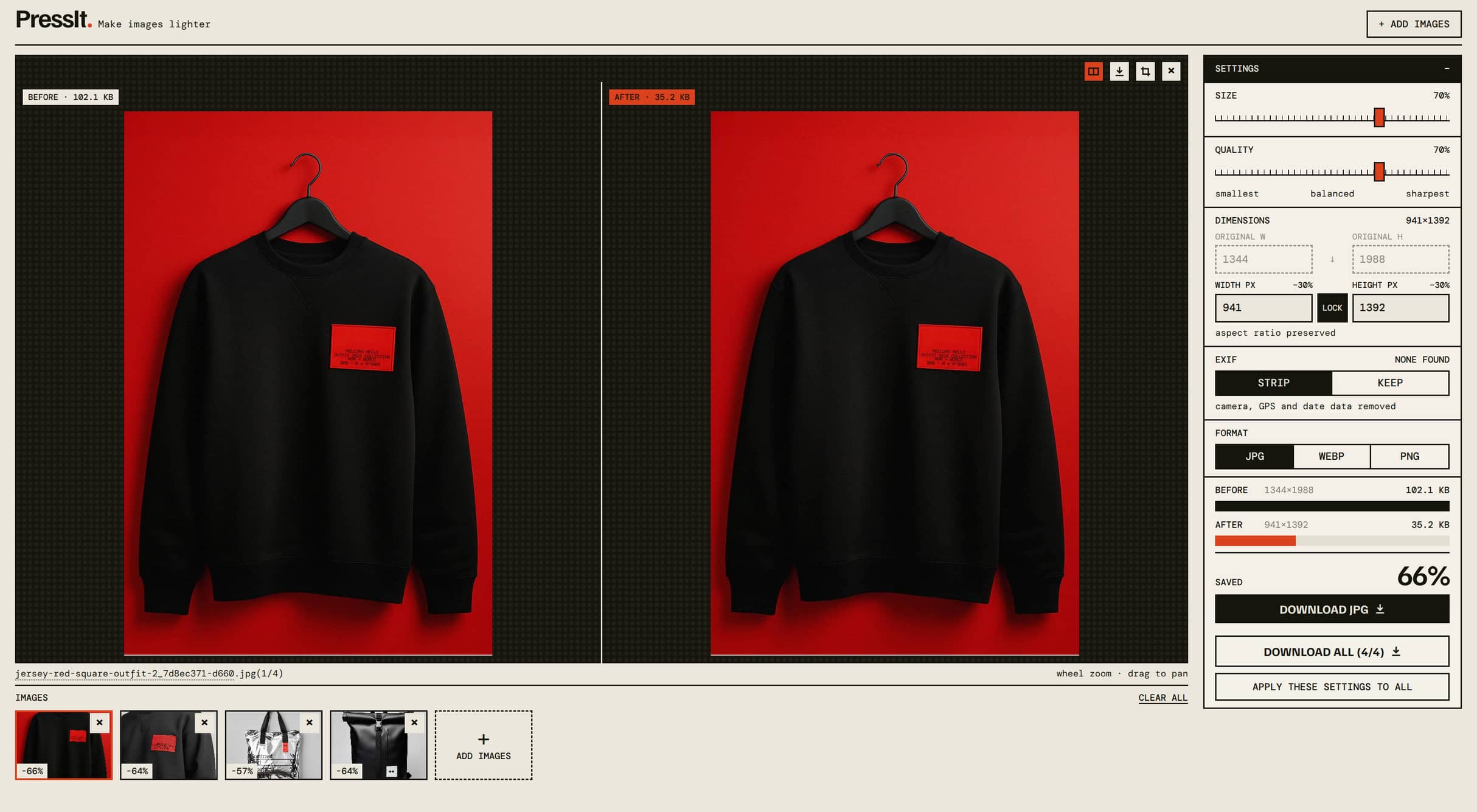
Make your images smaller. On your own computer, no uploads.
In your browser, or straight from your AI agent.
What it does
- Drop, browse or paste images. Add as many as you like.
- Make them smaller: change size, quality and format (JPG, WebP, PNG).
- Crop to any shape.
- Drag the slider to compare before and after, and see how much space you saved.
- Remove hidden photo data (camera, GPS location, date) or keep it.
- Download one image or all of them.
- Starts an MCP server, so AI agents can compress the images in your project.
Your images never leave your computer.
Install and use
-
Install Node.js (version 20 or newer).
-
Open a terminal and run:
shgit clone https://github.com/AliReza99/pressit.git cd pressit pnpm install pnpm build pnpm start -
Open http://127.0.0.1:8787 in your browser.
To stop PressIt, press Ctrl+C in the terminal. To start it again later, run pnpm start in the pressit folder.
Use it from your AI agent (MCP)
While building a website or app, ask your AI agent to optimize its images, without leaving your editor. PressIt does the work on your computer. No clone, no API key, nothing to keep running: your agent starts PressIt when it needs it, also after a reboot. You only need Node.js 20 or newer.
Set up once in your agent:
-
Claude Code:
shclaude mcp add --scope user pressit -- npx -y pressit-mcp@latestOr as a plugin, inside Claude Code:
/plugin install pressit --marketplace AliReza99/pressit. -
Cursor:

-
VS Code:
-
Codex:
codex mcp add pressit -- npx -y pressit-mcp@latest -
Claude Desktop, Windsurf, Gemini CLI and others: add this to the agent's MCP config:
json{ "mcpServers": { "pressit": { "command": "npx", "args": ["-y", "pressit-mcp@latest"] } } }

The first start downloads PressIt (about 30 MB, mostly the image library), later starts use the copy npm keeps.
Then just ask, for example:
- "Compress the images in
public/imagesbefore I deploy" - "Convert the product photos in
src/assets/productsto WebP, 1200 px wide" - "Resize
hero.jpgto 50% and save it aspublic/hero.webp" - "Shrink the screenshots in
docs/and save them todocs/optimized"
By default, images are resized to 70% at quality 70 and saved to a compressed folder next to them. Your originals are never changed, and an image that would not get smaller is copied as it is. Agents can also pass maxWidth (shrink big images to fit, never enlarge small ones), format: "webp" and recursive for nested folders.
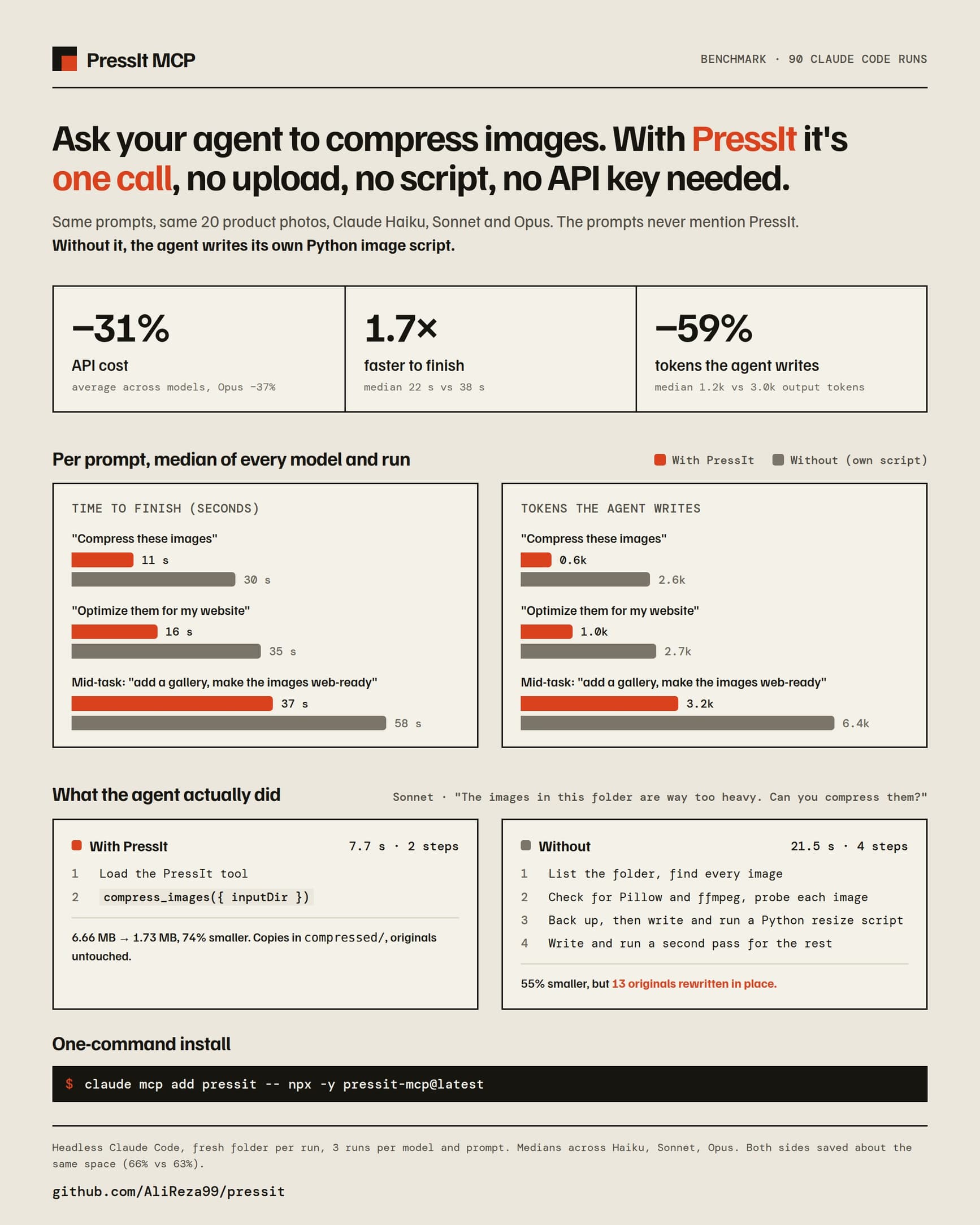
You don't have to mention PressIt in the prompt. In our benchmark the agent picked it on its own in every run, finished 1.7× faster, and never rewrote an original file. Without it, the agent wrote its own script and rewrote the originals in a third of the runs. The setup and raw numbers are in bench/.
To turn PressIt off, remove it in your agent, for example claude mcp remove --scope user pressit.
The PressIt app from Install and use also serves MCP while it runs, at http://127.0.0.1:8787/mcp (claude mcp add --transport http --scope user pressit http://127.0.0.1:8787/mcp). pnpm mcp:off turns that off, pnpm mcp:on turns it back on.
Questions
Which images work? JPG, PNG, WebP and GIF, up to 50 MB each. For GIFs, only the first frame is kept.
Port 8787 is already in use. Pick another one: PORT=9000 pnpm start, then open http://127.0.0.1:9000.
For developers
Project layout, commands and API
Layout
apps/
  web/      React 19 + Vite UI (TypeScript)
  api/      Hono on Node, image processing with sharp (libvips + mozjpeg)
  mcp/      The `pressit-mcp` npm package: the api's MCP tools over stdio
packages/
  shared/   Constants, types and zod schemas shared by both apps
Commands
pnpm dev        # web on http://localhost:3104 (proxies /api), api on http://127.0.0.1:8787
pnpm test       # api and MCP tests, run against the real sharp pipeline
pnpm typecheck
pnpm build      # builds web, then bundles the api
pnpm start      # api serves the built web app on http://127.0.0.1:8787
PORT and HOST override the API's listen address.
ALLOWED_HOSTS in apps/web/.env adds comma-separated hostnames the Vite dev server accepts (see apps/web/.env.example).
API
| Method | Path | Body | Response |
|---|---|---|---|
POST | /api/images | multipart file | 201 SourceInfo (id, oriented width/height, EXIF size) |
POST | /api/images/:id/compress | JSON CompressOptions | 200 image bytes, with x-output-width, x-output-height, x-exif-kept headers |
DELETE | /api/images/:id | 204 | |
POST | /api/compress | multipart file + options (JSON CompressOptions, width/height optional) | 200 image bytes, same headers as above |
GET | /api/health | { ok: true } | |
POST | /mcp | MCP over Streamable HTTP (stateless, JSON responses) | Tools compress_image and compress_images, see apps/api/src/mcp.ts |
The original is uploaded once to the local API. Each settings change then sends only a small JSON body. The API keeps at most 16 originals in memory and evicts them after 30 idle minutes. If the API restarts, the web app uploads the image again on its own.
For scripts and batch jobs, POST /api/compress does it in one request and stores nothing. A missing width or height is scaled to keep the aspect ratio, and with both missing the image keeps its size:
curl -sf http://127.0.0.1:8787/api/compress \
  -F file=@photo.jpg \
  -F 'options={"width":1600,"quality":75,"format":"webp","keepExif":false}' \
  -o photo.webp
Releasing pressit-mcp
pnpm mcp:version patch   # or minor, major, 1.2.3: sets it in every file that carries it
git commit -am "chore(mcp): release x.y.z"
pnpm mcp:publish      # tests the bundle over stdio, then publishes it to npm
pnpm mcp:registry     # then lists that version in the MCP registry (needs `mcp-publisher`, logs in with GitHub when needed)
/mcp is served by the same process as the API but sits outside /api, so the Vite dev proxy never forwards it. It rejects any request whose Host or Origin is not loopback, and returns 404 while .pressit-mcp-disabled exists in the repo root (that is all pnpm mcp:off does).