Listed from the MCP registry; nobody on Odel publishes it.

Acctmux
Multi-account router for MCP servers: one endpoint, lazy per-account workers, tool policy.
Runs on your machine from its package; the steps are below.
What it does
- Reads
- Writes
- High impact
At most: moves money, runs code or commands, deletes data, or sends messages for you.
What it costs
FreeOdel charges nothing per call. The publisher may charge for its own service.
Runs locally over stdio
This server isn't hosted — your MCP client launches it from a package registry. Use one of the commands below, or drop the config into your client (e.g. Claude Desktop).
Run
npx -y acctmux
MCP client config
{
  "mcpServers": {
    "acctmux": {
      "command": "npx",
      "args": [
        "-y",
        "acctmux"
      ]
    }
  }
}
One MCP server. Many accounts. One explicit account argument.
Route calls to isolated stdio workers, share one tool surface across coding-agent sessions, and apply per-account policy without forking the upstream server.





Quick start · Benchmarks · Features · Security · Documentation
Status: 0.1.0, experimental. Tested mainly on Linux and used by the author. It is not yet a mature, independently audited product. See known limitations.
Who needs this
- You use two or more Gmail, Calendar or Drive accounts (work, personal, a backup) from Claude Code, Codex or OpenCode and are tired of duplicate MCP entries and the processes behind them.
- You rotate several API keys (Tavily, for example) and want automatic failover when one runs out of quota.
- You want to deny dangerous tools per account (delete, share, merge) without forking the upstream server.
If you have one account per service and one client, you do not need it.
The problem
Many MCP servers expose one account per process. Connect two Google accounts, two Notion workspaces, or several API keys in multiple coding-agent sessions, and the naive setup duplicates both processes and tool schemas.
Without acctmux                         With acctmux

Claude Code ── server: work             Claude Code ┐
Claude Code ── server: personal         OpenCode    ├── acctmux ── worker: work
OpenCode    ── server: work             Codex       ┘             └─ worker: personal
OpenCode    ── server: personal                       one shared tool list
... every session × every account                   account="work" or "personal"
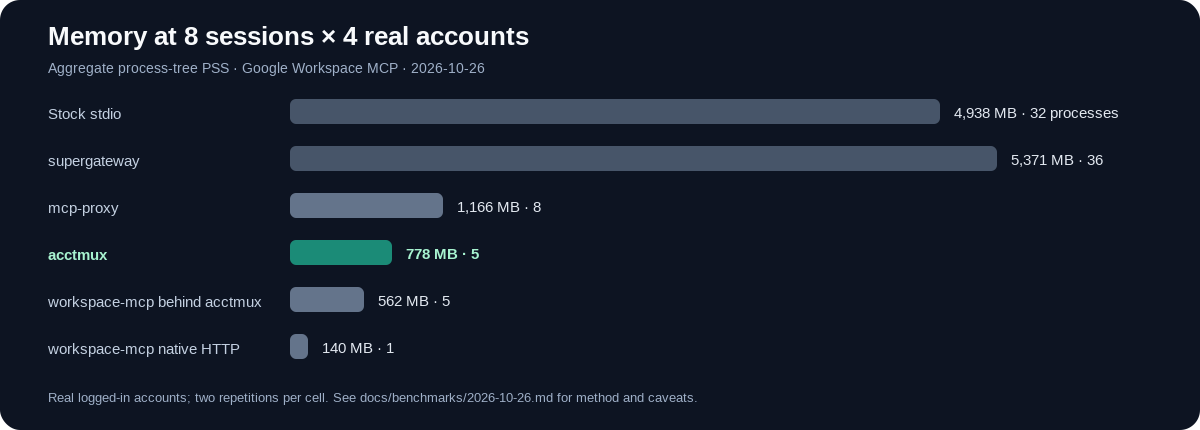
With eight client sessions and four real Google accounts, the latest benchmark measured 4,938 MB PSS across 32 processes for stock stdio versus 778 MB across five processes with acctmux. That's 6.3× less aggregate PSS in this workload. See the 2026-10-26 four-account benchmark for the full comparison and methodology.
Install in 30 seconds
Requires Node.js 22 or newer.
npm install -g acctmux
acctmux init --preset google-workspace
acctmux
The initializer writes a starter config and a bearer token (file mode 600), refuses to overwrite an existing config, and prints connection snippets for Claude Code, OpenCode, and Codex. The Google preset expects the upstream executable on your PATH:
npm install -g @dguido/google-workspace-mcp
Authenticate the Google account or profiles with the upstream package before calling their tools. For other presets, use acctmux init --preset notion, tavily, or github, then add the account credential files described by the initializer and preset docs.
Connect Claude Code
claude mcp add --transport http acctmux \
  'http://[::1]:18704/mcp' \
  --header "Authorization: Bearer $(cat ~/.config/acctmux/token)"
For OpenCode and Codex, use the snippets printed by acctmux init. The endpoint is local-only by default; do not publish the port to a network.
What the model sees
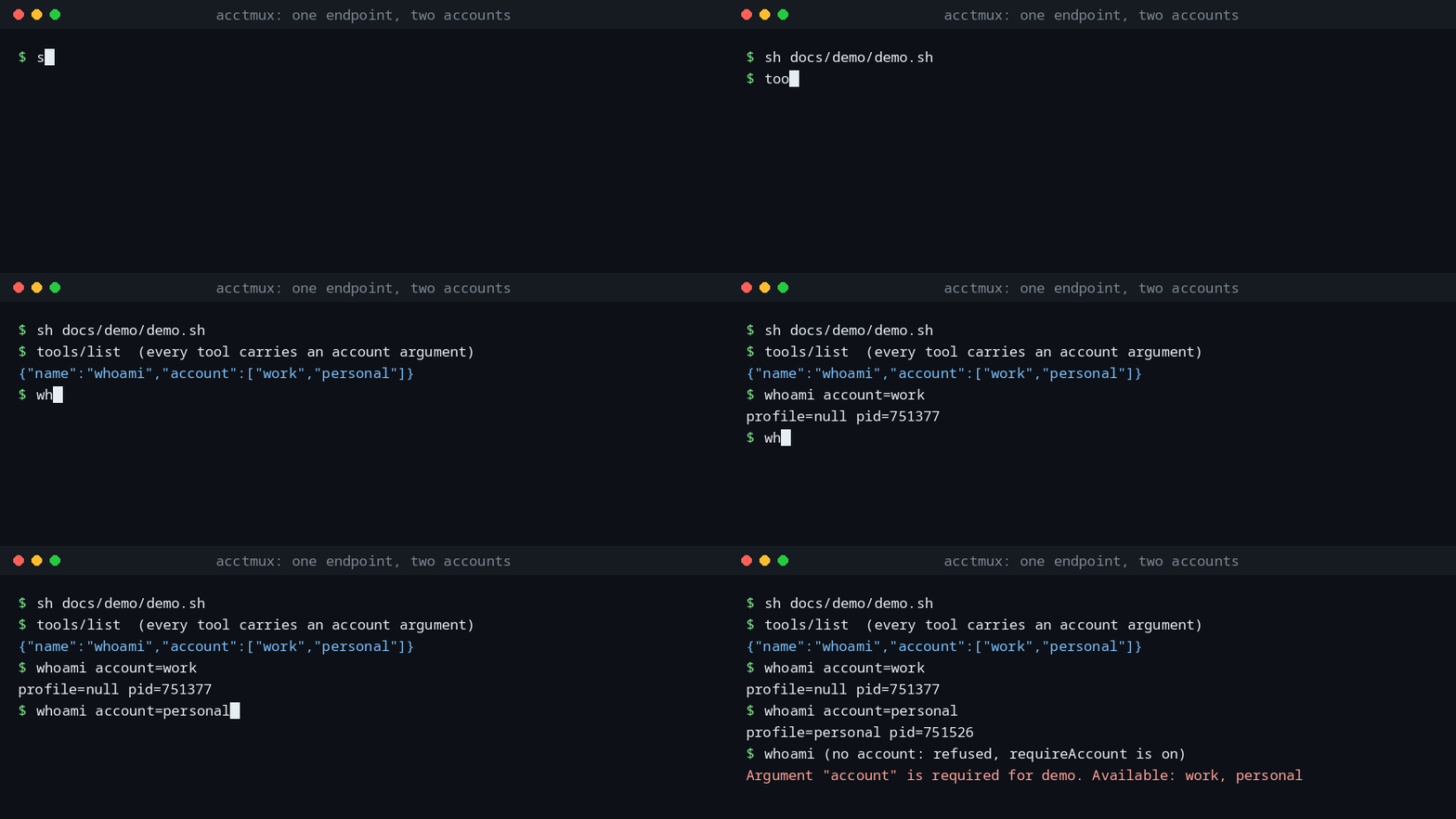
Each tool gets an optional account argument whose enum lists the configured accounts. For example:
You:    Compare Drive storage on my work and personal accounts.
Model:  get_storage_quota(account="work")
        get_storage_quota(account="personal")
For upstreams where silently choosing a default account would be risky, set requireAccount: true to reject calls that omit the selector.
Features
| Capability | What it gives you |
|---|---|
| One shared tool surface | One endpoint and one set of tool definitions across client sessions, with an explicit per-call account selector. |
| Lazy, isolated workers | A separate stdio child per active account. Workers are started on demand, reused across calls, and stopped after the idle timeout. |
| Multiple upstream servers | Combine different MCP servers behind one endpoint. Conflicting tool names are prefixed with the upstream name. |
| Per-account tool policy | Allow or deny tools for an account, such as letting a mailbox read but not send or delete. |
| Account pools | Route interchangeable API keys using round-robin, sticky, or usage-aware selection. |
| Quota failover | Move to another pool member on configured quota errors, with an explicit tool retry allowlist and cooldowns. |
| Prompts and resources | Forward upstream prompts and resources; resource URIs are namespaced by upstream and account. |
| Credential discovery and templating | Configure accounts as lists, maps, or directory scans; substitute {account} in arguments and environment values. |
| Safer local transport | Loopback binding, optional bearer authentication, Unix sockets, Origin/Host checks, and request-body limits. |
| Fast failure and recovery | Optional warm-up calls, clearer login-expiry errors, and exponential backoff for unavailable upstreams. |
| MCP protocol compatibility | One endpoint supports the 2026-07-28 protocol natively and older 2025-era clients through the SDK's stateless fallback. Listening clients can receive tool-list change notifications. |
Account selection is explicit, not round-robin, unless you configure a pool. Separate accounts often mean separate data and permissions; they are not interchangeable identities.
Architecture
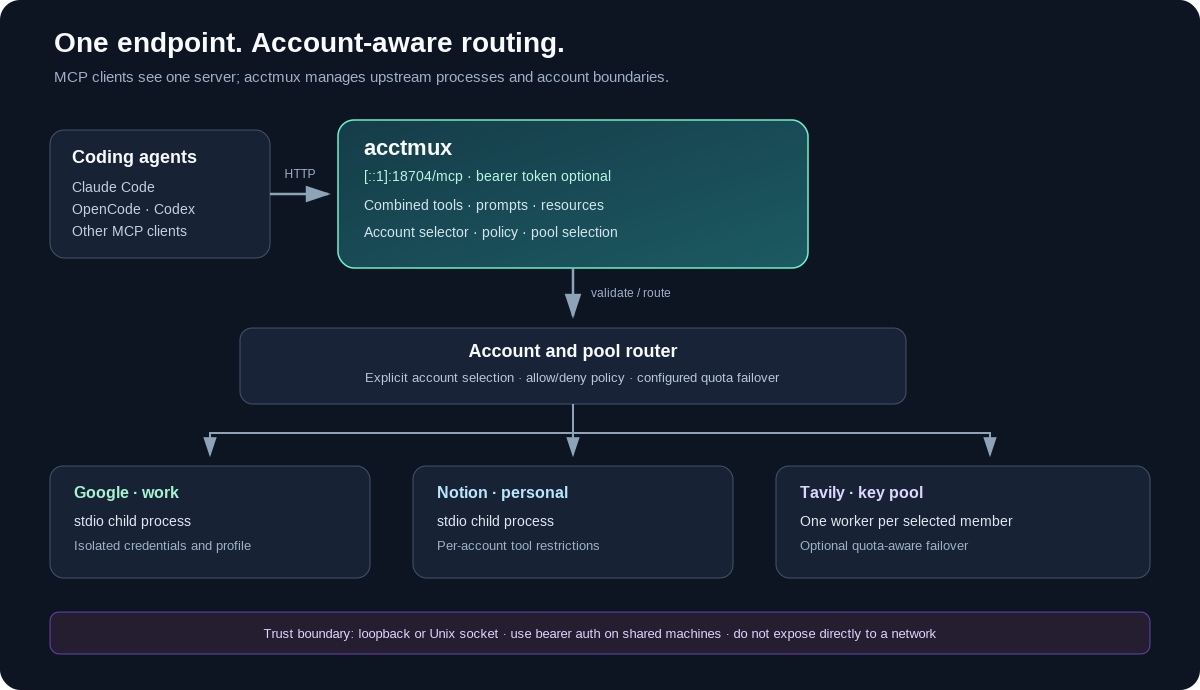
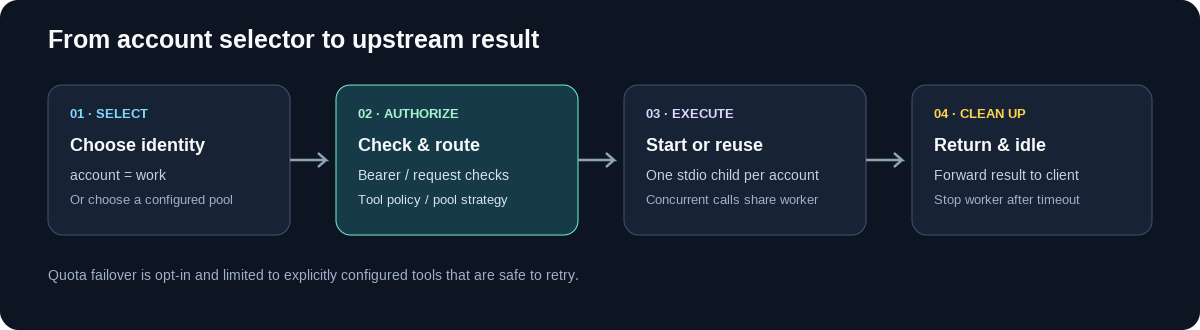
A request follows this path:
- Discover the configured accounts and currently available upstream tools.
- Publish a combined tool list with an account selector and any configured policy.
- Validate and route the selected account, applying pool selection where configured.
- Spawn or reuse that account's stdio worker, then forward the MCP call.
- Return the result and stop the worker after it has been idle long enough.
The router opens its endpoint before all upstreams have finished loading. Requests wait for initial loading within a configured deadline; when no upstream is ready, the router returns a retryable service error rather than hanging startup indefinitely. When accounts or late-loading upstreams change the tool surface, clients using the supported change-subscription flow can be notified.
Configuration
The default config path is ~/.config/acctmux/config.json. Override it with ACCTMUX_CONFIG. A complete minimal example is in config.example.json, and the configuration reference documents every key.
A small custom upstream example:
{
  "auth": { "tokenFile": "~/.config/acctmux/token" },
  "upstreams": [
    {
      "name": "notion",
      "command": "npx",
      "args": ["-y", "@notionhq/notion-mcp-server"],
      "accounts": {
        "work": { "env": { "NOTION_TOKEN": "ntn_work_token_here" } },
        "personal": { "env": { "NOTION_TOKEN": "ntn_personal_token_here" } }
      },
      "defaultAccount": "work",
      "requireAccount": true,
      "policy": {
        "personal": {
          "deny": ["API-patch-page", "API-post-page", "API-patch-block-children"]
        }
      }
    }
  ]
}
Use credential files or your own secret-injection mechanism for real tokens; do not commit secrets into JSON config. The example above shows the config shape, not a recommendation to store live tokens there.
Presets and examples
| Need | Start here |
|---|---|
| Google Workspace profiles | acctmux init --preset google-workspace · Google example |
| Notion workspaces | acctmux init --preset notion · minimal example |
| GitHub accounts | acctmux init --preset github · policy example |
| Several different upstreams | Multi-upstream example |
| Interchangeable API keys and quota failover | Pool example |
Preset versions are pinned where applicable. Presets are starting points; review upstream permissions and each policy before using them with real accounts.
Run as a service
- Linux / systemd user service:
systemd/acctmux.service - Docker:
packaging/Dockerfile. The image contains the router, not your upstream servers; configure and provide those separately. The checked path uses a non-root user and a Unix socket. - macOS / launchd:
packaging/dev.acctmux.plist. The plist is linted in CI, but loading it under launchd is not yet tested.
Environment variables:
| Variable | Default | Purpose |
|---|---|---|
ACCTMUX_CONFIG | ~/.config/acctmux/config.json | Config path |
ACCTMUX_PORT | 18704 | TCP port; loopback binding only |
ACCTMUX_IDLE_MS | 150000 | Worker idle timeout |
ACCTMUX_MAX_BODY | 33554432 | Maximum request body (32 MiB) |
ACCTMUX_TOKEN | unset | Bearer token override |
ACCTMUX_SOCKET | unset | Optional Unix socket path |
Benchmarks
These numbers are measurements, not performance promises. The full reports explain the environment, methodology, repeated runs, and limitations.
Aggregate process-tree memory
Eight client sessions, four real Google accounts, Google Workspace MCP upstream. The latest report is 2026-10-26:
| Setup | Aggregate PSS | Processes |
|---|---|---|
| Stock stdio, one server per session per account | 4,938 MB | 32 |
supergateway, stateful, one per account | 5,371 MB | 36 |
mcp-proxy, one instance per account | 1,166 MB | 8 |
| acctmux | 778 MB | 5 |
workspace-mcp native HTTP multi-account | 140 MB | 1 |
workspace-mcp behind acctmux | 562 MB | 5 |
These memory figures come from the 2026-10-26 run with four real, logged-in Google accounts. They are not directly comparable with the credential-free 2026-10-25 re-run, where upstream workers did not instantiate Google API clients. The native HTTP workspace-mcp implementation exposes 38 tools rather than the Google Workspace upstream's 54, so its feature surface differs. The workspace-mcp behind acctmux row measures that alternate upstream behind the router.
Latency and tool surface
The 2026-10-26 four-account live run measured session start at 2.3 ms for acctmux versus 767 ms for stock stdio. Warm calls were 386 ms versus 388 ms, respectively. Google API latency dominates the warm-call time, so the main difference is process reuse and tool-surface size rather than faster upstream API execution.
| Measurement | Result | Context |
|---|---|---|
| Tool definitions per session, 4 accounts | 54 vs. 216 for per-account servers | One shared tool surface |
| Tool-schema parity | 54/54 | Same upstream descriptions and schemas apart from the injected selector |
| Router process, idle | ~49 MB PSS | Credential-free 2026-10-25 run |
| Router start until port accepts | ~243 ms | Credential-free startup test |
Router start until first Google tools/list | ~1.24 s | Upstream list loading completes after the port opens |
| Fake-upstream calls | 39,825, no failures | Three-repetition offline test suite |
- Latest benchmark: 2026-10-26, four real Google accounts
- Benchmark report: 2026-10-23, original live-account run
- Benchmark report: 2026-10-25, credential-free re-run
- Reproduce with
node scripts/bench.mjs; see the report for setup and exact commands.
Tested with
| Upstream | What has been exercised |
|---|---|
@dguido/google-workspace-mcp 3.4.4 | Four real Google accounts in the 2026-10-26 scaling benchmark; schema parity and live checks |
taylorwilsdon/google_workspace_mcp workspace-mcp 2.1.2 | Benchmark and interoperability checks |
tavily-mcp | Six API keys in a pool; quota failover tested with the documented quota-limit error |
| Official Notion MCP | One workspace; write tools denied by policy in the author's deployment |
github-mcp-server | One account; delete_file and merge_pull_request denied by policy in the author's deployment |
The first two have dedicated benchmark/interop evidence; the final three are the author's deployment examples, not a claim of broad production validation. Other upstreams may work, but are untested.
Security
Warning
Treat acctmux as a local trust boundary. Any process that can authenticate to the endpoint can invoke the tools and accounts configured there, including destructive tools. Use bearer authentication and restrictive local permissions; never expose the endpoint to a network without a deliberate authentication and access-control design.
acctmux initcreates a bearer token by default. The token file is mode600; group/world-readable token files are refused.- Requests without a valid token are rejected before the body is read. Token comparison uses constant time.
- TCP binds to loopback only (
::1by default, or127.0.0.1when configured). An optional Unix socket can be used instead or as well; its directory and socket permissions matter. - Requests with an
Originheader, a non-loopbackHost, or a content type other thanapplication/jsonare rejected. - Request bodies are capped at 32 MiB by default.
- Child processes receive an allowlisted environment, with configured account and service variables added.
- The router does not read upstream credential stores. It does read its own bearer-token file and, for usage-aware pools, configured key files used only for the configured usage URL.
- Per-account
allow/denypolicy is a useful guardrail, not a replacement for upstream credentials, least privilege, or client-side review.
Generate a token manually if needed:
install -d -m 700 ~/.config/acctmux
openssl rand -hex 32 > ~/.config/acctmux/token
chmod 600 ~/.config/acctmux/token
See SECURITY.md for reporting vulnerabilities and Architecture: trust boundaries for implementation details.
Related projects
The MCP ecosystem moves quickly, and the projects below solve overlapping but different problems. This is a short orientation, not a leaderboard.
- Claude Code and OpenCode are coding agents that can connect to MCP servers; acctmux sits behind the client as a local server router.
- mohanagy/miftah is a multi-account credential broker with profile management and credential-handling features. Its profile-selection model differs from acctmux's per-call selector.
- mcp-account-router focuses on failover across ordered profiles and a limited read-only tool set.
- supergateway and mcp-proxy bridge or proxy MCP transports; their process and tool-surface trade-offs are included in the benchmark reports.
- Model Context Protocol is the protocol acctmux routes.
Choose the tool that fits the trust model and deployment. If native multi-account support in an upstream already solves your use case, a second router may not be necessary.
Development
Clone the repository and install dependencies:
git clone https://github.com/AmanKRoy/acctmux.git
cd acctmux
npm ci
npm test
npm run lint
The test suite uses a fake upstream and does not require Google, Notion, GitHub, or Tavily credentials. CI covers Node.js 22 and 24, and runs on macOS as well as Linux-specific checks where available.
Contributions and bug reports are welcome. Read CONTRIBUTING.md first. For security issues, use private vulnerability reporting as described in SECURITY.md, not a public issue.
Documentation
- Configuration reference
- Architecture and design decisions
- Known limitations and alternatives
- Benchmarks and methodology
- Setup guide for AI agents
- Review log
- Roadmap
- Changelog
Support the project
If acctmux saved you time, you can star the repo so others find it. Issues with your setup are welcome too; they shape the roadmap.






