
pdffr


A PDF decompiler, not an image reader. PDF → Markdown in the browser or Node, in milliseconds for born-digital pages — with on-device OCR spent only on the pixels the text layer can't explain.
Try it in your browser → — drop any PDF; it never leaves the tab.
import { decompile } from 'pdffr';

const { markdown, stats } = await decompile(file);
// stats.firstOutputMs ≈ 150ms for a typical report; the file never leaves the tab
npx pdffr report.pdf -o report.md
Why this exists
Every PDF→Markdown tool sits at one of two extremes:
| Approach | Speed | Quality | Problem |
|---|---|---|---|
Text-layer extraction (pdfminer, pdf.js getTextContent) | instant | poor | PDF has no paragraphs, headings, tables or reading order — you get a soup of positioned strings |
| Render + OCR / vision model (Textract, LlamaParse, VLMs) | slow, paid, cloud | high | Rasterizes a page that was already digital, then asks a model to re-read pixels the file could have told it exactly |
~80% of real-world PDFs are born-digital: every glyph's exact coordinates, size and font are already in the file. pdffr treats PDF as what it is — a drawing program — and decompiles the drawing back into structure:
- Geometry-native decompilation. Glyph runs → lines → an XY-cut reading-order tree over whitespace → headings (font-size clustering), paragraphs (leading analysis), nested lists (marker glyph + indent), tables (ruling lines from the content stream, or column x-alignment), inline
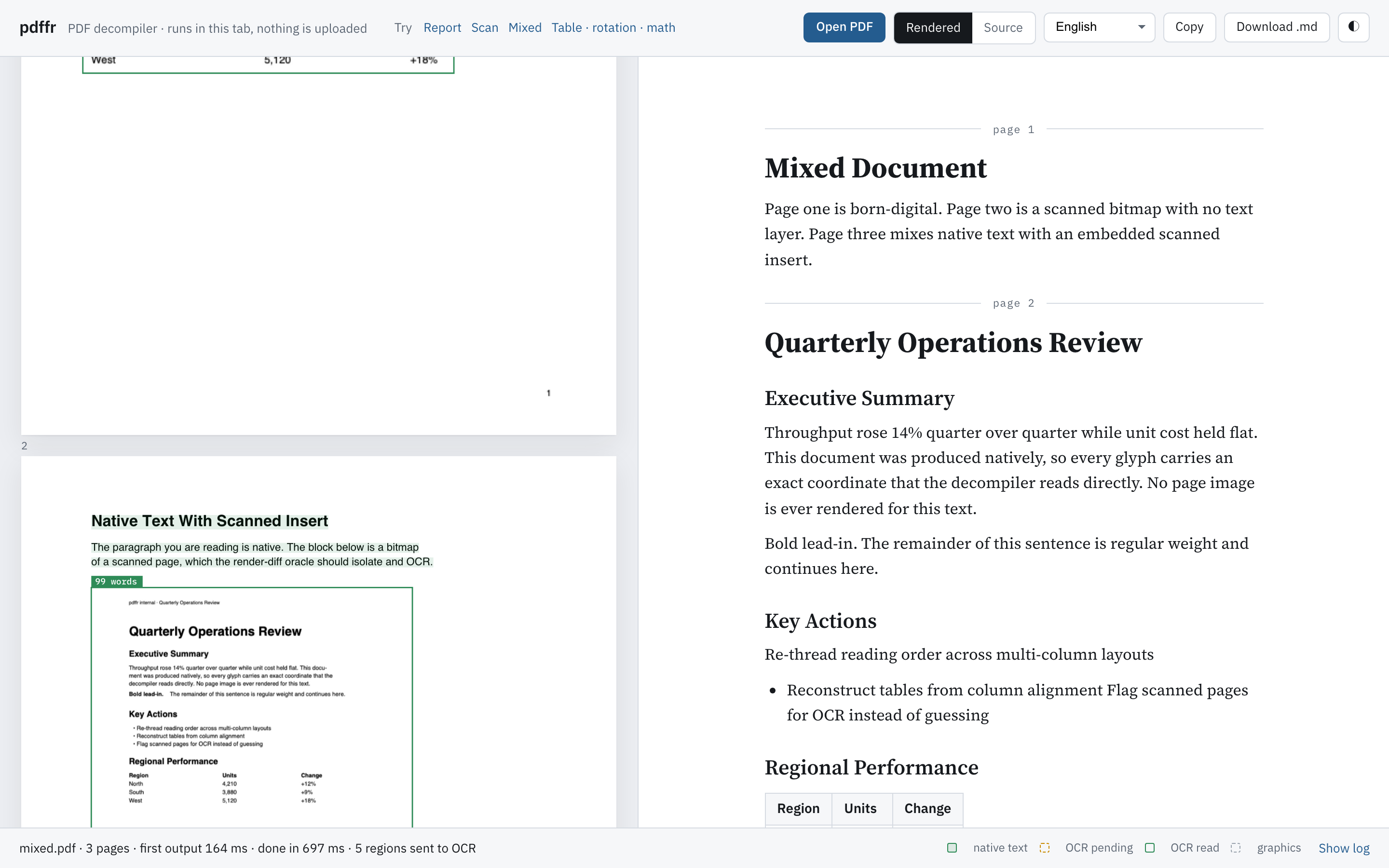
**bold**/*italic*/<sup>, math fonts and sub/superscripts transliterated to$LaTeX$, rotated text re-framed upright, running header/footer stripping, hyphenation repair. No rasterization. Milliseconds per page. - Render-diff oracle. When a page carries bitmaps or thin text coverage, the page is rendered once, the raster's ink mask is computed, and the dilated boxes of every native glyph are erased from it. What's left is ink the text layer cannot explain — scans, stamps, screenshots with burned-in text. Exact image rectangles from the content stream (CTM-tracked) sharpen the regions further. Only those regions go to OCR.
- One IR for both sources. OCR words come back with boxes and confidence, get gated by a text-plausibility test (confidence alone lies on icons and charts), and enter the same geometry engine as native glyphs. Structure recovery is source-agnostic.
- Parallel and optimistic. Pages decompile concurrently; markdown streams out immediately with placeholders; a pool of tesseract workers fills them in place. Whole-page scans are split along their own ink into chunks so the pool works in parallel.
- Private by construction. pdf.js and tesseract.js run in web workers in the user's tab. Nothing is uploaded.
- Same engine in Node.
pdffr/noderuns the identical pipeline on the server or the command line, with@napi-rs/canvasstanding in for the DOM.
Install
npm install pdffr pdfjs-dist tesseract.js
# Node / CLI additionally:
npm install @napi-rs/canvas
pdfjs-dist and tesseract.js are peer dependencies; @napi-rs/canvas is an optional peer used only by the Node entry.
Usage
Browser
import { decompile, warmOcr, setPdfWorkerSrc } from 'pdffr';

// Bundled apps: point pdf.js at its worker. Without this, pdffr falls back to the jsdelivr build.
setPdfWorkerSrc(new URL('pdfjs-dist/build/pdf.worker.min.mjs', import.meta.url).href);

// Optional: pre-load OCR workers while the user is still choosing a file.
warmOcr();

const result = await decompile(file, {
  ocr: true, // escalate unexplained ink to on-device OCR (default true)
  lang: 'eng', // tesseract language(s): 'deu', 'eng+ara', 'chi_sim', …
  concurrency: 4, // pages decompiled in parallel
  onPage(page, md) {
    // streams: first the native pass, then again as OCR regions land
    render(page, md);
  },
  onEvent(e) {
    // every trace line, page (re)emit, and stats update
    if (e.type === 'trace') console.log(e.kind, e.msg);
  },
});

result.markdown; // the whole document
result.pages[0].blocks; // typed blocks: heading | para | math | list | table
result.stats; // firstOutputMs, nativeDoneMs, totalMs, ocrRegions, nativeChars, ...
Node
import { decompileFile, terminateOcr } from 'pdffr/node';

const { markdown } = await decompileFile('invoice.pdf', { lang: 'deu' });
await terminateOcr(); // let the process exit once the tesseract workers are done
Command line
pdffr scan.pdf                    # markdown on stdout, progress on stderr
pdffr scan.pdf -o scan.md --lang eng+fra
pdffr paper.pdf --no-ocr -q       # native text only, silent
pdffr paper.pdf --json --pages 1-3  # per-page markdown, typed blocks and stats as JSON
API
decompile(input, options?) → Promise<DecompileResult>—inputis anArrayBuffer,Uint8Array,BloborFile. Options:ocr,lang,concurrency,pool,onPage,onEvent,pdfWorkerSrc.decompileFile(path, options?)— Node only.warmOcr(lang?)/terminateOcr()— pre-load or shut down the shared tesseract pool.ocrPool(lang?)— the sharedOcrPool; pass your own viaoptions.poolto control worker count.runPipeline(buffer, emit, { ocr, concurrency, escalate })— the streaming core, if you want raw events.blocksToMarkdown(blocks)— render typed blocks yourself.setPdfWorkerSrc(url)— configure pdf.js's worker.
Types: Block, ListItem, Run, Region, Rules, PageState, Stats, PipelineEvent.
Integrations
| Package | What it is |
|---|---|
pdffr-mcp | MCP server for Claude Desktop / Claude Code / Cursor / any agent: pdf_to_markdown, pdf_outline, pdf_tables — listed on the MCP Registry |
pdffr-langchain | LangChain.js document loader — one Markdown Document per page |
pdffr-llamaindex | LlamaIndex.TS reader — one Markdown Document per page |
langchain-pdffr (PyPI) | Python: pdffr.convert() and a LangChain PdffrLoader, driving the CLI (needs Node 20+) |
from langchain_pdffr import PdffrLoader
docs = PdffrLoader("report.pdf").load()   # one Markdown Document per page
{ "mcpServers": { "pdffr": { "command": "npx", "args": ["-y", "pdffr-mcp"] } } }
How a page flows through
getTextContent ─► runs (x, y, w, h, size, bold, italic, math font, rotation)
                   │
getOperatorList ─► exact bitmap rects + ruling lines (CTM walk), font resolution
                   │
        suspicious? (bitmaps, or thin coverage)
             │ no                          │ yes
             ▼                             ▼
     structure pass                render page once (print intent)
                                   ink mask − native glyph boxes = residual
                                   regions = bitmap rects ∪ residual components
                                   large regions split along their ink
                                   ─► OCR pool (2×/3× upsampling for small crops,
                                      second read of doubtful words,
                                      text-plausibility gate)
                                   ─► OCR runs join the same structure pass
Structure pass: rotated runs re-framed upright (a dominant rotation turns the whole page; a minority is a sidebar group) → buildLines (math spans → LaTeX) → orderRuns (XY-cut: tall prose gutter → vertical cut; largest whitespace band → horizontal cut; ruled and aligned tables detected first as atomic boxes) → toBlocks (headings, lists with nesting, paragraphs by leading, display math, tables, furniture stripping) → markdown.
Demo
npm install
npm run dev
The playground in demo/ shows each page with the engine's decisions drawn on it — text it read straight from the file, regions it sent to OCR and what came back — beside the decompiled document. It opens on a sample report; drop any PDF onto it. Four canonical samples ship with it: a born-digital report (headings, bold runs, a list, a table, a two-column page, running header and page numbers), a full-page scan of the same report, a mixed document with a scanned insert inside native text, and one page each of a ruled table, a rotated sidebar and equations.
Benchmark
docs/benchmark.md compares pdffr with pdf-parse, raw pdf.js text and pdf2md on the four samples — time, and how much of the reference structure (headings, table rows, list items, reading order) each tool reproduces. Regenerate with npm run bench; add a cloud parser to bench/run.mjs if you have a key.
Documentation
docs/benchmark.md— reproducible comparison against other open-source PDF tools.docs/architecture.md— the pipeline, the render-diff oracle, the shared IR, and every heuristic with its threshold and rationale.CONTRIBUTING.md— layout of the code, the one rule for new heuristics, how to add a test.CHANGELOG.md
Development
npm test             # vitest: unit tests + Node end-to-end runs on the sample PDFs
npm run typecheck
npm run format
npm run build        # library to dist/, demo to dist-demo/
CI runs typecheck, format check, tests and the build on every push.
Status and roadmap
Early. It is accurate on the documents it was built against (reports, Word exports with screenshots, scans, two-column layouts, ruled tables, rotated sidebars, simple equations) and will have gaps on others. What it handles today:
- Born-digital text with headings, nested lists, tables (ruled or aligned), inline styles, two-column reading order, running headers/footers, hyphenation.
- Scans and figures with burned-in text via on-device OCR, any tesseract language, with icons and chart glyphs rejected by shape and colour rather than trusted on confidence.
- Rotated pages and sidebars (multiples of 90°); skewed watermarks are dropped, not reordered.
- Math set in math fonts (Symbol, Computer Modern, STIX, Cambria Math…): Greek, operators, sub/superscripts → inline
$…$and display$$…$$LaTeX. - Browser, Node and CLI.
Also: letter-spaced headings, label columns (**KSA-UAE tension** — paragraph layouts become headings over their paragraphs), card/lane layouts, fractions drawn with a bar, multi-line display math, paragraphs cut by a page break, bold recovered from OCR stroke weight.
Known limitations:
- Radicals with an argument bar, matrices and
alignedblocks are not reconstructed. - Math typed in an ordinary upright text font (a bare
x2with no italic or math font) is not recognised as math. - Tables whose cells span rows or columns are flattened.
- Icons that are neither solid nor coloured (a thin grey outline) can still OCR into a character.
- OCR output carries bold (from stroke weight) but no italic.
Bug reports with a PDF attached are the fastest way to improve it.
License
MIT © Amer Sarhan