Listed from the MCP registry; nobody on Odel publishes it.

Convo Vault
Local ChatGPT, Grok and Gemini exports with original text and available reasoning records.
Runs on your machine from its package; the steps are below.
What it does
- Reads
- Writes
- High impact
At most: creates or changes data: records, files, settings.
What it costs
FreeOdel charges nothing per call. The publisher may charge for its own service.
Runs locally over stdio
This server isn't hosted — your MCP client launches it from a package registry. Use one of the commands below, or drop the config into your client (e.g. Claude Desktop).
Distributed as an MCP bundle (`https://github.com/amethyst-cosmos/convo-vault/releases/download/v0.17.6/convo-vault-0.17.6.mcpb`) — download it and import the bundle in your MCP client.






English · 简体中文
Recommended: ego lite · Quick start · What you get · CLI · Privacy · Changelog
Current version: 0.17.6
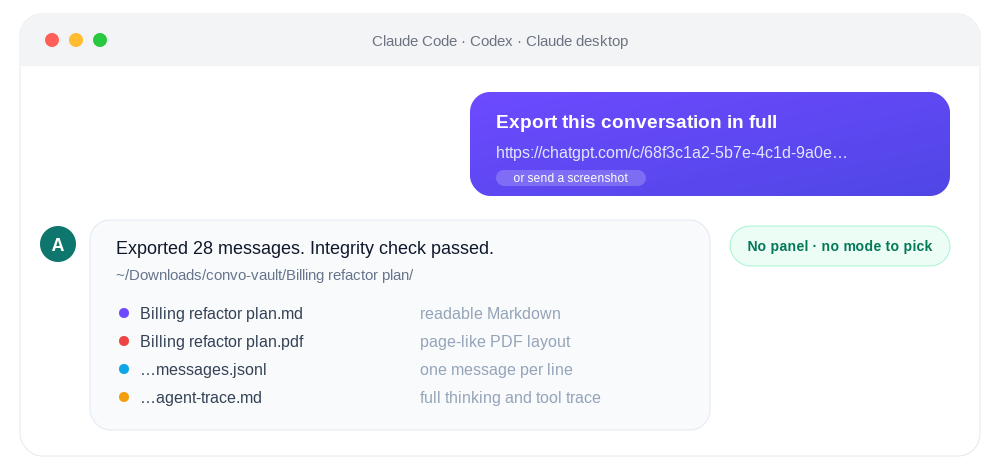
Convo Vault exports ChatGPT, Grok and Gemini conversations to a folder on your computer. Give Claude or Codex a conversation link or a screenshot with the address visible. Export Markdown, PDF, JSONL, images and structured records. The original wording and languages are preserved, including mixed-language conversations.
Open *.decision-path.md to see how a reply developed. It groups available progress notes, reasoning summaries and tool results, with links to the original trace events. Coverage depends on the chat service and the individual reply.
Everything runs on your machine. Convo Vault reads the chat tab you are already signed in to (in ego lite directly, in Chrome, Edge or Brave through a small extension), and a small local service renders the files. No cloud converter, and no cookies or tokens handed to an agent.
Recommended: ego lite
Tip
For the smoothest experience, use Convo Vault with ego lite. There is no extension to install, no Developer mode and nothing to click. Sign in to your chat site in ego lite once; after that, telling your agent "export this conversation" is all it takes.
ego lite is a Chromium browser that lets local programs work in its pages. Convo Vault uses that to run its exporter right inside the chat tab you are signed in to, so the one manual step other browsers need, loading an unpublished extension by hand, is gone. The exported files are the same either way.
| ego lite (recommended) | Chrome, Edge, Brave | |
|---|---|---|
| Browser extension | Not needed | Load it once by hand (Developer mode, Load unpacked) |
| First time | The agent installs Convo Vault; you sign in to the chat site | The agent installs Convo Vault; you load the extension and sign in |
| After an update | Runs the new version at once | The extension reloads itself |
| What you get | The same folder | The same folder |
When ego lite is installed, the CLI and the skill use it automatically; --browser ego picks it explicitly. Chrome, Edge and Brave keep working with the extension.
Supported chats
| Chat | Give it a link like | How it is read | What the export is checked against |
|---|---|---|---|
| ChatGPT | chatgpt.com/c/<id> | its conversation API | its own message list, by message id |
| Grok | grok.com/c/<id> | its conversation API | its response tree |
| Gemini | gemini.google.com/app/<id> | the page itself, scrolled to the top first | only what the page shows (a weaker check, stated in a warning) |
Each export includes the same file formats. ChatGPT and Grok can provide recorded reasoning summaries and tool activity. Gemini exports the visible messages and images, with page-based validation. ChatGPT supports project listing and optional attachment downloads.
Why Convo Vault
Quick start
1. Let an agent install it
In Claude Code, the Code tab of the Claude desktop app, or Codex, send:
Install https://github.com/amethyst-cosmos/convo-vault for me. Follow INSTALL.md in the repository and put it in ~/convo-vault.
The agent clones the repository, installs dependencies, builds the extension, installs the skill and runs a check.
2. Get your browser ready
ego lite (recommended): just sign in. Sign in to your chat site (ChatGPT, Grok or Gemini) in ego lite. There is nothing to install in the browser; Convo Vault picks ego lite by itself (or pass --browser ego).
Chrome, Edge or Brave: load the extension once. These browsers do not let programs install unpublished extensions, so this one step is manual:
- Open the extensions page (
chrome://extensionsoredge://extensions) and turn on Developer mode. - Click Load unpacked and choose
~/convo-vault/dist/convo-vault-extension. - Sign in to your chat site (ChatGPT, Grok or Gemini) in that browser.
3. Use it
Start a new agent session and say:
Export this conversation: https://chatgpt.com/c/xxxxxxxx-xxxx-xxxx-xxxx-xxxxxxxxxxxx
A Grok (https://grok.com/c/…) or Gemini (https://gemini.google.com/app/…) link works the same way.
Or send a screenshot of the conversation and say "download this whole conversation". The agent reads the link from the address bar. The folder appears in ~/Downloads/convo-vault/.
Prefer to install it yourself?
Download convo-vault-<version>.zip from Releases and unzip it, or clone the repository, then:
node cli/convo-vault.mjs setup     # install dependencies, build the extension, install the skill
node cli/convo-vault.mjs verify    # after loading the extension: confirm the browser answers
Requires Node 20 or newer.
Where it works
| Environment | Works | How |
|---|---|---|
| Claude Code, the Code tab of the Claude desktop app, Codex | ✅ | Skill, installed by setup |
| Claude desktop chat, Cursor and other clients with local MCP | ✅ | node cli/convo-vault.mjs mcp install, then send a link or screenshot in chat |
| claude.ai, chatgpt.com, grok.com and gemini.google.com in the browser (including ChatGPT agent mode) | ❌ | They run in a cloud sandbox and cannot reach your browser or local services |
The skill is the self-contained folder skills/convo-vault-skill. Copy it anywhere, or run node cli/convo-vault.mjs skill install --dir <folder>. Its launcher finds the project, or installs it from GitHub the first time.
Distribution channels
- GitHub Releases has the versioned portable installer, its SHA-256 file and the desktop MCP bundle.
- skills.sh lists the Agent Skill from this repository. Install it with
npx skills add amethyst-cosmos/convo-vault --skill convo-vault. - ClawHub lists the skill for OpenClaw. Its catalog version tracks the skill instructions separately from the Convo Vault runtime release.
- Agensi offers the text-only Agent Skill. It guides the agent through local installation from GitHub or the portable release ZIP.
- The official MCP Registry lists
io.github.amethyst-cosmos/convo-vault, which points to the versioned local MCP bundle.
Use a signed-in Ego Lite session for extension-free export. Chrome, Edge and Brave use the same exporter after you load its extension once.
Grok
Grok conversations work the same way: give the agent a https://grok.com/c/<id> link, or run node cli/convo-vault.mjs export https://grok.com/c/<id>. The extension reads Grok's own conversation API with the session your browser already has (no token, no scrolling) and checks that every message came back before it exports. The PDF and data files look the same as a ChatGPT export, labelled Grok; Grok's recorded thinking steps, search queries and tool calls are saved in order in the trace files. The JSON preserves the stored tool inputs and the answer keeps its citations as footnotes.
Images (the ones Grok generated and the ones you uploaded) are downloaded into the bundle; other attachments are listed by name. Not yet for Grok: downloading attachments, list and --project. A conversation with regenerated answers exports its newest branch and says how many alternatives it skipped. Links to several Grok conversations run in one grok.com tab, and a mix of ChatGPT and Grok links gets one tab per site.
Gemini
Gemini conversations work too: give the agent a https://gemini.google.com/app/<id> link. Gemini has no conversation API the extension can call, so the page itself is read: the extension scrolls the conversation to the top until no older turns appear, turns each reply's HTML back into Markdown (lists, tables, code with its language, math, links) and exports the same bundle, labelled Gemini. Several Gemini links each get their own tab, one after another.
Honest limits: Gemini does not say how many messages a conversation has, so the check is only what the page shows (a reply for every prompt, nothing still being written, no turns dropped while loading) and the export says so in a warning. Images, including the ones Gemini generated, are read from the page and embedded; if the page does not let a script read one, it appears as a link and the export says how many. The collapsed thinking panel, source chips and attachments are not exported (attachment names appear where the page shows them). This is the most fragile of the three sites: a Gemini redesign can break it.
What you get
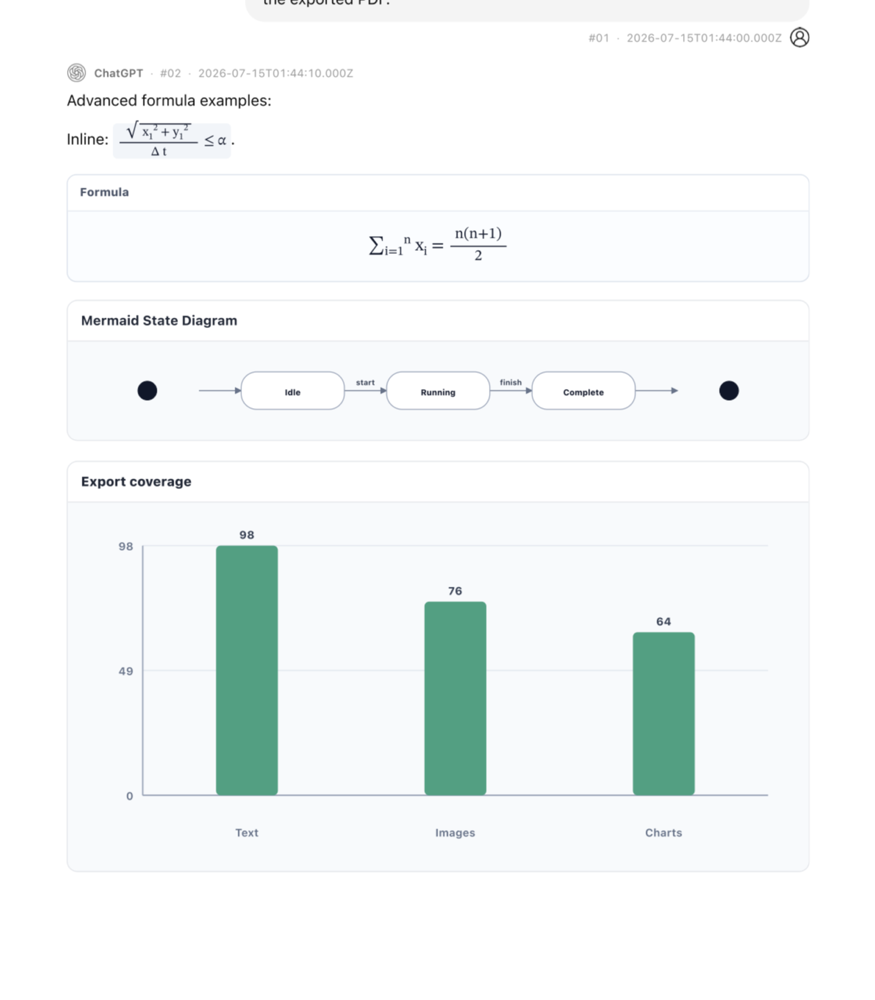
Each export is a folder (and a .zip), including a PDF that reads like the chat page.
Export label language. The decision-path headings support English, Simplified and Traditional Chinese, Japanese, Korean, Spanish, French, German, Portuguese, Arabic, and Hindi. Choose one export's labels with |
PDF output: formulas, Mermaid diagrams and charts, rendered from the test fixtures |
How it works
flowchart LR
    A["You / agent"] -->|"export link"| B["CLI"]
    B -->|"create job"| C["Local renderer<br/>127.0.0.1"]
    B -->|"open the conversation"| D["ego lite, or the extension<br/>in your signed-in browser"]
    D -->|"claim job, capture, integrity check"| D
    D -->|"send conversation and images"| C
    C -->|"render Markdown / PDF / data"| C
    C -->|"zip"| B
    B -->|"unpack to a folder"| A
- The CLI creates a job on the local renderer and opens the conversation with the job id in the URL. The extension (in ego lite, the same code run in the page by the CLI) claims the job, captures the conversation with the session already in your browser, passes the integrity check and hands the data to the renderer.
- If the capture is incomplete the job fails and says what is missing. The renderer started for the CLI exits two minutes after its last request.
CLI
Install the portable Agent Skill with npx skills add amethyst-cosmos/convo-vault --skill convo-vault. MCP clients that support desktop bundles can install the .mcpb from GitHub Releases. Exports use a signed-in Ego Lite session or a browser with the Convo Vault extension loaded.
node cli/convo-vault.mjs export https://chatgpt.com/c/<id>        # a link (ChatGPT, Grok or Gemini) or a ChatGPT conversation id
node cli/convo-vault.mjs export <link> --out ./archive            # choose where to save
node cli/convo-vault.mjs export <link> --no-pdf                   # data only: faster, no headless Chrome
node cli/convo-vault.mjs export <link> --files                    # also download uploaded and generated files
node cli/convo-vault.mjs export <link> --files-kind generated     # only what ChatGPT generated (or: uploaded)
node cli/convo-vault.mjs export <link> --browser ego              # ego lite: no extension needed
node cli/convo-vault.mjs export <link> --browser "Microsoft Edge"
node cli/convo-vault.mjs export <link1> <link2> <link3>           # several at once, in one browser tab
node cli/convo-vault.mjs list --project "Research"                 # see what is in a project (id, date, title)
node cli/convo-vault.mjs export --project "Research"               # every conversation in the project
node cli/convo-vault.mjs export --project "Research" --files-for "invoice,report"   # files only for those
Several conversations run in one tab, one after another, so nothing pops up per conversation (on macOS the tab also opens without bringing the browser to the front). Each result is printed, a failed conversation does not stop the rest, and the exit code is 1 if any failed. --files-for takes words from titles (or ids); --files means all. --files-kind generated|uploaded keeps one side only (alone it applies to every conversation).
| Command | What it does |
|---|---|
setup | Install dependencies, build the extension, install the skill |
list | List conversations (all recent ones, or --project NAME); --json for data |
verify | Confirm your browser answers (ego lite, or the extension) |
doctor | Check dependencies, extension build, browsers and skills |
doctor --debug-pack [--from EXPORT.zip] | Save a shareable diagnostic ZIP with check results and optional aggregate export counts |
update | Pull the latest version, reinstall and reload the extension (git checkouts) |
reload | Make the extension reload itself after a rebuild (not needed in ego lite) |
skill install | Reinstall the Claude and Codex skills |
mcp install / mcp config | Add the MCP server to Claude desktop; print config for other clients |
backend start / stop / status | The local renderer; it starts on demand and exits when idle |
Other options: --no-extract keeps only the zip, --keep-tab leaves the tab open, --allow-incomplete exports a capture that failed the integrity check (refused by default). The first export tries ego lite (if installed), then each installed Chrome, Edge and Brave, and remembers the one that answered.
Without an agent
By default the extension is only a connector: exports are started by your agent or the command line, and the popup has nothing to click. If you would rather export by hand, click the Convo Vault icon and turn on Manual controls. The choice is remembered, and your agent can still start exports either way.
With manual controls on, open the conversation (ChatGPT, Grok or Gemini) and press Export this conversation. It exports the whole conversation, with no selection step. The local renderer must be running: node cli/convo-vault.mjs backend start, or Copy Start in the popup.
How it reads the conversation
For ChatGPT and Grok, Convo Vault reads the site's own conversation API, the same data the page is drawn from. It never scrolls or clicks the page, so a very long conversation takes seconds and the tab can stay in the background. The result is checked against the site's message list (ChatGPT by message id, Grok by its response tree); if anything is missing the export is blocked and says what. Gemini has no such API, so its page is read and scrolled instead (see Gemini above).
For ChatGPT and Grok, the export keeps the summaries and tool activity available in the provider's records. The decision path describes the sequence, and the full trace shows coverage and missing events. ChatGPT can omit stored tool arguments. Grok may have recorded calls without separate tool results. Gemini's separate thinking panel is outside the export. Uploaded and generated ChatGPT files are listed in the manifest and can be downloaded on request with --files.
Privacy and security
- Convo Vault reads only the chat page you have open (chatgpt.com, grok.com or gemini.google.com), through the extension or, in ego lite, directly. No remote conversion service is used, and files never leave your machine.
- The renderer listens on
127.0.0.1only and requires a token. - Export jobs use a 192-bit random id. Only local programs can create them, and only the extension or a local program (the ego lite driver) can claim them, once. Web pages cannot.
- An agent never needs, and never gets, your chat session: the exporter uses the one already in your browser.
See SECURITY.md to report a vulnerability.
Languages and output types
Conversation text is kept as Unicode and never translated, so Chinese, Japanese, Korean, Arabic, Hebrew, European languages and mixed text all export correctly. Content that cannot be drawn in the PDF (video, audio, interactive cards) becomes a clear card, and the JSON records why, so nothing disappears silently.
Development
npm test                  # all tests
npm run check             # syntax and JSON checks, and that the content script builds
npm run build:extension   # build dist/convo-vault-extension and its zip
npm run package           # build dist/convo-vault-<version>.zip
- The extension is in
extension/; its content script is generated fromextension/content/index.jsand its modules bynpm run build:extension, which writes the loadable folder todist/convo-vault-extension. - Releases:
npm run version:set -- X.Y.Zwrites the version into every file that carries it (and adds an empty entry to both changelogs). Fill in the two changelog entries, merge, then push avX.Y.Ztag. GitHub Actions checks, tests, packages and publishes the release.
See CONTRIBUTING.md for more.







