
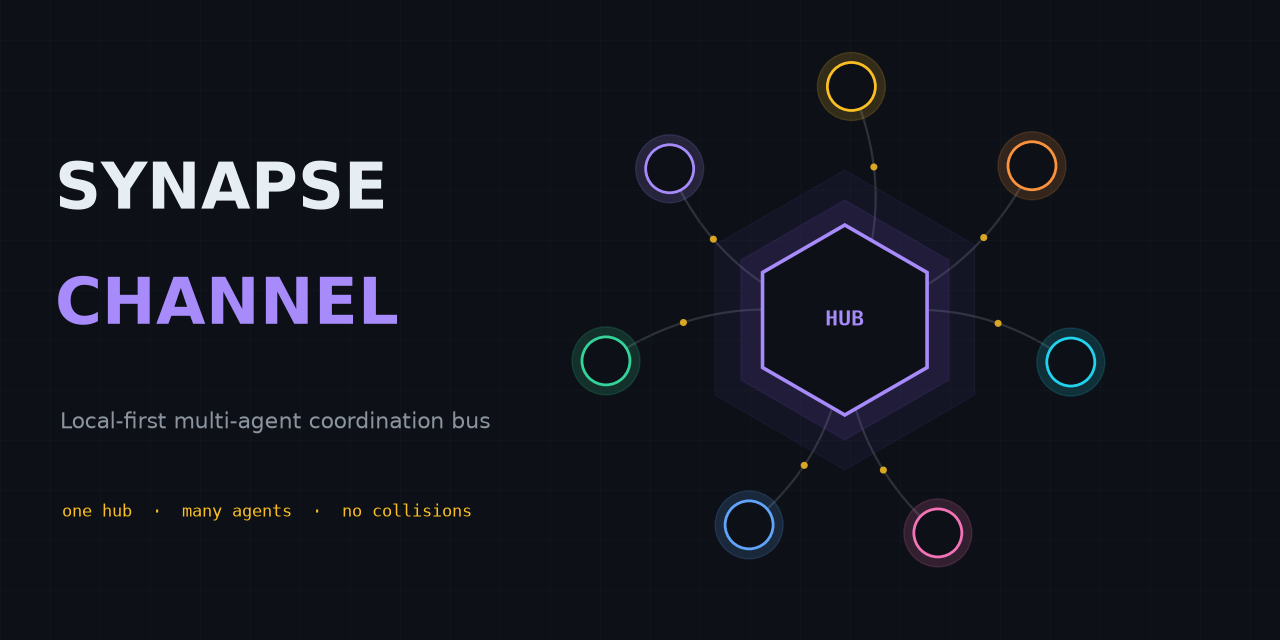
The local-first coordination bus for fleets of AI agents.
One WebSocket hub is the shared source of truth for presence, file-scope claims, a shared plan, task status, and capabilities — for agents working in one repository or across a whole ecosystem of them.
Flagship example: coordinate parallel AI coding agents through declared file scopes — the hub refuses a second overlapping live claim, while covered provider hooks and the staged Git gate enforce only their documented mutation boundaries.









English · 简体中文 · Español · Português (Brasil) · 日本語 · 한국어 · Deutsch · Français · Slovenčina
A local-first coordination bus for a fleet of AI agents working in parallel — within a single repository or spread across a whole ecosystem of them. One WebSocket hub is the shared source of truth for presence, work claims, chat, task status, and resource offers: agents address each other across projects and share one plan, while file-scope claims keep the agents in any one repository from receiving overlapping live authority. Documented provider hooks and the staged Git gate enforce that authority only on their covered mutation surfaces.
New here? Read Why SYNAPSE CHANNEL — a five-minute read on what it is, what you build on it, how it differs from the tools next to it, and why coordination becomes the bottleneck once you run more than one agent.
Project lineage: SYNAPSE CHANNEL dates back to September 2025.
The bus is transport-light (one dependency, websockets), hub-centric by design
(one place owns presence, leases, and history), and runs entirely on the local
machine. Model workers reply on-channel through any OpenAI-compatible endpoint,
including a local Ollama server, with a deterministic rule-based fallback for
offline use.
Your existing agents plug in without new code. Any Model Context Protocol
host — Claude Code, Claude Desktop, Cursor — reaches the bus through the bundled
synapse mcp server, which exposes send, durable inbox, status, claim, release,
handoff, and task verbs as MCP tools plus the board, agents, and resources as
read-only MCP resources. Agents that speak A2A connect through the Agent Card face instead.
The hub itself stays protocol-agnostic and the core install keeps its single
dependency — the MCP and A2A adapters are optional extras (pip install 'synapse-channel[mcp]'). See the MCP guide.
python -m pip install synapse-channel && synapse demo
Get the Python package · Run the first 60 seconds · Read the quickstart
Coordinate. Observe. Govern.
Synapse's daily promise is three explicit loops:
- Coordinate declared work and surface collisions:
synapse git-init,synapse git-claim,synapse git-claim-check --staged,synapse task, andsyn ackturn work scope, dependencies, and evidence into shared state instead of side-channel notes. - Observe the fleet from durable state:
synapse who,synapse state,synapse dashboard,synapse event-query, and observed peer rows show who is present, what is claimed, what changed, and which peer-hub facts are advisory. - Govern risky actions with evidence: policy checks, approvals, release receipts, Merkle roots, ACL surfaces, federation, and encryption-key commands make operator decisions auditable. Governance surfaces report by default; operators decide what blocks a merge, release, or cross-hub action.
- Protect the durable log at rest with optional SQLCipher page encryption for the live hub event store (plus whole-file AES-GCM envelopes for relay logs, A2A state, cursors, and archives). See SQLCipher live event store below.
What it does, surface by surface
Seven shipped coordination surfaces, each named by the command or doc that delivers it today:
-
Claim before edit.
synapse git-initinstalls claim-aware Git hooks;synapse git-claimrecords an exact worktree, branch, and path scope so an overlapping claim can be refused before files diverge.
-
Block unclaimed native file edits. Provider file-edit claim hooks adapt Claude Code
Edit|Write, Codexapply_patch, Gemini CLIreplace|write_file, and KimiEdit|Writeto one live-claim decision engine.
-
Share the plan.
synapse taskandsynapse boardkeep task state, dependencies, and ready work on the hub instead of in separate agent notes.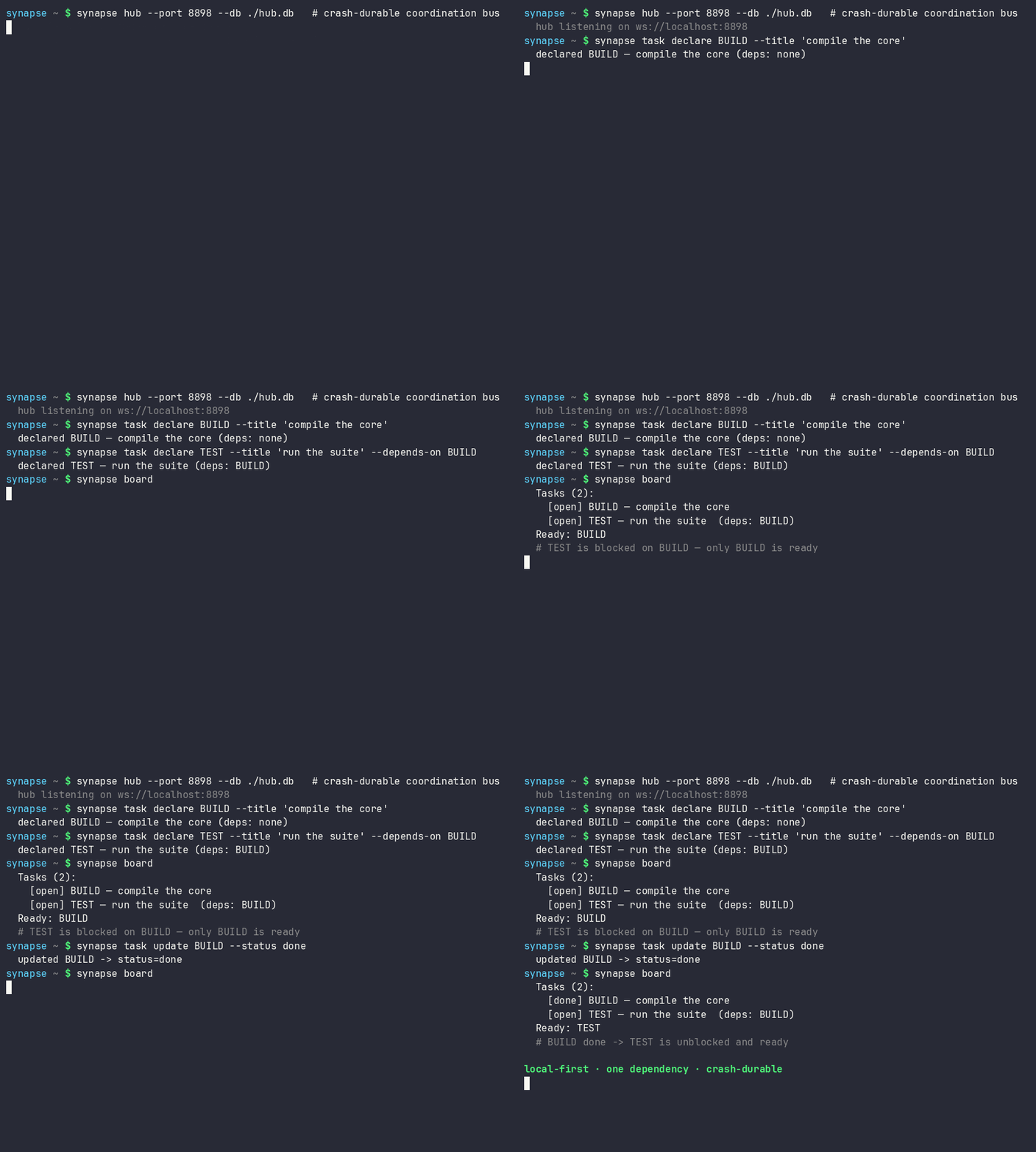
-
Hand work over without an ownership gap. Atomic handoff moves the held task, scope, status, and checkpoint to an online recipient without a release-and-reclaim window.

-
Expose a dark seat. After 30 continuous seconds without the owner's exact waiter, the hub emits one
dark_seat_alertfor affected claims or assigned work, including the permanent-arm remedy; it does not release or reassign work automatically.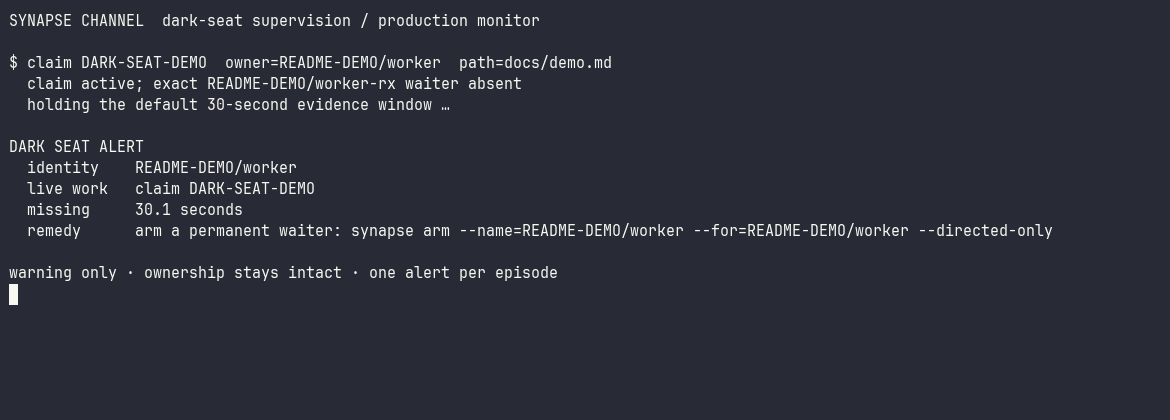
-
Read the fleet from one cockpit.
synapse dashboardserves the local command centre, exact-status task columns, claims, conflicts, security posture, and an optional durable event feed; the read-only Studio projection adds no new hub authority.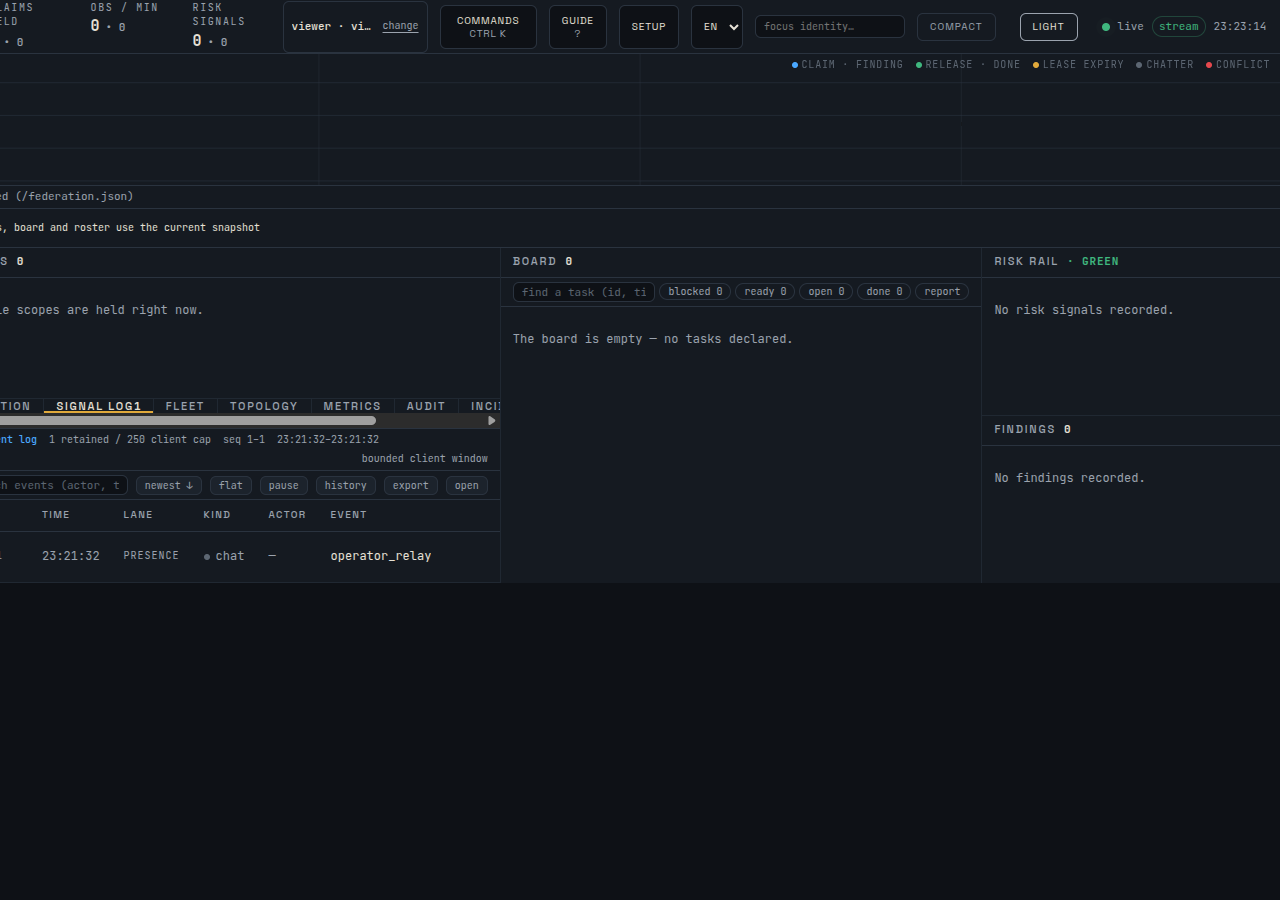
-
Connect existing agent protocols at the edge.
synapse mcpexposes coordination tools and read-only resources over stdio; the A2A bridge exposes a local Agent Card and HTTP+JSON surface while keeping its partial validation boundary explicit.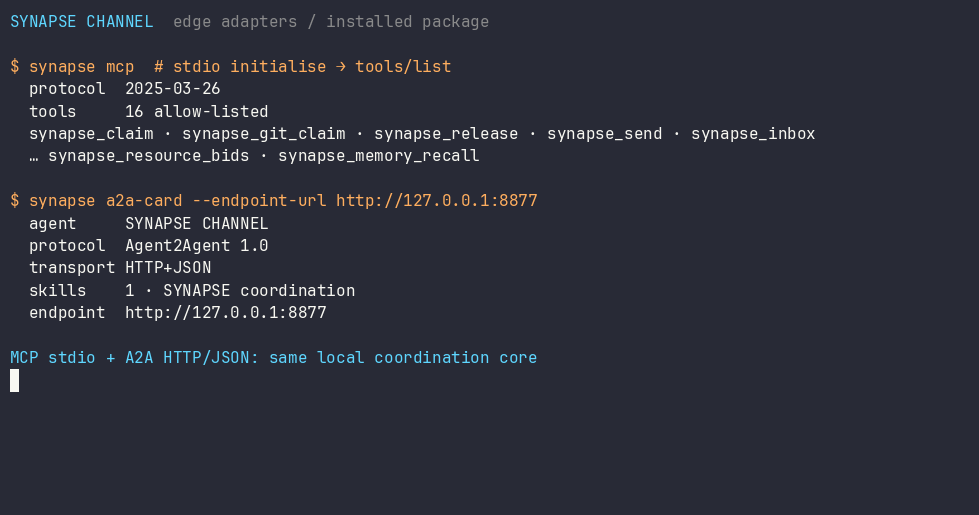
At a glance
graph LR
    A1["Agent"] --> H
    A2["Agent"] --> H
    A3["Worker"] --> H
    SUP["Supervisor"] --> H
    H["SynapseHub<br/>single source of truth"] --> CL["Claims & leases<br/>scope · epoch · checkpoint"]
    H --> BB["Blackboard<br/>plan + progress"]
    H --> CAP["Capabilities<br/>cards + routing"]
    H --> LOG["Event log (SQLite WAL)<br/>durable · optional SQLCipher at rest"]
A claim leases a declared unit of work with a file scope, so the hub refuses overlapping live claims. Provider hooks and the staged Git gate enforce that authority on their documented surfaces; they do not sandbox every filesystem or external side effect. Plans, handoffs, checkpoints, and a stall supervisor keep the work moving, and the durable event log means a hub restart resumes live leases rather than losing them.
Core and Optional Layers
SYNAPSE CHANNEL ships as one installable package, but the public surface is tiered so the lean bus stays clear:
| Layer | Taxonomy tier | What belongs there |
|---|---|---|
| Local coordination core | stable | The hub, send/wait/listen/arm, claims, tasks, locks, status, board, init, and fleet bootstrap commands used for daily coordination. |
| Edge adapters | adapter | MCP, A2A, git hooks, tmux/provider bridges, shell hooks, ingestion, and worker seats that connect existing tools to the bus. |
| Operator analysis | analysis | Doctor, state, dashboard, causality, multihub, reliability, trust graph, directory, accounting, fleet scorecard export, manifests, and event queries. These do not mutate coordination state; explicit export modes can write to an operator-selected sink. |
| Governance and integrity | governance | Policy checks, approvals, ACL/role surfaces, federation, Merkle roots, release receipts, reproduction, compaction, encrypt-key / SQLCipher key operations. |
| Lab surfaces | experimental | Benchmarking, participant fabric, route-task, sandbox, workflow, TTL advice, memory recall, auto-action, and resource bidding. |
The authoritative map is synapse_channel.surface_taxonomy
and the generated operator view is Public surface and stability.
Adapters and lab surfaces can be installed and used from the same package, but
they do not change the single-dependency local core.
Six measurable discovery profiles keep those layers explicit without hiding or
removing commands: first-use, core, adapters, governance, labs, and
all. Inspect any profile without starting a hub or optional process:
synapse commands --profile first-use
synapse commands --profile first-use --json
The JSON contract records three first-use concepts and three shell commands, against a hard limit of eight concepts, with zero optional extras and zero implicitly started persistent services. Profile inspection is read-only; optional capabilities activate only through their documented package extra and command or flag, and deactivate by stopping that exact process or omitting the opt-in. See installation profiles.
Optional Participant memory recall
participant ask, participant exchange, and participant convene can wrap
their seats with bounded, read-only recall from REMANENTIA's lightweight HTTP
API. Recall is disabled unless --memory-url is present; no memory process is
started implicitly. Tokens are accepted only through --memory-token-file, and
recalled snippets enter TurnRequest.context inside a data-only fence while the
operator prompt remains unchanged.
synapse participant ask claude "review this design" \
  --memory-url http://127.0.0.1:8001 \
  --memory-token-file /run/secrets/remanentia
Current HTTP results omit REMANENTIA's honesty axes, so every recalled hit is shown as boundary data; similarity is relevance evidence, not truth evidence. No-hit and unavailable states remain visible without failing the provider turn. See Participant memory recall for setup, limits, CLI flags, library use, and audit boundaries.
Coming: Studio — the dashboard is growing into an operator Studio: a control plane that answers, at a glance, what is happening, what is at risk, and what is safe to do next. The instrument-panel design system,
/studioreference, live/studio/commandshell, security-posture panel, and event-log LiveFeed have shipped. Local-first and read-only by default — an organisation-level workbench is planned as a separate layer.
Install
python -m pip install synapse-channel       # the release from PyPI
python -m pip install -e ".[dev]"           # or an editable dev checkout
# optional: live hub event-store page encryption (SQLCipher)
python -m pip install 'synapse-channel[sqlcipher]'
# optional: whole-file AES-GCM envelope helpers (encrypt-key profile/migrate/rekey)
python -m pip install 'synapse-channel[encryption]'
For an editable checkout, keep the local .venv aligned with the repository's
declared dev, docs, and benchmark extras:
.venv/bin/python tools/check_dev_dependency_drift.py --check
.venv/bin/python tools/audit_dependency_tooling.py --check
The second check is offline. It verifies that local preflight still covers the expected tool gates, GitHub Actions are pinned to full commit SHAs, Dependabot covers actions/Python/Docker, and the PyPI publish/download metadata surfaces remain wired.
This installs the synapse command. To run the hub as an always-on local service
or a container, see the deployment guide (a systemd user
unit and docker compose are both included). On Linux, install only a permanent
exact-identity waiter with
synapse arm install --identity myproject/agent --start; it uses mailbox replay
and Restart=always, without installing a hub. Its
myproject/agent-rx receiver can coexist with agent-tmux's distinct
myproject/agent-pane-rx bridge, preserving durable gap recovery and active
pane delivery without name takeover. The pane bridge fails closed on busy,
modal, unknown, or ambiguous provider screens: it persists the pending wake and
submits its fixed prompt only after two provider-specific idle-composer probes.
It acknowledges delivery only after the pane shows prompt consumption; an Enter
ignored during asynchronous provider startup leaves the single staged prompt
pending for a safe Enter-only retry.
It accepts only exact identity, role, or group targets; global priority and CEO
broadcasts remain durable inbox traffic but never inject into provider panes.
For unattended active delivery, supervise that pane bridge independently of agent turns:
synapse waker install \
  --identity myproject/agent \
  --session myproject-agent \
  --cwd "$PWD" \
  --agent-command codex \
  --start
synapse waker status --identity myproject/agent
The generated synapse-waker@.service has Restart=always and a main-loop
watchdog, so a dead bridge is recreated without relying on the agent to remember
to re-arm it. waker stop --reason ... first persists an inhibited state and
then stops only the exact bridge; systemd cannot immediately resurrect it, and
the tmux provider terminal is not killed or restarted. Only an explicit
waker resume clears the inhibit.
Native Windows service setup is not
claimed; use WSL with systemd as documented in the deployment guide.
For agent-assisted environment preparation, synapse setup spec, inspect,
plan, authorize, apply, verification-plan, authorize-verification,
and verify expose the packaged synapse-setup.v1
contract. The first three describe requirements, observe the host, and bind a
credential-free target to a non-executable SHA-256 plan. authorize emits a
short-lived envelope for one reviewed plan. Restart authority must match the
exact hub PID observed in that plan; first-start authority carries no PID. On
Linux with systemd-user,
apply re-inspects the target and plan-bound executable generation, atomically
reserves the authorization in a private replay ledger, and may install or start
only the package-owned local hub and exact waiter units. It preserves declared
PIDs, emits a digest-bound receipt, and restores prior unit and service state on
failure. After a successful application, the separate verification transaction
sends one directed canary, requires the exact waiter's durable ACK, restarts
only the authorized hub PID, proves replay through a new hub PID, re-inspects
the bound generation, and preserves declared terminal/provider PIDs. It emits a
single-use, digest-bound verification receipt; an application receipt alone is
not strict end-to-end readiness evidence. Package, Python, identity, secret,
remote, macOS, native Windows, and container changes remain blocked. See
Machine-readable setup for the schema,
expiry, nonce-consumption, and exact-PID authority rules.
Two optional shell conveniences ship with the CLI: synapse completions bash|zsh|fish prints tab completion for every subcommand (generated from the
live parser, so it never drifts), and synapse install-shell-hook adds the
guarded block that auto-arms a wake listener in each new terminal:
synapse completions bash > ~/.local/share/bash-completion/completions/synapse
synapse install-shell-hook          # auto-arm Bash, Zsh, and Fish terminals
Who it's for
- A developer running two or three coding agents on one repository, tired of merge collisions and duplicated work.
- A team operating a fleet of agents across several services that needs one plan, one roster, and cross-repository task dependencies.
- A builder of long-running autonomous agents who wants event-driven wakeups, durable coordination, and a resume-after-restart story instead of a polling loop and lost state.
See use cases for when it fits, when it is overkill, and who reaches for it.
Getting started
The one path to follow. Run the three-command self-contained proof below, then follow the multi-seat golden path for persistent agents. Optional adapters and generated workspaces come later.
First 60 seconds
On a clean Python environment, verify the installed CLI before wiring agents into a real repository:
python -m pip install synapse-channel
synapse doctor
synapse demo --output ./synapse-golden-demo
synapse doctor reports local setup issues such as identity, hub exposure,
root-filesystem pressure, and missing waiters. A brand-new machine may warn that
no hub or waiter is running; that is expected before service setup. synapse demo starts its own local hub, drives a planner/worker coordination flow, and
succeeds when it prints:
The CLAUDE and CODEX names in that flow are scripted in-process
SynapseAgent identities. The demo launches no provider CLI and spends no model
turn.
success: coordination demo completed
After the self-contained proof, synapse quickstart-coding remains available as
an optional generated-workspace demo. It creates a temporary coding-fleet
workspace, runs the live overlapping-claim refusal demo, removes the workspace
after success, and prints:
success: coding fleet demo completed
Or run the whole first-run sequence as one command:
synapse fleet-init
It runs the doctor (--fix to repair the default local hub and waiter),
scaffolds a persistent ./synapse-fleet workspace, probes which provider CLIs
this machine can seat (claude, codex, kimi, ollama, …), runs the demo smoke,
and prints the next-steps plan — waiter arming, per-provider seat commands,
git-init, dashboard — with the workspace's project name filled in.
Fastest safe trial path
Use one self-contained path before changing a real checkout:
python -m pip install synapse-channel
synapse doctor
synapse demo --output ./synapse-golden-demo
The demo starts and stops its own local hub, uses a disposable committed Git
repository, proves separate claims and overlapping-claim refusal, denies a
mutation before handoff, permits it after handoff, and writes an observed
verification receipt plus a static dashboard. It needs no persistent hub,
provider CLI, Git hook, MCP host, or A2A bridge. The same exact three-command
block is regression-bound across this README, the quick start, and the CLI
reference, and its synapse demo command is exercised as a real subprocess.
After that proof passes, use synapse fleet-init --fix to prepare a persistent
local workspace, hub, and waiter, then run synapse git-init --name trial-agent inside the real repository before an agent edits it. Optional A2A
interoperability is a follow-on in the A2A bridge guide; it is
not a prerequisite for first coordination value.
Releases
This package is developed in the open and dogfooded daily: a fleet of coding
agents runs its own coordination on it, so problems surface in real use and are
fixed quickly. Releases are therefore frequent and mostly small — fixes and
hardening rather than churn. Current 0.x releases do not promise backward
compatibility across minor releases. The wire vocabulary and public Python API
are guarded against accidental drift, but a reviewed 0.x minor release may
deliberately change either surface. Every such change updates the frozen
contract tests, bumps WIRE_PROTOCOL_VERSION for a wire-incompatible change,
and ships changelog plus migration notes. Starting with 1.0.0, a breaking
stable public Python API change requires a package major release; a breaking
wire change requires a wire-protocol version bump. See
API and wire stability.
1.0.0 is planned as the first stable commercial release of SYNAPSE CHANNEL,
with the operational contracts, packaging, support surface, and commercial
licensing terms documented as part of that release.
SYNAPSE CHANNEL is seeking startup funding, strategic partners, and aligned
ecosystem co-owners who want to help mature the coordination layer for
production multi-agent development. See commercial licensing
or write to protoscience@anulum.li.
If you need a fixed target, pin a version (synapse-channel==X.Y.Z); to get the
latest fixes, track the newest release. Both are supported.
Usage
Run a hub with model workers
Launch a hub plus one or two local model workers in one command:
synapse team
If Ollama isn't running, synapse team falls back to a single offline
rule-based worker (deterministic canned replies) so the flow still works; start
Ollama and re-run for real model replies.
Then, from another terminal, watch the channel or send a message:
synapse listen --name USER                                 # terminal A: watch the channel as USER
synapse send --target FAST "what is the status of TASK-1?"  # terminal B: one-shot, unique ephemeral sender
synapse send --require-recipient --target FAST "ping"  # also print the positive receipt
A send without --name uses a unique ephemeral sender, so a one-shot send
never trips the hub's one-owner-per-name rule against a listener you already
have connected under the same name. One-shot sends also avoid the waiter-name
collision: synapse send --name api-dev-rx ... sends as api-dev, leaving the
persistent api-dev-rx wake
socket connected. Directed sends request a private receipt by default and exit
non-zero when no consume-live recipient matches — including when a stale socket
is still connected but has neither a recent reaction nor a live waiter. The
message remains journalled and best-effort routed, while the hub records a dead
letter instead of reporting socket presence as delivery. Each one-shot send
uses a unique message identity and accepts only its matching receipt, so an old
pending receipt replayed when the sender reconnects cannot be reported as the
new send's result. Add
--require-recipient when the positive receipt should also be printed and a hub
too old to return receipts must fail closed.
For selected sensitive payloads, encrypt the body before it reaches the hub and decrypt it only on the recipient side:
synapse send --target FAST \
  --encrypt-key-file ./payload.key \
  --encrypt-key-id project-main-v1 \
  --encrypt-recipient FAST \
  "private handoff note"
synapse listen --name FAST --for FAST --decrypt-key-file ./payload.key
The hub still sees sender, target, channel id, key id, recipient names, nonce, ciphertext, and delivery metadata. This does not manage key discovery or rotation.
Running pieces individually
synapse hub --port 8876
synapse hub --port 8876 --db ./synapse.db            # crash-safe: resumes leases + history on restart
synapse hub --port 8876 --relay-log ./feed.ndjson    # mirror the channel to a compact file for observers
synapse hub --shutdown-close-timeout 5               # bound active socket close handshakes on stop
synapse hub --max-progress-per-author 500            # cap retained board progress per author
synapse hub --max-findings-per-agent 200             # cap durable findings admitted per agent
synapse hub --tls-certfile ./hub.crt --tls-keyfile ./hub.key  # native wss://
synapse worker --name FAST --provider ollama --model gemma3:4b
synapse worker --name OFFLINE --provider rule        # no network, canned replies
synapse worker --name TIER --provider tiered --model small --heavy-model big  # route trivial→rule, hard→heavy
synapse relay ./feed.ndjson                          # decode and print that file as readable lines
synapse ingest ./synapse.db --memory --cursor ./mem.cursor  # stream durable memory events since a seq cursor (NDJSON)
synapse memory-recall ./synapse.db "transport handoff"       # local recall over durable memory records
synapse compact ./synapse.db --all --max-checkpoints-per-task 3 --archive-report ./compact-report.html
synapse board                                        # print the shared task/progress blackboard
synapse task declare BUILD --title "compile" --idem-key build-v1  # retry-safe durable write
synapse task update BUILD --status done              # mark a plan task done so dependents unblock
syn ack BUILD --evidence "pytest -q"                 # post evidence and mark a board task done
synapse supervisor --idle-seconds 300 --history-multiplier 3  # re-offer stalled plan tasks
synapse manifest                                     # print capability cards, including contract counts
synapse capability-card keygen --key-id PROJECT:worker:v1 --private-out ./card.pem --agent PROJECT/worker --project PROJECT --trust ./card-trust.json
synapse directory                                    # print discovery-only agents/resources
synapse route-task BUILD --limit 3 --event-store ./synapse.db  # add observed evidence
synapse resource-bids BUILD --resource-kind gpu      # rank live resource offers without reserving capacity
synapse a2a-card --endpoint-url https://agent.example.com/a2a/v1  # emit A2A Agent Card JSON
synapse a2a-serve --endpoint-url http://127.0.0.1:8877             # run the HTTP+JSON A2A bridge
synapse doctor                                       # check for common misconfigs (identity, exposure, hub, waiter)
synapse demo                                         # installed self-check: local hub + planner/worker flow
synapse quickstart-coding                            # create a temporary coding fleet workspace and run it
synapse new coding-fleet ./demo-fleet                # scaffold a runnable two-agent coding demo workspace
synapse hub --host 0.0.0.0 --token s3cret            # require a shared secret when binding off-loopback
synapse hub --host 0.0.0.0 --token s3cret --tls-certfile ./hub.crt --tls-keyfile ./hub.key
synapse hub --max-connections-per-host 4             # cap simultaneous sockets from one remote host
synapse send --token s3cret --name USER "hello"      # agents present the token to a secured hub
For an observed cross-hub task revision, task declare and task update also
accept --causal-parent HUB_ID:SEQ:SHA256. The SHA-256 is the complete event
fingerprint exposed in multi-hub board provenance. A verified same-task parent
lets the observed fold discard only that proven ancestor; a missing or
mismatched reference remains unresolved and never becomes a concurrency claim.
This metadata changes the advisory observed board, not local claim authority.
Use it with your coding agent
Synapse coordinates the agents you already run; it does not replace them. Its MCP and A2A adapters are interop surfaces: they let Claude Code, Claude Desktop, Cursor, Codex, Copilot-style hosts, Aider, orchestration frameworks, and other agent tools participate in one local coordination bus while those tools still own prompting, model choice, tool use, and editor/runtime behavior. The integration demo matrix lists three narrow, repeatable paths and the unsupported behavior that remains outside each demo.
-
Claude Code / Codex / Claude Desktop / Cursor (MCP): register the stdio server and its coordination tools load automatically — no shell hook or Synapse-specific client code.
python -m pip install 'synapse-channel[mcp]'
claude mcp add synapse -- synapse mcp         # resolves <git-project>/mcp
codex mcp add synapse -- synapse mcp --name my-repo/codex
Cursor and Claude Desktop can reuse the secret-free
examples/mcp/.mcp.jsontemplate. MCP does not wake an idle provider in this adapter; callsynapse_inboxat turn start and keepsynapse arm install --identity NAME --startactive for prompt delivery. -
Claude Code / Codex / Gemini / Grok / Kimi native file edits: print a provider-native pre-tool recipe (
PreToolUsefor the Claude family, Grok, and Kimi;BeforeToolfor Gemini CLI) that checks the authoritative live claim before a supported file tool runs.synapse adapters claude-claim-hook --identity my-repo/claude --print-config synapse adapters codex-claim-hook --identity my-repo/codex --print-config synapse adapters gemini-claim-hook --identity my-repo/gemini --print-config synapse adapters grok-claim-hook --identity my-repo/grok --print-config synapse adapters kimi-claim-hook --identity my-repo/kimi --print-config synapse adapters kimi-claim-hook --identity my-repo/kimi --install-config--print-configis read-only. Save the Grok fragment under~/.grok/hooks/*.json;synapse adapters install grokseparately installs the kebab-case~/.grok/skills/synapse/SKILL.mdcoordination skill. Kimi's opt-in installer writes only one marked block in$KIMI_CODE_HOME/config.toml(default~/.kimi-code/config.toml), and--uninstall-configremoves only that block. The equivalent combined Kimi path issynapse adapters install kimi --identity my-repo/kimi --with-hook.The provider claim-hook guide documents exact tool coverage, token-file setup, and the native-host limits. These are bounded file guards, not complete Bash or filesystem isolation.
-
Aider, or any non-MCP tool: claim a file scope before editing and let a git hook release it on commit. The claim prevents conflicting grants; enforcement of the tool's working-tree writes remains the operator's responsibility, with the staged Git gate providing a separate commit-time check.
synapse quickstart-coding # optional: run a temporary overlapping-claim refusal demo synapse new coding-fleet ./demo-fleet # optional: keep the generated workspace synapse git-init --name aider-1 # one step: install the hooks + write the conventions guide synapse git-claim --task-id AUTH --paths src/auth --name aider-1 aider src/auth/*.py # ... edit; the post-commit hook releases the claim -
Check the wiring:
synapse doctorreports the common setup mistakes — no live waiter, a hub exposed without a token, an accidental identity, or a pressured root filesystem — each with its fix. With a durable hub it also reportsN undelivered messages pending for <identity>from the receiver watermark; this is mailbox transport acknowledgement, not proof a model processed the messages. Use--disk-path <path>to check the filesystem that holds a specific workspace or cache. -
Inspect the live board:
synapse dashboard --port 8765opens a loopback-only read-only HTML view of roster, exact blackboard/claim status columns, progress, fleet visibility, task-dependency graph edges, branch-conflict candidates, release receipts, and advertised capabilities, with the same snapshot available at/snapshot.jsonfor local tooling. Pass--a2a-state-file <path>to add persisted A2A task and push-config counts to the fleet section. The dashboard derives task dependencies from the blackboard snapshot and uses live claim metadata for branch conflicts; runsynapse conflicts --check-diffwhen you need client-side git-diff refinement. The state snapshot also carriesdead_letters— directed chats that reached no live connection, per target with counts — so a message nobody is listening for shows up on the page instead of being discovered by a human relaying it. The dashboard is growing into an operator Studio — open/studiofor the design-system reference — and ships a React cockpit underclients/cockpit/(build instructions in its README; serve the built bundle withsynapse dashboard --cockpit-dist clients/cockpit/dist). If you deliberately expose the dashboard with--allow-non-loopback, pass--dashboard-token <token>and require clients to sendAuthorization: Bearer <token>; the React cockpit loads its token-free static shell, asks for that bearer, and retains it only in the tab's session storage. It never accepts the bearer in a URL. When the token is omitted on an exposed bind, Synapse generates and prints a startup token. Teams can instead pass an owner-only--dashboard-access-filemapping separate viewer/operator/admin token files to browser principals and distinct relay identities. The server-authored capability descriptor removes unauthorized write controls from the DOM and command search, but every POST is still re-authorized server-side and at the hub; admin currently gains no mutation beyond the three shipped operator writes. With--operator, the authorized command palette exposes governed message, task-declaration, and task-update forms; each reports the hub's strict outcome and grants no authority beyond the hub's validation, ACL, rate limit, and audit decision. With--feeds-db, the cockpit's Audit tab incrementally renders the universal receipt ledger and governed operator-relay history as two distinct, bounded store-attested feeds. The receipt ledger includes minimized claim and guard denials, dead-letter escalations, and identity-pin reclaim outcomes; every declared durableEventKindis explicitly classified as receipt-bearing or intentionally omitted. Absence and stale last-good data remain visible. Add--observed-peer HUB=URIto include advisory peer-hub rows in the browser and/snapshot.json; those rows are labelledobserved@HUBand never grant local claims. -
Verify a release redeploy:
synapse doctor --redeploy-checklistprints package, service, roster, durable-state, and git-hook checks for a post-release local fleet restart. It does not restart services by itself, and restart commands are withheld by default. After inspecting the exact live hub PID and roster, an operator with fresh disruption authority can add--redeploy-authorize-restart-pid PID; the rendered command rechecks that PID while holding a fail-fast host-local custody lock. Dogfooding requires every new release tag to be adopted by the local hub immediately after publication, using that bounded authorised path and post-restart health verification. -
Install the always-on local services:
synapse initprints or installs the hub, project presence, and non-LLM wake listener units.doctor --fixprints the exact commands when a waiter is missing.synapse init --project myrepo --identity myrepo/worker --install-user-services synapse init --project myrepo --identity myrepo/worker --start-user-services synapse doctor --fix -
Launch a provider command with Synapse identity:
worker-sessionexports the identity variables before the provider starts. Interactive terminal providers such as Codex, Claude, Kimi, and Grok run in a persistent tmux session by default when launched from an interactive terminal, with a directed waiter kept alive in the background. Non-terminal commands keep the temporarysyn armsidecar path.synapse worker-session --identity myrepo/worker -- codex --sandbox danger-full-access -
Inspect or control the tmux wake path manually:
codex-tmuxis the diagnostic/admin surface behind the automatic provider launch path. It keeps a provider TUI in a named tmux session and injects a fixed wake prompt when Synapse receives a directed message. It does not paste the Synapse payload into the terminal; the provider reads the inbox itself after waking. Existing sessions are accepted only when their live tmux environment matches the configuredSYN_PROJECTand exactSYN_IDENTITY; a session already owned by another seat is refused by start, status, and wake before any keys are sent. A successfultmux send-keyscall is not treated as provider delivery: the bridge observes prompt consumption and retains an unacknowledged staged prompt for a later Enter-only retry, so provider startup cannot strand or duplicate it. While waiting, the bridge disconnects at a bounded interval and re-proves the session, binding, and live agent pane before registering again, so a vanished pane cannot remain advertised indefinitely.synapse codex-tmux start --identity myrepo/codex-main --session myrepo-codex --cwd "$PWD" synapse codex-tmux wait --identity myrepo/codex-main --session myrepo-codex --cwd "$PWD"For unattended operation, replace the manually maintained
waitprocess withsynapse waker install --identity myrepo/codex-main --session myrepo-codex --cwd "$PWD" --agent-command codex --start. The waker supervises only the delivery bridge and attaches to the existing bound session; it never owns the provider terminal lifecycle.
Agent ergonomics — the syn commands
For the short loop an agent runs every session — arm a waiter, send a message,
read the inbox, glance at the board — the package also ships syn, a thin,
identity-correct front end over the commands above:
syn name                          # resolve and print this terminal's identity
syn arm                           # keep a directed-only waiter armed (named <project>-rx, distinct from the sender)
syn say REMANENTIA,CEO "ack"      # send to one, several, or all
syn ask CEO "status?"             # send, require an online recipient, and wait for replies
syn inbox                         # print messages addressed to you since the cursor
syn inbox --project-wide          # explicitly include every identity in this project
syn inbox --name PROJ/role        # read one exact identity under its own cursor
syn board                         # the shared task/progress board
syn who --me                      # show whether this identity and its -rx waiter are online
syn reap                          # list this identity's shell-hook waiter pidfile
syn reap --pid 1234               # remove a dead pidfile or SIGTERM only the verified waiter PID
syn locks                         # list this project's active leases with release commands
syn ack BUILD --evidence "pytest -q" --artifact coverage.xml
syn commit README.md -m "document the change"
The one thing it gets right that a hand-rolled shell alias does not is identity.
The project is resolved from --project, then $SYN_PROJECT, and the working
directory only as a last resort. Ambient $SYN_IDENTITY is never a silent
source: it refines the identity to a full project/<type>-<id> only when
$SYN_PROJECT is also set and agrees with it — the pair the shell hook exports
together is the opt-in. A SYN_IDENTITY standing alone or disagreeing (the
borrowed-shell signature) is dropped out loud: the command proceeds as the local
identity and says so, or refuses entirely when the local fallback also looks
accidental (the home directory, a system path). Set $SYN_PROJECT once per
terminal and the identity is stable across tool calls.
syn inbox filters on that full resolved identity and advances a cursor named for
that identity. It never falls back to a shared project cursor. Use
--project-wide when the broader project feed is intentional, --name PROJ/name
for another exact address, or repeat --as PROJ/name to drain standing role
addresses under independent cursors. A bare --as PROJ is the explicit
project-wide alias form; $SYN_ALIASES supplies the same standing alias list.
On the hub side the waiter identity is protected by a name-ownership lease:
the first synapse wait/arm for a name is granted an opaque token (persisted
under ~/synapse/owner-lease/), every re-arm presents it and re-takes its own
name, and a stranger claiming the name — takeover flag or not — is refused with
close code 4016 until the lease lapses (--lease-offline-ttl, default one
hour offline). Beneath the lease sits a zero-config machine identity: the
first connect provisions a per-machine Ed25519 key, the hub pins each signed
name to it on first use (durable across hub restarts, --identity-pins), and
a claim from any other machine is refused until the operator clears the pin.
One name, one owner, across reconnects and restarts.
While the hub is running, it also watches every unexpired claim and assigned
non-terminal board task. If that exact owner has no fresh -rx waiter for 30
continuous seconds, the hub broadcasts one machine-readable dark_seat_alert
with the affected work and the exact permanent-arm command. Re-arming clears the
episode; the monitor never releases or reassigns work on its own.
Hyphenated aliases
(syn-name/syn-wait/syn-say/syn-ask/syn-inbox/syn-board/syn-reap/syn-locks/syn-ack/syn-commit)
are installed too.
| Command | What it does | The detail it gets right |
|---|---|---|
syn name | Resolve and print this terminal's identity. | Same resolution order every syn command uses — what it prints is what you coordinate as. |
syn arm | Keep a persistent directed-only waiter armed. | Connects as the -rx sidecar (never steals the sender name); announces exactly whose messages it wakes on; stays armed across many wakes. |
syn-wait | The wake primitive: wait for one directed message, print it, exit. | Defaults to --max-wakes 1 so a harness that re-invokes on background-task exit is actually woken; self-healing reconnect means a hub restart re-arms transparently and only a real wake ends the wait. |
syn say | Send to one, several, or all. | Sends as the owner identity even when a waiter holds the -rx name. |
syn ask | Send and wait for replies. | Requires an online recipient — a question never silently addresses nobody. |
syn inbox | Print messages addressed to you. | Defaults to the exact resolved identity and its own cursor, so another terminal's mail is neither displayed nor consumed; broader project scope requires --project-wide. |
syn board | The shared task/progress board. | One view of the plan every agent sees. |
syn who --me | Presence of this identity and its waiters. | Reports the identity separately from durable -rx and active -pane-rx sidecars, because receiver sockets are not agents. |
syn locks | Active leases for the project. | Prints holder, scope, age, remaining TTL, checkpoint/git context, and the exact synapse release <task> --name <owner> command. |
syn reap | Clean up shell-hook waiter sidecars. | Inspects only this identity's pidfile and refuses to signal a PID unless its live command line verifies as that exact waiter — it never pattern-kills. |
syn ack TASK | Post evidence and close a board task. | Repeatable --evidence/--artifact land as an assessment note authored by the resolved identity; waits for hub confirmation before marking done. |
syn commit | Lease-guarded, pathspec-scoped commit. | Holds the project git lease and stages/commits only the requested paths, so a co-agent's staged files stay out of your commit. |
Two follow-ons complete that loop. Adding --mailbox to synapse arm also wakes
the waiter on directed messages that arrived while it was disconnected — the
reconnect or re-arm gap — by asking the hub to replay them on connect, resuming
from a per-identity cursor under ~/synapse/mailbox-cursor/ so a re-arm does not
replay the whole backlog (off by default; needs a wire version 2 hub).
Agent-tmux uses a distinct <identity>-pane-rx receiver, so the mailbox arm can
stay online beside live pane injection without either sidecar taking over the
other's name. synapse release can attach a hub-echoed receipt with evidence, artifacts,
changed files, approvals, known failures, confidence, and evidence freshness; the
receipt carries advisory epistemic_status metadata (supported,
needs_freshness, stale, degraded, or unsupported) with reasons derived
from the submitted evidence, and --receipt-json prints it for automation.
To make fresh terminals connect automatically, install the shell hook once:
synapse install-shell-hook --shell auto
New Bash/Fish/Zsh terminals then export SYN_PROJECT/SYN_IDENTITY and keep a
cheap synapse arm sidecar running. The hook does not silently join whatever
git checkout the terminal happens to start in. It joins the neutral
SYNAPSE_DEFAULT_PROJECT lane, or user when unset, unless you explicitly set
SYN_PROJECT/SYN_IDENTITY or opt a repository in with .synapse/project:
mkdir -p .synapse
printf '%s\n' myrepo > .synapse/project
For legacy CWD-derived behavior, set SYNAPSE_AUTO_PROJECT_FROM_CWD=1 in that
terminal. The hook also wraps common provider commands (codex, claude,
kimi, grok, gemini, agent, ask, ollama) through synapse worker-session, so cloud and local LLM sessions inherit the same Synapse
identity from process start. In an interactive terminal, Codex/Claude/Kimi/Grok
launch through a persistent tmux session and directed wake bridge automatically;
the user still types only the provider command. Set SYNAPSE_PROVIDER_TMUX=0 to
keep those providers on the direct execution path, or SYNAPSE_AUTO_CONNECT=0 to
disable the hook for a terminal.
Durability
Passing --db backs the hub with an append-only SQLite event log (standard
library, WAL mode). Claims, releases, task updates, resource offers, task-board
writes, and chat messages are recorded, and the hub rebuilds its state by
replaying the log on start-up. The guarantee is split honestly by workload:
keyed covered coordination mutations commit their event, canonical request
digest, exact response, and evidence intent together at synchronous=FULL
(durable across an OS crash); the high-volume chat/history path commits at
synchronous=NORMAL (durable across an application crash, may lose the last
commit on power loss).
Native Agent Evidence Format (AEF) v0.1 emission is an explicit opt-in on top of that durable log. Generate an owner-only Ed25519 receipt key, give the hub a stable identity, and enable the route:
synapse merkle keygen ~/synapse/aef-receipt-key
synapse hub \
  --db ~/synapse/hub.db \
  --hub-id hub.example \
  --aef-signing-key ~/synapse/aef-receipt-key
Supported evidence rows and their AEF outbox cursor commit in one SQLite
transaction. Before serving, the hub reconciles every pending cursor; while
serving, a dedicated worker drains new rows in order (default cadence one
second, configurable with --aef-drain-interval). A crash after receipt
emission but before acknowledgement reuses the verified receipt rather than
emitting a duplicate. A failed drain leaves the durable cursor pending and
retries; legacy rows and their historical Merkle serialization are never
rewritten or merged with the native AEF chain. Without --aef-signing-key, the
hub retains its legacy-only posture.
Use synapse compact to bound the durable memory spine after every read-side
consumer has advanced past a floor sequence. Add --archive-report when the
maintenance run should leave an operator-readable HTML record of the
pre-compaction event snapshot:
synapse compact ./synapse.db --all --max-checkpoints-per-task 3 \
  --archive-report ./compact-report.html
The report is written owner-only and includes event counts, the compaction floor, checkpoint/finding removal counts, board tasks, release receipt notes, and a bounded coordination timeline. It is an audit aid for a local event store; it does not certify that release evidence is sufficient.
SQLCipher live event store (at rest)
SQLCipher completes the at-rest encryption story for the live hub. The default install stays dependency-free and uses ordinary SQLite. When you need page-level confidentiality for the durable coordination log while the hub holds it open, install the optional extra and pass an owner-only key file:
python -m pip install 'synapse-channel[sqlcipher]'
synapse encrypt-key generate ~/synapse/hub.key
chmod 600 ~/synapse/hub.key

# New encrypted store (main DB + WAL stay ciphertext on disk):
synapse hub --db ~/synapse/hub.db --db-key-file ~/synapse/hub.key

# Plaintext → encrypted offline migration (hub stopped; destination must not exist):
synapse encrypt-key migrate-sqlcipher \
  --key ~/synapse/hub.key \
  --source ~/synapse/hub-plain.db \
  --destination ~/synapse/hub.db

# In-place key rotation via PRAGMA rekey (hub stopped):
synapse encrypt-key generate ~/synapse/hub.key.new
synapse sqlcipher rekey \
  --db ~/synapse/hub.db \
  --old-key ~/synapse/hub.key \
  --new-key ~/synapse/hub.key.new
Passphrase-derived keys (optional) tune scrypt cost on generation:
synapse encrypt-key generate --from-passphrase \
  --scrypt-n 65536 --scrypt-r 8 --scrypt-p 1 \
  ~/synapse/hub.key
Operators and analysis CLIs open the same store with the same key material — missing or wrong keys fail closed (no silent empty report):
synapse doctor --db-path ~/synapse/hub.db --db-key-file ~/synapse/hub.key
synapse event-query ~/synapse/hub.db --db-key-file ~/synapse/hub.key 'task T timeline'
synapse postmortem ~/synapse/hub.db --db-key-file ~/synapse/hub.key T
synapse reliability ~/synapse/hub.db --db-key-file ~/synapse/hub.key
synapse causality contention ~/synapse/hub.db --db-key-file ~/synapse/hub.key
synapse dashboard --feeds-db ~/synapse/hub.db --feeds-db-key-file ~/synapse/hub.key
synapse multihub observe --peer-db ~/peer/hub.db --db-key-file ~/peer/hub.key
| Surface | What SQLCipher covers |
|---|---|
| Live hub | synapse hub --db … --db-key-file — page encryption for main DB + WAL while open |
| Doctor | synapse doctor --db-path … --db-key-file — verify the key opens the store |
| Readers / analysis | event-query, postmortem, merkle, causality, accounting, reliability, trust-graph, memory-recall, debug/reproduce, approval status, ttl-advice, workflow contention, participant costs, cross-repo --db, … |
| Operator UI | Dashboard store feeds via --feeds-db-key-file |
| Multi-hub / MCP | multihub observe --db-key-file; MCP tools take event_store_key_file for route observations and memory recall |
Complementary whole-file envelopes (optional [encryption] extra) protect
relay logs, A2A state files, cursors, and archives with AES-256-GCM via
synapse encrypt-key profile|migrate|rekey|backup|restore. They do not
replace page encryption for a live open SQLite database — that is SQLCipher's
job.
Honest limits: SQLCipher does not protect hub RAM, does not replace filesystem
permissions or connect authentication, and is not multi-tenant isolation. Stock
installs without [sqlcipher] refuse --db-key-file with an install hint.
Full operator profile, key handling, and rotation: at-rest encryption.
Token-thrifty observation
--relay-log mirrors every broadcast to a newline-delimited file in a compact
short-key form (encode_lite), so a token-budgeted agent can watch the channel
by tailing a file instead of holding a socket. synapse relay <file> decodes it
back to readable lines and can resume from a saved --cursor. Version 2 retains
structured JSON payloads and every auxiliary envelope field under a compact
extension mapping; the decoder remains compatible with existing version-1 logs.
Timestamps retain millisecond precision, and --relay-max-lines bounds the file.
A committed benchmark compares the same full field set in wire, minified, and
lite forms — see benchmarks/.
Exposure
By default the hub binds to loopback and runs with no authentication — the right
posture for one operator on one machine. When that is not enough (a worker with
tool-use, or a hub bound off-loopback), --token requires a shared secret that
connecting agents present with --token. Binding off loopback without a token is
refused rather than silently exposed: the hub will not start unless you set a
token (and --metrics-token when metrics are on), or explicitly pass
--insecure-off-loopback to accept the risk. This is a proportionate gate, not a
cryptographic identity system.
For native wss://, pass both --tls-certfile and --tls-keyfile. TLS protects
the transport but does not replace --token; an off-loopback hub still needs the
shared secret unless you explicitly opt into --insecure-off-loopback. Off
loopback TLS is also required, not just recommended: a token presented over
plaintext ws:// off loopback is refused (the token and every frame would be
readable on the wire), so add native TLS or a wss:// proxy — or pass
--insecure-off-loopback to accept the risk on a trusted LAN.
MCP server face
Any MCP-compatible agent — Claude Desktop, Claude Code, an editor assistant — coordinates through Synapse with no Synapse-specific code. Install the optional extra and register the host in one command:
python -m pip install 'synapse-channel[mcp]'
claude mcp add synapse -- synapse mcp
# or: codex mcp add synapse -- synapse mcp --name my-repo/codex
synapse mcp runs a Model Context Protocol server over stdio that is itself a hub
client, exposing send, bounded durable inbox, status, claim, release, handoff,
and plan updates as MCP tools, with the board, state, and manifest as live
resources. It also exposes read-only resource templates for a single board task,
one agent, and one resource kind. The bridge derives a visible project identity
when --name is omitted, but concurrent clients should pin distinct names. It
does not wake an idle provider; the permanent waiter remains a separate path.
The hub stays MCP-agnostic and the core install keeps its single dependency — see
the MCP guide.
Discovery, advisory routing, and memory
Every surface in this group is advisory by design: it prints ranked, provenance-tagged evidence for a human or an agent to act on, and none of it claims work, reserves capacity, mutates the board, or turns a capability card into executable trust.
| Surface | What it prints or serves | Where its authority ends |
|---|---|---|
synapse a2a-card | The live capability manifest projected as an A2A Agent Card JSON document, ready for a thin HTTP edge to serve as /.well-known/agent-card.json. | Discovery metadata only. |
synapse a2a-conformance | The local support matrix against the A2A 1.0.0 operation model — supported, partial, unsupported, and external rows. | Visible from the installed package; not an external conformance claim. |
synapse directory | The capability manifest joined with live resource offers into a discovery-only directory. | Routing hints and review evidence; no reservation, authorisation, or trust certification. |
synapse route-task | Candidate agents for a board task, ranked by deterministic local signals; with --event-store it adds positive release-receipt notes as observed evidence, each tied to its source task and durable event sequence. | Does not claim work, mutate the board, reserve resources, or grade agents. |
synapse resource-bids | Resource offers ranked with deterministic reasons: kind, capacity, task-class/skill matches, description and name overlap, metadata. | A marketplace-style view only; nothing is reserved or authorised. |
synapse memory-recall | Provenance-preserving recall over durable findings, checkpoints, and handoffs: source sequence, event kind, task id, actor, matched tokens. | Reads only the local event store; no external embeddings, no service, no truth certification. |
Capability cards can also carry declarative capability contracts: per-task-class
input_schema and output_schema mappings plus optional preconditions and
postconditions — discovery metadata for routing and review, not a grant of
executable trust.
They can now carry a domain-separated Ed25519 signature from a separate
card-signing key. synapse capability-card keygen|sign|verify manages the local
profile; worker --capability-card-key ... signs live advertisements and
hub --capability-card-trust ... verifies them. Every projection exposes an
explicit result, including valid, missing_signature, key/signature/expiry
failures, replay, downgrade, binding, digest, and history-capacity failures.
Verification remains advisory and unsigned cards remain compatible. History is
bounded and in memory by default; hub --capability-card-history-db FILE adds an
owner-only SQLite replay/downgrade floor across hub restarts and fails visibly as
history_unavailable when it cannot commit lifecycle state.
Official Go client
clients/go/synapse provides the official Go client for read-only ops and CI
tools. It fetches HTTP JSON surfaces such as synapse dashboard /snapshot.json
through DashboardSnapshot or GetJSON, with optional bearer authentication
for dashboard tokens on exposed HTTP surfaces.
It does not implement the WebSocket mutation protocol for claims, chat, board
writes, release receipts, or presence. See the Go client guide.
Official TypeScript/JavaScript client
clients/js provides the official typed WebSocket client, published to npm as
@anulum/synapse-channel. Unlike the read-only Go client it speaks the mutation
protocol — chat, claims, releases, board reads, presence, and receipts — and runs
unchanged in the browser and in Node 20+ with no runtime dependencies. See the
TypeScript/JavaScript client guide.
A2A HTTP bridge
synapse a2a-serve --endpoint-url ... runs the Agent2Agent edge directly — an
intentionally local-first HTTP+JSON bridge:
- Serves the public Agent Card; forwards
POST /message:sendtext/data/file parts into SYNAPSE chat; supports immediatePOST /message:streamServer-Sent Events; exposes bridge-local task list/get/cancel and push-notification configuration routes; exposes authenticated task-scoped, credential-free push-delivery evidence; accepts JSON-RPC 2.0 on/rpc. - Operational bounds: Bearer auth plus request size/depth limits, durable task
state with
--state-file, stale-task failure with--task-timeout, one bounded subscription wait with--subscribe-timeout, plus a fixed bounded three-attempt webhook retry schedule whose exhaustion dead-letters delivery without rewriting the stored task transition. - Bearer custody: prefer owner-only
--a2a-token-file PATHon serving and outbound commands. Explicit--a2a-tokenremains a process-visible compatibility override. Outbound clients refuse bearer-over-HTTP except to a literal loopback IP unless--a2a-allow-insecure-httpaccepts the risk. - Task correlation travels in structured chat metadata (
a2aTaskId,a2aContextId) — the bridge never appends or trusts inline markers in chat text, so user-authored message bodies stay data rather than task selectors. - Safety posture: owner-only state/temp files, unsafe caller ids and webhook targets rejected (including delivery-time DNS or redirect targets that resolve to local networks), bounded task/history/artifact/replay retention with terminal-task GC, and subscription replay only from the current bridge process.
Independent validation now includes an official a2a-sdk==1.1.0
discovery/send/get/list/cancel lifecycle and an official A2A TCK HTTP+JSON MUST
run (55 passed, 5 structured-response failures, 175 skipped). That is partial
interoperability evidence, not certification or full conformance: structured
artifact/direct Message scenarios, an outbound external-server pass, public
webhook and proxy/TLS receipts, durable replay, and operator deployment
sign-off remain open. Validation stays a track of reproducible
validation receipts — discovery, task
lifecycle, webhook, proxy/TLS, replay, and threat-model — rather than one
score. The installed support matrix is available with
synapse a2a-conformance and in the
A2A conformance matrix; exposed deployments should
also follow the A2A deployment threat model.