Listed from the MCP registry; nobody on Odel publishes it.

Architecture Diagrams
AWS, Azure and GCP architecture diagrams with official icons, reviews, Terraform and GCP import
Runs on your machine from its package; the steps are below.
What it does
- Reads
- Writes
- High impact
At most: creates or changes data: records, files, settings.
What it costs
FreeOdel charges nothing per call. The publisher may charge for its own service.
Runs locally over stdio
This server isn't hosted — your MCP client launches it from a package registry. Use one of the commands below, or drop the config into your client (e.g. Claude Desktop).
Run
uvx arch-diagram-mcp
MCP client config
{
  "mcpServers": {
    "architecture-diagrams": {
      "command": "uvx",
      "args": [
        "arch-diagram-mcp"
      ]
    }
  }
}Run
npx -y arch-diagram-mcp
MCP client config
{
  "mcpServers": {
    "architecture-diagrams": {
      "command": "npx",
      "args": [
        "-y",
        "arch-diagram-mcp"
      ]
    }
  }
}Architecture Diagram MCP Server
arch-diagram-mcp is an MCP server that generates, reviews and imports cloud architecture diagrams for
AWS, Azure and Google Cloud. It uses the official provider icons, about 1,800 in all, including
Kubernetes, on-prem and SaaS services such as PostgreSQL, Redis, Kafka and Nginx. Diagrams render
through Graphviz to PNG, self-contained SVG, PDF or JPG.
You can design new architectures, or diagram what already exists: from Terraform, or straight from a running Google Cloud project's own inventory, with the real resource names, however it was created.
Quick start. Install Graphviz, then add the server to your MCP client with any of these:
| From | Command |
|---|---|
| PyPI, with uv | uvx arch-diagram-mcp |
| PyPI, with pipx | pipx install arch-diagram-mcp, then run arch-diagram-mcp |
| npm (launches the PyPI package through uv or pipx) | npx -y arch-diagram-mcp |
For example, in Claude Code: claude mcp add architecture-diagrams -s user -- uvx arch-diagram-mcp.
It is also listed in the MCP Registry as
io.github.apatilgtn/architecture-diagrams.
Using it as a developer? Start with the developer guide. It covers connecting Claude Code, VS Code, Cursor or Claude Desktop, on your machine or to a shared team server, and gives example prompts. The rest of this README is for running and configuring the server.
Samples
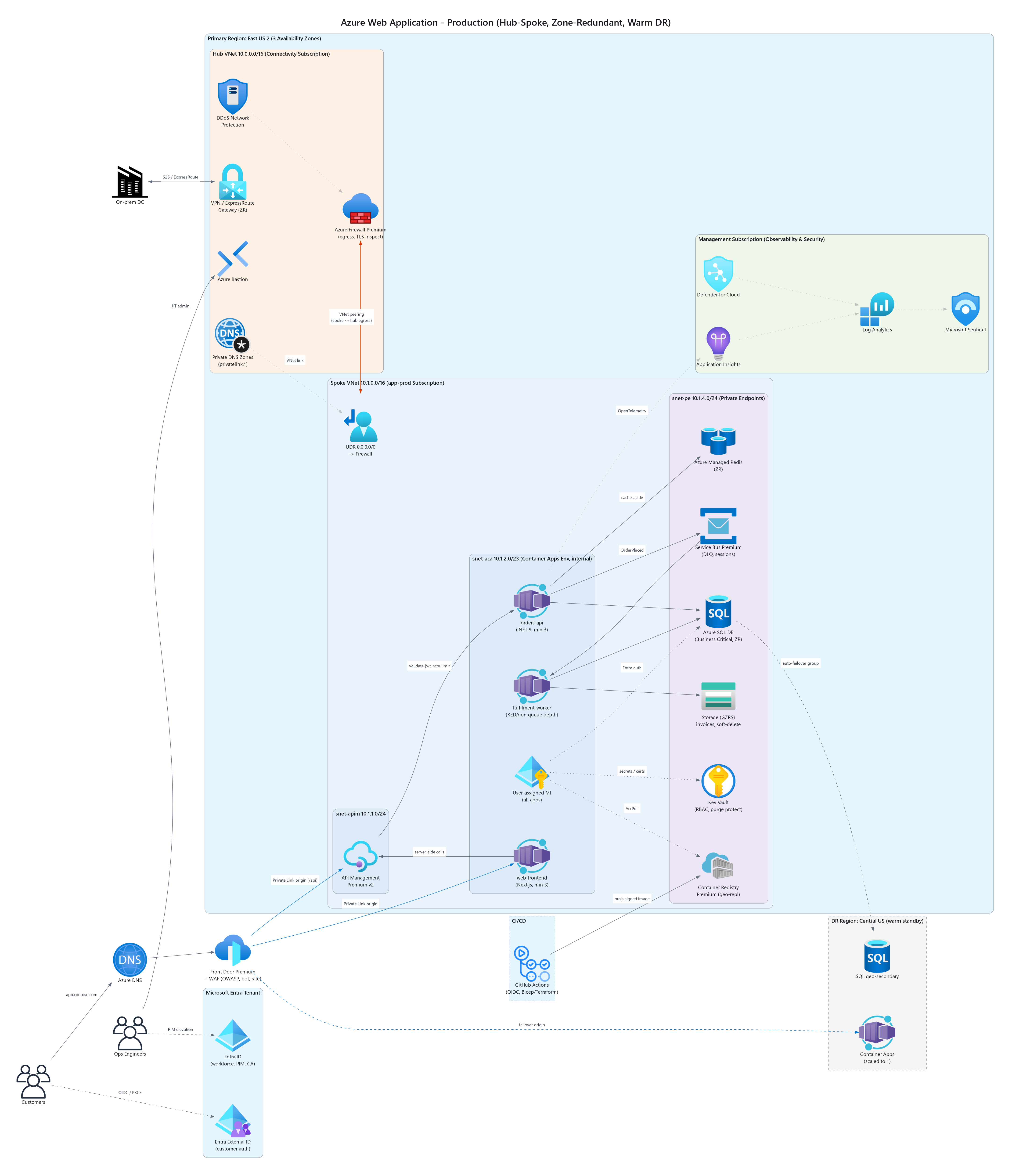
These are the bundled templates and the Terraform example, rendered exactly as the server produces them.
The score is from review_architecture. Click a diagram for the full-size image.
 Azure web app, hub-spoke with warm DR azure_webapp_hub_spoke, review 94 (A) |  Azure AKS microservices azure_aks_microservices, review 97 (A) |
 AWS three-tier web app aws_three_tier, review 86 (B) |  AWS serverless, event-driven aws_serverless_event_driven, review 100 (A) |
 GCP GKE microservices gcp_gke_microservices, review 97 (A) |  GCP serverless and data platform gcp_serverless_data, review 81 (B) |
 Imported from Terraform diagram_from_terraform on examples/aws_plan.json, review 73 (C) |  A running GCP platform, from its inventory diagram_from_inventory on a real export (identifiers replaced), review 67 (C) |
To regenerate them, run python scripts/render_samples.py.
The server has also been tested end to end on Google Cloud: a private bucket with signed URLs, and a private Cloud Run service with two layers of auth. See docs/CLOUD_TESTING.md for how it was tested, what was checked and the bug it found.
Tools
| Tool | What it does |
|---|---|
search_icons(query, provider?, limit?) | Ranked icon search by service name or alias (ecs, s3, aks, cloud run, redis) |
list_icon_categories(provider) | Lists every category and service for a provider |
list_templates(provider?) / get_template(id) | Returns bundled reference architectures as editable specs |
validate_diagram(spec) | Checks a spec without rendering: icon ids (with suggestions), references, nesting cycles, limits |
generate_architecture_diagram(spec) | Renders the diagram; returns file paths, a JSON summary and an inline PNG preview |
review_architecture(spec) | Runs a heuristic Well-Architected review and returns a 0–100 score, a grade and findings with recommendations |
diagram_from_terraform(title, terraform_json | path, ...) | Builds a diagram from terraform show -json output (plan or state) or a raw .tfstate file |
diagram_from_inventory(title, inventory_json | path, projects?, regions?, labels?, ...) | Builds a diagram of resources already running in Google Cloud from a Cloud Asset Inventory export, with real names |
server_info() | Reports the version, Graphviz status, icon count, output directory and limits |
There is also one prompt, design_architecture(provider, workload, requirements). It walks the model
through choosing a template, searching icons, validating, rendering and reviewing.
Bundled templates
aws_three_tieraws_serverless_event_drivenazure_webapp_hub_spokeazure_aks_microservicesgcp_serverless_datagcp_gke_microservices
Every template is tested to validate, to render, and to have no critical- or high-severity review findings.
Diagram spec
{
  "title": "My App",
  "direction": "LR",
  "theme": "light",
  "output_formats": ["png", "svg"],
  "clusters": [{"id": "vpc", "label": "VPC 10.0.0.0/16"}, {"id": "app", "label": "Private subnet", "parent": "vpc"}],
  "nodes": [{"id": "api", "type": "aws.compute.ECS", "label": "orders-api", "cluster": "app"}],
  "edges": [{"source": "alb", "target": "api", "label": "HTTPS", "style": "dashed"}]
}
Review rules
| Pillar | Rules |
|---|---|
| Security | Internet → data store (critical); internet → compute without a gateway (high); no WAF; no secrets/KMS; no identity provider; data stores outside a network boundary; no egress control |
| Reliability | VM without a load balancer; single region; no backup; deep synchronous call chains |
| Operational Excellence | No monitoring; no CI/CD; unconnected components |
| Performance Efficiency | No CDN for public traffic; no cache layer |
The rules only see what the diagram shows. Treat findings as review prompts, not proof of a misconfiguration.
Terraform import
terraform show -json plan.out > plan.json gives the best result, because the plan includes the
configuration's references.
- Mapped resources: about 140 AWS, Azure and GCP resource types become nodes.
- Boundaries: VPC/VNet, subnet, resource group and Container Apps environment resources become nested clusters. Nodes are placed in the most specific boundary they reference, either directly or through a NIC.
- Edges: references between resources become edges, and module outputs are resolved.
- Inferred edges: links that pass through plumbing resources become dashed edges, oriented edge → compute → messaging → data. Plumbing resources include listeners, target groups, NICs, role assignments, Front Door origins and backend services.
- Unmapped types: the result lists them, so you can see what was left out.
Inventory import (Google Cloud)
For infrastructure that is already running, however it was created (console, gcloud, scripts,
Terraform, Pulumi), export the project's inventory and pass it to diagram_from_inventory:
gcloud asset list --project <project-id> --content-type resource \
  --asset-types "$(arch-diagram-mcp --gcp-asset-types)" --format json > assets.json
--gcp-asset-types prints the 54 asset types the importer uses. Asking only for those keeps the
export small: a test project went from 4.4 MB to 535 KB with the same diagram. The caller needs
roles/cloudasset.viewer and the Cloud Asset API enabled.
- Names: every node keeps its real name. A second line adds detail, such as the database version, machine type, ingress setting, replica count or cron schedule.
- Boundaries: Project › VPC › Subnet › GKE cluster › Namespace. Shared VPC networks owned by another project are drawn under that project. Cloud Run with direct VPC egress sits in its subnet.
- Edges from configuration:
- Cloud SQL, secret, KMS, Pub/Sub, bucket and Redis references in annotations and environment variables;
- URLs matched to the Cloud Run service or function that owns them (push subscriptions, Scheduler targets, env vars);
- the load balancer chain (forwarding rule › proxy › URL map › backend › NEG, bucket or MIG), with path rules, CDN and Cloud Armor;
- Eventarc triggers, dead-letter topics, BigQuery and Cloud Storage subscriptions, VPC connectors.
- Noise left out: GKE system namespaces and nodes, MIG member VMs (drawn as one MIG), Cloud Functions' own Run services, build and staging buckets, routes, firewalls and RBAC objects.
- Filters:
projectsandregionsare hard limits.labels(for example{"app": "payments"}) selects resources plus the ones they connect to (include_neighbors, on by default). - Limits: calls that exist only in application code can't be seen. The result returns the spec,
so you can add those edges and re-render. External hosts found in env vars are listed in
external_hosts.
Accepted formats: gcloud asset list JSON (recommended), gcloud asset export newline-delimited
JSON, and gcloud asset search-all-resources --read-mask='*' JSON. Azure Resource Graph and AWS
inventories are planned.
Install
Requires Python 3.11+ and Graphviz.
winget install Graphviz.Graphviz        # Linux: apt install graphviz   macOS: brew install graphviz
python -m venv .venv
.venv\Scripts\python -m pip install -e ".[dev]"
.venv\Scripts\python -m pytest            # 85 tests
Register with Claude Code (stdio)
claude mcp add architecture-diagrams -s user `
  -e ARCH_DIAGRAM_OUTPUT_DIR=C:\Devops-Projects\Architecture-diagram-mcp\output `
  -- C:\Devops-Projects\Architecture-diagram-mcp\.venv\Scripts\python.exe -m arch_diagram_mcp
Run as a shared HTTP service
docker build -t arch-diagram-mcp:1.2.0 .
docker run -d -p 8000:8000 -v diagrams:/data \
  -e ARCH_DIAGRAM_AUTH_TOKENS="ci=$(openssl rand -hex 32),platform-team=$(openssl rand -hex 32)" \
  -e ARCH_DIAGRAM_PUBLIC_BASE_URL=https://diagrams.internal.example.com \
  -e ARCH_DIAGRAM_URL_SIGNING_KEY=$(openssl rand -hex 32) \
  -e ARCH_DIAGRAM_ALLOWED_HOSTS="diagrams.internal.example.com:*" \
  arch-diagram-mcp:1.2.0
Clients connect to https://<host>/mcp with Authorization: Bearer <token>. GET /healthz is
unauthenticated and works as a probe. The server runs stateless, so it scales horizontally behind a
load balancer. All replicas must share ARCH_DIAGRAM_URL_SIGNING_KEY so any replica can serve any link.
Authentication
| Mode | Set | Identity in audit logs | Roles |
|---|---|---|---|
token | ARCH_DIAGRAM_AUTH_TOKENS="name=secret,..." | the token's name | Full access |
oidc | ARCH_DIAGRAM_OIDC_ISSUER + ARCH_DIAGRAM_OIDC_AUDIENCE | preferred_username / upn / email, keyed by oid/sub | ARCH_DIAGRAM_READER_ROLE, ARCH_DIAGRAM_AUTHOR_ROLE |
Token mode. Several named tokens can be active at once. To rotate, add the new token, roll out clients, then remove the old one. Each token must be at least 16 characters.
OIDC mode. The server validates JWTs against the issuer's published signing keys (JWKS, found by
discovery or set with ARCH_DIAGRAM_OIDC_JWKS_URI). It checks:
- signature (asymmetric algorithms only: no HS*, no
none); issandaud;expandnbf, with 60 s leeway;- optional
ARCH_DIAGRAM_OIDC_REQUIRED_SCOPES.
Roles come from the roles claim (Entra app roles) and the scp scope claim:
- Reader: search, templates, validate, review.
- Author: also render, and import Terraform or cloud inventories. Author implies Reader.
- If neither role variable is set, any valid token gets full access.
The server publishes RFC 9728 metadata at /.well-known/oauth-protected-resource, and every 401
response points to it, so MCP clients can discover the authorization server.
Entra ID example:
- Register an API app with Application ID URI
api://arch-diagrams. - Set
accessTokenAcceptedVersion: 2in its manifest. - Add app roles
Diagrams.ReaderandDiagrams.Author, and assign them to groups. - Configure the server:
ARCH_DIAGRAM_OIDC_ISSUER=https://login.microsoftonline.com/<tenant-id>/v2.0
ARCH_DIAGRAM_OIDC_AUDIENCE=api://arch-diagrams      # v2 tokens may carry the app's client id instead; list both
ARCH_DIAGRAM_READER_ROLE=Diagrams.Reader
ARCH_DIAGRAM_AUTHOR_ROLE=Diagrams.Author
Entra ID has no dynamic client registration. Clients either use a pre-registered client app, or pass
a token they already hold, e.g. az account get-access-token --resource api://arch-diagrams.
Artifact storage
Over HTTP, responses contain download URLs instead of server file paths:
ARCH_DIAGRAM_STORAGE | Links | Credentials |
|---|---|---|
local (default) | https://<PUBLIC_BASE_URL>/artifacts/<file>?exp=..&sig=.., served by this server and HMAC-signed | ARCH_DIAGRAM_URL_SIGNING_KEY |
s3 | SigV4 presigned GET; objects encrypted with SSE-S3, or SSE-KMS when ARCH_DIAGRAM_S3_KMS_KEY_ID is set | Standard AWS chain (IRSA, instance role, env, profile) |
azure | Read-only, HTTPS-only SAS. Uses a user-delegation key via Entra ID with ARCH_DIAGRAM_AZURE_ACCOUNT_URL, or an account key via AZURE_STORAGE_CONNECTION_STRING | Managed / workload identity needs Storage Blob Data Contributor |
gcs | V4 signed URL. Signs locally with a service-account key, or through IAM signBlob under workload identity | Needs Storage Object Creator and Service Account Token Creator |
- Object keys:
<prefix>/<yyyy>/<mm>/<dd>/<sha256(caller)[:16]>/<file>. Files are separated per caller, and keys never contain user names. - Link lifetime: set by
ARCH_DIAGRAM_URL_TTL_S, default 1 h, maximum 7 days. - Cleanup:
ARCH_DIAGRAM_DELETE_LOCAL_AFTER_UPLOAD=trueremoves local copies once a cloud upload succeeds. For cloud objects, use a bucket lifecycle rule. - Served SVGs: sent with
Content-Security-Policy: sandboxandnosniff. - Terraform paths:
diagram_from_terraform(path=...)is disabled over HTTP, so remote callers can't read server files.
Configuration (environment)
| Variable | Default | Purpose |
|---|---|---|
ARCH_DIAGRAM_OUTPUT_DIR | ~/architecture-diagrams | Where diagrams are written |
ARCH_DIAGRAM_INPUT_ROOTS | cwd + output dir | os.pathsep-separated directories that diagram_from_terraform(path=...) may read |
ARCH_DIAGRAM_MAX_NODES / _MAX_EDGES / _MAX_CLUSTERS | 300 / 800 / 100 | Spec size limits |
ARCH_DIAGRAM_RENDER_TIMEOUT_S | 60 | Graphviz is killed after this many seconds |
ARCH_DIAGRAM_MAX_TERRAFORM_BYTES | 25 MB | Terraform input size limit |
ARCH_DIAGRAM_RETENTION_DAYS | 0 (keep forever) | Deletes generated files older than N days |
ARCH_DIAGRAM_KEEP_DOT_SOURCE | true | Keeps the .dot file for hand-editing |
ARCH_DIAGRAM_INLINE_PNG_MAX_BYTES | 4 MB | Larger PNGs are returned as a path only |
ARCH_DIAGRAM_FONT | auto | Font family; auto picks Segoe UI on Windows, Helvetica Neue on macOS, DejaVu Sans on Linux |
ARCH_DIAGRAM_PNG_DPI | 144 | PNG/JPG resolution (72–300) |
ARCH_DIAGRAM_LOG_LEVEL | INFO | JSON logs go to stderr, one audit line per tool call |
ARCH_DIAGRAM_HTTP_HOST / _HTTP_PORT | 127.0.0.1 / 8000 | HTTP bind address and port |
ARCH_DIAGRAM_AUTH_MODE | auto | none / token / oidc; inferred from the variables below |
ARCH_DIAGRAM_AUTH_TOKENS | – | name=secret,... named bearer tokens (the legacy single ARCH_DIAGRAM_AUTH_TOKEN still works) |
ARCH_DIAGRAM_OIDC_ISSUER / _OIDC_AUDIENCE / _OIDC_JWKS_URI / _OIDC_REQUIRED_SCOPES | – | OIDC validation |
ARCH_DIAGRAM_READER_ROLE / _AUTHOR_ROLE | – | Role names for RBAC (OIDC) |
ARCH_DIAGRAM_PUBLIC_BASE_URL | – | External URL; used for download links and OAuth metadata |
ARCH_DIAGRAM_STORAGE | local | local / s3 / azure / gcs |
ARCH_DIAGRAM_STORAGE_BUCKET / _STORAGE_PREFIX | – / diagrams/ | Bucket or container, and key prefix |
ARCH_DIAGRAM_S3_REGION / _S3_KMS_KEY_ID / _AZURE_ACCOUNT_URL | – | Backend specifics |
ARCH_DIAGRAM_URL_TTL_S | 3600 | Download-link lifetime (60 s – 7 days) |
ARCH_DIAGRAM_URL_SIGNING_KEY | random per process | HMAC key for local links; ≥32 chars; share it across replicas |
ARCH_DIAGRAM_DELETE_LOCAL_AFTER_UPLOAD | false | Removes local files after a cloud upload |
ARCH_DIAGRAM_ALLOWED_HOSTS / _ALLOWED_ORIGINS | – | Comma-separated Host/Origin allow-lists (DNS-rebinding protection) |
ARCH_DIAGRAM_ALLOW_UNAUTHENTICATED | false | Allows a non-loopback bind without a token (only behind an authenticating proxy) |
Security model
- Spec validation: ids, colours and styles are pattern-checked, and size limits apply.
- Text escaping: titles, node labels and cluster labels are always written as literal strings,
never as Graphviz HTML labels. Edge labels are HTML-escaped. A label therefore can't inject DOT
statements, such as an
image=attribute that reads local files. - Rendering: Graphviz runs as a subprocess with a hard timeout, and partial output is deleted on failure.
- Output files: file names are sanitised, timestamped and uniquely suffixed. Retention cleanup only touches files the server generated.
- Terraform input: file reads are confined to
ARCH_DIAGRAM_INPUT_ROOTSand size-limited. - HTTP:
- Static tokens are compared in constant time against every configured token.
- OIDC JWTs are fully validated, and key-confusion and
alg: nonetokens are rejected (both are tested). - Per-tool RBAC applies, and every audit line records the caller.
- The server refuses to bind to a public address without authentication.
- DNS-rebinding protection uses Host/Origin allow-lists.
- The container runs as a non-root user.
- SVG output: icons are embedded, so the files don't leak local paths and render anywhere.
Layout
src/arch_diagram_mcp/
  server.py        MCP tools, prompt, error mapping, audit logging
  catalog.py       icon index, alias resolution, ranked search, suggestions
  models.py        spec schema + semantic validation
  renderer.py      Graphviz source build, timed subprocess render, themes, SVG inlining, retention
  review.py        Well-Architected heuristic rules and scoring
  terraform.py     Terraform plan/state -> spec
  gcp_inventory.py Cloud Asset Inventory export of running GCP resources -> spec
  template_library.py + templates/*.json   reference architectures
  auth.py          principals, static-token + OIDC authenticators, RBAC
  storage.py       local signed links, S3 / Azure Blob / GCS uploads with signed URLs
  http_app.py      streamable-HTTP app, auth middleware, OAuth resource metadata, /artifacts, /healthz
  config.py, logs.py, __main__.py
tests/             85 tests: catalog, validation, rendering, label injection, review, Terraform, GCP
                   inventory (real export fixture), MCP tools, HTTP auth, OIDC (incl. attack tokens), RBAC,
                   signed links, S3 (moto), Azure SAS, GCS V4
docs/USER_GUIDE.md      developer guide: connecting clients, example prompts, troubleshooting
docs/CLOUD_TESTING.md   how the server was tested on real Google Cloud
docs/samples/      rendered sample diagrams shown above
scripts/render_samples.py   regenerates docs/samples/
scripts/e2e_cloud.py, run_impersonated.py   real-cloud end-to-end test tools
License
Apache-2.0. The bundled provider icons come from the diagrams library and remain subject to their owners' terms.







