Listed from the MCP registry; nobody on Odel publishes it.

memory-boost
Markdown memory for coding agents that audits itself: drift reports and session digests.
Runs on your machine from its package; the steps are below.
What it does
- Reads
- Writes
- High impact
At most: creates or changes data: records, files, settings.
What it costs
FreeOdel charges nothing per call. The publisher may charge for its own service.
Runs locally over stdio
This server isn't hosted — your MCP client launches it from a package registry. Use one of the commands below, or drop the config into your client (e.g. Claude Desktop).
Run
uvx memory-boost
MCP client config
{
  "mcpServers": {
    "memory-boost": {
      "command": "uvx",
      "args": [
        "memory-boost"
      ]
    }
  }
}
memory-boost
Memory for coding agents that reviews itself.


Try it · What it answers · Connect your agent · How it works · vs. alternatives
Your agents write everything down. Nobody reads it back.
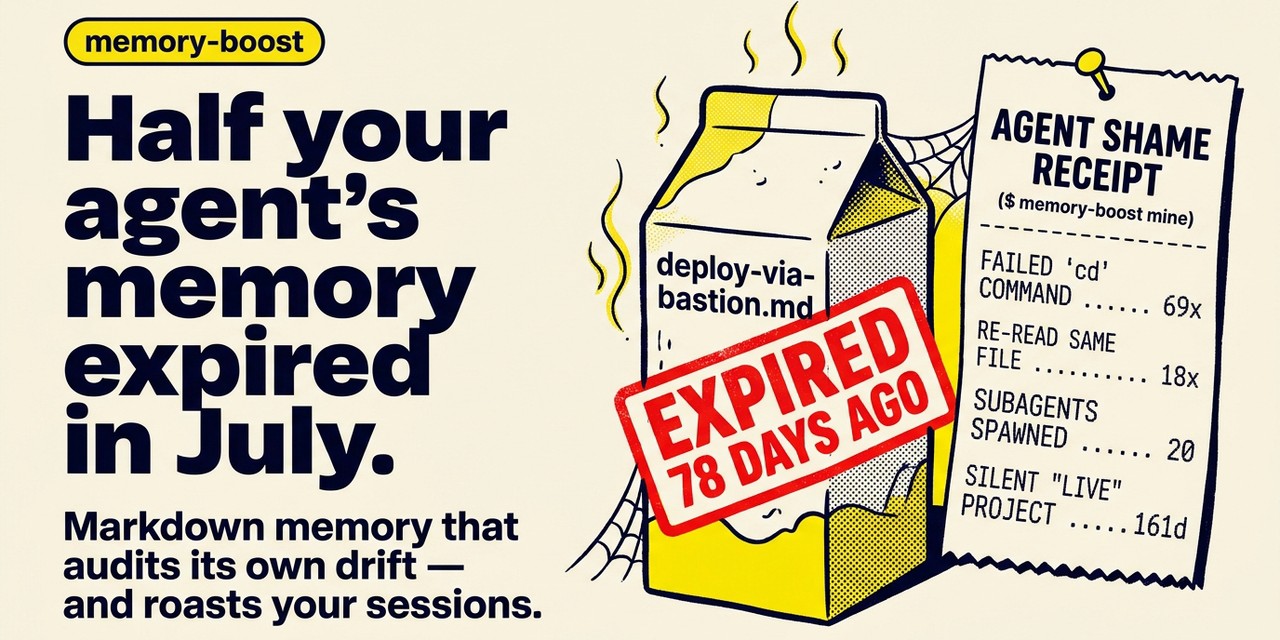
Every memory tool for coding agents helps them remember more. None of them mention that half of what they remember expired in July. memory-boost keeps a plain-markdown memory your agents read and write over MCP, and then does the unglamorous part: it audits that memory and your own sessions, and tells you what drifted. Politely, with numbers.
Think of it as a code review for what your agents remember and a fitness tracker for how you work
with them. Mostly the fitness tracker: mine told me my most-failed command was cd. Sixty-nine
times.
What it answers
| You wonder… | memory-boost answers |
|---|---|
| Which decisions quietly expired while we were busy shipping? | drift: review_by 2026-07-08, 78 days ago |
| Which "active" projects actually died months ago? | drift: last session 161 days ago; still listed as live |
| We fixed this exact bug in another repo. How? | lessons: the fix follows you to every project with the same stack |
| Why does my agent keep re-reading the same file? | mine: one file, read 18 times |
| Is my agent spawning 20 subagents behind my back? | mine: yes, and in which session |
Where was I before /compact ate my context? | The session-start hook puts your checkpoint back |
Using an AI agent? Point Claude Code, Codex, Cursor or Gemini CLI at this repo: AGENTS.md tells it how to install memory-boost, seed a wiki and run the reports for you.
Try it in 30 seconds
No install needed; the wiki lands in ~/.local/share/memory-boost:
uvx memory-boost==0.2.1 init --example   # sample wiki with five kinds of rot + four synthetic transcripts
uvx memory-boost==0.2.1 drift            # what in that memory is stale, orphaned or never written down
uvx memory-boost==0.2.1 mine             # now on your real ~/.claude/projects: aggregates only
To keep it in Claude Code, install the plugin. It brings the MCP server, the session-start brief and the skills in one step; it only needs uv on your PATH.
/plugin marketplace add arnaugonzalez/memory-boost
/plugin install memory-boost@memory-boost
Other agents, or the CLI on its own: uv tool install memory-boost==0.2.1 (or
pipx install memory-boost==0.2.1). Or let your agent do it: see Install from your agent.
Install from your agent
Paste this into Claude Code, Codex, Cline or Cursor:
Install memory-boost 0.2.1 by following https://github.com/arnaugonzalez/memory-boost/blob/main/llms-install.md : install the CLI with
uv tool install memory-boost==0.2.1, runmemory-boost init, registermemory-boost serveas a stdio MCP server namedmemory, check that it answers with ninememory_*tools, then runmemory-boost driftand show me the output. Ask me before writing outside the memory home (~/.local/share/memory-boost) or editing any global agent config.
The agent-oriented steps (stdio and serve --http, per harness, with checks) are in
llms-install.md.
Example: back on a project after two months

You come back to acme-api and the agent still trusts everything it wrote down. drift says
which of it no longer holds: a Postgres pin whose review date passed in June, a superseded decision
that points nowhere, projects that went silent. page shows why the pin was made, so you can
decide in a minute. lessons brings over what pixel-notes learned about retrying jobs, because
both projects run background jobs. Bundled example data (memory-boost init --example), recorded
with vhs from docs/demo.tape.
On a real machine
Five weeks of the author's own daily use: 29 decisions, 24 projects, 657 Claude Code transcripts. Output as produced; only project and file names are replaced.
$ memory-boost drift
# Drift report — 2026-09-24
29 decisions · 24 projects · 204 log entries · 33 open checkpoints · **20 findings**

## decision-expired (9)
- deploy-via-bastion — review_by 2026-07-08 (78 days ago); revisit or mark historic
- bot-guardrails — review_by 2026-07-08 (78 days ago); revisit or mark historic
  …
## project-no-decisions (2)
- thesis-solver — 20 sessions logged, 0 decisions tagged 'thesis-solver': the learning lives only in transcripts
## project-silent (5)
- mood-api — last session 2026-04-16 (161 days ago); still listed as live
  …

$ memory-boost mine
# Session digest — 2026-09-24
sessions      80 with ≥20 turns
tools         Bash 5956 · Edit 860 · Read 692 · Write 493 · Agent 203 · ToolSearch 138
bash          5956 calls, 159 failed (2.7%); most failed: cd (69), sleep (12), ssh (9), pkill (8), ls (7)
bash/edit     4.4x; extreme: worktree-a 107.5x, sandbox 70.0x, sandbox 54.0x
reads         692 calls, 131 re-reads of a file already read (19%); top: …/apply_email.py ×18
discipline    62 long sessions (≥60 turns): 47 never checkpointed, 29 never saved
subagents     203 spawned in 44 sessions; max in one session: 20
Every line is a habit to change, a decision to revisit, or a rule worth writing down. None of it needed a new tool: the data was already on disk. It needed a reader.
What it is
- A wiki you own.
projects/*.md,decisions/*.md,concepts/*.md,log.md. Plain markdown; edit by hand, keep it in git. SQLite FTS5 index as a disposable cache. Nine MCP tools for any harness:memory_brief,memory_recall,memory_page,memory_save,memory_checkpoint,memory_resume,memory_drift,memory_lesson,memory_shelf.memory_shelf(CLI:memory-boost shelf "idea") appends a dated one-line idea toconcepts/idea-shelf.mdwithout the agent reading the page back. - Freshness as data. Decisions carry
status:andreview_by:. Search results are taggedcurrent / unclassified / review / historic / superseded, current first. - Session checkpoints that survive
/compact, with one line per other active session on the same project so parallel agents don't collide. driftreads the wiki and reports what expired, what went silent, what was never written down and what was left half-done. The current project's top findings go into every session brief.minereads your local Claude Code transcripts and reports tool usage, failed commands, re-reads, subagent fan-out and checkpoint discipline. Aggregates only: no prompt, command or file content is stored or printed, so the digest is safe to paste anywhere.lessons:concepts/pages withapplies_when: [tags]. A project page that lists matchingtags:gets those lessons in its brief, so what worked in one repo reaches the next. The/retroskill writes them at session end.
Connect your harness
MCP server (all harnesses): command memory-boost, args ["serve"].
To share one server between several sessions, run it over streamable HTTP (stateless, JSON
responses) and point each harness at http://127.0.0.1:8765/mcp:
memory-boost serve --http                      # --host 127.0.0.1 --port 8765 are the defaults
claude mcp add --transport http memory -s user http://127.0.0.1:8765/mcp
It binds to loopback by default and has no authentication: keep it there.
| Harness | MCP registration | Context at session start |
|---|---|---|
| Claude Code (plugin) | /plugin install memory-boost@memory-boost | Included: hook, MCP server, skills |
| Claude Code (manual) | claude mcp add memory -s user -- memory-boost serve | Hook below (startup, resume, compact); mine reads its transcripts |
| Codex CLI | codex mcp add memory -- memory-boost serve | AGENTS.md: "call memory_brief first" |
| Cursor / VS Code / Gemini CLI | stdio entry in their mcp.json / settings.json | Same line in rules (hook adapters: roadmap) |
Manual Claude Code hooks (~/.claude/settings.json), not needed with the plugin:
{ "hooks": {
  "SessionStart": [ { "hooks": [ { "type": "command", "command": "memory-boost hook session-start" } ] } ],
  "Stop":         [ { "hooks": [ { "type": "command", "command": "memory-boost hook stop", "timeout": 10 } ] } ],
  "PreCompact":   [ { "hooks": [ { "type": "command", "command": "memory-boost hook pre-compact", "timeout": 20 } ] } ]
} }
On startup/resume it injects ~1k tokens: catalog, the project's context and last sessions,
its drift, open pending items, lessons from other projects, your open checkpoint. On compact
only this session's checkpoint. It never blocks session start: on any error it prints nothing.
stop and pre-compact write an automatic checkpoint from the transcript, with no LLM call:
your prompts (minus <private>…</private>), files edited and git commits, under the checkpoint's
auto key. What the agent wrote (task, done, next) is never overwritten. stop writes only when
something changed and 10 minutes or 4 prompts passed; pre-compact always writes, so the
post-compact re-injection has something to show even if the agent never called memory_checkpoint.
Skills: /memory-boost (router: when to run what), /save-session, /restore-session,
/retro. The plugin installs them as /memory-boost:retro and so on; without it, copy
skills/* into ~/.claude/skills/. The first session after installing the plugin takes a few
extra seconds while uv fetches memory-boost==0.2.1 and its dependencies from PyPI (the only
network access the plugin makes); later sessions start in about 0.2 s.
CLI contract for agents: data on stdout, errors on stderr with a fix: line, --json on every
reading command (with a version field), exit 0 = trust stdout, 1 = not found, 2 = bad input.
Reports end with a next: line naming the exact command to run.
How it works
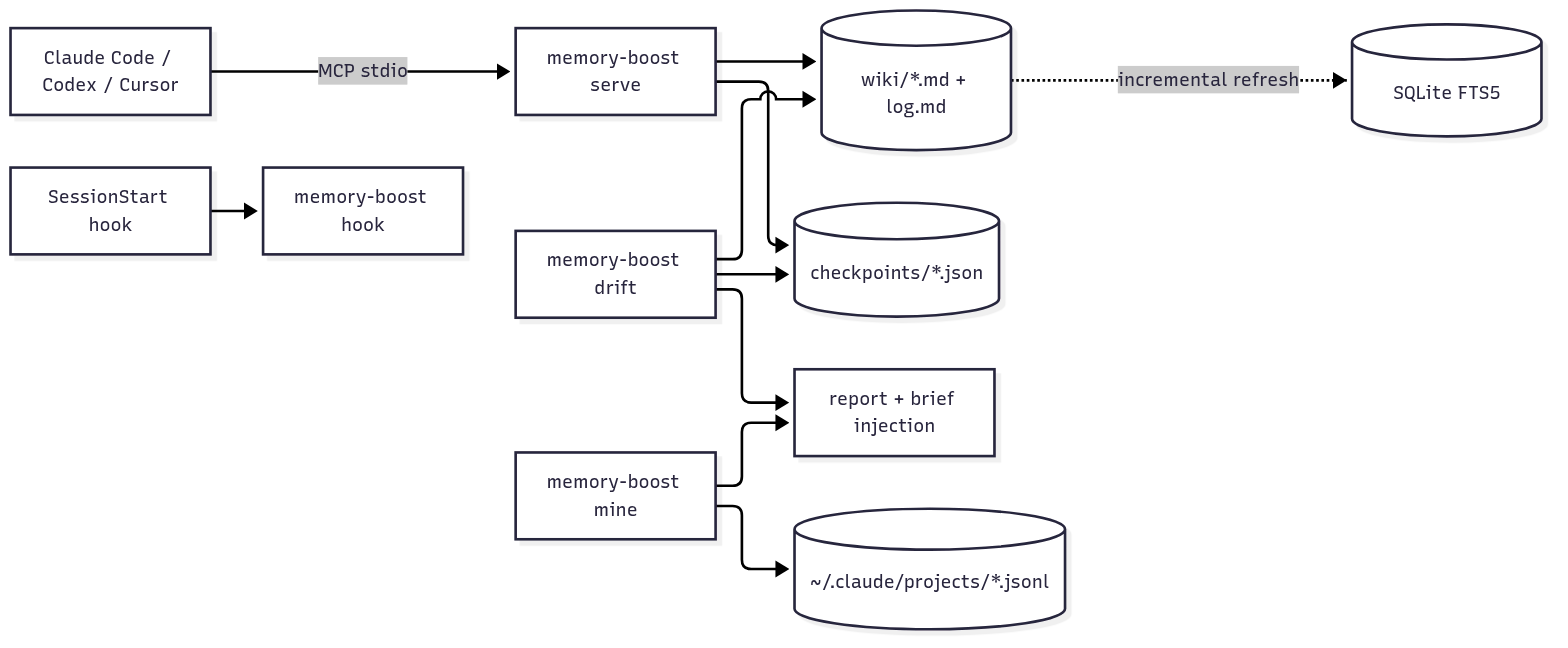
Source: docs/architecture.mmd
The project is resolved from the working directory name (~/work/acme-api → projects/acme-api.md);
map other names in aliases.json. Under 1,900 lines of Python, one dependency (mcp), no
embeddings unless you opt into semantic recall, no daemon unless you run serve --http.
Session events v2
Every memory_save (or memory-boost save) writes one event to $MEMORY_BOOST_HOME/events/<agent>/<YYYY-MM-DD>.jsonl
and one entry to wiki/log.md. The v2 fields are all optional: a v1 call (project, action, result,
detail, pending as text) keeps working and writes the same log.md header. Each event now carries
"schema": "memory-boost/session@2", a server date_local, a per-session seq and the assigned pending ids;
v1 readers ignore the extra keys.
outcome:done | progress | blocked | waiting | research | abandoned.pending: a list of{text, owner, severity, due?, waiting_on?}. The server assigns each item a stable id<project>#<n>(counter per project inevents/pending-seq.json), shown in the brief underopen pending.closes/drops: ids the session finished or no longer needs. Open items are what remains after folding them.sessionandmetrics: optional blocks stored as given. The caller computes them, for example with a session summary tool; the save itself does not read transcripts.
{
  "schema": "memory-boost/session@2",
  "project": "acme-api",
  "action": "Moved the job queue to Postgres and added retries",
  "result": "ok",
  "outcome": "progress",
  "session": {"id": "3f9c2a1e-…", "harness": "claude-code", "cwd": "/home/me/work/acme-api",
              "segment_start": "2026-10-28T10:00:03Z", "segment_end": "2026-10-28T14:45:12Z"},
  "metrics": {"source": "ledger session-summary@1", "minutes": {"acme-api": {"attention": 182, "agent": 160, "gross": 230}},
              "commits": [{"repo": "acme-api", "sha": "f2c1114", "pushed": false}],
              "tests": {"runs": 6, "passed": 1180, "failed": 0}, "cost_usd": 14.2},
  "pending": [{"text": "Run the batch import", "owner": "user", "severity": 3},
              {"text": "Push main to origin", "owner": "user", "severity": 2}],
  "closes": ["acme-api#12", "acme-api#14"]
}
date_local is set by the server from MEMORY_BOOST_TZ (an IANA zone such as Europe/Madrid; UTC by default).
Events written before v2 have no pending ids, so memory-boost pending [--project] (and closes) cannot see them.
Semantic recall (optional)
Off by default: memory_recall is full-text only and the base install stays one dependency.
To also match paraphrases and other languages, run a local embedding model:
pip install "memory-boost[semantic]==0.2.1"   # adds sqlite-vec
ollama pull embeddinggemma
export MEMORY_BOOST_SEMANTIC=1
memory-boost index                       # embeds the wiki once; later runs embed only changes
The first index of a large wiki on CPU can take minutes: as a rough guide, about 15 minutes for some
850 documents on a laptop without a GPU (one measurement, not a benchmark). memory-boost index and
recall show embedding N/M chunks… on stderr while it runs; later runs re-embed only what changed.
Default mode when on is hybrid (full-text and vectors fused by weighted reciprocal rank); override
with MEMORY_BOOST_RECALL_MODE=fts|semantic|hybrid or memory-boost recall --mode. If Ollama is down,
recall falls back to full-text and logs a warning. On a private 64-query set (39 literal, 25 paraphrase)
with a warm index on CPU: paraphrase nDCG@10 0.46 to 0.76, literal 0.80 to 0.85, p50 about 110 ms per query.
The query set is not published.
Configuration
| Variable | Default | Purpose |
|---|---|---|
MEMORY_BOOST_HOME | $XDG_DATA_HOME/memory-boost | Wiki, events, checkpoints, aliases.json |
MEMORY_BOOST_WIKI | $MEMORY_BOOST_HOME/wiki | Point at an existing wiki (e.g. a git repo) |
MEMORY_BOOST_INDEX | $XDG_CACHE_HOME/memory-boost/index-<hash>.db | Search index |
MEMORY_BOOST_CHECKPOINTS | $MEMORY_BOOST_HOME/checkpoints | Checkpoint directory |
MEMORY_BOOST_TRANSCRIPTS | ~/.claude/projects | Where mine looks (several dirs: a:b) |
MEMORY_BOOST_TODAY | today (UTC) | Pin the date for reproducible reports |
MEMORY_BOOST_TZ | UTC | IANA zone for date_local in events (e.g. Europe/Madrid) |
MEMORY_BOOST_AUTOSAVE_SECS | 600 | hook stop: minimum seconds between automatic checkpoints |
MEMORY_BOOST_AUTOSAVE_TURNS | 4 | hook stop: or this many new prompts, whichever comes first |
MEMORY_BOOST_SEMANTIC | unset | 1 enables vector recall (needs memory-boost[semantic] + Ollama) |
MEMORY_BOOST_RECALL_MODE | fts (hybrid with semantic) | fts, semantic or hybrid |
MEMORY_BOOST_EMBED_MODEL | embeddinggemma | Ollama embedding model |
MEMORY_BOOST_OLLAMA_URL | http://localhost:11434 | Ollama endpoint |
Status values: current, review, historic, superseded; accepted/active read as
current and proposed as review.
Experimental (shipped, little real use yet): memory_shelf, memory-boost friction and the
lesson fields cue/evidence/confidence. Their output format may still change.
vs. alternatives
| memory-boost | basic-memory | claude-mem | agent-retro | |
|---|---|---|---|---|
| Store | Markdown wiki you edit | Markdown | Captured observations | None (prompt skill) |
| Search | FTS5 (+ optional local vectors) | FTS + vectors | FTS + vectors | — |
| Freshness / review dates | Yes | No | No | — |
| Drift report over memory | Yes | No | No | No |
| Session analytics | Yes (aggregates, local) | No | No | LLM reads the conversation |
| Parallel-session awareness | Yes | No | No | — |
| License | MIT | AGPL-3.0 | Apache-2.0 | ? |
Want better search, more integrations and a community? Use basic-memory. Want everything captured automatically? claude-mem. Use memory-boost if you want to learn from what your agents already wrote down.
Limits / non-goals
- Full-text search by default; embeddings only with the optional
[semantic]extra and a local Ollama. mineunderstands Claude Code transcripts today. Codex is on the roadmap.- Reports are as good as the wiki: an empty wiki yields an empty
drift. - Single user, local files. Linux and macOS; Windows untested.
- The wiki is read by your agents as instructions. Only use a wiki you trust; see SECURITY.md.
License
MIT







