Listed from the MCP registry; nobody on Odel publishes it.

Agentsol
Lint AGENTS.md/CLAUDE.md/skills, scan skills and MCP servers, learn from past agent sessions
Runs on your machine from its package; the steps are below.
What it does
- Reads
- Writes
- High impact
At most: creates or changes data: records, files, settings.
What it costs
FreeOdel charges nothing per call. The publisher may charge for its own service.
Runs locally over stdio
This server isn't hosted — your MCP client launches it from a package registry. Use one of the commands below, or drop the config into your client (e.g. Claude Desktop).
Run
npx -y agentsol
MCP client config
{
  "mcpServers": {
    "agentsol": {
      "command": "npx",
      "args": [
        "-y",
        "agentsol"
      ]
    }
  }
}

Agentsol
Your AI agents forget. Agentsol remembers.
Agentsol learns what went wrong in your past agent sessions, guards each command before an agent runs it,
and checks the instructions, skills and MCP servers your agents rely on. Local, no account, and every file change waits for you.


Website · Live demo · Check in your browser · GitHub Action · Quick start · Docs
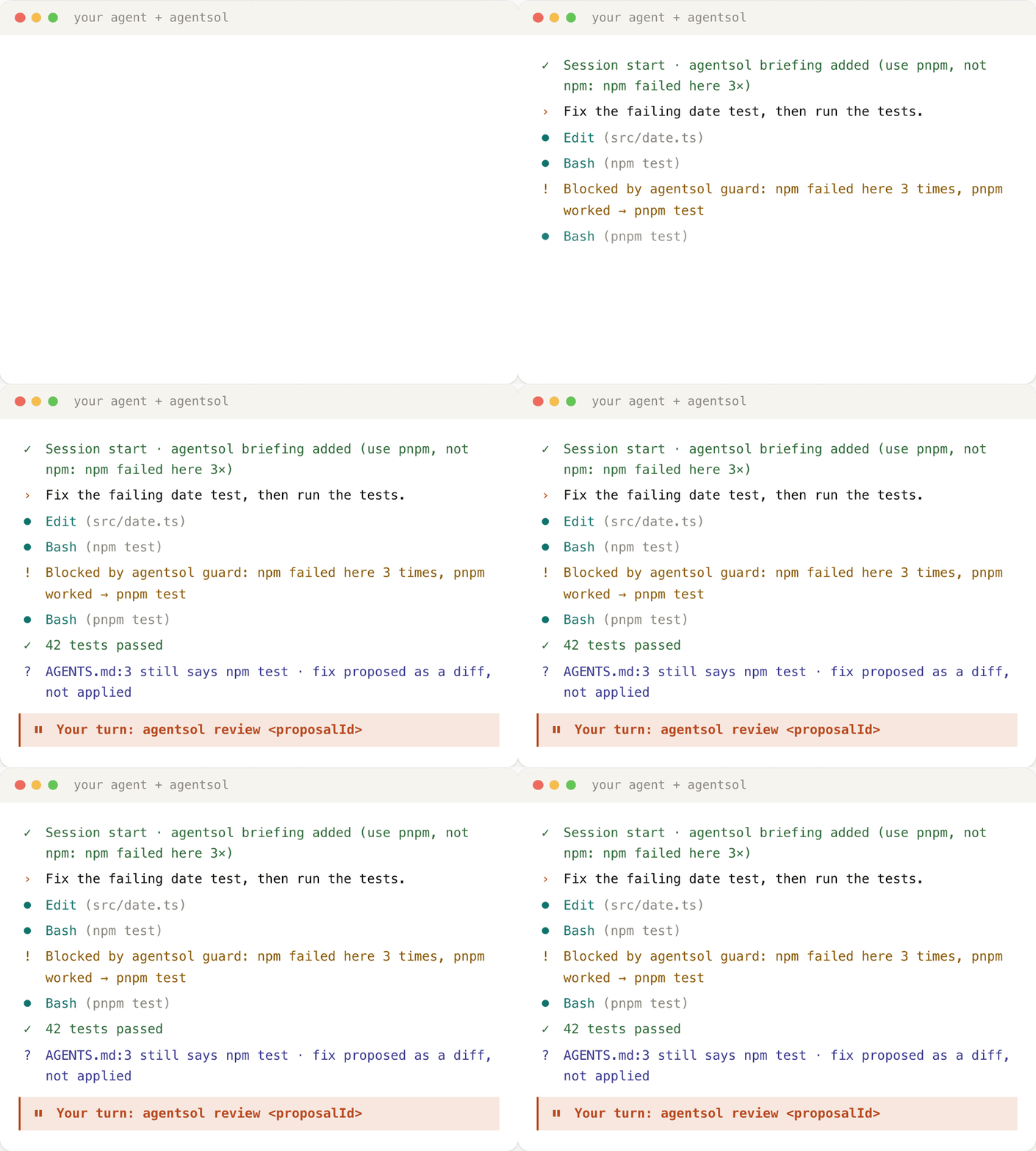
Illustrative session. The briefing and the block are Agentsol's real hook output.
Quick start
cd your-project
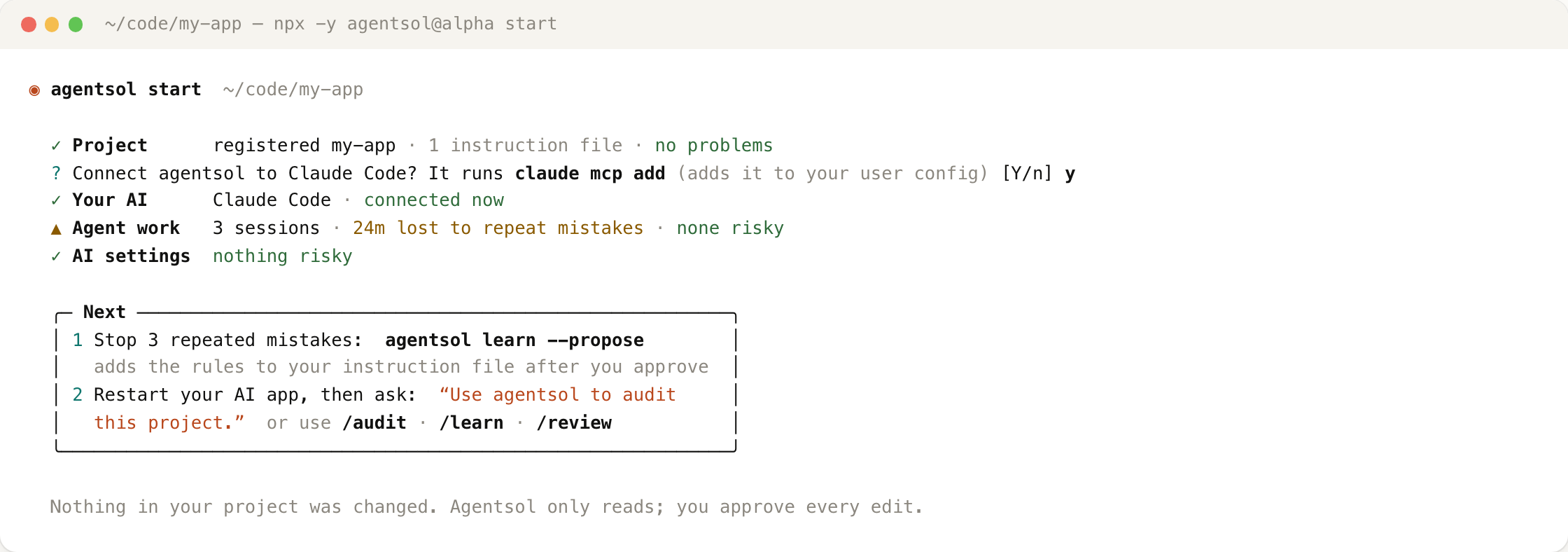
npx -y agentsol@alpha start                                  # scan, connect your apps, show what past mistakes cost
npm i -g agentsol@alpha && agentsol connect --guard             # brief every agent session, stop known-wrong commands
start registers and scans the folder, connects the AI apps you have (it asks first), and shows what to fix first. connect --guard adds two hooks to every agent app it finds (Claude Code, Codex, Gemini CLI, Cursor, Copilot CLI, Cline), asking for each: one briefs each new session with what agents got wrong in this project, the other checks each shell command. After that you never call Agentsol; it is there in every session. The hooks need an installed copy because they must not depend on npx's cache. No account, no API key, no hosted service; everything runs on your machine.
How it works
Agents forget everything between sessions. They run npm in a pnpm repo again, look for tests in the wrong folder again, break the same file again, and you type the same correction again. Agentsol closes that loop in three steps:
| Step | Command | What happens |
|---|---|---|
| 1. Learn | learn | Reads your Claude Code and Codex transcripts for this folder and turns repeated mistakes into lessons, with the time and tokens they cost and the instruction line that caused them. |
| 2. Guard | connect --guard | Hooks in each agent app: every new session starts with this project's lessons, a command known to fail here is blocked with the one that works, and a dangerous one waits for you. |
| 3. Check | check · inspect | Instruction files that are broken, unread or contradict the project, and third-party skills or MCP servers that steal credentials, send data out or hide instructions. |
Every fix is a diff you approve and apply in your own terminal. Agentsol never edits a project file on its own.
Learn · the mistakes your agents keep repeating
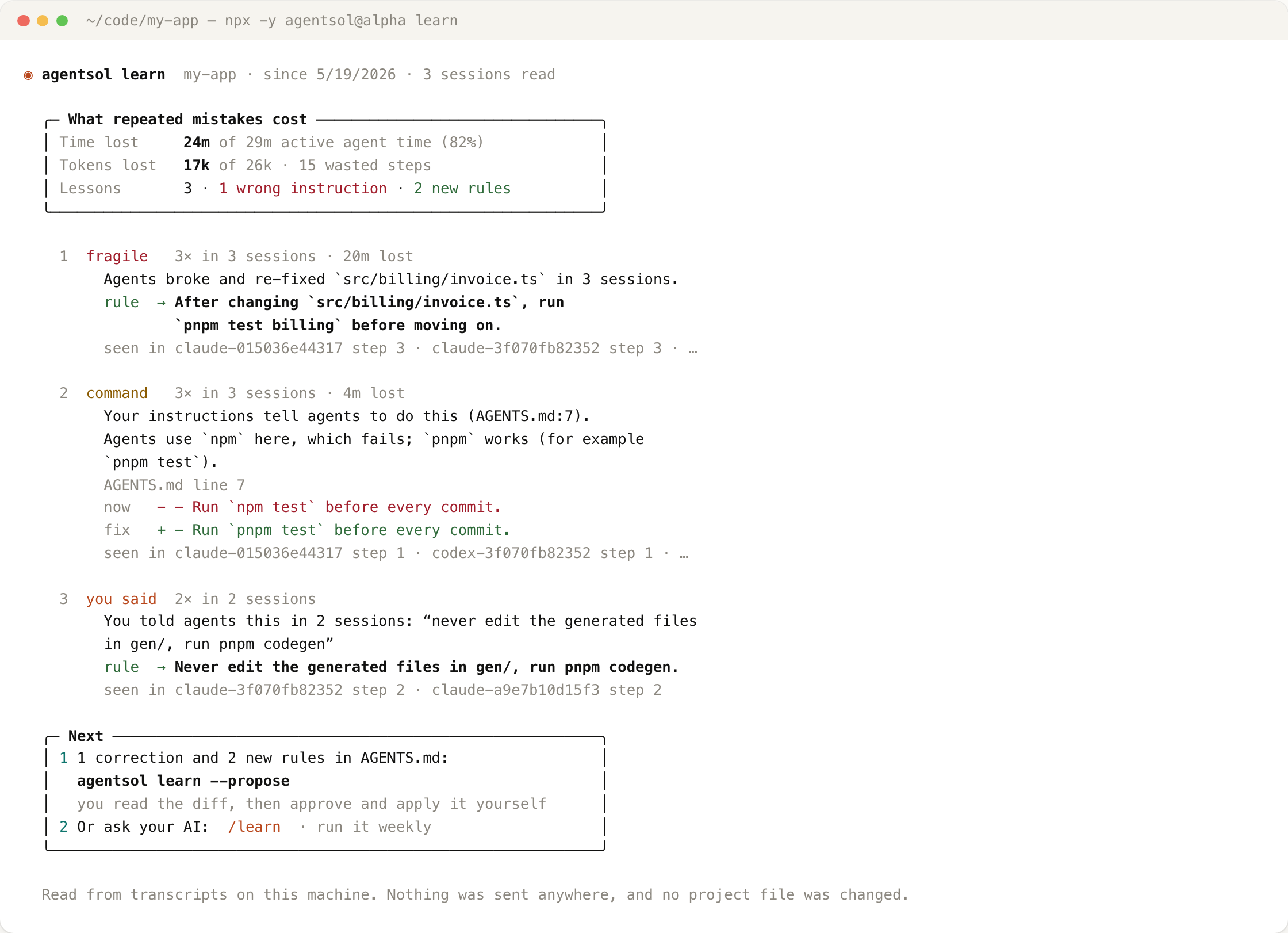
npx -y agentsol@alpha learn              # what keeps going wrong, with the cost
npx -y agentsol@alpha learn --propose    # one diff per instruction file, for you to approve
It finds commands that fail here and the one that works, files agents look for in the wrong folder ("use paths under src/, not tests/"), things you said in two or more sessions, fragile files agents break and re-fix, and commands that fail everywhere. When AGENTS.md or CLAUDE.md is the cause, it shows that line and corrects it in place. It ignores failures the project can't fix (network or DNS errors, rate limits, sandbox denials), retries that pass, test-first red → green runs, and sessions in other folders. A long conversation counts each compaction as a fresh start, because that is when the agent forgets.
Measured: npm run eval:learn replays 48 labelled agent histories in Claude Code and Codex formats. On the 27 held out, 100% of reported lessons were right and 86% of expected lessons were found; no planted secret ever reached the output. The histories are synthetic and many were written alongside the tuning, so treat this as a regression bar, not proof on your history. See docs/EVALUATION.md.
Guard · every session starts briefed, wrong commands never run
agentsol connect --guard                # finds your agent apps, asks for each, adds the hooks (backup kept)
agentsol connect cursor --guard         # or one app
agentsol guard --test "npm install"     # what the agent would be told, without running anything
agentsol connect --guard --remove       # undo
At session start the agent gets the project briefing in its context: the rules from mistakes agents repeated here, instruction lines that are out of date with what to do instead, and what to ask you first. No tool call, no prompt to type, and in any app with hooks. It covers the projects you set up with start; lessons come from Claude Code and Codex transcripts and reach every app. Projects with nothing to report add nothing.
Before each shell command:
| The agent runs | Guard |
|---|---|
A package manager the project doesn't use (npm ci with pnpm-lock.yaml) | Blocks, and tells the agent pnpm install --frozen-lockfile |
| A command that failed in past sessions here | Blocks with the version that worked, or asks you when nothing did |
curl … | sh, rm -rf ~, force-push to main, reset --hard, reading .env or SSH keys, rewriting AI app settings, DROP TABLE | Asks you first |
| Anything else | Runs, silently |
| App | Hooks file | Session briefing | Command check |
|---|---|---|---|
| Claude Code | ~/.claude/settings.json | Yes | Block and ask |
| Codex | ~/.codex/hooks.json | Yes | Block (no ask in Codex yet) |
| Gemini CLI | ~/.gemini/settings.json | Yes | Block, and a warning instead of ask |
| Cursor | ~/.cursor/hooks.json | Yes | Block and ask |
| Copilot CLI | ~/.copilot/hooks/agentsol.json | Yes | Block (no ask yet) |
| Cline | ~/Documents/Cline/Hooks/ (turn on Enable Hooks) | Yes, at task start | Block (no ask) |
| Any other MCP app (VS Code, Windsurf, Claude Desktop, OpenCode, …) | MCP only | The agent is told to call project_briefing first | command_check before build, test, install or deploy commands |
The Claude Code hooks were tested live; the others follow each app's published hook format and are covered by tests, not yet by a live run.
It is local and fast (about 0.1 s per command), and fails open: any error or a 2-second timeout lets the command run. Lessons come from registered projects and refresh in the background at most every 30 minutes. AGENTSOL_GUARD=off turns it off. Commands longer than 20,000 characters are checked on their first 20,000 and then wait for you. The hooks store absolute paths, so run connect --guard again after upgrading Node or reinstalling; agentsol doctor warns when those paths are gone. A symlinked settings file is written through to its target. Other hooks you have stay as they are; a Cline hook that is not Agentsol's is never replaced. The hooks have not been tested on Windows.
Check · instructions your agents actually read
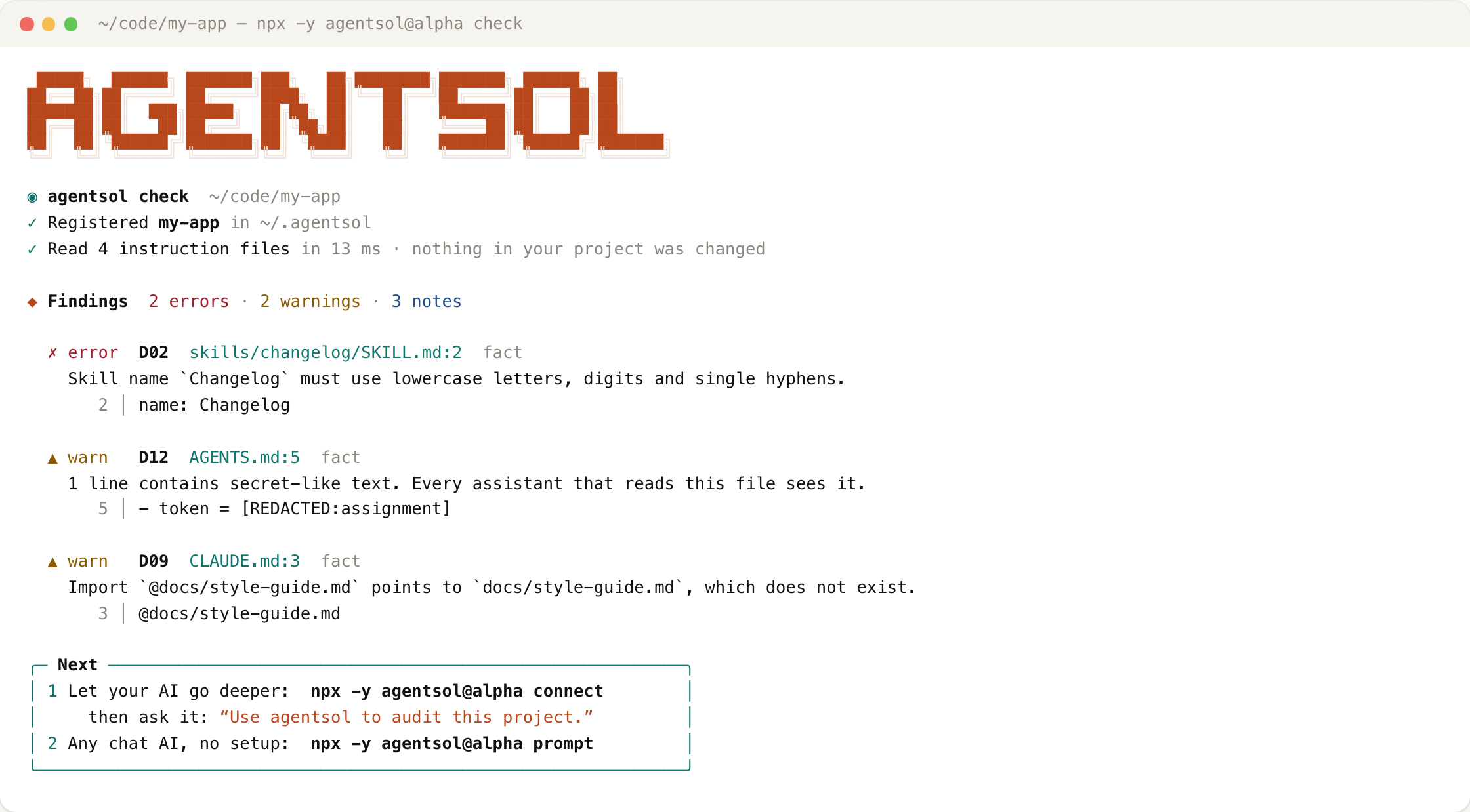
npx -y agentsol@alpha check # every finding with its file and line; --strict exits 1 on errors
Reads AGENTS.md, AGENTS.override.md, CLAUDE.md, .claude/CLAUDE.md and SKILL.md, masks secret-like text first, and reports: nested AGENTS.md files Claude Code never reads, skills that can't load, files over Codex's 32 KiB budget, commands for the wrong package manager, rules that contradict each other, leaked secrets, and unsafe or injected instructions. On 32 public repos every remaining error and warning was confirmed by hand.
In CI
Findings show up in GitHub code scanning on each pull request. The job needs security-events: write:
name: agentsol
on: [pull_request]
permissions: { contents: read, security-events: write }
jobs:
  check:
    runs-on: ubuntu-latest
    steps:
      - uses: actions/checkout@v5
      - uses: ArSenic04/agentsol@v0.2.0-alpha.9
        with: { strict: "true" }
The action pins an exact Agentsol version (set version to change it), so a new npm release never changes your CI. On pull requests from forks the token is read-only, so the upload is skipped and findings stay in the job log; an upload error never fails the job. Locally, npx -y agentsol@alpha check --sarif-file agentsol.sarif writes the same SARIF and keeps the normal report.
Inspect · before you install a skill or MCP server
npx -y agentsol@alpha inspect ./some-skill        # a skill or server folder
npx -y agentsol@alpha inspect tools.json --json   # a server's tools/list result
A verdict (danger, caution, clean) with every finding's file and line, from reading the files: it never runs them. It exits 1 on danger, so it works as a CI gate. On 1,567 public skills and servers it rated 22 as danger after hand review; most are an offensive-security collection with real payloads.
Also included
sessions: risky steps in recent agent sessions: destructive commands, secrets exposed to the model, skipped hooks, weakened tests, unverified edits, insecure code (A01–A14).doctor: your AI apps' settings: plaintext keys in MCP config, unpinned servers, settings that let agents act without asking (C01–C10).log: who approved, applied or rejected each change.- In the browser: the demo shows real output for a synthetic project, and Check and Inspect run entirely in your browser.
Works with
| App | Add the MCP server, run once |
|---|---|
| Claude Code (plugin: server + skill) | claude plugin marketplace add ArSenic04/agentsol then claude plugin install agentsol@agentsol |
| Claude Code | claude mcp add agentsol -s user -- npx -y -p agentsol@alpha agentsol-mcp |
| Codex | codex mcp add agentsol -- npx -y -p agentsol@alpha agentsol-mcp |
| Gemini CLI | gemini mcp add -s user agentsol npx -y -p agentsol@alpha agentsol-mcp |
| VS Code | code --add-mcp '{"name":"agentsol","command":"npx","args":["-y","-p","agentsol@alpha","agentsol-mcp"]}' |
| Cursor, Claude Desktop, Windsurf | npx -y agentsol@alpha connect prints the JSON for each |
| No MCP | npx -y agentsol@alpha prompt prints one masked prompt to paste into any chat AI |
Connected agents get project_briefing (the rules for this folder when they start) and command_check (the guard's answer for a command, before they run it), plus the prompts audit, fix, explain, review, setup and learn (in Claude Code: /mcp__agentsol__learn and so on). skills/agentsol/SKILL.md tells an agent when to use them; copy it into .claude/skills/ or your agent's skills folder.
flowchart LR
  T[("Past session<br/>transcripts")] -- learn --> L["Lessons"]
  L --> G{"guard hook"}
  A["Your agent"] -- "every shell command" --> G
  G -- "allow · block with the fix · ask you" --> A
  L -- "learn --propose" --> P["A diff to<br/>AGENTS.md · CLAUDE.md"]
  P --> Y{"You, in a<br/>terminal"}
  Y -- "approve + apply" --> I["Instruction files"]
What it will never do
- Write without you. There is no approve, apply, write or delete MCP tool, and approve, apply and reject refuse to run inside coding-agent terminals. The only files it changes outside your workspace are the hook settings of your agent apps, for the guard, each after you type yes, with a backup.
- Send your data anywhere. No hosted service, analytics or telemetry. What MCP tools return goes to your assistant's provider, as with any tool you use with it.
- Show you a secret. Secret-like text is masked before your assistant sees it (by pattern, so keep secrets out of instruction files anyway). Session review, learn and guard return derived facts only, never transcript text or secret values.
- Read what you did not register. Only folders you add are visible.
CLAUDE.local.md,.env*, keys, credentials, symlinks and hard-linked files are never read.
Early alpha (0.2.0-alpha.9). A person has not yet run approve and apply end to end through this CLI; those steps are covered by automated tests only. No real assistant app has been formally validated. Tested on macOS (arm64) with Node 24 and 26; Linux and Windows are untested. Try it on the synthetic demo first and keep your files in version control.
All commands
| Command | What it does |
|---|---|
start | Register, scan, connect your apps, show session costs and what to fix first |
learn | Lessons from past sessions. --since 365d, --propose |
connect [app] --guard · guard --test "<cmd>" | Add the session-briefing and command-check hooks to your agent apps (--remove to undo), or see the guard's answer for a command |
check | Scan this folder: every finding with its line. --strict exits 1 on errors (CI), --json |
inspect <path> | Verdict on a skill or MCP server |
sessions · session <id> | What agents did, risky steps flagged. --since 7d, --timeline |
doctor | Preflight plus the AI-app settings audit. --strict |
connect · prompt | Set up an app, or a paste-in prompt for chat AIs |
review · approve · apply · log | The human step for a proposed change, and its audit log |
The details
Learn, in depth
Agents forget between sessions, so they repeat the same mistakes in the same project. learn reads the Claude Code and Codex transcripts on your machine for sessions in this folder from the last 180 days and finds four kinds of lesson. A session started in a parent or sibling folder that worked here counts too, but only its steps in this folder, not what you said in it. A resumed session counts only from the start of the window, and a command lesson is dropped once that command later runs fine as written, so a rule the project outgrew is not kept. Claude Code deletes its transcripts after 30 days unless cleanupPeriodDays in its settings is higher, so older mistakes may be gone.
- command: a command that fails here and the one that works (
npm testfails,pnpm testworks). - you said: something you told agents in two or more sessions ("no, use pnpm", "from now on…", "make sure you…", "I told you to…"), turned into a plain rule, masked and shortened. Text the app adds itself, like Codex's copy of AGENTS.md, is never counted as you.
- fragile: a file agents edit, break and re-edit before a check passes, in two or more sessions or three times in one, with the check that passed that tests this file (never a formatter or a test of another file).
- failing: a command that failed in several sessions and never worked anywhere; it asks you how to run it.
It also checks your instruction files against what happened. If AGENTS.md says "run npm test" and npm fails here, that line is why agents keep doing it: learn shows the file and line, the corrected line, and fixes it in place instead of adding a contradicting rule. It checks every AGENTS.md, AGENTS.override.md, CLAUDE.md and CLAUDE.local.md at any depth (in a monorepo, the wrong line in packages/web/AGENTS.md is corrected there, not with a second rule at the root), skips lines that already warn against the command, and only treats a bare word like pytest as a command in code or after "run". The same goes for things you told agents more than once: if you said "never edit the generated files in gen/, run pnpm codegen" in two sessions and AGENTS.md says "Edit the generated files in gen/ when the API changes", that line is replaced with what you said, instead of counting as already covered. This works for "never X", "don't X" and "use Y instead of X" or "Y, not X"; it leaves prose that only mentions X alone, and a line about a different scope ("in unit tests" against "in integration tests"). When a rule is written down but agents still break it, it says why: Codex reads AGENTS.md and not CLAUDE.md (and when a non-empty AGENTS.override.md sits next to AGENTS.md, Codex reads only the override, so rules go there), and Claude Code reads AGENTS.md only through an @AGENTS.md line in CLAUDE.md. With no instruction file yet, it names the one your apps read; when only Claude Code made the mistakes and CLAUDE.md does not import AGENTS.md, new rules go to CLAUDE.md. It works with symlinked project folders, Windows commands (npm.cmd, $env:CI=1) and CRLF instruction files, older and newer Codex transcript formats (including archived Codex sessions), Claude Code subagent transcripts (counted with the session that started them; a prompt one agent wrote for another is never read as something you said), CODEX_HOME and CLAUDE_CONFIG_DIR when set, and transcripts up to 512 MB.
npx -y agentsol@alpha learn                 # last 180 days
npx -y agentsol@alpha learn --since 365d
npx -y agentsol@alpha learn --propose       # one proposal per instruction file: corrections and new rules
npx -y agentsol@alpha review <proposalId>
Each lesson cites its session ids and step numbers, says whether the instruction file already covers it, and shows the active time and tokens it cost (pauses over 5 minutes count as 5 minutes). --propose never writes a file: you review, approve and apply each diff yourself, and running it again returns the proposals already waiting instead of new copies. Over MCP the same report is lessons_list, and /learn walks your assistant through it. Lessons are patterns, not proof; read each rule before keeping it.
When an agent starts work, project_briefing (pass the folder it works in; Claude Code, Codex and Gemini CLI start the server in the project, so there it can be left out) returns a short briefing: the rules to follow here, the instruction lines that are out of date with what to do instead, and the commands that never worked, which it should ask you about. Before a build, test, install or deploy command, command_check says whether that command failed here before and what worked instead (npm test → pnpm test), or that it never worked or goes against something you said, so the agent asks you first. Both are read-only, and the server tells connected agents to use them. To make sure every agent does, add one line to your AGENTS.md or CLAUDE.md: Before you start, call the agentsol project_briefing tool with this folder and follow it. When learn --propose adds a lessons section to a file, it includes a line like this for you.
Instruction checks, sessions and setup audit
- Instructions. Audits AGENTS.md, AGENTS.override.md, CLAUDE.md, .claude/CLAUDE.md and SKILL.md, including rules that tell assistants to do something unsafe (curl | sh, --no-verify, force-push, skipping failing tests, printing secrets), prompt-injection phrasing and invisible characters (D13–D15), and commands for a package manager the project does not use, such as
npm testwhere the lockfile is pnpm's, with the command to use instead (D16). The assistant reads and proposes changes through MCP. Only you can approve and apply a change, from a local CLI. - Sessions.
agentsol sessionsreads the Claude Code and Codex transcripts on your machine and flags destructive commands, secrets exposed to the model, skipped hooks, weakened tests, edits never verified, retry loops, prompt injection in tool output, and insecure code the agent added such as SQL injection, disabled TLS checks or eval (A01–A14). Grades from your assistant are stored as assistant judgment next to the deterministic findings, never instead of them. - Setup.
agentsol doctorchecks your AI apps' settings (C01–C10). sessions --since 24h|7d|2w|<date> --limit N [path]narrows the list;--jsoneverywhere.doctor --strictexits 1 when the setup audit finds an error.checkopens an interactive report: a banner, findings sorted by severity with the cited lines, and the next steps. Colors followNO_COLOR,FORCE_COLORandTERM=dumb; pipes get plain text, as wide asCOLUMNSwhen it is set (80 otherwise). Text from your files is sanitized, so it cannot inject terminal escape codes.npx -y agentsol@alphawith no command, in a terminal, shows the home screen: workspace, the folder you are in, the tools, prompts and checks.- The workspace defaults to
~/.agentsol(created private,0700). Use--workspace <dir>orAGENTSOL_WORKSPACEto keep it elsewhere; set the same value for the CLI and the MCP server. - Your assistant cannot register folders; it tells you to run
checkwhenprojects_listis empty. inspectreads text only and runs nothing; it cannot see code a server downloads at run time. The same engine runs as theinspectMCP tool (files passed inline, nothing read from disk) and on the website's Inspect page, entirely in the browser.
What leaves your computer
- Anything the MCP tools return goes to your assistant's provider (usually a cloud service), under that provider's terms.
- Agentsol returns only AGENTS.md, AGENTS.override.md, CLAUDE.md and SKILL.md files from folders you registered.
- It blanks out text that matches known secret patterns. Pattern matching is not a guarantee: unknown formats and short or split secrets can get through, so keep secrets out of instruction files.
- Session and setup review returns derived facts only: check ids, step kinds, masked commands and paths, and setting names. Transcript text, tool output and secret values are never returned. Over MCP, sessions are limited to folders you registered, and absolute paths are replaced with
<project>,~or<path>. The CLI shows you every session on your machine. CLAUDE.local.md, secret-like names (.env*, keys, credentials,.ssh, and similar), symlinks and hard-linked files are never read.
What is protected
- What gets read: only folders you register with the CLI are visible. Your home folder (and anything containing it),
/, system folders,~/Libraryand config folders, broad folders such as~/Documents, secret-named folders and the workspace itself are refused. - Text from repository files: instruction file text is treated as untrusted data. Assistants are told not to follow it. Control and bidi characters are escaped in all CLI output, and proposed lines may not contain them.
- Assistant findings: they are labelled "possible", need exact quotes from the current file version, and are hidden once the file changes.
- Approving a change: it is bound to the full digest of the exact proposal shown to you. The approval is single-use, expires after 10 minutes, and only one can be active per proposal.
- Applying a change: the file must still match, be reachable without symlinks inside the root, and not be hard-linked. A backup is kept, the write is atomic, and the result is checked after writing.
- The approval guards are not authentication. Approve, apply and reject refuse known coding-agent environments and non-interactive input. A program running as your user account can get around those checks. See
docs/SECURITY_REVIEW.md.
MCP tools, prompts and resource
projects_list, workspace_status, sources_freshness, sources_scan, sources_list, source_read, scope_resolve, checks_run, findings_list, findings_submit, change_propose, changes_list, change_status, sessions_list, session_review, session_grade, setup_audit, inspect, lessons_list, project_briefing, command_check. There is no approve, apply, write or delete tool.
Prompts: audit and fix (optional project), explain (path, optional project), review, setup and learn (optional project, since). Resource: agentsol://guide (markdown: the workflow, the check catalogue and how to report).
The CLI and the MCP server call the same assistant-safe service (src/core/service/assistant.ts), so validation, redaction and error messages are identical; --json output equals the MCP result. Approve, reject, apply and project registration live in a separate operator service that only the CLI imports. findings_submit and change_propose accept an optional requestKey: retrying with the same key returns the original result, and reusing a key for a different request is refused.
Status and freshness
status / workspace_status keep three things separate:
- Last-scan snapshot: sources, findings (
findings.basis: "last_scan_snapshot") and proposal counts. - Coverage (
scan.partial): what the last scan could not inspect (skipped folders, depth limit, symlinks, case variants, secret-like names, files not read). - Freshness (observed now): for each file the last scan recorded, a metadata-only
lstatcomparison (size, modification and change time, inode, device, link count). No content is read.- Per-file states are
metadata_unchanged,changed,removed,unsafe(now a symlink, not a regular file, extra hard links, or outside the root) andunknown. - Project states are
no_known_changes,changes_detectedorincomplete;unknownwhen the root is missing, a symlink or replaced, or the scan predates freshness metadata;not_checkedwhen the project was never scanned.
- Per-file states are
Matching metadata does not prove a file is unchanged, and new files are not detected until you scan again. Evidence checks and apply never use metadata; they compare byte hashes.
First run from source (synthetic data only)
Requirements: the installed package needs Node 24 or later. The source checkout needs Node with built-in TypeScript support and has only been run on Node 26.8.2. Run every step from this folder, in your own terminal.
- Install from the lockfile.
npm ci(exact versions frompackage-lock.json; nothing global). - Preflight.
npm run doctor. It reports the Node version, whether the installed packages match the lockfile, whether this terminal is agent-driven (approve/apply refuse there), and with-- --workspace <dir>whether that folder is private. It reads only.--jsonfor machine-readable output. - Tests.
npm run check(typecheck plus all tests; fixtures are synthetic temp folders).npm run eval:learnscoreslearnon 48 labelled histories and fails below 90% precision or 80% recall. - Synthetic demo.
npm run democreates$TMPDIR/agentsol-demowith a made-up project, drives the MCP server over stdio with the official SDK client (scan, read, a "possible" finding, one proposed edit), and prints the next commands. Run it again to see pending proposals;-- --resetrecreates it (refuses while it holds proposals; add--discard-proposals);-- --dir <empty folder>puts it elsewhere. - Check the workspace.
npm run cli -- --workspace "$TMPDIR/agentsol-demo/workspace" status. - Review and decide, as a person.
review <proposalId>, thenapprove <proposalId>(type the one-time code), thenapply <proposalId>(writes the demo file and keeps a backup). - Optional: connect a client yourself.
npm run doctor -- --workspace <ws>prints an MCP stdio config with absolute paths. Agentsol never installs it.
npm run check                                       # typecheck plus all tests
export AGENTSOL_WORKSPACE="$PWD/.local-workspace"   # gitignored
npm run cli -- project add /path/to/a/project --name demo
npm run cli -- status                 # also: projects, sources, findings, scan, freshness <projectId>
npm run cli -- review <proposalId>
npm run cli -- approve <proposalId>   # interactive terminal; type the one-time code it shows
npm run cli -- apply <proposalId>     # interactive terminal; type "apply" (approvals expire after 10 minutes)
npm run cli -- reconcile <proposalId> # only if an apply was interrupted
npm run mcp                           # MCP server on stdio, same workspace
Example MCP client config (stdio). GUI clients often have a different PATH, so use the absolute node path that npm run doctor -- --workspace <dir> prints:
{ "command": "/ABSOLUTE/PATH/TO/node", "args": ["/ABSOLUTE/PATH/TO/your-checkout/src/mcp/main.ts", "--workspace", "/ABSOLUTE/PATH/TO/your-checkout/.local-workspace"] }
Website and read-only workspace view
The site and the workspace view are one static app in web/ (no framework, no runtime dependencies), built into dist/web/.
npm run web:build                                   # builds dist/web and records the synthetic demo data
npm run web:preview                                 # static site + demo at http://127.0.0.1:4318/ (no API)
npm run web:local -- --workspace "<workspace dir>"  # adds your workspace, read-only, at http://127.0.0.1:4317/
npm run test:web                                    # build, then browser tests (needs the local Playwright Chromium)
- Demo (
#/demo) shows real Agentsol output recorded from the synthetic demo project at build time. The "possible" finding and the proposed change were prewritten by the demo script. - Workspace (
#/workspace) works only underweb:local, which binds to 127.0.0.1, serves GET requests only, and cannot scan, edit, approve, apply or register folders. It opens only the workspace folder you name. - The site loads nothing from other servers: no analytics, cookies, external fonts, CDNs or third-party scripts. A strict Content Security Policy blocks inline scripts.
- The local bridge (
src/web/) must never be exposed to a network or run on a shared machine.
Release checks (maintainers)
npm run pack:check: preview tarball inartifacts/pack/with a strict file allowlist; fails on install-time scripts, private paths, secret-like tokens or leftover.tsimports, and requires"private": true.npm run install:check -- [--tarball <file>] [--node <path>]: clean install into a temp folder with scripts disabled, then the CLI and an MCP stdio handshake against the installed copy only.npm run release:check -- --node <node24>: packs a staged copy without"private"intoartifacts/release/(never overwriting a release file), runs the install check per Node runtime, thennpm publish --dry-runon that exact file, confirms its sha512 did not change, and records everything in<tarball>.release.json.- The repository's own
package.jsonstays"private": true, sonpm publishfrom this folder fails by design. Publishing is a person's step, with npm 2FA:npm publish ./artifacts/release/agentsol-<version>.tgz --tag alpha --access public. - The package has no install scripts. It ships compiled JavaScript, this README and
LICENSE, and depends on@modelcontextprotocol/server,yamlandzod.
Known limitations
- If a different folder appears at a registered path (deleted and recreated, or swapped), scans and apply refuse with
root_replaceduntil you confirm it yourself withproject add <the same path>. - Accuracy on real projects (32 public repos, 1,567 public skills and MCP servers, what was right, what was fixed and what is still open) is in
docs/EVALUATION.md. - Load figures from
npm run load:test(synthetic monorepos up to about 5,000 files) describe one Mac and are not a guarantee; seedocs/ALPHA_VERIFICATION.md. - The website has not been tested with a screen reader and has had no formal accessibility audit.
- Backups in
<workspace>/backupskeep original bytes, secrets included. The workspace must be private (chmod 700). scope_resolvemodels documented defaults for a given working directory and always reportscoverage: "partial".- Freshness is metadata-only and only covers files recorded by the last scan; it cannot prove that nothing changed.
- Claude Code scope assumes the default "Project instructions" setting. User-level, managed and
.claude/rulesfiles are not inspected. Cursor.mdcrules are not supported. - Only LF or CRLF files with consistent line endings can be edited. Lines with redacted secrets cannot be edited through Agentsol.
- A process that can rewrite folders inside the project during an apply can still race the final rename. This is detected afterwards (
write_unverified) but not prevented. Power loss during apply is not tested. - Every push runs the tests on Linux, macOS and Windows (Node 24 and 26) and a clean install of the package on Linux and Windows. Day-to-day use is on macOS. On Windows,
startprints the commands to connect your apps instead of running them, and Cline hooks are not installed.
Version history and earlier names
0.1.0-alpha.2addedcheck,connect,prompt, the default workspace and the MCP prompts. Session review, grading and the setup audit arrived with0.2.0-alpha.0;learnwith0.2.0-alpha.1;startwith0.2.0-alpha.2; field-evaluation fixes (fewer false alarms incheckandinspect, compaction-awarelearn) with0.2.0-alpha.3; check D16 (wrong package manager), wrapped commands, MCP Registry and Claude Code plugin packaging with0.2.0-alpha.4.guard,check --sarifwith the GitHub Action, thelearneval, andlearnignoring network, rate-limit and sandbox failures with0.2.0-alpha.5, and hardened after an independent review and a red-team in0.2.0-alpha.6.- Earlier names were AgentWeave, then Agentlore (both Nov 2026; the npm name
agentlorewas refused as too similar to an existing package).AGENTLORE_WORKSPACE, thenAGENTWEAVE_WORKSPACE, still work whenAGENTSOL_WORKSPACEis not set. Existing workspaces need no migration. - Demos made earlier in
$TMPDIR/agentweave-demoor$TMPDIR/agentlore-demostill work with--workspace "$TMPDIR/agentweave-demo/workspace".
MIT licence · made for people who let agents write code and want to know what they did · logos belong to their owners and do not imply endorsement







