vaultguard
AI agents use your Obsidian secrets by name — values never reach their context.
Runs on your machine from its package; the steps are below.
What it does
- Reads
- Writes
- High impact
At most: moves money, runs code or commands, deletes data, or sends messages for you.
What it costs
FreeOdel charges nothing per call. The publisher may charge for its own service.
Runs locally over stdio
This server isn't hosted — your MCP client launches it from a package registry. Use one of the commands below, or drop the config into your client (e.g. Claude Desktop).
Run
npx -y @ashishrao-4/vaultguard
MCP client config
{
  "mcpServers": {
    "vaultguard": {
      "command": "npx",
      "args": [
        "-y",
        "@ashishrao-4/vaultguard"
      ]
    }
  }
}
🔐 vaultguard
Your Obsidian vault, guarded for your AI agents.
npx @ashishrao-4/vaultguard init · zero dependencies · pure Node · cross-platform
The problem
Your AI agents are powerful. They ship code, run commands, and one day they will ask: "give me the database URL."
You hand it over. Now that value lives in every transcript, log, checkpoint, and backup of your conversations. Rotate it a month later — a year later — and the old one is still out there.
The vault itself — Obsidian — is encrypted only if you make it so, and your agent reading your notes means your agent reading your secrets.
What vaultguard does
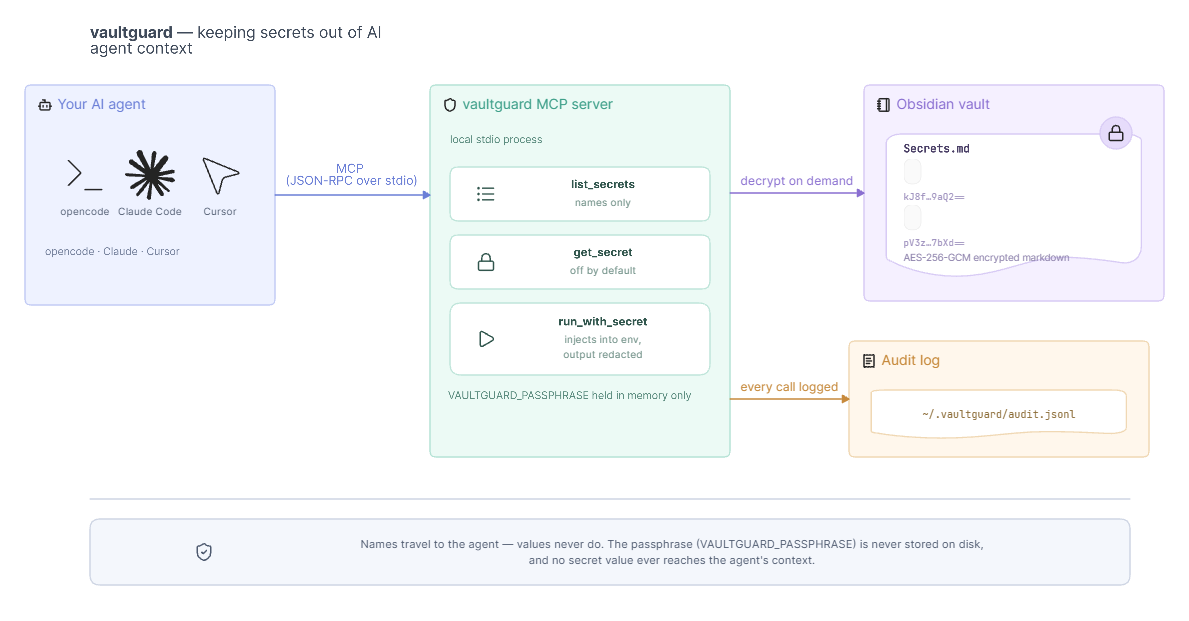
Secrets live in your Obsidian vault as AES-256-GCM ciphertext. Your agents get them by name over MCP — they run commands with the values injected into the environment and never see them, while every access is audited.
The simple version: your agent asks by name, vaultguard decrypts on demand, the value stays out of the conversation.
- You own the data. No cloud, no SaaS, no server. The encrypted blocks are plain markdown.
- Readable in Obsidian. Encrypted blocks look like notes; reveal them with one click.
- Tell your agent to run things using secrets — values never surface in transcripts.
- Zero npm dependencies. Pure Node ≥ 18. Windows / macOS / Linux.
Quickstart
1 · Install
npm install -g @ashishrao-4/vaultguard
2 · Point it at your vault
vaultguard init --vault "C:\Users\you\Documents\Obsidian Vault"
It asks for a passphrase — the key that encrypts and decrypts every block in this vault. Then it:
- creates
Secrets.mdin your vault, - installs the Inline Secret Block plugin into the vault automatically,
- writes
~/.vaultguard/config.json— without the passphrase (you provide it viaVAULTGUARD_PASSPHRASE).
Restart Obsidian and enable the plugin: Settings → Community plugins → Inline Secret Block → Enable.
The passphrase is never written to disk by default. Prefer env vars:
VAULTGUARD_PASSPHRASE(orDOORMAN_PASSPHRASE). If you want it conveniently stored anyway — at the cost of weaker security — runvaultguard init --store-passphraseinstead (see Threat model).
3 · Add your first secret — the Obsidian way
In Obsidian, open Secrets.md and add a plaintext block:
```secret DATABASE-URL
Mydatabaseurl@postgres
```
Click Show — the plugin instantly replaces it with an encrypted secret-lock block. Your raw value is gone; what remains:
```secret-lock DATABASE-URL
Nx60U4Ph/+1CO+58Zr00HXhEW9GZ6voHlpS+bEXPpP69avbJaSfafZCC2dpPn6UgdMN+3PJUd+UPm39YAXhFTbHvLUpHDndzbODsL8fOm7IMWC16zjSQCW7CbRWklmUxOGl0lX2qpQ==
```
That's it. Same value, later, forever: click Show again.
No Obsidian? Use the CLI instead:
bashvaultguard add DB_URL # hidden prompt vaultguard set DB_URL # rotate in place
4 · Connect your agent
vaultguard mcp
prints ready-made config for your harness:
opencode — in opencode.json (or globally via the app):
{
  "mcp": {
    "vaultguard": {
      "type": "local",
      "command": ["node", "C:/path/to/vaultguard/src/server.mjs"],
      "environment": { "VAULTGUARD_PASSPHRASE": "your-passphrase" }
    }
  }
}
Claude Code:
claude mcp add vaultguard -e VAULTGUARD_PASSPHRASE=your-passphrase -- node C:/path/to/vaultguard/src/server.mjs
Cursor: add the same server to your project's .cursor/mcp.json (or the MCP settings tab):
{
  "mcpServers": {
    "vaultguard": {
      "command": "node",
      "args": ["C:/path/to/vaultguard/src/server.mjs"],
      "env": { "VAULTGUARD_PASSPHRASE": "your-passphrase" }
    }
  }
}
5 · Use it
you : "run a quick sanity check against DB_URL"
agent: run_with_secret(command: "psql $DB_URL -c 'SELECT 1'", secrets: ["DB_URL"])
you :  ✔ exit 0  ·  audit entry written  ·  no secret leaked
run_with_secret— secrets injected into the command's environment only.- Output is scrubbed — any accidental echo of a secret is replaced with
[REDACTED:NAME]. get_secret— disabled by default so values never reach the agent; opt in withallowGetSecret: truein the config if a tool insists on the raw value.
Security model
| Layer | What stops it |
|---|---|
| At rest | AES-256-GCM, PBKDF2-SHA-256 (250,000 iterations, 16-byte salt, fresh 12-byte IV per value). Byte-compatible with the Inline Secret Block plugin. |
| Approval gate | run_with_secret is denied by default unless you set requireApproval: false (or VAULTGUARD_REQUIRE_APPROVAL=0). |
| Secret access gate | get_secret is disabled by default — values never reach the agent; enable only via allowGetSecret: true. The intended path is run_with_secret (env injection, values never seen). |
| Host allowlist | Only named clients (from MCP clientInfo) may call tools. Empty list = allow all. |
| Command allowlist | Only command prefixes you list may run (e.g. ["psql", "node", "git"]). Empty = allow all. |
| Audit log | Every call — who (host), what, which secrets, outcome — appended to ~/.vaultguard/audit.jsonl. View with vaultguard audit. |
| Output scrubbing | Secret values and their first 8 chars are redacted from command output. |
Configuration
Edit ~/.vaultguard/config.json:
{
  "vaultPath": "C:/Users/you/Documents/Obsidian Vault",
  // passphrase is NOT stored here by default — provide VAULTGUARD_PASSPHRASE instead
  "allowlist": { "hosts": [], "commands": ["psql", "node"] },
  "requireApproval": false,          // true (default) = gate run_with_secret
  "audit": true,
  "allowGetSecret": false            // false (default) = values never reach the agent
}
The only way the passphrase lands in this file is vaultguard init --store-passphrase,
which sets "storePassphraseOnDisk": true and includes "passphrase". Everything else reads
the passphrase from the VAULTGUARD_PASSPHRASE env var or the CLI prompt.
| Env var | Overrides |
|---|---|
VAULTGUARD_VAULT_PATH / VAULT_PATH | vault path |
VAULTGUARD_PASSPHRASE / DOORMAN_PASSPHRASE | passphrase |
VAULTGUARD_HOME | config dir (default ~/.vaultguard) |
VAULTGUARD_REQUIRE_APPROVAL=0 | auto-approve |
VAULTGUARD_AUDIT=0 | disable audit |
VAULTGUARD_ALLOW_GET_SECRET=1 | enable get_secret (default: off) |
Passphrase hygiene: vaultguard never writes the passphrase to disk unless you opt in (
init --store-passphrase). SupplyVAULTGUARD_PASSPHRASEin each harness config (see step 4) and protect~/.vaultguardlike an SSH key. Changed passphrase?vaultguard rekeyre-encrypts every block, then update the env var wherever you set it.
CLI reference
| Command | What it does |
|---|---|
vaultguard init | Configure vault + passphrase, create Secrets.md, install plugin |
vaultguard add <NAME> | Encrypt + store a new secret (interactive or --value) |
vaultguard set <NAME> | Rotate a secret in place |
vaultguard rekey | Re-encrypt every block with a new passphrase (interactive, or --old-passphrase/--new-passphrase) |
vaultguard list | List secret names (no values) |
vaultguard audit [--lines n] | Tail the audit log |
vaultguard mcp | Print harness-specific MCP config |
vaultguard info | Show config + security posture |
vaultguard test | Crypto self-test |
Threat model — and when NOT to use it
vaultguard is a thin convenience layer, not a secrets manager. Its job is to keep secret values out of your AI-agent transcripts, logs, and checkpoints.
What it does NOT protect against:
- A compromised machine or harness. The passphrase (or an opted-in stored config) lives on your disk. Any process running as you — a backup tool, ransomware, a compromised plugin, your IDE — can read your files and decrypt the vault.
- A hostile agent. The entire idea is that the agent runs commands with secrets in the
environment. Treat that as "the agent is you." Start with command allowlists and review
vaultguard audit; don't grant access you wouldn't grant yourself. - Weak passphrases. AES-256-GCM + PBKDF2 is only as strong as the passphrase. Use a long random one (your password manager can generate and store it).
- Exfiltration through legitimate channels. A determined agent can copy ciphertext or raw values anywhere that's reachable. vaultguard is a barrier, not a boundary.
- Plugin supply chain.
vaultguard initdownloads the Inline Secret Block plugin from its GitHub releases. A malicious plugin that knows your passphrase can decrypt everything — pin/verify it if you care.
Use it when: you want "agents run things with secrets without me pasting values into the chat" and the residual risks above are acceptable to you.
Don't use it when: you need real secrets-management guarantees — rotation policy, hardware-backed keys, no procedure that makes plaintext reachable to a native plugin — when your threat model includes a hostile agent on a shared or CI machine, or when the vault itself needs encryption at rest (Obsidian's own vault encryption, or an encrypted volume, is the answer there).
FAQ
Is my vault git-safe? The encrypted blocks are plain markdown — safe to commit, sync, or put anywhere Obsidian works. Since the passphrase no longer lives in ~/.vaultguard/config.json by default, committing that file leaks your vault path and settings but not your key.
What if I forget the passphrase? The blocks are AES-256-GCM. It cannot be recovered — that's the point.
Which Obsidian plugin? Inline Secret Block — vaultguard init installs it for you.
Do I need a server? No. It's a local stdio MCP server (node src/server.mjs). Nothing listens on a port.
License
MIT © vaultguard contributors.
The bundle installs the Inline Secret Block plugin (also MIT), downloaded at init time from the plugin's official releases — it is not vendored into this package. This project uses Node.js built-ins only (crypto), so there are no dependency licenses to track.
Guard your vault. Let your agents work.