Listed from the MCP registry; nobody on Odel publishes it.
Is this yours? Claim it
Bilinc
Hosted agent memory with provenance, contradiction surfacing, and snapshot rollback.
One address for any MCP client. You sign in at bilinc.space once, after adding it.

What it does
- Reads
- Writes
- High impact
At most: moves money, runs code or commands, deletes data, or sends messages for you.
What it costs
FreeOdel charges nothing per call. The publisher may charge for its own service.
What it asks for at sign-in
| Access to | Read | Change |
|---|---|---|
| Memory | ||
| Stay signed in |
From the sign-in at bilinc.space, as the endpoint publishes it. You approve it there.
Tools
None listed · checked 13 Nov 2026Odel could not list its tools without signing in.
Bilinc





Hosted memory for AI agents. Save what your agents learn, recall it before they act, see who wrote each memory and what changed, and roll back when a run goes wrong.
The bilinc package on PyPI is the Python SDK, the bilinc CLI and the stdio MCP adapter for Bilinc Cloud. Its source is ReARCLabs/bilinc; the hosted service is not part of the package.
Start in 60 seconds
Claude, ChatGPT or Codex, without Python. In Claude, open Customize → Connectors → Add custom connector, name it Bilinc and paste https://mcp.bilinc.space/mcp. Sign in and choose read-only or read and write. In Claude Code:
claude mcp add --transport http --scope user bilinc https://mcp.bilinc.space/mcp
The same address works in ChatGPT and Codex: remote MCP guide.
Python, the CLI or any MCP client.
pip install -U bilinc
bilinc login        # browser sign-in, free, no card required
bilinc quicktest    # one hosted commit, one recall and a status check
bilinc login saves an API key for this computer with owner-only permissions; the key never appears in a URL or your terminal. Without a browser, use bilinc login --device. For CI and scripts, set BILINC_API_KEY.
Where Bilinc sits
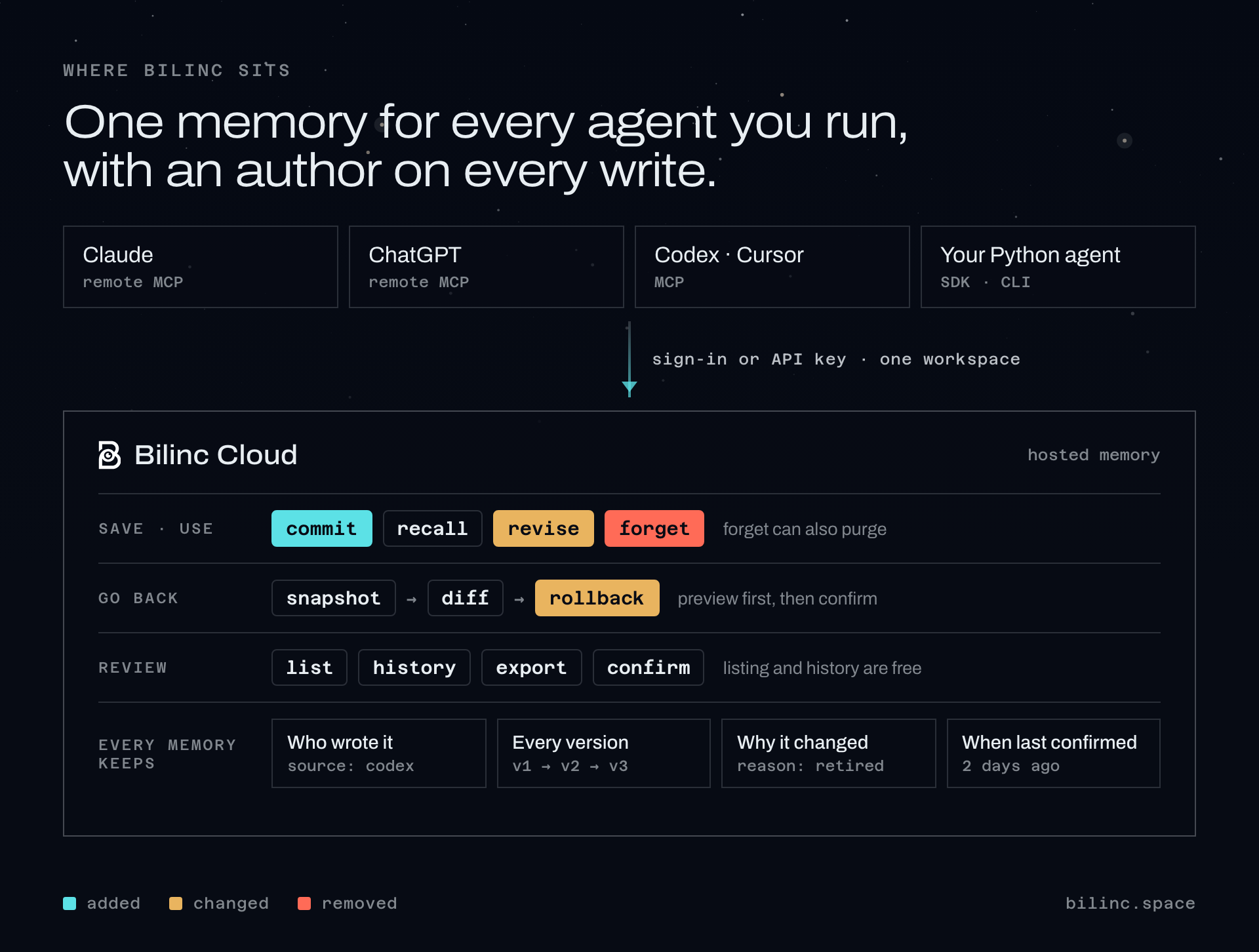
Every write records where it came from and returns a version you can pass back, so a change is refused if the memory moved since you read it. Forget requires a reason and revise accepts one. In the remote connector, recall shows when each memory was last confirmed and marks entries past their review window as possibly outdated; nothing is hidden or deleted by that check.
Similar is not the same as current
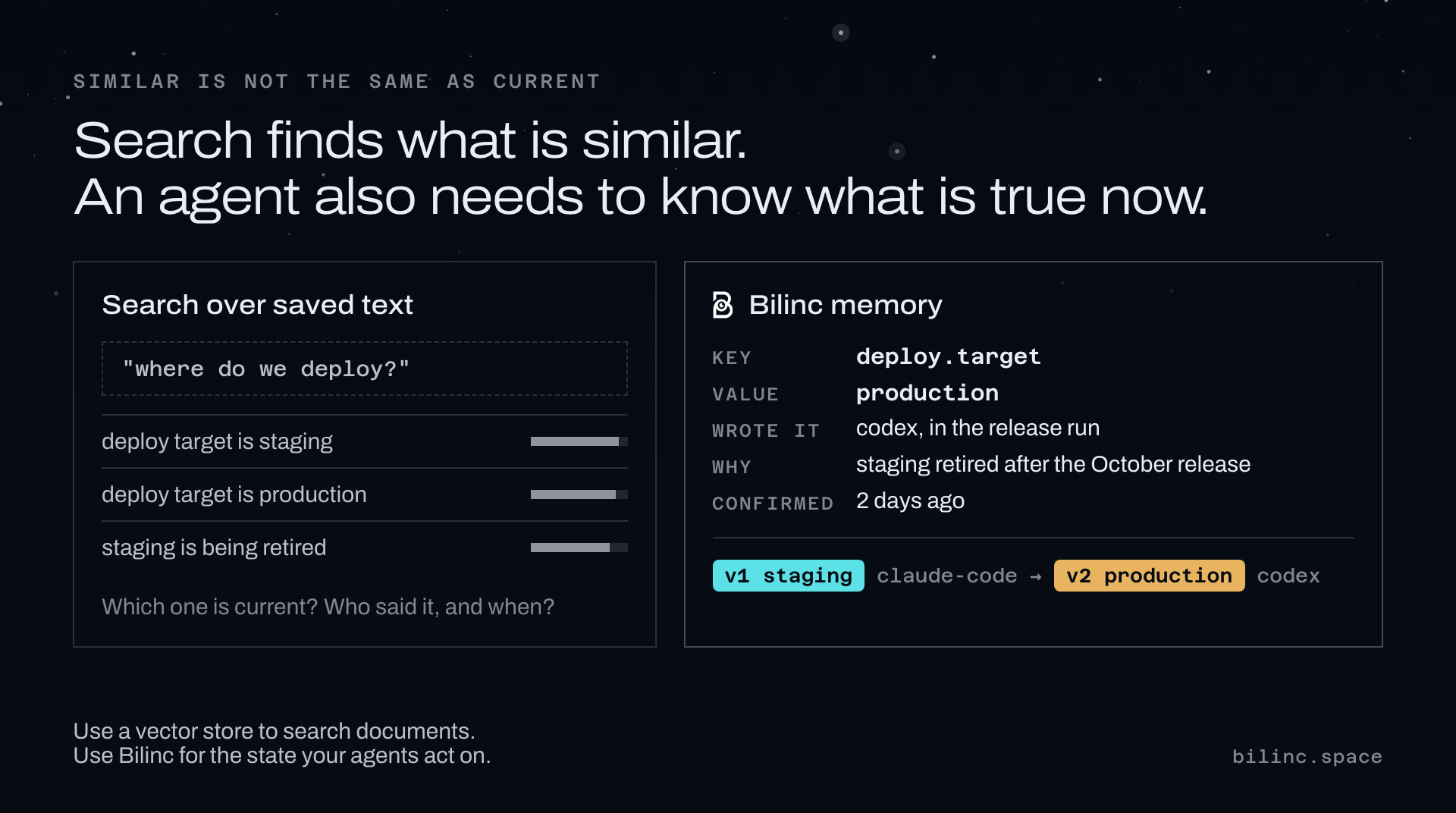
Use Bilinc when:
- a long-running agent (coding, support, research, a personal assistant) needs earlier decisions before a risky action;
- you need to know which run, tool or person wrote a piece of agent state;
- a bad run wrote wrong state and you need a way back, not a manual cleanup;
- several agents or teammates share one memory and you want per-key access and visible usage.
Reach for something else when you only need semantic search over documents (a vector database is the simpler tool), when you need an Apache-2.0, fully self-hosted runtime (this package is cloud-only and BUSL-1.1), or when you want the memory layer to also be your agent framework.
Python SDK
from bilinc import CloudClient

client = CloudClient()  # reads BILINC_API_KEY or the key saved by `bilinc login`

# Write, and keep the version for optimistic concurrency.
written = client.commit("agent.goal", {"ship": "reliable memory"}, memory_type="semantic")
results = client.recall("agent goal", limit=5)

# Correct something you already know. Fails if the key does not exist.
client.revise("agent.goal", {"ship": "verifiable memory"},
              reason="scope corrected", expected_version=written["entryVersion"])

# Checkpoint before risky work, then see what changed.
snapshot = client.create_snapshot(label="before-autonomous-run")["snapshot"]
client.diff(snapshot["id"])

# Recover. The preview is free; executing needs its token.
preview = client.rollback_preview(snapshot["id"], reason="undo bad agent run")
client.rollback(snapshot["id"], confirmation_token=preview["confirmationToken"],
                reason="undo bad agent run")

# Review what is stored. Listing, history and export are free reads.
for entry in client.iter_memories(prefix="agent."):
    print(entry["key"], entry["updatedAt"])
client.history("agent.goal")
client.confirm("agent.goal")   # still accurate; costs one write

# Take a memory out of use. A reason is required and recorded.
client.forget("agent.goal", reason="superseded by the planner service")
CLI
bilinc status                          # plan, capabilities, limits, usage
bilinc commit --key agent.goal --value '{"ship":"reliable memory"}'
bilinc recall --query "agent goal"
bilinc revise --key agent.goal --value '{"ship":"verifiable memory"}' --reason "scope corrected"
bilinc list --prefix agent.            # keys, types, update times, value previews
bilinc history agent.goal              # recorded changes, newest first
bilinc snapshot create --label before-autonomous-run
bilinc diff --from-snapshot snap_...
bilinc export -o bilinc-export.json    # full values; the file is readable only by you
bilinc forget --key agent.goal --reason "superseded by the planner service"
Rollback is two steps, and execute never prompts, so it is safe in automation:
bilinc rollback preview --snapshot snap_... --reason "undo bad agent run"
bilinc rollback execute --snapshot snap_... --reason "undo bad agent run" \
  --confirmation-token <token-from-preview>
MCP adapter
The stdio adapter works with any MCP client: Claude Code, Codex, Cursor, Hermes Agent, opencode and others. After bilinc login, let the CLI write the setup:
bilinc mcp install --client claude-code     # prints a ready `claude mcp add ...` command
bilinc mcp install --client claude-desktop  # prints the config and where Claude Desktop keeps it
bilinc mcp install                          # plain mcpServers JSON for any other client
The config carries no key; the adapter reads the one bilinc login saved. On a machine without one, add "env": { "BILINC_API_KEY": "..." }.
| Tool | What it does |
|---|---|
commit_mem | Save durable state with its source; returns a version. |
recall | Find earlier context and decisions before acting. |
revise | Correct an existing memory. It never creates one. |
forget | Take a memory out of use. Destructive; a reason is required. |
status | Workspace, plan, capabilities, limits and usage. Never billed. |
snapshot | Save a checkpoint before risky work, or list checkpoints. |
diff | Compare a checkpoint with another one or with now. |
rollback | Restore a checkpoint: a free preview, then a confirmed execute. |
list_memories | Browse what is stored. Free. |
history | One memory's changes, newest first. Free. |
confirm | Record that a memory is still accurate. One write. |
dream_start | Start a dream pass: the entries changed since the last one, for your agent to review. Stdio adapter and hosted connector. |
dream_apply | Apply the dream's merges, retirements, confirmations and flags. Destructive; undo with dream_undo. Stdio adapter and hosted connector. |
dream_undo | Undo a dream in one step, for 7 days. Stdio adapter and hosted connector. |
export_wiki | Write your memory as Obsidian-compatible Markdown into a folder on your machine, the same export as bilinc wiki. Stdio adapter only. |
The remote connector at https://mcp.bilinc.space/mcp has 13 tools, the dream tools included; a read-only connection lists only the four read tools. Client guides: Claude Code · Codex · Cursor · any MCP client.
Forget and purge
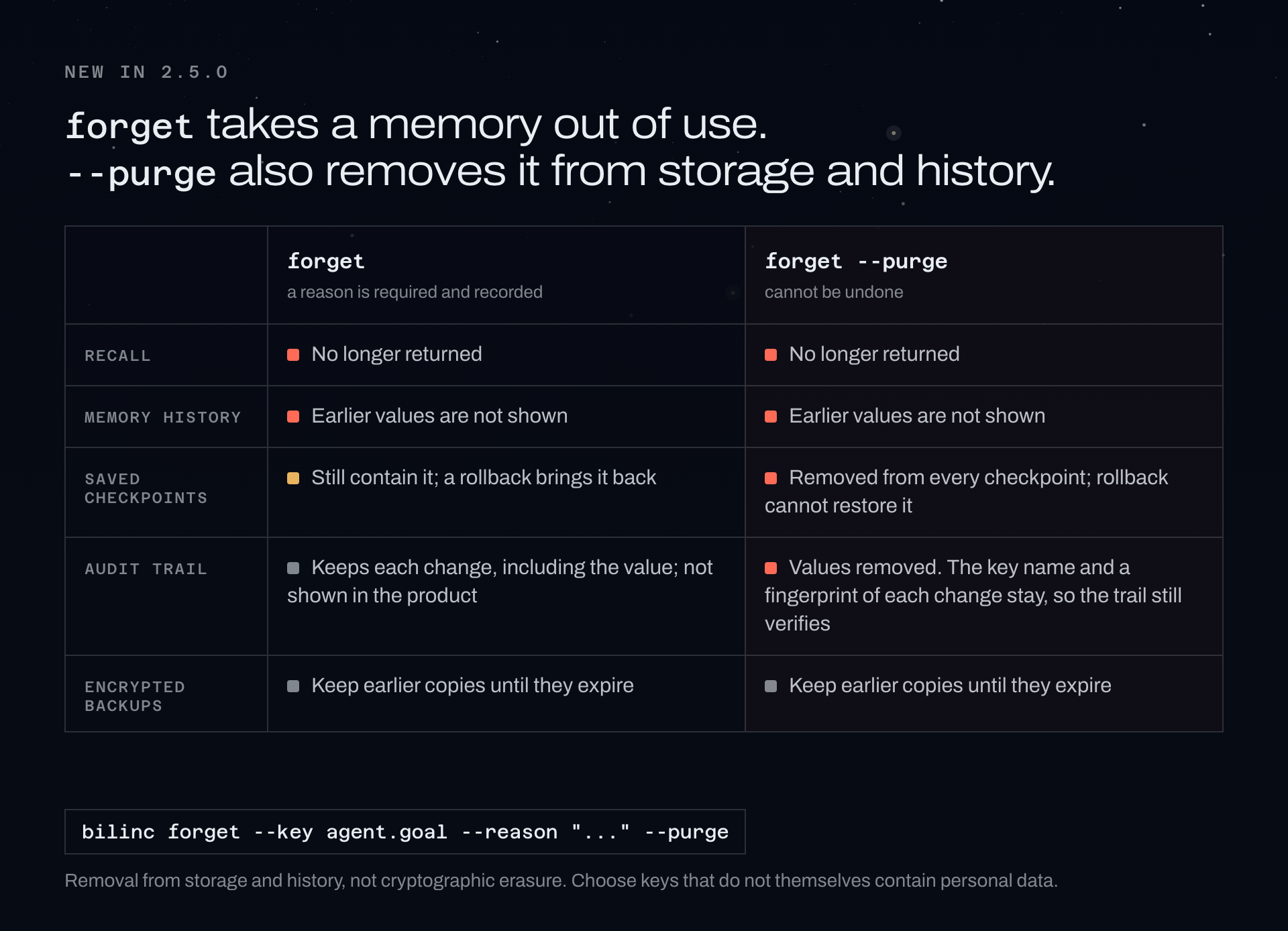
Since 2.5.0: client.forget(key, reason=..., purge=True), bilinc forget --key ... --reason ... --purge, or "purge": true in the REST API also removes the memory's stored content from storage and history. It works on a memory you forgot earlier and cannot be undone. See the privacy policy for what is kept and for how long.
Hosted API
All endpoints live under https://bilinc.space. Memory operations need an API key and an active Bilinc Cloud plan; the free plan needs no card.
| Endpoint | Notes |
|---|---|
GET /api/cloud/health | Public service health. No key, never billed. |
GET /api/cloud/status | What one key can do. Never billed. |
POST /api/cloud/memory/commit · recall · revise | Write, read, correct. |
POST /api/cloud/memory/forget | Destructive. Reason required; "purge": true also removes stored content. |
GET · POST /api/cloud/memory/snapshots | List (free) or create checkpoints. |
POST /api/cloud/memory/diff | Compare checkpoints. Free. |
POST /api/cloud/memory/rollback/preview | Free. Returns a confirmation token. |
POST /api/cloud/memory/rollback | Destructive. Requires that token. |
Send an Idempotency-Key header on any write you might retry: the same key with the same payload replays the original result and is billed once; a different payload is refused with 409 idempotency_conflict. Saves that contain a credential, such as an API key, token or private key, are refused with secret_detected and the value is never echoed back.
What leaves your machine
Bilinc is a cloud SDK: commit, recall, revise, export and the other calls send the memory keys and values you pass, with your API key, to Bilinc Cloud over HTTPS. The package keeps no memory store on your computer. bilinc login saves the API key and the host it belongs to in ~/.config/bilinc/config.json (or $BILINC_CONFIG_DIR), readable only by you (0600); bilinc wiki and the export_wiki tool write files only to the folder you name. Remove a memory with forget, and its stored content as well with --purge. What Bilinc Cloud keeps, and for how long, is in the privacy policy.
What's new in 2.7.3
- Faster hosted recall: Bilinc Cloud reads only the columns recall uses, loads result details in one query, no longer slows sharply on "what is the current X" questions over thousands of memories, and lists checkpoints from small summaries instead of reading every checkpoint in full.
- Recall timing: hosted recall responses carry a
Server-Timingheader (no memory content) so slow calls can be traced.
What's new in 2.7.2
- Safer base URLs: the API key goes only to an
https://host (plainhttp://only for localhost), a key saved bybilinc logingoes back to the host it was saved for, and saving a key for a host other than bilinc.space needs--allow-custom-host. - Newer minimum dependencies:
mcp>=1.30.0andcertifi>=2026.10.18, which close known advisories in older versions.
What's new in 2.7.1
- Newer optional libraries: the
semanticandembeddingsextras accept sentence-transformers 6 and huggingface_hub 2; development installs accept pytest 9 and mypy 2.
What's new in 2.7.0
- Wiki export:
bilinc wiki <dir>writes your memory as Obsidian-compatible Markdown, one page per key, with recent changes, links between keys and an index. It is one-way, never touches files it did not write, and reruns reuse unchanged pages.--wikilinkswrites[[...]]links; the stdio MCP adapter has the same export asexport_wiki. - Dream pass: your agent tidies its own memory (merges duplicates, retires stale entries, flags what a person should decide) and you can undo the pass's own changes in one step for 7 days. Bilinc runs no model for this. Available in the SDK, the CLI (
bilinc dream), the stdio MCP adapter and the hosted connector.
Every release: changelog.
Links
- bilinc.space · Docs · Install guide · Pricing (free plan, no card) · Changelog · Trust
- Compare: vector memory · Mem0 · Zep · Letta
- Guides: What is AI agent memory? · Rolling back an agent memory write · Auditing what an agent remembered
- For machines: llms.txt · ai-index.json
Feedback and security
Questions, bugs and ideas: GitHub Issues. Report security issues privately to bilincsupport@rearclabs.com (see security.txt). Please keep memory values, API keys and production logs out of issues and screenshots.
License
Business Source License 1.1, licensed by ReARC Labs Inc. See LICENSE.








