Listed from the MCP registry; nobody on Odel publishes it.

Docmost (self-hosted)
Self-hosted remote MCP server for Docmost CE: members read and edit the wiki as themselves
Runs on your machine from its package; the steps are below.
What it does
- Reads
- Writes
- High impact
At most: moves money, runs code or commands, deletes data, or sends messages for you.
What it costs
FreeOdel charges nothing per call. The publisher may charge for its own service.
Runs locally over stdio
This server isn't hosted — your MCP client launches it from a package registry. Use one of the commands below, or drop the config into your client (e.g. Claude Desktop).
Run
docker run -i --rm ghcr.io/bbik52/docmost-mcp-remote:1.3.0
MCP client config
{
  "mcpServers": {
    "docmost-self-hosted": {
      "command": "docker",
      "args": [
        "run",
        "-i",
        "--rm",
        "ghcr.io/bbik52/docmost-mcp-remote:1.3.0"
      ]
    }
  }
}Run
uvx docmost-mcp-remote
MCP client config
{
  "mcpServers": {
    "docmost-self-hosted": {
      "command": "uvx",
      "args": [
        "docmost-mcp-remote"
      ]
    }
  }
}docmost-mcp-remote
Let your team's AI assistants read and edit your Docmost wiki, each member as themselves.
A self-hosted remote MCP server for Docmost Community Edition.








English · Русский
Highlights · Comparison · Quick start · Connect a client · Tools · Security · Configuration · Feedback
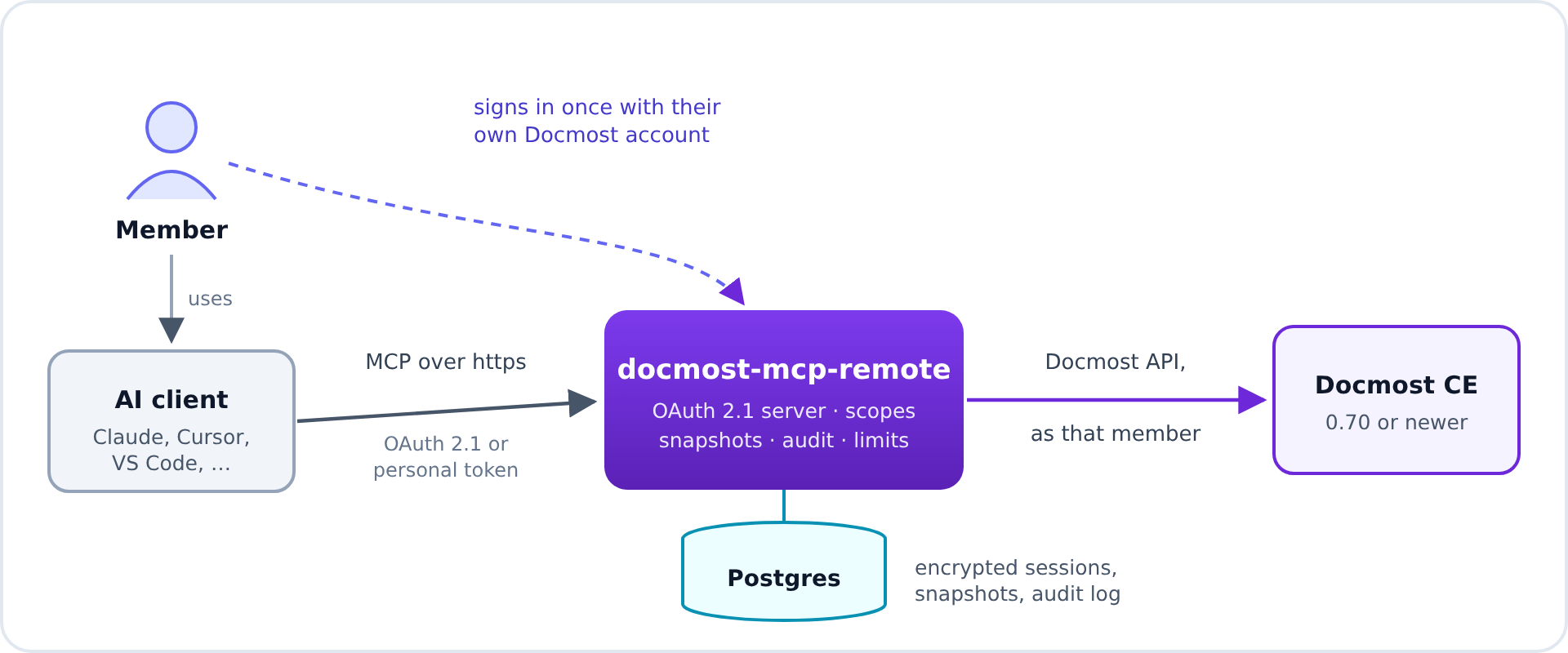
Run it next to your Docmost, put it behind your domain, and connect Claude, Claude Code, Cursor, VS Code or any other MCP client. Every member signs in with their own Docmost account, so the assistant sees exactly what they can see and every change in Docmost carries their name.
Docker images use Python 3.15 and support amd64 and arm64. Installing the Python package directly supports Python 3.12 through 3.15.
Independent community project, not affiliated with or endorsed by Docmost, Inc. Docmost is a trademark of Docmost, Inc.; the name is used only to say which software this server works with.
✨ Highlights
- 👥 One server for the whole team. Each member signs in once in the browser with their own Docmost account. Everything their AI client does is done as them, with their Docmost rights.
- 🔐 Real authorization. OAuth 2.1 for remote connectors (Claude.ai, Claude Desktop, Claude Code, Cursor, VS Code) and personal tokens for scripts. There is no unauthenticated mode.
- 🛡️ Safe by default. Only
readis granted without asking;write,deleteandadminare opt-in per client. Nothing is deleted permanently, risky changes ask you first, and an encrypted snapshot of a page is saved before every change. - 🧰 72 tools. Read, search, write by section, comment with @-mentions, move, label, export, restore old versions, check a space's health and run the workspace: spaces, groups, invitations and roles.
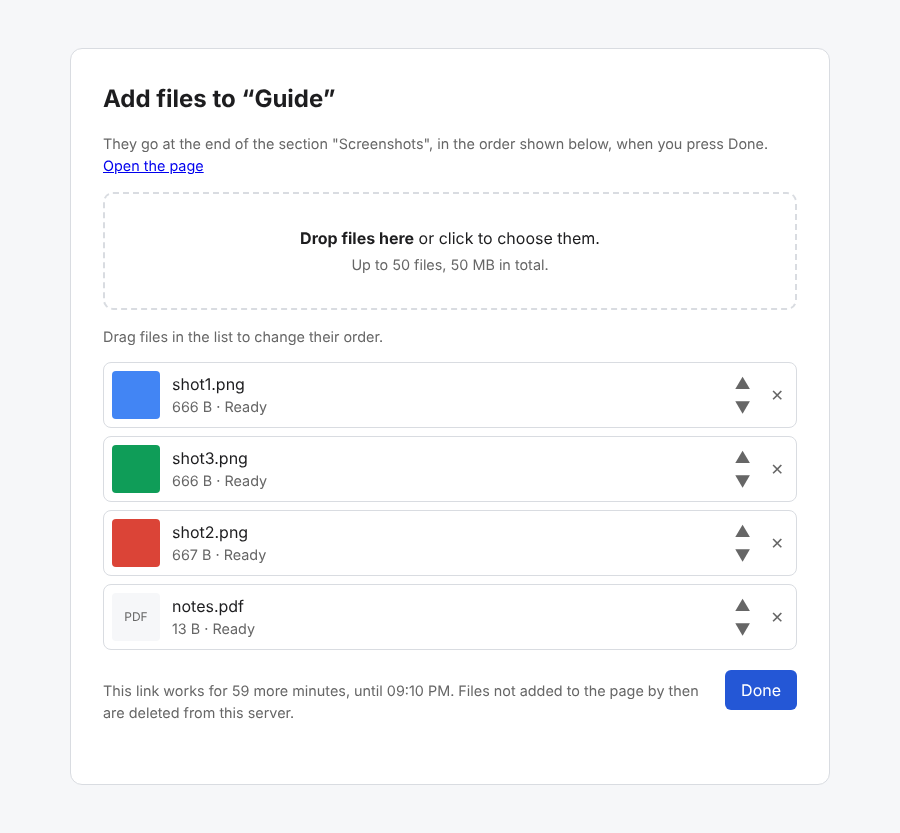
- 📎 Files without burning tokens. The assistant gives you an upload link: drop files in the browser, put them in order, and they land in the right place of the page.
- 🐳 Easy to host. One container plus Postgres with a ready
compose.yaml, orpip install. Tested in CI against Docmost 0.80.1 to 0.98.
⭐ If this server is useful to you, please star the repository. It helps other Docmost users find it and tells us the work is worth continuing.
🆚 How it compares
There are several open-source MCP servers for Docmost Community Edition. Most of them run on one person's machine with one shared Docmost account. This one is built to be shared by a team.
| Feature | This server | Other Docmost CE MCP servers |
|---|---|---|
| Remote server for many people, with OAuth 2.1 sign-in | ✅ | ❌ |
| Each member acts with their own Docmost account and rights | ✅ | ❌ |
| Per-client scopes, read-only by default | ✅ | ⚠️ a global read-only switch at most |
| Nothing is deleted permanently | ✅ | ❌ |
| Encrypted snapshot before every change, with restore | ✅ | ❌ |
| Write is read back and checked | ✅ | ⚠️ rare |
| Risky changes ask you first in the client (MCP elicitation) | ✅ | ⚠️ rare |
| Rewrites refused while someone else is editing the page | ✅ | ⚠️ rare |
| Edit one section, refused if it changed since it was read | ✅ | ⚠️ rare |
| Upload files through a browser link, no tokens spent | ✅ | ❌ |
| Restore a page version with all formatting | ✅ | ⚠️ rare |
| Page content marked as untrusted for the model | ✅ | ⚠️ rare |
| Audit log and per-member rate limits | ✅ | ❌ |
| Space health check: stale, empty and duplicate pages, broken links | ✅ | ⚠️ rare |
| Workspace admin: invitations, roles, groups | ✅ | ⚠️ rare |
| Resources and prompts as well as tools | ✅ | ⚠️ rare |
| Releases on PyPI, ghcr.io and the MCP Registry, CI on several Docmost versions | ✅ | ⚠️ rare |
Based on the public Docmost CE MCP servers we could find in October 2026. They are good choices for a single person working locally over stdio, and some offer things this server does not, such as permanent deletion.
🧭 How it works
The first time a client connects, the member signs in with their Docmost email and password and picks what the client may do. They can see and revoke every connected app and token on their account page.
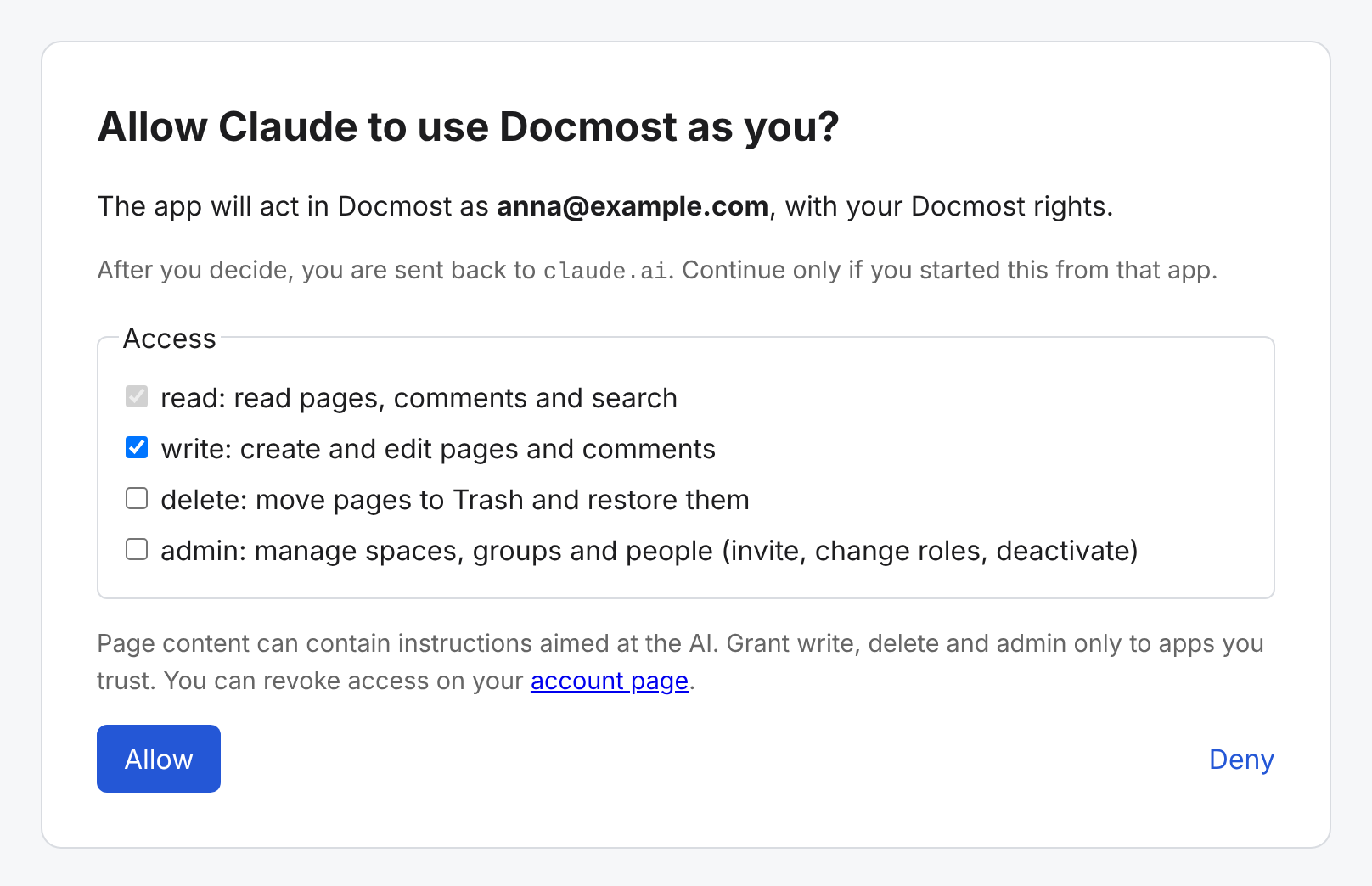 | 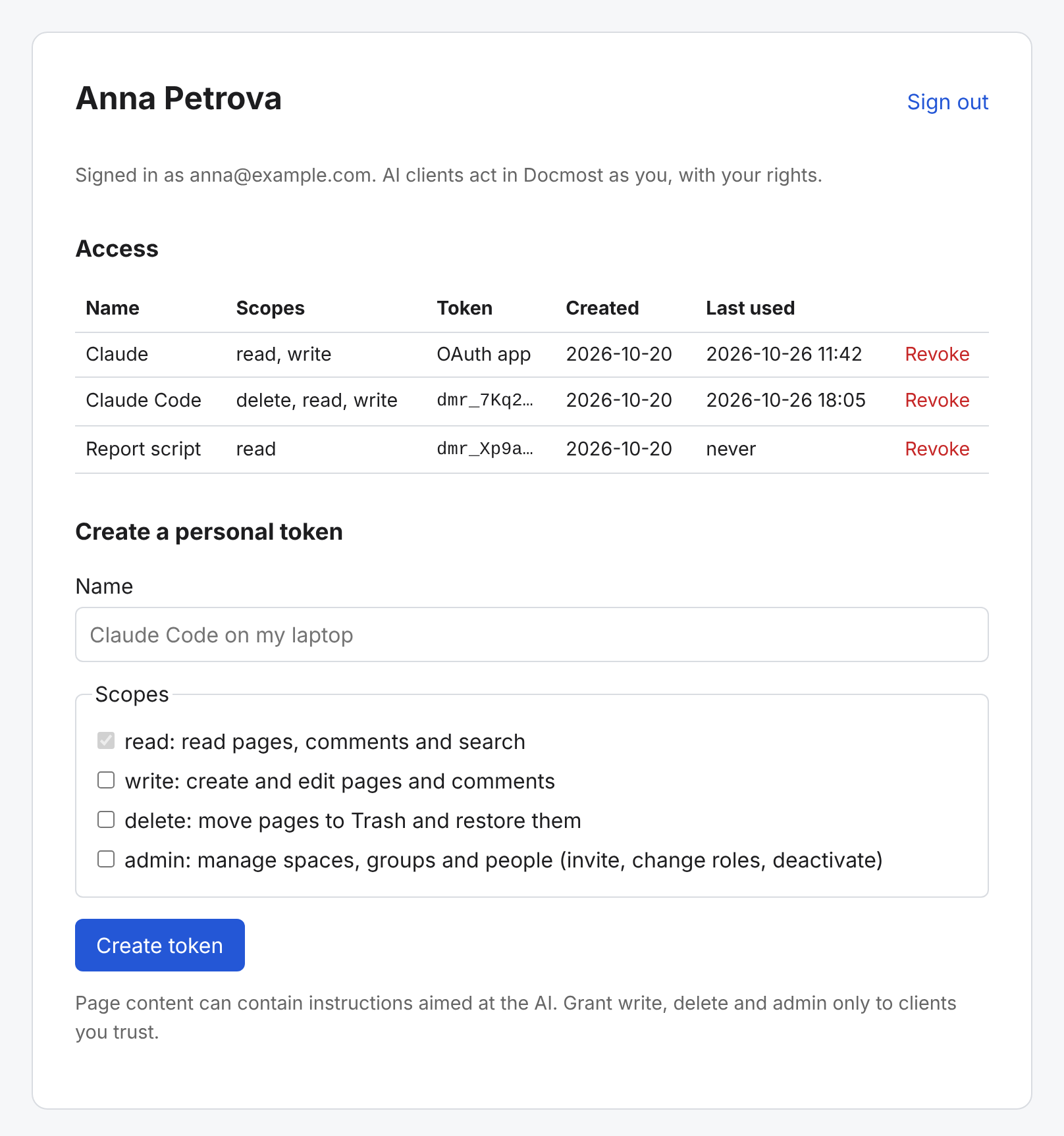 |
| Choosing what a client may do | Connected apps and personal tokens |
🚀 Quick start
You need Docker with Compose, a Docmost reachable from the server, and a host
name with https for the server itself, for example mcp.example.com.
-
Download the compose file and the settings template:
shmkdir docmost-mcp && cd docmost-mcp curl -fsSLO https://raw.githubusercontent.com/bbik52/docmost-mcp-remote/master/compose.yaml curl -fsSL -o .env https://raw.githubusercontent.com/bbik52/docmost-mcp-remote/master/.env.example -
Edit
.env: setPUBLIC_URL(the https URL of this server),DOCMOST_URL, a long randomPOSTGRES_PASSWORDandSECRET_KEY(openssl rand -hex 32gives a good value for both). ConsiderALLOWED_EMAILSto limit who can sign in. -
Start it and check that it is up:
shdocker compose up -d curl http://127.0.0.1:8000/healthz -
Put a reverse proxy with https in front of
127.0.0.1:8000(see Reverse proxy) and openPUBLIC_URL/loginin a browser to check that you can sign in with your Docmost account. -
Connect a client (see Connecting a client).
The server applies its database migrations at startup. Back up the Postgres
volume like you back up Docmost: it holds the encrypted sessions, the
snapshots and the audit log. Losing SECRET_KEY signs every member out and
makes the snapshots unreadable.
The compose.yaml
# docmost-mcp-remote: the server and its Postgres.
# Copy .env.example to .env and fill in the required values first, then put a
# reverse proxy with https in front of port 8000.

services:
  server:
    # "1" follows 1.x releases; set IMAGE_TAG to a full version such as 1.1.0 to pin one.
    image: ghcr.io/bbik52/docmost-mcp-remote:${IMAGE_TAG:-1}
    restart: unless-stopped
    environment:
      PUBLIC_URL: ${PUBLIC_URL:?set PUBLIC_URL to the public https URL of this server}
      DOCMOST_URL: ${DOCMOST_URL:?set DOCMOST_URL to the base URL of your Docmost}
      DOCMOST_ALLOW_INSECURE_HTTP: ${DOCMOST_ALLOW_INSECURE_HTTP:-false}
      DATABASE_URL: postgresql://docmost_mcp:${POSTGRES_PASSWORD:?set POSTGRES_PASSWORD}@postgres:5432/docmost_mcp
      SECRET_KEY: ${SECRET_KEY:?set SECRET_KEY to a random value of at least 32 characters}
      SECRET_KEY_PREVIOUS: ${SECRET_KEY_PREVIOUS:-}
      ALLOWED_EMAILS: ${ALLOWED_EMAILS:-}
      ALLOWED_SPACES: ${ALLOWED_SPACES:-}
      OAUTH_REDIRECT_ALLOWLIST: ${OAUTH_REDIRECT_ALLOWLIST:-}
      RELOGIN_MODE: ${RELOGIN_MODE:-ask}
      SNAPSHOT_RETENTION_DAYS: ${SNAPSHOT_RETENTION_DAYS:-30}
      AUDIT_RETENTION_DAYS: ${AUDIT_RETENTION_DAYS:-90}
      UPLOAD_RETENTION_MINUTES: ${UPLOAD_RETENTION_MINUTES:-60}
      UPLOAD_MAX_MB: ${UPLOAD_MAX_MB:-50}
      TOOL_CALLS_PER_MINUTE: ${TOOL_CALLS_PER_MINUTE:-60}
      MAX_PAGE_CHARS: ${MAX_PAGE_CHARS:-60000}
      # Proxies on loopback or a private network; the client address is the last
      # untrusted one in X-Forwarded-For, so a header sent by the client is ignored.
      FORWARDED_ALLOW_IPS: ${FORWARDED_ALLOW_IPS:-127.0.0.1,::1,10.0.0.0/8,172.16.0.0/12,192.168.0.0/16,fc00::/7}
      LOG_LEVEL: ${LOG_LEVEL:-info}
    ports:
      - "127.0.0.1:8000:8000"
    depends_on:
      postgres:
        condition: service_healthy
    read_only: true
    tmpfs:
      - /tmp
    cap_drop:
      - ALL
    security_opt:
      - no-new-privileges:true

  postgres:
    image: postgres:17-alpine
    restart: unless-stopped
    environment:
      POSTGRES_USER: docmost_mcp
      POSTGRES_DB: docmost_mcp
      POSTGRES_PASSWORD: ${POSTGRES_PASSWORD:?set POSTGRES_PASSWORD}
    volumes:
      - postgres-data:/var/lib/postgresql/data
    healthcheck:
      test: ["CMD-SHELL", "pg_isready -U docmost_mcp -d docmost_mcp"]
      interval: 10s
      timeout: 5s
      retries: 5

volumes:
  postgres-data:
The server is also on PyPI (pip install docmost-mcp-remote or
uvx docmost-mcp-remote) for setups without containers; it needs Postgres
and the same settings as environment variables.
Reverse proxy
The server listens on plain http and expects a reverse proxy that terminates https. Serve it at the root of its own host name; a sub-path is not supported. The proxy must not buffer responses, because MCP streams them.
Caddy (gets certificates by itself):
mcp.example.com {
    reverse_proxy 127.0.0.1:8000
}
nginx
server {
    listen 443 ssl;
    server_name mcp.example.com;
    ssl_certificate     /etc/letsencrypt/live/mcp.example.com/fullchain.pem;
    ssl_certificate_key /etc/letsencrypt/live/mcp.example.com/privkey.pem;

    location / {
        proxy_pass http://127.0.0.1:8000;
        proxy_http_version 1.1;
        proxy_set_header Host $host;
        proxy_set_header X-Forwarded-For $remote_addr;
        proxy_set_header X-Forwarded-Proto $scheme;
        proxy_buffering off;
        proxy_read_timeout 1h;
    }
}
The server uses X-Forwarded-For for its per-IP rate limits. The proxy must
set the header to the address it sees, not pass on what the client sent: the
nginx example above does that with $remote_addr, and Caddy and Traefik do it
by default. The compose file trusts proxies on loopback and private networks
(FORWARDED_ALLOW_IPS); if your proxy reaches the server from a public
address, set it to that address.
🔌 Connecting a client
The MCP endpoint is PUBLIC_URL/mcp, for example
https://mcp.example.com/mcp. Clients that support MCP authorization open a
browser window: sign in with your Docmost email and password and choose what
the client may do. read is always granted; tick write, delete or
admin only for clients you trust.
Give clients the full endpoint, ending in /mcp. The server's base URL alone
is refused with invalid_target. After "Allow" a page sends you back to the
app; if the browser asks whether to open a desktop app such as Cursor, allow
it, or use the link on the page.
Claude.ai and Claude Desktop
Settings, Connectors, Add custom connector, then enter the endpoint URL. The server must be reachable from the internet over https for Claude.ai.
Claude Code
claude mcp add --transport http docmost https://mcp.example.com/mcp
Then run /mcp in Claude Code to sign in.
Cursor
~/.cursor/mcp.json:
{
  "mcpServers": {
    "docmost": { "url": "https://mcp.example.com/mcp" }
  }
}
VS Code
.vscode/mcp.json:
{
  "servers": {
    "docmost": { "type": "http", "url": "https://mcp.example.com/mcp" }
  }
}
Scripts and clients without OAuth (personal token)
-
Open
PUBLIC_URL/loginand sign in with your Docmost email and password. -
On the account page, create a personal token with the scopes you need. It expires after 90 days unless you pick another lifetime (7 days to a year, or never).
-
Configure the client with the endpoint and the header
Authorization: Bearer <token>:shclaude mcp add --transport http docmost https://mcp.example.com/mcp \ --header "Authorization: Bearer dmr_..."
Connected apps and tokens are listed and revoked on the account page,
PUBLIC_URL/account.
Operators can optionally restrict OAuth callbacks with OAUTH_REDIRECT_ALLOWLIST.
It stays empty by default. See the callback guide for
seven common clients, exact addresses, a multi-client example and setup steps.
🧰 Tools
72 tools in groups. The scope is what a client needs to be granted to see the
tool: read is always granted, the others are opt-in.
Account and spaces
| # | Tool | Scope | What it does |
|---|---|---|---|
| 1 | whoami | read | The Docmost account, scopes and Docmost version of this connection, and the link to the account page |
| 2 | list_spaces | read | Spaces you can access, with your role |
| 3 | get_space | read | One space: description, visibility, member count, your role |
| 4 | check_space_health | read | Stale, empty and untitled pages, duplicate titles, broken links and top editors of a space |
Browsing and reading pages
| # | Tool | Scope | What it does |
|---|---|---|---|
| 5 | list_pages | read | Page tree of a space, one level at a time |
| 6 | get_page_tree | read | Several levels of the page tree in one call, within depth and size limits |
| 7 | recent_pages | read | Recently updated pages |
| 8 | get_page | read | One page as Markdown, or as ProseMirror JSON with all formatting, by id, slug id or Docmost URL |
| 9 | get_page_outline | read | The headings of a page, to find a section without reading the whole body |
| 10 | get_section | read | One section of a page, with a hash for replace_section |
Search
| # | Tool | Scope | What it does |
|---|---|---|---|
| 11 | suggest | read | Quick lookup of pages, people and groups by name |
| 12 | search | read | Full-text search with snippets; filters by title only, labels or your own pages |
Writing pages
| # | Tool | Scope | What it does |
|---|---|---|---|
| 13 | create_page | write | New page with a Markdown body, optionally under a parent |
| 14 | update_page | write | Append, prepend or replace a page body with Markdown; dry_run shows a diff |
| 15 | replace_section | write | Replace one section of a page, refused if it changed since it was read |
| 16 | replace_page_json | write | Replace a page body with ProseMirror JSON, checked against the editor schema first; dry_run shows a diff |
| 17 | rename_page | write | Change a page title |
| 18 | move_page | write | Move a page within its space, to the start, the end or after a sibling |
| 19 | move_page_to_space | write | Move a page with its children to another space |
| 20 | duplicate_page | write | Copy a page with its children, in the same space or into another one |
Comments
| # | Tool | Scope | What it does |
|---|---|---|---|
| 21 | list_comments | read | Comments and replies on a page |
| 22 | add_comment | write | Comment on a page or reply to a comment, optionally @-mentioning people, whom Docmost notifies |
| 23 | update_comment | write | Change the text of one of your own comments |
History, snapshots and restore
| # | Tool | Scope | What it does |
|---|---|---|---|
| 24 | list_page_history | read | Versions of a page saved by Docmost, with who changed it |
| 25 | get_page_version | read | One saved version of a page as Markdown |
| 26 | list_snapshots | read | Snapshots this server saved before your changes to a page |
| 27 | diff_page | read | Unified diff between the current body, a saved version or a snapshot |
| 28 | restore_page_version | write | Put a page body back to a version from its history, formatting included |
| 29 | restore_snapshot | write | Put a page body back to a snapshot |
Labels and links
| # | Tool | Scope | What it does |
|---|---|---|---|
| 30 | list_backlinks | read | Pages that link to a page, or that a page links to (Docmost 0.90+) |
| 31 | list_labels | read | Labels of the workspace or of one page (Docmost 0.90+) |
| 32 | find_pages_by_label | read | Pages with a label in a space (Docmost 0.90+) |
| 33 | add_labels | write | Add labels to a page (Docmost 0.90+) |
| 34 | remove_label | write | Remove a label from a page (Docmost 0.90+) |
Files and export
| # | Tool | Scope | What it does |
|---|---|---|---|
| 35 | export_page | read | A page as Markdown or HTML; with children or files, a download link to a zip |
| 36 | export_space | read | A download link to a zip of a whole space (space admins) |
| 37 | list_attachments | read | Files uploaded to a page (Docmost 0.96+) |
| 38 | get_attachment | read | Details of a file with a download link; small text files inline |
| 39 | create_upload_link | write | A link where the person drops files into a page in the browser, or the assistant sends them with curl; no tokens spent |
| 40 | get_upload_status | read | Files sent to an upload link and whether they are in the page yet |
| 41 | upload_attachment | write | Upload a file as base64 (up to 10 MB, about a million tokens per MB) and add it to the page |
Trash
| # | Tool | Scope | What it does |
|---|---|---|---|
| 42 | list_trash | read | Pages in the Trash of a space |
| 43 | trash_page | delete | Move a page to the Trash |
| 44 | restore_page | delete | Restore a page from the Trash |
People and groups
| # | Tool | Scope | What it does |
|---|---|---|---|
| 45 | list_space_members | read | Users and groups with a role in a space |
| 46 | list_workspace_members | read | People in the workspace, with their role |
| 47 | list_groups | read | Groups of the workspace |
| 48 | list_group_members | read | People in a group |
| 49 | list_invitations | read | Pending invitations to the workspace |
Space administration
| # | Tool | Scope | What it does |
|---|---|---|---|
| 50 | create_space | admin | Create a space |
| 51 | update_space | admin | Change a space's name, slug or description |
| 52 | add_space_members | admin | Give users (by email) and groups (by name) a role in a space |
| 53 | change_space_member_role | admin | Change the role of a user or group in a space |
Workspace administration
| # | Tool | Scope | What it does |
|---|---|---|---|
| 54 | create_group | admin | Create a group, optionally with members |
| 55 | update_group | admin | Rename a group or change its description |
| 56 | add_group_members | admin | Add people to a group |
| 57 | invite_people | admin | Invite people by email, with a workspace role and groups; existing members and pending invitations are skipped |
| 58 | resend_invitation | admin | Send an invitation again |
| 59 | revoke_invitation | admin | Cancel an invitation |
| 60 | change_workspace_role | admin | Make someone a member, admin or owner of the workspace |
| 61 | deactivate_member | admin | Stop someone from signing in, keeping their account |
| 62 | activate_member | admin | Let a deactivated member sign in again |
| 63 | resolve_comment | write | Close a discussion (Docmost CE 0.98+) |
| 64 | reopen_comment | write | Reopen a discussion (Docmost CE 0.98+) |
| 65 | archive_space | admin | Archive a space (Docmost 0.98+) |
| 66 | unarchive_space | admin | Unarchive a space (Docmost 0.98+) |
| 67 | set_space_homepage | admin | Set a space home page, or reset with page: null (Docmost 0.98+) |
| 68 | set_page_cover | write | Set a built-in or attached-image cover; remove: true clears it (0.98+) |
| 69 | get_member_profile | read | Profile, recent pages and spaces visible to you (0.98+) |
| 70 | update_my_profile | write | Your display name, language and time zone only (0.98+) |
| 71 | get_workspace_language | admin | Read the workspace default language (0.98+) |
| 72 | set_workspace_language | admin | Set the default language for new members (0.98+) |
People cannot be removed from the workspace or from groups, and groups cannot be deleted. Docmost has no way to create an account or edit someone else's profile: people join through an invitation and set their own password.
resolve_comment(comment_id) closes a discussion and reopen_comment(comment_id)
opens it again. Both need write, a top-level comment id and Docmost CE 0.98+.
Docmost permissions and ALLOWED_SPACES apply.
For a custom cover, use upload_attachment(add_to_page=false) and pass the
returned id as attachment_id to set_page_cover. The image must belong to
that page and be at most 10 MB; the server creates Docmost's dedicated cover
upload. No external image URL is fetched. position is 0–100 percent.
get_member_profile() reads your profile; give user (email, exact name or id)
for another member. Recent pages and spaces have independent cursors and
respect ALLOWED_SPACES. update_my_profile accepts only name, locale and
timezone; it cannot change another person, credentials or roles.
invite_people(message="...") adds a personal note to invitation emails on
Docmost 0.98+. The message is optional, at most 500 characters; Docmost strips
links. Calls without message keep working on older supported releases.
get_workspace_language and set_workspace_language(locale="...") need
admin scope and Docmost 0.98+. Updating the workspace default does not
change existing members' language choices or unrelated settings. The
write uses confirmation and verifies the saved language.
Archived spaces (Docmost 0.98+): use list_spaces(status="archived") or
status="all", and search(include_archived=true) for global search.
Results expose archived; a search scoped to one space includes that
space even when archived. ALLOWED_SPACES still applies to archived data.
Smart dates from Docmost 0.98 are preserved by JSON writes and Markdown append/prepend operations. Markdown replacement warns that it would lose smart dates; use JSON to keep them. Writing dates requires a verified 0.98+ backend version.
🛡️ Safety nets
- Snapshots. Before every body change the server saves the current body
as a snapshot in its own database, encrypted, for
SNAPSHOT_RETENTION_DAYS; if the snapshot cannot be saved, nothing is written. Snapshots can hold content of pages that were later deleted in Docmost until they expire. - Read-back. After a change the server reads the page back and reports an
error if Docmost did not apply it (this happens when Docmost runs with
COLLAB_DISABLE_REDIS). - Confirmation. Risky changes ask you first, in your client, where the client supports it (MCP elicitation): moving a page to the Trash, moving or copying a page to another space, giving people or groups a role in a space, inviting people, changing a workspace role and deactivating someone. The question goes to you, not to the model, so text in a page cannot answer it. If the client says it can ask but the question fails, nothing changes. Clients that cannot ask make these changes without the question, within the scopes you granted.
- Busy pages. A change that rewrites the whole body (a replace, a section, a JSON write, a restore) is refused while someone else is editing the page, that is when another person saved it in the last minute, because their typing would be lost. Appending and prepending merge with their edits and are not refused.
- Untrusted content. Page bodies, comments and snippets are returned
inside a
<docmost-untrusted-content>envelope so the model treats them as data.
📎 Adding files
Passing a file to the model costs tokens: as base64, about a million per
megabyte. So create_upload_link gives a one-time link to a page instead.
The person opens it, drops in one or more files (or picks them), puts them in
order and presses Done; the files appear in the page at the end, at the end
of a section (after_heading) or after a paragraph (after_text). An
assistant that can run commands sends files it has with curl to the same
link. Until Done the files are kept on this server, encrypted; the link works
for UPLOAD_RETENTION_MINUTES and whatever was not added by then is deleted.
upload_attachment takes the same place parameters.
💬 Resources and prompts
Besides tools, which the model picks itself, the server offers resources and prompts that you pick in your client, where the client supports them (Claude Desktop and Claude Code do; many clients only support tools).
| Resource | What it holds |
|---|---|
docmost://spaces | The spaces you can access, with your role |
docmost://pages/{page} | One page as Markdown, with its place and link. While you type a title, the client is offered matching pages |
| Prompt | Scope | What it asks for |
|---|---|---|
summarize_page | read | A summary of a page: purpose, key points, what looks outdated |
summarize_space | read | An overview of a space: what it covers, how it is organised, its gaps |
answer_from_wiki | read | An answer only from wiki pages, with links to them |
whats_new | read | What changed in the wiki or in a space in the last days, page by page |
draft_page | write | A draft page on a topic, after checking for existing ones; created once you agree |
tidy_page | write | Better structure and wording of a page without changing its facts; written once you agree |
A prompt only writes the request; the model does the work with the tools the
connection is allowed to use. Resource reads count against
TOOL_CALLS_PER_MINUTE and go to the audit log as read_resource.
📦 Supported Docmost versions
Docmost Community Edition 0.80.1 or newer. Older versions are refused at
sign-in and on every tool call: they have published security advisories that
the endpoints this server calls expose (CVE-2026-34212, fixed in 0.71.0, and
CVE-2026-48073, fixed in 0.80.1). CI runs the integration tests against
Docmost 0.80.1, 0.97.0 and 0.98.0: the oldest supported, previous and newest
tested releases. The Docker tag latest is also tested as a non-blocking canary.
Newer releases work in most cases and log a warning until they are added to
the tested range. Docmost users who sign in with SSO only (an
Enterprise feature) cannot use this server: it signs in with email and
password. Labels and backlinks need Docmost 0.90 or newer, and the
title_only and labels search filters and list_attachments need 0.96 or
newer; on older versions these tools answer that Docmost needs an upgrade.
🔐 Security model
Members sign in with their own Docmost account; everything a client does is
done as that member, with their Docmost rights. The server keeps the Docmost
session token encrypted with a key derived from SECRET_KEY and does not
store passwords unless RELOGIN_MODE=stored_password. Personal tokens are
stored as hashes, shown once and expire after 90 days by default. The
sign-in page has CSRF protection and per-IP and per-email rate limits, and
"Sign out everywhere" on the account page ends its sessions in every
browser.
The server is its own OAuth 2.1 authorization server, following the MCP
authorization spec: dynamic client registration (limited per IP, redirect
URIs must be https, loopback http or a native app scheme), authorization
code with PKCE (S256 only), exact redirect URI match, tokens bound to this
server's /mcp resource, one-hour access tokens and 30-day refresh tokens
that rotate on every use. A reused refresh token or a replayed code revokes
the whole grant. OAuth grants and personal tokens are listed and revoked on
the same account page.
Page content is treated as untrusted data and labelled as such for the model;
titles and names, which are returned as plain fields, lose hidden and control
characters and are cut at 300 characters.
Prompt injection in a page can still make a client act within the scopes the
member granted, so grant write, delete and admin only to clients you trust.
Tool calls and resource reads are limited per member and recorded in an
audit log.
Exports of several pages and file downloads are handed out as links to this server that are valid for ten minutes. A link carries, encrypted, who asked and what to download, so anyone holding it can download the file until it expires; the server streams the file from Docmost with that member's session and stores nothing. Links are kept out of the access log.
See the threat model, SECURITY.md for how to report a vulnerability and the design.
🛠️ Administration
The admin command runs where the server runs, with the same environment:
docker compose exec server docmost-mcp-remote admin members
docker compose exec server docmost-mcp-remote admin migrate
docker compose exec server docmost-mcp-remote admin grants anna@example.com
docker compose exec server docmost-mcp-remote admin revoke-grant <grant id>
docker compose exec server docmost-mcp-remote admin revoke-member anna@example.com
docker compose exec server docmost-mcp-remote admin disable-member anna@example.com
docker compose exec server docmost-mcp-remote admin audit --email anna@example.com
revoke-member revokes every grant of the member and drops their stored
Docmost session; disable-member blocks them until enable-member. Every
tool call and resource read is recorded in the audit log with the tool, the page or space id
and the outcome, never with content or arguments.
To rotate SECRET_KEY: set the old value as SECRET_KEY_PREVIOUS and a new
SECRET_KEY, restart, run admin rotate-key, then remove
SECRET_KEY_PREVIOUS and restart again.
⬆️ Upgrading
-
Read the changelog for "Upgrade notes".
-
Back up the database:
shdocker compose exec -T postgres pg_dump -U docmost_mcp -Fc docmost_mcp > docmost-mcp-$(date +%F).dump -
Pull the new image and restart:
shdocker compose pull && docker compose up -d
The server upgrades its database schema at startup, in one transaction and
one process at a time, so a failed upgrade leaves the old schema in place.
docker compose exec server docmost-mcp-remote admin migrate shows the
schema revision.
The image tag 1 follows 1.x releases; set IMAGE_TAG in .env to pin a
version. Going back to an older version after its schema was upgraded is not
supported: an older server refuses to start on a newer schema. To roll back,
restore the backup with the old image:
docker compose stop server
docker compose exec -T postgres pg_restore -U docmost_mcp -d docmost_mcp --clean --if-exists < docmost-mcp-2026-01-31.dump
IMAGE_TAG=1.1.0 docker compose up -d
⚙️ Configuration
| Variable | Required | Default | Meaning |
|---|---|---|---|
PUBLIC_URL | yes | Public https URL of this server | |
DOCMOST_URL | yes | Base URL of your Docmost | |
DOCMOST_ALLOW_INSECURE_HTTP | no | false | Allow an http:// DOCMOST_URL on a trusted private network |
DATABASE_URL | yes | Postgres URL (postgresql://user:password@host/db) | |
SECRET_KEY | yes | At least 32 characters; encrypts stored Docmost sessions and signs cookies | |
SECRET_KEY_PREVIOUS | no | The old key during a rotation | |
ALLOWED_EMAILS | no | empty | Comma-separated emails allowed to sign in; empty allows every Docmost user |
ALLOWED_SPACES | no | empty | Comma-separated space slugs or ids members may use through this server; empty allows all |
OAUTH_REDIRECT_ALLOWLIST | no | empty | Optional comma-separated exact OAuth callback URIs; empty keeps supported redirects open. Loopback http callbacks stay allowed on any port. See the callback guide for seven common clients. |
MAX_PAGE_CHARS | no | 60000 | Longest page body returned; longer bodies are truncated |
SNAPSHOT_RETENTION_DAYS | no | 30 | Days a snapshot of a page body is kept |
AUDIT_RETENTION_DAYS | no | 90 | Days an audit log entry is kept |
UPLOAD_RETENTION_MINUTES | no | 60 | Minutes an upload link works; files not added to the page by then are deleted |
UPLOAD_MAX_MB | no | 50 | Largest total size of the files sent to one upload link |
TOOL_CALLS_PER_MINUTE | no | 60 | Tool calls and resource reads one member may make per minute, over all their clients |
WEB_SESSION_HOURS | no | 12 | Hours a sign-in to the account page lasts |
RELOGIN_MODE | no | ask | ask: members sign in again when their Docmost session expires; stored_password: the password is kept encrypted and used to sign in again |
DOCMOST_TIMEOUT_SECONDS | no | 15 | Timeout for one request to Docmost |
DOCMOST_MAX_RESPONSE_BYTES | no | 5242880 | Largest Docmost response the server reads |
FORWARDED_ALLOW_IPS | no | 127.0.0.1 | Proxies trusted for X-Forwarded-For (loopback and private networks in the compose file) |
HOST / PORT | no | 0.0.0.0 / 8000 | Listen address |
LOG_LEVEL | no | info | debug, info, warning or error |
IMAGE_TAG | no | 1 | Image tag used by compose.yaml |
🧑💻 Development
uv sync
uv run ruff check . && uv run ruff format --check .
uv run mypy
DATABASE_TEST_URL=postgresql://test:test@localhost:5433/test uv run pytest
Tests that need Postgres are skipped without DATABASE_TEST_URL; for example
docker run -d -p 5433:5432 -e POSTGRES_USER=test -e POSTGRES_PASSWORD=test postgres:17-alpine.
Integration tests run against a real Docmost:
DOCMOST_VERSION=0.98.0 docker compose -f tests/integration/compose.yaml up -d
DOCMOST_TEST_URL=http://localhost:3000 uv run pytest tests/integration
To run the compose stack with a local build:
docker build -t ghcr.io/bbik52/docmost-mcp-remote:dev .
IMAGE_TAG=dev docker compose up -d
docmost-mcp-remote --tool-catalog serves the tools, resources and prompts
over stdio without Docmost, a database or any configuration, and refuses
every call. MCP directories use it to list what the server offers, for
example docker run -i --rm ghcr.io/bbik52/docmost-mcp-remote --tool-catalog.
See CONTRIBUTING.md and the roadmap.
🙌 Feedback and support
⭐ Like it? Star the repository. Stars help other Docmost teams find the server and keep the project going.
Issues are not only for bugs. Ask for a new tool or feature, tell us what is awkward in your workflow, or ask a question: every request is read. For a security problem, follow SECURITY.md instead of opening an issue.
📄 License
Apache License 2.0. The license does not cover the project name: forks are welcome under another name. This project is an independent implementation and is not affiliated with Docmost. It was inspired by docmost-mcp-oss.