
Benethos Mailbox
MCP server that gives AI agents your mailboxes through mailbox-service, within its token's rights.
Runs on your machine from its package; the steps are below.
What it does
- Reads
- Writes
- High impact
At most: moves money, runs code or commands, deletes data, or sends messages for you.
What it costs
FreeOdel charges nothing per call. The publisher may charge for its own service.
Runs locally over stdio
This server isn't hosted — your MCP client launches it from a package registry. Use one of the commands below, or drop the config into your client (e.g. Claude Desktop).
Run
uvx benethos-mailbox-mcp
MCP client config
{
  "mcpServers": {
    "benethos-mailbox": {
      "command": "uvx",
      "args": [
        "benethos-mailbox-mcp"
      ]
    }
  }
}Distributed as an MCP bundle (`https://github.com/benethos-hub/mailbox/releases/download/v0.4.1/benethos-mailbox-mcp-0.4.1.mcpb`) — download it and import the bundle in your MCP client.
 Mailbox










One REST API for all your mailboxes, whichever provider they are at, a Python client for it and an MCP server on top. Scripts, tools and AI agents work with your mail through one door you control.
Status: beta, version 0.4.1. Usable with real accounts. A breaking change of the API or the configuration is announced in the changelog. Stored data is carried forward by migrations.
Contents
- What it is for
- What it can do today
- Providers
- The four packages
- Getting started
- Documentation
- Development
- Licence
What it is for
Most people and small companies have more than one mail account: a personal address at GMX or web.de, a company mailbox at Microsoft 365, an info@ address at some hoster, maybe a Gmail account. Each speaks its own dialect: IMAP here, Microsoft Graph there. Every tool that wants to work with mail has to learn all of them and has to be given the passwords.
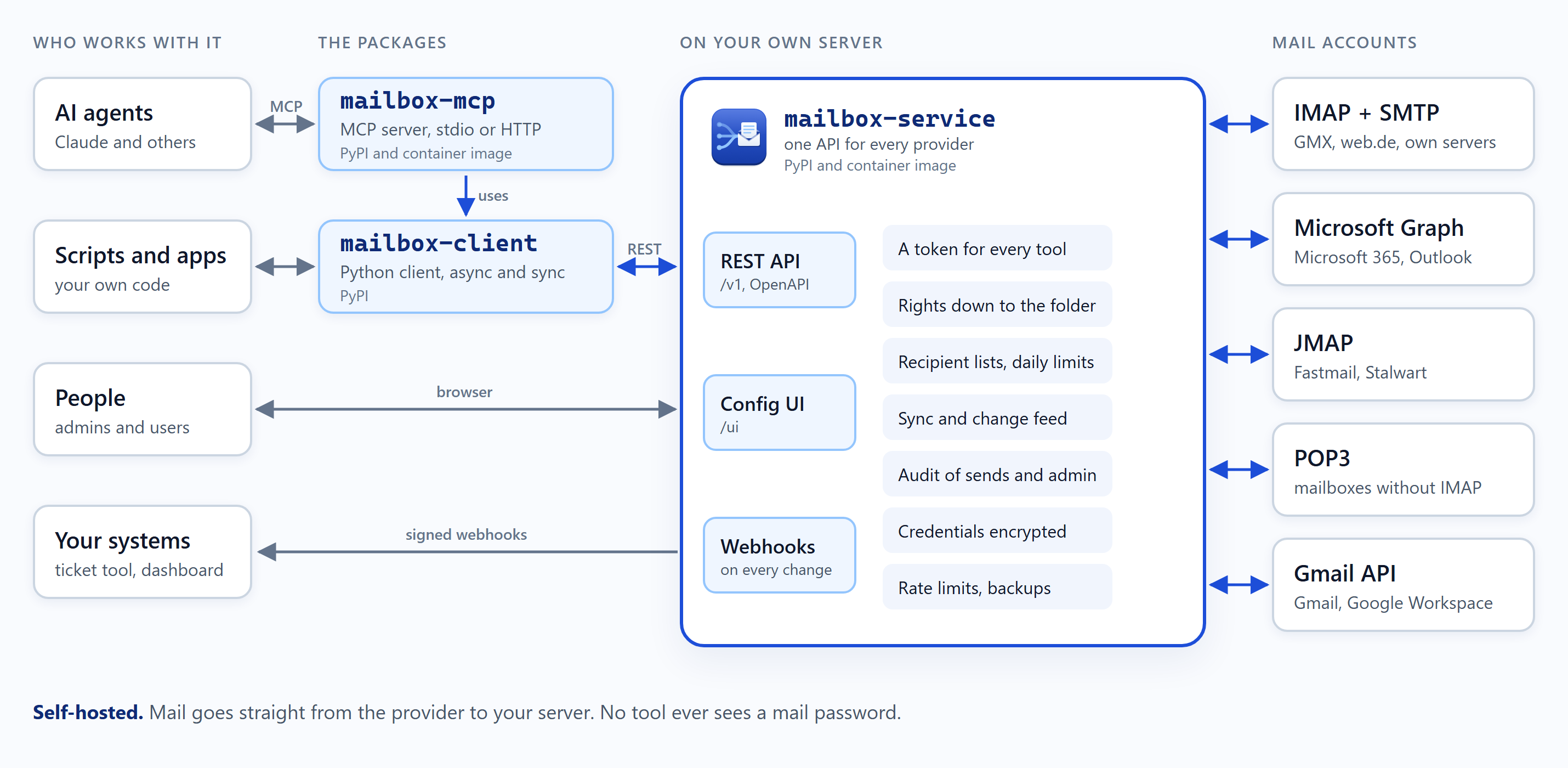
Mailbox turns that around. It has four packages. mailbox-service runs on
your own machine or server and holds the connections to all accounts.
Everything else talks to that service only, through one REST API that
looks the same for every provider. mailbox-client is the Python
client of that API, for scripts and apps. mailbox-mcp, the MCP
server, builds on the client and opens the service to AI agents.
mailbox-common holds what the service and the MCP server share. The
service decides who may do what. A script, an app or an AI agent gets
a token of its own. That token opens exactly the accounts and
operations it was given, nothing more.

That makes a few things simple that are hard otherwise.
Working with an AI agent in your mail
Through the MCP server, Claude or another AI agent works with every account you gave it. A few requests it handles today:
- "What came in since last night?"
- "Move every invoice from Company XY to the folder Accounting."
- "Forward today's invoices to our tax advisor."
- "Show me all mail from Company XY between the 1st and the 15th of September."
- "Which mails with attachments came this week? Read the invoice and tell me the amount and the due date."
- "Sum up the mails about the offer and write a draft reply."
- "Mark last week's newsletters as read and move them to the archive."
Its rights decide whether it may send on its own or only leave drafts for a person to send. A grant can also name the recipients it may write to, such as the tax advisor's address alone, and how many mails it may send a day. A mail to anyone else is refused. It can keep the agent to some folders, such as the invoices, and end after a week.
More uses
- Controlled access. A bookkeeping tool reads the invoice folder of one account and nothing else. It may neither send nor delete, and it never sees a mail password, only its own token.
- Automation across accounts. A script files invoices, archives newsletters and forwards order confirmations. It works the same way for GMX, Microsoft 365 and your own mail server.
- Sending with guard rails. A newsletter job sends from info@, to a fixed list of recipients, at most a few times a day.
- React instead of polling. Signed webhooks tell your own system about new mail, a ticket tool or an internal dashboard for example.
- Traceable. Every send is recorded in the audit: by whom, when and under which grant. So is every sign-in and every change to users, tokens, roles, accounts and webhooks.
- One inbox for your own tools. A dashboard or a small internal app lists, searches and answers mail from every account with one client.
- Self-hosted. The service stores the credentials encrypted. Mail goes straight from the provider to you, never through a third party's cloud.
What it can do today
- Accounts: IMAP with SMTP for sending, set up from the address alone (autodiscovery), JMAP servers such as Fastmail and Stalwart, POP3 for mailboxes without IMAP (the inbox only), and Microsoft accounts (Outlook.com, Microsoft 365) over Microsoft Graph with OAuth sign-in. Credentials are encrypted (AES-256-GCM) under a master key kept outside the database.
- Reading: folders, lists and search, one account or all at once, messages as text and HTML, attachments, the raw source. Message ids stay the same when a message moves, kept by a background sync.
- Writing: flags, moving, deleting, folders, drafts, and sending with
reply, reply to all and forward. A retried send is not sent twice
(
Idempotency-Key). - Changes: a change feed names each message created, changed or deleted since a point you keep, in IMAP, JMAP, POP3 and Microsoft accounts, flags set in other mail clients included where the IMAP server offers CONDSTORE. Webhooks post the same events, signed, to a URL of your choice, a host in your local network included.
- Users and rights: users, roles and grants per account and per operation, down to folders, grants that expire, API tokens, limits on sending (allowed recipients, sends per day), an audit of every send and an audit of administration.
- MCP server: reads, sorts, writes drafts, sends and tells what is new, over stdio or streamable HTTP, offering only the tools its token may use. Mail content reaches the model marked as foreign text.
- Configuration UI in the browser under
/ui: accounts, users, rights, tokens, reading and writing mail, the send audit, webhooks, the status of accounts and sync, the audit of administration, the service log. - Operation: encrypted backup and restore, container images, compose files for operation with HTTPS through Caddy and MCP server instances.
Planned next: threads across folders. The order is in docs/ROADMAP.md.
Providers
| Provider | Connected via | Credential | State |
|---|---|---|---|
| GMX, web.de, T-Online, Yahoo, AOL, iCloud, Posteo, mailbox.org, IONOS, Strato, own mail servers | IMAP + SMTP | app password | available |
| Microsoft 365, Outlook.com | Microsoft Graph | OAuth, through the project's app or your own (setup) | available |
| Proton Mail | IMAP + SMTP through Proton Mail Bridge | Bridge password | IMAP, not tested |
| Gmail / Google Workspace | Gmail API, or IMAP + SMTP | OAuth, with your own Google Cloud client (setup), or an app password | available |
| Fastmail, Stalwart, other JMAP servers | JMAP | API token or password | available |
| legacy mailboxes without IMAP | POP3 + SMTP: the inbox only, no folders, no read state, no search | password | available |
Not supportable: Tuta, which offers no IMAP and no API. Details per provider in docs/CONCEPT.md, section 5.3.
The four packages
| Package | What it is | Runs | Read more |
|---|---|---|---|
mailbox-service | the service: REST API, configuration UI, users and rights, accounts, encrypted credentials, provider adapters, background sync | permanently | packages/mailbox-service |
mailbox-client | the Python client of the REST API, async and sync | inside your own code | packages/mailbox-client |
mailbox-mcp | the MCP server, on top of mailbox-client | per client over stdio, or as a server over HTTP | packages/mailbox-mcp |
mailbox-common | what the service and the MCP server share | installed with them | packages/mailbox-common |
A release publishes all four to PyPI under the same version, as
benethos-mailbox-service, benethos-mailbox-client,
benethos-mailbox-mcp and benethos-mailbox-common, and the service
and the MCP server as container
images on ghcr.io. The MCP server is listed in the official MCP
Registry as io.github.benethos-hub/benethos-mailbox-mcp, and every
release carries it as a Claude Desktop extension,
benethos-mailbox-mcp.mcpb. Each package has its own README. It
explains how to install, start and configure it, for the service and
the MCP server with the container image and the compose file.
Getting started
- Start the service and create the first user: packages/mailbox-service.
- Open
http://127.0.0.1:8080/ui, sign in asadminwith the one-time password, choose a password of your own and connect your accounts. - Give your scripts or your AI agent a user with the rights they need
and a token
(step by step),
and for an agent, add the MCP server to it. Claude Desktop installs
it as an extension from the release, other clients start it with
uvx: packages/mailbox-mcp.
Documentation
- docs/CONCEPT.md: the design, the API, the security model
- docs/ROADMAP.md: the phases and what is done
- docs/ARCHITECTURE.md: the layers, the modules and the rules for new code
- docs/LIMITS.md: every rate limit and how they work together
- docs/PERMISSIONS.md: users, roles and rights
- docs/AUTHENTICATION.md: signing in to the configuration UI, the password and the second factor
- docs/LOGGING.md and docs/AUDIT.md: the service log and the audit of administration
- docs/UI.md: how the pages of the configuration UI look and behave
- docs/REFACTORING.md: how the layout of the code came to be
- docs/IDEAS.md: collected, not decided
- docs/MICROSOFT.md: connecting Microsoft accounts
- docs/GOOGLE.md: connecting Gmail accounts, the Google client of your own
- docs/openapi.json: the API contract. A running
service shows it at
/docs - CHANGELOG.md
- SECURITY.md: how to report a vulnerability
- containers/: the Dockerfiles, and compose files for operation, for development and for a test mail server
Development
One uv workspace, one lockfile, four distributions.
uv sync
uv run pytest -q
uv run ruff check . && uv run ruff format --check .
uv run mypy
The tests run offline. CI runs these checks too. It also installs the
packages on the lowest versions their pyproject.toml allows, runs the
tests there and checks those versions against OSV for known
vulnerabilities. Manual checks against real test accounts live in
live/ and are described in CLAUDE.md, which also holds the
working rules for this repository.
Licence
MIT, see LICENSE.