
Enterprise MCP Gateway







Production-grade, high-performance Model Context Protocol (MCP) Gateway in Go.
A secure, audited, and PII-sanitized bridge connecting AI agents (Claude Desktop, Cursor, Antigravity, LangGraph) to enterprise backends (OpenAPI, Java/Spring Boot, Go microservices, relational databases).

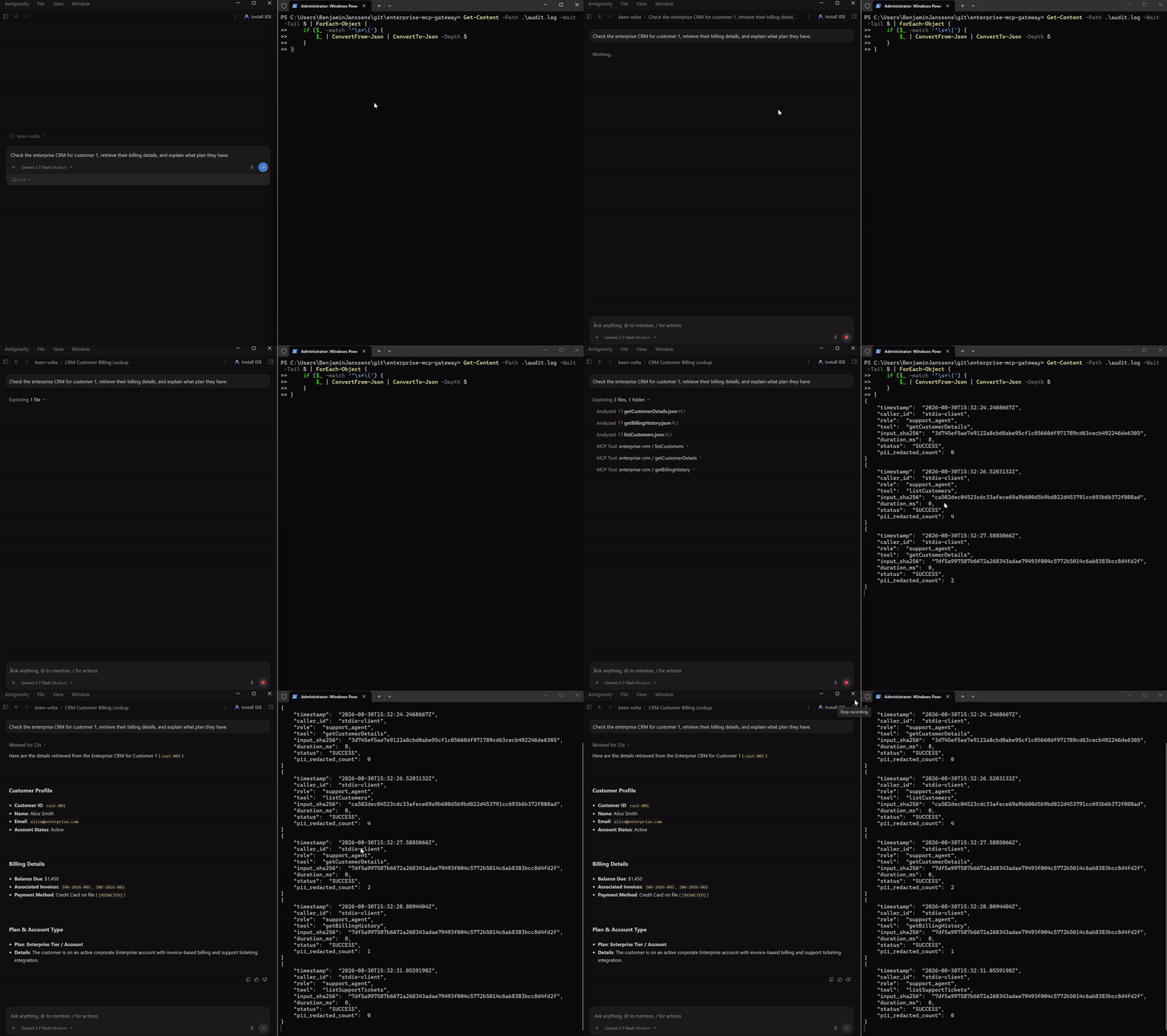
Live Demo: AI Agent querying CRM with in-flight PII & card redaction (left) while the Gateway streams structured JSON audit logs in real-time (right).
🚀 Key Features
- ⚡ Blazing Fast & Lightweight: Single static Go binary (<25MB resident memory footprint, sub-millisecond routing overhead, zero external runtime dependencies).
- 🛡️ High-Performance PII & Secret Redaction: Real-time stream and JSON-key masking (Credit Cards with Luhn checksum validation, SSNs, emails, phone numbers, AWS keys, JWTs, GitHub PATs, and custom regex rules) before tool responses reach LLMs.
- 🔐 Role-Based Tool Governance (RBAC): Token-to-role resolution that limits tool visibility in
tools/listand enforces execution permissions duringtools/call. - 🔌 Dynamic OpenAPI / Swagger Connector: Instantly registers validated MCP tools directly from OpenAPI 3.0/Swagger YAML or JSON specs without writing backend glue code.
- 📜 Structured JSON Audit Logging: Emits tamper-resistant, structured JSON logs containing caller identity, tool invoked, SHA-256 hashed parameters, execution latency, and PII redaction metrics.
- 🔄 Dual Transport Support: Fully compliant JSON-RPC 2.0 engine supporting both standard
stdio(for Claude Desktop / Cursor) and HTTP Server-Sent Events (SSE) for distributed microservices.
🏗️ Architecture
┌────────────────────────────────────────────────────────┐
│           AI Client (Claude / Cursor / Agent)          │
└──────────────────────────┬─────────────────────────────┘
                           │ JSON-RPC 2.0 (stdio or SSE)
                           ▼
┌────────────────────────────────────────────────────────┐
│           Enterprise MCP Gateway (Single Go Binary)    │
│                                                        │
│  1. Transport Layer (pkg/mcp/transport)                │
│     - Stdio & HTTP-SSE Transceivers                    │
│  2. Security & Auth Guard (pkg/governance/rbac)        │
│     - Token authentication & least-privilege filtering │
│  3. Router & Tool Registry (pkg/mcp/protocol)          │
│     - JSON-RPC 2.0 & MCP handshake engine              │
│  4. Backend Dispatcher (pkg/connector/openapi)         │
│     - Dynamic OpenAPI 3.0 path/query/body mapper       │
│  5. Sanitization Engine (pkg/sanitizer/pii)            │
│     - Zero-alloc PII, secret, & JSON key redactor      │
│  6. Structured Audit Logger (pkg/audit)                │
│     - Cryptographic JSON event trail for SIEM          │
└──────────────────────────┬─────────────────────────────┘
                           │ Authorized & Sanitized Calls
                           ▼
┌────────────────────────────────────────────────────────┐
│      Internal Enterprise Services (Java / Go / DBs)    │
└────────────────────────────────────────────────────────┘
📦 Quick Start
1. Build from Source
Ensure you have Go 1.24+ installed:
# Clone the repository
git clone https://github.com/BenjaminJ/enterprise-mcp-gateway.git
cd enterprise-mcp-gateway

# Build gateway and mock backend server
go build -o bin/mcp-gateway ./cmd/gateway
go build -o bin/mockserver ./cmd/mockserver
2. Run the Mock Enterprise Backend (Terminal 1)
./bin/mockserver --port 8081
3. Run the Gateway with Sample Config (Terminal 2)
Option A: Stdio Mode (Default)
./bin/mcp-gateway --config ./examples/config.yaml --token "agent-support-key"
Option B: HTTP Server-Sent Events (SSE) Mode
./bin/mcp-gateway --config ./examples/config.yaml --transport sse --port 8080
4. Stream Live Audit Logs in Real-Time (Terminal 3)
Follow and format structured audit records as tools execute:
PowerShell (Windows):
Get-Content -Path .\audit.log -Wait -Tail 10 | ForEach-Object {
    if ($_ -match '^\s*\{') {
        $e = $_ | ConvertFrom-Json
        $time = ([DateTime]$e.timestamp).ToLocalTime().ToString("HH:mm:ss")
        $statusColor = if ($e.status -eq "SUCCESS") { "Green" } else { "Red" }
        $redactColor = if ($e.pii_redacted_count -gt 0) { "Yellow" } else { "DarkGray" }
        Write-Host "[$time] " -NoNewline -ForegroundColor DarkGray
        Write-Host "[$($e.status)] " -NoNewline -ForegroundColor $statusColor
        Write-Host "$($e.tool) " -NoNewline -ForegroundColor Cyan
        Write-Host "(Role: $($e.role), Latency: $($e.duration_ms)ms, Redacted: $($e.pii_redacted_count))" -ForegroundColor $redactColor
    }
}
Bash / Linux / macOS (jq):
tail -f audit.log | jq -c '{time: .timestamp, status: .status, tool: .tool, role: .role, latency_ms: .duration_ms, redacted: .pii_redacted_count}'
🔍 Verification with Anthropic Official MCP Inspector
You can test and inspect the gateway using Anthropic's official @modelcontextprotocol/inspector:
Test via Stdio:
npx @modelcontextprotocol/inspector ./bin/mcp-gateway --config ./examples/config.yaml --token agent-support-key
Test via SSE:
- Start the gateway in SSE mode:
./bin/mcp-gateway --config ./examples/config.yaml --transport sse --port 8080 - Open the inspector pointing to the SSE endpoint:
npx @modelcontextprotocol/inspector http://localhost:8080/sse
💻 Claude Desktop Integration
To connect Claude Desktop to your enterprise systems through enterprise-mcp-gateway:
-
Open your Claude Desktop configuration file:
- macOS:
~/Library/Application Support/Claude/claude_desktop_config.json - Linux:
~/.config/Claude/claude_desktop_config.json - Windows:
%APPDATA%\Claude\claude_desktop_config.json
- macOS:
-
Add
enterprise-mcp-gatewayto themcpServersobject:
{
  "mcpServers": {
    "enterprise-gateway": {
      "command": "/absolute/path/to/enterprise-mcp-gateway/bin/mcp-gateway",
      "args": [
        "--config",
        "/absolute/path/to/enterprise-mcp-gateway/examples/config.yaml",
        "--token",
        "agent-support-key"
      ]
    }
  }
}
- Restart Claude Desktop. The enterprise tools (
listCustomers,getCustomerDetails,createSupportTicket, etc.) will appear with a hammer icon in the prompt interface.
⚙️ Configuration Guide (config.yaml)
server:
  name: "enterprise-mcp-gateway"
  version: "1.0.0"
  transport: "stdio"       # "stdio" or "sse"
  host: "0.0.0.0"
  port: 8080

governance:
  enabled: true
  default_role: "support_agent"
  tokens:
    "agent-ro-secret": "readonly_agent"
    "agent-support-secret": "support_agent"
    "admin-master-secret": "admin"
  roles:
    readonly_agent:
      allowed_tools:
        - "list*"
        - "get*"
    support_agent:
      allowed_tools:
        - "list*"
        - "get*"
        - "createSupportTicket"
    admin:
      allowed_tools:
        - "*"

sanitizer:
  enabled: true
  mask_card_numbers: true  # Luhn-verified Credit Card masking
  mask_ssn: true           # US SSN masking
  mask_secrets: true       # Private keys, AWS keys, JWTs, PATs
  sensitive_keys:
    - "password"
    - "secret"
    - "token"
    - "apiKey"
    - "ssn"
    - "creditCard"
  custom_regex:
    - name: "Internal Employee ID"
      pattern: "\\bEMP-[0-9]{6}\\b"
      replacement: "[REDACTED-EMP-ID]"

audit:
  enabled: true
  log_path: "stdout"       # "stdout" or path to file e.g. "/var/log/mcp-audit.log"
  hash_inputs: true        # SHA-256 hashes tool arguments for compliance

connectors:
  - name: "enterprise-crm"
    type: "openapi"
    spec_file: "./examples/crm-openapi.yaml"
    base_url: "http://localhost:8081"
    headers:
      Authorization: "Bearer backend-secret-token"
      X-Gateway-Source: "enterprise-mcp-gateway"
    timeout_seconds: 15
🧪 Testing
Run all unit and end-to-end integration tests:
# Run all unit and integration tests
go test -v ./...

# Run tests with the Go race detector enabled
go test -race ./...
🐳 Docker Deployment
# Build lightweight Docker image
docker build -t enterprise-mcp-gateway:latest .

# Run container in SSE mode
docker run -d -p 8080:8080 -p 8081:8081 enterprise-mcp-gateway:latest --transport sse --port 8080
📄 License
MIT License.