
jevjam
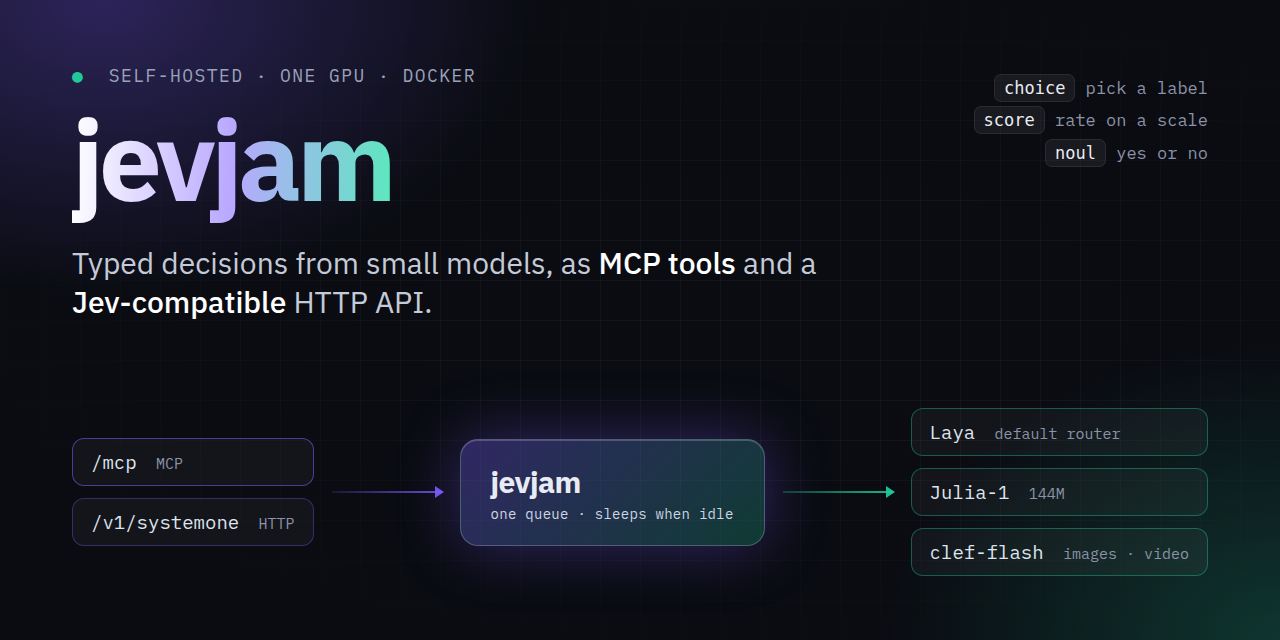
Typed decisions (choice, score, yes/no) from Laya, Julia-1 and clef-flash on your own GPU
Runs on your machine from its package; the steps are below.
What it does
- Reads
- Writes
- High impact
At most: only reads or looks up information.
What it costs
FreeOdel charges nothing per call. The publisher may charge for its own service.
Runs locally over stdio
This server isn't hosted — your MCP client launches it from a package registry. Use one of the commands below, or drop the config into your client (e.g. Claude Desktop).
Run
docker run -i --rm ghcr.io/beremaran/jevjam:0.3.3
MCP client config
{
  "mcpServers": {
    "jevjam": {
      "command": "docker",
      "args": [
        "run",
        "-i",
        "--rm",
        "ghcr.io/beremaran/jevjam:0.3.3"
      ]
    }
  }
}





jevjam
Self-hosted MCP server and Jev-compatible HTTP API for small decision models, on one GPU, in Docker.
Ask a model typed questions about a piece of text, JSON, an image or a video, and get
calibrated answers back in milliseconds: pick a label (choice), rate on a scale
(score), or answer yes or no (noul). Agents call it as MCP
tools; services call POST /v1/systemone, the same protocol as TypeSafe Jev, so a Jev
client only needs a new base URL.
Use it to route tickets, flag abuse, guard tool calls, pick a model for a prompt, or any other decision you would rather not spend a large LLM call on.
Models
| Model | By | Size | Reads | Picked when |
|---|---|---|---|---|
| Laya | Convai Innovations | 3 checkpoints, ~1.2B in all | text, JSON | by default; its router picks English, multilingual or typed-decisions |
| Julia-1 | Supersonic Labs | 144M | text, JSON | the request names julia-1 |
| clef-flash | Cloudflare | 9B | text, JSON, images, video | the request names clef-flash |
One checkpoint stays in VRAM at a time, and it is freed after five idle minutes. See docs/models.md for sizes, quantization and limits.
Quick start
You need Docker, an NVIDIA GPU, and the NVIDIA Container Toolkit.
docker run -d --name jevjam --gpus all -p 127.0.0.1:8000:8000 \
  -v jevjam-models:/models ghcr.io/beremaran/jevjam:latest
Or, from a clone, docker compose up -d. No model downloads at boot; the first request
fetches what it needs into the jevjam-models volume, which takes minutes once.
Ask over HTTP:
curl -s http://127.0.0.1:8000/v1/systemone -H 'Content-Type: application/json' -d '{
  "state": "We were billed twice for March. Refund it today or we cancel.",
  "questions": {
    "department": {"type": "choice", "instructions": "Who should handle this?",
                   "criteria": {"billing": "payments, refunds", "technical": "bugs, outages"}},
    "churn_risk": {"type": "noul", "instructions": "Does the user threaten to leave?"}
  }
}'
The answer, trimmed:
{
  "answers": {
    "department": {"type": "choice", "choice": "billing", "probabilities": {"billing": 0.97, "technical": 0.03}, ...},
    "churn_risk": {"type": "noul", "noul": 0.82, ...}
  },
  "routing": {"model": "english", "reason": "English Latin text", ...}
}
Or connect an agent over MCP, at http://127.0.0.1:8000/mcp:
claude mcp add --transport http jevjam http://127.0.0.1:8000/mcp   # Claude Code
codex mcp add jevjam --url http://127.0.0.1:8000/mcp                 # Codex
Agents get four tools: jevjam_predict, jevjam_preset (guard, moderation,
triage, model_router), jevjam_route and jevjam_status. The
MCP guide covers OpenCode, Pi, remote access and reverse proxies.
Features
- One process, two doors. The HTTP API and MCP share one queue and one resident model, so neither starves the other of VRAM.
- Sleeps when idle. After
JEVJAM_IDLE_TIMEOUTseconds (300 by default) every checkpoint is freed and the GPU memory goes back to the driver. The next request loads only what it needs; Laya wakes in 0.6 s on an RTX 4070 Ti SUPER. - Fits the card it finds. clef-flash loads in BF16, 8-bit, 4-bit, or split across GPU and CPU, whichever fits.
- Drop-in for Jev. Same request and response shapes; unknown fields are ignored.
- Locked down by default. Runs as non-root, binds to loopback in Compose, and
takes an optional bearer key (
JEVJAM_API_KEY) for both endpoints.
Docs
| Guide | What is in it |
|---|---|
| Configuration | Running, settings, the model cache, sleeping on idle |
| MCP server | Tools, auth, client setup, reverse proxies |
| HTTP API | /health, /v1/systemone, question types, JSON Schema, errors |
| Models | Laya, Julia-1 and clef-flash: sizes, VRAM, limits |
Moving from laya-docker
This repo used to be laya-docker. The old image, ghcr.io/beremaran/laya-docker,
gets no more updates; switch to ghcr.io/beremaran/jevjam. Old LAYA_* settings
still work and log a warning; see Configuration.
Contributing
Bug reports and pull requests are welcome; see CONTRIBUTING.md. Report security problems privately, as SECURITY.md describes.
License
jevjam is licensed under Apache-2.0. The image also contains the
Apache-2.0 Laya package and checkpoints by
Convai Innovations, the Apache-2.0 Julia-1 code and checkpoint by Supersonic Labs, and
the Apache-2.0 clef-flash code and checkpoint by Cloudflare. The clef-flash code is
copied into src/jevjam/vendor/ with its license.




