Listed from the MCP registry; nobody on Odel publishes it.
Is this yours? Claim it
Google Ads Transparency — API & MCP
Competitors' Google ads via API or MCP: ad copy, winning, new & stopped ads, promo codes. $1/1K.
One address for any MCP client. Your key stays in your Odel vault.
What it does
- Reads
- Writes
- High impact
At most: only reads or looks up information.
What it costs
FreeOdel charges nothing per call. The publisher may charge for its own service.
Tools
None listed · checked 27 Nov 2026Odel could not list its tools without signing in.
Google Ads Transparency MCP & API

Track any competitor's Google ads worldwide — on Search, YouTube, Shopping, Maps and Google Play — from Google's official Ads Transparency Center, as clean JSON.
Use it as a regular Apify API (Python, JavaScript, cURL) or as an MCP server that AI agents (Claude, ChatGPT, Cursor, n8n, LangChain) can call directly.
In the EU and EEA you also get a unique bonus: the official impression range per country and per platform, plus the audience-selection criteria the advertiser used, published by Google under the EU Digital Services Act (DSA). Those ranges are not published for the US or the UK.
This repository documents the public Apify Actor and its MCP server. It does not contain the Actor's source code.
$1 per 1,000 ads ($0.001 per ad, ad copy included, no start fee; $0.70 per 1,000 on Apify GOLD plans). $0.0015 for an ad with full EU details. A free Apify account includes $5 of monthly credit.
- Store: apify.com/xsi/google-ads-transparency
- MCP endpoint (Streamable HTTP):
https://xsi--google-ads-transparency.apify.actor/mcp - Demo: How to track any competitor's Google Ads (and get EU impression data) with an API / MCP (version française)
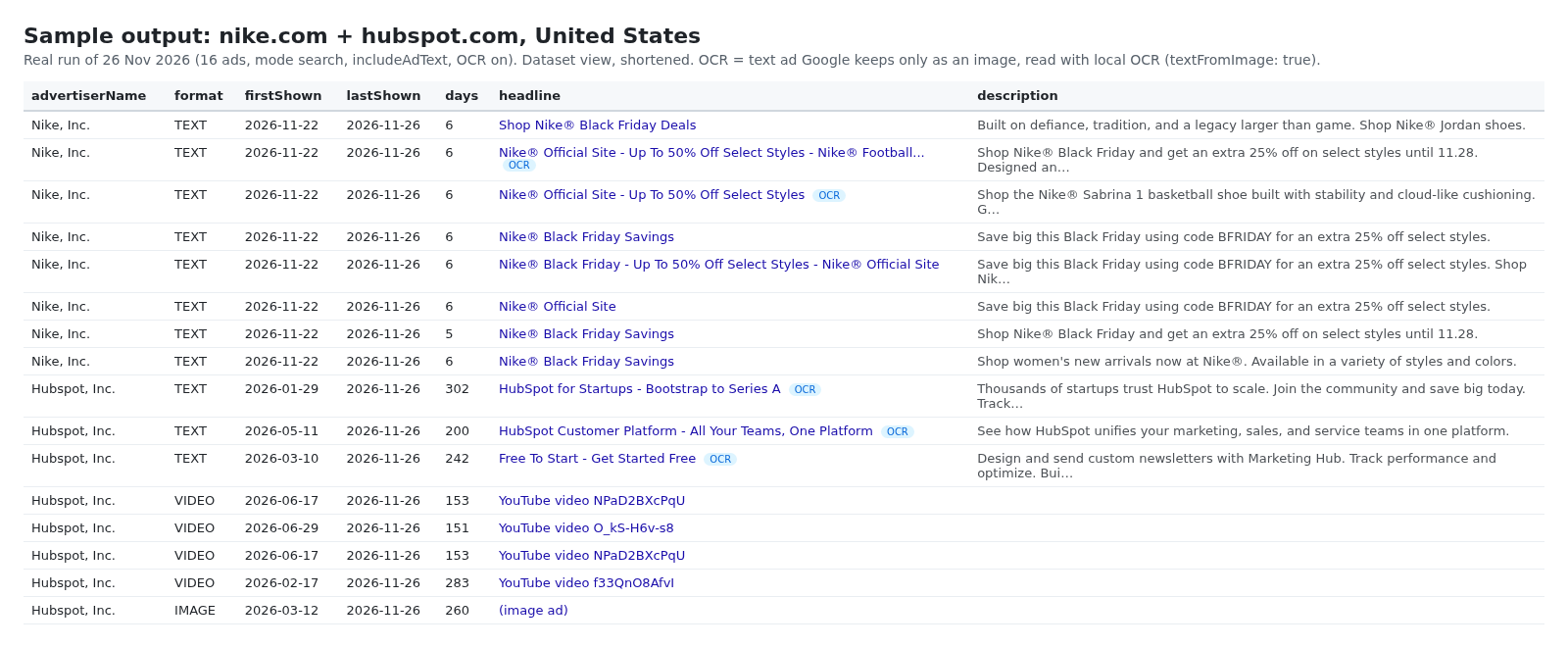
Real run of 26 Nov 2026: nike.com + hubspot.com, United States, with ad copy (OCR turned on for this sample; it is off by default since 2.1.14).
Who it is for
- Marketers and e-commerce teams who want to see which ads a rival is running now, in which markets, and with what copy.
- Agencies pitching or auditing a brand's Google presence in the US, UK, EU or elsewhere.
- Ad-intelligence and AI-agent builders who need a stable API or MCP tool, not a browser script.
Why this one
- Worldwide coverage from the official Transparency Center: any country Google supports, including the US, UK, Germany, France and dozens more.
- Ad copy when Google's official preview has it: headline, description, visible URL, call-to-action, sitelinks, or the YouTube video ID of a video ad. Text ads that Google keeps only as an image can be read with local OCR, an opt-in option (
"ocrImageAds": true, +$0.001 only when text is found, flaggedtextFromImage: true). Default runs (OCR off, 256 MB) are billed for ads only:{"domain":"nike.com"}took 29–31 s for 25 ads = $0.025 on the FREE plan, 0ad-textevents (runsoxr6VSx5a1yHu9c3B,3BijF31qR8ebC1FkX, 26 Nov 2026). - EU bonus: official DSA impression ranges by country and platform, plus targeting criteria (demographics, locations, contextual signals, customer lists, topics of interest).
- Ready-made signals on every ad (v2.1):
daysActive,isWinningAd,isNewLaunch,detectedPromoCodes,detectedDiscounts, plus one freedomain_summaryrow per website (active, winning and new ads, format split, oldest ad, promo codes). - New-ad and stopped-ad alerts you can schedule daily or weekly (stopped-ad rows are free).
- MCP server with four tools, so agents can ask “what is Nike running in the US this week?” without a custom integration.
- $0.001 per ad among the most-used Transparency Center Actors on the Apify Store as of 26 November 2026, with no start fee. Empty or failed results are not billed, and a run never exceeds your cost cap.
YouTube video files are not downloaded (YouTube's terms forbid it). You get the official video ID, the YouTube URL and, if you turn the option on, the thumbnail.
Quick start (Apify API)
Get a token from Apify Console → Integrations. A free account is enough.
Python
from apify_client import ApifyClient

client = ApifyClient("YOUR_APIFY_TOKEN")
run = client.actor("xsi/google-ads-transparency").call(
    run_input={
        "mode": "search",
        "queries": ["nike.com", "adidas.com"],
        "regions": ["US", "GB", "DE", "FR"],
        "includeDetails": True,
        "includeAdText": True,
        "maxAdsPerQuery": 2,
        "maxItems": 16,
    },
    timeout_secs=480,
    memory_mbytes=256,
    max_total_charge_usd=0.08,
)
for ad in client.dataset(run["defaultDatasetId"]).iterate_items():
    print(ad["query"], ad["region"], ad["advertiserName"], ad.get("headline"), ad.get("selectedRegion"))
JavaScript
import { ApifyClient } from 'apify-client';

const client = new ApifyClient({ token: 'YOUR_APIFY_TOKEN' });
const run = await client.actor('xsi/google-ads-transparency').call(
  {
    mode: 'search',
    queries: ['nike.com', 'adidas.com'],
    regions: ['US', 'GB', 'DE', 'FR'],
    includeDetails: true,
    includeAdText: true,
    maxAdsPerQuery: 2,
    maxItems: 16,
  },
  { timeout: 480, memory: 256, maxTotalChargeUsd: 0.08 },
);
const { items } = await client.dataset(run.defaultDatasetId).listItems();
console.log(items);
cURL
Do not put the token in the URL (it ends up in logs). Use the Authorization header:
curl -X POST \
  "https://api.apify.com/v2/acts/xsi~google-ads-transparency/runs?timeout=480&memory=256&maxTotalChargeUsd=0.08" \
  -H "Authorization: Bearer YOUR_APIFY_TOKEN" \
  -H "Content-Type: application/json" \
  -d '{
    "mode": "search",
    "queries": ["nike.com", "adidas.com"],
    "regions": ["US", "GB", "DE", "FR"],
    "includeDetails": true,
    "includeAdText": true,
    "maxAdsPerQuery": 2,
    "maxItems": 16
  }'
Runnable copies of these examples are in examples/.
MCP client config (AI agents)
Transport: Streamable HTTP. Auth: your Apify token as a Bearer token.
{
  "mcpServers": {
    "google-ads-transparency": {
      "url": "https://xsi--google-ads-transparency.apify.actor/mcp",
      "headers": {
        "Authorization": "Bearer YOUR_APIFY_TOKEN"
      }
    }
  }
}
Paste that into Cursor (~/.cursor/mcp.json), Claude Desktop (claude_desktop_config.json), or any client that supports remote MCP servers over Streamable HTTP.
Tools
| Tool | What it does | Billing |
|---|---|---|
find_advertiser | Company name or website → advertiser IDs (AR…), legal name, country, ad-count range | $0.003 per call with results; no match is free |
list_ads | Ads of a domain, advertiser ID or name, filtered by country, format, platform and dates. Returns a summary plus token-lean rows (verbose: true for every key); OCR only with includeOcr: true | $0.003 + $0.001 per ad (+$0.001 per OCR text); empty results are free |
get_ad_details | One ad: variants, countries, and — in the EU — impressions and audience selection | $0.003 + $0.0015 |
new_ads_since | Ads first shown on or after a date — for a daily or weekly watch | $0.003 + $0.001 per new ad; “nothing new” is free |
Measured on 26 Nov 2026 (build 2.1.8): five timed list_ads calls answered in 3.3–8.6 s (nike.com US 3.3 s, hubspot.com 4.8 s, semrush.com 5.2 s, adidas.com 8.4 s, nike.com GB 8.6 s), plus 0.6–2.1 s for initialize. Text answers were 54% smaller than in v2.0.
Example output
Real data from run biPCUmNEKOhNQP5oO on 26 November 2026 at 10:48 (Europe/Brussels, 09:48 UTC). The query compared nike.com and adidas.com in the United States, United Kingdom, Germany and France, with details and ad copy, capped at 2 ads per brand and country (16 ads). The run took 46.8 seconds and billed 16 “ad-detail” events plus 13 “ad-copy” events ($0.045 at the list prices of that day; ad copy is now included in the ad price).
Google's own totals for these global domains (a brand may also advertise under a country domain, which is a separate query):
| United States | United Kingdom | Germany | France | |
|---|---|---|---|---|
| nike.com | 8,000–9,000 ads | 2,000–3,000 | 9,000–10,000 | 8,000–9,000 |
| adidas.com | 4,000–5,000 ads | 68 | 600–700 | 600–700 |
A Nike Black Friday text ad running in the US that day:
{
  "advertiserName": "Nike, Inc.",
  "domain": "nike.com",
  "region": "US",
  "creativeId": "CR09898538327395532801",
  "format": "TEXT",
  "headline": "Nike® Golf Collection",
  "description": "Save big this Black Friday using code BFRIDAY for an extra 25% off select styles.",
  "displayUrl": "nike.com",
  "firstShown": "2026-11-22T05:02:42.000Z",
  "lastShown": "2026-11-26T09:13:25.000Z",
  "transparencyUrl": "https://adstransparency.google.com/advertiser/AR16735076323512287233/creative/CR09898538327395532801?region=US"
}
The US and the UK do not get official impression counts. The EU bonus shows up once you look at Germany or France. In the same run, a long-running Nike Shopping image ad in France (training socks) had an official floor of 10,000,000 impressions in France, with no upper bound published by Google, including 450,000–500,000 on Shopping and 15,000–20,000 on YouTube. A Nike text ad sampled in Germany had only 0–1,000 impressions there, but 250,000–300,000 across the EU.
More of this run, trimmed, is in examples/sample-output.json. The demo article walks through all 16 ads.
Pricing
You only pay for results. Apify compute and proxy are included in these prices. There is no start fee.
| Event | FREE plan | BRONZE | SILVER | GOLD+ |
|---|---|---|---|---|
| Ad (ad copy included) | $0.001 | $0.0009 | $0.0008 | $0.0007 |
| Ad with EU DSA details (replaces Ad) | $0.0015 | $0.0013 | $0.0012 | $0.001 |
OCR ad copy (opt-in ocrImageAds, only when text is found) | $0.001 | $0.001 | $0.001 | $0.001 |
| Media file saved | $0.002 | |||
| Advertiser record (advertiser mode) | $0.002 | |||
| Monitored target checked (monitor mode) | $0.001 | |||
| New-ad alert (monitor mode, details + copy included) | $0.005 | |||
| MCP tool call (plus the ads it returns) | $0.003 |
Prices as listed on 26 Nov 2026; the Store page is the reference. Never billed: empty results, status rows, summary rows, stopped-ad rows, duplicates, failed runs, invalid input. The "$0.01 minimum" shown in Apify Console is only the lowest Max cost per run you can set, not a fee: a run on a website without ads charged 0 events (run h4dbATcj0vjr0bviz).
Modes
search— list ads for a website, advertiser name or advertiser ID (AR…). Turn on Include EU DSA details and Include ad copy as needed.advertiser— find advertiser IDs and ad-count ranges per country. With a website it also answers “does this site run Google ads?” (runsAds).details— full data for official Transparency Center URLs you paste.monitor— schedule it daily or weekly; you get one alert per new ad and a freeSTOPPED_ADrow when an ad stops. The first run only stores a baseline.
Queries can be domains (nike.com), names in any script, advertiser IDs, or URLs copied from the Ads Transparency Center.
Disclaimer
This tool only reads public data from Google's Ads Transparency Center. It does not access any advertiser's private Google Ads account. Impression figures are official ranges published by Google under the EU DSA; they are typically available only after about 90 days, they are ranges rather than exact counts, and they are not published for non-EU countries. Always check the official ad page linked in transparencyUrl.
License
The documentation and examples in this repository are under the MIT License. The hosted Actor is a paid service on the Apify Store; using it is subject to Apify's terms and Google's Ads Transparency Center terms.
Free workflows (n8n, Make, Clay)
Weekly watch of your competitors' Google ads → Slack or Notion: see workflows/. Ready-to-import n8n files (weekly winning-ads digest for Slack; Radar: winning, new and stopped ads to Slack and Notion), plus Make and Clay guides.