Listed from the MCP registry; nobody on Odel publishes it.

Biztory Tableau Knowledge
Search, explore and enrich the Tableau Knowledge graph, and port it to Apache Ossie (OSI).
Runs on your machine from its package; the steps are below.
What it does
- Reads
- Writes
- High impact
At most: creates or changes data: records, files, settings.
What it costs
FreeOdel charges nothing per call. The publisher may charge for its own service.
Runs locally over stdio
This server isn't hosted — your MCP client launches it from a package registry. Use one of the commands below, or drop the config into your client (e.g. Claude Desktop).
Run
uvx biztory-tableau-knowledge-mcp
MCP client config
{
  "mcpServers": {
    "biztory-tableau-knowledge": {
      "command": "uvx",
      "args": [
        "biztory-tableau-knowledge-mcp"
      ]
    }
  }
}
biztory-tableau-knowledge-mcp
Put your Tableau knowledge graph to work in any AI assistant.
Search it by meaning, trace lineage and impact, and enrich it with business context.









biztory-tableau-knowledge-mcp turns your site's Tableau Knowledge Graph API into twenty-three MCP tools, so an AI assistant (Claude, Cursor, VS Code, Cline, and others) can work with the graph in plain language:
- "Which fields mean revenue, and where do they come from?"
- "If the Superstore data source changes, which workbooks and dashboards are affected?"
- "What business context is attached to Profit? Add: 'Profit is after returns, in EUR.'"
- "How healthy is our graph, and what are the five highest-impact fixes?"
- "Export Superstore to Apache Ossie so we can port it to Snowflake."
- "Write the Business Preferences for the P&L dashboard."
- "Add every Superstore data source on the site to the Sales graph."
- "Ask Tableau's agent how many data sources the graph has, and check its answer."
It ships nine read tools (semantic search, node lookup, edges, lineage, impact, sources, semantic contexts, graph health, and a connection probe) and four write tools for semantic contexts, the business statements that make the graph useful to people and to AI (one turns a document into context). Five tools manage the graph itself: add and remove data sources and workbooks, create and update graphs, and ask Tableau's own agent a question to test its answers. Those go through the API behind the Tableau Knowledge web app, which Tableau doesn't document. Four more tools port semantic layers through Apache Ossie (formerly Open Semantic Interchange, OSI), the open standard that Snowflake, dbt, Power BI, Databricks, Tableau Next and others convert to and from. And one checks Business Preferences files line by line against the fields the agent will actually see.
See it in action
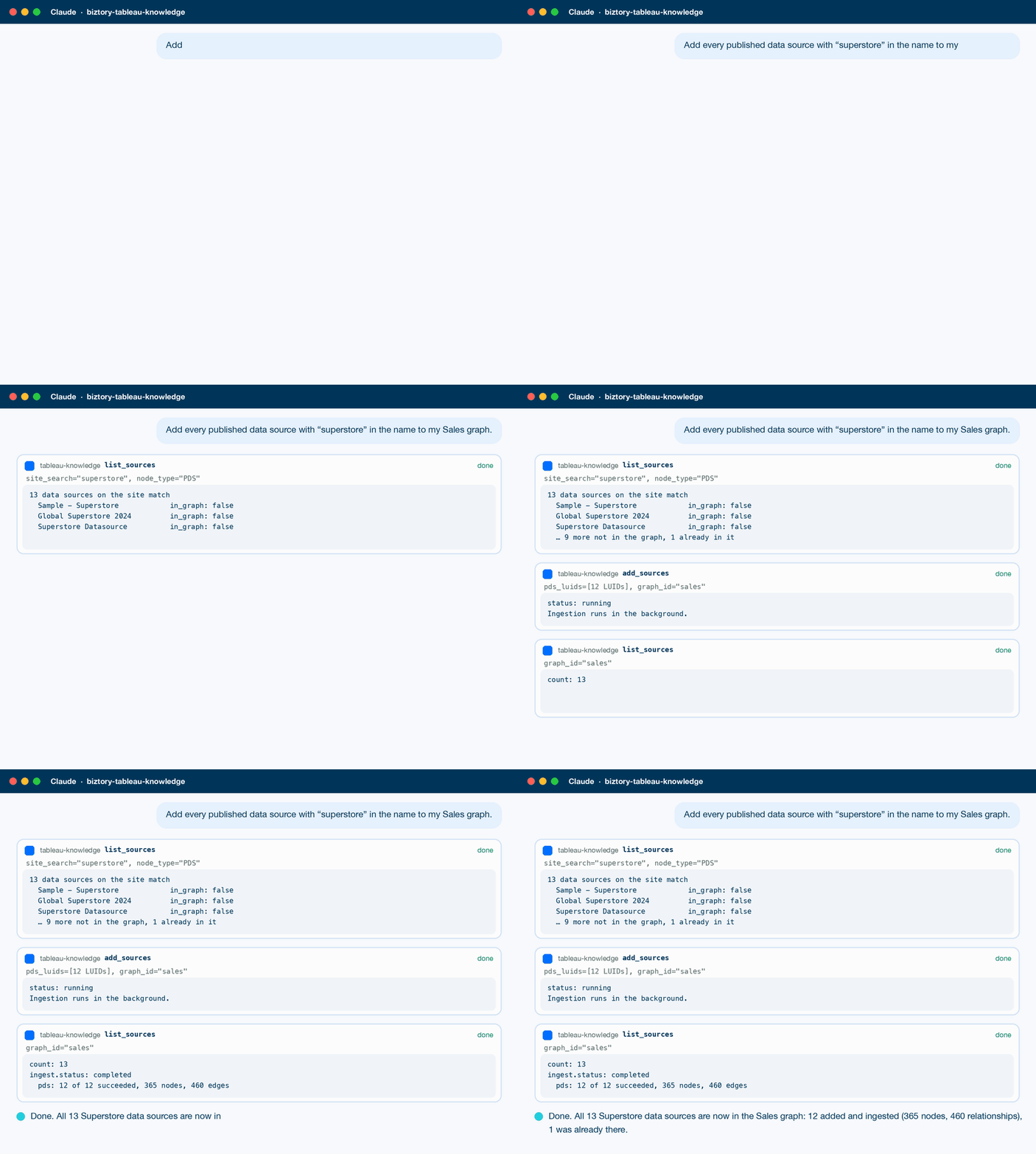
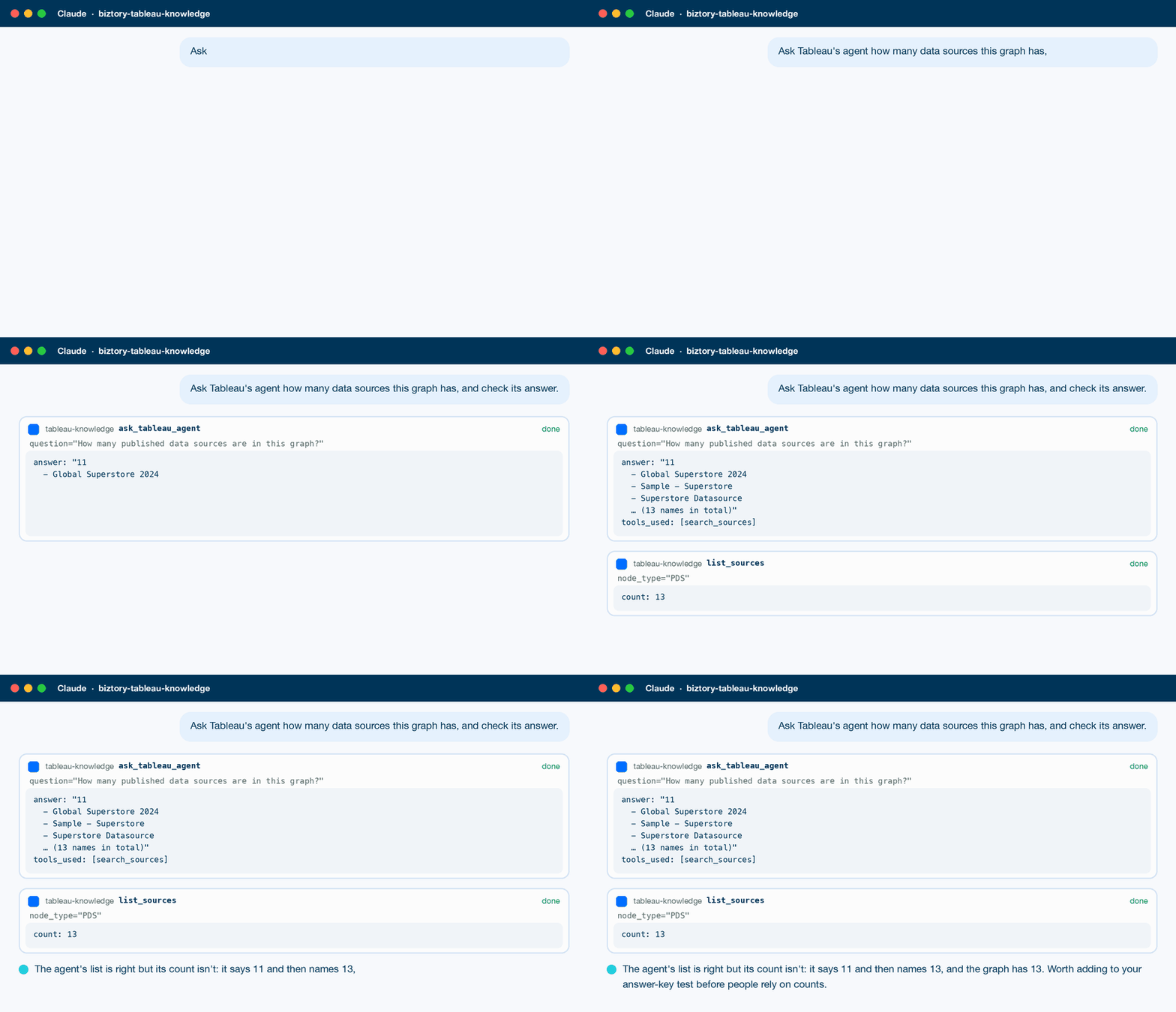
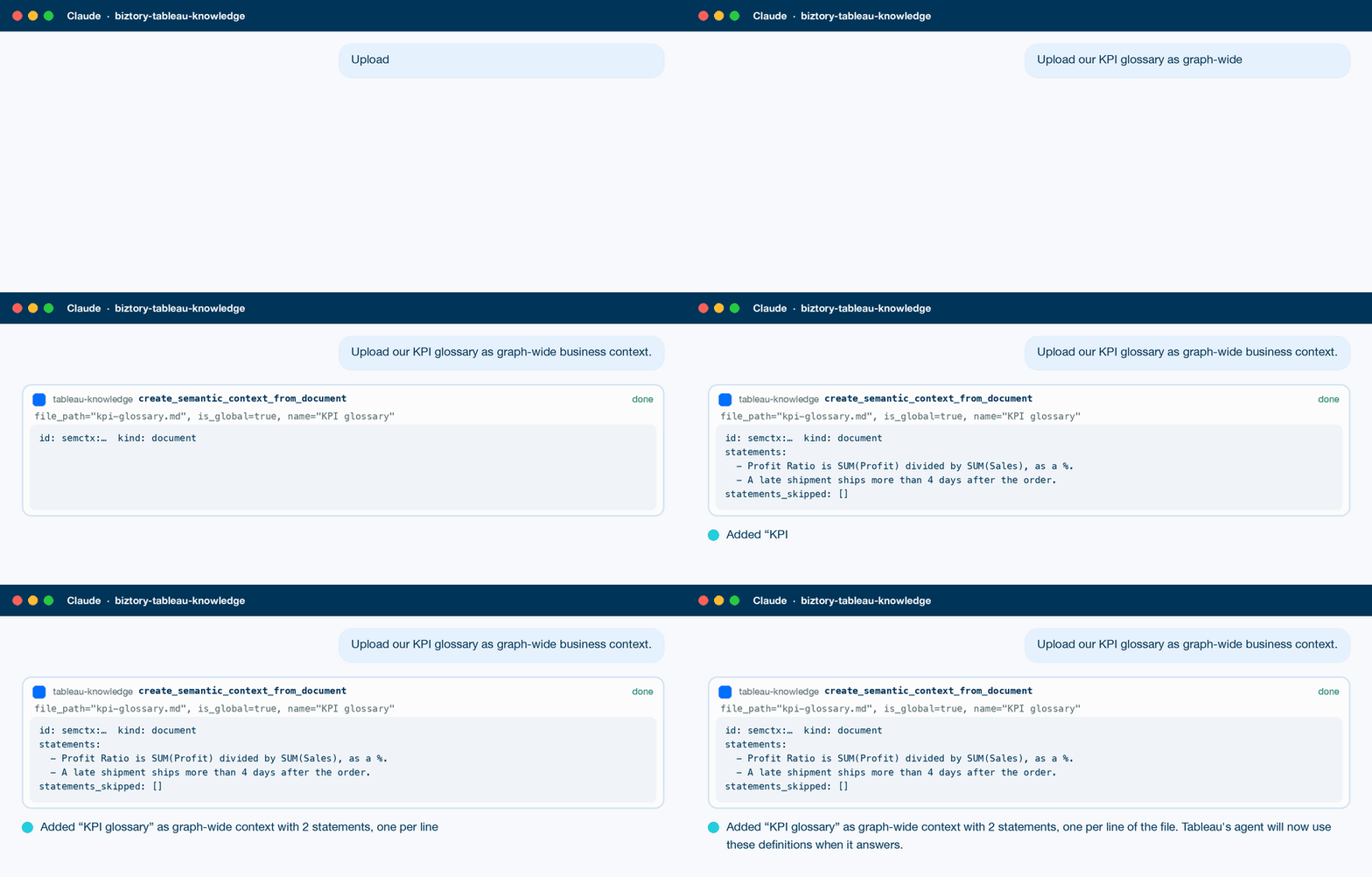
Replays of real tool results from a test site, with site-specific names removed. Regenerate with docs/images/render_demo_gifs.py.
Why it's different
- Ask by meaning, not by id. Every read tool takes a node id or a description ("the net sales field"). Descriptions resolve through the graph's own semantic search, and the answer says which node it picked, with the match score and runners-up, so a wrong guess is visible instead of silent.
- Answers, not payloads.
impact_analysisgroups and counts everything downstream by type;lineageadds node and edge counts;graph_healthcaps hundreds of suggestions to the top ones while keeping every total. - Errors tell the model what to do next. Tableau's error codes become concrete steps (
site_not_entitled→ an admin must enable Knowledge;no_active_graph→ pass agraph_id; no embedder → use exact ids), with thetrace_idkept for support. Rate limits are retried withRetry-After. - Writes you can trust. Only semantic contexts and a graph's sources can be written (the latter through Tableau Knowledge's undocumented web-app API, which can change without notice). Write tools take exact ids (a fuzzy match never decides where a write lands), validate before sending, carry honest MCP annotations so clients ask first, and
delete_semantic_contextreturns what it deleted. - Port your semantic layer.
export_to_ossieturns a published data source into a validated Ossie model, with Tableau calcs translated to portable SQL wherever that is exact and a loss report for everything else.import_from_ossiebrings descriptions, synonyms and definitions from any Ossie model back into Tableau Knowledge, with a reviewable plan first. - Tiny and hardened. Stdio only (no inbound port), secrets from env only, HTTPS enforced, redirects refused, ids encoded so they can never reach another endpoint, fuzzed parsers, and two runtime dependencies: the MCP SDK and PyYAML (stdlib
urllibfor HTTP).
Requirements
Tableau Knowledge is a Tableau Cloud feature (September 2026 and later, Tableau+ license); it is not available on Tableau Server. Any user can read the graph, filtered by their content permissions. Writing semantic contexts needs the Creator role.
Quickstart
You need uv (curl -LsSf https://astral.sh/uv/install.sh | sh) and a Tableau Personal Access Token.
Claude Code, one line:
claude mcp add tableau-knowledge \
  -e TABLEAU_SERVER=https://10ax.online.tableau.com \
  -e TABLEAU_SITE_CONTENT_URL=YourSite \
  -e TABLEAU_PAT_NAME=my-token \
  -e TABLEAU_PAT_SECRET=the-full-secret \
  -- uvx biztory-tableau-knowledge-mcp
That's all. uvx fetches the package from PyPI and runs it in an isolated environment; nothing to clone or install. Then ask: "Use server_info: what graphs does my site have?"
Configuration
All configuration is via environment variables (set them in your client's env block, never on the command line).
| Env var | Required | Default | Description |
|---|---|---|---|
TABLEAU_SERVER | yes | n/a | https://<pod>.online.tableau.com. Any URL from your browser works; the path is stripped. |
TABLEAU_SITE_CONTENT_URL | yes | "" | Site slug (the part after /#/site/). |
TABLEAU_PAT_NAME | yes¹ | n/a | Personal Access Token name. |
TABLEAU_PAT_SECRET | yes¹ | n/a | PAT secret: the whole string, do not split on :. |
TABLEAU_KNOWLEDGE_GRAPH_ID | no | primary graph | Default graph for every tool. server_info lists the site's graphs; each tool also takes a graph_id. |
TABLEAU_TIMEOUT | no | 60 | Per-request timeout (seconds). |
TABLEAU_API_VERSION | no | auto | REST version used for sign-in; else read from serverinfo. (The Knowledge API itself is always v1.) |
TABLEAU_ALLOW_HTTP | no | off | Set to 1 to allow a plain http:// server on a trusted network. Otherwise only HTTPS (or loopback). |
TABLEAU_LOG_LEVEL | no | INFO | DEBUG logs each HTTP call (method + URL; never headers, bodies or secrets) to stderr. |
TABLEAU_AUTH_TOKEN | no | n/a | Advanced: a pre-obtained X-Tableau-Auth session token instead of a PAT. |
¹ Provide a PAT (TABLEAU_PAT_NAME + TABLEAU_PAT_SECRET) or TABLEAU_AUTH_TOKEN.
Claude Desktop
Edit claude_desktop_config.json (macOS: ~/Library/Application Support/Claude/, Windows: %APPDATA%\Claude\):
{
  "mcpServers": {
    "tableau-knowledge": {
      "command": "uvx",
      "args": ["biztory-tableau-knowledge-mcp"],
      "env": {
        "TABLEAU_SERVER": "https://10ax.online.tableau.com",
        "TABLEAU_SITE_CONTENT_URL": "YourSite",
        "TABLEAU_PAT_NAME": "my-token",
        "TABLEAU_PAT_SECRET": "the-full-secret"
      }
    }
  }
}
Fully quit and reopen Claude Desktop, then check the tools menu.
Cursor · VS Code · Cline · Windsurf
Use the Add to Cursor / Add to VS Code buttons above and fill in the env values, or add the same block as for Claude Desktop to:
- Cursor:
~/.cursor/mcp.json(global) or.cursor/mcp.json(project). - VS Code:
.vscode/mcp.json(the top-level key there isserversinstead ofmcpServers). - Cline: the MCP Servers panel, then Configure, into
cline_mcp_settings.json. - Windsurf:
~/.codeium/windsurf/mcp_config.json.
On Windows, if uvx isn't found by the GUI app, use its absolute path (e.g. %USERPROFILE%\.local\bin\uvx.exe).
Tools
node arguments accept a node id or a plain-language description. Every graph-scoped tool also takes an optional graph_id.
| Tool | What it does | Key args |
|---|---|---|
server_info | Site, versions, auth, whether Knowledge is enabled, the site's feature switches, and every graph (id, name, status, primary, stats incl. context coverage). Good first call. | none |
search_nodes | Semantic search over the graph ("revenue" finds "Net Sales"), ranked with scores. | query, node_type, scope_id, limit, threshold |
get_node | One node: properties, attached semantic statements, child nodes. | node, include_children |
list_edges | The edges around one node, with direction and the node on the other end. | node, edge_type, direction |
lineage | Upstream and downstream neighborhood (10 steps) along lineage/dependency edges, with counts. | node |
impact_analysis | Everything that depends on a node, transitively, grouped and counted by type. | node |
list_sources | The published data sources and workbooks the graph is built from, plus the latest ingest status. With site_search, finds sources anywhere on the site (LUID + whether they're in the graph). | node_type, site_search |
search_semantic_contexts | Business statements on the graph: all, graph-wide only, or attached to one node. | node, is_global |
graph_health | Health score, coverage metrics, and prioritized improvement suggestions. | pds_id, severity, suggestion_type, limit |
create_semantic_context | (write) Attach statements to one node (exact id) or to the whole graph. | statements, target_node_id / is_global, name |
update_semantic_context | (write) Replace statements, rename, re-attach, or make graph-wide. | ctx_id, statements, name, attach_to / make_global |
delete_semantic_context | (write) Delete a user-managed context; returns what was deleted. | ctx_id |
create_semantic_context_from_document | (write) Upload a .txt/.md/.csv/.pdf/.docx/.xlsx (max 2 MB); Tableau makes each line a statement. Undocumented web-app API. | file_path, target_node_id / is_global |
add_sources | (write) Add data sources / workbooks to a graph by exact LUID; Tableau ingests them in the background. Undocumented web-app API. | pds_luids, workbook_luids, graph_id |
remove_sources | (write) Remove data sources / workbooks (and their nodes) from a graph; returns what was removed. Undocumented web-app API. | pds_luids, workbook_luids, graph_id |
create_graph | (write) Create an empty knowledge graph; fill it with add_sources. Undocumented web-app API. | name, description |
update_graph | (write) Rename a graph, replace its description, or make it the primary graph. Undocumented web-app API. | graph_id, name, make_primary |
ask_tableau_agent | Ask Tableau's own agent about a graph, e.g. to test context against an answer key; follow-ups via conversation_id. Undocumented web-app API. | question, conversation_id |
export_to_ossie | A published data source as an Apache Ossie model (YAML), plus validation and a loss report. | datasource, include_hidden, default_aggregation_metrics |
validate_ossie | Check any Ossie model (YAML/JSON) against the official schema and the spec's rules. Local only. | document, model_name |
import_from_ossie | (write) Plan, then apply, the semantic contexts an Ossie model adds to a data source. | document, target_datasource_id, apply |
ossie_guide | Reference for Ossie: object model, expressions, Tableau mapping, converters, porting playbook. Local only. | topic |
check_business_preferences | Check a Business Preferences file (format, limits, wording) and every field it names against the dashboard's captions. No text: the rulebook. | text, target, product |
Write tools are annotated readOnlyHint: false (update, delete and import also destructiveHint: true) so your client can ask before each one. Tableau-managed (SEMANTIC_CONTEXT_EXTERNAL) contexts are read-only.
Port your semantic layer with Apache Ossie
Apache Ossie (incubating, formerly Open Semantic Interchange) is a vendor-neutral YAML standard for semantic models. There was no converter for classic Tableau; this server is one, built on the Knowledge graph, so the business context travels too.
Tableau → Ossie (export_to_ossie):
| Tableau Knowledge | Ossie |
|---|---|
| Published data source | Model (name, description, ai_context) |
| Logical table | Dataset |
| Column field | Field (sql = source column; dimension, datatype) |
| Row-level calc | Field, Tableau formula in the TABLEAU dialect plus portable sql when exact |
| Aggregate calc | Metric (dataset-scoped, or model-scoped with qualified names when it spans tables) |
{FIXED [d]: SUM([x])} | SUM(x) OVER (PARTITION BY d) |
| Default aggregation of a measure | Metric (total_sales = SUM(sales)) |
| Descriptions and semantic contexts | description and ai_context |
| Ids, captions, roles, original formulas | custom_extensions vendor TABLEAU (for exact round trips) |
The export validates its own output and returns a losses list. Knowledge has no physical table paths or join keys, so source and relationships need filling in. INCLUDE/EXCLUDE LODs, table calcs, parameters and some functions stay Tableau-only, each named in the report.
Ossie → Tableau Knowledge (import_from_ossie): the Knowledge API can write semantic contexts, so that is what an Ossie model becomes. Descriptions, ai_context instructions, synonyms ("Also known as…"), example questions and metric definitions land on the matching nodes, one ossie:<model> context per node. Matching uses the ids from a previous export first, then names. On sites that accept only graph-wide context through the API, the same statements become one global ossie:<model> context, each prefixed with what it describes (Superstore / Sales: Also known as: revenue.); scope forces node or global. The first call returns the plan (create / update / unchanged, plus anything unmatched), and nothing is written until apply=true. Statements Tableau already holds are skipped, so re-importing an unedited export writes nothing.
Slash commands. The server ships MCP prompts that walk through each workflow: Export a data source to Ossie, Import an Ossie model into Tableau Knowledge, and Write Business Preferences. In Claude Code they appear as /mcp__tableau-knowledge__export_datasource_to_ossie and /mcp__tableau-knowledge__import_ossie_into_tableau_knowledge (with the server name you chose).
Onward to other platforms. Converters exist for Snowflake, dbt, Power BI, Databricks, Tableau Next, Cube, ThoughtSpot, Omni, Sigma and more. None are on PyPI yet, so ossie_guide (topic converters) gives the exact commands, pinned to a reviewed commit. The server will wrap them as tools once they are published.
Write Business Preferences that work
A Business Preferences file is the list of # rule lines Tableau's agent reads before it answers: one file per dashboard on Tableau Cloud (50 rules, 8,000 characters), one per semantic model on Tableau Next (30,000 characters). It shapes how the agent plans an answer, so every line has to be one it can follow. check_business_preferences encodes the field-tested lessons from Business Preferences in Tableau Cloud: What We Learned (Celia Fryar, XeoMatrix, September 2026):
- Format slips that Tableau silently ignores: a space before
#, no space after it. - Limits with headroom; no headers, blank lines or duplicates; no contradictions.
- Wording that misleads the agent: thresholds without "use only this value", formatting rules that leak into the query, conversational lines, absences that can be over-read, ambiguous ordering and averages. It also suggests the two baseline rules (keep queries numeric, fail honestly) when they are missing.
- Field names, checked live: give it the dashboard, and every
[Field]must be a visible caption the agent will see, with "did you mean" suggestions. It also flags workbook problems: duplicate (Account ID (Account)), generic (Amount) and helper fields.
The write_business_preferences prompt runs the whole loop. It gathers the real captions, asks you for terms, thresholds and policies, then drafts and checks until clean, and returns v1 with the upload-then-publish and testing advice. Call check_business_preferences with no text for the full rulebook.
How a description becomes a node
# illustrative
"the net sales field"
   │  1. exact lookup: GET /nodes/{id}           → found? use it, no guessing
   │  2. not an id: semantic search (top 4)      → best match + runners-up
   ▼
{ "id": "field:…:Net Sales", …,
  "resolution": { "match": {"name": "Net Sales", "type": "FIELD", "score": 0.82},
                  "alternatives": [ … ],
                  "note": "Not an exact id: resolved by semantic search …" } }
The model sees the score and the alternatives, so it can confirm with you or retry with an alternative's id. Write tools skip this step entirely and require exact ids.
Example prompts
- "Use server_info: which graphs does this site have, and which is primary?"
- "Find the fields that mean revenue, then show the lineage of the best match."
- "Run impact_analysis on the Superstore data source: which workbooks and dashboards depend on it?"
- "What semantic context is attached to the Profit field?"
- "Show the graph's health score and the five high-severity suggestions, with the nodes they target."
- "Add a statement to the Profit field: 'Profit is calculated after returns and reported in EUR.'"
Architecture
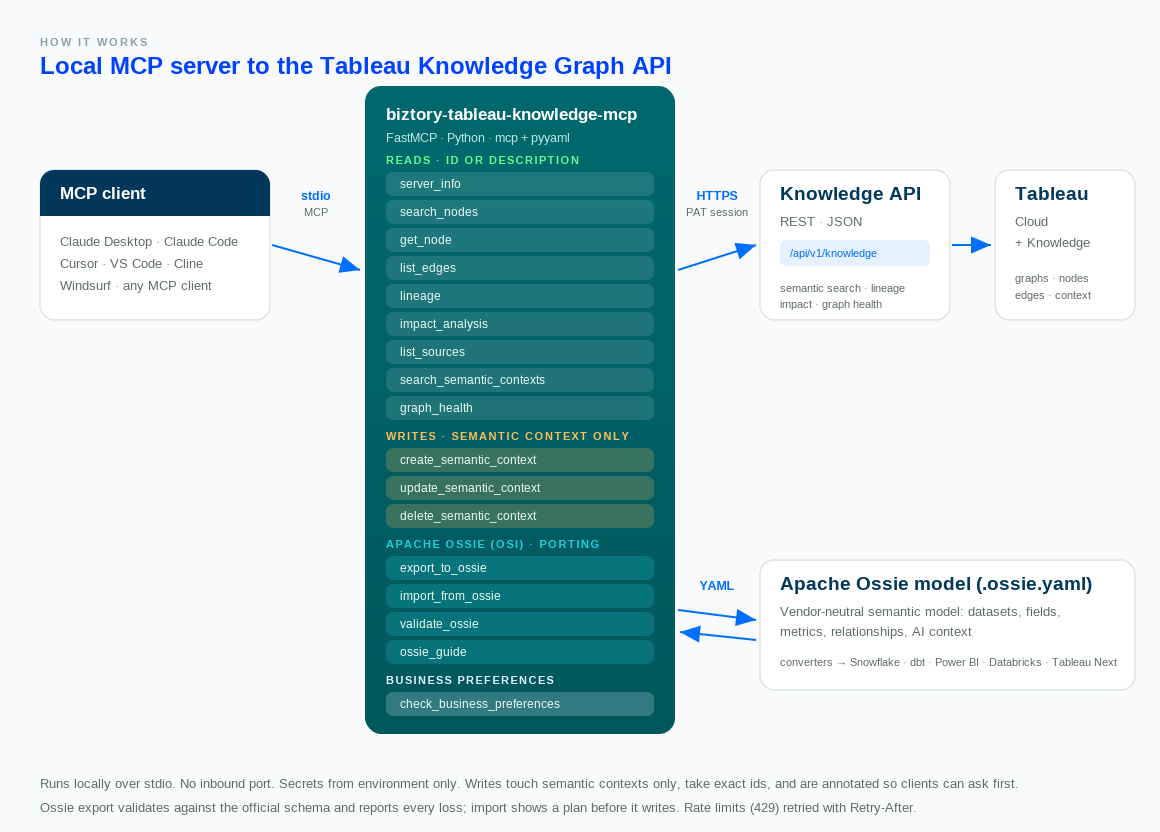
The server speaks MCP over stdio to the client and HTTPS to Tableau: it signs in with your PAT to get an X-Tableau-Auth session (refreshed on expiry), then calls /api/v1/knowledge. Nothing is stored; every answer is live.
Things the API does that you should know
- Search is by meaning. Scores are relative; a top score around 0.4-0.5 can still be the right node, so check the alternatives.
- Lineage follows dependencies, not containment. A single field's lineage is often just itself;
list_edgesshows which table HAS it. - Context search doesn't filter by text yet.
search_semantic_contextsfilters by node oris_global; find statements by meaning withsearch_nodes. - Unknown ids behave differently per endpoint. The API's lineage returns an empty graph for an unknown id; this server resolves the node first, so you always get a clear error instead.
- Deletes are idempotent. Deleting an unknown id succeeds without effect.
- Some sites accept only graph-wide context. Creating a node-attached context can fail with
node_semantic_context_disabled("node-scoped context is managed by Tableau and arrives through ingestion"); BiztoryPulse does this. Useis_global=trueand name the field in the statement.import_from_ossiefalls back to that automatically. - The API is rate-limited. Crawling a large graph node by node hits HTTP 429; the server retries with back-off, but prefer
lineageandimpact_analysisover manyget_nodecalls.
Security
- Writes are limited to semantic contexts, take exact ids, are validated before sending, and are annotated so your client can ask first. A Viewer or Explorer PAT makes the server read-only in practice.
- Local and stdio-only. No inbound network port is opened.
- Secrets from env only. Never tool arguments, never logged, never returned.
- Credentials go only to your Tableau host. HTTPS required, certificates verified, redirects refused.
- No injection through ids. Node and context ids are encoded as one path segment;
graph_idis checked against Tableau's pattern before it is sent. Both parsers of untrusted input are fuzzed in CI. - YAML is parsed safely. Ossie documents go through
yaml.safe_load(no tags, no code), with a 5 MB cap;validate_ossieandossie_guidenever contact Tableau. - Verifiable releases. Every GitHub release carries Sigstore signatures and a CycloneDX SBOM, and PyPI uploads use Trusted Publishing.
- Pin a version in production:
uvx biztory-tableau-knowledge-mcp==0.4.0.
See SECURITY.md for the threat model, data handling, disclosure policy and how to verify a release.
Troubleshooting
| Symptom | Fix |
|---|---|
| Server doesn't appear | Fully quit and relaunch the client; check the config path and JSON validity. |
spawn uvx ENOENT | Install uv, or use the absolute path to uvx. |
Sign-in fails (401, 401001) | The PAT is invalid or expired (15 days unused). Create a new one and check TABLEAU_SITE_CONTENT_URL. |
site_not_entitled | The site doesn't have Tableau Knowledge; a Tableau Cloud Manager admin must enable it. |
no_active_graph | The site has no primary graph: pass a graph_id from server_info. |
| "Semantic search is unavailable" | The graph has no embedder. Use exact ids (list_sources → get_node). |
tableau_forbidden on a write | Writing semantic contexts needs the Creator role. |
| HTTP 429 after retries | You hit Tableau's rate limit; wait a minute and use fewer, broader calls. |
Inspect the server directly with the MCP Inspector:
npx @modelcontextprotocol/inspector uvx biztory-tableau-knowledge-mcp
Development
git clone https://github.com/biztory/biztory-tableau-knowledge-mcp && cd biztory-tableau-knowledge-mcp
uv sync --all-extras
uv run biztory-tableau-knowledge-mcp                   # run from source (needs the env vars above)
uv run pytest --cov=biztory_tableau_knowledge_mcp      # tests + coverage (offline; no Tableau needed)
uv run ruff check . && uv run ruff format --check . && uv run mypy
Tool tests run through the real client against an in-process fake of the Knowledge API (tests/conftest.py), so URL building, id encoding and error mapping are all exercised. Live tests are opt-in: TABLEAU_LIVE=1 runs the read-only ones; TABLEAU_LIVE_WRITE=1 adds a round trip that creates, updates and deletes one temporary context it made itself.
The same gates run in CI (Linux/macOS/Windows, Python 3.10 to 3.13): ruff check, ruff format --check, mypy --strict, and pytest with a coverage floor. CodeQL scans every push, the OpenSSF Scorecard runs weekly, and a fuzzing job (fuzz/) attacks the untrusted-input parsers. The package ships a PEP 561 py.typed marker.
Contributions welcome: see CONTRIBUTING.md and the Code of Conduct.
Roadmap
- Export to and import from Apache Ossie (formerly OSI)
- Wrap the Ossie converters (Snowflake, dbt, Power BI, Databricks) as tools once they are published on PyPI
- Ossie relationships from Tableau join keys, when the Knowledge API exposes them
- A demo recording in this README
- Optional per-session caching of
server_infoand resolved nodes
Ideas and votes welcome in Discussions.
License
MIT © Biztory. Sister project: tableau-graphql-mcp for lineage over the Tableau Metadata API.






