
Blockrun
Web search, deep research, prediction markets & crypto data for AI agents. Pay per call via x402.
Runs on your machine from its package; the steps are below.
What it does
- Reads
- Writes
- High impact
At most: moves money, runs code or commands, deletes data, or sends messages for you.
What it costs
FreeOdel charges nothing per call. The publisher may charge for its own service.
Runs locally over stdio
This server isn't hosted — your MCP client launches it from a package registry. Use one of the commands below, or drop the config into your client (e.g. Claude Desktop).
Run
npx -y @blockrun/mcp
MCP client config
{
  "mcpServers": {
    "blockrun": {
      "command": "npx",
      "args": [
        "-y",
        "@blockrun/mcp"
      ]
    }
  }
}BlockRun MCP
Real-time data — and real trades — for Claude and any AI agent.
Agents can pay like agents: sign transactions from a wallet.
Teams can pay like teams: get a BlockRun API key at user.blockrun.ai, add credit by card or wire, and let the MCP call api.blockrun.ai.
BlockRun MCP gives your agent 19 tools — markets, research, web search, images, video, on-chain data, and live Polymarket trading — paid per call.
Two ways to pay, same tools: a self-custody wallet (USDC on Solana or Base, no account needed) — or a BlockRun API key backed by account credit. Sign up at user.blockrun.ai →
Read the odds and place the bet, from one self-custody wallet.


















claude mcp add blockrun -s user -- npx -y @blockrun/mcp@latest
api.blockrun.ai. Ask Claude anything.
BlockRun MCP is an open-source Model Context Protocol server that gives Claude — and any MCP-compatible agent — 19 tools for real-time data and real actions: 88 LLMs, image & video generation, prediction-market data, live web/X search, on-chain queries across 40 chains, and the ability to place real, USDC-settled bets on Polymarket.
You pay per call, and you choose how. Wallet mode authenticates with a signature and settles each call in USDC via the x402 protocol — no account, no credit card, no subscription, on Solana or Base. Account mode authenticates with a BlockRun API key (brk_live_…) from user.blockrun.ai, routes service calls through api.blockrun.ai, and draws down card- or wire-funded account credit at exact usage. Same 19 tools either way. MIT licensed.
🏆 First of its kind — the signal → trade loop in Claude Code
Read live Polymarket odds and place the bet, from one self-custody wallet, pay-per-call. Jump to Polymarket trading →
Why BlockRun MCP exists
Every other data integration was built for human developers — create an account, copy an API key into .env, add a credit card, repeat for every vendor.
BlockRun gives you both payment rails without rebuilding the integration. Use a wallet when the agent should self-custody funds, or use an account key when a team wants card-funded credits and a dashboard.
- One wallet, every source — 19 tools behind a single self-custody wallet. No per-vendor signups.
- One account key, every source — mint a key at user.blockrun.ai, top up by card or wire, then the MCP calls api.blockrun.ai with that key.
- No API key required in wallet mode — your wallet signature is authentication.
- No credit card required in wallet mode — pay per request in USDC via x402, fractions of a cent each.
- Starts free — the free tier (
blockrun_chat mode:"free",blockrun_dex, cryptoblockrun_price,blockrun_models) costs $0. - Reads and acts — most tools deliver data;
blockrun_polymarketplaces real, confirm-gated trades. - Human-in-the-loop payments — turn on
BLOCKRUN_CONFIRM_SPEND=onand the agent pauses before any paid call above your threshold; nothing is signed until you approve. Details ↓ - Generative UI — on Claude Desktop, claude.ai, VS Code and Cursor the Polymarket preview is a live order card with a Place button, and the wallet is a panel with balances, QR and card top-up. MCP Apps ↓
- Self-custody — your key never leaves your machine (
~/.blockrun/.session,0600— or the OS keychain once you opt intoBLOCKRUN_KEYCHAIN=strict). BlockRun can't move your funds.
How it compares
| Raw provider APIs | Typical single-vendor MCP | BlockRun MCP | |
|---|---|---|---|
| Setup | Account + API key per vendor | Account/key for 1 vendor | Wallet auto-created — or one BlockRun key for everything |
| Payment | Credit card, monthly minimums | Credit card / vendor plan | USDC per-call via x402, or card/wire-funded account credit |
| Data sources | One per integration | One vendor | 19 tools — LLMs, media, markets, chain |
| Place real bets | Build it yourself | Rare | Yes — Polymarket CLOB, confirm-gated |
| Pay-chain | — | — | Solana + Base, or api.blockrun.ai with no chain at all |
| Agent budgets | Manual | — | Built-in per-agent delegation |
| Spend approval | — | — | Ask-before-pay dialog (MCP elicitation) |
| Generative UI | — | Rare | Order card + wallet panel (MCP Apps) |
| Open source | Varies | Varies | Yes (MIT) |
✓ One wallet or one account key · ✓ Pay-per-call · ✓ Reads and trades · ✓ Multi-chain · ✓ Agent-ready · ✓ Open source
What changes
Before BlockRun, Claude can't answer:
- "What's the current Polymarket probability that Bitcoin hits $100k this year?"
- "Find me the top 5 papers on RAG published in the last 30 days."
- "What are people saying about @sama on X right now?"
- "What's the 24h volume on the PEPE/ETH pair on Uniswap?"
- "Polymarket has the Fed holding at 73% — put $2 on it." ← and now it can place the trade, not just read the odds.
After BlockRun, it can. Each query costs fractions of a cent — billed from a local USDC wallet, or from card-funded credit on a BlockRun account through api.blockrun.ai. No subscriptions, no per-vendor signups.
Quick Start
0. Choose how you pay
| Wallet (default) | API key | |
|---|---|---|
| Setup | Nothing — a wallet is created on first run | Sign in at user.blockrun.ai, mint a key, use it against api.blockrun.ai |
| Funding | Send USDC (Solana or Base) | Credit card / wire → account credit |
| Billing | Per call, settled on-chain, + $0.001 network fee | Exact-usage account credit, no per-call network fee, no minimum |
| Identity | A keypair on your machine | An account with members, credits, and a usage ledger |
| Best for | Agents, solo devs, anything self-custody | Teams, companies, anyone who can't run a wallet |
| Trade on Polymarket | ✅ | ❌ — needs a keypair to sign |
Both modes reach the same 19 tools. Account mode sends service calls to https://api.blockrun.ai by default. You can switch at any time; setting BLOCKRUN_API_KEY takes priority over a wallet, and unsetting it hands the wallet back.
1. Install
Claude Code (recommended)
claude mcp add blockrun -s user -- npx -y @blockrun/mcp@latest
-s user installs globally (available in every project). The -- separator ensures -y is passed to npx, not parsed by claude mcp add.
💡 Homebrew / nvm users: if the server doesn't connect, Claude Code likely can't find
node/npxon its launcher PATH. Pass your shell PATH through — works on CLI and desktop:bashclaude mcp add blockrun -s user -e PATH="$PATH" -- npx -y @blockrun/mcp@latestSee Troubleshooting if it persists.
Every MCP client — one command or one JSON block. Verified = we ran the published package on that client and saw the tools listed (client version · date). Documented = install path from the client's own docs; not run by us yet — tell us if it works. The Spend dialog column is whether the client renders the human-in-the-loop payment prompt; on ❌ clients paid calls proceed without asking and BLOCKRUN_BUDGET_LIMIT is the guard.
| Client | Status | Spend dialog | Install |
|---|---|---|---|
| Claude Code | ✅ Verified · 2.1.251 · 2026-08-30 | ✅ | claude mcp add blockrun -s user -- npx -y @blockrun/mcp@latest |
| Codex CLI | ✅ Verified · 0.142.5 · 2026-08-30 | ❌ | codex mcp add blockrun -- npx -y @blockrun/mcp@latest |
| OpenClaw | ✅ Verified · 2026.8.2 · 2026-09-02 | ⚠️ surface-dependent; see below | openclaw mcp set blockrun '{"command":"npx","args":["-y","@blockrun/mcp@latest"]}' |
| Claude Desktop | 📝 Documented | ⚠️ renders; OK reports cancel → proceeds | claude_desktop_config.json — JSON below |
| Cursor | 📝 Documented | ✅ | ~/.cursor/mcp.json — JSON below |
| VS Code (Copilot) | 📝 Documented | ✅ | code --add-mcp '{"name":"blockrun","command":"npx","args":["-y","@blockrun/mcp@latest"]}' |
| Gemini CLI | 📝 Documented | ❌ | gemini mcp add -s user blockrun npx -y @blockrun/mcp@latest |
| Grok | 📝 Documented · see the timeout note | ❌ | grok mcp add blockrun -- npx -y @blockrun/mcp@latest — raise startup_timeout_sec first, below |
| Windsurf | 📝 Documented | ❌ | ~/.codeium/windsurf/mcp_config.json — JSON below |
Any other MCP client that can spawn a stdio server works the same way: command: npx, args: ["-y", "@blockrun/mcp@latest"]. With nvm/Homebrew Node on a JSON-configured client, put the absolute path from which npx in command. Spend-dialog sources and what "proceeds without asking" means: docs/spend-confirmation.md.
Grok — raise the startup timeout before you install, or the first run looks broken.
Grok waits startup_timeout_sec for an MCP server to answer, and it defaults to 30
(xAI's MCP docs). A first npx -y run has
to download this package and its dependency tree before the server can say anything, and
that is a race: measured cold, with an empty npm cache, it took 17s on a fast connection
and 42-46s on a slower shared box. Lose the race and grok mcp doctor blockrun says
server timed out (no response within 30s) and the UI shows blockrun [unavailable] — an
install that is working, timing out, and indistinguishable from broken.
Give it room in ~/.grok/config.toml (or .grok/config.toml for one project):
[mcp_servers.blockrun]
command = "npx"
args = ["-y", "@blockrun/mcp@latest"]
enabled = true
startup_timeout_sec = 120
Or skip the cold download entirely, which is faster every run after the first:
npm install -g @blockrun/mcp@latest
grok mcp add blockrun -- blockrun-mcp
Only the FIRST run pays this: npx caches by exact spec, so the next start is warm (~9s
here). The same trap exists on any client with a startup timeout — if a fresh install
shows as unavailable and npx -y @blockrun/mcp@latest runs fine in a terminal, raise the
client's timeout or install globally before looking for anything else. Thanks to
@0xCheetah1 for the report.
OpenClaw: the published npx package was verified end-to-end on 2026.8.2: all 20 tools were projected (19 since the Surf delisting), free calls worked, and paid x402 calls settled. Add a hard session cap while installing:
openclaw mcp set blockrun '{"command":"npx","args":["-y","@blockrun/mcp@latest"],"env":{"BLOCKRUN_BUDGET_LIMIT":"2"}}'
openclaw mcp doctor blockrun --probe
Spend confirmation depends on the OpenClaw runtime and chat surface. Its Codex harness supports MCP form elicitation, but an unmappable prompt is returned as an explicit decline; in the WebChat → Codex route tested here, BLOCKRUN_CONFIRM_SPEND=on declined paid calls without presenting an actionable dialog. Keep confirmation off on that route and rely on BLOCKRUN_BUDGET_LIMIT plus OpenClaw's own tool-approval mode.
JSON for Claude Desktop, Cursor, Windsurf
{
  "mcpServers": {
    "blockrun": { "command": "npx", "args": ["-y", "@blockrun/mcp@latest"] }
  }
}
| Client | File |
|---|---|
| Claude Desktop | claude_desktop_config.json (Settings → Developer → Edit Config) |
| Cursor | ~/.cursor/mcp.json · Windows %APPDATA%\Cursor\mcp.json |
| Windsurf | ~/.codeium/windsurf/mcp_config.json · Linux ~/.config/.codeium/windsurf/mcp_config.json · Windows %APPDATA%\Codeium\windsurf\mcp_config.json |
Add "env": { "BLOCKRUN_CONFIRM_SPEND": "on" } inside the server object to turn on the spend dialog where the client supports it.
2. Choose a tool profile (optional)
Expose a trimmed tool set so the client loads fewer schemas into context. Pass --profile <name> (or set BLOCKRUN_MCP_PROFILE); omit for the full set.
| Profile | Tools |
|---|---|
full (default) | everything (19 tools) |
media | wallet models image video realface music speech |
trading | wallet price dex markets defi rpc polymarket_read polymarket |
research | wallet models chat search exa |
chat | wallet models chat |
blockrun_surf was removed in 0.49.0: the gateway has answered every Surf (asksurf.ai) path with 410 since 2026-09-06, so the tool could only ever return an error, and its schema cost every agent context on every turn. Those questions go to blockrun_price, blockrun_defi, blockrun_markets and blockrun_dex; the surf skill maps each former endpoint to its replacement.
claude mcp add blockrun-trading -s user -- npx -y @blockrun/mcp@latest --profile trading

# Codex CLI
codex mcp add blockrun-trading -- npx -y @blockrun/mcp@latest --profile trading
An unknown profile name falls back to full. modal and phone are full-profile only.
What each profile costs your context
Installing an MCP server spends context on every turn, whether or not you call the tools — the client loads each tool's schema into the model's prompt and re-sends it for the whole session. Package managers have shown install size for decades. Almost no MCP server shows this. Ours:
| Profile | Tools | Context |
|---|---|---|
full (default) | 19 | 14,348 |
trading | 8 | 5,411 |
media | 7 | 7,144 |
research | 5 | 2,740 |
chat | 3 | 2,095 |
Running --profile trading instead of the default costs 62% less context for the same trading
workflow. If you only ever ask about markets, that is the single cheapest change you can make.
Measure it yourself — against us, or against any other stdio MCP server:
npm i gpt-tokenizer
node scripts/measure-tool-schema.mjs                     # this server, every profile
node scripts/measure-tool-schema.mjs -- npx -y @some/other-mcp-server
How the number is computed, and why it is a slight under-count
It counts the model-visible projection — {name, description, input_schema} per tool, with the
mcp__blockrun__ prefix the host prepends — because that is what lands in the API tools array.
It excludes annotations, _meta and outputSchema, which the host consumes and never forwards
to the model (a further ~3.7% on the wire).
The tokenizer is o200k_base. Claude's tokenizer is not public and runs a few percent higher on
JSON, so every figure here is a slight under-count, never an over-count.
Two caveats worth stating plainly. Tool schemas sit at the front of the prompt and are covered by prompt caching, so after the first turn they re-send at cache-read rates — the context-window cost is 100% every turn, the dollar cost is roughly a tenth of that. And 54% of our own cost is tool descriptions, not schemas, which is where the remaining work is.
3. Add funds
Option A — API key + account credit (no wallet). Sign in at user.blockrun.ai with Google. This is the dashboard for keys, credits, and activity; the MCP uses the key to call api.blockrun.ai for the actual services.
- Dashboard → Keys — mint a key. It looks like
brk_live_…and is shown once. - Dashboard → Credits — top up by credit card or wire.
- Point the server at it. By default, account-mode calls go to
https://api.blockrun.ai:
claude mcp add blockrun -s user -e BLOCKRUN_API_KEY=brk_live_… -- npx -y @blockrun/mcp@latest
Or export BLOCKRUN_API_KEY=brk_live_… in the environment the client launches from.
If your client makes environment variables awkward, write the key to
~/.blockrun/.api-key instead (chmod 600) — same file directory the
wallet uses. The environment variable wins when both are present.
4. Dashboard → Activity — every call, priced at exact usage.
Verify with blockrun_wallet action:"status" — it reports the account, its real
balance, and what this session has spent:
Paying with: BlockRun account API key (no wallet, no chain)

  Account:  acme (gated)
  Credit remaining: $12.5000 of $50.00 granted
  Top up:   https://user.blockrun.ai/dashboard/credits
Invoiced accounts show Spent to date: $4.5239 (invoiced account — no prepaid ceiling) instead. If the account is blocked, status says so and why before you spend a call finding out.
Option B — wallet (no account). Run blockrun_wallet to see your addresses. New installs default to Solana; send USDC (SPL) on Solana from Coinbase (pick "Solana"), Phantom, Solflare, or Backpack. To pay on Base instead: blockrun_wallet action:"chain" chain:"base", then send USDC on Base. Full instructions: Fund your wallet.
$5 covers ~525 market queries · ~500 Exa searches · ~250 image generations · ~14 Seedance 1.5-pro clips.
4. Ask Claude anything
"What's Polymarket saying about the next Fed decision? If 'hold' is above 70%, put $2 on it."
Claude reads the odds with blockrun_markets. In wallet mode, and only after your confirmation, it can also place the trade with blockrun_polymarket. In API-key mode, the data/media/research calls run through api.blockrun.ai; Polymarket trading still requires a local keypair to sign.
5. Install the agent skills (optional)
The package ships 17 skills — which tool answers what, worked examples, and a setup / debug / upgrade trio so the agent can install, troubleshoot and update the server on its own.
/plugin marketplace add BlockRunAI/blockrun-mcp            # Claude Code
npx -y @blockrun/mcp@latest skills install                 # any project → ./.claude/skills
npx -y @blockrun/mcp@latest skills install --global        # ~/.claude/skills
npx -y @blockrun/mcp@latest skills install --to ~/.codex/skills
skills list shows what ships; --only a,b picks; --force refreshes copies after an upgrade.
Demo
User: What's Polymarket saying about the Fed rate decision next month?
Claude: According to Polymarket, the market puts a 73% probability on the Fed holding rates steady, 24% on a 25bp cut, 3% on a hike. 24h volume: $2.1M. The "Hold" contract last traded at $0.73.
(via
blockrun_markets· cost: $0.0085 on Base — $0.0075 + the $0.001 network fee)
User: Polymarket has Hawley at ~13% to announce a 2026 presidential run — put $1 on Yes.
Claude: Done — bought 7.63 shares of Yes at $0.131 ($1.00, market FOK). Real on-chain order, settled in pUSD from your gasless Polymarket deposit wallet; I'm tracking the position now.
(signal via
blockrun_markets, trade viablockrun_polymarket— one self-custody wallet, gasless · on-chain tx0x7ca8…)
Tools
| Tool | Data source | Cost |
|---|---|---|
blockrun_chat | 88 LLMs (GPT, Claude, Gemini, DeepSeek, Kimi K3, GLM, NVIDIA free tier, …) with mode tier routing | per token |
blockrun_image | Generate: openai/gpt-image-2, gpt-image-1, google/nano-banana(-2/-pro), xai/grok-imagine-image(-pro), zai/cogview-4, bytedance/seedream-5-pro. Edit: img2img, inpaint, fusion. | $0.015–0.15 |
blockrun_video | Sora 2 + xAI Grok Imagine Video + ByteDance Seedance 1.5/2.0-mini/2.0-fast/2.0/2.5 (720p + audio; 4K on 2.0, up to 30s on 2.5); RealFace asset → real-person video; reference images, video and audio on the account rail | $0.053–0.32/sec charged; reference clips billed at the model's ceiling (15.2s on 2.0, 30.2s on 2.5) |
blockrun_realface | Enroll a real person (phone liveness) or AI character (Virtual Portrait) as a ta_xxxx asset for Seedance 2.0 / 2.0-fast / 2.0-mini video (not 2.5) | free; $0.01 to enroll |
blockrun_music | MiniMax music generation | per track |
blockrun_speech | ElevenLabs TTS (Flash/Turbo/Multilingual/v3, 8 voices) + ByteDance Seed Audio (prompt-directed) + cinematic sound effects; free voice listing | $0.05–0.10/1k chars |
blockrun_price | Pyth-backed realtime + OHLC — crypto / FX / commodity, plus the ticker catalog for 12 equity markets (equity quotes withdrawn 2026-09-05) | free |
blockrun_markets | Polymarket (markets, candles, trades, orderbooks, leaderboards, smart-wallet PnL/clusters, UMA oracle), Kalshi, Limitless, Opinion, Predict.Fun, dFlow, Binance Futures, cross-platform search | $0.0075 + fee/query |
blockrun_polymarket_read | Read-only Polymarket positions/open orders plus executable live order previews, separated for MCP clients that enforce tool safety annotations | free |
blockrun_polymarket | Trade on Polymarket (CLOB V2): place/cancel real bets, positions, redeem winnings — signed locally, settled in pUSD from a gasless deposit wallet. Confirm-gated, $25/order default cap. Details ↓ | free tool; bets are your funds |
blockrun_exa | Neural web search (Exa) — research, competitors, papers, URL content | $0.01 + fee/query |
blockrun_search | Grok Live Search — web + news with citations | $0.08 flat + network fee |
blockrun_dex | Live DEX prices via DexScreener | free |
blockrun_rpc | Raw JSON-RPC on 40 chains (Ethereum, Base, Solana, Bitcoin, Sui, NEAR, …) via Tatum | $0.002 + fee/call |
blockrun_defi | DefiLlama — protocol TVL, chain TVL, yield pools (APY), token prices | $0.001–0.005 + fee/call |
blockrun_modal | Isolated code execution in a BlockRun-hosted Modal sandbox — disposable container, optional GPU (T4 → H100) | $0.01 create; $0.001/op |
blockrun_phone | Outbound AI voice calls (Bland) + wallet-owned US/CA numbers (Twilio), carrier + fraud lookups | $0.54/call; $5/number |
blockrun_models | Live catalogue of every LLM/image/video/music model + pricing | free |
blockrun_wallet | Balance, spending, agent budgets, setup QR, chain switch | free |
Flat data prices are the base. In wallet mode the gateway adds its flat network fee on top — $0.001 per call on Base today, and the Solana gateway quotes the base alone; the account rail charges no fee. The exact figure is in the payment-required header of any unpaid request, which is free to ask for. The server reserves $0.002 for the fee against the budget cap, so blockrun_wallet action:"report" and the spend-confirmation dialog run $0.001 high per call by design.
Key use cases
- Prediction-market consensus → "Polymarket's odds for the next Fed decision?" —
blockrun_markets - Signal → trade (the full loop, self-custody) → "If 'hold' is under 30%, put $2 on Yes." —
blockrun_marketsreads,blockrun_polymarket action:"buy"places. Gasless, confirm-gated. - Smart-money forensics → "This Polymarket whale — who are they, which wallets are theirs, what's their P&L?" —
blockrun_marketspolymarket/wallet/identity/:wallet+.../cluster - Cited research → "5 most-cited papers on speculative decoding, last 90 days." —
blockrun_exa - Image generation with on-image text → "Poster announcing GPT-5.5, retro-futuristic, headline 'NOW LIVE'." —
blockrun_image - Give your agent a voice → "Speak this with the sarah voice." —
blockrun_speech - Voice phone-out → "Call +1-415-… and confirm Friday at 3pm." —
blockrun_phone - Multi-agent research, capped → "Spawn 3 agents on competing L1 narratives. Cap each at $0.50." —
blockrun_wallet delegate × 3 - Raw chain reads, 40 chains → "Latest Base block, and this contract's USDC balance." —
blockrun_rpc
📈 Polymarket trading
blockrun_polymarket lets an agent place real bets on Polymarket (CLOB V2, Polygon). It is non-custodial: every order and approval is EIP-712-signed locally by your BlockRun wallet key — the same self-custody key that pays x402 API fees on Base also authorizes bets on Polygon. Neither BlockRun nor Polymarket's relayer can move funds; they only forward payloads you signed.
Architecture — the official "deposit wallet" path (signature type POLY_1271): a smart-contract vault on Polygon, CREATE2-derived from your key (only your key can authorize it), holds betting funds in pUSD (Polymarket's 1:1 collateral wrapper). Deployment, approvals, and redemptions all run gasless through Polymarket's relayer — you never need POL.
📖 Full step-by-step guide: docs/polymarket-trading-setup.md
# 1. Provision your deposit wallet (idempotent, gasless)
blockrun_polymarket action:"setup"

# 2. Fund it from your Base USDC in one call (gasless; $0.01 fee, non-custodial)
blockrun_polymarket action:"fund" amount_usd:5 confirm:true

# 3. Sign the one-time gasless approval batch
blockrun_polymarket action:"setup" confirm:true

# 4. Find a market, preview safely, then place only after exact user approval
blockrun_polymarket_read action:"preview" side:"buy" token_id:"<id>" amount_usd:5 order_type:"FOK"
blockrun_polymarket action:"buy" token_id:"<id>" amount_usd:5 order_type:"FOK" confirm:true

# 5. Manage → positions · orders · cancel · sell · redeem · withdraw
Safety rails (server-side; an agent cannot bypass them): confirm:true required for every order/approval/redeem, POLYMARKET_MAX_BET_USD per-order cap (default $25), optional POLYMARKET_MAX_SESSION_USD session cap, and bets never draw from the x402 API budget.
Regions: Polymarket geoblocks order placement by IP (US/UK + many regions). Handled by default — the MCP routes CLOB traffic through BlockRun's hosted Finland egress (a fully unrestricted region under Polymarket's policy), so trading works out of the box; setup reports your status. Override POLYMARKET_CLOB_HOST to go direct or run your own egress, optionally reached via HTTPS_PROXY / POLYMARKET_CLOB_PROXY (a proxy alone doesn't change the Polymarket-facing egress). Complying with Polymarket's terms for your jurisdiction is your responsibility.
⚠️ Back up your signer key (
~/.blockrun/.sessionby default; aBLOCKRUN_WALLET_KEYenv var or an existing agentwallet.jsontakes precedence —setupprints the actual signer address). It is the only key to both the payment wallet and the Polymarket deposit wallet.
🛡️ Human-in-the-loop payments
Turn on BLOCKRUN_CONFIRM_SPEND=on and every paid tool pauses before it signs. The server sends an MCP elicitation; your client renders it as a dialog with the estimated charge:
💸 BlockRun charge — video · bytedance/seedance-2.5 · 10s
Estimated: $2.6500
Approve this spend? (USDC is debited per call.)
To stop the charge, choose Decline — Cancel/ESC lets it proceed.

[ ] Approve all BlockRun charges for the rest of this session (don't ask again)

                                          [ Decline ]  [ Approve ]
Decline → nothing is sent, nothing is charged, the tool reports "Charge declined". Approve → the call proceeds. Tick the box and you're not asked again for the session. Free calls never prompt. Set BLOCKRUN_CONFIRM_THRESHOLD=0.05 to only be asked above $0.05.
claude mcp add blockrun -s user -e BLOCKRUN_CONFIRM_SPEND=on -e BLOCKRUN_CONFIRM_THRESHOLD=0.05 -- npx -y @blockrun/mcp@latest
| Client | Dialog | Client | Dialog | |
|---|---|---|---|---|
| Claude Code | ✅ | Claude Desktop | ⚠️ renders; OK reports cancel → proceeds | |
| Cursor | ✅ | Windsurf | ❌ proceeds without asking | |
| VS Code Copilot | ✅ | Codex CLI · Gemini CLI | ❌ proceeds without asking |
On a client that can't ask, the gate fails open — the call proceeds and the cost footer reports the charge. The hard stop on every client is the budget: BLOCKRUN_BUDGET_LIMIT for the process, blockrun_wallet action:"delegate" per sub-agent. blockrun_polymarket keeps its own, stronger per-order confirm:true.
📖 When to use it, sources for the matrix, limitations: docs/spend-confirmation.md
🧩 MCP Apps — order card & wallet panel
On hosts that support the MCP Apps extension — Claude Desktop, claude.ai, VS Code, Cursor, ChatGPT — two tools render as interactive cards instead of text. Everywhere else (Claude Code, Codex, terminals) nothing changes.
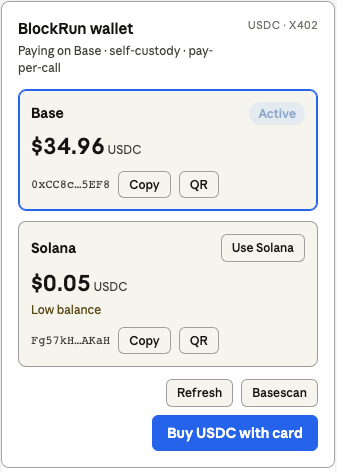
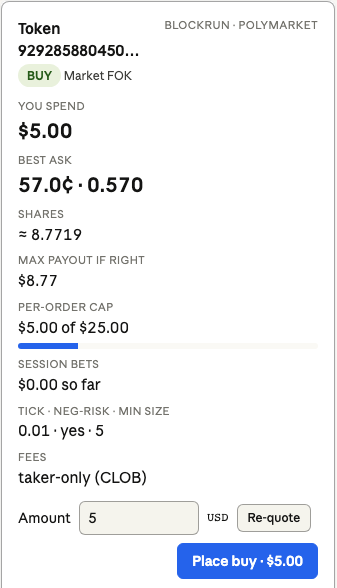
- Order card on
blockrun_polymarket_read action:"preview"— question, outcome, side, best quote, est. shares, notional, cap meter, session ledger. Edit the amount → Re-quote. Place order is arm-then-confirm and asks the host to callblockrun_polymarket … confirm:true, so the host's consent prompt and every server cap (POLYMARKET_MAX_BET_USD, session cap) still apply. - Wallet panel on
blockrun_wallet— both chains' balances, switch chain, copy address, EIP-681 / Solana Pay QR, explorer, Buy USDC with card.
📖 Hosts, money path, local testing: docs/mcp-apps.md
Fund your wallet
Paying with an API key instead? There is no wallet to fund — top up credit by card or wire at user.blockrun.ai/dashboard/credits. The MCP will use that key against api.blockrun.ai and skip the wallet rail entirely.
The server keeps two wallets — one on Solana, one on Base — and pays from one at a time. Run blockrun_wallet to see both addresses, balances, and which is active.
$5 covers ~525 market queries, ~500 Exa searches, ~250 image generations, or ~14 Seedance 1.5-pro clips (5s @ 720p+audio, ~$0.35 each).
Pay on Solana (default for new installs)
blockrun_wallet action:"setup" # shows the Solana address + funding QR
Send USDC (SPL) on the Solana network — from Coinbase (pick "Solana"), Phantom, Solflare, or Backpack.
Pay on Base
One tool call — no env vars, no file editing, no restart:
blockrun_wallet action:"chain" chain:"base"   # provisions + activates the Base wallet
blockrun_wallet action:"setup"                # shows the Base address + funding QR
| Method | Steps |
|---|---|
| Coinbase | Send → USDC → Base network → paste address |
| Bridge from Ethereum | bridge.base.org |
| Card | blockrun_wallet action:"deposit" — Coinbase Onramp, Base only |
Switch back with blockrun_wallet action:"chain" chain:"solana". Switching only changes which wallet pays; both keep their balances.
Upgrading from an older version? Nothing moves. The Solana-first default applies only to installs with no wallet and no saved chain preference — if you already have a Base wallet, you stay on Base until you switch.
What each mode reaches
Almost everything now settles on either chain. The exceptions:
| Capability | API key | Solana wallet | Base wallet |
|---|---|---|---|
| Chat, image, video, music, speech, RealFace | ✅ | ✅ | ✅ |
| Search, Exa, markets, RPC, DEX, phone | ✅ | ✅ | ✅ |
blockrun_defi (DefiLlama) | ✅ | ❌ not served on the Solana gateway | ✅ |
blockrun_modal (sandboxes) | ✅ | ❌ not configured on the Solana gateway | ✅ |
Native Anthropic claude-* passthrough | ✅ | ❌ the SDK signs EIP-3009 only | ✅ |
| Polymarket trading | ❌ needs a keypair | ✅ | ✅ |
blockrun_wallet balance / deposit / QR | ❌ no wallet | ✅ | ✅ |
blockrun_realface action:"list" | ❌ indexed by wallet address | ✅ | ✅ |
A blocked capability returns a message naming the fix, not a raw error.
What a call costs, and how sure we are
| Mode | Reported cost |
|---|---|
| API key — most tools | The amount actually settled, read from the account API's per-call response |
API key — blockrun_chat | An estimate. Chat settles after the response by design, so no figure exists when the answer is sent |
API key — blockrun_image | The amount actually settled (since 0.49.0); only when the account API returns no figure does it fall back to the catalog estimate, marked ~ |
| Wallet | The amount signed and settled on-chain, from the 402 quote |
Anything estimated is printed with a ~ and says so. Estimates run high on
the account rail — they add a transaction fee it does not charge — so a budget
cap trips early rather than late. The source of truth is always
Dashboard → Activity.
For agents & LLMs
If you are an LLM invoking BlockRun MCP tools, read these first:
- CRITICAL: On any payment / balance / 402 error, call
blockrun_walletfirst to check status, thenaction:"setup"for funding. Don't retry the failing tool blindly — the wallet is empty. - CRITICAL:
blockrun_polymarketmoves REAL user funds (pUSD on Polygon), separate from the x402 API budget. Neverbuy/sell/redeemwithconfirm:trueunless the user explicitly approved that exact trade; withoutconfirmyou get a safe dry-run. Discover markets/token IDs withblockrun_marketsfirst. - CRITICAL:
blockrun_musicandblockrun_videoare payment-on-completion async. Failures / client timeouts do NOT charge. Don't retry-loop — they may take 60–180s. - CRITICAL: Before spawning child agents, allocate per-agent budget:
blockrun_wallet action:"delegate" agent_id:"X" agent_limit:1.00, then passagent_id:"X"to every downstream call. The child is auto-blocked at zero. - Free tier first for drafts:
blockrun_chat mode:"free"(NVIDIA),blockrun_dex,blockrun_price(crypto/FX/commodity), andblockrun_modelsare $0. - A declined spend confirmation is the user's decision. Report it and stop — never re-issue the call with a cheaper model, smaller parameters, or split requests to get under their threshold.
Showcase
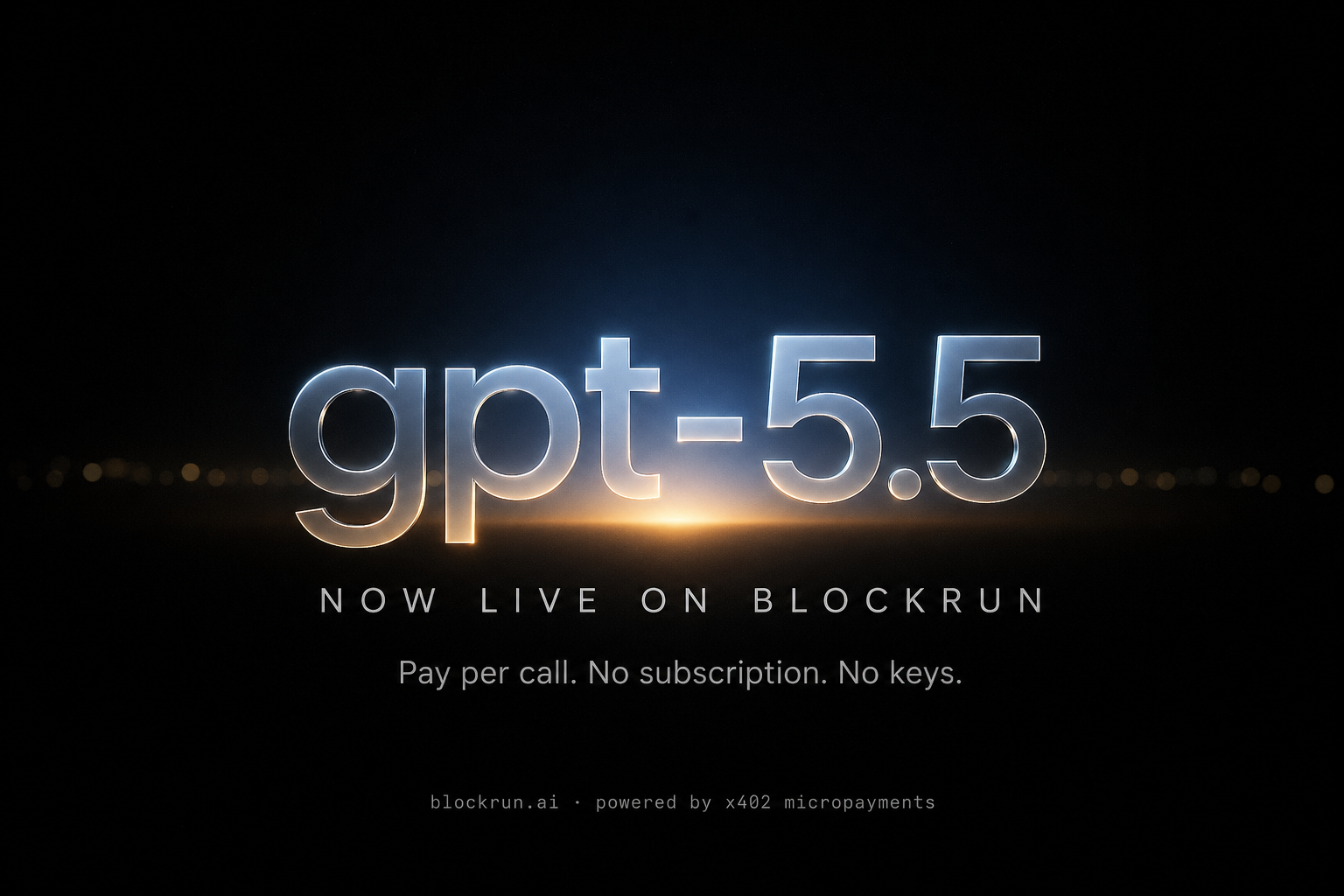
Posters generated through blockrun_image with openai/gpt-image-2 — each a single API call routed through BlockRun, paid from either account credit or a USDC wallet.
 |  | 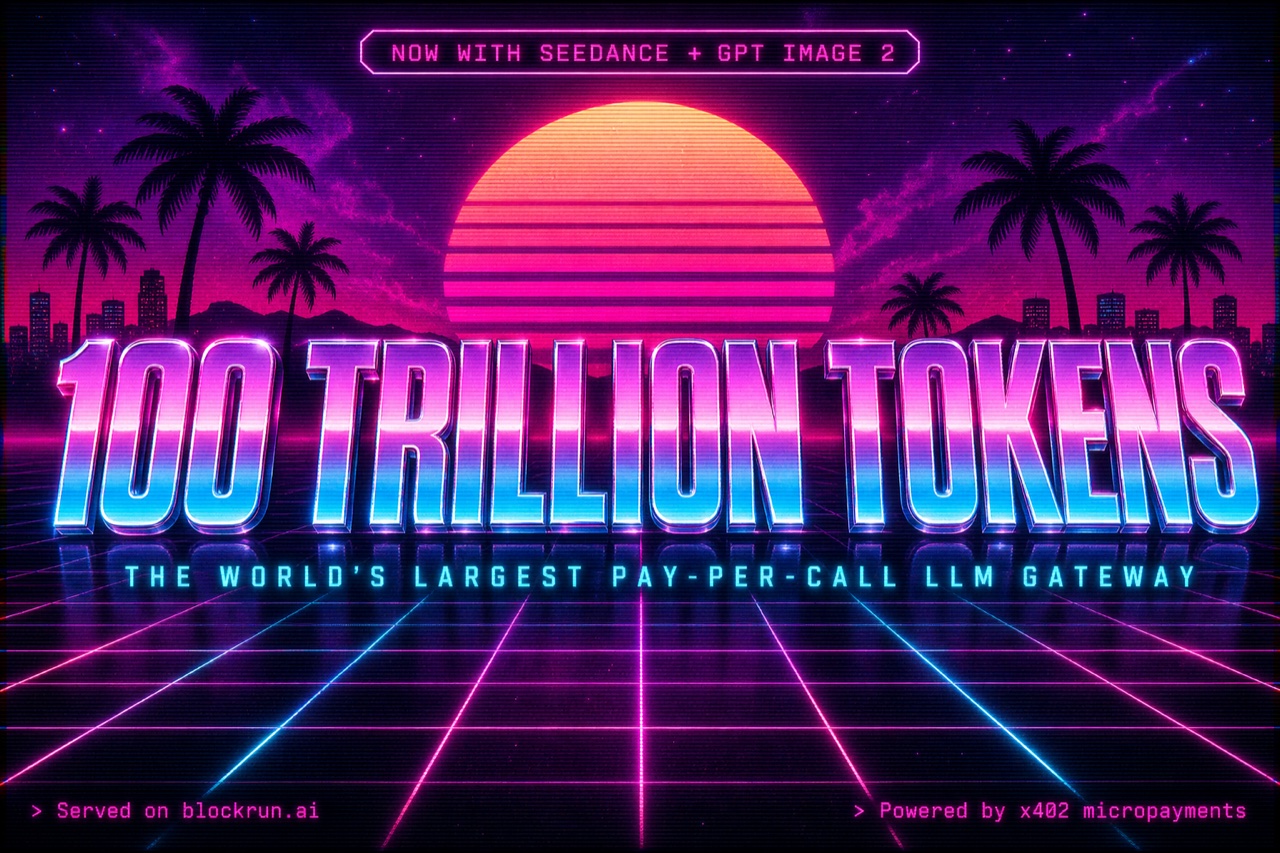 |
| Cornell Blockchain Conference 2026 | Cornell Blockchain Conference 2026 | 100 Trillion Tokens milestone |
Prompts and a worked example are in skills/image-prompting/SKILL.md.
Why not just use the APIs directly?
| Direct APIs | BlockRun | |
|---|---|---|
| Exa | Sign up, $20/mo minimum | $0.011/call on Base ($0.01 + fee), or exact account usage via api.blockrun.ai |
| Polymarket | Undocumented, rate-limited | $0.0085/call on Base ($0.0075 + fee), or exact account usage for reads — plus wallet mode can trade |
| DefiLlama | Free tier, rate-limited, no SLA | $0.006/call on Base ($0.005 + fee), or exact account usage via api.blockrun.ai |
| Multiple sources | 3 accounts, 3 API keys, 3 billing pages | 1 wallet, or 1 BlockRun account key |
One wallet, or one dashboard-backed API key. All sources.
Configuration
Environment variables & files
| Variable / File | Default | Effect |
|---|---|---|
BLOCKRUN_API_KEY | unset | A BlockRun account key (brk_live_…) from user.blockrun.ai/dashboard/keys. Set → account billing through api.blockrun.ai: no wallet is created, read or used, and no chain applies. Takes priority over every wallet setting below. A malformed value is a startup error, never a silent fall back to the wallet. |
~/.blockrun/.api-key | not created | The same key on disk, for clients that make env vars awkward. Read only when BLOCKRUN_API_KEY is unset; an empty or unreadable file falls through to wallet mode. |
BLOCKRUN_API_BASE_URL | https://api.blockrun.ai | Account API service endpoint used after you get a key at user.blockrun.ai. Override only for staging. Accepts the OpenAI-style …/v1 form too. |
~/.blockrun/.session | created on the first blockrun_wallet call (with .solana-session) | EVM private key (0x…). Which chain pays is the priority list below, not this file's existence. Also the Polymarket signer (unless BLOCKRUN_WALLET_KEY or an agent wallet.json takes precedence). |
BLOCKRUN_WALLET_KEY | unset | Env override of the EVM key — takes precedence over .session / wallet.json as the Base + Polymarket signer. |
~/.blockrun/.chain | unset | Explicit chain preference: base or solana. Written only by blockrun_wallet action:"chain" — i.e. only when you choose. |
~/.blockrun/.chain-auto | written on first run | Automatic pin: the chain you were already on when your second wallet was provisioned. Keeps a Base user on Base once a Solana session exists, and is outranked by SOLANA_WALLET_KEY. Cleared whenever you set a chain explicitly. |
~/.blockrun/.solana-session | created on the first blockrun_wallet call (with .session) | Solana private key — the funded wallet on a new install. Which chain pays is the priority list below. |
SOLANA_WALLET_KEY | unset | Env override of .solana-session. Set → use Solana. |
BLOCKRUN_KEYCHAIN | auto | Key storage. auto — mirror the key into the OS keychain (macOS Keychain / Linux secret-tool) and keep the plaintext file, which stays authoritative so other BlockRun tools keep working and so replacing it still rotates your wallet. off — file only. strict — also delete ~/.blockrun/.session once a read-back proves the keychain holds the same key; this breaks other tools that read that file directly. |
BLOCKRUN_MCP_PROFILE | full | Tool profile (media / trading / research / chat). |
BLOCKRUN_BUDGET_LIMIT | unset (unlimited) | Hard USD cap on spend for this server process (both rails). In-memory; resets on restart. Per-agent caps via blockrun_wallet action:"delegate". |
BLOCKRUN_CONFIRM_SPEND | off | on — ask before every paid call via MCP elicitation. Details. Fails open on clients without elicitation. |
BLOCKRUN_CONFIRM_THRESHOLD | 0 | Only ask for calls estimated above this many USD. Malformed values fall back to 0 (ask for everything), never to "off". |
POLYMARKET_CLOB_HOST | BlockRun Finland relay | Geoblock egress for order placement — defaulted for you. Override to go direct (https://clob.polymarket.com) or your own egress. |
POLYMARKET_MAX_BET_USD | 25 | Hard per-order notional cap. |
POLYMARKET_MAX_SESSION_USD | unset | Optional cumulative per-process betting cap. |
POLYMARKET_SIG_TYPE | 3 | 3 = deposit wallet (POLY_1271, gasless); 0 = plain EOA mode. |
POLYMARKET_CLOB_PROXY | unset | HTTPS proxy for Polymarket CLOB traffic only. |
POLYMARKET_BOUNDED_APPROVALS | unset (unlimited) | Bound pUSD exchange allowances to this many dollars. |
BLOCKRUN_BUILDER_CODE | unset | Optional Polymarket builder attribution code carried on orders. |
Chain selection priority (src/utils/wallet.ts), highest first: .chain preference → SOLANA_WALLET_KEY → .chain-auto pin → non-empty .solana-session → Solana key in the OS keychain → an existing Base wallet keeps Base → otherwise Solana (a fresh install with no wallet at all).
That second-to-last step is the upgrade guard: without it, flipping the default to Solana would move every existing Base-only user onto an empty wallet, and their next paid call would fail on a zero balance with nothing on screen explaining why. None of this applies in account mode — BLOCKRUN_API_KEY has no chain.
The server runs a non-blocking npm registry check at startup and prints an Update available notice to stderr when a newer @blockrun/mcp exists — re-run the install command to upgrade.
Troubleshooting
🤖 Hand this to the agent: the
blockrun-debugskill carries every row below as symptom → cause → fix, plus the diagnostics it can run itself.blockrun-setupandblockrun-upgradecover the other two halves. Install:npx -y @blockrun/mcp@latest skills install.
Insufficient balance/ HTTP 402 after retry → Runblockrun_wallet action:"setup", send USDC on Base (or Solana).blockrundoesn't connect / "MCP server failed" /spawn npx ENOENT→ Almost always a PATH issue: Claude Code can't findnode/npxon its launcher PATH (common with Homebrew / nvm, on CLI and desktop). Fix by passing your shell PATH at install:Then restart Claude Code. Or pin absolute paths (bashclaude mcp remove blockrun -s user claude mcp add blockrun -s user -e PATH="$PATH" -- npx -y @blockrun/mcp@latestwhich npx).claude mcp listdoesn't showblockrun→ Checknode -v(≥20.19). Clear the npx cache:rm -rf ~/.npm/_npx. Re-run the install.fetch failed/ balance-check timeout → Base RPC transient outage. The tool falls through 3 public RPCs; retry after 30s. Persistent = local proxy / firewall blocking outbound RPC.Video/Music generation timed out→ Upstream queue congestion. Whether it cost anything depends on the rail, and the error says which: on the Base wallet payment settles on completion, so it is not charged and a retry is safe; on Solana music and every account-rail media job the gateway bills at submit, so the job is charged, the error names it, and re-running bills a second one — checkblockrun_wallet action:"report"instead.blockrun_pricesaysEquity quotes are not served (gateway 501 …)→ Equity price/history were withdrawn on 2026-09-05; not an outage, and nothing was charged (the wallet is never asked to sign). The ticker catalog (action:"list" category:"stocks") is still free. Equity coverage: hello@blockrun.ai.blockrun_marketsonsports/*fails — before 0.49.0 asAPI error after payment: 502with no balance change → Predexon'ssports/*routes have been down upstream since 2026-08-04; the gateway releases the payment on that upstream 500, so the call is not charged (the error says so when the gateway's "payment NOT charged" confirmation is in the response; otherwise it tells you to checkblockrun_wallet action:"report"). For sports odds usepath:"markets/search"withparams:{ q: "NBA" }, orpolymarket/eventswithparams:{ search: "NBA" }— the baremarketsroute and itsleaguefilter were removed upstream on 2026-08-04 and 404 before payment. Upgrade to ≥ 0.49.0 so the error says all of this itself.- No spend-confirmation dialog although
BLOCKRUN_CONFIRM_SPEND=on→ Your client doesn't support MCP elicitation (Windsurf, Codex, Gemini CLI); the server proceeds without asking by design. UseBLOCKRUN_BUDGET_LIMITas the guard, or a client from the support table. - Polymarket: neg-risk ("winner") market buy fails, or
redeemreverts, though setup shows ready → Re-runaction:"setup" confirm:trueonce (grants the on-chain approvals a pre-upgrade deposit wallet may lack — including the collateral-adapter approvalsredeemneeds). See the setup guide.
FAQ
What is BlockRun MCP? An open-source MCP server that gives Claude and other agents 19 tools for real-time data and real actions (trading, media, on-chain), paid per call — from a self-custody wallet or a BlockRun account key.
Do I need an API key or an account? No. A wallet is auto-created locally on first run; you fund it with USDC and there are no signups, dashboards or keys to rotate.
But you can have one. If your team can't hand a wallet to an agent, sign in at user.blockrun.ai, mint a key at Dashboard → Keys, top up account credit by card or wire at Dashboard → Credits, and set BLOCKRUN_API_KEY. The MCP then sends paid service calls to api.blockrun.ai and bills exact usage against that account credit — no $0.001 per-call network fee, no per-call minimum — with a ledger at Dashboard → Activity. Everything works except the parts that genuinely need a keypair: Polymarket trading, wallet balances/top-ups, and the wallet-indexed blockrun_realface action:"list".
Which is cheaper? Account billing, slightly — it charges exact metered usage with no per-call minimum and no $0.001 transaction fee. Wallet mode buys you self-custody and Polymarket trading instead.
How much does it cost?
Pay-per-call — fractions of a cent to a few cents. The free tier (blockrun_chat mode:"free", blockrun_dex, crypto blockrun_price, blockrun_models) is $0. $5 of USDC or account credit covers thousands of queries.
Is it safe / non-custodial?
Yes. Your private key never leaves your machine (~/.blockrun/.session by default, 0600). x402 payments and Polymarket orders are signed locally — BlockRun forwards signed payloads and cannot move your funds.
Which clients work? Any MCP client that can spawn a stdio server. Verified on Claude Code and Codex CLI, in daily use on OpenClaw; install paths documented for Claude Desktop, Cursor, VS Code, Gemini CLI and Windsurf — see the client table. The spend-confirmation dialog additionally needs MCP elicitation (Claude Code, Cursor, VS Code).
Does it have a UI? On MCP-Apps hosts (Claude Desktop, claude.ai, VS Code, Cursor) the Polymarket preview is a live order card and the wallet is a panel — see MCP Apps ↑. Terminal clients get the same information as text.
Can I make the agent ask before it spends?
Yes — BLOCKRUN_CONFIRM_SPEND=on. Every paid tool pauses with the estimated charge and nothing is signed until you approve. Human-in-the-loop payments ↑
Can it really place real bets?
Yes. blockrun_polymarket places real, USDC-settled orders on Polymarket's CLOB — confirm-gated and capped. Read the odds with blockrun_markets, place with blockrun_polymarket.
Base or Solana?
Both. Switch instantly with blockrun_wallet action:"chain". Three things are Base-only, and each says so when you call them on Solana: blockrun_defi (DefiLlama) and blockrun_modal, which the Solana gateway does not serve, and claude-* chat with thinking (the native /v1/messages path pays on Base; a plain claude-* call takes the compat path on Solana). Media generation, markets, search and Polymarket all settle on either chain.
From the BlockRun ecosystem
BlockRun is agent-native AI infrastructure — one wallet with x402 USDC micropayments, or one account API key with card-funded credit, across every surface:
- ⚡ ClawRouter — the agent-native LLM router for OpenClaw. 88 models, <1ms local routing, USDC on Base & Solana.
- 🤖 BRCC — BlockRun for Claude Code: smart routing + x402 payments, purpose-built for Claude Code.
- 🐍 ClawRouter-Hermes — Python plugin wiring NousResearch Hermes into the ClawRouter proxy.
- 📚 Docs · Models & pricing — full SDKs, APIs, and the model catalogue.
Support & community
| 💬 Community Telegram | t.me/blockrunAI |
| 🐦 X / Twitter | @BlockRunAI |
| 📖 Documentation | blockrun.ai/docs |
| 🐛 Issues | github.com/BlockRunAI/blockrun-mcp/issues |
Contributing
PRs welcome. See CONTRIBUTING.md for setup, the tool-vs-skill design rule, and how to add a new partner API.
MIT License · blockrun.ai — Agent-native AI infrastructure
Website · npm · Docs · @BlockRunAI