Listed from the MCP registry; nobody on Odel publishes it.

Sidehand
Let AI agents operate Windows apps behind your window, without taking your mouse or keyboard.
Runs on your machine from its package; the steps are below.
What it does
- Reads
- Writes
- High impact
At most: moves money, runs code or commands, deletes data, or sends messages for you.
What it costs
FreeOdel charges nothing per call. The publisher may charge for its own service.
Runs locally over stdio
This server isn't hosted — your MCP client launches it from a package registry. Use one of the commands below, or drop the config into your client (e.g. Claude Desktop).
Run
npx -y sidehand
MCP client config
{
  "mcpServers": {
    "sidehand": {
      "command": "npx",
      "args": [
        "-y",
        "sidehand"
      ]
    }
  }
}
Sidehand
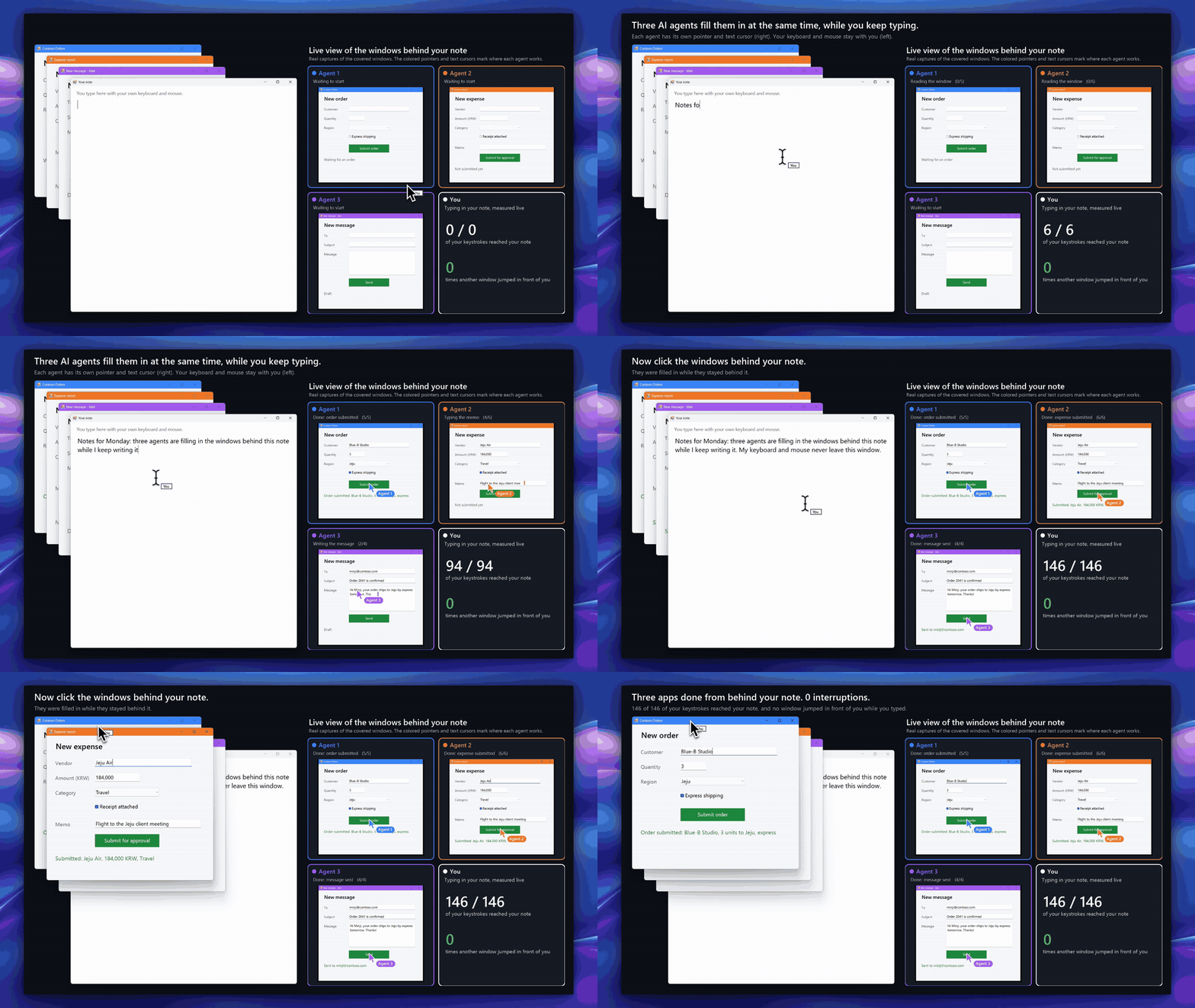
Your AI agent works in your Windows apps. You keep the keyboard.




https://github.com/user-attachments/assets/478a9769-6333-49dd-843c-7be7e5b0d2a5
Sidehand lets Claude, Codex, Cursor or any MCP client read and operate Windows apps behind the window you are using. It types, clicks, picks from lists and reads the screen as text without moving your mouse or taking your keyboard.
Why Sidehand
- In the benchmark task your note kept the keyboard the whole time: 0 s lost, no window came forward, the cursor never moved.
- It works in windows covered by yours, so you can keep using the one in front.
- One short line per control: the task took 277 tokens, against 2,488 to 13,425 for the other tools. Reading a window takes about 4 to 5 times fewer tokens than agent-desktop on typical apps, and about 20 times fewer on an Edge page.
- It finished the task in 2.0 s. Windows-MCP and Terminator, the other tools that finished it, took 65.5 s and 68.0 s.
Quick start
You need Windows 10 or 11 and Node 18.3+. Add the server to your MCP client:
{
  "mcpServers": {
    "sidehand": { "command": "npx", "args": ["-y", "sidehand", "mcp"] }
  }
}
| Client | Where |
|---|---|
| Claude Code | claude mcp add sidehand -- npx -y sidehand mcp |
| Cursor | ~/.cursor/mcp.json |
| Codex | codex mcp add sidehand -- npx -y sidehand mcp |
| Claude Desktop | Settings › Developer › Edit Config |
| pi | pi install git:github.com/Blue-B/sidehand |
On native Windows, Claude Desktop, Cursor and Codex need cmd /c npx. That, the Codex TOML, the CLI, the Claude Code guard hook and SIDEHAND_ALLOW are in docs/setup.md.
Or paste this to your AI agent and it sets itself up:
Install Sidehand (https://github.com/Blue-B/sidehand) for yourself: add an MCP server named "sidehand"
with command "npx" and args ["-y", "sidehand", "mcp"] to your own MCP settings.
If you are Claude Code, also run `npm install -g sidehand` and add the `sidehand guard`
PreToolUse hook from docs/setup.md in that repo. Then tell me whether I need to restart you.
Run sidehand doctor (or npx -y sidehand doctor) to check your setup.
How it compares
| Sidehand | Claude computer use | ChatGPT computer use | agent-desktop | |
|---|---|---|---|---|
| You keep typing while it works | ✅ | ❌ hides your other windows on Windows | ❌ moves the pointer and takes the foreground on Windows | ❌ 4 windows came forward |
| Works on covered windows | ✅ | ❌ on Windows | ❌ on Windows | ✅ |
| Reads apps as text | ✅ | screenshots | screenshots | ✅ |
Sidehand and agent-desktop were measured (docs/benchmark.md); the computer use cells come from the linked vendor pages. More tools and all sources: docs/comparison.md.
Usage
$ sidehand tree "Contoso Orders"
window: Contoso Orders  (18 elements)
  e4 Edit "Customer"
  e12 Button "Submit order"

$ sidehand act e4 type "Blue-B Studio"
$ sidehand act e12 click
| Command | What it does |
|---|---|
tree <title> | the window's controls as text, each with a ref (e4) |
act <ref> <action> [value] | type, click, select, check, press, wheel, drag and more |
ocr <title> | text of custom-drawn windows (games, Qt, canvas) via Windows OCR, with refs (t1) that act can click |
act @x,y <action> | click, drag or scroll any pixel of the last capture window image: icons, canvases, 3D views |
wait <title> <text> | wait until a control with that text appears (or --gone) |
window, launch | move, resize, restore or close a window; start an app without taking your focus (--isolated, experimental: on a hidden desktop of its own) |
log | the latest actions from the local action log |
capture, mask | screenshot a covered window; black out, pixelate or blur regions |
doctor | check your setup |
MCP and pi expose the same operations as tools (ui_tree, ui_ocr, ui_act, ...), plus ui_undo, which puts back the latest text, checkbox or selection the agent changed. Every command and option: docs/usage.md.
You stay in control
- Before the agent first touches an app, you choose Don't allow, Allow once, Always allow or Always block. Delete, Send, Pay and similar buttons, and closing a window, ask again (MCP clients with elicitation, and pi).
- While it acts, a small strip in the corner of your screen says what it is doing. Its Stop button (or Ctrl+Alt+Pause) stops every agent until you press Resume. The strip never takes your focus.
- Every action goes to
%LOCALAPPDATA%\sidehand\actions.log, without the text it typed.
Details and settings: docs/setup.md.
Hide private info in screenshots
Blur emails, API keys and faces before you paste a screenshot into a blog post, issue or chat. Your agent can do it for you: ask "hide the email in this screenshot".
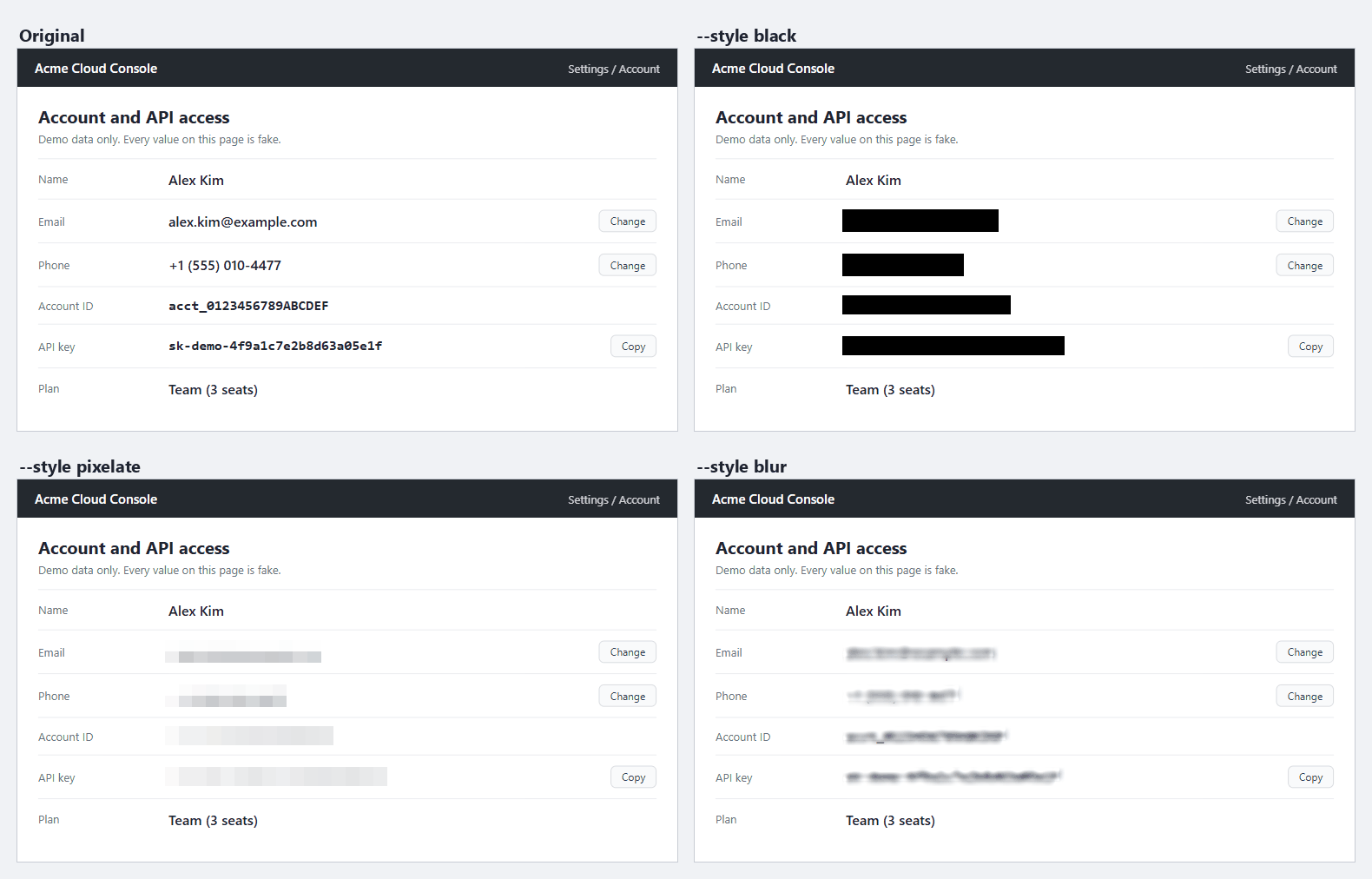
$ sidehand mask shot.png "170,185,180,26;170,331,256,22" --style pixelate
What works in the background
| Win32, WinForms | WPF | Chrome, Edge | VS Code | |
|---|---|---|---|---|
| Type, click, check, select, expand | ✅ | ✅ | ✅ except <select> | ✅ click |
| Wheel, double-click | ✅ | ✅ through UI Automation | ✅ | - |
| Right-click, hover, drag | ✅ | ❌ | ✅ | - |
| Keys and shortcuts | ✅ | Enter on a button or link; others with consent | keys in text fields, Enter on a button or link; others with consent | with consent |
"With consent" means --allow-foreground, your permission to take the foreground.
Games that read raw mouse input ignore posted clicks, but capture and ocr still work.
Apps running as administrator need an agent running as administrator. Details: docs/usage.md.
Troubleshooting
Run sidehand doctor first. It checks Node, WSL, PowerShell, the execution policy, the engine and OCR languages, and touches no window.
spawn npx ENOENTon native Windows: start the server withcmd /c npx(docs/setup.md).- Codex startup timeout: add
startup_timeout_sec = 60under[mcp_servers.sidehand]. - "running scripts is disabled on this system": Group Policy sets the execution policy; only your administrator can change it.
ocrsays no language is installed: add a Windows OCR language pack.- An app running as administrator does not respond: run your agent as administrator too.
More: docs/troubleshooting.md.
Security
Text Sidehand reads from other windows goes to your agent, so treat it like web content: a page or message can try to instruct the agent.
Lines that look like such instructions are marked with ⚠. This catches common phrasings, not every attack.
SIDEHAND_ALLOW limits which windows it sees, and every string it passes to PowerShell is quoted or refused.
License
PolyForm Shield 1.0.0. Free for any use, including at work, except building or offering a product that competes with Sidehand or with products Blue-B provides using it, free or paid. It includes a patent license that ends for anyone who claims Sidehand infringes a patent. For a commercial license, open an issue.






