Listed from the MCP registry; nobody on Odel publishes it.
Is this yours? Claim it
Tailwind Shades
Tailwind CSS palettes (50-950) from any color, the closest Tailwind color, and Tailwind's defaults
One address for any MCP client. No sign-in needed on this server.
What it does
4 read1 other
Grouped by tool name. At most: only reads or looks up information.
What it costs
FreeOdel charges nothing per call. The publisher may charge for its own service.
Tools
5 · grouped by tool name · checked 17 Nov 2026Read · 4Look things up
- find_closest_tailwind_color
- get_tailwind_palette
- list_tailwind_colors
- convert_color
Other · 1Neither hinted nor named
- generate_palette
Tailwind CSS Shades






Generate a full Tailwind CSS color palette (50 to 950) from any color, right in your editor. Works with Tailwind v4, v3, v2 and v1.
VS Code Marketplace · Open VSX (Cursor, Windsurf, VSCodium)
Also as a command line tool and an MCP server for AI agents, with the same palettes. Try it in the browser: tailwindshades.bourhaouta.com.
Usage
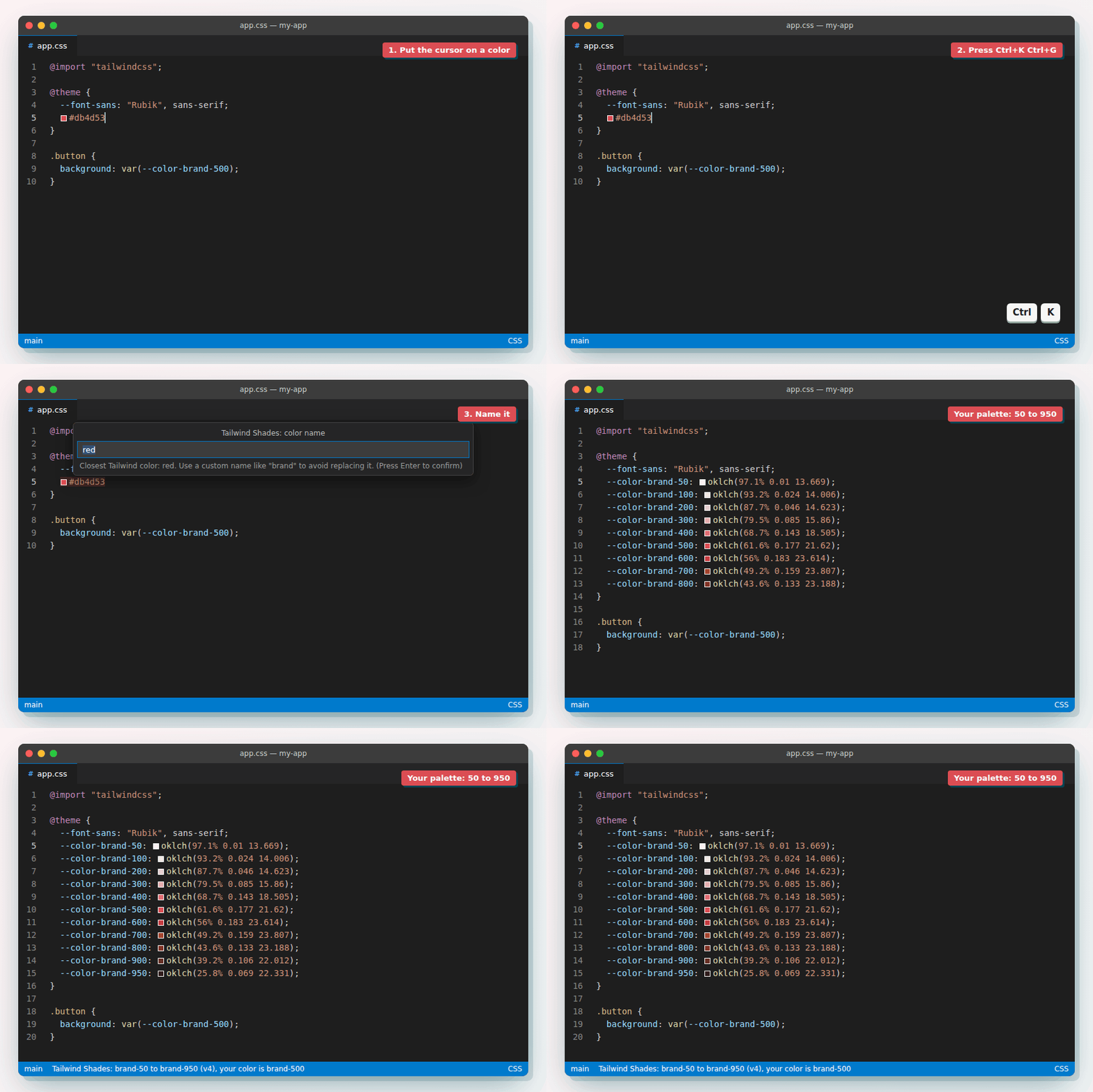
- Select a color, or just put the cursor on it:
#db4d53,rgb(…),hsl(…),oklch(…)or a CSS color name. - Press Cmd+K Cmd+G (macOS) or Ctrl+K Ctrl+G, or run Tailwind Shades: Generate color palette from the Command Palette.
- Pick a name. The closest Tailwind color is suggested; type your own (like
brand) to keep Tailwind's color too.
With no color under the cursor, the extension asks you for one.
Tailwind v4 (CSS file)
@theme {
  --color-brand-50: oklch(97.1% 0.01 13.669);
  --color-brand-100: oklch(93.2% 0.024 14.006);
  --color-brand-200: oklch(87.7% 0.046 14.623);
  --color-brand-300: oklch(79.5% 0.085 15.86);
  --color-brand-400: oklch(68.7% 0.143 18.505);
  --color-brand-500: oklch(61.6% 0.177 21.62);
  --color-brand-600: oklch(56% 0.183 23.614);
  --color-brand-700: oklch(49.2% 0.159 23.807);
  --color-brand-800: oklch(43.6% 0.133 23.188);
  --color-brand-900: oklch(39.2% 0.106 22.012);
  --color-brand-950: oklch(25.8% 0.069 22.331);
}
Already inside an @theme { … } block? Only the variables are added.
Tailwind v3 (tailwind.config.js)
brand: {
  50: '#fdf2f3',
  100: '#fae2e3',
  200: '#f6c9cc',
  300: '#efa5a9',
  400: '#e7757a',
  500: '#db4d53',
  600: '#ca373c',
  700: '#aa2c30',
  800: '#8d272b',
  900: '#772528',
  950: '#411012',
},
How the shades are made
The palette follows Tailwind's own colors instead of simply mixing with white and black:
- It finds the Tailwind color closest to yours, and copies how that color's lightness, saturation and hue change from light to dark.
- Your color stays exactly as it is, at the shade where it fits best. A light color can become
200, not always500. - The math happens in OKLCH, the color space Tailwind v4 uses, so the steps look even to the eye.
Tailwind versions
The version is detected from your project, most reliable source first:
- The closest
package.jsonwith atailwindcssdependency - The current CSS file:
@import "tailwindcss",@theme,@utility,@plugin→ v4;@tailwind base;→ v3 - A
tailwind.config.js(or.ts,.cjs,.mjs) in the project → v3 - Other CSS files in the project, with the same hints as step 2
If nothing is found, v4 is used. The status bar tells you which version was used and why, e.g. v3 from tailwind.config.js.
| Version | Shades | In CSS files | In JS/TS files | Colors |
|---|---|---|---|---|
| v4 | 50–950 | @theme block | config object | OKLCH |
| v3 | 50–950 | CSS variables | config object | hex |
| v2 | 50–900 | CSS variables | config object | hex |
| v1 | 100–900 | CSS variables | config object | hex |
Each version uses its own default palette as the reference, so a v1 palette looks like v1 colors.
Commands
| Command | What it does |
|---|---|
| Generate color palette | Picks the version and output for you (see above). Shortcut: Ctrl/Cmd+K Ctrl/Cmd+G |
| Generate color palette (choose version and output)… | Asks which Tailwind version and output to use |
| Generate color palette as CSS variables | Always writes --brand-500: …; variables |
Settings
| Setting | Default | Options |
|---|---|---|
tailwindshades.tailwindVersion | auto | auto, 4, 3, 2, 1 |
tailwindshades.colorFormat | auto (OKLCH for v4, hex before) | auto, oklch, hex, rgb |
tailwindshades.output | auto (from the file type) | auto, theme, config, cssVariables |
tailwindshades.promptForName | true | Ask for the color name |
tailwindshades.readablePairs | false | Add a comment with text and background pairs that pass WCAG AA contrast |
With readablePairs on, the palette starts with a comment like this, tested on the real shades:
/* Readable pairs (WCAG AA, 4.5:1 or more):
   button     bg-brand-600 text-white      5.09:1
   text       bg-white text-brand-600      5.09:1
   badge      bg-brand-100 text-brand-700  5.43:1
   dark mode  bg-brand-950 text-brand-400  5.33:1
   avoid      bg-brand-500 text-white      4.03:1 */
Command line
The same palettes, without an editor:
npx tailwindshades-cli "#db4d53" --name brand
| Option | Values | Default |
|---|---|---|
-n, --name | letters, digits and dashes | the closest Tailwind color |
-t, --tailwind | 4, 3, 2, 1 | 4 |
-f, --format | oklch, hex, rgb | oklch for v4, hex before |
-o, --output | theme, config, css, live, shopify | theme for v4, config before |
The palette goes to stdout, so you can add it to a file: npx tailwindshades-cli db4d53 -o css >> colors.css. More in the package README.
Colors picked at runtime: -o live writes CSS where every shade follows one variable, set by a user, a tenant or a CMS (relative colors: Chrome 119+, Safari 18+, Firefox 128+, with the static palette as the fallback). -o shopify adds the theme editor setting for Shopify themes. See Colors picked at runtime.
Use it with AI agents
AI coding agents often guess Tailwind shades, or add one --color-brand line instead of a palette. The tailwindshades-mcp server gives them five tools:
generate_palette: the same palette code as the extension, for the project's Tailwind versionfind_closest_tailwind_color: the Tailwind class closest to a color (e.g.#db4d53→red-500), and whether the difference is visibleget_tailwind_palette: Tailwind's own default colors, exactly as Tailwind defines them (e.g.slate-500), so agents don't write them from memorylist_tailwind_colors: the names of Tailwind's default colors for a versionconvert_color: any color tooklch()(what Tailwind v4 uses), hex and rgb
And an add_brand_color prompt, which Claude Code shows as a slash command.
Then ask things like "Add a brand color #db4d53 to my theme".
Remote, nothing to install: connect to https://tailwindshades.bourhaouta.com/mcp.
Claude Code
claude mcp add --transport http --scope user tailwindshades https://tailwindshades.bourhaouta.com/mcp
Cursor (~/.cursor/mcp.json, or .cursor/mcp.json in a project)
{
  "mcpServers": {
    "tailwindshades": { "url": "https://tailwindshades.bourhaouta.com/mcp" }
  }
}
VS Code (.vscode/mcp.json)
{
  "servers": {
    "tailwindshades": { "type": "http", "url": "https://tailwindshades.bourhaouta.com/mcp" }
  }
}
Local: run npx -y tailwindshades-mcp as a stdio server instead, for example claude mcp add --scope user tailwindshades -- npx -y tailwindshades-mcp. Setup for each agent is in the package README.
It's also in the MCP Registry as io.github.bourhaouta/tailwindshades, with both options.
Development
An npm workspace: the extension is at the root, the palette engine and CLI in packages/core, the MCP server in packages/mcp, and the website with the remote MCP endpoint (/mcp) in apps/web (npm run dev -w apps/web).
npm install
npm run check   # type check + tests
npm run build   # bundle the extension to dist/
Press F5 in VS Code to try the extension in a new window. After upgrading a tailwindcss dev dependency, run npm run palette to refresh the reference palettes. After an engine change, node media/demo/record.mjs re-records the demo GIF (see the file for setup).
License
MIT © Omar Bourhaouta






