Listed from the MCP registry; nobody on Odel publishes it.

Open Shopping Agent
Shopping agent: compares Amazon, Walmart, eBay, Best Buy, Target, Shopify; buys only with your OK
Runs on your machine from its package; the steps are below.
What it does
- Reads
- Writes
- High impact
At most: moves money, runs code or commands, deletes data, or sends messages for you.
What it costs
FreeOdel charges nothing per call. The publisher may charge for its own service.
Runs locally over stdio
This server isn't hosted — your MCP client launches it from a package registry. Use one of the commands below, or drop the config into your client (e.g. Claude Desktop).
Run
npx -y open-shopping-agent
MCP client config
{
  "mcpServers": {
    "open-shopping-agent": {
      "command": "npx",
      "args": [
        "-y",
        "open-shopping-agent"
      ]
    }
  }
}An open-source AI shopping agent. One request searches Amazon, Walmart, eBay, Best Buy and Target, plus any Shopify store you name by its domain, compares the real totals and fills the carts. It never buys without your OK.


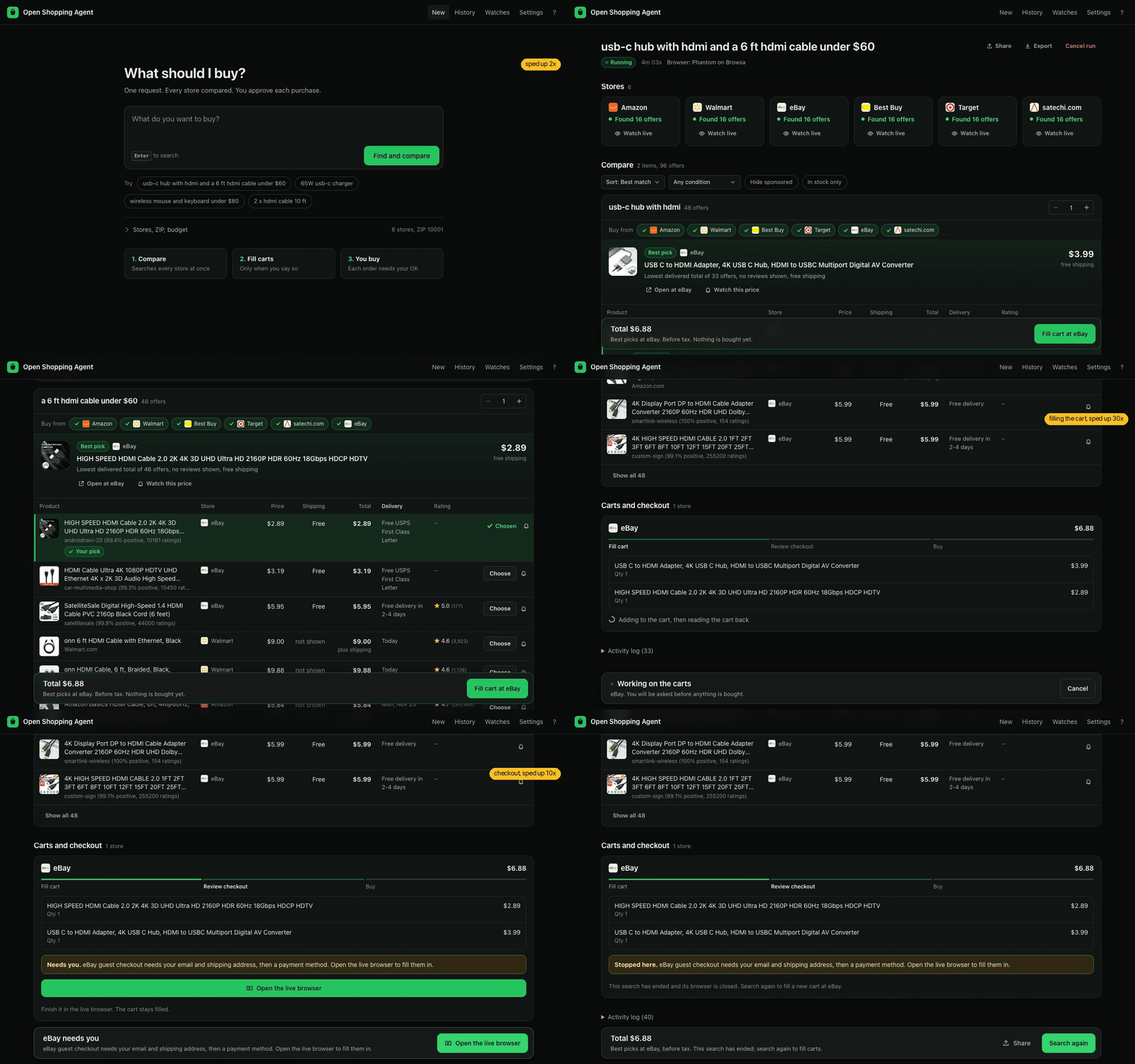
A real run on 18 Nov 2026, in its real order: one request, 6 stores, 96 offers compared, both best picks at eBay for $6.88, the cart filled and read back, checkout stopped at eBay's guest checkout. Nothing was bought. Waiting parts are sped up and labelled in the frame. This run used Phantom cloud browsers on Browsa; 7 min 10 s and 11 Browsa credits in all.
Quick start
No account and no key needed: it runs on the Chrome (or Edge) already on your computer. Node 20 or later.
npx open-shopping-agent web                                   # web app on http://localhost:4319
npx open-shopping-agent "usb-c hub with hdmi under \$40"       # command line
npm i -g open-shopping-agent                                  # or install it once and run osa "..."
claude mcp add open-shopping-agent -- npx -y open-shopping-agent mcp  # MCP for Claude Code
Stores that block bots (Walmart, eBay and others in the table below) work better on Browsa cloud browsers, which are optional: set BROWSA_API_KEY and the agent uses them. A free Browsa key comes with 100 credits: get one at browsa.io.
Why it's safe
- Never orders without your OK: either on the exact total at checkout, or up front within limits you set. By default it stops on the store's order review page for your approval. With Buy without asking it buys only checkouts within your limit. Either way, if the store asks for more right before the click, nothing is placed.
- Never types card numbers or store passwords. Sign-in, codes and card checks are handed to you.
- MCP orders are off by default. An assistant over MCP can search, compare and fill carts, but cannot place an order unless you set
OSA_MCP_ALLOW_ORDERS=1.- No subscriptions or memberships. It picks one-time purchase and declines Prime, Walmart+ and free trials.
More in docs/SAFETY.md and SECURITY.md.
What it does
- Asks once, searches everywhere. Type what you want in plain words. It searches every store you allow at the same time: the five big stores by default, and the Shopify stores you name.
- Compares the real total. Price, shipping, delivery date, rating and seller, side by side, with a one-line reason for each pick. The reason counts the offers that were compared and says how many were left out and why (out of stock, over your price limit, another currency).
- Fills the carts. It picks the right size or colour, chooses one-time purchase, and reads the cart back from the store to check it.
- Stops before paying. It goes to checkout and stops on the review page. Nothing is bought until you approve that exact total, or until you say up front "buy without asking, up to $60".
- Hands you the browser when needed. Sign-in, a code by text message or a card check is yours to do, in the browser window or in Phantom Live.
- Watches prices. Set a target price or a back-in-stock alert and get a terminal line, an email, a Slack message or a webhook.
Screens from the same run: request, result, compare, cart read back, checkout stop, phone, history.
Black Friday price watch
Save a watch, then check it on a schedule. It only alerts; it never adds to a cart or buys.
osa --watch "27 inch 4k monitor" --below 199              # alert when the best in-stock price is $199 or less
osa --watch "nintendo switch oled" --back-in-stock        # alert when it is back in stock
osa watch run --once                                      # one pass now (put it in cron), or `osa watch run` to keep checking
osa watch add takes more options: stores, Slack, email or webhook alerts, the check interval. See Price and stock watches.
Supported stores
Amazon, Walmart, eBay, Best Buy and Target are searched by default, in the US for now. Any Shopify store works too, but only when you name it: --stores amazon,satechi.com (or Settings in the web app). A default run searches no Shopify store, because there is no list of them to search; the opt-in Shop catalog can find them for you. Stores in other countries are open issues.
By browser
Measured 18 Nov 2026, one run per browser, on a test connection that the stores did not see as a US address: "usb-c hub with hdmi and a 6 ft hdmi cable under $60", ZIP 10001, a cart at every store, stopped before buying (numbers and timings).
| Store | Phantom on Browsa | Your Chrome | Your Chrome, headless | Any CDP browser (a local Chrome) |
|---|---|---|---|---|
| Amazon | cart filled, checkout handed off (it said an item was out of stock) | cart filled, stopped at sign-in | blocked at the cart (bot check) | not run |
| Walmart | cart filled, stopped at sign-in | blocked at the cart (bot check) | blocked at search (bot check) | blocked at the cart (bot check) |
| eBay | cart filled, stopped at guest checkout | blocked at search (403) | blocked at search (403) | not run |
| Best Buy | cart 1 of 2 items, stopped at sign-in or guest | cart filled, stayed on the cart (no shipping to the ZIP Best Buy guessed) | blocked at the cart (product pages refused) | not run |
| Target | cart filled, stopped at the $35 minimum and sign-in | no pick (every offer shown out of stock) | cart 1 of 2 items, checkout did not open | not run |
| satechi.com (Shopify) | cart filled, stopped at guest checkout | cart filled, stopped at guest checkout | cart filled, stopped at guest checkout | cart filled, stopped at guest checkout |
Search, compare, carts, the approval gate, watches, the web app, CLI and MCP work on every browser. A connection the stores see as a US home address may get further on your Chrome; that was not measured.
The bench on Phantom
What the bench did on each store: fixed shopping tasks on Phantom, 3 per store. "Reaches checkout" means it got to the sign-in, guest or order review page; nothing is ever bought. Amazon's checkout said an item was out of stock and handed the browser over. The Shopify row is three Shopify stores named in the task file, not every Shopify store.
The table comes from two runs on the same day. The first ran all six stores (13 credits). eBay and the Shopify stores were then run again (2 credits), because the first run counted a guest checkout page that asks for an address as a failure and one task named a store that is not on Shopify. Both runs are in bench/results/; latest.json holds the result shown per store and says which run each came from. The bench has not run since: the daily workflow has no Browsa key in this repository, so it only does a dry run, which measures nothing.
| Store | Search | Cart | Reaches checkout |
|---|---|---|---|
| Amazon | ✓ | ✓ | ✗ |
| Walmart | ✓ | ✓ | ✓ |
| eBay | ✓ | ✓ | ✓ |
| Best Buy | ✓ | ✓ | ✓ |
| Target | ✓ | ✓ | ✓ |
| Shopify stores (named by domain) | ✓ | ✓ | ✓ |
Measured 18 Nov 2026 on Phantom (Browsa) by the bench in 2 runs (eBay and Shopify stores (named by domain) were run again), stopped before buying (results, 13 Browsa credits for the results shown, 15 for the 2 runs in all). Your own Chrome: see the browser table above.
How it compares
| Searches and compares many stores | Fills carts | Stops for your approval before paying | Runs on your own Chrome | Open source | |
|---|---|---|---|---|---|
| Open Shopping Agent | yes, built in | yes | yes, tied to the exact total (or an up-front limit you set) | yes | yes, MIT |
| Price trackers (changedetection.io, PriceGhost, PriceBuddy) | they watch pages you give them | no | no orders | they fetch the pages, some with a browser | yes |
| General browser agents (browser-use, Stagehand, Skyvern) | if you write the task | if you write the task | if you build it | yes | yes |
| Shopping assistants inside one company's app | mostly their own store or partners | yes | yes | no | no |
General browser agents can do anything in a browser, so you write the shopping steps, the checks and the limits yourself. Open Shopping Agent is narrower: store adapters with tests, ranking by delivered total, and an approval gate in the engine. Price trackers are the right tool if you only want alerts.
Same item, price per unit, Shop catalog
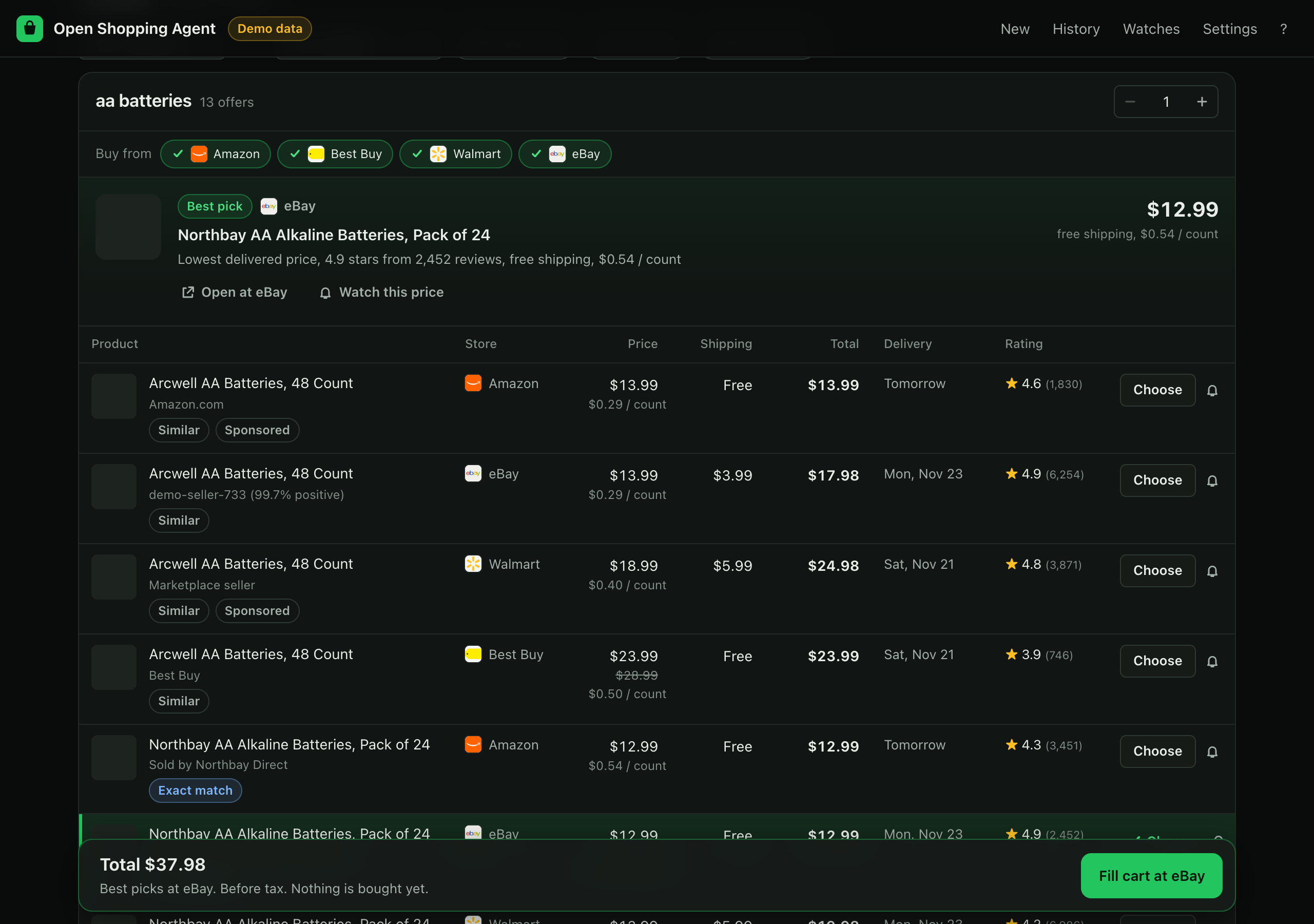
Same item across stores. Product pages are read for the GTIN (UPC/EAN), brand and manufacturer part number (JSON-LD, the store's own data and spec tables). Relative to the item you chose, each offer is labelled Exact match (same GTIN, or same brand and part number) or Similar (not proven the same). Similar offers are never dropped; "Same item only" in the web app hides them if you want.
The product, not its case. When you name a product ("AirPods Pro 3"), offers for its accessories ("ESR for AirPods Pro 3 Case", "Replacement Ear Tips for AirPods Pro 3", "iPhone 17 Pro Case") are left out of the pick when some offer is the product itself, and the pick reason counts them ("4 accessories (not the item itself)"). With a model number in the query, offers for another product ("JBL Live Beam 3", "Apple EarPods") or another model ("AirPods 5", "AirPods Pro (1/2 Generation)"), matched on whole words, and offers under 40% of the model's median price are left out the same way. They stay in the list. A search for an accessory ("airpods pro 3 case", "usb-c hub") leaves nothing out.
Price per unit. When a title or the store says what is in the pack ("Pack of 24", "2 x 1L", "500 ml", "12 Count (Pack of 2)"), the offer shows a comparable unit price such as "$0.42 / count". Titles with two sizes, ranges or unrelated counts get none instead of a guess. It is a sort you pick ("Unit price") and only breaks exact ties in the ranking; the default ranking does not change.
Shop catalog (opt-in, off by default). OSA_SHOP_CATALOG=1, or the switch in Settings, also finds Shopify stores through Shopify's public catalog API (mcp.shop.com, the server the MIT-licensed @shopify/shop CLI uses): an anonymous search, and a lookup by GTIN to find the same item on other Shopify stores. It runs when Shopify is one of the run's stores. Your search words and the GTINs go to Shopify, and Shopify's API terms apply. There is no Shop sign-in, cart or checkout: results open on each store's own site with the Shopify adapter, the cart is read back from the store, and the order still needs your approval of the exact total.
More ways to run it
Command line
npx open-shopping-agent "a USB-C hub with HDMI under \$40 and a pack of AA batteries"
npx open-shopping-agent --no-cart --stores amazon,satechi.com "usb-c hub with hdmi"
Installed globally, the command is osa. --no-cart compares only; --stores takes store names and Shopify domains (a Shopify store is searched only when its domain is given). By default each item goes to the store with the best pick; --every-store fills a cart with every item at each store, so you can compare the real delivered totals the stores show. --zip 10001 sets the delivery ZIP, --budget 60 a total budget. osa --help lists everything.
Web app (Docker)
git clone https://github.com/browsa-io/open-shopping-agent
cd open-shopping-agent
docker build -t open-shopping-agent .
docker run --rm -p 8080:8080 -v osa-data:/data -e BROWSA_API_KEY=your_key open-shopping-agent
Then open the link it prints (http://localhost:8080/?token=...). The container has no Chrome window to show you, so it runs on Browsa or a CDP browser. It listens on all addresses, so the web app asks for that token; set your own with -e OSA_WEB_TOKEN=.... Run history and settings stay in the osa-data volume.
MCP (Claude Desktop, Cursor, Claude Code)
Claude Desktop (claude_desktop_config.json) and Cursor (~/.cursor/mcp.json):
{
  "mcpServers": {
    "open-shopping-agent": {
      "command": "npx",
      "args": ["-y", "open-shopping-agent", "mcp"]
    }
  }
}
Add "env": { "BROWSA_API_KEY": "your_key" } to use Browsa cloud browsers. Claude Code: claude mcp add open-shopping-agent -- npx -y open-shopping-agent mcp (add -e BROWSA_API_KEY=your_key before -- for Browsa).
Over MCP the agent searches, compares, fills carts and reviews checkout. It does not place orders unless you add "OSA_MCP_ALLOW_ORDERS": "1" to the server's env; even then each order needs the exact total you approved in the chat, unless you also set an up-front limit there ("OSA_MCP_APPROVE_UP_TO": "60", see Buy without asking). Without it, finish the order in the web app or the CLI.
Plugin (Claude Code, Cursor, Codex, Gemini CLI)
The repository is also a plugin: the MCP server plus a skill (skills/open-shopping-agent/SKILL.md) with the safety rules. Orders stay off in every plugin unless you set OSA_MCP_ALLOW_ORDERS=1 yourself.
claude plugin marketplace add browsa-io/open-shopping-agent      # Claude Code
claude plugin install open-shopping-agent@open-shopping-agent
gemini extensions install https://github.com/browsa-io/open-shopping-agent   # Gemini CLI
Claude Code and Gemini CLI ask for an optional Browsa key. Cursor, Codex, VS Code and other clients read the Agent Plugins files (plugin.json, mcp.json) or .cursor-plugin/plugin.json; set BROWSA_API_KEY in your environment there. Without a key the stores open in your own Chrome.
Buy without asking
Not yet tried on a real purchase. No order has gone through Open Shopping Agent end to end yet. Placing orders, Buy without asking and order tracking are tested against fakes and saved store pages, not a live checkout. Try them on a small order first, and report what you see.
Off by default. You can approve purchases up front, so the agent buys without stopping at checkout:
osa "usb-c hub with hdmi" --approve-up-to 60 --approve-stores walmart,target --approve-expires 2h
# Buy without asking, up to $60 per order at walmart, target, until ...? [y/N]
- Your limits: the most one order may cost (with shipping and tax), and optionally the stores, an expiry (default: this run only), a total for the run (
--approve-run-total) and a number of orders (--approve-max-orders, default one per store). - Outside them it asks, as without it, and says why ("the total $74.10 is over your up-front limit of $60 per order").
- Every other guard stays: the total is re-read right before the click and any change means no order; no subscriptions or memberships; your budget; never a second click; sign-ins, codes and card checks still come to you; prices in other currencies never count.
- Only you can set it. The CLI asks you once in the terminal (
--yesskips the question). The web app has a "Buy without asking" setting on the search, off by default, with a confirmation. Over MCP it comes only from the server's environment:OSA_MCP_ALLOW_ORDERS=1plusOSA_MCP_APPROVE_UP_TO=60(andOSA_MCP_APPROVE_STORES,OSA_MCP_APPROVE_EXPIRES). No tool call can set or widen it, and the plugins ship without it. - Orders bought this way show "Bought under your up-front approval (up to $60)" and are saved in the run history with
approval_source: "mandate"and your limits.
Pick a browser
Open Shopping Agent runs on three kinds of browser. Pick one with --browser, OSA_BROWSER or Settings in the web app. Without a choice it uses Browsa when a Browsa key is set, else your own Chrome, so it works with no signup. If the browser you chose cannot run (--browser browsa without BROWSA_API_KEY, --browser cdp without OSA_CDP_URL, or no Chrome installed), the command stops and says what to set. Made-up demo data is only ever used when you pass --demo.
1. Your own Chrome, no signup (Chrome or Edge installed on this computer)
npx open-shopping-agent --browser local "6 ft usb-c cable under \$15"
A window opens so you can take over (sign-in, a code, a bot check). Add --headless (or OSA_HEADLESS=1) to hide it, and OSA_CHROME_PATH to pick a browser binary. Logins and carts stay in .osa/browsers/<store> on this computer.
2. Phantom on Browsa (cloud browsers, Browsa key)
export BROWSA_API_KEY=your_key
npx open-shopping-agent "6 ft usb-c cable under \$15"
3. Any browser that speaks the DevTools protocol (your remote Chrome, another cloud provider)
export OSA_CDP_URL=ws://my-host:9222/devtools/browser/...   # or http://my-host:9222
export OSA_CDP_HEADERS='{"X-API-Key":"..."}'                # optional
npx open-shopping-agent --browser cdp "6 ft usb-c cable under \$15"
| Your Chrome | Any CDP browser | Phantom on Browsa | |
|---|---|---|---|
| Request parsing, search, compare, carts | yes | yes | yes |
| Approval gate (never buys without your OK) | yes | yes | yes |
| Watches, web app, CLI, MCP | yes | yes | yes |
| Bot checks passed with Phantom | no, you solve them in the window | no | yes |
| Captchas solved in-session | no | no | yes |
| US home-internet exit per store | your own proxy only | your provider's proxy | yes |
| Take over from any device (Phantom Live) | no, the window on this computer | no | yes |
| AI fallback | with your own model key | with your own model key | yes (hosted model or your key) |
| Saved profiles in the cloud | no, a folder on this computer | no | yes |
| Measured store results | one run | one run | yes, the bench |
On Browsa, when a store shows a captcha or a press-and-hold check, the agent asks Browsa to solve it in the same browser session (the Browsa.solveCaptcha command on the browser's CDP socket). The run notes say which check it was and how long Browsa took. If Browsa cannot solve it, you get a Phantom Live link to finish it yourself.
A store that blocks the browser is reported as a block, in the words of the table above, never as "nothing found": for example "eBay: Blocked at search (403)" or "Walmart: Blocked at the cart (bot check)", and the run exits with code 2 or 3 (see exit codes). It ends with one line, for example "Walmart blocked this browser. Browsa's Phantom passes it: browsa.io". On your Chrome or a CDP browser, a store that shows a bot check stops with "This store showed a bot check. Solve it in the browser window, or run with Browsa to pass it automatically." Amazon, Target and Best Buy often block non-US or datacenter browsers; the agent warns once per run.
Bring your own keys
Proxies. Free on every browser. Browsa takes them as its own-proxy option (they replace the built-in exit), your Chrome gets them as its launch proxy, and a CDP browser uses the proxy set at your provider.
| Setting | What it does |
|---|---|
OSA_PROXY=http://user:pass@host:port | one proxy for every store (http, https or socks5; host:port and host:port:user:pass work too) |
OSA_PROXY_AMAZON=socks5://host:1080 | one store's proxy (also WALMART, EBAY, BESTBUY, TARGET, SHOPIFY); wins over OSA_PROXY |
OSA_PROXIES=host1:8000,host2:8000 or @proxies.txt | a small pool, rotated per store and run; one that fails a quick check is skipped |
Logs and the UI show only host:port. Settings has a Test proxy button that shows the exit IP and country.
Models. Your own key for everything that uses a model: reading your request and the AI fallback.
export OSA_LLM=anthropic:claude-sonnet-5-5     # or openai:<model>, openrouter:<model>, google:<model>
export OSA_LLM_API_KEY=your_model_key
export OSA_LLM_BASE_URL=https://.../v1         # optional, any OpenAI-compatible API
On Browsa the AI fallback runs as a Browsa task with your key (no markup), or with a saved Browsa key (OSA_AI_LLM_KEY_ID); without a key it uses Browsa's hosted model. On your Chrome or a CDP browser the fallback is a small loop on the store's own page: it reads the page, asks your model for one action, does it, and stops after 8 steps. It never clicks a final order or pay button, never signs in and never types card details. The fallback gets its own time (150 s, OSA_AI_FALLBACK_MS), not what is left of the store's step; when that runs out or you stop the run, its Browsa task is cancelled so it stops charging. Without any model key, requests are read by a rule parser and the AI fallback is off on non-Browsa browsers (the run says so once).
Keys stay on your machine: the environment, or .osa/config.json (mode 0600) when saved in Settings. The web app only ever gets masked values. Settings has a Test key button.
How it works
- One browser per store. Each store gets its own browser profile: a folder on your computer with your Chrome, or a cloud profile on Browsa. Carts and sign-ins stay in that profile between runs.
- Direct code first, AI as a fallback. Each store has an adapter that reads search results, product pages and carts with plain page code. That is fast and cheap. If a page changed and the code fails, an AI agent finishes that one step. On Browsa with a fresh browser per run (the default) the fallback runs in its own browser with a separate cart, so it can read pages there but cannot fill your cart; those steps then fail without spending credits.
- Shopify through its public JSON. Any Shopify store you name by its domain works without store-specific code.
- The engine decides, the adapter only reads and clicks. The engine ranks offers, applies your budget and limits, and asks for approval.
- Approval gate. The agent stops on the order review page and shows you the total. It places the order only with your approval, and only if the store still asks the same total. You can also click the final button yourself.
- Hand-off. When a store wants a sign-in, a one-time code, a card check or a puzzle, you do that step yourself: in the Chrome window, or on Browsa through a single-use Phantom Live link.
Exit address per store on Browsa
Amazon, Target and Best Buy block Browsa's default exit, which is not in the US (measured 2026-11-18: Amazon shows "I am human", Target answers 429, Best Buy resets the connection). The agent picks the exit per store:
- Your own proxy, when you set one (
OSA_PROXY=http://user:pass@host:port, or Settings in the web app). Every store uses it. Your own proxies are free on Browsa. - Else Amazon, Target and Best Buy get Browsa's residential US exit when your account's proxy network lists it (billed per GB from credits). If Browsa refuses it, the store falls back to the default exit with a warning.
- Else the default exit, with a warning naming the stores that may block.
Walmart, eBay and Shopify stores work on the default exit. The exit shows on each store card and in the CLI. OSA_US_EXIT=0 turns step 2 off.
When a store refuses the address at search (Amazon's "Sorry! Something went wrong" page, Access Denied, a 403), the agent stops that browser and searches again in a fresh one on a new address of the same exit, up to twice per store per run (OSA_FRESH_EXITS=0 turns it off, 1 allows one). This needs Browsa's fresh browsers: your own proxy, a saved profile, your own Chrome and CDP browsers keep their address.
Price and stock watches
osa watch add "27 inch 4K monitor" --store walmart,bestbuy --target 250 --notify slack
osa watch add --url https://www.target.com/p/... --back-in-stock --notify email --to you@example.com
osa watch list
osa watch run           # keep checking
osa watch run --once    # one pass, for cron
Without a global install, use npx open-shopping-agent in place of osa. Watches live in .osa/watches.json and each check is a line in .osa/watches/<id>.jsonl. A watch checks at most every 6 hours (12 hours by default), so stores are not polled hard. You get an alert when the best in-stock price reaches your target, when it drops again, or when the item is back in stock.
Alerts go to:
| Channel | Settings |
|---|---|
| Desktop | prints to the terminal |
| Slack | OSA_SLACK_WEBHOOK_URL (an incoming webhook) |
| Webhook | OSA_WEBHOOK_URL, optional OSA_WEBHOOK_SECRET (signs the body with HMAC-SHA256 in X-OSA-Signature) |
SMTP: OSA_SMTP_HOST, OSA_SMTP_PORT, OSA_SMTP_USER, OSA_SMTP_PASS, OSA_SMTP_FROM. Or RESEND_API_KEY or SENDGRID_API_KEY with OSA_EMAIL_FROM |
Test a channel with osa watch test slack.
Price history (preview, off by default). Start the web app with OSA_PRICE_HISTORY=1 and each price watch gets a "Price history" button: a small chart of the best in-stock price every check found, with the lowest and the latest price labelled and the same numbers as a table. It reads the history a watch already keeps in .osa/watches/<id>.jsonl on your computer; nothing new is stored and nothing is sent anywhere. A point appears per finished check, so a new watch starts with an empty chart.
Run watches on a schedule without your own server:
- GitHub Actions. Fork this repo, add
BROWSA_API_KEYand your alert settings as repository secrets, set the repository variableOSA_WATCHEStoon, and commit your.osa/watches.json. The watch workflow runswatch run --onceevery 6 hours and commits the history back. Actions minutes are free on public repositories. - Browsa schedules. A Browsa schedule runs an agent task on an interval (1 hour to 30 days) and posts the result to a webhook. Use it when you want a plain-language check with no machine of yours involved.
On Browsa each check uses credits for browser time. On your own Chrome a check costs nothing.
Safety and limits
-
Not yet tried on a real purchase. Every run and test so far stopped before buying or used fakes; order placement, Buy without asking and order tracking still need a first real order.
-
Never buys without your OK. Either the approval is tied to the exact total you saw at checkout, or you set an up-front limit (Buy without asking) and only checkouts within it are bought. If the store asks for more right before the click, the order is not placed.
-
Never clicks Place order twice. One approval places at most one order. If the store does not show an order number, the order is marked "check the store" and the agent does not try again.
-
No subscriptions or memberships. It picks one-time purchase and declines Prime, Walmart+ and free trials.
-
Budget caps. Set a total budget per run, and on Browsa a cap on credits per run (default 40,
OSA_MAX_CREDITS). The cap and the credits a run prints count only that run's own browsers and AI tasks, read from Browsa's credit ledger. A fresh browser counts 1 credit per started 12 minutes it ran, plus residential exit data. If Browsa's figures cannot be read, the run estimates from browser time and says "about". -
Your keys stay local. Your keys and alert settings stay in your environment or
.osa/. Store passwords are never typed by the agent: you sign in yourself. -
You are responsible for following each store's terms. Some stores limit automated access. Read docs/SAFETY.md.
Reference
Orders and their states
Each store's checkout moves through proposed (order review read) → awaiting_approval → placing → placed, failed or unknown, saved in the run history.
- placed: the store's confirmation page showed an order number.
- failed: nothing was submitted (the total changed, the store needed you first).
- unknown: Place order may have gone through, but no order number was read back (a timeout, an error, a page without a number). The agent re-reads the page in the same browser, never clicks Place order again, and asks you to check your orders on the store before you retry.
osa orders                      # placed orders and ones to check on the store (--all adds failed)
osa orders refresh [run-id]     # read each order's page on the store: status, carrier, tracking
osa orders refresh opens each placed order's page (from its confirmation) in the store's saved browser profile and reads it. It never clicks, types or signs in. On Browsa it needs saved store profiles (Settings, or OSA_BROWSERS=persistent). The web app shows the same list under Orders.
JSON output and exit codes
--json prints one reply:
{ "ok": true, "v": 1, "data": { "runId": "...", "picks": [] }, "next": ["..."] }
{ "ok": false, "v": 1, "error": { "code": "timeout", "message": "...", "retryable": true, "next": ["..."] } }
| Exit | Meaning | Error codes |
|---|---|---|
| 0 | ok: every store finished | |
| 1 | user error, or a setting is missing | bad_args, not_found, nothing_to_do, setup_needed |
| 2 | a store or the network failed or blocked the browser, also when other stores gave results; try again later | store_error, network, timeout, blocked, no_browser |
| 3 | needs you | needs_sign_in, needs_captcha, needs_user, needs_approval, order_unknown |
| 4 | safety refusal | approval_mismatch, total_changed, over_budget, credits_cap, already_ordered, orders_disabled, safety_refusal |
The exit code is the same with and without --json. A run where some stores gave picks and one failed still prints its picks (with --json: "ok": true, data.partial: true and the failed stores in data.failures, each with its code) and exits with that failure's code, so a script cannot read a blocked store as success. When several stores fail, the code is the most pressing one: needs you (3), then safety (4), then store or network (2). setup_needed means no browser can run with your settings (for example --browser browsa without a key); nothing is searched and no demo data is shown.
--json compares only (no carts). Order results and order states carry approval_source: "user" (approved at checkout) or "mandate" (bought under your up-front approval, with its limits). --dry-run shows what each cart would get and changes no cart (MCP: fill_carts with dry_run: true). MCP tool results carry the same ok, v and next, and errors carry structuredContent.error with the same codes. MCP tools: find_and_compare, fill_carts, review_checkout, place_order, watch_price, list_runs, list_orders. Each carries MCP annotations: find_and_compare, list_runs and list_orders are marked read-only, place_order is marked destructive (and review_checkout too when you set an up-front limit). npx open-shopping-agent mcp --help lists the tools and settings and exits.
FAQ
What does it cost? The code is free, and runs on your own Chrome cost nothing. On Browsa, a free key has 100 credits; the run above used 11. What a run costs depends on the stores and on how often the AI fallback is needed. The bench records the credits of each of its runs.
Do I need Browsa?
No. It runs on your own Chrome (the default without a key) or any DevTools browser (--browser cdp). Browsa adds bot checks passed with Phantom, captchas solved in-session, a US home-internet exit per store and take-over from any device. See Pick a browser.
Which countries?
The US stores for now (amazon.com, walmart.com, ebay.com, bestbuy.com, target.com), and Shopify stores that ship to you. --zip 10001 sets the delivery ZIP the way a guest can on each store, with no sign-in. Adapters for other countries are welcome: see Add a store.
Will it buy something by mistake? It cannot place an order without your OK: an approval of the exact total, or an up-front limit you set yourself (off by default). The bench and the tests never place orders.
Where is my data?
Run history and watches are files in .osa/ on your machine. See docs/SAFETY.md.
Contributing
Store pages change, so adapter fixes and new stores are the most useful help. Each store is one file with saved-page tests. What changed in each version is in CHANGELOG.md. Start with CONTRIBUTING.md and the issues labelled good first issue.
License
MIT. Copyright (c) 2026 Browsa Technologies LLC.
Not affiliated with Amazon, Walmart, eBay, Best Buy, Target or Shopify. Store names and icons belong to their owners; icons are loaded from each store's own site at run time. You are responsible for following each store's terms.