Listed from the MCP registry; nobody on Odel publishes it.

Monomem
Local shared memory for AI coding agents: SQLite notes with writer provenance, undo, search.
Runs on your machine from its package; the steps are below.

What it does
- Reads
- Writes
- High impact
At most: creates or changes data: records, files, settings.
What it costs
FreeOdel charges nothing per call. The publisher may charge for its own service.
Runs locally over stdio
This server isn't hosted — your MCP client launches it from a package registry. Use one of the commands below, or drop the config into your client (e.g. Claude Desktop).
Run
npx -y monomem
MCP client config
{
  "mcpServers": {
    "monomem": {
      "command": "npx",
      "args": [
        "-y",
        "monomem"
      ]
    }
  }
}
Monomem
Shared memory for your AI agents, with an undo button.
Monomem is one local memory that Claude Code, Cursor, Codex, Gemini CLI and your other agents all read and write. Every note says which agent wrote it, writes that match a known attack pattern wait for you, and one command (monomem rollback --writer <name>) undoes what one agent wrote.
Everything stays in one file on your own computer: no cloud account, no API keys, no model in the write path.
See it in 60 seconds, on a throwaway store that never touches your notes: npx monomem demo --open. It opens a dashboard with two agents, a held write you can reject, and a bad writer you can undo.
Beta. Not independently security-reviewed. MIT licence, no warranty. The security checks and benchmarks here were written and run by the author (with AI reviewers); numbers are self-measured and reproducible from this repo, not third-party audited.
What it records. When capture is on, Monomem stores the text of your prompts and of tool output (secrets are redacted first) in a local file on this computer. By default Monomem makes no outbound connection. The only calls are ones you start or configure:
monomem update, and an embeddings, summarizer or lint-model address you set. Raw captured events are deleted after 7 days by default (MONOMEM_CAPTURE_RETENTION_DAYS). Notes are encrypted at rest only if you turn encryption on, and file paths are never encrypted.
Get it



One download, nothing else to install (no Node needed): each release has one archive per computer (a zip of about 40 MB on Windows) and a SHA256SUMS file to check it. Node is inside the folder (Node's own signed program, about 96 MB of the 105 MB unpacked), so you do not install Node. On Windows: right-click the zip, Properties, tick Unblock, OK; then Extract All, open the Monomem folder and double-click monomem to open your notes. The download is not code-signed yet: if you skip Unblock, Windows may ask before it runs monomem.cmd (INSTALL.md shows what you will see). To connect your apps, run this one command from the folder you unpacked into (.\Monomem\monomem.cmd setup on Windows):
./Monomem/monomem setup
Setup finds your apps (Claude Code, Claude Desktop, Cursor, Codex, Gemini CLI, VS Code, Zed and ten more, listed in docs/apps.md), shows exactly what it will change, keeps a backup of every file, and asks before it writes. monomem setup --undo takes it all back. Already have Node 22.16 or newer? npx monomem setup does the same. Which file to pick, and what Windows or macOS may say about an unsigned download: INSTALL.md.
What it costs your assistant. The seven tools shown by default add 10,051 characters of tool definitions (names, descriptions and input schemas), about 2,510 tokens (estimated: characters divided by 4, not a tokenizer count). A session start adds up to about 1,500 tokens of your notes (you can change that limit).
What it does not do (what it is NOT). Please read this before you rely on it:
- Not a wall. The write check is pattern matching, so rewording an attack can get it past the filter;
monomem check --attacksreplays the 27 it knows (2 are known misses). The undo button is the net under it. - Not proven better at answering. With a 7B local reader model, answer accuracy on 60 LongMemEval-S questions tied plain BM25 search (53% vs 53%, no significant difference; details in docs/BENCHMARK.md, section "Answer accuracy with local models"). Monomem is not a graph or a semantic-search product.
- Not signed and not reviewed. The download is not code-signed (and not tested with Windows Smart App Control on), and nobody outside the project has reviewed the security.
- Windows first. Mac and Linux downloads exist but are untested; the benchmarks ran on one Windows PC.
- It only guards what goes through Monomem. An app that can run shell commands (Claude Code included) or open the database file can read or change your notes directly.
- For apps connected on your computer, the writer name comes from that app's config file. It tells your apps apart; it is not proof.
- Keyword search finds words, not meaning, unless you run a local embedding model (Ollama).
How to verify what you downloaded
Full commands for Windows, Mac and Linux: docs/verify.md. In short:
| Check | Command | What it proves |
|---|---|---|
| Hash | sha256sum -c SHA256SUMS --ignore-missing (Mac: shasum -a 256 -c SHA256SUMS --ignore-missing; Windows: Get-FileHash) | The file is not damaged or swapped for another one in the release |
| GitHub build attestation | gh attestation verify <archive> --repo calasdan-sketch/monomem | This repository's GitHub workflow built exactly these bytes |
| npm provenance | npm install monomem && npm audit signatures | The npm package was published by this repository's workflow |
| SBOM | monomem-<version>-sbom.cdx.json on each release (or npm run sbom) | The list of packages inside, in CycloneDX format |
Not signed: Monomem's own program files are not code-signed. Windows code signing needs a paid certificate and Apple notarization needs a paid developer account; neither has been bought. Windows SmartScreen may therefore ask before it runs a downloaded file (right-click the zip, Properties, Unblock, before extracting). Node, bundled inside, keeps its makers' signature. Rivals that ship signed binaries are ahead of us here. An application for free open-source signing is drafted, not submitted.
- claude.ai and ChatGPT can connect only through OAuth, which is off by default and a preview (one internal security review, no outside review). You need your own HTTPS address that reaches your computer: docs/oauth.md.
More: install it with your agent · what it does, in detail · how it compares · all tools and commands · backups · known limits · security
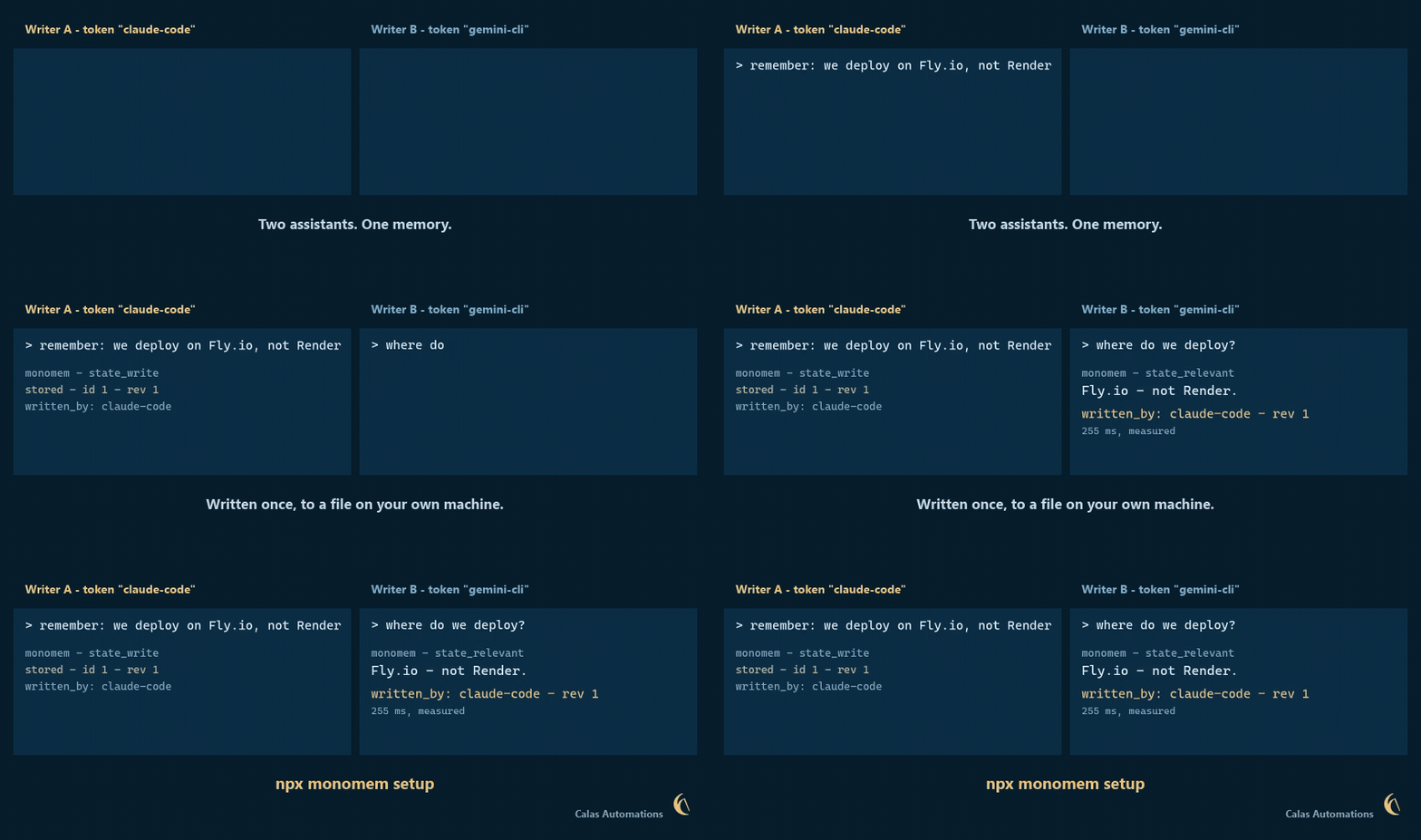
Recorded on 1.5.0; the screens have changed since. Recorded 2026-11-05, before the dashboard redesign, from a real run against a throwaway store (transcript): a write containing an injected instruction is held and never reaches the other agent's search, then rejected from the real dashboard. The two terminal panes are drawn from the real REST responses; the dashboard is a screen recording. Nothing sped up.
Useful commands: monomem digest (same as monomem activity --summary; add --verbose for the outside-read ranges) says in plain words what changed; monomem bench --longmemeval --data <file> --per-question out.ndjson writes one line per question so two systems can be compared question by question; monomem tidy marks is a dry run until you add --yes.
Want to see it before you set anything up? monomem demo (or npx monomem demo) runs a short tour on a throwaway store that is deleted at the end; it never touches your notes.
Using Monomem at work? Monomem is free and stays free (MIT). If your team wants help, Calas Automations Inc. offers a paid team setup, a memory security check and monthly support: calasautomations.com/devtools/monomem/#teams. The tool does not need any of it.
Try it
After setup, restart your apps. Then, in one of them, say "Save to Monomem: my staging server is on port 8443", and in a different app (or a fresh chat) ask "What port is my staging server on?". Say "Save to Monomem" rather than just "remember": some assistants, Claude Code among them, keep a memory of their own, and a plain "remember" can land there instead, where your other apps cannot see it. Step by step, with fixes if something goes wrong: docs/live-claude-code.md.
monomem open shows your notes in the browser. monomem check gives one grade with the reason, and monomem review lists anything that waits for you.
Why not just CLAUDE.md?
CLAUDE.md and AGENTS.md are good for rules you write yourself, and Monomem leaves them alone. But each app reads its own file in its own way, a line in them does not say which assistant added it, and nothing checks what an agent writes there. Monomem is for what your agents learn while they work: every note says who wrote it, keeps its earlier versions, can be replaced or archived and brought back, and a write that looks like a planted instruction waits for you. Already have notes in Claude Code? monomem import --claude --dry-run shows what it would bring in. Coming from Engram, agentmemory, ai-memory, claude-mem, mem0, basic-memory or the official MCP memory server: monomem import --auto <file> (docs/switching.md).
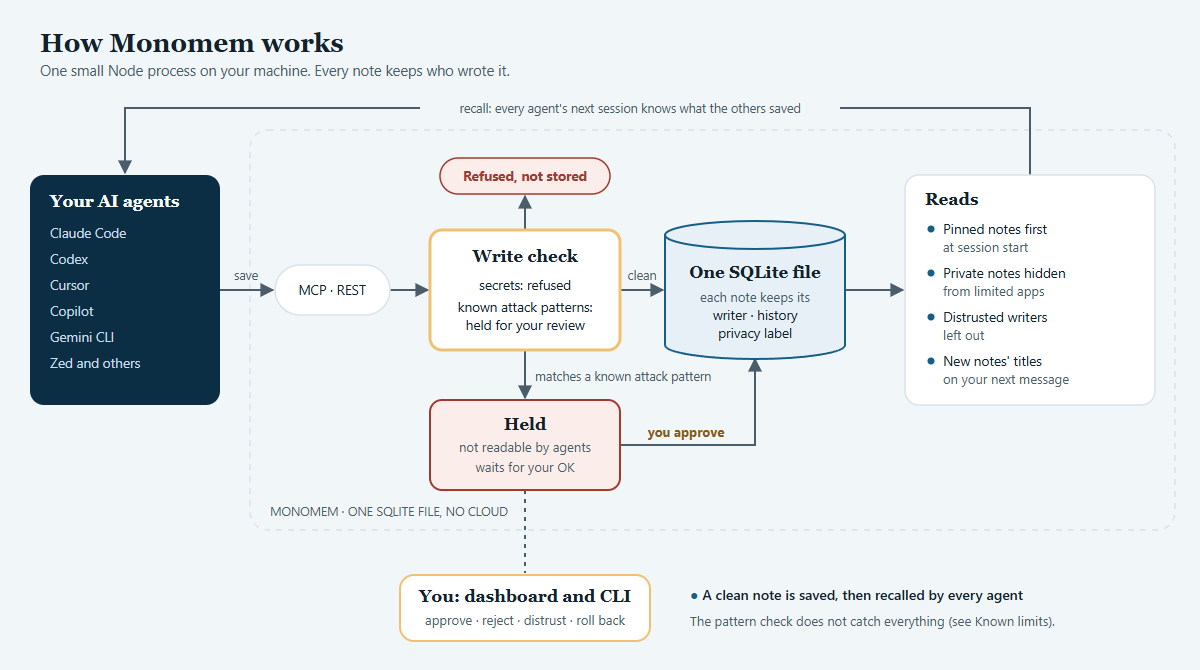
Diagram source: docs/monomem-architecture.mmd (Mermaid). More detail: docs/architecture.md.


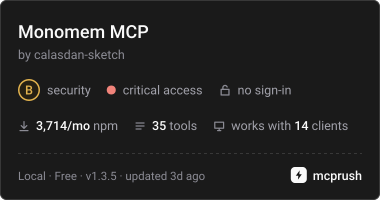

The mcprush card is a third-party scan's grade, updated after each scan: it reads the published package, not our claims.
Benchmark
monomem bench checks the provenance behaviour a shared agent memory needs: that one agent cannot silently turn a weak
guess into shared truth. It is deterministic, offline, uses no model, and runs on a throwaway store through the real REST API
(npm run bench from a checkout; --json for every scenario with expected vs actual; exit 1 on any failure, so it can gate CI).
It has five suites, as plain JSON scenario files you can extend in bench/scenarios/.
| Suite | Scenarios | What it checks | Headline number |
|---|---|---|---|
| A Stale memory | 38 | a fact updated, replaced, deleted or aged: is the current value first and the old one never shown (or flagged)? | stale-hit-rate@1/@5, current-recall@1 |
| B Contradiction recovery | 31 | writer A against writer B, then a trusted correction; distrusting the bad writer; a weak overwrite of a trusted note | resolved to the correction, loser stays visible, overwrite protected |
| C Permission isolation | 27 | one tenant cannot read, write, search, export or undo another's notes; key scopes; signed imports | leakage-count (must be 0), unexpected-denials |
| D Provenance retention | 19 | source, writer, creator, timestamps and confidence survive export, import, merge and update | fields-lost |
| E Memory poisoning | 56 | injected or malicious memories never reach an agent as trusted content (held, refused, stored with a warning, or left out once the writer is distrusted) | poison-reach-count (must be 0; two designed misses are not counted, see below) |
What it does not measure. The provenance suites are not a retrieval-quality or semantic-search benchmark (keyword
search, made-up unique words, no embeddings). It does not measure speed, scale or concurrency, and "0 leaks" means none of
these probes leaked: it is a regression gate, not an audit. Known gaps in the benchmark: 7 gap ids are open, covering 20 of the 171 scenarios (151 pass, 0 fail; counts re-derived from monomem bench on 2026-11-24; listed in docs/BENCHMARK.md): hand-written and tool-generated probes (garak, PyRIT), and an AI attacker that rewords a hostile goal, all still reach the agent, as do plain claims with no command words. poison-reach-count 0 counts only the probes the suite claims to defend, so it is a regression gate, not proof of safety. Read docs/threat-model.md. Besides that, poison-reach 0 does not mean every attack is stopped: two of the probes are designed misses, E16 (a reworded override) and SELF (self-poisoning), and they get in until a person distrusts the writer (see "What it does not do" above and monomem drill); the history of each
one and how it was fixed is in docs/BENCHMARK.md.
Retrieval. On LongMemEval-S, keyword search finds a right conversation in the top 5 for 97.5 % of questions, and every right
conversation for 86.2 %, on the 239 questions of half b (the current code; 87.0 % before 1.6.0's title weighting; one Windows PC). Ranking was tuned on the
other half of this set (half a), so the full 470-question figures (97.2 % and 85.7 %, 2026-11-15, 1.5.0) are not quoted as the headline: half b is the fairer one, though it
also checked each tuning candidate, so it is a validation half and not an untouched test set. A re-run on 2026-11-19 gave 86.0 % on all 470 against 85.7 %; we
have not found what moved the 0.3. These are retrieval numbers, not the answer accuracy memory vendors usually publish, and they are not the
highest published either: as of 2026-11-16 Vestige's README reports 97.45 % and 86.60 % on the same 470 questions (all 470, so not like-for-like with half b) (its own
numbers from github.com/samvallad33/vestige benchmarks/README.md, not re-run by us and unverified here). LoCoMo figures are not comparable between the two projects, because Vestige reports its 1,536-question
CORE set and Monomem all 1,982 questions. Every number, hybrid search, and where it is worse: docs/BENCHMARK.md. Re-measured 2026-11-23 (one PC, local nomic-embed-text): keyword search on all 470 LongMemEval-S questions finds a right conversation in the top 5 for 97.4 % and every right one for 86.0 %. Hybrid (keyword and semantic scores blended 50/50) was run on the first 150 questions only: 98.7 % in the top 5 against 96.0 % for keyword on the same 150. Semantic search alone is worse than keyword on both datasets. Every mode at k = 1, 3, 5, 10 and 20, including where hybrid or semantic loses, is in docs/BENCHMARK.md.
Known limits
- The write check is pattern matching. A reworded attack it does not know passes;
monomem check --attacksreplays the attacks it does know. - Monomem guards what goes through it. A program that can run shell commands, or open the database file itself, is not stopped.
- Local apps connected over stdio have no key, so a limit on other apps does not apply to them. A note marked
privateis hidden from apps given a limit; apps with no limit (including your main Claude connection) still see it. - The writer name of a local app comes from its config file: it tells your apps apart, but it is not proof.
- A later note by the same writer on the same subject ranks ahead of the older one (labelled
restated_by, both returned). Two notes with no shared fact key and no close similarity link are left in search order. Replace the old note to retire it for good. - Notes are marked as from outside content only when Monomem sees the outside read.
Read,Bash(curl) and apps without the hooks are not seen, and a confirm's stated source is a claim Monomem does not check. - With encryption on (
monomem encrypt enable), body search runs from an index kept in memory only; the system can page that memory to swap or a hibernation file, so use whole-disk encryption too. Sizes and timings: docs/BENCHMARK.md. - Keyword search finds words, not meaning. Semantic search needs a local embedding service (Ollama); without one you get keyword results.
- Upgrading the database is one way (older versions refuse a newer file). A backup copy is made first and
monomem backup restoregoes back. - The npm install needs Node 22.16 or newer, because Monomem uses Node's built-in SQLite. The download brings its own Node.
- Automatic daily backups run only while Monomem's server is running (docs/backups.md).
- Lowering a note's label does not rewrite its older saved versions.
Documentation
| INSTALL.md | the download, npm, and every MCP client by hand |
| docs/features.md | checks, automatic memory, who wrote this, the security model in one place |
| docs/comparison.md | other memory tools and built-in memories, dated and sourced; where they are ahead and where Monomem is |
| docs/mamb.md | MultiAgentMemBench: 30 multi-agent tasks, Monomem 132/150 against the official MCP memory server 45/150, with its failures and limits |
| docs/lossless.md | what is checked about acknowledged writes (six invariants, L1 to L6) and what is not |
| docs/tools.md | every MCP tool and its token cost, every command |
| docs/backups.md | where your data lives, daily backups, backup and restore, Docker |
| docs/live-claude-code.md | monomem setup step by step, checking it in live Claude Code, troubleshooting |
| docs/configuration.md | all environment variables, server-side namespace resolution |
| docs/upgrading.md | what changes per release, and how to go back |
| docs/sensitivity-labels.md | public / internal / private labels and per-key limits |
| docs/give-an-app-limited-access.md | give one app its own key and a limit, step by step |
| docs/footprint.md | every file Monomem writes and how to remove it; every outbound call (none by default) |
| docs/README.md | every other guide, by what you want to do |
| SECURITY.md | what it protects against, and what it does not |
| CHANGELOG.md | release notes |
Credits
Several ideas were adapted from other open projects, with thanks:
- llmem: consolidation candidates, the similarity-edge graph, access-count
importance,
#statusstaleness, and the context/relevant split with keyword extraction. - lontar (rymanalu, described in "One memory across AI agents: what it actually takes" on dev.to): the fail-silent
SessionStart recall hook, server-side namespace resolution from the working directory, and one-directional
reads_fromgrants. - lossless-memory: natural-language time phrases as a first-class query filter.
License
MIT, see LICENSE. Built by Calas Automations Inc. Third-party licences: THIRD_PARTY_NOTICES.md.
Monomem is not affiliated with, endorsed by or sponsored by Anthropic, OpenAI, Google, Microsoft, Cursor, Notion, mem0 or any other product named here; those names are trademarks of their owners, used only to say what Monomem works with or is compared to.







