
qodercli-mcp
English | 简体中文





The missing MCP server mode for Qoder CLI — delegate coding tasks to local Qoder agents from any MCP client (Qoder IDE, Claude Code, Cursor…).
A minimal MCP server that wraps the local qodercli (Qoder CLI) as MCP tools, letting any MCP client (Qoder IDE, Claude Code, Cursor, …) call Qoder like a sub-agent.
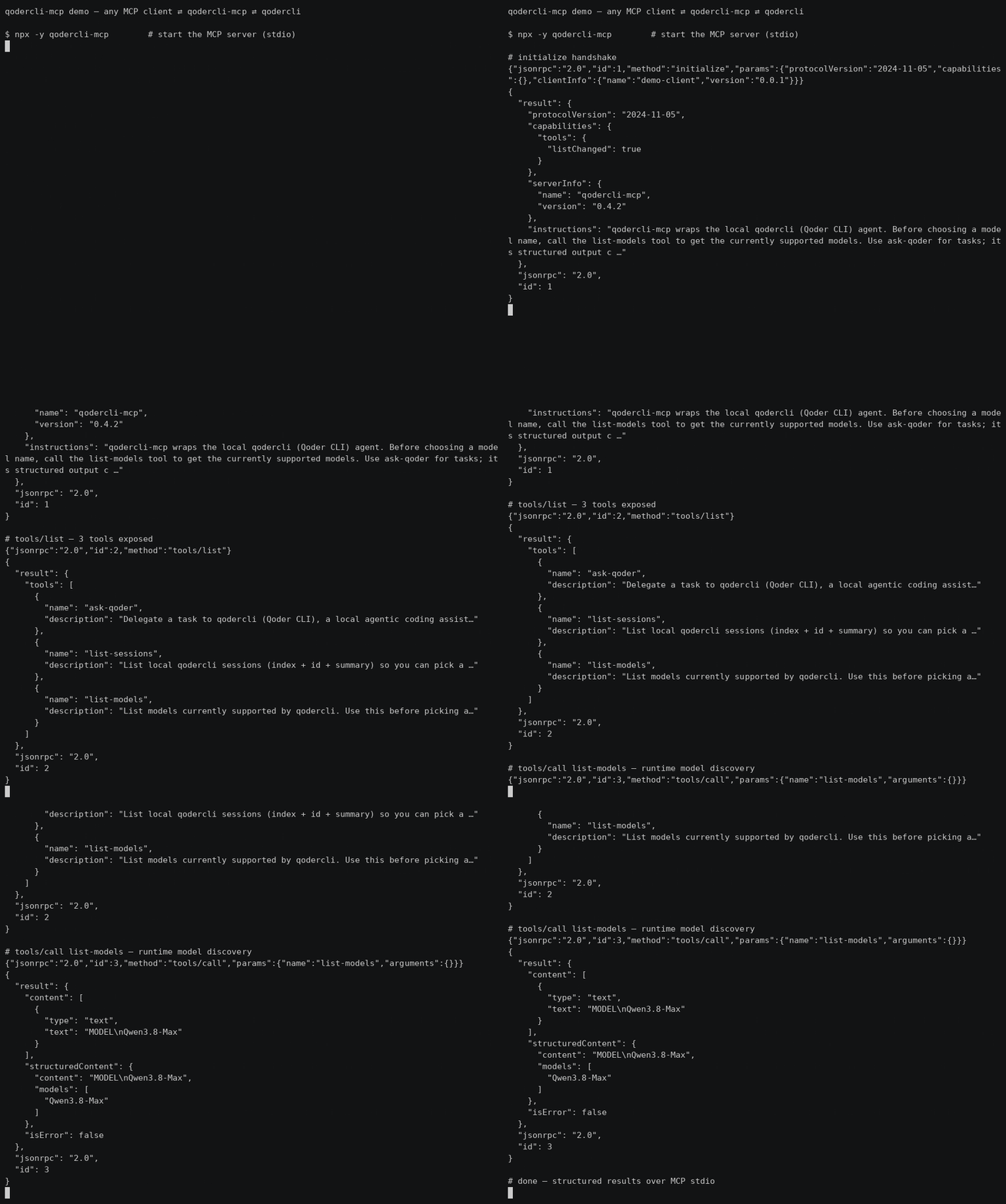
30s demo: MCP client ⇄ qodercli-mcp ⇄ qodercli — initialize → tools/list → list-models (real output, not sped up)
Quick start
Zero-config via npx — add this to your MCP client config (~/.qoder/mcp.json, claude_desktop_config.json, …):
{ "mcpServers": { "qodercli-mcp": { "command": "npx", "args": ["-y", "qodercli-mcp"] } } }
Three tools are exposed:
| Tool | Purpose |
|---|---|
ask-qoder | Delegate a task to qodercli |
list-sessions | Discover resumable sessions |
list-models | Runtime model discovery |
Highlights: verified permission semantics (see below — e.g. dont_ask is read-only),
codex-style sandbox/approval_policy, structured output (session_id/duration_ms/total_credits).
Full configuration options are in Install.
Why
Some CLI agents ship an official MCP server mode (e.g. codex mcp-server), but qodercli currently only acts as an MCP client. This project fills that gap with a thin wrapper: it spawns qodercli -p <prompt> under the hood and streams the result back over MCP stdio.
Features
ask-qodertool — delegate a prompt to qodercli- Structured output (
session_id,is_error,duration_ms,total_credits,num_turns) via-o jsonparsing list-sessionstool to discover resumable sessionslist-modelstool for runtime model discovery (no stale model lists)reasoning_effortparameter (--reasoning-effort)- Server
instructionsin the MCP initialize result guide clients on usage - Codex-style
sandboxlevels (read-only/workspace-write/danger-full-access) - System prompt injection (
system_prompt/append_system_prompt) - Working directory, model, permission mode, output format control
- Session resume (
resume_session_id) for multi-turn delegation - Timeout protection with SIGKILL fallback
- Proxy quota support (
HTTP_PROXY/HTTPS_PROXYinjection) - Zero build step — plain ESM JavaScript, Node.js >= 18
Prerequisites
- Node.js >= 18
qodercliinstalled and signed in (qodercli login)
Install
Option A — npx (recommended): no clone needed, the MCP client downloads the package on first use.
"command": "npx", "args": ["-y", "qodercli-mcp"]
Option B — from source (for development):
git clone https://github.com/cantbeblank96/qodercli-mcp.git
cd qodercli-mcp
npm install
MCP client configuration
Qoder IDE
Add to ~/.qoder/mcp.json. Prefer the absolute path of node and set QODERCLI_PATH explicitly (nvm-managed binaries are often missing from the PATH seen by MCP child processes):
Proxy Support: To use your Qoder CLI proxy quota, add
HTTP_PROXYand/orHTTPS_PROXYto the server's environment. When these are set at the MCP server level, they will be passed to all qodercli subprocesses.
{
  "mcpServers": {
    "qodercli-mcp": {
      "command": "npx",
      "args": ["-y", "qodercli-mcp"],
      "env": {
        "QODERCLI_PATH": "/absolute/path/to/qodercli",
        "PATH": "/usr/local/bin:/usr/bin:/bin"
      }
    },
    "qodercli-mcp-with-proxy": {
      "command": "npx",
      "args": ["-y", "qodercli-mcp"],
      "env": {
        "QODERCLI_PATH": "/absolute/path/to/qodercli",
        "HTTP_PROXY": "http://127.0.0.1:39900",
        "HTTPS_PROXY": "http://127.0.0.1:39900",
        "PATH": "/usr/local/bin:/usr/bin:/bin"
      }
    }
  }
}
Developers running a local checkout instead of the published package (Option B) should replace command/args with the absolute node path and /path/to/qodercli-mcp/src/index.js (nvm-managed node is often missing from the PATH seen by MCP child processes).
Claude Code / Claude Desktop
{
  "mcpServers": {
    "qodercli-mcp": {
      "command": "node",
      "args": ["/absolute/path/to/qodercli-mcp/src/index.js"],
      "env": {
        "QODERCLI_PATH": "/absolute/path/to/qodercli"
      }
    }
  }
}
Tool: ask-qoder
| Parameter | Type | Description |
|---|---|---|
prompt | string (required) | The task or question for qodercli |
cwd | string | Working directory |
model | string | Model for this session; call list-models to discover available names |
reasoning_effort | string | Reasoning effort level (--reasoning-effort), e.g. low/medium/high; depends on the model |
permission_mode | enum | dont_ask (default, read-only) | accept_edits (auto-approve file edits) | bypass_permissions (full access incl. shell) | auto | default; mutually exclusive with approval_policy, prefer sandbox |
approval_policy | enum | codex-style: untrusted→read-only | on-request→auto | never→full access |
sandbox | enum | read-only | workspace-write | danger-full-access (codex-style; controls the effective permission mode) |
system_prompt | string | Replace the default system prompt |
append_system_prompt | string | Append instructions to the default system prompt |
resume_session_id | string | Resume a previous session |
output_format | string | Passed to -o (default json). Note: non-json formats degrade structured output (session_id etc. become unavailable) |
extra_args | string[] | Raw CLI args appended before the prompt; reserved flags (permission mode, system prompt, model, -o, -r, -w...) are rejected |
timeout_ms | number | Timeout in ms, default 600000 |
Structured output
ask-qoder declares an MCP outputSchema and returns, in addition to the
human-readable text, a structuredContent object:
{
  "session_id": "77826b5c-...",   // pass back as resume_session_id
  "content": "OK",
  "is_error": false,
  "exit_code": 0,
  "duration_ms": 1280,
  "total_credits": 0.53,
  "num_turns": 1,
  "timed_out": false,
  "truncated": false
}
Sandbox mapping
| sandbox | Effective permission mode | Effect on qodercli |
|---|---|---|
| (omitted) | dont_ask | Read-only: permission-requiring tools are silently denied |
read-only | dont_ask | Plus --disallowed-tools write_file,replace,run_shell_command as defense in depth |
workspace-write | accept_edits | Agent can create/modify files in cwd |
danger-full-access | bypass_permissions | Full access including shell |
Explicit permission_mode or approval_policy always wins over sandbox.
Permission modes (verified semantics)
| Mode | Behavior |
|---|---|
dont_ask | Read-only: silently denies every tool call that requires permission. Headless-safe default |
accept_edits | Auto-approves file edits; shell still governed by policy |
bypass_permissions | Auto-approves everything including shell |
auto | qodercli's own automatic policy |
default | Interactive confirmation — not headless-friendly, avoid in MCP calls |
Tool: list-sessions
Lists local qodercli sessions (index, summary, session id) so a client can
pick a resume_session_id. Takes no arguments.
Tool: list-models
Lists models currently supported by qodercli (via --list-models), so a
client can pick a valid model value at runtime instead of relying on
stale knowledge. Returns both a text list and a structured models array.
Takes no arguments.
Usage Examples
Example 1: Simple code explanation
{ "name": "ask-qoder", "arguments": {
  "prompt": "Explain what main.py does",
  "cwd": "/path/to/project",
  "timeout_ms": 180000
}}
Example 2: Ask a second opinion
{ "name": "ask-qoder", "arguments": {
  "prompt": "@src/service.py Review this file for security issues and suggest improvements",
  "model": "qwen-plus",
  "permission_mode": "dont_ask",
  "timeout_ms": 300000
}}
Example 3: Multi-turn conversation via resume
// First call — session_id comes back in structuredContent
{ "name": "ask-qoder", "arguments": {
  "prompt": "Help me refactor this module to improve readability",
  "cwd": "/projects/backend",
  "timeout_ms": 300000
}}
// Then reuse structuredContent.session_id:
{ "name": "ask-qoder", "arguments": {
  "prompt": "Now add error handling for database timeouts",
  "resume_session_id": "77826b5c-cd6b-4213-b423-d95b4e1deab0"
}}
// Or discover ids with list-sessions
{ "name": "list-sessions", "arguments": {} }
Example 4: Code review with specific focus
{ "name": "ask-qoder", "arguments": {
  "prompt": "Analyze performance bottlenecks in utils.py",
  "model": "qwen-max",
  "permission_mode": "default",
  "output_format": "text",
  "timeout_ms": 240000
}}
Example 5: Read-only analysis
{ "name": "ask-qoder", "arguments": {
  "prompt": "Audit this codebase for security issues; do not modify anything",
  "cwd": "/workspaces/repo",
  "sandbox": "read-only",
  "timeout_ms": 300000
}}
read-only disables write/shell tools — good for audits and reviews.
Example 6: Project-wide analysis
{ "name": "ask-qoder", "arguments": {
  "prompt": "Summarize the architecture of this project and identify key modules",
  "cwd": "/workspaces/repo",
  "timeout_ms": 420000,
  "model": "qwen-plus"
}}
Best Practices
- Specify working directory — Always pass
cwdwhen operating on a specific project - Use timeout protection — For complex prompts, set explicit
timeout_msshorter than 60min - Resume for multi-turn — Chain follow-ups via
resume_session_idinstead of repeating context - Model selection — Call
list-modelsfirst to discover currently supported models; larger models are better for deep analysis - Permission mode — The server default is read-only (
dont_ask); setQODERCLI_DEFAULT_PERMISSION_MODE=bypass_permissionsto make full (YOLO) access the default for personal deployments. Per-call: tasks that must create/modify files needsandbox: "workspace-write"; shell access needsdanger-full-access. Do not combinesandboxwith an explicitpermission_mode(the latter wins)
Environment variables
| Variable | Default | Description |
|---|---|---|
QODERCLI_PATH | qodercli | Path to the qodercli binary |
QODERCLI_TIMEOUT_MS | 600000 | Default timeout |
QODERCLI_MAX_OUTPUT_MB | 50 | Per-call stdout/stderr cap in MB (OOM protection) |
QODERCLI_DEFAULT_PERMISSION_MODE | dont_ask | Default permission mode when the caller omits permission_mode/approval_policy/sandbox; set bypass_permissions for full (YOLO) access |
HTTP_PROXY | - | HTTP proxy URL for qodercli |
HTTPS_PROXY | - | HTTPS proxy URL for qodercli |
Development
npm test        # smoke test: protocol handshake + tool invocation
node src/index.js   # run the server manually (stdio)
Disclaimer
This is an unofficial, third-party tool. It is not affiliated with, endorsed, or sponsored by Qoder. Use permission_mode: bypass_permissions with care — delegated prompts may modify files in the target working directory.
Product Hunt Gallery
Main gallery image (1270×760, dark tech theme): ph-gallery.png. Optional demo video can be converted from the GIF (docs/demo.gif).
License
MIT