Listed from the MCP registry; nobody on Odel publishes it.
Oh My Cassette
Video editing through the Cassette agent: import media, edit by chat turn, read the timeline, export
Runs on your machine from its package; the steps are below.
What it does
- Reads
- Writes
- High impact
At most: creates or changes data: records, files, settings.
What it costs
FreeOdel charges nothing per call. The publisher may charge for its own service.
Runs locally over stdio
This server isn't hosted — your MCP client launches it from a package registry. Use one of the commands below, or drop the config into your client (e.g. Claude Desktop).
Run
uvx oh-my-cassette
MCP client config
{
  "mcpServers": {
    "oh-my-cassette": {
      "command": "uvx",
      "args": [
        "oh-my-cassette"
      ]
    }
  }
}
Oh My Cassette
Edit video by talking to the Cassette agent from Claude Code, Codex, OpenCode or Hermes.
A small MCP bridge, installed from PyPI. The editing tools come from the Cassette MCP service, so they stay current without a plugin update.



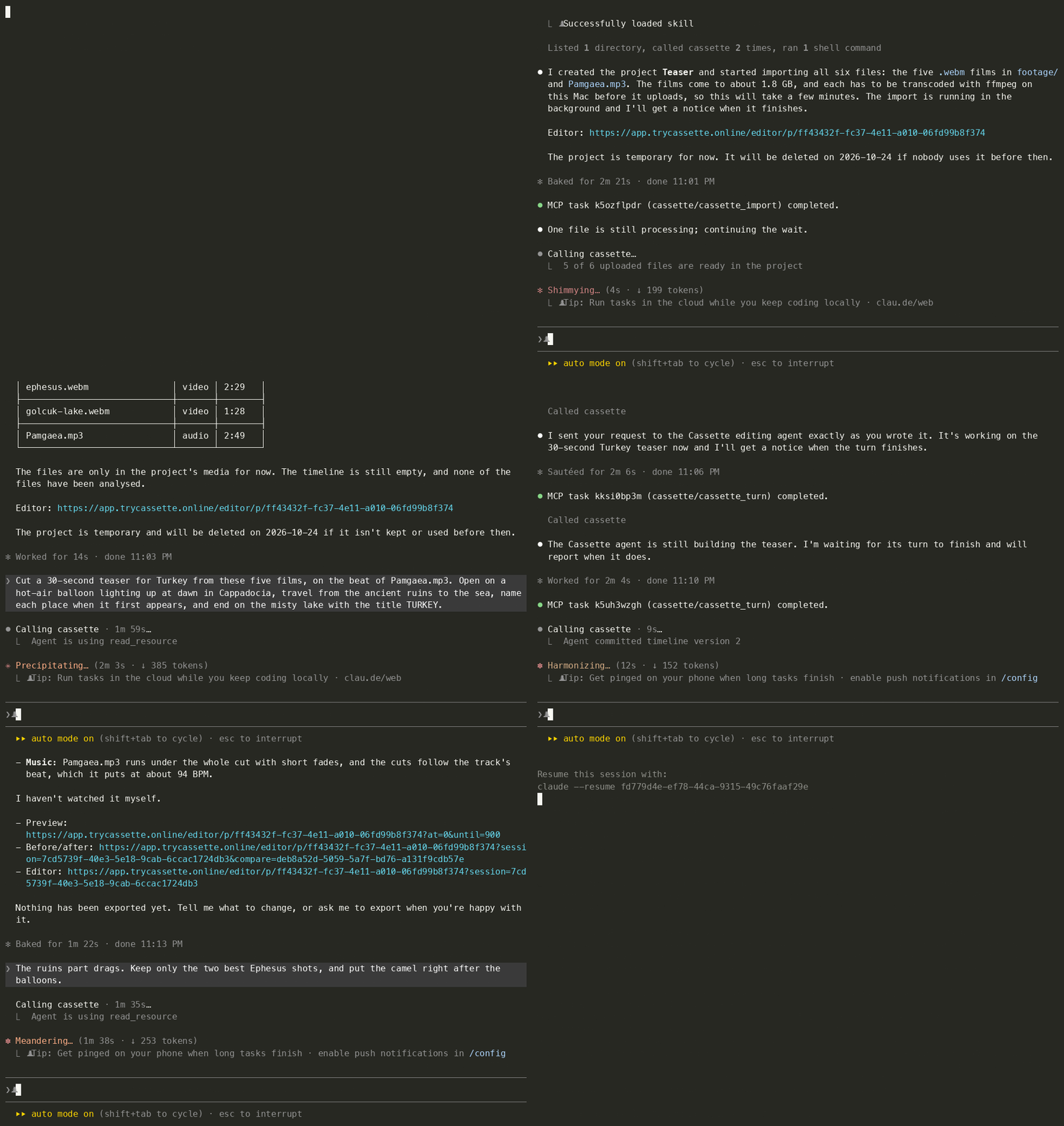
One real Claude Code session, with every prompt shown as it was typed. Five 4K travel films (10½ minutes of
footage) and a song go in, a two-sentence brief and a one-line revision go to the Cassette agent word for word, and a
30-second 1080p MP4 lands in cassette-exports/. Waits are fast-forwarded: in real time the import took 4½ minutes, the first cut 9½, the revision
3½ and the export 1.
Cut a 30-second teaser for Turkey from these five films, on the beat of Pamgaea.mp3. Open on a hot-air balloon lighting up at dawn in Cappadocia, travel from the ancient ruins to the sea, name each place when it first appears, and end on the misty lake with the title TURKEY.
The ruins part drags. Keep only the two best Ephesus shots, and put the camel right after the balloons.
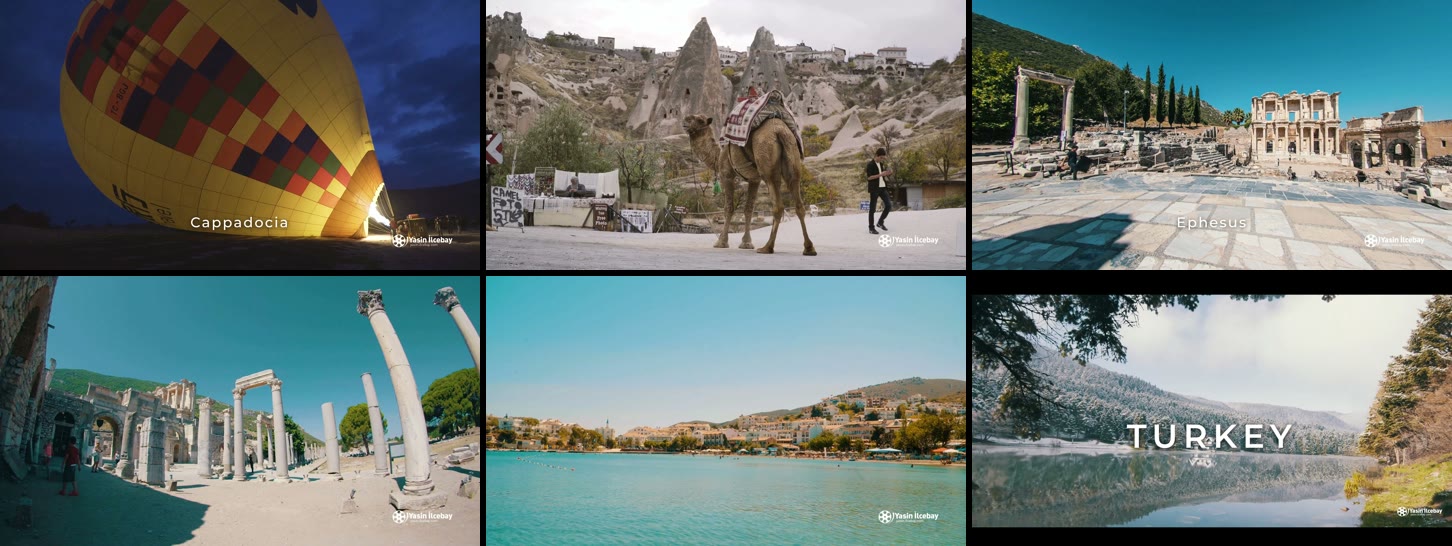
Watch the teaser it made (MP4, 30 s, with sound). Footage and music credits are below.
Install in 30 seconds
You need uv (it fetches Python and the package on first start) and, to import video into a cloud project, ffmpeg.
1. Add Oh My Cassette to your agent.
# Claude Code
claude plugin marketplace add Cassette-Editor/oh-my-cassette
claude plugin install oh-my-cassette@cassette-editor
# Codex
codex plugin marketplace add https://github.com/Cassette-Editor/oh-my-cassette.git
codex plugin add oh-my-cassette@cassette-editor
# Hermes
hermes mcp add cassette --command uvx --args oh-my-cassette==0.7.5
For OpenCode or any other MCP host, see Install below.
2. Sign in, whichever host you use:
uvx oh-my-cassette==0.7.5 login
Your browser asks for the code Cassette emails you. Then restart your agent if it cannot refresh its tool list, and say:
Start a new Cassette project and import the clips in ./footage, then cut a 30-second travel video with a title at the start.
Projects and retention
A new project lives in the cloud unless you place it on one of your Macs; when your account has a Mac running Cassette for Mac, the service asks which you want.
- A cloud project is deleted with its media after three idle days. Every use pushes that back, and each answer says
when it is due (
retention_expires_at). Exported files are already on your machine incassette-exports/and stay there. - A project held by Cassette for Mac is kept. The bridge can open, edit, import into and export it while that Mac is online. When the bridge runs on that Mac, the app reads each file where it is and nothing uploads; from any other machine each file uploads unchanged, with its embedded metadata, and the cloud copy is deleted once the Mac has it. docs/privacy.md has the details.
Overview
Oh My Cassette connects your coding agent to the Cassette editing agent. It is a local stdio MCP server
that relays to the Cassette MCP service (CASSETTE_MCP_URL), which in turn calls the Cassette backend:
Claude Code / Codex / OpenCode / Hermes ──stdio──▶ oh-my-cassette ──HTTP──▶ Cassette MCP service ──▶ Cassette backend
- The tools are the service's. Whatever it lists (projects, editing turns, questions, undo, export) is what your agent sees, with the service's own descriptions and workflow instructions. When Cassette changes, the tools change with it; the plugin does not need a release.
- The bridge adds only what needs your machine. Local files named in a call are sent first (only
from the workspace, media types only). For a cloud project they are prepared here: video is
transcoded with ffmpeg into the renditions the service declares, and audio or images the service
cannot take as they are get converted. For a project a Mac holds they go as they are (see
Projects and retention). Each file uploads while the next one is prepared, in parts, four transfers at a time; a file whose
upload was interrupted picks up its earlier import when you import it again.
Exported files are downloaded into
cassette-exports/. The workspace identity travels with each call so the service can remember a project per directory. - Long work never times out the host. Every call waits a bounded time; slow local preparation
answers
preparingand keeps going in the background, and the next identical call picks it up. An export download that outlasts the wait goes on in the background too, and the answer says where the file will appear. - It survives deploys. It reconnects on its own, retries a call that carries a request id when
the connection drops or the service turns it away, resumes interrupted downloads, reports
bridge.*errors with aretryableflag (andretry_after_secondswhen the service said when), and, while the service is unreachable or refuses the token, lists a singlecassette_bridge_statustool that says why.
The rules between the plugin and the service are defined in
src/oh_my_cassette/contract.py; oh-my-cassette check verifies a
service against them.
Requirements
- An invited Cassette account. While the service is unreachable or refuses your sign-in, the only tool
listed is
cassette_bridge_status, which says why. - uv 0.5 or newer.
uvx oh-my-cassette==0.7.5resolves Python 3.11 or newer by itself. - ffmpeg (with ffprobe) to import video into a cloud project:
brew install ffmpeg,sudo apt install ffmpegorwinget install ffmpeg. Video is transcoded on your machine before it uploads, and a build withzscalealso tone-maps HDR footage properly. A project held by Cassette for Mac does not need it.
The service declares which file types each tool accepts and how they are prepared; the bridge sends
only video, audio and images unless you set CASSETTE_UPLOAD_ANY_TYPE.
Configuration
Sign in once with oh-my-cassette login, using the Cassette account that holds your projects; the browser asks for the emailed code and your consent. One sign-in reaches every project of the account, whether it was made on the web or in Cassette for Mac. login, status and logout keep the credentials in your operating-system keyring, so no token needs to be copied. The environment variables below are optional overrides.
| Variable | Default | Meaning |
|---|---|---|
CASSETTE_MCP_URL | the saved connection, otherwise https://mcp.trycassette.online/mcp | Explicit MCP endpoint override. |
CASSETTE_AUTH_TOKEN | unset | Advanced bearer-token override. Normally use login; the same account, scope and resource checks apply. Never place it in shared configuration. |
CASSETTE_WORKSPACE | the directory the host starts the server in | Where relative paths resolve, where local files may come from, and the directory the service may remember a project for. A host that starts the server in the whole disk or your home folder gives it no files to read until you set this, or CASSETTE_ALLOWED_ROOTS. |
CASSETTE_ALLOWED_ROOTS | unset | Extra directories local files may come from (:-separated; ; on Windows). |
CASSETTE_DOWNLOAD_DIR | <workspace>/cassette-exports | Where exported files are saved. The default must stay inside the workspace: a cassette-exports symlink leading elsewhere is refused. |
CASSETTE_MAX_UPLOAD_MB / CASSETTE_MAX_DOWNLOAD_MB | 4096 / 16384 | Size limits per file. |
CASSETTE_UPLOAD_ANY_TYPE | off | Allow non-media uploads when a tool accepts them. |
CASSETTE_LOCAL_WAIT_SEC | 240 | How long one call waits for local preparation and upload before it answers preparing. |
CASSETTE_FFMPEG / CASSETTE_FFPROBE | from PATH | The ffmpeg and ffprobe programs used to prepare local media. |
CASSETTE_TEMP_DIR | the system temp directory | Where each upload makes its own private directory (oh-my-cassette-job-*) for prepared files until they are uploaded. |
CASSETTE_CONNECT_TIMEOUT_SEC | 10 | How long to wait for the service when connecting. |
CASSETTE_MCP_HOST | unset | The host name sent to the service when the host does not identify itself. |
CASSETTE_AUTH_DIRECTORY | ~/.config/oh-my-cassette | Where the saved connection's settings are kept (the token and your own OpenAI key stay in the keyring). |
OH_MY_CASSETTE_LOG | WARNING | Log level on stderr. |
Your own OpenAI key
An account can pay for its Cassette agent turns with its own OpenAI key instead of Cassette's. Save it once, after login:
uvx oh-my-cassette==0.7.5 key set      # prompts for the key (sk-…) without echoing it
uvx oh-my-cassette==0.7.5 key status   # shows whether one is saved, and its fingerprint
uvx oh-my-cassette==0.7.5 key remove
The key stays in your operating-system keyring (service oh-my-cassette.provider-key), kept for the account you signed in with, and is never written to a file. The bridge sends it in the x-cassette-provider-key header on its requests to the Cassette MCP service only; the service hands it to Cassette, which holds it in memory while your turns need it and switches the account to its own key. key remove first has Cassette let go of the key it holds at once, then forgets it here; the account stays on its own key, so its turns wait for one until you set a key again. Switch back to Cassette's key in Cassette settings. A turn that waits for a key Cassette does not hold answers needs_credential; save the key and continue the turn. With CASSETTE_AUTH_TOKEN set, no key is sent. status shows the fingerprint Cassette shows: the first 8 hex digits of the key's SHA-256 and its last four characters.
Install
Claude Code
Plugin (recommended): the two commands at the top. The plugin uses the connection saved by oh-my-cassette login and starts uvx oh-my-cassette==0.7.5 with a 10-minute tool timeout.
Project scope without the plugin: copy .mcp.json into your project, or run:
claude mcp add --transport stdio cassette -- uvx oh-my-cassette==0.7.5
The skill lives in skills/cassette-video-edit/SKILL.md and ships with the plugin.
Codex
Plugin: the two commands at the top (.codex-plugin/plugin.json declares the server inline with tool_timeout_sec: 600 and passes the CASSETTE_* variables through from your shell). Or add the server directly:
codex mcp add cassette -- uvx oh-my-cassette==0.7.5
OpenCode
Add to opencode.json (project or ~/.config/opencode/opencode.json):
{
  "mcp": {
    "cassette": {
      "type": "local",
      "command": ["uvx", "oh-my-cassette==0.7.5"],
      "timeout": 600000
    }
  }
}
Then copy the skill so OpenCode loads it:
mkdir -p ~/.config/opencode/skills/cassette-video-edit
curl -fsSL https://raw.githubusercontent.com/Cassette-Editor/oh-my-cassette/v0.7.5/skills/cassette-video-edit/SKILL.md \
  -o ~/.config/opencode/skills/cassette-video-edit/SKILL.md
OpenCode has no MCP elicitation, which is fine: the editing agent's questions come back as ordinary tool results, and the service's tools say how to answer them.
Hermes
hermes mcp add cassette --command uvx --args oh-my-cassette==0.7.5

mkdir -p ~/.hermes/skills/cassette-video-edit
curl -fsSL https://raw.githubusercontent.com/Cassette-Editor/oh-my-cassette/v0.7.5/skills/cassette-video-edit/SKILL.md \
  -o ~/.hermes/skills/cassette-video-edit/SKILL.md
Set mcp_servers.cassette.timeout: 600 in ~/.hermes/config.yaml so a call's bounded waits fit. Hermes is a plain MCP host here: the 0.4 gateway/plugin layer is gone.
Any other MCP host
Command uvx, args ["oh-my-cassette==0.7.5"], stdio transport, a tool timeout of 10 minutes, and the environment variables above. No uv? pipx run oh-my-cassette==0.7.5 works too.
How a turn looks
you:    Import intro.mp4 and beach.mov, then make a 20-second cut with the title "Kota Kinabalu".
agent:  (calls the service's import tool with ["intro.mp4", "beach.mov"])
        bridge: transcodes both videos, uploads them, passes the service media references
        (calls the service's editing tool with your sentence, verbatim; progress streams while it runs)
        "Done. Added a 20 s cut from both clips with the title at the start. Open it: <editor link>"
you:    Export it.
agent:  (calls the service's export tool)
        bridge: downloads the MP4 to cassette-exports/kota-kinabalu.mp4
The editor link comes from the service: open it in a browser to watch the run live and take over by hand.
Check a service
uvx oh-my-cassette==0.7.5 check --url http://127.0.0.1:8790/mcp --upload \
  --arguments '{"project_id": "<a test project>"}'
Prints one line per check (transport and token, contract declaration, instructions, tool schemas,
local-file and prepare declarations, and with --upload a real upload round trip; --arguments
are the file tool's other arguments for it) and exits 1 on any failure. --json gives
machine-readable output for the service's CI. The service must speak MCP 2026-07-28; one that only
answers the handshake-era initialize fails the transport check, and the bridge refuses it with
bridge.protocol_unsupported.
Upgrading from 0.4
0.5 is a rewrite. The 0.4 plugin carried its own editing runtime, music search and Hermes gateway; 0.5 is a thin bridge to the Cassette MCP service, and the tools your agent sees are the service's.
- Sign in again with
uvx oh-my-cassette==0.7.5 login. 0.4 passwords and tokens are not used. - Tools are new. Projects, editing turns, questions, plans, undo, media, analysis and export come from the service,
with their own descriptions; the 0.4 tool names (
cassette_run_job,cassette_ingest_media,cassette_match_bgm, …) are gone. Reinstall the plugin, or point your host config atuvx oh-my-cassette==0.7.5. - Projects live in your Cassette account, the same ones you open on the web or in Cassette for Mac, and the editor link each answer carries opens the project you are working on. 0.4 sessions do not carry over.
- Hermes is a plain MCP host now; remove the 0.4 gateway plugin.
Update
Bump the pin in your host config (oh-my-cassette==<new version>) or reinstall the plugin; uvx fetches the new wheel on next start. Releases: CHANGELOG.md.
Development
git clone https://github.com/Cassette-Editor/oh-my-cassette && cd oh-my-cassette
uv sync --group dev
uv run pytest -q                                   # reference service on loopback, no network; ffmpeg tests skip without it
uv run oh-my-cassette                              # the bridge itself (stdio)
uv run oh-my-cassette check --url <endpoint>       # conformance check
tests/reference_remote.py is an executable reference service for the contract;
RELEASING.md has the PyPI release flow.
Credits
The demo footage is by yasin ilcebay, licensed CC BY 3.0, from Wikimedia Commons: Aizanoi Temple of Zeus, Cappadocia, Datça, Ephesus and Gölcük Lake. The teaser trims and reorders it, and adds place names, a title and music.
The music is "Pamgaea" by Kevin MacLeod (incompetech.com)
Licensed under Creative Commons: By Attribution 4.0
https://creativecommons.org/licenses/by/4.0/
The teaser uses an excerpt of it.
License
The code is MIT. Oh My Cassette is the client; the Cassette service has its own terms.
The demo recording (assets/demo-claude-code.gif), the teaser frames (assets/turkey-teaser.jpg)
and the teaser video attached to the release contain the works credited above. They are not covered
by the MIT license and remain under their own licenses (CC BY 3.0 for the footage, CC BY 4.0 for
the music).
MCP registry: mcp-name: io.github.Cassette-Editor/oh-my-cassette