Listed from the MCP registry; nobody on Odel publishes it.
Is this yours? Claim it
web2mcp
Zero-dependency Cloudflare Worker gateway turning websites and REST APIs into MCP tools.
One address for any MCP client. No sign-in needed on this server.
What it does
6 read10 other
Grouped by tool name. At most: only reads or looks up information.
What it costs
FreeOdel charges nothing per call. The publisher may charge for its own service.
Tools
16 · grouped by tool name · checked 16 Nov 2026Read · 6Look things up
- wikipedia_search
- hackernews_search
- geocode_search
- github_search_repos
- arxiv_search
- holidays_list
Other · 10Neither hinted nor named
- wikipedia_summary
- hackernews_front_page
- weather_forecast
- currency_latest
- github_repo
- npm_package
- npmstats_downloads
- holidaycn_year
- baiduhot_realtime
- shici_random
web2mcp
Turn any website or REST API into MCP tools — one tiny Cloudflare Worker, zero dependencies.




GitHub's 665 REST endpoints → 2 MCP tools, ~147,000 tokens of tool definitions → ~300 (catalog mode)
Every AI agent (Claude, ChatGPT, Cursor, your own bots…) now speaks the Model Context Protocol. But most websites and apps don't. web2mcp is the glue: describe an HTTP API in a few lines of config and it instantly becomes an MCP tool that any agent can call — hosted for free on Cloudflare's edge.
 Claude / Cursor / any MCP client
              │  MCP (Streamable HTTP, JSON-RPC)
              ▼
   ┌──────────────────────────┐
   │  web2mcp  (CF Worker)    │  connectors/*.js  or  CONNECTORS_JSON
   └──────────────────────────┘
      │        │        │
   Wikipedia  GitHub  any REST API / web page …
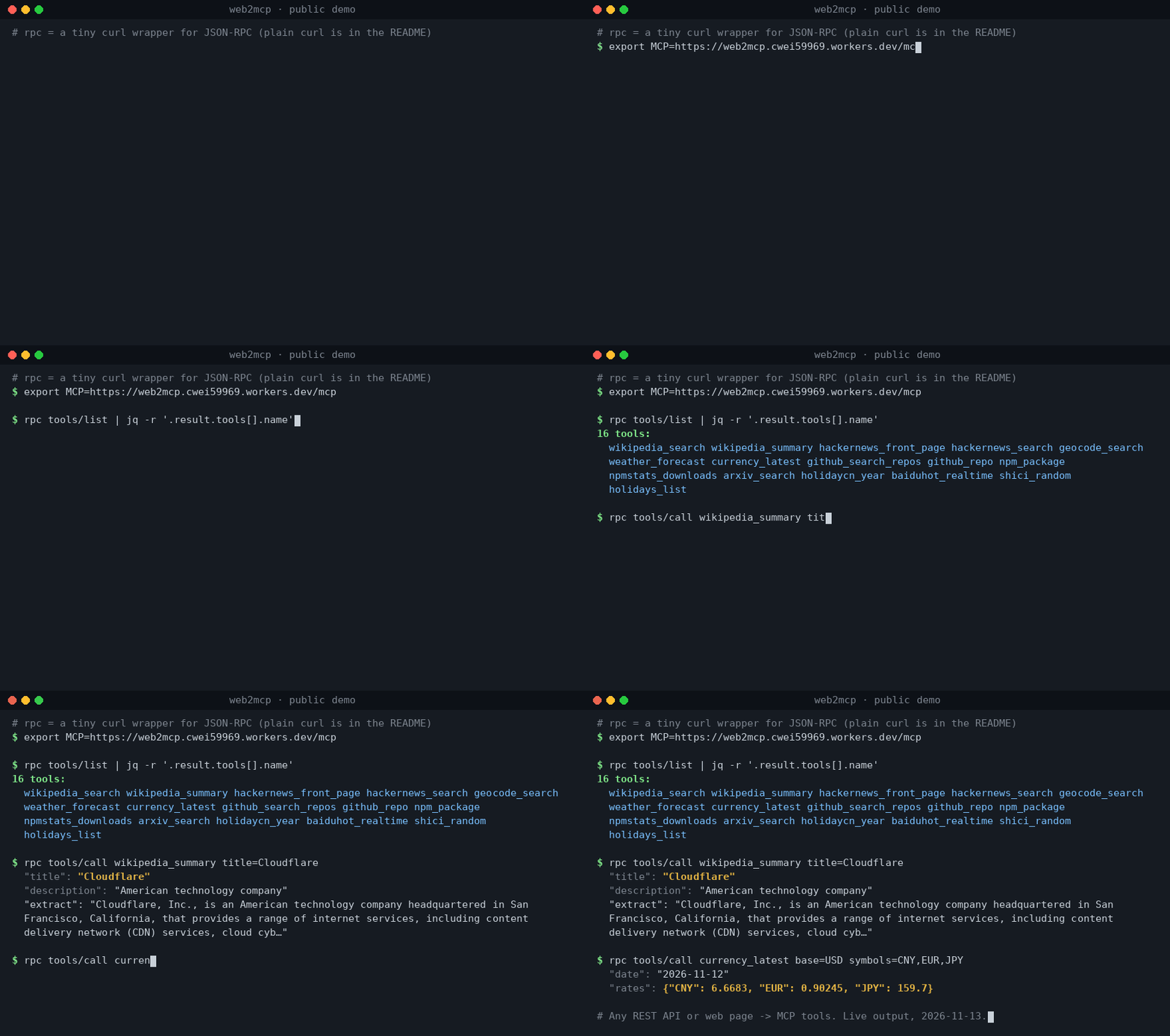
Try it in 30 seconds
No install, no account. A public demo runs at:
https://web2mcp.cwei59969.workers.dev/mcp
1. List the tools with the official MCP Inspector (CLI mode, works over SSH):
npx -y @modelcontextprotocol/inspector --cli https://web2mcp.cwei59969.workers.dev/mcp \
  --transport http --method tools/list
2. Call one:
npx -y @modelcontextprotocol/inspector --cli https://web2mcp.cwei59969.workers.dev/mcp \
  --transport http --method tools/call --tool-name wikipedia_summary --tool-arg title=Cloudflare
Or with plain curl:
curl -s https://web2mcp.cwei59969.workers.dev/mcp \
  -H 'content-type: application/json' -H 'accept: application/json, text/event-stream' \
  -d '{"jsonrpc":"2.0","id":1,"method":"tools/call","params":{"name":"weather_forecast","arguments":{"latitude":35.68,"longitude":139.69}}}'
Prefer a UI? Run npx @modelcontextprotocol/inspector, pick Streamable HTTP, paste the URL.
The demo runs on the Workers free plan: it is rate-limited,
reader_readis disabled,bilibili_*is not available (Bilibili blocks Cloudflare IPs), and thegithub_*tools often hit GitHub's anonymous rate limit (HTTP 403). Deploy your own, or run it locally, for real use.
Who is this for
- You want an agent to use a public REST API today and don't want to write an MCP server for it. Describe the endpoint in ~15 lines of config; web2mcp turns it into a typed MCP tool.
- You have a big API (hundreds of endpoints) and tool definitions are eating your context.
Catalog mode exposes it as 2 tools (
search_api+call_api). - You want free, always-on hosting with no servers: one Cloudflare Worker, zero runtime dependencies.
- You want to run it locally with no cloud account:
npx -y github:charleswei118/web2mcp(stdio).
Not a fit if you need browser automation / logged-in scraping, or OAuth on behalf of end users.
Why
- Config, not code. A connector is a plain object: base URL, path, query, params. No SDK to learn.
- Zero runtime dependencies. ~800 lines of readable JavaScript. Audit it in 10 minutes.
- Token-friendly output.
pickandfieldstrim giant JSON responses down to what the model needs. - Free hosting. Runs on the Cloudflare Workers free plan. Deploy in one click.
- Safe by default. Requests are locked to each connector's host, arguments are type-checked, secrets stay server-side, optional bearer auth.
- OpenAPI import. Convert any OpenAPI 3 spec into a connector with one command.
Built-in connectors (no API keys)
| Tool | What it does |
|---|---|
wikipedia_search, wikipedia_summary | Search Wikipedia, read article summaries |
hackernews_front_page, hackernews_search | Hacker News stories |
geocode_search | Place name → coordinates (Open-Meteo) |
weather_forecast | Current weather + daily forecast (Open-Meteo) |
currency_latest | ECB exchange rates (Frankfurter) |
github_search_repos, github_repo | Public GitHub repositories (set GITHUB_TOKEN on Workers: shared IPs hit GitHub's anonymous limit) |
reader_read | Any web page → clean Markdown (Jina Reader) |
npm_package, npmstats_downloads | npm package info and weekly downloads |
arxiv_search | Search arXiv research papers |
holidays_list | Public holidays by country and year (Nager.Date) |
holidaycn_year | Mainland China holidays and make-up workdays (调休) for a year |
baiduhot_realtime | Baidu real-time hot search (百度热搜) |
shici_random | A random line of classical Chinese poetry (今日诗词) |
bilibili_popular, bilibili_ranking | Bilibili trending / ranking videos (stdio & self-hosted only: Bilibili blocks Cloudflare IPs) |
Deploy your own in one click
Click Deploy to Cloudflare above. Cloudflare copies this repo into your GitHub account, asks for an AUTH_TOKEN (any long random string, e.g. openssl rand -hex 32), then builds and deploys it. A minute later your server is live at https://web2mcp.<your-subdomain>.workers.dev/mcp, and every push to your copy redeploys it. The free Workers plan is enough.
Quick start
git clone https://github.com/charleswei118/web2mcp && cd web2mcp
npm test                 # unit tests, no install needed (Node 20+)
npm run smoke            # calls the built-in tools against the real APIs
npx wrangler dev         # local server at http://localhost:8787/mcp (no Cloudflare login needed)
npx wrangler deploy      # your own https://web2mcp.<you>.workers.dev/mcp
wrangler dev serves /mcp without auth unless you create .dev.vars: cp .dev.vars.example .dev.vars and set AUTH_TOKEN.
Optional: protect your deployed endpoint
npx wrangler secret put AUTH_TOKEN
Connect your client
Use the demo URL to try it; swap in https://web2mcp.<you>.workers.dev/mcp once you deploy.
The demo needs no token. Add the Authorization header only if you set AUTH_TOKEN on your own deployment.
Claude Code
claude mcp add --transport http web2mcp https://web2mcp.cwei59969.workers.dev/mcp
# your own, protected deployment:
claude mcp add --transport http web2mcp https://web2mcp.<you>.workers.dev/mcp \
  --header "Authorization: Bearer $WEB2MCP_TOKEN"
Cursor (~/.cursor/mcp.json, remote URL supported natively)
{
  "mcpServers": {
    "web2mcp": { "url": "https://web2mcp.cwei59969.workers.dev/mcp" }
  }
}
VS Code (.vscode/mcp.json)
{
  "servers": {
    "web2mcp": { "type": "http", "url": "https://web2mcp.cwei59969.workers.dev/mcp" }
  }
}
Claude Desktop / Windsurf / any stdio-only client (bridge with mcp-remote)
{
  "mcpServers": {
    "web2mcp": {
      "command": "npx",
      "args": ["-y", "mcp-remote", "https://web2mcp.cwei59969.workers.dev/mcp"]
    }
  }
}
With a protected deployment, add the header:
"args": ["-y", "mcp-remote", "https://web2mcp.<you>.workers.dev/mcp",
         "--header", "Authorization: Bearer ${WEB2MCP_TOKEN}"],
"env": { "WEB2MCP_TOKEN": "your-token" }
No cloud at all: run it locally over stdio
{
  "mcpServers": {
    "web2mcp": {
      "command": "npx",
      "args": ["-y", "github:charleswei118/web2mcp"],
      "env": { "ENABLED_CONNECTORS": "wikipedia,hackernews,weather" }
    }
  }
}
Or with Docker: docker build -t web2mcp . && docker run -i --rm web2mcp. Environment variables work the same as Worker bindings (ENABLED_CONNECTORS, CONNECTORS_JSON, MAX_OUTPUT_CHARS, TOOL_MODE=catalog).
Claude.ai / ChatGPT connectors / OpenAI Responses API / Cloudflare AI Playground: paste the URL directly.
Write a connector
Create connectors/myapi.js and add it to connectors/index.js:
export default {
  name: "openlibrary",                       // tool names become openlibrary_<tool>
  description: "Search books on Open Library.",
  baseUrl: "https://openlibrary.org",
  headers: { /* "authorization": "Bearer ${MY_API_KEY}" */ },
  tools: [
    {
      name: "search",
      description: "Search books by title or author.",
      method: "GET",                          // GET | POST | PUT | PATCH | DELETE
      path: "/search.json",                   // "{arg}" in the path is URL-encoded
      query: { q: "{query}", limit: "{limit}" },
      params: {
        query: { type: "string", required: true, description: "Title or author" },
        limit: { type: "integer", minimum: 1, maximum: 20, default: 5 },
      },
      pick: "docs",                           // dotted path into the JSON response
      fields: ["title", "author=author_name", "year=first_publish_year"],
    },
  ],
};
Template rules:
| Syntax | Meaning |
|---|---|
"{arg}" | Tool argument. As a whole value it keeps its type; missing optional args are dropped. |
"${SECRET}" | Read from a Worker secret / var — never exposed to the model. |
"${?SECRET}" | Optional secret: the value is dropped when it is not set. |
pick: "a.b.*.c" | Select part of the response (* maps over arrays; a single value counts as a one-item list). |
fields: ["x", "alias=deep.path"] | Keep only these fields. |
limit: 10 | Truncate arrays. |
format: "public-url" (on a param) | Reject localhost, private/intranet IPs, cloud metadata, embedded credentials and odd ports before any request is made (SSRF guard). Used by reader_read. |
response: "xml" | Parse an XML/Atom/RSS response into JSON first, so pick / fields work on it (attributes become @name, namespace prefixes are dropped, repeated elements become arrays). Also "json", "text" (raw body) or "auto" (default). |
No-code option: put connectors in the CONNECTORS_JSON secret (a JSON array of the same objects) and they appear without touching the code. Use ENABLED_CONNECTORS="wikipedia,weather" to expose only some.
From an OpenAPI spec
node scripts/openapi2connector.js https://petstore3.swagger.io/api/v3/openapi.json petstore --only GET > connectors/petstore.js
Catalog mode: 665 endpoints, 2 tools
Exposing every endpoint as its own tool floods the model's context. In catalog mode web2mcp exposes just two tools:
search_api— find operations by keywords; returns their names and argument schemascall_api— run one operation by name with an arguments object
Measured with GitHub's full REST OpenAPI spec (GET operations only, converted with scripts/openapi2connector.js):
| Mode | Tools in tools/list | Approx. context |
|---|---|---|
| Default (one tool per endpoint) | 665 | ~147,000 tokens |
| Catalog | 2 | ~300 tokens |
Turn it on per request with /mcp?mode=catalog, or for the whole deployment with the variable TOOL_MODE = "catalog" (?mode=tools switches back). Try it on the demo: https://web2mcp.cwei59969.workers.dev/mcp?mode=catalog.
Endpoints
| Path | |
|---|---|
POST /mcp | MCP Streamable HTTP endpoint (JSON responses, batch supported) |
POST /mcp?mode=catalog | Same, in catalog mode (search_api + call_api) |
GET / | Human-readable list of tools |
GET /tools | Tool list as JSON |
GET /health | Health check |
Supported MCP methods: initialize, ping, tools/list, tools/call, plus empty resources/list and prompts/list. Protocol versions 2025-06-18, 2025-03-26, 2024-11-05.
Roadmap
- Catalog mode (
search_api+call_api) — v0.2 - Load OpenAPI specs at runtime from a URL
- One-click “Deploy to Cloudflare” — v0.2
- HTML scraping connectors (CSS selectors via
HTMLRewriter) - Per-tool rate limits and KV caching
- OAuth for connectors that need user accounts
- Connector registry: share connectors as JSON files
- Agent-to-agent (A2A) chat rooms on Durable Objects
PRs with new connectors are very welcome — see CONTRIBUTING.md.
Troubleshooting
| You see | Why | Fix |
|---|---|---|
{"error":"Use POST for MCP requests"} (HTTP 405) | You opened /mcp in a browser or sent GET | MCP clients POST to /mcp. Open / for the human-readable tool list. |
HTTP 401 on /mcp | AUTH_TOKEN is set on the deployment | Send Authorization: Bearer <token> (see client configs above). |
Upstream 403 Forbidden: API rate limit exceeded from github_* | GitHub's anonymous limit, shared by all Cloudflare IPs | npx wrangler secret put GITHUB_TOKEN on your deployment, or run locally. |
Unknown tool: <name> (JSON-RPC -32602) | Tool not enabled (ENABLED_CONNECTORS), disabled on the demo, or the name is wrong | Run tools/list first; check ENABLED_CONNECTORS. |
bilibili_* fails on Workers | Bilibili blocks Cloudflare IPs | Use stdio / Docker / self-hosted Node. |
reader_read missing on the demo | Disabled on the public demo to prevent abuse | Deploy your own. |
reader_read rejects a URL | SSRF guard: localhost, private IPs, metadata hosts and odd ports are refused | Use a public http(s) URL. |
| Response cut off | MAX_OUTPUT_CHARS (default 20000) | Raise it, or use pick / fields in the connector. |
wrangler: Proxy environment variables detected | You're behind HTTP(S)_PROXY | Harmless; wrangler uses the proxy for upstream fetches. |
npm test syntax errors | Node < 20 | Upgrade to Node 20+. |
Responsible use
Only connect APIs and sites you are allowed to use. Respect each service's terms, robots rules and rate limits, and keep credentials in Worker secrets.
License
If web2mcp saves you time, please ⭐ the repo — it helps others find it.






