KaiBoard MCP
Let AI agents draw on your local-first KaiBoard whiteboards (relay or local folder).
Runs on your machine from its package; the steps are below.
What it does
- Reads
- Writes
- High impact
At most: moves money, runs code or commands, deletes data, or sends messages for you.
What it costs
FreeOdel charges nothing per call. The publisher may charge for its own service.
Runs locally over stdio
This server isn't hosted — your MCP client launches it from a package registry. Use one of the commands below, or drop the config into your client (e.g. Claude Desktop).
Run
npx -y @kaibuddy/kaiboard-mcp
MCP client config
{
  "mcpServers": {
    "kaiboard-mcp": {
      "command": "npx",
      "args": [
        "-y",
        "@kaibuddy/kaiboard-mcp"
      ]
    }
  }
}KaiBoard MCP Server
English | 简体中文 · Protocol · Changelog
Let MCP-capable AI agents draw on your own KaiBoard whiteboards.
KaiBoard is a free, open-source, local-first whiteboard: your boards live on your own device, never in the cloud. This repo is the bridge that lets an agent read and edit those boards — the agent runs wherever your MCP client runs, and the canvas stays on your machine.
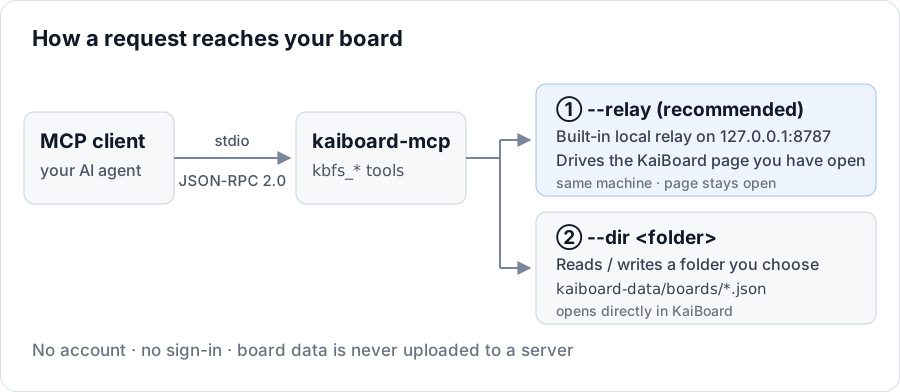
It contains two independently usable packages:
| Package | Role |
|---|---|
@kaibuddy/kaiboard-mcp | MCP server (stdio JSON-RPC 2.0) exposing the kbfs_* tools |
@kaibuddy/kaiboard-core | Storage-agnostic command core (executor, element model, snapshots, Mermaid conversion) |
What it does
@kaibuddy/kaiboard-mcp is a single package that serves two combinable modes through the same set of kbfs_* tools:
--relay mode (recommended) | --dir mode | |
|---|---|---|
| Backend | A running KaiBoard page | A local folder you choose |
| App must be open? | Yes (with "Agent co-draw" enabled in the app) | No |
| Typical use | The agent works on the user's live board, changes visible immediately | A workspace the agent owns offline |
| Data location | The user's own KaiBoard library | <folder>/kaiboard-data/ |
Both can be enabled at once:
kaiboard-mcp --relay --dir /path/to/workspace
Install
npm install -g @kaibuddy/kaiboard-mcp
# or run without installing
npx -y @kaibuddy/kaiboard-mcp
Requires Node.js >= 18.
Connect your MCP client
Recommended: --relay mode — drives the board you're looking at, with changes visible immediately.
It needs a relay token, obtained from KaiBoard's "Agent co-draw" panel:
{
  "kaiboard": {
    "command": "npx",
    "args": ["-y", "@kaibuddy/kaiboard-mcp", "--relay"],
    "env": { "KAIBOARD_TOKEN": "<your-token>" }
  }
}
--relaystarts a built-in local relay on127.0.0.1:8787that talks to the KaiBoard page. The relay and the page must therefore be on the same machine, and the page has to stay open while the agent works.
--dir mode can also be used on its own (no app required — the agent works in a local folder):
{
  "kaiboard-mcp": {
    "command": "npx",
    "args": ["-y", "@kaibuddy/kaiboard-mcp", "--dir", "/path/to/your/workspace"]
  }
}
Or combine them: "args": ["-y", "@kaibuddy/kaiboard-mcp", "--relay", "--dir", "/path/to/your/workspace"]
Restart your MCP client after changing the config so it picks up the new server.
Tools
tools/list returns 20 tools: 19 commands plus one capability declaration.
⚠️ marks a destructiveHint tool (may make hard-to-undo changes); the tools in the
read-only group are readOnlyHint: true.
| Tool | Purpose |
|---|---|
| Discovery — read-only | |
kbfs_list_capabilities | Runtime capabilities: available commands, storage modes, snapshot limit, server info |
kbfs_list_boards | List boards and folders |
kbfs_list_trash | List soft-deleted boards / folders (trash) |
kbfs_get_board | Read a board's elements |
kbfs_get_screenshot | Render a board to PNG so the agent can look at it (--relay; degrades gracefully under --dir) |
| Boards | |
kbfs_create_board | Create a board |
kbfs_replace_board ⚠️ | Replace a board's contents (auto-snapshot) |
kbfs_rename_board | Rename a board |
kbfs_delete_board ⚠️ | Delete a board (soft delete, restorable in the app) |
| Folders | |
kbfs_create_folder | Create a folder |
kbfs_rename_folder | Rename a folder |
kbfs_delete_folder ⚠️ | Delete a folder |
| Tree | |
kbfs_move_node | Move a board or folder into another folder |
kbfs_reorder_node | Change ordering within a folder |
kbfs_restore_node | Restore a board or folder from the trash |
| Elements | |
kbfs_add_element | Add elements |
kbfs_patch_element | Patch element properties by id |
kbfs_delete_element ⚠️ | Delete elements by id |
| Content & metadata | |
kbfs_from_mermaid | Build native editable elements from a Mermaid diagram |
kbfs_set_metadata | Write board metadata (status / version / history / comments) |
CLI details, envelope format and error codes: see docs/PROTOCOL.md.
Elements and fill colors
Elements use the Excalidraw element format. fill is accepted as a shorthand for backgroundColor, and stroke for strokeColor:
{
  "type": "rectangle",
  "id": "r1",
  "x": 40, "y": 40, "width": 160, "height": 90,
  "fill": "#ffec99",
  "stroke": "#e8590c"
}
Data and privacy
- Board data is never uploaded to any server. In
--relaymode the relay listens on127.0.0.1only, for same-machine communication; in--dirmode the server reads and writes the local folder you specify. - No account, no sign-in.
- On-disk layout (
--dirmode):kaiboard-data/boards/<id>.jsonpluskaiboard-data/tree.json— a format KaiBoard can open directly.
Development
npm install
npm run typecheck   # type check
npm run build       # build both packages into their dist/
npm run e2e         # end-to-end (core + fs adapter / real stdio server)
npm run smoke       # real MCP client smoke test (initialize -> tools/call)
Third-party notices
Third-party components are referenced as optional peer dependencies (the license text ships inside each package):
| Component | License | Role |
|---|---|---|
@excalidraw/excalidraw | MIT | element types / canvas rendering (provided by the host) |
@excalidraw/mermaid-to-excalidraw | MIT | Mermaid → element conversion (optional) |
Build-time only: typescript (Apache-2.0), @types/node (MIT).
No upstream source code is vendored — every component is used as an ordinary npm dependency.
Versioning
Currently 0.4.x — the API may still change between minor versions. 1.0.0 will mark the stability commitment. See CHANGELOG.md for the current release.