Listed from the MCP registry; nobody on Odel publishes it.

Optical Context MCP
Compress OCR-heavy PDFs into dense packed images so agents can work with long visual documents.
Runs on your machine from its package; the steps are below.
What it does
- Reads
- Writes
- High impact
At most: creates or changes data: records, files, settings.
What it costs
FreeOdel charges nothing per call. The publisher may charge for its own service.
Runs locally over stdio
This server isn't hosted — your MCP client launches it from a package registry. Use one of the commands below, or drop the config into your client (e.g. Claude Desktop).
Run
uvx optical-context-mcp
MCP client config
{
  "mcpServers": {
    "optical-context-mcp": {
      "command": "uvx",
      "args": [
        "optical-context-mcp"
      ]
    }
  }
}
Optical Context MCP
Compress OCR-heavy PDFs into dense packed images so agents can work with long visual documents.


Optical Context MCP is built for one specific job: turning large, visually structured PDFs into a smaller set of retrievable packed images for agent workflows.
It reads a local PDF, runs OCR with Mistral, recomposes the extracted text and figures into dense PNGs, and exposes those artifacts over MCP for batch retrieval.
What It Does
- reads a local PDF from the MCP host machine
- extracts page markdown and embedded images with Mistral OCR
- packs that content into dense PNGs that preserve visual grouping
- optionally sizes embedded figures with a bundled technical-document model
- stores a manifest and temp job artifacts for follow-up retrieval
- lets an agent pull only the packed images it needs
Where It Fits
Use it for:
- operating manuals
- scanned handbooks
- product catalogs
- PDF slide decks
- visually structured OCR-heavy documents
Skip it for:
- tiny PDFs
- clean text-native PDFs where normal extraction is enough
- workflows that require exact page-faithful rendering
- cases where OCR cost is not justified
Example Result
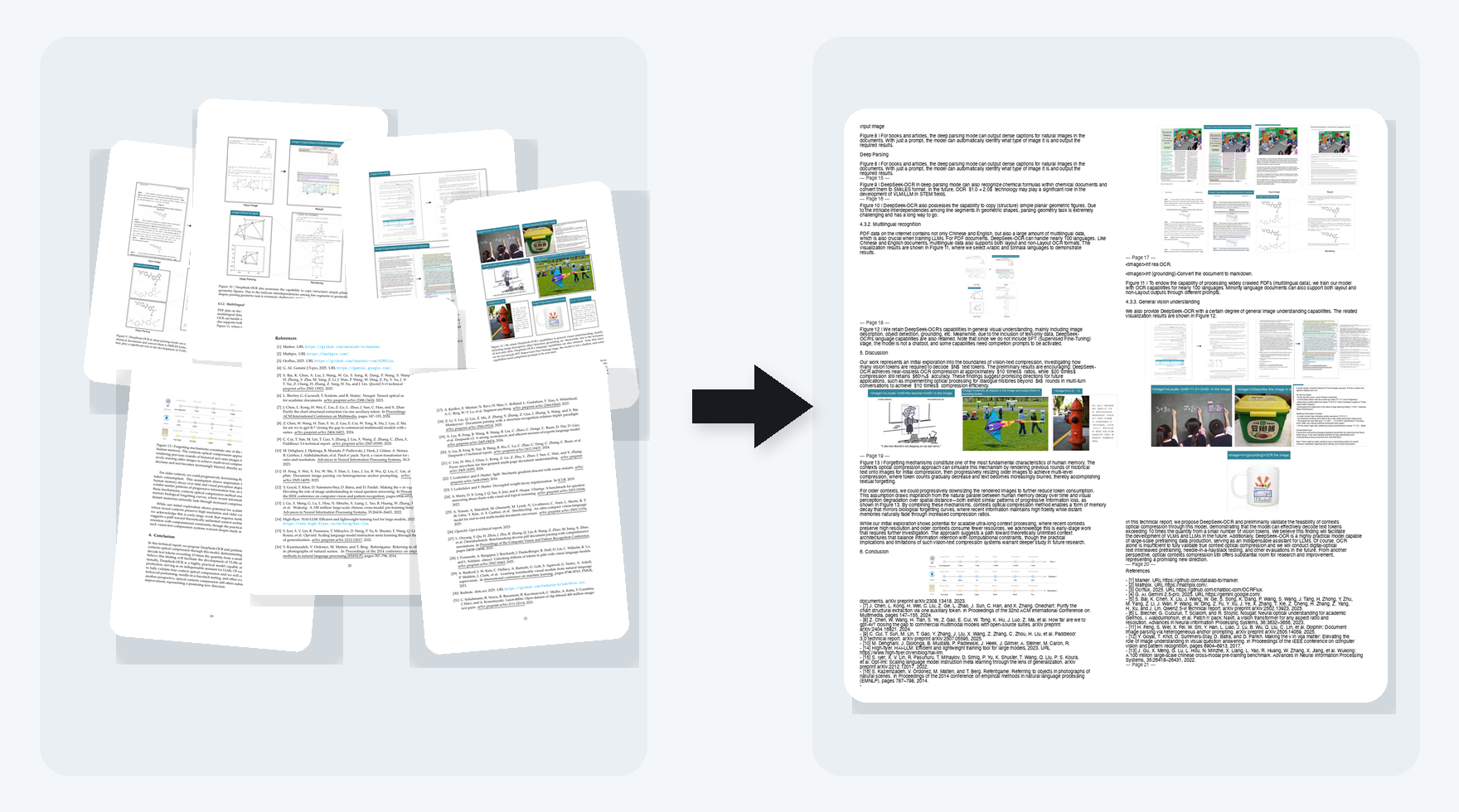
The image below shows a real local validation run on a public research paper with dense text, figures, charts, and page-level visual structure. The packed image on the right consolidates the seven source pages shown on the left.
Example local run facts from the generated manifest:
- source paper pages: 22
- previewed source page range: 15 to 21
- extracted images: 30
- packed output images: 6
- example packed image size:
986x1084 - example packed image file size:
536,697 bytes
This example shows the intended workflow: take a long, visually structured PDF and compress it into a smaller set of retrievable packed images that still preserve the visual structure of the source.
Install
python -m pip install optical-context-mcp
Install with the adaptive sizing runtime:
python -m pip install "optical-context-mcp[ml]"
Run without installing:
uvx optical-context-mcp
MISTRAL_API_KEYis required forcompress_pdf- packed images are always stored locally under the system temp directory
compress_pdfreturns up to30packed images inline by default- the adaptive sizing checkpoint is bundled with the package
- adaptive sizing activates automatically when
torchandtorchvisionare available - set
OPTICAL_CONTEXT_DISABLE_ADAPTIVE_SIZING=1to force the legacy fixed sizing - set
OPTICAL_CONTEXT_ADAPTIVE_MODEL_PATH=/path/to/model.ptto override the bundled checkpoint
For pinned shared setups:
uvx --from optical-context-mcp==0.1.5 optical-context-mcp
Run
Default transport is stdio:
optical-context-mcp
Claude Code
Register the server in a project:
claude mcp add -s project optical-context -- uvx optical-context-mcp
Typical use:
- call
compress_pdf - inspect the returned manifest
- fetch packed images with
get_packed_images
MCP Tools
compress_pdf: run OCR plus recomposition and create a stored jobget_job_manifest: load metadata for an existing jobget_packed_images: fetch one or more packed PNGs from an existing job
How It Works
flowchart LR
    A["Local PDF"] --> B["Mistral OCR"]
    B --> C["Page markdown + embedded images"]
    C --> D["Recomposition engine"]
    D --> E["Dense packed PNG images"]
    E --> F["Stored job artifacts"]
    F --> G["Agent fetches manifest or image batches over MCP"]
Why Packed Images Instead Of Just OCR Text
- section grouping
- table-like layout
- captions near figures
- visual adjacency between text and embedded graphics
For many vision-capable agents, that is a better intermediate format than a plain OCR dump.
Current Scope
- depends on Mistral OCR
- currently handles local file paths, not remote uploads
- stores artifacts in the local system temp directory by default
- optimized for compression and retrieval, not final polished markdown generation
- quality depends on OCR quality and the visual density of the source document
- adaptive sizing falls back safely to fixed medium image sizing when the ML runtime is absent
Roadmap
- make the OCR layer provider-agnostic so different OCR backends can be swapped behind the same MCP workflow
Feedback
Tried Optical Context in a document workflow? You can voluntarily share what worked and what got in the way using the feedback form. Include your package version, MCP client and a brief description of the document type. Do not attach private PDFs or API keys. Feedback is public on GitHub.
See the changelog for changes between published versions.
Development
uv venv --python /opt/homebrew/bin/python3.11 .venv
uv pip install --python .venv/bin/python -e ".[dev]"
.venv/bin/python -m pytest
Publishing
Keep pyproject.toml and both versions in server.json synchronized. Run the
Publish PyPI workflow on the reviewed release commit. It checks the wheel,
runs tests against the installed distribution, publishes to PyPI, then publishes
the same version to the MCP Registry. Both use GitHub OIDC; no local publishing
token is required. If only the registry job fails, rerun that failed job rather
than republishing the immutable PyPI version.
When a workflow correction requires a new run, select registry_only to retry
registry publication without uploading the existing PyPI version again.
Create the matching GitHub release from that same commit and attach the workflow's
python-distributions artifact.






