Netatmo Energy
MCP server for Netatmo thermostats and radiator valves: status, history, analytics, opt-in control.
Runs on your machine from its package; the steps are below.
What it does
- Reads
- Writes
- High impact
At most: creates or changes data: records, files, settings.
What it costs
FreeOdel charges nothing per call. The publisher may charge for its own service.
Runs locally over stdio
This server isn't hosted — your MCP client launches it from a package registry. Use one of the commands below, or drop the config into your client (e.g. Claude Desktop).
Run
npx -y netatmo-energy-mcp
MCP client config
{
  "mcpServers": {
    "netatmo-energy": {
      "command": "npx",
      "args": [
        "-y",
        "netatmo-energy-mcp"
      ]
    }
  }
}
Netatmo Energy MCP
English | Français



A Netatmo MCP server for Netatmo smart thermostats and smart radiator valves. It gives AI assistants structured access to your heating:
- room temperatures and setpoints
- heating demand and boiler activity
- temperature history
- deterministic heating analytics
- weekly heating schedules
- optional heating control: room setpoints, away / frost-guard mode and schedules, with every change confirmed by you
It runs on your machine and talks only to the official Netatmo Energy API. It is read-only by default: it can change your heating only if you enable write mode at login.
It works with any Model Context Protocol client that runs local servers, whatever the model:
- Claude: Claude Desktop, Claude Code
- GPT / OpenAI: Codex CLI, VS Code + GitHub Copilot, Cursor
- Gemini: Gemini CLI, VS Code + GitHub Copilot
- Mistral and others through multi-model clients
- Local LLMs (Llama, Qwen, Mistral, DeepSeek, …): LM Studio, and Ollama via Goose, Continue, Cline, AnythingLLM, LibreChat or Open WebUI
It also works in Windsurf / Devin Desktop, Zed, Roo Code, Kilo Code, JetBrains AI Assistant, Kiro and Warp. See all compatible clients.
ChatGPT and Claude on the web and on mobile only accept remote servers. For them, deploy the optional remote server to your own Cloudflare account (free plan).
Status: early release (0.3.1). The Netatmo API integration has been validated on a real installation; feedback and device reports are welcome.
Why this project?
A Netatmo heating system records useful data:
- the temperature and setpoint of every room
- what each radiator valve is asking for
- when the boiler is asked to heat
That data is locked in the Netatmo app, where you can look at it but not ask questions about it.
This project is a small bridge between the Netatmo Energy API and any MCP-compatible AI assistant. Ask in plain language: "Which room was coldest last night?" The assistant calls a precise tool and answers from your data. It doesn't guess. With write mode enabled, you can also say "Set the bedroom to 19 °C until 7 am", then confirm the change.
The few other Netatmo MCP servers target Netatmo weather stations. This one is built for thermostats, radiator valves and heating history. See docs/research.md for the comparison.
Features
- Discovery: homes, rooms, thermostats, smart radiator valves, relays and gateways.
- Current status
- Per room: temperature, setpoint, setpoint mode and heating demand.
- Boiler on/off and open-window detection.
- Device health: battery, radio/Wi-Fi signal, reachability.
- History
- Room temperature and setpoint history at 30 min to 1 month resolution.
- Boiler activity history (installations with a Netatmo thermostat).
- Long ranges are fetched in chunks and summarised, so answers stay small.
- Gaps are reported, never filled in.
- Heating analytics. These are deterministic calculations; no AI
model computes the numbers.
- Per-room statistics.
- Time below, within or above the setpoint.
- Largest temperature drop and cool-down rates.
- Room rankings.
- Rule-based detection of unusual readings, each with severity and confidence.
- Weekly schedules: zones (Comfort, Night, Eco…), room setpoints per zone and the timetable, as readable days and times.
- Heating control (opt-in write mode)
- Temporary room setpoints that always end (3 h by default, at most 24 h), or a return to the schedule.
- Home mode: schedule, away or frost guard, optionally until a date.
- Switch, create, edit and rename weekly schedules.
- Every change is previewed and needs your explicit confirmation. Temperatures are limited to 7–28 °C by default.
- 15 read-only MCP tools, 6 heating-control tools, 4 resources and 4 prompts (daily report, anomaly review, room comparison, heating pattern review).
- Simple setup
- OAuth2 browser login with a single
logincommand. - Tokens stored securely and refreshed automatically.
doctorchecks your setup.
- OAuth2 browser login with a single
Quick start
You need Node.js 22.19 or later and a Netatmo account with Energy devices.
1. Create a free Netatmo developer app
- At https://dev.netatmo.com/apps, choose Create.
- Set the redirect URI to
http://localhost:8977/callback. - Keep the client ID and client secret for step 2.
Step-by-step guide: docs/authentication.md.
2. Log in
npx -y netatmo-energy-mcp login
login asks for the client ID and secret, then opens your browser so you
can sign in on netatmo.com and approve read-only access. To let the
assistant change your heating, run login --write instead (see
write mode). Then check the setup:
npx -y netatmo-energy-mcp doctor
Running from source instead: clone the repository, run
pnpm install && pnpm build, then usenode /path/to/netatmo-energy-mcp/dist/index.jsin place ofnpx -y netatmo-energy-mcp.
3. Connect your AI assistant
Most clients use the same mcpServers JSON block. This works for Claude
Desktop, Cursor, Windsurf / Devin Desktop, Cline, Roo Code, Kiro,
LM Studio, JetBrains AI Assistant, AnythingLLM, Warp and Gemini CLI:
{
  "mcpServers": {
    "netatmo-energy": {
      "command": "npx",
      "args": ["-y", "netatmo-energy-mcp"]
    }
  }
}
Command-line clients:
# Claude Code
claude mcp add --transport stdio --scope user netatmo-energy -- npx -y netatmo-energy-mcp
# OpenAI Codex CLI
codex mcp add netatmo-energy -- npx -y netatmo-energy-mcp
# GitHub Copilot CLI
copilot mcp add netatmo-energy -- npx -y netatmo-energy-mcp
VS Code + GitHub Copilot. Add this to .vscode/mcp.json; note the
servers key:
{
  "servers": {
    "netatmo-energy": { "type": "stdio", "command": "npx", "args": ["-y", "netatmo-energy-mcp"] }
  }
}
No secrets go in any of these files: login stored them in your user
configuration folder. File locations for each client, plus Zed,
Continue, Goose, LibreChat, Kilo Code, Msty and Open WebUI, are in
examples/.
4. Ask
"What's the temperature in each room right now?"
Example questions
These are the kinds of questions the tools are built for. The assistant chooses the tools; the table shows which ones answer each question.
| Question | Tools used |
|---|---|
| "What's the temperature in my bedroom, and is it at its target?" | netatmo_get_room_status |
| "Is the boiler running right now? Which rooms are asking for heat?" | netatmo_get_heating_status |
| "How long did my boiler run yesterday?" | netatmo_get_boiler_history |
| "Show the living room temperature for the last 7 days." | netatmo_get_temperature_history |
| "Compare my rooms over the last week. Which one cools down fastest?" | netatmo_compare_rooms |
| "Did my heating behave unusually last night?" | netatmo_detect_anomalies |
| "Give me yesterday's heating report." | prompt heating_daily_report → netatmo_get_heating_summary |
| "Are any valve batteries low?" | netatmo_get_device_status |
| "What does my weekly schedule look like?" | netatmo_get_schedules |
| Write mode: "Heat the office to 21 °C for 2 hours." | netatmo_set_room_setpoint |
| Write mode: "I'm away until Sunday evening." | netatmo_set_home_mode |
| Write mode: "Lower the night zone to 17 °C in every bedroom." | netatmo_get_schedules → netatmo_update_schedule |
Boiler "run time" is the time the thermostat requested heat. Netatmo does not measure gas or energy consumption, so this project never reports it.
Available MCP tools
The read-only tools need only the read_thermostat OAuth scope. The full
reference, with arguments and outputs, is generated from the server
itself: docs/tools.md.
| Tool | Description |
|---|---|
netatmo_list_homes | Homes with Energy devices, room/device counts |
netatmo_get_home | Home details: heating mode, schedules, rooms, devices |
netatmo_list_rooms | Rooms with IDs, types and devices |
netatmo_list_devices | Thermostats, valves, relays: model, room, gateway |
netatmo_get_home_status | Current status of every room, boiler state, alerts |
netatmo_get_room_status | Current temperature and setpoint of one room |
netatmo_get_heating_status | Boiler on/off, rooms requesting heat |
netatmo_get_device_status | Battery, signal, reachability, firmware |
netatmo_get_temperature_history | Room temperature history with statistics and gaps |
netatmo_get_setpoint_history | Room setpoint history and setpoint periods |
netatmo_get_boiler_history | Boiler heat-demand time per hour/day/week |
netatmo_get_heating_summary | Per-room comfort metrics plus boiler time over a period |
netatmo_compare_rooms | Room metrics and rankings |
netatmo_detect_anomalies | Unusual readings with severity, confidence and evidence |
netatmo_get_schedules | Weekly schedules: zones, room setpoints, timetable |
Write mode only. Each change needs your confirmation.
| Tool | Description |
|---|---|
netatmo_set_room_setpoint | Temporary room setpoint or boost, or back to the schedule |
netatmo_set_home_mode | Schedule, away or frost-guard mode, optionally until a date |
netatmo_switch_schedule | Make another weekly schedule active |
netatmo_create_schedule | New schedule copied from an existing one, with changes |
netatmo_update_schedule | Room setpoints per zone, away/frost temperatures, timetable |
netatmo_rename_schedule | Rename a schedule (experimental: undocumented endpoint) |
Resources: netatmo://homes and netatmo://homes/{homeId}/rooms,
…/devices and …/status.
Write mode (heating control)
Write mode is off by default. To enable it, log in again with:
npx -y netatmo-energy-mcp login --write
This also requests the write_thermostat OAuth scope. The heating control
tools appear after you restart your MCP client.
Safeguards:
- You confirm every change. Clients that support MCP elicitation ask
you directly. With other clients, the first call only returns a preview
and a one-time token. The assistant must show you the preview and get
your agreement before calling again. Nothing is sent to Netatmo before
that. This second flow relies on the assistant following its
instructions; set
NETATMO_MCP_CONFIRM=elicitationto allow changes only through a confirmation prompt shown by your client. If your client cancels every change without showing anything, setNETATMO_MCP_CONFIRM=token. - Limits. Temperatures must stay between 7 and 28 °C. Manual setpoints
end after 3 h by default and 24 h at most. Change these with
NETATMO_MCP_MIN_TEMP,NETATMO_MCP_MAX_TEMPandNETATMO_MCP_MAX_SETPOINT_HOURS. - Kill switch.
NETATMO_MCP_WRITE=0forces read-only mode, even with a write-enabled login. - Audit log. Every applied or failed change is appended to
changes.login your configuration folder. - No automatic retries. A failed write is never resent blindly.
Netatmo has no API to delete a schedule: schedules created here can only be deleted in the Netatmo app. Renaming a schedule and choosing a schedule with home mode "schedule" use undocumented Netatmo parameters, so they are marked experimental. Details: docs/configuration.md.
Web and mobile (remote server)
The local server is the simplest and most private option. To use your heating from ChatGPT or Claude on the web and on your phone, deploy the same tools as a remote server on your own Cloudflare account (free plan): remote/README.md.
- Same tools and safeguards. Read-only by default; write mode with previews, confirmations and the same limits.
- Your secrets stay in your account. Your Netatmo app credentials and tokens are encrypted at rest in your Cloudflare account.
- Assistants sign in with OAuth. You approve each one on a consent page with your owner password, and you can revoke it.
- One command to link your home:
npx netatmo-energy-mcp remote setup <your-worker-url>. - Optional: let family or friends connect their own Netatmo account
with an invite code (
ONBOARDING=invite). Each account only sees its own home.
The sign-in flow was validated with ChatGPT (desktop and mobile) and Claude (web, desktop and mobile). Design: ADR-0013, ADR-0014.
Supported devices
| Device | Netatmo type | Status |
|---|---|---|
| Smart Thermostat | NATherm1 | Tested. API validated on a live installation (2026-10-08) |
| Smart Radiator Valve | NRV | Tested. Same installation (6 valves) |
| Thermostat Relay | NAPlug | Tested. Same installation |
| OpenTherm Modulating Thermostat / Gateway | OTM / OTH | Expected to work, untested |
| BTicino Smarther with Netatmo | BNS | Not supported in v0.1 (probably needs the read_smarther scope) |
Run netatmo-energy-mcp probe and open a
device compatibility report
to help extend this table. The probe output is sanitized.
Compatible AI assistants and MCP clients
This is a standard local (stdio) MCP server, so it is not tied to one AI vendor. Any MCP client that can start local servers can use it, with whatever model that client runs.
| Client | Models |
|---|---|
| Claude Desktop, Claude Code | Claude |
| OpenAI Codex CLI | OpenAI GPT models |
| Gemini CLI | Google Gemini |
| VS Code + GitHub Copilot (agent mode), GitHub Copilot CLI | GPT, Claude, Gemini and other Copilot models |
| Cursor, Windsurf / Devin Desktop, Zed, Warp, Kiro, JetBrains AI Assistant | multiple hosted models |
| Cline, Roo Code, Kilo Code, Continue | multiple, including local models (Ollama, LM Studio) |
| LM Studio | local open models: Llama, Qwen, Mistral, DeepSeek, … |
| Goose, AnythingLLM, LibreChat, Msty Studio | many providers, including Ollama |
| Open WebUI | Ollama and others, through the mcpo proxy |
Configuration for each client, checked against official documentation: examples/.
Web and mobile assistants (ChatGPT apps and connectors, Claude.ai and the Claude and ChatGPT mobile apps) only accept remote MCP servers. Use the remote server for them. Mistral Le Chat has not been tested.
Testing. The server is tested with the official MCP SDK client and the MCP Inspector. Tool-calling quality with small local models varies by model. Please report any client-specific problem.
Authentication
This project uses Netatmo's OAuth2 authorization code flow. You sign in on netatmo.com; your Netatmo password is never seen by this tool.
Scope. By default only read_thermostat is requested, so a leaked
token couldn't change your heating. login --write also requests
write_thermostat.
Your own app. Each user registers a free Netatmo developer app. The client secret cannot be shipped in open-source code.
Refresh. Access tokens are refreshed automatically. Several MCP clients running at once coordinate through a lock file, so they don't invalidate each other's tokens.
Details: docs/authentication.md.
Privacy & security
What leaves your machine. Only HTTPS requests to api.netatmo.com.
In read-only mode they only reach 4 read endpoints: the client refuses
any write before it touches the network, and tests enforce this. In
write mode, a change is sent only after you confirm it.
What stays local.
- Credentials live in
credentials.jsonin your user configuration folder, readable only by your account (0600on macOS/Linux; a restricted ACL on Windows). - No telemetry, no analytics and no third-party services.
- The server talks to your MCP client over stdio and opens no network port.
Your AI provider. Data that tools return is read by the assistant you use, so it is processed by that model provider.
No account data or location. Your email and home coordinates are never returned.
Read more:
Architecture
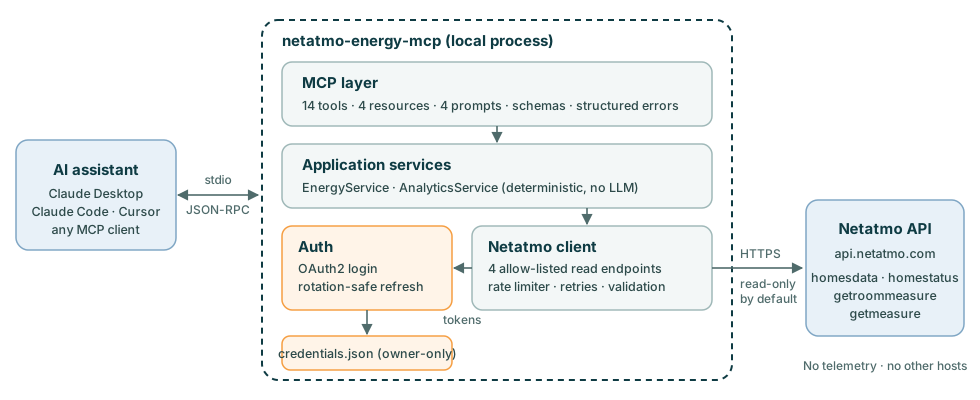
The Netatmo client and the analytics are independent of MCP. Design decisions are recorded as ADRs, and docs/architecture.md describes the layers.
Limitations
These come from the Netatmo Energy API; details are in docs/api-capabilities.md.
- No energy or gas consumption. Boiler activity is heat-demand time. With aggregated data, the number of burner cycles cannot be known.
- No history of valve heating demand. It is only available as a current value. A future opt-in collector may record it (ADR-0011).
- No outdoor temperature in the Energy API. Weather context is planned for v0.4.
- History resolution is 30 minutes at best. Each request returns at most 1024 values, so long ranges use coarser scales.
- The documentation doesn't match the API in places. Live data shows that boiler measures are in seconds, not the documented minutes. This project converts them.
- Rate limits. Netatmo limits requests per user and per app. The server throttles itself and caches topology and current status.
Roadmap
| Version | Focus |
|---|---|
| v0.1 | Read-only MCP server |
| v0.2 | Schedules, opt-in heating control |
| v0.3 | Remote server for web and mobile (current) |
| v0.3.x | Richer diagnostics |
| v0.4 | Weather context (Open-Meteo) |
| v0.5–v0.7 | Thermal modelling, predictions, digital twin |
| v1.0 | A stable interface |
Write mode will never be enabled by default. See docs/roadmap.md.
Contributing
Bug reports, device compatibility reports and pull requests are welcome. See CONTRIBUTING.md to set up the project, which runs on mocked API responses: no Netatmo account needed. Please follow the Code of Conduct.
License
Disclaimer
This is an independent open-source project. It is not affiliated with, endorsed by or sponsored by Netatmo or Legrand. "Netatmo" is a trademark of its owner and is used here only to describe compatibility. Use at your own risk; heating safety must never depend on an AI assistant.