Listed from the MCP registry; nobody on Odel publishes it.

CP Memory
Local-first, governable long-term memory for AI coding agents
Runs on your machine from its package; the steps are below.
What it does
- Reads
- Writes
- High impact
At most: creates or changes data: records, files, settings.
What it costs
FreeOdel charges nothing per call. The publisher may charge for its own service.
Runs locally over stdio
This server isn't hosted — your MCP client launches it from a package registry. Use one of the commands below, or drop the config into your client (e.g. Claude Desktop).
Run
uvx cp-memory-mcp
MCP client config
{
  "mcpServers": {
    "cp-memory": {
      "command": "uvx",
      "args": [
        "cp-memory-mcp"
      ]
    }
  }
}

CP Memory
Local-first, governable memory for AI coding agents.
Remember project rules across sessions, recall only what matters, and correct bad memory without hiding history.
简体中文 | English




Why CP Memory
For reproducible package, protocol and recall checks, see verification evidence and limits.
- Local first: memory stays in
~/.cp-memory/memory.dbby default. - Governable: inspect, review, correct, scope, or retire memory instead of silently overwriting it.
- MCP-ready, Codex-enhanced: the stdio MCP server is the portable baseline; the Codex plugin adds Skills and lifecycle Hooks.
Quick Start — Portable MCP
With Python 3.10+ and uv installed, any stdio MCP client can start CP Memory with:
uvx cp-memory-mcp
The public package passed a clean-cache MCP handshake with all 40 tools and a write/search/correct flow. See MCP client setup for Codex, Claude Code, Cursor, VS Code, and Gemini CLI examples.
For the enhanced Codex integration with lifecycle Hooks and Skills, install the plugin:
codex plugin marketplace add CJhuochai/cp-memory
codex plugin add cp-memory@cp-memory
Restart Codex after installation and approve the lifecycle Hooks if prompted.
See The Result In 30 Seconds
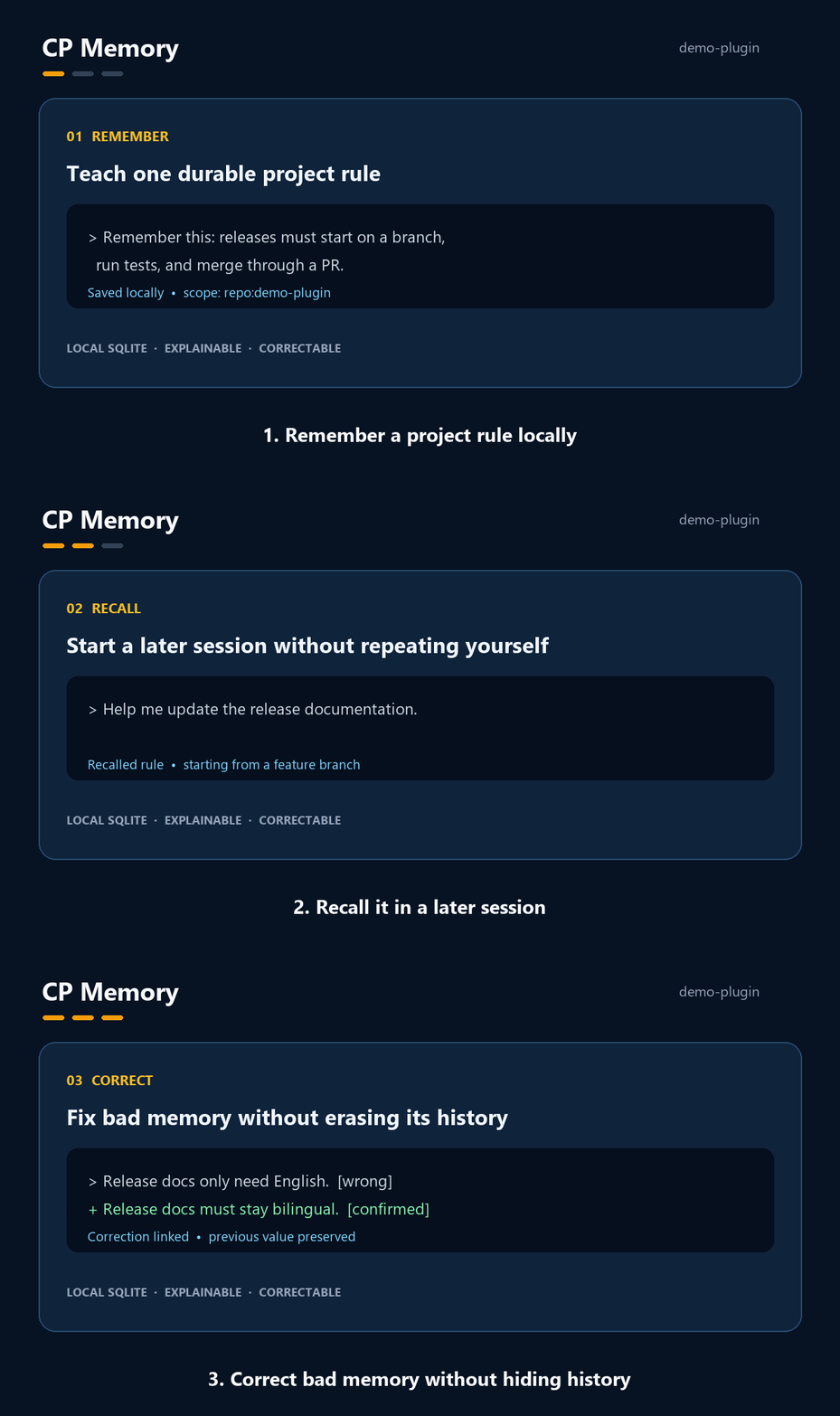
- Tell Codex a project rule, such as: “Releases must start on a branch, run tests, and merge through a PR.”
- In a later session, CP Memory restores the relevant rule from the local primary store so Codex can continue following it.
- If the rule is wrong, preserve correction history and mark the old record wrong, stale, or scoped instead of silently overwriting it.
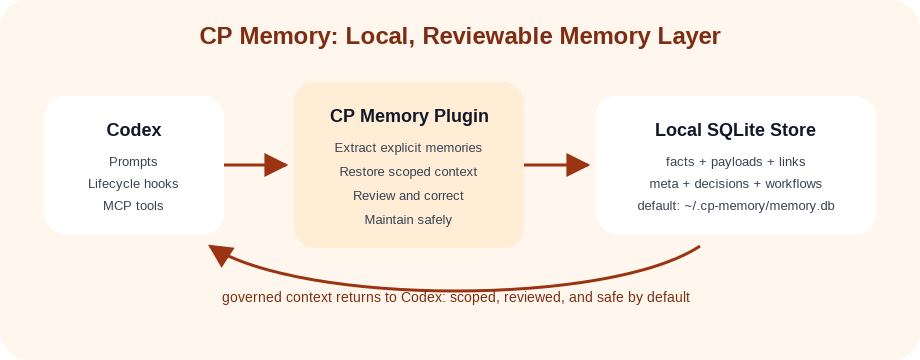
CP Memory is a local-first memory plugin for Codex. It stores facts, preferences, ongoing work, episodes, decisions, and conversation checkpoints in a local SQLite database, then restores relevant context through MCP tools and lifecycle hooks.
The goal is not to remember as much as possible. The goal is memory that remains trustworthy after long-term use: explainable, reviewable, correctable, and governable.
Current Capabilities
- Context restore: restores relevant local-primary memory on startup and eligible prompts.
- Automatic extraction: conservatively creates long-term personal memory candidates from explicit statements.
- Project scope: prioritizes current-project memories with
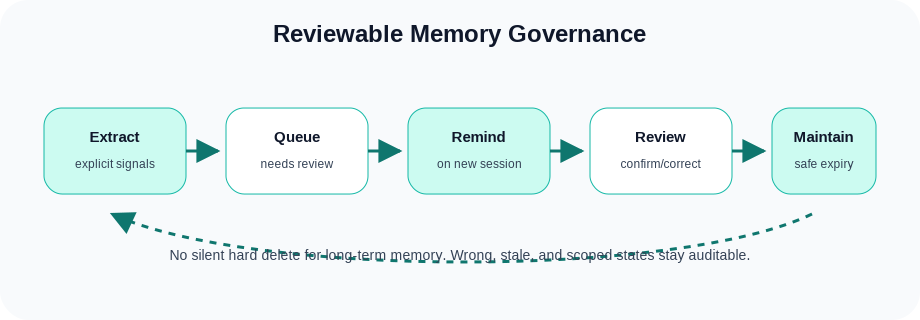
repo:,project:, andworkspace:scopes. - Reviewable governance: supports review inbox, review digests, conflict suggestions, correction states, and startup reminders.
- Safe maintenance: weekly maintenance runs health checks, governance preflight, and low-risk expiry cleanup only.
30-Second Example
You tell Codex:
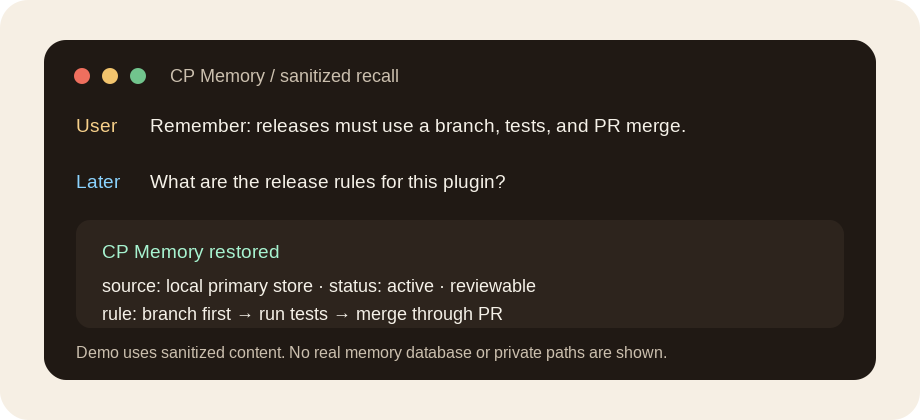
Remember this: releases for this project must start on a branch, run tests, and merge through a PR.
In a later session, you ask:
What are the release rules for this plugin?
CP Memory restores the relevant memory from the local primary store first, and Codex follows that rule. If the memory is wrong, you can mark it wrong, mark it stale, or write a corrected version.
See more anonymized examples in docs/examples.md.
For a GIF, short video, or launch post, use the sanitized 30-second demo script.
Install
For any stdio MCP client, use the verified public package:
uvx cp-memory-mcp
Client-specific commands and JSON files are in docs/mcp-clients.md.
For Windows, the recommended path is GitHub Marketplace installation:
codex plugin marketplace add CJhuochai/cp-memory
codex plugin add cp-memory@cp-memory
Restart Codex after installation. If Codex asks you to trust hooks, approve the CP Memory lifecycle hooks in the hooks view.
For macOS/Linux, use the source installer. It creates a private Python runtime for the plugin and installs the MCP dependency:
git clone https://github.com/CJhuochai/cp-memory.git
cd cp-memory
sh ./install.sh
Restart Codex when it finishes. Do not treat GitHub Marketplace installation on macOS/Linux as an equivalently verified path: Marketplace does not run install.sh, so it does not create that private runtime.
Platform Support
| Platform | Recommended installation | Verified coverage |
|---|---|---|
| Windows | GitHub Marketplace; install.ps1 for local development | Unit tests, isolated installation validation, and GitHub Actions CI passed |
| macOS | Source installer: sh ./install.sh | GitHub Actions macOS CI passed unit tests and isolated install/MCP startup validation |
| Linux | Source installer: sh ./install.sh | GitHub Actions Ubuntu CI passed unit tests and isolated install/MCP startup validation |
Manual smoke testing of real Codex desktop Hook injection on macOS/Linux is still pending access to physical devices. This release is accepted through three-platform CI; the boundary does not affect the installer and MCP-startup checks already covered, but it is not a substitute for full desktop manual acceptance.
Safety
- Do not commit your real
memory.db, logs, private summaries, or environment files. - Automatic extraction is intentionally conservative. Generated memories can be reviewed, corrected, marked stale, or marked wrong.
- When memories need review, the current version injects a reminder into assistant context. It is not a user-facing popup or visible review panel, and it does not auto-delete memory or auto-resolve conflicts.
- Weekly maintenance runs health checks, governance preflight, and low-risk expiry cleanup only; long-term personal memories, tasks, and decisions are protected by default.
- Examples and screenshots use sanitized content, so you do not need to expose your real memory database.
Comparison
If you have seen other memory projects, start with docs/comparison.md. CP Memory's main difference is Codex lifecycle integration plus memory governance, not just storage and search.
Roadmap
See docs/roadmap.md for future directions. The roadmap prioritizes local-first behavior, explainability, correctability, and privacy safety.
See CHANGELOG.md for version history.
Local Development
Windows users normally do not need to run install.ps1. It is mainly for local development, refreshing the personal marketplace cache, and migrating old global hook wiring from earlier versions.
For local macOS/Linux development, run:
sh ./install.sh
sh ./scripts/test-install.sh
Python 3 with python3 on PATH is required. The installer creates a private virtual environment in the plugin directory and installs runtime dependencies; this is the currently verified installation path for macOS/Linux.
Run the test suite:
python -m unittest discover -s tests -p test_cp_memory.py
Validate the installer in an isolated temporary profile without touching your real Codex configuration:
powershell -ExecutionPolicy Bypass -File .\scripts\test-install.ps1
License
MIT







