Listed from the MCP registry; nobody on Odel publishes it.

mssqlcl — SQL Server MCP Server & CLI
SQL Server MCP server and CLI with zero-config VS Code and Antigravity IDE connection discovery.
Runs on your machine from its package; the steps are below.
What it does
- Reads
- Writes
- High impact
At most: moves money, runs code or commands, deletes data, or sends messages for you.
What it costs
FreeOdel charges nothing per call. The publisher may charge for its own service.
Runs locally over stdio
This server isn't hosted — your MCP client launches it from a package registry. Use one of the commands below, or drop the config into your client (e.g. Claude Desktop).
Published to NuGet as `mssqlcl` — run it with your .NET MCP host.

mssqlcl
SQL Server MCP Server & CLI with zero-config connection discovery for VS Code and Antigravity IDE.





Features • Prerequisites • Installation • MCP Setup • Tools (11) • CLI • Security
Configure your SQL Server connections once in VS Code, Antigravity IDE (ms-mssql.mssql), or via mssqlcl conn save, and expose them safely to any MCP-compatible AI client (Antigravity, Claude Desktop, Claude Code, Cursor, etc.) over stdio.
flowchart LR
Client["AI Client<br/>(Antigravity / VS Code / Cursor / Claude)"] <-->|"stdio<br/>JSON-RPC 2.0"| Server["mssqlcl --mcp<br/>(Self-contained .NET 10)"]
Server -->|"Zero-config discovery"| IDE["VS Code / Antigravity IDE<br/>(ms-mssql.mssql + SecretStorage)"]
Server -->|"Fallback / Override"| Vault["Local DPAPI Vault<br/>(%USERPROFILE%\.mssqlcl)"]
Server -->|"Read-only guard<br/>& T-SQL"| SQL[("SQL Server /<br/>Azure SQL")]
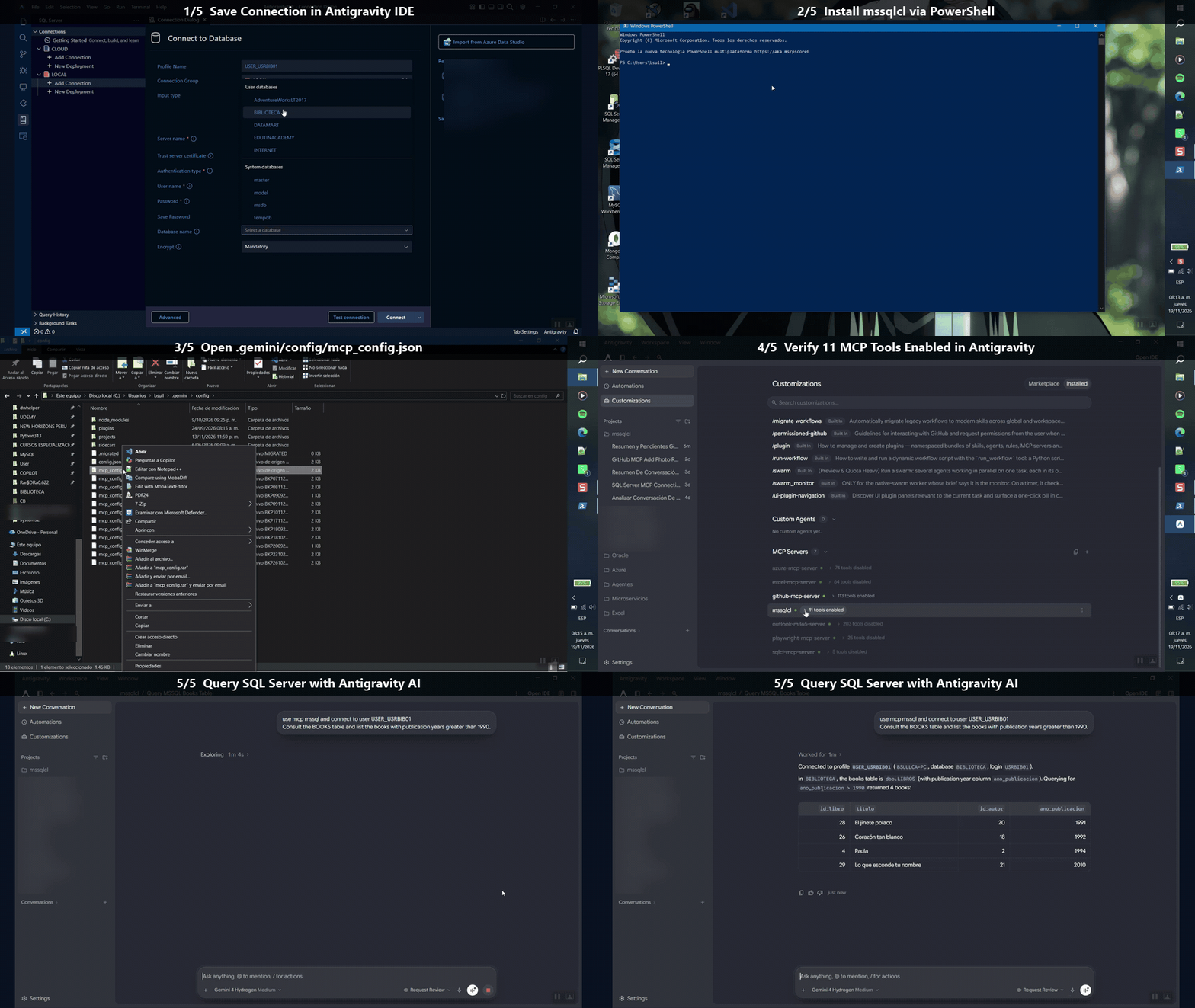
🎥 Quick Demo — End-to-End in Antigravity
✨ Features
| Capability | What it gives you |
|---|---|
| Zero-Config IDE Discovery | Automatically reads mssql.connections and mssql.connectionGroups (JSONC) from Antigravity IDE, VS Code, and %USERPROFILE%\.mssqlcl\connections.json. |
| Automatic Credential Resolution | Supports Windows Auth (Integrated), SQL Login (SqlLogin) via Electron SecretStorage (Local State DPAPI + state.vscdb AES-256-GCM) or local DPAPI vault, and Microsoft Entra ID / MFA (AzureMFA). |
| 20 Multi-Connection MCP Tools | Full server discovery, connection management, schema/object inspection, Query Store diagnostics, and query execution keyed by connectionId. |
| Token-Efficient Output | Compact CSV output by default (optional json) with --max-rows capping (default 500) to minimize LLM token usage. |
| Read-Only Lexical Guard | --readonly enabled by default: skips comments, string literals, and quoted identifiers while blocking DML/DDL/execution keywords (INSERT, UPDATE, DELETE, MERGE, DROP, ALTER, CREATE, TRUNCATE, EXEC, SELECT ... INTO, etc.). |
Clean stdio & Local Audit | Diagnostics go exclusively to stderr. Queries are logged locally to JSONL at %USERPROFILE%\.mssqlcl\audit.log without touching target databases or logging secrets. |
📋 Prerequisites
- Operating System: Windows 10 / 11 (
x64) — required for Windows DPAPI and ElectronSecretStoragedecryption. - Connection Source (choose one):
- Recommended (Zero-Config): VS Code or Antigravity IDE with the SQL Server (
ms-mssql.mssql) extension and your connections already saved. - Standalone (No IDE required): Manage profiles directly via
mssqlcl conn save(stored in%USERPROFILE%\.mssqlcl\encrypted with Windows DPAPI) orMSSQLCL_PWD_<PROFILE>environment variables.
- Recommended (Zero-Config): VS Code or Antigravity IDE with the SQL Server (
- Runtime:
- End users (Release ZIP / Installer): No .NET installation required (self-contained binary).
- Building from source: .NET 10 SDK.
Tip
If you already use the ms-mssql.mssql extension in VS Code or Antigravity IDE, you don't need to re-enter passwords or maintain separate connection strings—mssqlcl discovers them automatically.
📦 Installation
Option 1: One-Command Online Installer (PowerShell, no .NET SDK required)
irm https://raw.githubusercontent.com/codevswia/mssqlcl/main/scripts/install.ps1 | iex
Downloads the latest release ZIP to %LOCALAPPDATA%\Programs\mssqlcl and adds it to your User PATH (no Administrator privileges required).
Option 2: Portable ZIP (Offline — Zero system changes or User PATH)
- Download
mssqlcl-vX.Y.Z-win-x64.zipfrom GitHub Releases. - Extract it anywhere (for example
C:\tools\mssqlcl\). - Choose how you want to run it:
- Portable (zero system changes): Point your MCP config directly to
C:\tools\mssqlcl\mssqlcl.exe(noPATHchanges). - Install to User
PATH(no Admin required): Double-clickinstall.cmd(or runpowershell -ExecutionPolicy Bypass -File .\install-local.ps1) to copymssqlcl.exeto%LOCALAPPDATA%\Programs\mssqlcland add it to your UserPATH. Restart your IDE afterwards if it was already open. - Offline via main installer:
.\scripts\install.ps1 -LocalZip path\to\mssqlcl-vX.Y.Z-win-x64.zip
- Portable (zero system changes): Point your MCP config directly to
Option 3: Build & Install from Source (requires .NET 10 SDK)
# Build & run unit tests
dotnet test

# Build and install mssqlcl.exe to %LOCALAPPDATA%\Programs\mssqlcl and add to User PATH
.\scripts\install.ps1 -FromSource

# Or build a standalone self-contained binary from source
.\scripts\install.ps1 -FromSource -SelfContained
🔌 MCP Client Configuration
Add mssqlcl to your MCP client configuration (such as Antigravity IDE mcp_config.json, Claude Desktop claude_desktop_config.json, or Cursor):
{
  "mcpServers": {
    "mssqlcl": {
      "command": "mssqlcl",
      "args": ["--mcp"]
    }
  }
}
Note
If you installed mssqlcl in portable mode without adding it to PATH, replace "mssqlcl" in "command" with the full path (e.g. "C:\\tools\\mssqlcl\\mssqlcl.exe").
Optional MCP Flags
| Flag | Default | Description |
|---|---|---|
--readonly | enabled | Blocks DML/DDL/EXEC statements via lexical T-SQL inspection |
--readwrite | off | Allows write/DDL statements in mssql_run_query |
--max-rows <N> | 500 | Caps returned rows per result set |
--timeout <sec> | 30 | Default SQL command timeout in seconds |
--source <mode> | auto | auto, antigravity, vscode, or local |
--no-audit | off | Disables writing to %USERPROFILE%\.mssqlcl\audit.log |
🎬 Video Walkthroughs
🚀 Antigravity (IDE + App) — Full Walkthroughs
▶️ Guide 1: SQL Login — Save connection, install
mssqlclMCP & query SQL Server (3m 41s)https://github.com/user-attachments/assets/b5a99cef-7ed1-4fe2-acab-0bd34b7e16ae
▶️ Guide 2: Microsoft Entra ID / MFA — Save Azure SQL MFA connection, install MCP & query with AI (3m 38s)
https://github.com/user-attachments/assets/1ff4a37a-32d5-432e-9a07-061de0f1503d
💻 VS Code — Full Walkthroughs (Coming Soon)
Walkthroughs for VS Code (
ms-mssql.mssql) coming soon.
🛠️ MCP Tools Reference
mssqlcl exposes 20 database tools to your AI assistant, supporting multiple simultaneous connections via connectionId:
| Category | Tool | Description |
|---|---|---|
| Discovery | mssql_list_servers | Lists discovered SQL Server profiles from Antigravity IDE, VS Code, and local vault |
| Connection | mssql_connect | Opens a connection to a profile and returns a connectionId |
| Connection | mssql_disconnect | Closes an active connectionId session |
| Connection | mssql_get_connection_details | Returns active connection metadata (server, database, auth type, state) |
| Connection | mssql_change_database | Switches the active database context (USE <db>) for a connectionId |
| Schema | mssql_list_databases | Lists databases on the connected SQL Server instance |
| Schema | mssql_list_schemas | Lists schemas in the current database |
| Schema | mssql_list_tables | Lists tables (with schema and metadata) |
| Schema | mssql_list_views | Lists views in the current database |
| Schema | mssql_list_functions | Lists scalar/table-valued functions |
| Query | mssql_run_query | Executes T-SQL (protected by --readonly guard by default, CSV/JSON output) |
| Query Store | mssql_query_store_status | Checks Query Store state, storage usage, retention, and capture mode |
| Query Store | mssql_query_store_top_queries | Top N queries ranked by duration, CPU, logical reads, writes, memory, or executions |
| Query Store | mssql_query_store_query_details | SQL text, compile metadata, and aggregated runtime metrics for a queryId |
| Query Store | mssql_query_store_history | Time-bucketed execution history for a queryId |
| Query Store | mssql_query_store_wait_stats | Top Query Store wait categories (SQL Server 2017+ / Azure SQL) |
| Query Store | mssql_query_store_plans | Execution plans, metrics, forced status, and force failures for a queryId |
| Query Store | mssql_query_store_analyze_query | Consolidated diagnostic (details + plans + waits + multi-plan/failure flags) |
| Query Store | mssql_query_store_verify_forced_plan | Verifies whether a forced plan is active and free of force failures |
| Query Store | mssql_query_store_force_plan | Forces or unforces a plan (--readwrite required) |
💻 CLI Usage
Use the CLI directly to verify your environment, inspect discovered IDE profiles, or manage local DPAPI credentials:
# Verify environment, IDE discovery paths, and local vault health
mssqlcl doctor

# List discovered profiles and credential resolution status
mssqlcl conn list

# Test live connectivity for a profile (prefix with antigravity: or vscode: if duplicated)
mssqlcl conn test "MyServer\MyDatabase"
mssqlcl conn test "vscode:MyServer\MyDatabase"

# Create a local profile or store a DPAPI-protected password override
mssqlcl conn save --profile "LocalDev" --server "localhost\SQLEXPRESS" --database "AppDb" --user "sa" --savepwd
mssqlcl conn save --profile "ExistingIdeProfile" --savepwd

# Delete a local profile
mssqlcl conn delete "LocalDev"
🔒 Security
Important
Only pass --readwrite against databases where write or DDL operations are explicitly intended.
- Zero plaintext secret leaks:
mssqlclnever writes decrypted passwords to disk,stdout,stderr, oraudit.log. - Safe IDE vault reading:
state.vscdbis copied to a temporary file in read-only mode before querying and deleted immediately afterwards, so it works safely even while VS Code or Antigravity IDE is running. - Zero target database footprint: Audit logs are stored strictly locally at
%USERPROFILE%\.mssqlcl\audit.log.
👤 Author & Organization
- Author: Brayan Raul Sullca Ccarampa
- Organization: codevswia — Human Ideas. AI-Powered Development.
- Repository: github.com/codevswia/mssqlcl
📄 License
Distributed under the MIT License — see LICENSE for details.






