Listed from the MCP registry; nobody on Odel publishes it.
Is this yours? Claim it
CompletionKit
Prompt evals over MCP: run a prompt on your dataset, score each output 1-5 with an LLM judge.
One address for any MCP client. No sign-in needed on this server.

What it does
20 read25 act5 other
Grouped by tool name. At most: moves money, runs code or commands, deletes data, or sends messages for you.
What it costs
FreeOdel charges nothing per call. The publisher may charge for its own service.
Tools
50 · grouped by tool name · checked 16 Nov 2026Read · 20Look things up
- prompts_list
- prompts_get
- prompts_suggest_improvement
- runs_list
- runs_get
- responses_list
- responses_get
- datasets_list
- datasets_get
- metrics_list
- metrics_get
- metrics_suggest_variants
- metric_groups_list
- metric_groups_get
- metric_versions_list
- provider_credentials_list
- provider_credentials_get
- tags_list
- tags_get
- agreements_list
Act · 25Change something
- prompts_create
- prompts_update
- prompts_delete
- prompts_publish
- runs_create
- runs_update
- runs_delete
- datasets_create
- datasets_update
- datasets_delete
- datasets_create_from_url
- metrics_create
- metrics_update
- metrics_delete
- metric_groups_create
- metric_groups_update
- metric_groups_delete
- metric_versions_publish
- provider_credentials_create
- provider_credentials_update
- provider_credentials_delete
- tags_create
- tags_update
- tags_delete
- agreements_create
Other · 5Neither hinted nor named
- runs_generate
- runs_regrade
- runs_rerun
- runs_retry_failures
- metric_versions_dismiss



Your prompts need tests too.
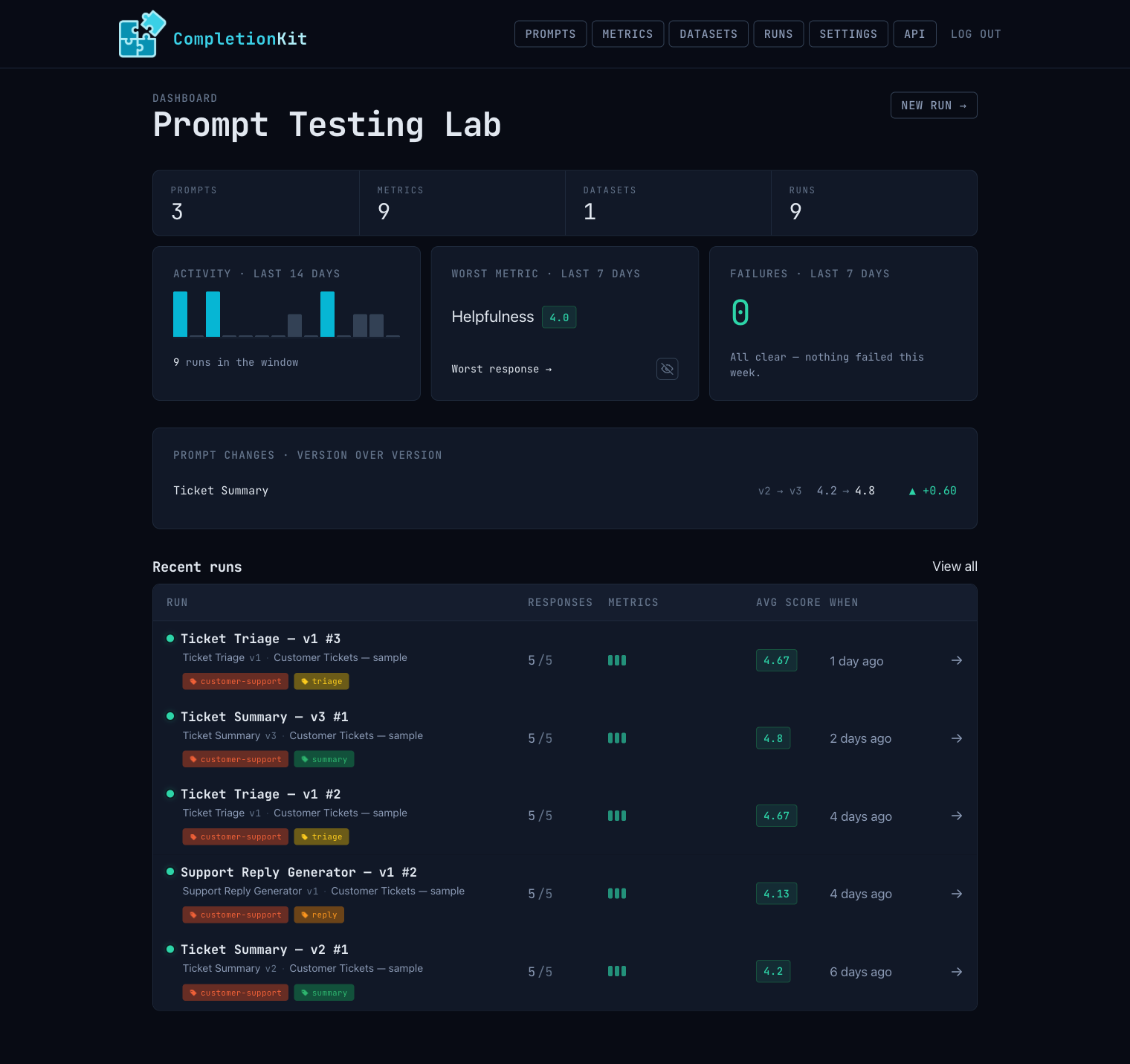
Run every prompt against real data. Score each output against criteria you define, with an LLM judge or a plain check. Change anything: the prompt, the model, the temperature, the dataset. Re-run and see exactly what got better and what broke. When the scores tell you something's off, CompletionKit suggests an improved prompt based on the judge's feedback on your runs. You inspect the diff, apply it as a new version, and check the improvement.
It's the difference between "this prompt seems to work" and "this prompt scores 4.3 out of 5 across 200 inputs, up from 3.8 last version."
Start on completionkit.com → | RubyGems
How it works
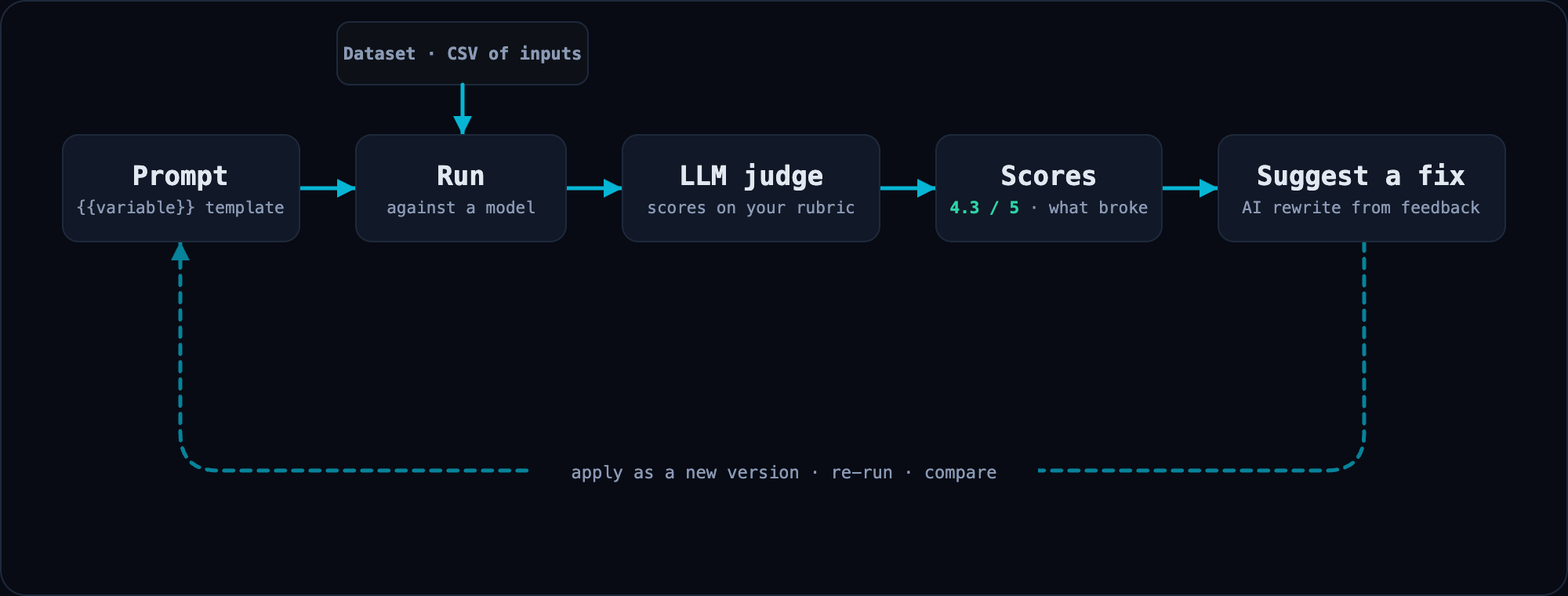
It's a loop. Each pass leaves you with a score you can compare against the last one.
- Create a prompt with
{{variable}}placeholders. - Upload a dataset. A CSV whose column headers match the variable names.
- Run it against a model and score the outputs against your metrics.
- Iterate. Change the prompt, the model, the temperature, or the dataset and re-run. CompletionKit versions your prompts, so you can always compare against earlier results.
- Get suggestions. When scores drop, ask CompletionKit for an improved prompt. The suggestion comes from the judge's feedback on each response, not generic prompt advice. Inspect the diff and apply it as a new version.
Concepts
- Prompt. A versioned template with
{{variable}}placeholders. Editing a prompt that has already run creates a new version, so earlier results stay reproducible. - Dataset. A CSV of real inputs. Each row becomes one test case.
- Run. One execution of a prompt against a dataset. It records every input (model, temperature, metrics) and stores every output and score.
- Response. The model's output for one dataset row, with its scores attached.
- Metric. What you score each response on. A judge metric has an instruction, evaluation steps and a 1 to 5 scale, and an LLM judge applies it. A check metric is a pass or fail test with no LLM involved: contains, does not contain, equals, regex, valid JSON, JSON field equals, length bounds, list overlap, number bounds, and number equals.
- Metric group. A set of metrics you can apply to a run together.
- Tag. A label for prompts, runs, metrics and datasets. Filter any list by tag (
?tag[]=...). - Provider credential. An API key for a model provider. It is encrypted at rest and never returned through the API.
Three ways to run it
Every option has the same engine, UI, REST API and MCP server. The first two work with any stack: you run CompletionKit as a product and talk to it over HTTP and MCP, whatever language your app is written in. The third is for teams already on Rails.
1. Hosted at completionkit.com (recommended)
Sign up and start testing prompts. There's no Rails app to run, no migrations, no job worker and no servers to keep up. Your whole team shares a workspace. Plans are at completionkit.com/pricing.
2. Self-hosted standalone app
Run it on your own servers as a self-contained product. There's nothing to integrate and no Ruby to write: once it's up, you drive it through the web UI, the REST API and the MCP server. It needs Postgres and a host that can run a Rails app.
git clone https://github.com/homemade-software-inc/completion-kit.git
cd completion-kit/standalone
bundle install
bin/rails completion_kit:install:migrations
bin/rails db:migrate
Run a web server and a Solid Queue worker, in two terminals:
bin/rails server
bin/jobs
Or run both in one terminal with foreman: foreman start -f Procfile.dev.
Visit http://localhost:3000. Add a provider credential under Settings, create a prompt, upload a CSV dataset, and run it. See Deploying self-hosted when you're ready for production.
3. Mounted in your Rails app
gem "completion-kit"
bin/rails generate completion_kit:install
bin/rails db:migrate
The engine mounts at /completion_kit. Runs work through Active Job (CompletionKit::GenerateRowJob, CompletionKit::JudgeReviewJob, CompletionKit::RunCompletionCheckJob and others), so your app needs a real job backend such as Solid Queue, Sidekiq or GoodJob. Don't use the :async adapter in production. It runs jobs inside Puma's thread pool with no durability or retries, and a long LLM call will hold up web requests.
Using your own layout
If your app renders the engine's pages inside its own layout, include the engine's stylesheet and JavaScript there:
<%= stylesheet_link_tag "completion_kit/application", media: "all" %>
<%= javascript_include_tag "completion_kit/application", defer: true, nonce: true %>
Without the JavaScript, much of the UI quietly stops working: clickable rows, dialogs, copy buttons, the run form, live run status and local times among them.
Content Security Policy
The engine's pages have no inline scripts or inline event handlers, and the engine layout puts the request nonce on its script tags, so they work under a nonce-based script-src. The views still use inline style attributes, so keep style-src out of the nonce directives and allow 'unsafe-inline' there for now.
Use a nonce that lasts the whole session. Turbo Drive re-creates scripts on each visit using the nonce from the csp-nonce meta tag, but the browser keeps enforcing the policy from the first page it loaded, so a fresh nonce per request blocks scripts after the first visit. The Rails default nonce, the session id, is empty on a new visitor's first response, so it blocks that first page's scripts. Keep a random nonce in the session instead, and skip API controllers so API and MCP calls don't get a session cookie:
Rails.application.configure do
  config.content_security_policy do |policy|
    policy.default_src :self
    policy.script_src  :self
    policy.style_src   :self, :unsafe_inline
  end

  config.content_security_policy_nonce_generator = lambda do |request|
    next if request.controller_instance.is_a?(ActionController::API)

    request.session[:csp_nonce] ||= SecureRandom.base64(16)
  end
  config.content_security_policy_nonce_directives = %w(script-src)
end
Providers
CompletionKit finds the available models from each provider's API.
| Provider | Env vars | What it covers |
|---|---|---|
| OpenAI | OPENAI_API_KEY | GPT-5, GPT-4.1, GPT-4o and the rest |
| Anthropic | ANTHROPIC_API_KEY | Claude Opus, Sonnet, Haiku |
| Ollama or a local endpoint | OLLAMA_API_ENDPOINT (default http://localhost:11434/v1), OLLAMA_API_KEY (optional) | Any model you've pulled with Ollama, or any OpenAI-compatible local server (vLLM, LM Studio, llama.cpp) |
| OpenRouter | OPENROUTER_API_KEY | 100+ models from 30+ providers through one key |
| Azure AI Foundry | None. Add it as a provider credential with api_key and api_endpoint (api_version is optional) | Azure OpenAI deployments and Foundry projects |
Set these as environment variables, in the generated initializer, or as provider credentials under Settings in the web UI.
The Ollama key from OLLAMA_API_KEY or config.ollama_api_key is only ever sent to the Ollama endpoint you configured, or to http://localhost:11434/v1 when you configured none and loopback endpoints are allowed. A provider credential without its own key borrows that key only while it points at that same endpoint. Point it anywhere else and CompletionKit sends no key, so store the key on the credential. A key stored on a credential always goes to that credential's endpoint. Endpoints match on scheme, host, port and path; letter case, a written-out default port, a trailing slash and a trailing /v1 don't count. A blank stored key counts as no key.
Custom model endpoints and CSV imports by URL may reach the server's own loopback interface by default, so a local Ollama works out of the box. If the people using CompletionKit shouldn't reach services on the app server itself, set config.allow_loopback_endpoints = false. Private, link-local and reserved addresses are always refused.
Encryption
Provider API keys are encrypted at rest with Active Record encryption. The app won't boot in production until three encryption keys are set. Generate them:
bin/rails db:encryption:init
Then set them as environment variables:
COMPLETION_KIT_ENCRYPTION_PRIMARY_KEY=<generated value>
COMPLETION_KIT_ENCRYPTION_DETERMINISTIC_KEY=<generated value>
COMPLETION_KIT_ENCRYPTION_KEY_DERIVATION_SALT=<generated value>
You can put them in config/credentials.yml.enc under active_record_encryption instead. In development the standalone app falls back to built-in values, so you can skip this locally.
Authentication
CompletionKit needs authentication anywhere it's deployed. In development and test the routes are open, with a warning in the log. Every other environment returns 403 until you configure one of these two modes.
Basic auth
CompletionKit.configure do |c|
  c.username = "admin"
  c.password = ENV["COMPLETION_KIT_PASSWORD"]
end
Your own auth (Devise and the like)
CompletionKit.configure do |c|
  c.auth_strategy = ->(controller) { controller.authenticate_user! }
end
Reviewer names
When someone agrees or disagrees with a judge's score in the web UI, CompletionKit saves that verdict under a reviewer name. Each reviewer keeps one verdict per response and metric, so give each person their own name or their verdicts overwrite each other. Set current_reviewer to a callable that takes the controller and returns the signed-in person's name:
CompletionKit.configure do |c|
  c.auth_strategy = ->(controller) { controller.authenticate_user! }
  c.current_reviewer = ->(controller) { controller.current_user&.email }
end
It must return a String or nil. Anything else, such as a user record, raises CompletionKit::ConfigurationError. When current_reviewer is unset or returns a blank value, verdicts go under username, or "operator" if there's no username.
The web UI doesn't read the X-Remote-User header by itself. If a proxy in front of your app sets it, pass it through:
CompletionKit.configure do |c|
  c.current_reviewer = ->(controller) { controller.request.headers["X-Remote-User"] }
end
Only do this when a trusted proxy always overwrites that header. Otherwise any client can send it and claim any name.
The REST API and the MCP server take the reviewer name from their own created_by parameter.
Limits
Rate limits
The REST API, the MCP endpoint and the web UI are rate limited per IP, per minute. The defaults are generous:
CompletionKit.configure do |c|
  c.api_rate_limit = 120  # REST API and MCP, requests per minute
  c.web_rate_limit = 300  # web UI, requests per minute
end
Limits are counted in Rails.cache. A shared store such as Solid Cache or Redis counts across all your app instances. A per-process store limits each instance on its own.
Input limits
Uploads, prompt templates and regex checks have limits, so one huge or hostile input can't tie up a worker:
CompletionKit.configure do |c|
  c.max_upload_bytes = 25 * 1024 * 1024  # largest dataset CSV or import file (default 25 MB)
  c.max_template_bytes = 1024 * 1024     # largest prompt template (default 1 MB)
  c.regex_timeout = 1.0                  # seconds a regex check may spend on one row (default 1.0)
end
A prompt over max_template_bytes fails validation when it's saved. Prompts saved before you lowered the limit keep working until their template changes.
A dataset fails validation when its header row is blank or longer than 64 KB (a fixed limit), or when the CSV isn't valid UTF-8. Export spreadsheets as UTF-8 CSV.
A regex check that runs out of time fails that row and says so. The limit is regex_timeout, or your app's Regexp.timeout if that's shorter, so the engine never loosens a stricter limit you set. It sets the limit per pattern and never touches the process-wide Regexp.timeout. Set regex_timeout to at least 0.001 seconds, or to nil to rely on Regexp.timeout alone. Any other value, such as 0 or Float::INFINITY, raises an ArgumentError when the initializer runs.
REST API
Every resource is available through a JSON API with a bearer token:
CompletionKit.configure { |c| c.api_token = ENV["COMPLETION_KIT_API_TOKEN"] }
curl -H "Authorization: Bearer $TOKEN" \
  http://localhost:3000/completion_kit/api/v1/prompts
Visit /completion_kit/api_reference in your running app for docs on every endpoint, with curl examples you can copy.
MCP server
CompletionKit runs a Model Context Protocol server at /completion_kit/mcp. It exposes every resource as tools that MCP clients such as Claude Code and Cursor can use directly:
{
  "mcpServers": {
    "completion-kit": {
      "url": "https://your-app.com/completion_kit/mcp",
      "headers": { "Authorization": "Bearer YOUR_TOKEN" }
    }
  }
}
The API reference page in the app has snippets you can paste into your MCP client's config.
Deploying self-hosted
Any host that runs Rails will do: Fly, Render, Heroku, Docker and so on. Point it at Postgres with DATABASE_URL, set your provider env vars, and run cd standalone && bin/rails db:migrate on each deploy.
| Variable | Purpose | Default |
|---|---|---|
COMPLETION_KIT_API_TOKEN | Bearer token for the REST API and MCP | None, so the API is off |
COMPLETION_KIT_USERNAME | Web UI username | admin |
COMPLETION_KIT_PASSWORD | Web UI password | None, so it's open in development only |
You also need the three COMPLETION_KIT_ENCRYPTION_* keys from Encryption.
When a new gem version ships a migration, install it locally and commit it before you deploy:
cd standalone
bin/rails completion_kit:install:migrations
bin/rails db:migrate
git add db/migrate/ && git commit -m "install new engine migration"
Docker
The standalone app ships a Dockerfile, so you can run it without Ruby on the host. Build from the repository root, since the app needs the engine source next to it:
docker build -f standalone/Dockerfile -t completion-kit .
CompletionKit needs a Rails secret (SECRET_KEY_BASE) and the three encryption keys. Without Ruby on the host you can't run bin/rails db:encryption:init, so generate them with openssl and write everything to an env file:
cat > completion-kit.env <<EOF
DATABASE_URL=postgres://user:pass@host/completionkit
SECRET_KEY_BASE=$(openssl rand -hex 64)
COMPLETION_KIT_ENCRYPTION_PRIMARY_KEY=$(openssl rand -hex 32)
COMPLETION_KIT_ENCRYPTION_DETERMINISTIC_KEY=$(openssl rand -hex 32)
COMPLETION_KIT_ENCRYPTION_KEY_DERIVATION_SALT=$(openssl rand -hex 32)
EOF
Generate these once and keep them. If the encryption keys change, the provider keys already in the database can't be decrypted. Keep completion-kit.env out of version control and back it up somewhere safe.
Run the web process and a job worker from the same image and the same env file, so both share the same secrets:
docker run -d -p 3000:3000 --env-file completion-kit.env completion-kit
docker run -d --env-file completion-kit.env completion-kit ./bin/jobs
The web container runs db:prepare on boot, so migrations apply on first start and on every deploy.
Contributing
See CONTRIBUTING.md for development setup, testing and pull request guidelines.
License
CompletionKit 0.3.0 and later are licensed under the Business Source License 1.1. You may use CompletionKit for any purpose, including production, except offering it (or a derivative) to others as a hosted or managed service whose main value is CompletionKit itself. Three years after each release, that version re-licenses to GPL-3.
CompletionKit 0.2.x and earlier remain available under the MIT License.
For other licensing, contact hello@homemade.software.