Listed from the MCP registry; nobody on Odel publishes it.

Surehand MCP for Adobe After Effects
Your AI works in Adobe After Effects and proves what it did: change reports, pixel proofs, QC.
Runs on your machine from its package; the steps are below.

What it does
- Reads
- Writes
- High impact
At most: moves money, runs code or commands, deletes data, or sends messages for you.
What it costs
FreeOdel charges nothing per call. The publisher may charge for its own service.
Runs locally over stdio
This server isn't hosted — your MCP client launches it from a package registry. Use one of the commands below, or drop the config into your client (e.g. Claude Desktop).
Distributed as an MCP bundle (`https://github.com/ConformLabs/surehand-mcp/releases/download/v1.4.1/Surehand-MCP.mcpb`) — download it and import the bundle in your MCP client.


Surehand MCP lets the AI app you already use work inside Adobe® After Effects®, and shows you what it did. It is for motion designers, finishing artists and technical directors who can't deliver on "the AI says it's done". Every edit is one undo step and comes back with an exact list of what changed. Structural changes come with pixel proof that the picture didn't change. Deliveries are checked against your own spec, templates are pushed through worst-case inputs, and every version built from data is checked row by row. Verified, not trusted.
- AI apps: Claude (Desktop and Code), ChatGPT (desktop app and web), Codex, Cursor, VS Code (GitHub Copilot), Windsurf / Devin Desktop, LM Studio, or any MCP client. Inside After Effects, the Surehand panel can also chat through Codex, Claude Code or Antigravity on your own sign-in.
- After Effects: 2025 and 2026 on macOS and Windows, in any language, are tested release by release. The extension loads in CC 2019 (16.0) and newer; versions before 2025 are best effort.
- Install: signed and notarized
.pkgfor Mac, signedSetup.exefor Windows. No administrator rights, no account. Free and open source (MIT). - Website and downloads: conformlabs.co/surehand.
It doesn't generate images and ships no presets or canned looks. It works on your project, by your rules, and measures the result.
AI app ──MCP──> surehand-ae server (Node, on your computer) ──localhost──> Surehand panel (CEP, inside After Effects) ──> ExtendScript
See it work
Four short demos, recorded on Surehand 1.4.1 and After Effects 2026. Long waits are cut and marked on screen; nothing is sped up. All four as a playlist, or on conformlabs.co/surehand.
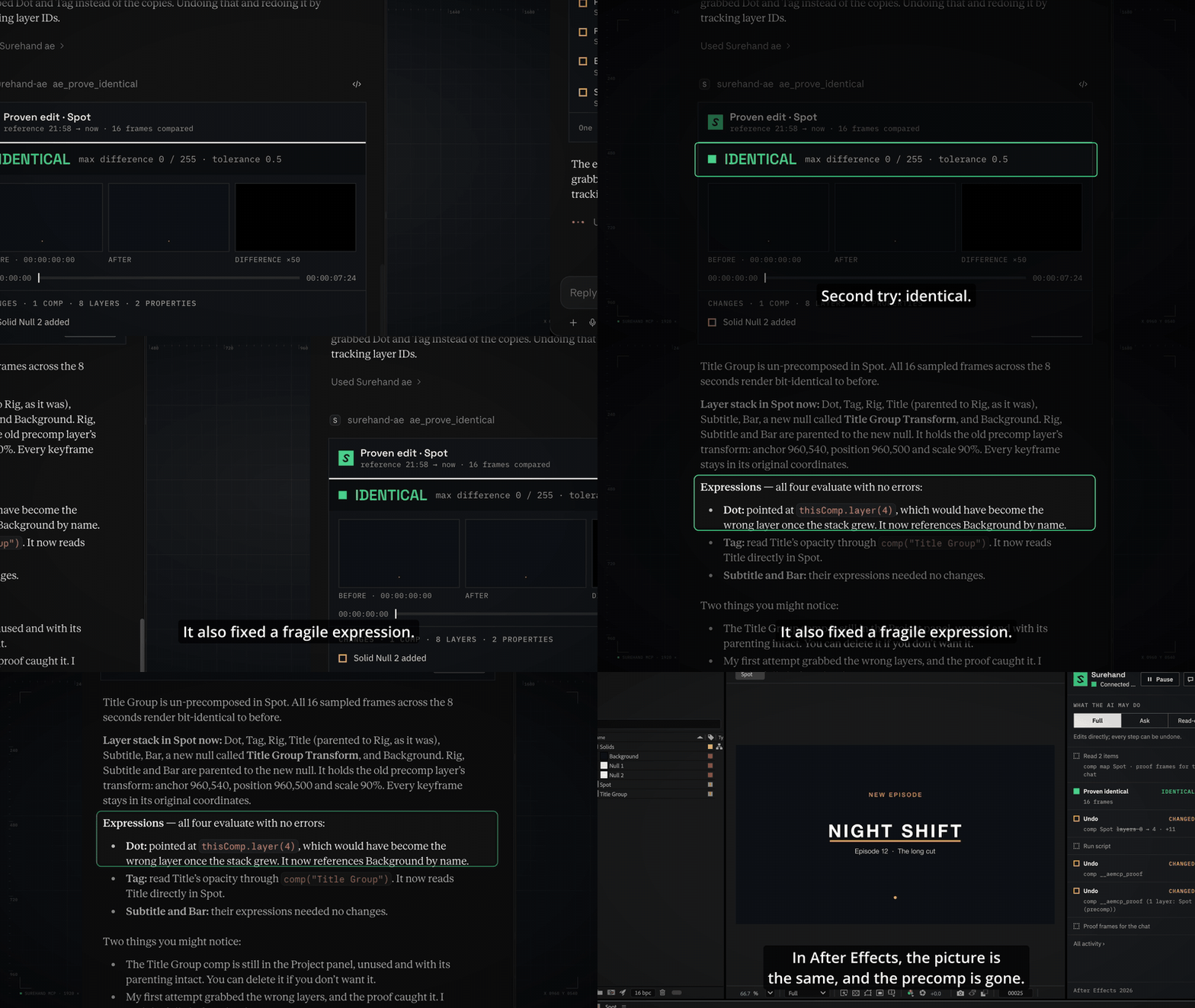
- Precomp surgery: Claude un-precomposes a comp, keeps every expression working and proves the picture didn't change (16 frames, zero difference).
- Preflight: a comp checked against the client's delivery spec finds 5 problems, each with a timecode, then one is fixed and checked again.
- Stress test: a lower-third template with long German names, Arabic, Hebrew and huge numbers; 28 of 33 variants break, and the original comp is confirmed unchanged.
- Farm render: a render split across 4 aerender processes, and every one of the 250 frames verified.
What you can ask it
Real requests, in your words. The AI picks the tool; the tool does the measuring.
| You ask | The tool |
|---|---|
| "Check Endcard against our broadcast spec before I send it." | ae_preflight: the comp and the rendered file against your delivery spec, with timecoded findings |
| "Stress-test the lower third with long German names and Arabic." | ae_stress_test: worst-case inputs through every control, each result measured, your comp left untouched |
| "Un-precompose Logo_Lockup and prove nothing changed." | ae_precomp_surgery: rehearsed on a scratch copy, applied only when the pixels match |
| "Why does this render slowly? Speed it up only where the picture stays identical." | ae_render_profile: a timeline cost map, then speed-ups kept only when proven identical |
| "Split the render across 3 processes and prove every frame is there." | ae_farm: chunks, aerender scripts, a local parallel run and a completeness check |
| "Make a version of Score Card for every row of scores.csv, and check each one before you queue them." | ae_versions_from_data: one undo step, every row read back and measured |
| "Export the texts for the Hebrew and French translators. When they come back, fit them: tracking down to -40, never below 36 px." | ae_localize: CSV or XLIFF out, a checked version per language back in |
| "Make a 9:16 of Promo. Logo pinned 80 px from the top, titles inside title-safe." | ae_reformat: your rules, checked on every frame |
| "I inherited this project. What does the render queue actually pull in, and what's fragile?" | ae_project_xray: a read-only explanation, with precise locations |
| "What changed between v11 and v12?" | ae_project_history: snapshots and a readable diff |
Everyday edits work the same way: comps, layers, keyframes at Graph Editor precision, expressions, effects, text, masks, 3D, audio, footage, Essential Graphics and render settings, plus any After Effects script when no tool fits. See the full tool list.
Install
| Your setup | Download |
|---|---|
| Mac | Surehand-MCP-<version>.pkg (signed and notarized) |
| Windows | Surehand-MCP-Setup-<version>.exe (signed) |
| Claude Desktop only | Surehand-MCP.mcpb |
| Setups the installers don't cover | Surehand-MCP-<version>.zip (Mac and Windows scripts; open START HERE.txt) |
Nothing else is needed: the .pkg and Setup.exe include Node.js 24, the .mcpb uses Claude Desktop's built-in
Node.js, and the zip's installer downloads Node.js if it is missing.
Step-by-step setup guides for each AI app: Claude, ChatGPT and Codex, Cursor, VS Code, Windsurf, LM Studio.
Mac and Windows installers
- Mac: double-click
Surehand-MCP-<version>.pkgand follow the steps. No administrator password: everything goes into your own home folder. Windows: runSurehand-MCP-Setup-<version>.exe. It installs per user, with no administrator rights. - Restart After Effects once.
- Restart the AI apps that were open during the install.
Both installers put a private Node.js 24, the server and the After Effects extension on your computer, connect the AI apps they find, and write the Surehand skills for them (see The installer).
First run
The bridge starts with After Effects; nothing needs to be opened. To see it, open Window > Extensions > Surehand MCP. A green dot means connected. The panel shows the latest calls, the permission mode and Pause AI.
Then ask your AI app something simple:
"Check After Effects is connected, then make a 1080p comp with an animated title and show me frame 1."
If something is off, the panel's ☰ › Test the connection (or surehand-ae selftest) says what and how to fix it.
Claude Desktop only (.mcpb)
Double-click Surehand-MCP.mcpb and click Install in Claude Desktop, then restart After Effects once. On first
start the server installs its After Effects extension by itself. Use either the .mcpb or an installer for Claude
Desktop, not both.
The zip
The same installer as double-click scripts, for setups the installers don't cover:
Surehand-MCP/
  START HERE.txt
  1. Claude Desktop (easiest)/   Surehand-MCP.mcpb
  2. Mac/                        1. Install, 2. Test Installation, 3. Connect ChatGPT, 4. Uninstall (.command)
  3. Windows/                    1. Install, 2. Test Installation, 3. Connect ChatGPT, 4. Uninstall (.bat)
  Support files/                 run.sh, run.ps1, surehand-ae.mjs, this README
Double-click 1. Install in 2. Mac or 3. Windows, then restart After Effects once. With After Effects open,
2. Test Installation checks everything. START HERE.txt (from installer/START HERE.txt) has the same steps in
plain language, including what to do if macOS Gatekeeper or Windows SmartScreen blocks the files.
The installer
What every installer (.pkg, Setup.exe, or 1. Install from the zip) does:
- uses the private Node.js 24 that the
.pkg/Setup.exeput in~/.surehand/node; the zip's scripts use the Node.js on your PATH, or download a private Node.js 22 LTS into~/.surehand/node(checksum-verified) - copies the MCP server to
~/.surehand/ae/server/surehand-ae.mjs(one self-contained file) - installs the After Effects extension into your user CEP extensions folder. The extension is signed,
so it loads without enabling unsigned extensions (
PlayerDebugMode) - creates
~/.surehand/ae/config.jsonwith a random access token - registers the server, under the name
surehand-ae, with the AI apps it finds: Claude Desktop, Claude Code, ChatGPT desktop / Codex (~/.codex/config.toml, created if the ChatGPT or Codex app is installed), Cursor, VS Code (its usermcp.json, used by GitHub Copilot's Agent mode), Windsurf / Devin Desktop (~/.config/devin/mcp_config.json,%APPDATA%\devinon Windows, and Windsurf's~/.codeium/windsurf/mcp_config.jsonwhile that folder is there) and LM Studio (~/.lmstudio/mcp.json). Before a config file is changed, a timestamped backup is made next to it (*.surehand-<time>.bak, the newest three are kept); the very first original also stays as*.surehand.bak. If Claude Desktop is open it offers to restart it, because a running Claude Desktop overwrites its config file - writes the Surehand skills (see Skills) for the AI apps that read skill files, and the zips to upload in Claude Desktop chat
The server also checks the After Effects extension every time it starts and installs or updates it if needed.
To uninstall: double-click 4. Uninstall from the zip, or run surehand-ae uninstall (and remove the .mcpb in
Claude Desktop > Settings > Extensions if you used it). Checkpoints are kept unless you pass --all.
Skills
Four Agent Skills teach the AI how to work with Surehand well:
surehand-ae: the basics. Check the connection, read before editing, confirm each edit with its change report, look at the result, never work around a refusal, plus the ExtendScript traps seen live.surehand-ae-delivery: preflight against your own delivery spec, stress tests, versions from data checked row by row, the localization round trip, farm renders.surehand-ae-safe-restructure: structural edits and render speed-ups with pixel proof.surehand-ae-timing-layout: exact keyframes, easing, measured alignment and reformats.
The source is skills/ in this repo.
- The installer writes them to
~/.claude/skills/(Claude Code; Cursor and VS Code read it too) and~/.agents/skills/(ChatGPT desktop / Codex, Cursor, VS Code, Windsurf / Devin Desktop);%USERPROFILE%on Windows. A folder is written only when one of those apps is on the computer (or the folder is there already). Only the foursurehand-ae*folders are written, replaced on update and removed on uninstall; other skills are never touched. - For Claude Desktop chat: upload the skills in Customize › Skills › Upload a skill (files in
~/.surehand/ae/skills, one zip per skill). claude.ai takes the same zips. surehand-ae skills [--json]shows where they are installed;surehand-ae skills install/uninstallwrites or removes them.
Claude Code plugin
In Claude Code you can also install Surehand as a plugin (the server and the four skills, from the latest release; needs Node.js on your PATH):
/plugin install surehand-ae --marketplace ConformLabs/surehand-mcp
The server installs the After Effects extension the first time it starts; restart After Effects afterwards.
Other MCP clients
Point them at the installed server (stdio):
{
  "mcpServers": {
    "surehand-ae": { "command": "/path/to/node", "args": ["/Users/<you>/.surehand/ae/server/surehand-ae.mjs"] }
  }
}
The panel's ☰ › Connect an AI app shows which apps are connected and connects the others.
For AI agents that install MCP servers themselves (Cline, for example), llms-install.md has the steps: download, checksum, install, MCP settings.
ChatGPT
ChatGPT desktop app (Mac and Windows): no tunnel needed. It runs local MCP servers itself and reads the same
~/.codex/config.toml as Codex, which the installer fills in. Restart ChatGPT after installing; surehand-ae
appears under Settings > Plugins > Servers (switch it on). To add it by hand: Add > MCP server > STDIO,
command = the Node path printed by the installer, argument = ~/.surehand/ae/server/surehand-ae.mjs.
ChatGPT on the web (chatgpt.com) can only reach MCP servers over public HTTPS, so the server runs in HTTP mode behind a temporary tunnel. The panel's ☰ › ChatGPT on the web screen runs it in the background (and can download Cloudflare's cloudflared for you); see the wiki page. By hand:
- Install a tunnel tool once: cloudflared (no account needed:
brew install cloudflaredon macOS,winget install --id Cloudflare.cloudflaredon Windows) or ngrok. - Double-click 3. Connect ChatGPT in the zip's
2. Macor3. Windowsfolder (or runsurehand-ae chatgpt). It prints a URL likehttps://xxxx.trycloudflare.com/mcp/<token>. - In ChatGPT: Settings > Apps & Connectors > Advanced settings > Developer mode on, then Create a connector, paste the URL, choose No authentication (the token is in the URL), and save.
- In a chat, enable the connector from the tools menu. Keep the tunnel running while you use it.
The URL contains your secret token: anyone with it can run scripts on your machine while the tunnel is up.
Quick-tunnel URLs change on every start, so update the connector URL each time (or set up a named Cloudflare
tunnel). To rotate the token, delete token from ~/.surehand/ae/config.json and re-run the installer, then
restart After Effects.
Safety model
Surehand is built so that you stay in charge of the project, and so that what the AI says it did can be checked.
Permissions, Pause AI and undo
Permissions. The mode selector Full / Ask / Read-only at the top of the Surehand panel (or "permissions"
in ~/.surehand/ae/config.json) applies to the next request, with no restart:
| Mode | What happens |
|---|---|
| Full (default) | Everything runs. Your AI app may still ask you before each tool call. |
| Ask | Every edit and script waits in the Surehand panel, showing the exact code or arguments, until you click Allow or Deny. When the panel is closed, an approval pop-up appears instead. Reads are not held. |
| Read-only | Tools that edit are refused. Scripts still run (to read information), but if one changes the project it is undone immediately and the AI is told what it tried to change. Scripts that touch the undo history (executeCommand, beginUndoGroup, endUndoGroup, purge) or do things that can't be undone (opening, closing or saving projects, newProject, quit, rendering, scheduleTask, saving preferences) are refused before they run. This is a text check (comments are ignored, escapes are decoded; a name inside a string or on another object counts too): a call assembled at runtime gets past it, and is then undone at most once, checked with a temporary undo marker, and reported if the project isn't back. |
Pause AI. One click in the panel, and every AI call is refused until you resume.
Undo. Every tool call is one undo step, and ae_undo reverts it and reports what was reverted. ae_batch runs
many steps as one undo step, all or nothing by default. The panel's activity feed has Undo on the most recent
change, offered only when nothing has changed the project since. After Effects itself can split a few operations into
several undo steps (seen with comp duplicates, layer copies and source replacements); where that can happen, the
result names the exact way back instead (a checkpoint, or a command that removes exactly the copies it made). See
Limits.
Checkpoints. ae_checkpoint saves a timestamped copy of the project, and restores one as a new file next to the
original; the original is never overwritten. Tools that make big changes (precomp surgery, render optimizations,
versions, reformats) can save one first. The panel lists them under ☰ › Checkpoints.
Existing files are never replaced silently. Save As, frame and contact-sheet output paths, frame exports,
handoff packages, farm plans and farm renders refuse when a file is already there; the AI passes overwrite: true
only when replacing it is intended.
Shell commands in scripts (system.callSystem) can be switched off separately (☰ › Shell commands in
scripts).
What the AI can and can't do
- It can do anything an After Effects script can:
ae_run_scriptruns JavaScript in After Effects (modern syntax is converted for ExtendScript), and the ready-made tools cover the common work with checks built in. - It can't approve its own requests, get past Pause AI, or press the panel's buttons. Approvals, Pause AI and the panel's own actions need a secret that the bridge keeps in memory and hands only to the Surehand panel and the approval pop-up through After Effects' extension events, never over the network or in a file. A new request can't be answered in its first second on screen, and Enter never allows.
- It sees what it asks to see: tool results, and frames it renders. Your project files stay on your computer; what your AI app sends to its provider (your messages, tool results, rendered frames) follows that provider's terms.
- Permissions are guardrails against mistakes, not a sandbox. A script can still read and write files. An AI app
with full shell access as your user account can read and change everything Surehand can, including
config.json.
Activity log. Every tool call is recorded in ~/.surehand/ae/activity.jsonl with time, AI app, tool, arguments
(including the full script code), duration and result. The panel shows the latest calls, ☰ › Activity history
lists them (click one for what changed), Open log file there reveals the file, and surehand-ae activity
prints it.
Security
- The bridge listens on
127.0.0.1only and requires the token from~/.surehand/ae/config.json(file mode 600); requests from web pages (with anOriginheader) are rejected. ae_run_scriptcan do anything an After Effects script can, including reading and writing files and running shell commands viasystem.callSystem. Only connect AI apps you trust, and keep the ChatGPT tunnel running only while you use it.- What the token protects against: other users of the computer, and programs that can't read your files. What it doesn't: a program running as your own user account with access to your files.
- Chat in After Effects never stores or handles an API key or sign-in: the AI agent runs on its own sign-in.
- Settings files of AI apps are only changed when they can be read (a file with a mistake in it is left as it is and reported), with a timestamped backup first (the newest three are kept) and an atomic write.
surehand-ae diagnosticsand Copy diagnostics in the panel contain no secrets.
Self-test
surehand-ae selftest (or 2. Test Installation, or the panel's Test the connection) checks every link of the
chain: the config and token, the extension and its signature, the AI apps' settings, the bridge inside After
Effects, ExtendScript, the scripting preference, a small non-destructive test job (a temporary comp with text,
keyframes and an effect) and a frame preview. A failed check says how to fix it.
surehand-ae selftest --full runs every major tool (over 60 steps) against temporary comps (removed afterwards; if
the open project has no unsaved changes, the Save As and checkpoint-restore checks briefly switch to a scratch
project and then reopen it), lists which scripting features your After Effects version has, and saves a report to
~/.surehand/ae/compat/. All steps pass on After Effects 2025 (25.6) and 2026 (26.5) on macOS and on 2026 on
Windows 11, also with 2025 and 2026 running side by side; the panel, permissions, approvals and background
rendering are verified on macOS and Windows. Please share reports from other versions.
What it does, by job
Check and deliver
Preflight (ae_preflight) checks the comp, and optionally the rendered file, against your delivery spec: a small
JSON file with the numbers from your client's or broadcaster's document. Nothing is built in. It covers comp
settings, missing items, text inside safe areas on every frame, cap height and reading speed, and in the file:
codec, levels, loudness, black and frozen frames and a flash pre-check. A check that couldn't run makes the verdict
INCOMPLETE, never PASS. The stress test (ae_stress_test) pushes worst-case inputs (long German and Finnish
strings, Hebrew and Arabic, CJK, emoji, huge and negative numbers) through every control a template exposes and
measures each result on a scratch copy; it also lists expressions that break in other After Effects languages.
ae_project_health lists missing footage, fonts and effects, expression errors and unused items.
Details: Preflight, Preflight: rendered files, Stress test.
Restructure safely
Every edit returns a change report computed by After Effects itself. ae_prove_identical renders reference
frames, lets the edit happen and renders them again: identical, identical within tolerance, or differs
with a difference image. ae_precomp_surgery un-precomposes or deep-duplicates with every expression reference
rewritten, rehearses the change on a scratch copy and applies it only when the pixels match; what it can't reproduce
exactly is refused with the reason. ae_replace_in_expressions does project-wide find and replace with a dry run.
Details: Change report, Proven edits, Precomp surgery.
Timing and layout
The keyframe table (ae_get_keyframes, ae_set_keyframe_table) reads and writes keys in frames or seconds with the
exact speed and influence After Effects stores. ae_copy_ease copies an ease to other keys, ae_audit_easing checks
motion against the project's own most-used curves, and ae_retime_keyframes scales, offsets, staggers or conforms
by whole frames. ae_align_layers aligns and distributes by measured on-screen bounds, not anchor points, and reports
any residual. ae_get_layer_bounds, ae_sample_pixels, ae_render_frame and ae_render_contact_sheet let the AI
measure and look at the result.
Versions, localization and reformats
ae_versions_from_data turns a CSV or JSON file into versions of a template comp in one undo step, then reads every
row back where it renders: text, number format, colour rules, overflow, safe areas, bar sizes against your mapping.
ae_localize exports texts with their context to CSV or XLIFF and brings translations back as a version per
language, fitted only by the adjustments you allow, with right-to-left handled. ae_reformat makes 9:16, 1:1, 4:5 or
any size from your rules (cover, safe areas, pins, scale limits) and checks the result on every frame. When a rule
can't be met, the report says FAIL and why; it doesn't decide for you.
Details: Versions from data, Localization, Reformat.
Renders and farms
ae_render_profile shows where render time goes across the whole timeline, then applies chosen speed-ups one at a
time and keeps only those proven identical, with the time saved. ae_handoff_package collects a project for someone
else with a manifest of what they need (fonts, plug-ins, colour settings) and can prove the package renders the same.
ae_farm lists what a render needs on a node and checks a node against it, splits a render into chunks for local
processes or other machines, runs them here in parallel, and proves the chunks add up. ae_render_background runs
aerender in a separate process while After Effects stays usable.
Details: Render profile, Handoff package, Render farm.
Understand a project
ae_project_xray explains an inherited project without changing it: what the render queue renders, what every
expression depends on and which links are fragile, what is missing, footage specs and what makes it heavy.
ae_project_history snapshots the project and diffs any two versions or checkpoints into a readable change list.
ae_get_comp_map maps nested precomps, parenting, mattes and expression links.
Details: Project X-ray, Project history.
Chat in After Effects
☰ › Chat with your AI app in the Surehand panel runs Codex, Claude Code or Antigravity, on your own sign-in and subscription, with Surehand's tools as its only tools. The same mode, approvals, Pause AI and activity log apply. In AI apps that show interactive views (for example Claude Desktop, ChatGPT, VS Code and Cursor), Preflight, X-ray, the stress test, proofs and history diffs come with an in-chat view: findings on a timeline, frames, before and after. Other apps get the same results as text. Details: Chat with your AI app, In-chat views.
Reference
All tools
Surehand has up to 114 ready-made tools, plus ae_run_script for anything else.
Run anything:
| Tool | |
|---|---|
ae_run_script | Run JavaScript in After Effects; return a value to get it back as JSON. Modern syntax (let/const, arrows, template strings, destructuring, classes, ?., ??, for...of) and common built-ins (map, filter, Object.keys, JSON...) work: the code is converted for AE's ES3 engine with Babel, keeping line numbers. Errors come back with the failing line, the code around it, and a hint. log() output is returned. One undo step per call. |
ae_run_script_file | Run a .jsx / .jsxbin file from disk with arguments. |
ae_get_scripting_guide | ExtendScript cheat sheet for the model (also an MCP resource aemcp://docs/extendscript). |
By area:
- Workflow:
ae_batch(many tool steps or scripts in one call and ONE undo step, with one change report; atomic by default: if a step fails everything is undone),ae_checkpoint(save a timestamped copy of the project, list, restore as a new file next to the original; the original is never overwritten; each checkpoint also gets a history snapshot),ae_list_scripts(your scripts: AE's Scripts folder, ScriptUI Panels, and folders listed as"scriptFolders"in~/.surehand/ae/config.json, with their descriptions) +ae_run_script_file,ae_toolsandae_call(every tool on demand, see Tool profiles) - Verification:
ae_prove_identical(Proven edits),ae_precomp_surgery(Precomp surgery),ae_project_history(Project history) - Checks and delivery:
ae_preflight(Preflight),ae_stress_test(Stress test),ae_project_health(missing footage/fonts/effects, expression errors, unused footage, empty comps/folders, duplicate comp names) - Versions:
ae_versions_from_data(Versions from data),ae_localize(Localization),ae_reformat(Reformat) - Understanding:
ae_project_xray(Project X-ray),ae_get_comp_map(nested precomps, parenting, track mattes, expression references) - Seeing the result:
ae_render_frame(a frame as an image; options: zoom into a region, render only some layers, transparency on a checkerboard or a color, difference image against another time or comp),ae_render_contact_sheet(a grid of frames across time, labelled with time and frame number, to judge motion and easing). The temporary comp stays until After Effects has written the image, then it is removed and anything switched for the render set back by hand, and the project is compared with how it was. They never use Edit > Undo (it could revert your own last step); After Effects may list a "Surehand MCP preview" step, which only brings the preview's own changes back. In a 32 bpc project, or one with "Blend Colors Using 1.0 Gamma", frames are rendered at 16 bpc without it, so colors look as in the viewer (After Effects writes such frames far too dark); the project settings are put back.ae_export_framesdoes the same.ae_prove_identicalalways renders with the project's own settings, so a capture and its comparison match. - Measuring:
ae_get_layer_bounds(exact on-screen boxes after transforms, parenting, 3D and camera; in-frame and action/title-safe checks),ae_sample_pixels(rendered RGBA/hex at points) - Status & app:
ae_status,ae_system_info,ae_execute_menu_command,ae_undo,ae_redo,ae_purge,ae_get_fonts,ae_reload_helpers - Project:
ae_get_project_info,ae_list_items,ae_get_item_info,ae_import_files,ae_create_folder,ae_move_items,ae_rename_item,ae_remove_items,ae_replace_footage,ae_save_project,ae_open_project,ae_new_project - Compositions:
ae_list_comps,ae_get_comp_info,ae_create_comp,ae_set_comp_settings,ae_duplicate_comp,ae_open_comp,ae_precompose,ae_add_comp_marker - Layers:
ae_get_layer_info,ae_add_layer(solid, text, shape, null, adjustment, camera, light, footage/comp),ae_set_layer_attributes(switches, timing, parent, blend mode, track matte, order...),ae_delete_layers,ae_duplicate_layer,ae_split_layer,ae_get_selection,ae_select_layers,ae_set_text - Properties & animation:
ae_get_properties,ae_find_properties(search all layers by name/match name, or list animated / expression properties),ae_set_property,ae_set_keyframes(interpolation + easing),ae_remove_keyframes,ae_set_expression,ae_get_expressions - Expressions:
ae_check_expression(try an expression and see errors and values without keeping it),ae_replace_in_expressions(project-wide find & replace, dry run, errors after the change) - Keyframes (Graph Editor level):
ae_edit_keyframes(value, move in time, in/out interpolation, speed + influence per dimension, continuous/auto-Bezier, spatial tangents, roving, keyframe color labels, delete),ae_copy_keyframes(between properties/layers/comps, time range, offset),ae_set_time_remap(keys or freeze frame). The keyframe tools take whole frames (frame,moveToFrame,frames,offsetFrames) as well as seconds. - Precision timing and easing:
ae_get_keyframes(a keyframe table across many layers and properties: whole frame and exact time of every key, exact value, interpolation, speed + influence per dimension exactly as After Effects stores them, tangents, roving; keys between frames are flagged; optional normalised curve numbers per segment),ae_set_keyframe_table(write such a table back, many properties in one undo step, every attribute exact),ae_copy_ease(the exact ease of a reference key onto keys of other properties and layers, with a stated rule for different dimension counts),ae_audit_easing(motion consistency against the project's own most-used curves: lists the segments that match none),ae_retime_keyframes(scale around an anchor, offset or stagger by whole frames, conform to a new frame rate; keeps the curves' shape, refuses keys colliding on a frame) - Measured layout:
ae_align_layers(align, distribute and centre by real on-screen bounds, through parenting, scale, rotation and text glyph boxes, not anchor points; reports any residual after the move) - Effects, shapes & masks:
ae_list_available_effects,ae_get_effect_params(an effect's exact parameter names, types, defaults and ranges, without touching your layers),ae_apply_effect,ae_set_effect_params,ae_remove_effect,ae_apply_preset(an animation preset.ffxfile by path),ae_add_shape,ae_add_mask - Text:
ae_style_text_range(per-character styling by range or matching words),ae_set_paragraph(justification, indents, spacing, box size),ae_add_text_animator(animator properties + range/wiggly/expression selector) - 3D:
ae_set_camera(one/two-node, focal length in mm, depth of field; reports angle of view),ae_set_light(type, color, intensity, cone, falloff, shadows),ae_set_material(material options, lists the 3D renderers) - Audio:
ae_audio_to_keyframes(Convert Audio to Keyframes),ae_audio_markers(markers at beats/peaks) - Color:
ae_color_settings(Adobe or OCIO color engine, working space, bit depth, linearization, OCIO spaces) - Footage:
ae_set_footage_interpretation(conform frame rate, alpha, fields, pulldown, loop, pixel aspect),ae_set_proxy,ae_relink_footage(find missing files by name in a folder tree, keeps sequences) - Files and exports:
ae_find_files(globs,~, Unicode names in either normalisation, depth and result limits, no symlink loops; After Effects not needed),ae_export_frames(PNG stills of comps, single layers or footage, frame lists and ranges, several exports per call, never replacing a file withoutoverwrite: true);ae_import_filessays when a file couldn't be imported the wayimportAsasked - Essential Graphics:
ae_essential_graphics(add properties as controllers, template name),ae_export_mogrt - Render:
ae_list_render_queue,ae_add_to_render_queue,ae_get_render_settings/ae_set_render_settings(every render-settings and output-module setting as editable key/value pairs),ae_queue_in_media_encoder,ae_render_background+ae_render_jobs(aerender in a separate process, with progress and cancel; After Effects stays usable),ae_render_queue_start,ae_clear_render_queue,ae_render_profile(Render profile),ae_handoff_package(Handoff package),ae_farm(Render farm)
Comps can be referenced by id, name, or omitted for the active comp; layers by 1-based index or name; properties by
paths like "Transform/Position" or "Effects/Gaussian Blur/Blurriness" (display names or match names).
Any After Effects language. Property, effect and menu names are translated in non-English After Effects. Common
English names still work everywhere: property paths like Transform/Opacity, effects like "Gaussian Blur" and menu
commands like "Pre-compose..." are mapped to internal match names and command ids, which are the same in every
language. Match names (ADBE ..., as returned by ae_get_properties / ae_get_effect_params) always work, and an
unknown effect name gets suggestions.
Tool profiles
Every tool description is sent to the AI in every chat, so by default only a core set of 29 tools is loaded
(about 12k tokens instead of 50k for all 114), and every other tool stays available on demand: ae_tools lists
all tools by category (or gives full parameter details of chosen ones), and ae_call runs any tool by name with the
same validation, permissions, change report and activity log. In AI apps that show in-chat views, the four tools with
a view (ae_preflight, ae_project_xray, ae_project_history, ae_stress_test) join the core set, because a view
only shows when the AI app calls the tool directly.
Loading everything up front is optional: switch to All tools in the Surehand panel (☰ › Tools the AI sees ›
All tools), in Claude Desktop's extension settings ("Enable all tools") for the .mcpb, or with
"toolProfile": "full" in ~/.surehand/ae/config.json, then restart the AI app. Advanced:
"toolProfile": "core,ae_import_files,ae_render_queue_start" adds single tools.
Core set: ae_status, ae_run_script, ae_get_scripting_guide, ae_render_frame, ae_render_contact_sheet,
ae_get_project_info, ae_get_comp_info, ae_get_layer_info, ae_get_selection, ae_get_properties,
ae_find_properties, ae_get_layer_bounds, ae_get_comp_map, ae_create_comp, ae_add_layer, ae_add_shape,
ae_set_property, ae_set_keyframes, ae_set_expression, ae_apply_effect, ae_get_effect_params, ae_undo,
ae_batch, ae_checkpoint, ae_prove_identical, ae_list_scripts, ae_run_script_file, ae_tools, ae_call.
Feature reference
How each verification feature works, what it checks and what it doesn't.
Preflight
Before you deliver, ask the AI to preflight the comp (ae_preflight). It checks the project, and optionally the
rendered file, against your delivery spec: a small JSON file with the numbers from your client's or
broadcaster's delivery document (or the same thing inline in the chat). Nothing is built in: there are no house
presets, every section of the spec is optional, and a check only runs when its section is there. The AI can help you
write the spec (action: "schema" gives it the fields).
In the project, for the delivered comp (comp in the spec, otherwise the active comp):
- Video: comp size, frame rate, pixel aspect ratio and duration (exact, with a tolerance in frames, or a range).
- Project: bit depth, working color space, missing footage, fonts and effects, expression errors, disabled layers that still carry effects (the same collector as Project X-ray, limited to the delivered comp and its precomps).
- Safe areas over time: every visible text layer, and any layer you name (wildcards like
Logo*), on every frame (or every Nth frame) where it is visible: its box after position, scale, rotation, anchor point and parents, and through the precomps it sits in, against title-safe, action-safe or the frame. Problems come back as time ranges, for example "Title: outside title-safe 00:00:02:03–00:00:03:10 (2.12s–3.40s), 46 px past it on the right at most". Layers that are off, transparent (opacity 0) or outside their in/out points are not visible and are not checked. 3D layers are reported as not checked (check them withae_get_layer_bounds, which projects through the camera); auto-orient, and effects that move or scale the pixels outside the transform (Transform, Offset, layer styles, text animators), are flagged as a warning that the bounds may be off. AlayersMustBeInname that matches no layer is a warning, not a pass. - Text: smallest cap height (estimated as 0.7 x the font size x the layer's scale, since real fonts vary from about 0.65 to 0.75), reading speed (characters per second while the text is visible, spaces included, line breaks not), shortest time on screen, paragraph text that overflows its box (After Effects 24.6 or later), and characters the font has no glyph for (After Effects 25.1 or later); on older versions the report says the check isn't available.
On a rendered file (target: "file" or "both"): codec, container, bit depth, chroma subsampling, alpha, field order,
color tags, legal range, black and frozen frames, loudness and true peak, and a flash check. File checks need ffmpeg:
the one on your system, or a one-time download. The flash check is a pre-check to catch obvious problems early; it
is not a certified PSE / Harding test.
The report starts with the verdict: FAIL (n) when anything failed; otherwise INCOMPLETE (n checks not run)
when a check the spec asks for couldn't run or ran on incomplete data (no ffmpeg, an RGB file for legal range, a check
that needs a newer After Effects, a file that couldn't be read to the end), so a check that didn't run is never a pass;
otherwise WARNINGS (n) or PASS. Then the checks that were requested but not run and why, the findings grouped by
check (failures first, then warnings, by time), with timecode in the comp's frame rate and seconds, where the problem is
(comp > layer) and a short fix, then what this run doesn't cover (a section not in the spec, a file check on a project
target). For files it also shows what ffprobe found and up to four frames at the worst problems. Preflight changes
nothing in the project and leaves no undo step, so it also runs in read-only mode. Long comps are checked within a
time budget (timeBudgetSeconds, default 120 s); a partial check says so.
Preflight: rendered files
Preflight also checks the rendered file itself against the same delivery spec, with ffprobe and one ffmpeg pass over the picture and sound. Each check runs only when its section is in the spec; a requested check that can't run is listed with the reason (no ffmpeg, an RGB file for legal range, a value ffmpeg didn't report...) and makes the verdict INCOMPLETE. A file with no audio stream fails when the spec asks for audio (usually Audio Output was off in the output module). Every decoded frame is counted against the picture's own duration: a truncated or damaged file fails ("only 2.8 s of 8 s could be decoded") instead of passing on the part that was read, and decoding errors are a warning. Durations (and black / frozen at the end) are the picture's, not the container's; sound that runs longer or shorter than the picture by more than a frame is a warning.
| Spec section | What is measured in the file |
|---|---|
video | container (file extension), codec, frame size, pixel aspect, frame rate (30000/1001 is 29.97, not 30), duration (± durationToleranceFrames), bit depth, chroma subsampling, alpha, field order, and the signalled color primaries / transfer / matrix / range (a tag that isn't there is a warning) |
audio | sample rate, channels, required; loudness per ITU-R BS.1770 / EBU R128 (ffmpeg ebur128): integrated, loudness range, true peak, highest short-term (3 s) loudness |
legalRange | every pixel of every frame, in the file's own bit depth scaled to 8-bit (a 10-bit 941 is 235.25: out of 16-235); a frame fails when more than maxOutOfRangePercent of its pixels are outside the luma / chroma range. Reported as time ranges, with the worst frame and its code values. YUV files only |
black, frozen | ffmpeg blackdetect / freezedetect: runs longer than maxSeconds (black allowed at the start / end per allowAtStart / allowAtEnd; a black run isn't reported again as frozen) |
flash | a pre-check, not a certified PSE / Harding test: the picture as a 32x18 grid, relative luminance per cell; a transition is a change of at least minLuminanceChange where the darker state is below 0.8, a flash is a pair of opposing transitions over at least minAreaFraction of the screen; more than maxFlashesPerSecond in any second fails. Saturated red flashes (R/(R+G+B) >= 0.8, change of (R-G-B)x320 > 20) are checked too unless redFlash is false (definitions after ITU-R BT.1702 / WCAG 2.x) |
Times in the findings are seconds in the file. Up to four JPEG frames (960 px wide at most) from the most important
failing times are written to ~/.surehand/ae/tmp, shown in the report and deleted right after (also when the check is
cancelled; leftovers older than a day are swept). A one-minute 1080p ProRes 422 HQ file with every check takes about 4 s on
an Apple Silicon Mac (legal range marks the out-of-range pixels and measures that mask averaged down to a small grid,
which is exact and much faster than full statistics on every frame).
ffmpeg. Surehand MCP uses, in this order: "ffmpegPath" / "ffprobePath" in ~/.surehand/ae/config.json, a private
copy in ~/.surehand/ffmpeg, then the PATH (plus /opt/homebrew/bin and /usr/local/bin on a Mac). If there is none, it
can download FFmpeg 9.0.2 once into ~/.surehand/ffmpeg, only after you allow it (in "ask" permission mode you also
approve it in the Surehand MCP panel; in read-only mode it never downloads). The download is a pinned build checked
against a SHA-256 written in the source, and must start and report the expected version before it is used; anything
else is refused and nothing is installed:
- macOS (Apple Silicon and Intel): Martin Riedl's static release builds (ffmpeg.martin-riedl.de),
ffmpeg.zip+ffprobe.zip, about 60 MB. These are GPL v3 builds (they include x264 / x265). - Windows x64 (and Windows on Arm, which runs x64 programs): BtbN/FFmpeg-Builds
ffmpeg-n9.0.2-...-win64-lgpl-shared-9.0.zipfrom a month-end release (those are kept), about 77 MB. LGPL v2.1+.
Surehand MCP doesn't ship or redistribute FFmpeg: it downloads the publisher's own file on your machine and runs it as a
separate program, so FFmpeg's licence (the GPL / LGPL terms above, with its source available from ffmpeg.org) applies to
that copy and not to Surehand MCP. ~/.surehand/ffmpeg/SOURCE.json records what was installed and from where. To use your
own FFmpeg instead, install it (brew install ffmpeg, winget install ffmpeg) or set "ffmpegPath".
Stress test
ae_stress_test finds what breaks in an editor's or client's hands before they do: it pushes worst-case inputs
through every variable a comp exposes and measures each result.
- What it varies: the comp's Essential Graphics controllers (text, numbers, checkboxes, menus, colours, media replacement) and text that reads data, or the layers you name. Inputs are test data, not looks: German and Finnish long strings scaled from the current text, Hebrew and Arabic with digits, Japanese, Chinese, Korean, Thai, Hindi, combining marks, emoji, all caps, empty, one character, no spaces; zero, negative, huge, past the slider limit, many decimals, both separator styles, percent; every checkbox and menu state. Your own values or CSV / JSON rows work too. Combinations are sampled evenly up to a cap, and the report says what was kept.
- What it measures, at the animation's key frames and where each text starts and stops being visible: box overflow and by how many pixels and lines (After Effects 24.6+), the frame / title- / action-safe area (your margins), the size text renders at (your minimum, or smaller than the comp's own text), missing glyphs (25.1+) and substituted fonts, right-to-left and complex scripts without the direction or composer they need, line count and breaks inside a word (24.3+), overlap with layers you name, and whether a number shows right in the text that shows it. What already fails in the comp as it is is listed once, as the baseline.
- Expressions in other languages: references by an English display name (
effect("Slider Control")("Slider"),thisLayer("Transform")("Opacity"), default shape and mask names) break in After Effects in another language; each is listed with the language-safe form (index, match name or attribute). - Never touches your comp: every variant is set on a scratch copy that the same step removes; your comp is read
back afterwards (every property value) and must be identical, or the report says so (
proveUnchanged: trueadds a pixel proof). Read-only mode returns the plan and the expression scan. - The report: PASS / FAIL with what breaks, where, at which frame and by how much ("Title overflows its box by 184 px; 3 lines, the box shows 2 at f48"), a grid of variants and checks, and a contact sheet PNG per failing variant. Where the AI app shows views, the grid comes with each failing frame marked.
Change report
Every call that edits the project ends with a Changes list, computed by After Effects itself (a snapshot before and after the call), for example:
Changes (layers/properties compared in: Main):
+ layer "Headline" in "Main"
~ layer "Plate" in "Main": name "Plate" -> "Background"; locked off -> on
+ Headline > Effects/Glow
~ Headline > Transform/Opacity: 100 -> 0, expression added
~ Headline > Transform/Position: [640,360] -> [640,800], keyframes 0 -> 2
Project items are always compared; layers, properties, keyframes, expressions, effects and masks are compared in the
active comp and any comp named in the call. If a script fails halfway, the report lists what it had already changed.
ae_undo reports what was reverted. On very large comps (tens of thousands of properties) this adds up to about a
second per edit; turn it off with "changeReport": false in ~/.surehand/ae/config.json, or per script with report: false.
Proven edits
Some changes should not change the picture at all: un-precomposing, duplicating a comp deeply, baking or collapsing
expressions, reordering effects, simplifying a rig. ae_prove_identical checks that. It renders reference frames of the
comps (by default the active comp, 5 frames across the work area, full size, at most 1920 px), you or the AI make the
change, and it renders the same frames again and compares them pixel by pixel. The answer is identical,
identical within tolerance (by default less than half an 8-bit step, so only the rounding of 16/32-bit projects passes; tolerance: 0 asks for bit-identical), or differs, with, for each frame, the largest
channel difference, how many pixels changed, the largest color difference (ΔE), the area that changed, and a
difference image of the worst frame (black = identical). If a comp was deleted or resized since the capture, it says so.
What is compared is the sampled video frames, alpha included: audio, the comp's background color and the times between
the sampled frames are not, and 32-bit values above 1.0 are clamped when the frames are saved, so differences in
over-bright areas can be missed. Comp ids belong to one project: a proof captured in a saved project is only compared in
that same file (otherwise the verdict is not proven); one captured in an unsaved project is compared if every comp still
has its name, with a note that the project itself couldn't be confirmed.
action: "run" does it in one call: capture, the edits as ae_batch steps (one undo step, all or nothing), compare.
For un-precomposing and deep duplicates, ae_precomp_surgery (see Precomp surgery) makes the edit itself, with the
expression rewrites, and proves it the same way before applying it.
Reference frames are stored in ~/.surehand/ae/proofs/ for 7 days (30 proofs at most). Rendering works like
ae_render_frame: through a temporary comp that is removed again and leaves no undo step behind (After Effects still
marks the project as changed); if the temporary comp can't be removed, the result says so. Capture and compare are
allowed in read-only mode; run makes edits, so it follows the same permissions as ae_batch.
Precomp surgery
Inherited projects often need restructuring: a precomp that should not be one, or a comp to copy with all its nested
precomps unlinked (a "deep duplicate"). After Effects' own commands and free scripts can drop what the precomp layer
did and silently break expressions such as comp("Logo").layer("Title") or thisComp.layer(3). ae_precomp_surgery
does it exactly or not at all.
unprecomposebrings a precomp layer's layers into its comp at its place. A null carries the precomp layer's anchor point, position, scale and rotation (keyframes and expressions included) and the moved top-level layers are parented to it (parents inside the precomp are kept;bakeNullleaves the null out when the transform is the identity). Layers move by the precomp layer's start time and are trimmed to its span; a layer entirely outside it is moved switched off. Names that are taken in the comp get a number. Expressions are read with a real JavaScript parser and rewritten by position: in the moved layersthisComp.layer("x")points at the moved copy,thisComp.layer(3)at its new index,thisComp.width(and every other comp attribute) becomescomp("<precomp>").width; references by index to the comp's own layers, from anywhere in the project, follow the layers that move down. Track mattes and Layer Control parameters are pointed at the moved layers. One visible layer takes over the precomp layer's opacity and blend mode. The source comp is kept (removeSourceremoves it only if nothing else uses it).deep_duplicatecopies a comp and every nested precomp, each once (a precomp used in several places maps to one copy), points the copies' precomp layers at the copies, and rewritescomp("X")in the copies when X is in the tree (references to comps outside it stay).suffix(default " copy", a number is added when the name is taken). The copies are made next to their originals: After Effects records every move into a folder as an undo step of its own, so moving them (ae_move_items) is left to a separate step. Footage and solids are shared, not copied.
Refused, with the exact reason, when it can't be reproduced exactly: effects, masks, layer styles, time remapping,
time stretch, track mattes, 3D, collapse transformations, motion blur or frame blending on the precomp layer; its blend
mode or opacity when the precomp has more than one visible layer; layers in the precomp that would interact with the
comp's other layers (blend modes, adjustment layers, Preserve Underlying Transparency, cameras, lights, 3D layers);
different frame rates or motion blur settings; Essential Graphics overrides; layers reaching outside the precomp's frame
where that part would show; and expressions whose references can't be rewritten safely: names or indices computed when
the expression runs, a layer's own index or wiggle / random (seeded by the layer index) when the index changes,
time when the layers move in time, toComp and friends, references to the precomp layer itself, ambiguous comp names,
expressions with an error before the surgery (they could start working). override: ["expressions"] or ["bounds"]
goes ahead anyway: those are still listed, left as they are, and the proof decides. dryRun returns the plan only:
what moves, what is renamed, every expression rewrite (before → after) and every problem.
Proof first, then the change. A checkpoint is saved (the project must be saved), reference frames are rendered (by
default 6 frames across the precomp layer's time span, first and last included; deep duplicate: 5 across the work area),
and the surgery is rehearsed on a scratch copy (a duplicate of the parent comp; for a deep duplicate, the copies). The
scratch copy is compared with the original pixel by pixel, the same comparison as ae_prove_identical (default
tolerance), and removed again. Only when it is IDENTICAL is the same surgery applied to the project, in one undo group,
and the result is checked layer for layer against the rehearsal (otherwise it is undone at once). After Effects can split
such an undo group (seen with layer copies and source replacements), so ae_undo may take several steps and the result
says what the exact way back is instead: for an un-precompose, the checkpoint saved first (ae_checkpoint restore, with
its id); for a deep duplicate, which never changes the originals and only adds copies, {action: "remove_copies", id}
removes exactly the copies it lists (refused while anything outside them uses one). DIFFERS means nothing was applied: the result lists the frames that differ with the largest difference, a
difference image, and the likely cause (for example a precomp layer that is scaled: the precomp was resampled as a whole,
while the moved layers are transformed once). Expression rewrites in other comps are exact text edits; the pixel proof
covers the parent comp (or the copied tree).
Versions from data
ae_versions_from_data turns a CSV or JSON file (or rows in the chat) into versions of a template comp, and then
checks every row. Filling data in is the easy part; this is about knowing that each version is right. Nothing is
built in: every format, colour, size and margin comes from your data and your own rules.
- Mapping: each column goes to a layer of the template comp (or an Essential Graphics controller): text; a number in
your format (decimals, decimal and thousands separators, prefix, suffix, how negatives are written); a colour from the
cell or from your rules (for example "below 0: #C62828, otherwise #2E7D32"); a footage file that replaces the layer's
source; any property value; or a bar's on-screen width or height through your value-to-pixels mapping (for example
0 → 0 px, 100 → 800 px). Names come from a pattern like
{comp} - {City}. - Two modes.
duplicate(layer targets) duplicates the comp per row. Duplicating a comp doesn't duplicate the precomps inside it (every version shares them), so targets are layers of the template comp itself.essentialGraphics(controller targets) makes a comp per row with the template as a precomp and sets that row's Essential Graphics values, the way After Effects keeps per-instance values; a row's layout can't be measured there, so those checks don't run. - One undo step, with the Changes list and an optional checkpoint first.
dryRun: truechecks the mapping against the template and the data and shows what each row would get, without changing anything. Names already in the project, keyframed targets and output files that exist are refused before anything is built. - Every row is checked: each value is read back where it renders (with expressions applied), so the text shows exactly the formatted string and the colour is what the rule says; paragraph text must not overflow its box, and the mapped text must stay inside the frame (or title- / action-safe with your margins) on every frame, measured with Preflight's own code; characters the font has no glyph for and missing fonts fail the row; bars are measured on screen (through parents) against your mapping within a tolerance you set; footage files must exist.
- The report: a verdict (
FAIL (n of m rows),INCOMPLETE,WARNINGSorPASS), totals, then one line per row: PASS, or FAIL with what and where. A check that didn't run (an older After Effects, a layer not visible at the checked time, Essential Graphics mode) makes the row INCOMPLETE, never PASS. - Render (optional):
queueadds every version to the render queue with your output module template and an output path pattern (/renders/{City}_{#3}.mov);render: truerenders only the versions that pass. Existing files are never replaced unlessoverwrite: true.
Localization
ae_localize takes a comp's texts to translators and back, with every language checked.
- Export (
action: "export"): every text layer of the comp and its precomps (visible or not; keyframed Source Text per keyframe) to a CSV for Excel (UTF-8 with a BOM, so Hebrew and Arabic open correctly; one column per language) or XLIFF 1.2 for CAT tools (Trados, memoQ, Phrase...; one file per language). XLIFF 1.2 is the version CAT tools import most widely; 2.0 files are read too. Each string has its context: comp and layer, time on screen, the paragraph box or the width a point text has to the edge of the frame (or your safe area), a character limit (yours, or estimated from the box withmaxChars: "fromBox") and your notes. - Import (
action: "import"): one version per language. The comp tree is duplicated the way versions from data duplicates a comp: the root and every precomp that holds a translated text, the copies using each other ("{comp} [{lang}]"). One undo step with the Changes list;dryRun: trueshows what each language gets; names already in the project are refused unlessoverwrite: true. - Fit by your rules, never invented: the adjustments you allow, in your order: tracking down to a minimum, font size down to a minimum (or a minimum cap height in comp pixels, measured on the font), horizontal scale down to a minimum, the paragraph box growing by at most so many pixels (away from the edge the text is aligned to); point text within a width you give. Each step goes only as far as needed. A text that still doesn't fit is left at the best attempt and FAILs with what was tried; nothing goes below your minimum. Without rules nothing is adjusted.
- Right to left: Hebrew, Arabic, Persian, Urdu, Yiddish (by the language code, or
direction) get right-to-left paragraph direction and the Universal composer (formerly South Asian and Middle Eastern, After Effects 24.0+), and their alignment is mirrored (left becomes right); a point text whose alignment flips keeps its place. Your font per language (fonts: {"he": {"*": "YourHebrewFont"}}). Not available to scripts, so not done: mirroring the layout itself, kashida justification, per-character direction. - Checks per language, worded like Preflight (
FAIL (1 of 3 languages),INCOMPLETE,PASS): each text read back where it renders, the fit, the direction, box overflow, text inside the frame or safe area on every frame, missing glyphs (the common Hebrew / Arabic problem: a Latin font without those letters) and missing fonts. Untranslated strings FAIL (or warn withallowUntranslated: true). - Drift (
action: "drift"): which master texts changed since the export, per language, compared with the file's source text; the import warns about them too.
Reformat
ae_reformat makes the comp at another size (16:9 to 9:16, 1:1, 4:5 or any size) by rules you set, then checks
the result on every frame. Nothing is guessed for you: no presets and no "smart crop".
- Rules: background layers that must cover or fit the new frame; layers that must stay inside title-safe,
action-safe or the frame (with your margins); layers pinned to an edge or corner with a margin in px; which layers
may scale and how far (a range in % of their size); a minimum text cap height; layers to switch off. Layers are
named exactly or with wildcards (
Logo*). A layer no rule names keeps its offset from the frame centre, as After Effects' own Composition Settings resize does with the centre anchor. - The edit: a duplicate of the comp (the source is never changed), in one undo step, with an optional checkpoint
first and the Changes list. Position and Scale keys are mapped by the same move and scale, with spatial tangents and
ease speeds scaled too, so the motion keeps its shape. Parented layers are moved in their parent's space, a track
matte moves with its layer, 3D layers move with the frame centre. Precomps are reused unless a rule names a layer
inside a full-frame precomp: then that precomp is duplicated and reformatted too, and the report says why
(
precomps: "reuse"or"duplicate"to choose). - The check: Preflight's project checks on the new comp (your safe-area rules and cap height, on every frame or every Nth), plus cover / fit and pins, plus the plan against what After Effects actually made. The verdict is Preflight's: PASS, FAIL (n), INCOMPLETE or WARNINGS (n).
- When a rule can't be met (a title too wide for 9:16 without going below the minimum cap height, a pin that conflicts with title-safe), the layer keeps the best attempt and the report says FAIL, with the reason and what you could decide: a shorter text, a line break, a smaller minimum, another scale limit. The AI doesn't pick one for you.
dryRun: trueshows the plan and the predicted result without changing anything.
Render profile
After Effects' own profiler shows one frame. ae_render_profile shows where a comp's render time goes over the whole
timeline, and keeps a speed-up only when the picture is proven unchanged.
measuretimes sampled frames (by default 24 across the work area, the image cache purged before each render, the median of 3 renders counts) and shows them as a text heat map with the slowest ranges. Then, at the slowest frames, it switches each layer and effect off in turn and times the difference (cost in ms and %). Findings come with their evidence: invisible layers that still cost time, 32 bpc where 16 bpc is proven to give the same picture, expressions recomputed under motion blur, oversized precomps, hidden costs. Each finding is marked can apply (optimize can apply and prove it), advice (you decide) or unknown (for example Multi-Frame Rendering support, which scripting can't read).timeBudgetSeconds(default 300) stops new measurements and the report says what was measured.