Listed from the MCP registry; nobody on Odel publishes it.

Starmux — All-in-One Self-Hosted Remote MCP Server & Gateway
All-in-one remote MCP server & gateway: built-in file, terminal, process & stdio tools over HTTP.
Runs on your machine from its package; the steps are below.
What it does
- Reads
- Writes
- High impact
At most: moves money, runs code or commands, deletes data, or sends messages for you.
What it costs
FreeOdel charges nothing per call. The publisher may charge for its own service.
Runs locally over stdio
This server isn't hosted — your MCP client launches it from a package registry. Use one of the commands below, or drop the config into your client (e.g. Claude Desktop).
Run
npx -y starmux
MCP client config
{
  "mcpServers": {
    "starmux-all-in-one-self-hosted-remote-mcp-server-gateway": {
      "command": "npx",
      "args": [
        "-y",
        "starmux"
      ]
    }
  }
}Starmux — All-in-One Self-Hosted MCP Server & Gateway
Built-in file, terminal & Git tools—plus a unified gateway to connect, run, and manage all your cross-platform MCP services in one place.
All-in-One MCP Server · 100% Self-Hosted & Zero Telemetry · Multi-MCP Gateway & Middleware · Streamable HTTP · MIT
Why Starmux? · All-in-One vs. DIY Stacks · Quick Start · Advanced Usage · Use Cases & FAQ · macOS App · Documentation
Why Starmux?
Cloud AI assistants (like ChatGPT Web, Claude, or Doubao) are isolated in the browser, and many desktop coding agents (like Codex, WorkBuddy, Cursor, Claude Code, Antigravity, DSH-Harness, Kimi Code, Minimax Code, or ZCode) lack native apps for headless Linux servers or ARM64 edge boards.
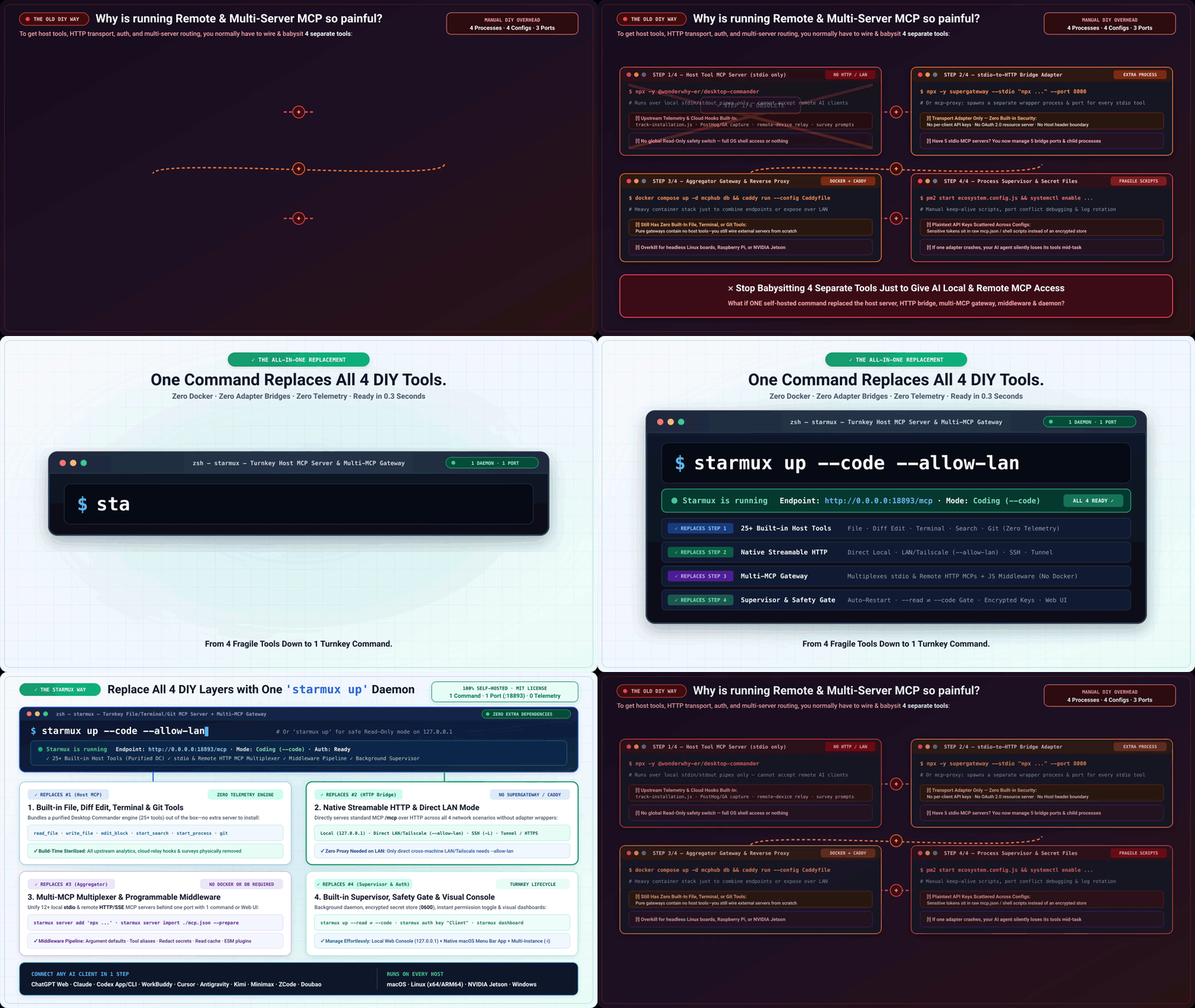
Meanwhile, deploying and managing MCP tools across machines normally requires manually assembling 4 separate open-source tools: a local host-tool server (DesktopCommanderMCP or filesystem-mcp), a stdio-to-HTTP bridge (supergateway or mcp-proxy), an authentication/aggregation gateway (MCPHub, ContextForge, or Caddy), and a process supervisor.
Starmux (Star topology + Multiplexer) is an out-of-the-box, 100% self-hosted All-in-One MCP Server & Gateway—with zero third-party cloud relays—that replaces that entire fragmented chain with a single 'starmux up' daemon:
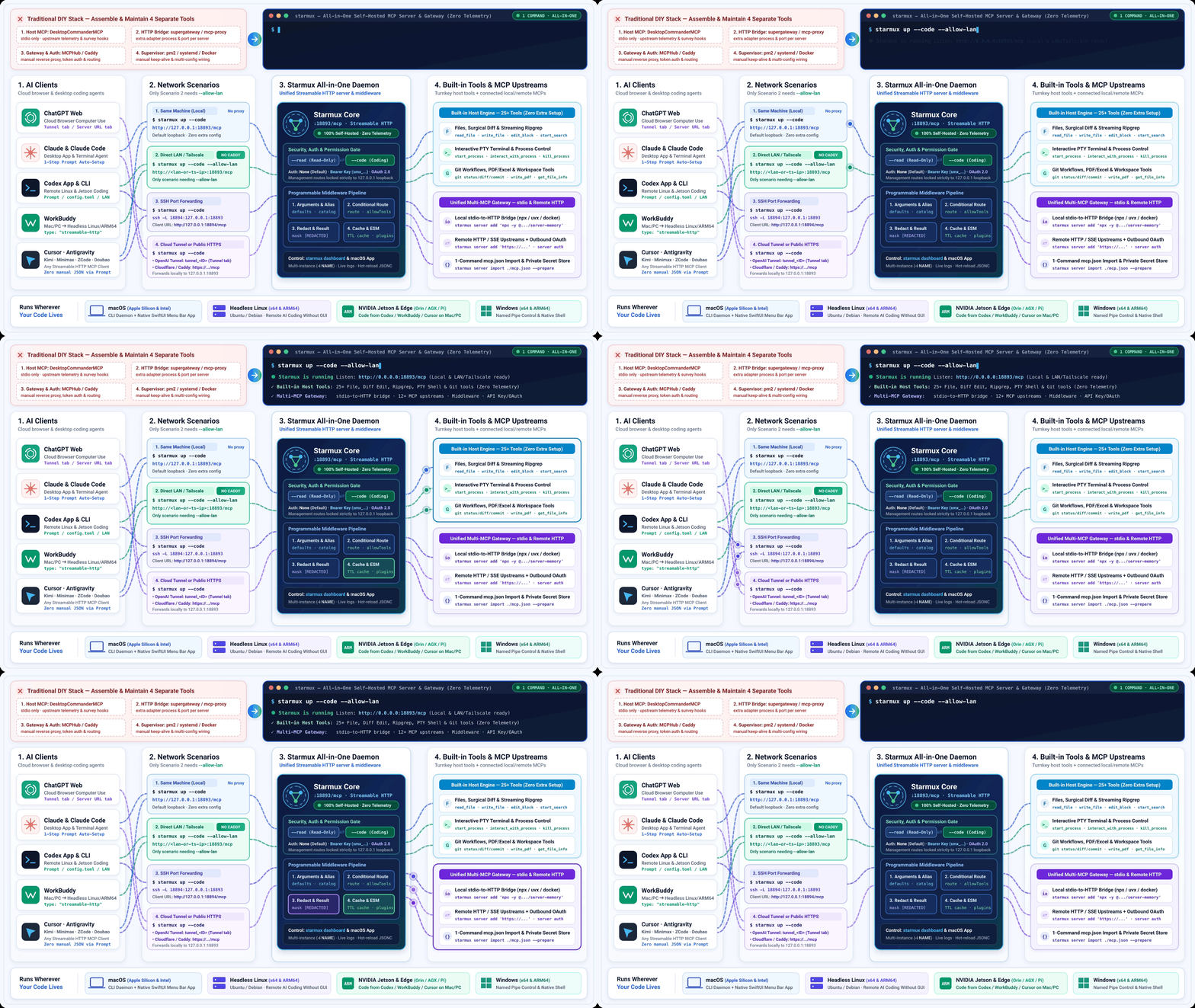
- Turnkey File, Diff Edit, Terminal & Git Tools (Zero Extra Setup): Built-in Desktop Commander engine (25+ host tools) lets AI read/write files, run ripgrep searches, apply surgical diff edits, control interactive shells, manage background processes, and run Git out of the box—no external MCP servers or reverse proxies required.
- 100% Self-Hosted, Privacy-First & Zero Telemetry: Your traffic never routes through a third-party cloud relay, and Starmux's bundled Desktop Commander engine is surgically stripped of all upstream telemetry, phone-home analytics, cloud-relay hooks, and prompt surveys at build time.
- Operate Headless Linux, NVIDIA Jetson (
ARM64), macOS & Windows Remotely: Desktop AI tools like Codex or WorkBuddy have no native Linux or ARM64 app. Run Starmux on your Linux server, NVIDIA Jetson Orin, or workstation, and code on it remotely from your Mac/Windows laptop or browser. - Unified Multi-MCP Gateway,
stdio-to-HTTP Bridge & Middleware: Built-instdio-to-Streamable HTTPmultiplexer that connects, runs, and manages multiple localstdioor remote HTTP MCP servers (starmux server addor Web Dashboard) behind a single/mcpendpoint—complete with argument defaults, tool aliases, conditional routing, field redaction, read caching, and custom ESM plugins. - Safe by Default & Turnkey Management: Starts in Global Read-Only mode (
--read) by default; switch to Coding mode (--code) in one command, expose directly on LAN/Tailscale (--allow-lan), lock down access with per-client Bearer API keys or OAuth 2.0 + PKCE, and manage everything via the local Web Dashboard or native macOS Menu Bar App.
All-in-One vs. Fragmented DIY Stacks
Instead of wiring together separate tool servers, transport bridges, and auth proxies—or deploying heavy gateways that still lack built-in host tools—Starmux provides one unified, privacy-pure runtime:
| Capability | Starmux (All-in-One Server & Gateway) | DIY Stack (DesktopCommanderMCP + supergateway / mcp-proxy) | Pure MCP Gateways (MCPHub / ContextForge / MetaMCP) | SSH MCP Bridges (ssh-mcp / ssh-mcp-server) | Vendor-Hosted Relays (Hosted Remote Desktop Commander) |
|---|---|---|---|---|---|
| Built-in File, Diff Edit, Terminal & Process Tools | ✅ Built-in (25+ tools) | ⚠️ Requires separate tool server | ❌ None (must wire external servers) | ✅ Via OpenSSH / SFTP | ✅ Built-in |
Native Streamable HTTP /mcp & Direct LAN Mode | ✅ Built-in (no Caddy needed) | ⚠️ Requires transport adapter | ✅ Built-in | ❌ Local stdio only | ✅ Hosted cloud endpoint |
| 100% Self-Hosted & Zero Telemetry (Privacy-Pure) | ✅ Zero telemetry & no relay | ⚠️ Upstream DC has telemetry | ✅ Self-hosted | ✅ Self-hosted | ❌ Routes via vendor cloud |
Unified Multi-MCP Management (stdio & Remote HTTP) | ✅ CLI + Local Web Dashboard | ⚠️ Adapter-dependent | ✅ Built-in | ❌ No | ❌ No |
| Programmable Middleware & Tool Allowlists | ✅ Built-in + ESM plugins | ❌ None | ⚠️ Partial | ❌ No | ❌ No |
Headless Linux x64 / ARM64 & NVIDIA Jetson | ✅ Single command (starmux up) | ⚠️ Manual multi-process setup | ⚠️ Often requires Docker / DB | ✅ Via SSH target | ⚠️ Depends on host agent |
| Global Read-Only vs. Coding Mode Switch | ✅ 1-command (--read / --code) | ❌ No unified read-only gate | ❌ No host-tool read/code mode | ❌ Relies on OS SSH user | ⚠️ Vendor-defined |
| Per-Client Revocable API Keys & OAuth 2.0 | ✅ Built-in + Local Web Dashboard | ❌ Requires external auth proxy | ✅ Built-in | ❌ SSH keys only | ✅ Vendor OAuth |
Quick Start
1. Install
Requires Node.js 22.12+ on macOS, Linux (x64 / ARM64 / NVIDIA Jetson), or Windows.
npm install -g starmux
(Upgrading? Run starmux down before installing the new version—see the Upgrade Guide.)
2. Start in your project directory
cd /path/to/your/project

# Option 1: Read-only mode on this computer (default — safely inspect files, folders & code)
starmux up

# or, Option 2: Coding mode on this computer (enable file edits, interactive terminal, processes & Git)
starmux up --code

# or, Option 3: Direct LAN / Tailscale access across computers (no Caddy or tunnel required)
starmux up --code --allow-lan
Starmux runs in the background on port 18893 with Authentication: None by default for immediate connection:
● Starmux is running  (instance: default)
  Instance        <instance UUID>
  Listen          http://127.0.0.1:18893/mcp  (this computer only)
  Project         /path/to/your/project
  Mode            Read-only (global · OS account)  (run 'starmux up --code' to enable edits & shell)
  Auth            None (no token required)
(Switch permissions anytime with starmux up --code / starmux up --read, or return from LAN mode to loopback-only with starmux up --local.)
Choose your network scenario at a glance:
Because SSH, tunnels (tunnel-client / cloudflared), and Caddy all forward traffic to 127.0.0.1:18893 locally on the host, only direct LAN / Tailscale connections across machines require --allow-lan:
| Scenario | When to Use | Starmux Command | Extra Forwarding Tool (if any) | What to Enter in AI Client |
|---|---|---|---|---|
1. Same Computer (localhost) | AI client and Starmux run on the same machine | starmux up --code(or starmux up for read-only) | ❌ None | URL: http://127.0.0.1:18893/mcp |
| 2. Direct LAN / Tailscale / WireGuard | Connecting across two machines on the same Wi-Fi/LAN or virtual LAN (e.g., Mac/PC $\rightarrow$ Linux or Jetson) | starmux up --code --allow-lan(only case that needs --allow-lan) | ❌ None | URL: http://<lan-or-tailscale-ip>:18893/mcp(run starmux status to see detected IP) |
| 3. Over SSH Port Forwarding | Connecting across machines via SSH without exposing 0.0.0.0 | starmux up --code | On client laptop:ssh -N -L 127.0.0.1:18894:127.0.0.1:18893 user@host | URL: http://127.0.0.1:18894/mcp |
| 4A. Cloud AI via Tunnel (No Domain / NAT) | Connecting ChatGPT Web / Codex or cloud AI behind NAT without a public IP or domain | starmux up --code(receives tunnel traffic from 127.0.0.1) | • OpenAI Tunnel: tunnel-client run ... --mcp.server-url http://127.0.0.1:18893/mcp• Cloudflare: cloudflared tunnel --url http://127.0.0.1:18893 | • OpenAI Tunnel ("Tunnel" tab): Select tunnel_<ID>• Cloudflare ("Server URL" tab): https://<tunnel-host>/mcp |
| 4B. Cloud AI via Public Domain HTTPS | Connecting cloud browser AI (ChatGPT Web, Claude, Doubao) with your own public IP & domain | starmux up --code(receives Caddy traffic from 127.0.0.1) | caddy reverse-proxy --from mcp.example.com --to 127.0.0.1:18893 | Server URL: https://mcp.example.com/mcp(see Networking Guide) |
3. Connect your AI client
With default settings (Auth: None), connect your AI client using any of the 3 options below.
Note: Default URL is http://127.0.0.1:18893/mcp. If connecting across machines (--allow-lan, SSH, HTTPS, or Tunnel), replace 127.0.0.1:18893 with the Client URL from your scenario above.
Option 1 — Ask your AI coding agent to add it for you (Zero manual config)
Send this prompt in Claude Code, Antigravity, Codex, Cursor, WorkBuddy, DSH-Harness, Kimi Code, Minimax Code, or ZCode:
Create this MCP Server connector:
"starmux": {
  "type": "streamable-http",
  "url": "http://127.0.0.1:18893/mcp"
}
or, Option 2 — AI clients with a Form UI (e.g., ChatGPT Web, Claude, Doubao)
| MCP Client Field | Value to Fill In |
|---|---|
| Connection / Transport | • Server URL (Streamable HTTP): Enter https://mcp.example.com/mcp (remote HTTPS / Cloudflare Tunnel) or http://127.0.0.1:18893/mcp (local)• Tunnel (ChatGPT Web): Switch to Tunnel (隧道) and select your tunnel_... ID |
| Authentication | None (default for local/LAN/private tunnel; use Bearer API Key or OAuth 2.0 when required) |
or, Option 3 — Manually paste into mcp.json
{
  "mcpServers": {
    "starmux": {
      "type": "streamable-http",
      "url": "http://127.0.0.1:18893/mcp"
    }
  }
}
Everyday CLI Commands
starmux status          # Check health, LAN/Tailscale endpoints, active permission mode, and tool activity
starmux dashboard       # Open the local Web Management Console (instances, MCP servers, auth & logs)
starmux up .            # Switch active project folder context to current directory
starmux up --allow-lan  # Enable direct LAN / Tailscale access (0.0.0.0) without reverse proxies
starmux up --local      # Restore loopback-only access (127.0.0.1)
starmux auth            # View auth mode, create/revoke per-client API keys, and inspect OAuth sessions
starmux verify          # Run an end-to-end local MCP handshake, tool discovery, and read probe
starmux doctor          # Run environment, port lease, and configuration diagnostics
starmux logs -f         # Stream live MCP gateway and tool invocation logs
starmux down            # Stop the gateway (alias: stop)
Advanced Usage: Manage MCP Servers, Auth & Multi-Instance
(Optional) Explore Starmux's multi-server gateway, programmable middleware, security, and multi-instance capabilities:
1. Unify & Manage Multiple MCP Servers (stdio & Remote HTTP) + Middleware
Connect extra MCP services to Starmux via the MCP servers page in starmux dashboard or with a single CLI command (Starmux automatically tests the connection, discovers tools, and extracts sensitive tokens/headers into a private secret store):
# 1. Add a local stdio MCP server command
starmux server add 'npx --yes @modelcontextprotocol/server-memory' --name memory

# 2. Add a remote Streamable HTTP / SSE MCP server URL
starmux server add 'https://your-server.example/mcp' --name remote

# 3. Import an existing mcp.json (auto-extracts secret env/headers & prepares packages)
starmux server import ./client-config.json --prepare

# 4. Sign in to an OAuth-protected upstream MCP server (if required)
starmux server auth remote login
Configure built-in Middleware (argument defaults, tool aliases/hiding, conditional routing, field redaction, opt-in read caching) or load local ESM plugins (starmux/middleware).
👉 Detailed Guide: Gateway Services, Upstream OAuth & Programmable Middleware
2. Local Management Console (starmux dashboard)
Open the owner-local Web control center (bound strictly to 127.0.0.1 on its own port, with English/Chinese and light/dark themes) to visually manage instances, connected MCP servers, middleware, client credentials, and logs:
starmux dashboard             # Start/reuse the local console and open it in your browser
starmux dashboard --no-open   # Print a private local console login link
starmux dashboard stop        # Stop the console service without stopping MCP instances
3. Securing Remote Access: Per-Client Bearer API Keys & OAuth 2.0
When exposing Starmux beyond 127.0.0.1 or trusted private networks, lock down access with revocable credentials:
- Per-Client Bearer API Keys (with instant revocation):
Then addbash
starmux auth key "My AI Client""headers": { "Authorization": "Bearer smx_YOUR_GENERATED_API_KEY" }to your client'smcp.json. - OAuth 2.0 + PKCE Browser Login (for ChatGPT Web): Acts as a standard OAuth 2.0 protected resource server with PKCE and session revocation (via self-hosted Keycloak). 👉 Detailed Guide: Security Model, Read-Only vs. Coding Boundaries & OAuth 2.0
4. Multiple Isolated Instances (-i)
Run separate remote MCP endpoints on one computer—each with its own port, project directory, Read-Only vs. Coding mode, credentials, and mounted MCP servers:
starmux up ~/work/repo-a -i work --code
starmux up ~/personal/blog -i blog --read
starmux ls                    # List all instances with status, mode, port, and project folder
starmux down -i work          # Stop a specific instance
👉 Detailed Guide: Multiple Instances & Hot-Reloading JSONC Configuration
Tested AI Client Matrix
| AI Client | Recommended Setup | Status | Detailed Guide |
|---|---|---|---|
| ChatGPT Web | Direct HTTPS or OpenAI Tunnel (+ OAuth 2.0) | ✅ Tested | ChatGPT Web Setup |
| Claude App / Code | Chat Prompt (Claude Code) or Remote MCP Custom Connector (Claude App) | ✅ Tested | AI Coding Agents · Claude App |
| WorkBuddy | Chat Prompt / Direct LAN (--allow-lan) / SSH / HTTPS (Mac/PC $\rightarrow$ Linux / Jetson) | ✅ Tested | WorkBuddy to Linux / Jetson Guide |
| Codex CLI / App | Chat Prompt / Direct LAN (--allow-lan) / Tunnel or HTTPS + Bearer API Key | ✅ Tested | Codex CLI Setup · Codex to Linux / Jetson |
| Antigravity | Chat Prompt / Local / Direct LAN (--allow-lan) / SSH / HTTPS | ✅ Tested | AI Coding Agents Setup |
| Cursor | Chat Prompt / Local / Direct LAN (--allow-lan) / SSH / HTTPS | ✅ Tested | AI Coding Agents Setup |
| DSH-Harness / Kimi / Minimax / ZCode | Chat Prompt / Local / Direct LAN (--allow-lan) / SSH / HTTPS | ✅ Tested | AI Coding Agents Setup |
| Doubao (豆包) | Direct HTTPS or Tunnel | ✅ Tested | Claude & Doubao Setup |
Common Use Cases & FAQ
1. All-in-One Turnkey Setup (Zero Manual Component Assembly)
- How do I run a remote file, terminal, and Git MCP server with one command instead of wiring
DesktopCommanderMCP + supergateway + Caddy? Runstarmux up --code --allow-lan. Starmux bundles 25+ host tools (read_file,write_file,list_directory,start_search,edit_block, interactive PTY/Shell sessions viastart_process/interact_with_process/read_process_output, background process control vialist_processes/kill_process/force_terminate, PDF/Excel parsing, and Git workflows), a nativeStreamable HTTPserver, a LAN listener, and a process supervisor into a single daemon. - How can I give ChatGPT Web, Claude, or Doubao local "Computer Use" (access to files and terminal tools on my computer)?
Start
starmux upin your project directory and expose127.0.0.1:18893/mcpvia OpenAI Secure MCP Tunnel, Cloudflare Tunnel, or Direct HTTPS so cloud AI can inspect folders, edit code, or execute terminal workflows without manual file uploads. - How do I switch an AI agent between safe Read-Only inspection and full Coding permissions on the fly?
Starmux defaults to Global Read-Only mode (
starmux up --read), blocking file writes, shell commands, and Git mutations at the gateway level. Runstarmux up --codeto enable coding tools immediately without reconfiguring your AI client.
2. 100% Self-Hosted, Privacy-First & Zero Telemetry
- Is there a privacy-first, zero-telemetry alternative to Desktop Commander MCP and its hosted Remote Desktop Commander service?
Yes. Upstream
DesktopCommanderMCPincludes installation tracking, telemetry capture, cloud-relay modules, and prompt surveys. Starmux surgically strips all telemetry, phone-home calls, and cloud-relay code at build time (verified by automated zero-telemetry audit tests) and runs 100% self-hosted on your own machine. - Does Starmux route my code, prompts, or terminal output through any third-party cloud server?
Never. Starmux has zero vendor-hosted relays and zero external analytics. All MCP tool execution stays strictly between your AI client and your own network (
127.0.0.1, LAN/Tailscale, or your self-managed HTTPS/Tunnel ingress).
3. Cross-Platform Remote Coding (Codex, WorkBuddy & Cloud AI on Linux / NVIDIA Jetson)
- How can Codex App, WorkBuddy, Cursor, or Claude Code on macOS/Windows write code and run commands on a headless Linux server, Raspberry Pi, or NVIDIA Jetson (
ARM64/aarch64)? Desktop AI apps like Codex App and WorkBuddy do not offer native Linux orARM64desktop clients (see also the WorkBuddy to Linux / Jetson Guide). Install Starmux on your target Ubuntu/Debian server, NVIDIA Jetson Orin / AGX, or ARM64 board, runstarmux up --code --allow-lan, and connect from your Mac/Windows AI client over HTTP—turning any headless Linux box into a local-feeling AI workspace. - Can ChatGPT Web operate a remote Linux workstation or NVIDIA Jetson edge device directly?
Yes. Run Starmux on the Linux
x64/ARM64or Jetson host and connect ChatGPT Web via an outbound tunnel or HTTPS so ChatGPT can inspect logs, edit code, compile projects, and manage services on the target device.
4. Multi-MCP Server Aggregation (stdio-to-HTTP Bridge) & Programmable Middleware
- How do I expose local
stdioMCP servers overStreamable HTTPand aggregate multiple local/remote MCP servers behind one endpoint? Usestarmux server add,starmux server import ./mcp.json --prepare, or thestarmux dashboardWeb UI. Starmux acts as a built-instdio-to-Streamable HTTPbridge and multi-server multiplexer—supervising localstdioprocesses and remote HTTP/SSE upstreams, managing their outbound OAuth/API keys, and namespacing all tools (<serverId>__<toolName>) on one port without needingsupergatewayormcp-proxy(see the full Gateway Reference). - How can I transform MCP tool arguments, hide or alias tools, redact sensitive output fields, or cache read-only MCP calls?
Configure Starmux's built-in Middleware pipeline (
arguments,catalog,route,result,redact,cache) viastarmux middleware addor the Web Dashboard, or write custom local ESM plugins usingdefineMiddlewarefromstarmux/middleware.
5. NAT Traversal & Enterprise-Grade Authentication
- How do I connect an AI client to a self-hosted MCP server behind NAT, CGNAT, or a home firewall?
For your own desktop AI clients across networks, join both machines to Tailscale / WireGuard, run
starmux up --code --allow-lan, and connect directly via the host's Tailscale IP (http://100.x.y.z:18893/mcp). For cloud browser AI (like ChatGPT Web) that cannot join your virtual LAN, runstarmux up --code(listening on127.0.0.1:18893) and forward127.0.0.1:18893via OpenAI Secure MCP Tunnel (select Tunneltunnel_...in ChatGPT) or Cloudflare Tunnel /frp/ngrok(enter Server URLhttps://.../mcp). - How can I secure a remote MCP endpoint with per-client revocable API keys or OAuth 2.0 + PKCE?
Run
starmux auth key "Client Name"to issue independent Bearer tokens (smx_...) that can be audited or revoked anytime instarmux dashboard, or configure self-hosted Keycloak OAuth 2.0 + PKCE for browser-based AI connectors.
中文场景速览(开箱即用 · 100% 自托管零遥测 · 跨平台 ·
stdio转 HTTP 可编程多 MCP 网关):
- All-in-One 极简开箱即用(本地 Computer Use): 无需手工拼装
DesktopCommanderMCP + supergateway + MCPHub + Caddy,仅需一条starmux up(或局域网/Tailscale 免反代直连starmux up --allow-lan),即可获得内置的 25+ 本地文件读写、ripgrep 代码搜索、Diff 块编辑、交互式 PTY 终端、后台进程管理与 Git 工具,以及原生Streamable HTTP(/mcp) 端点,轻松让网页版 ChatGPT、Claude、豆包 实现本地电脑操作(Computer Use)。- 100% 自托管、无遥测(Zero Telemetry)、重隐私(Desktop Commander 私有化纯净替代方案): 在构建期物理剥离了原版 Desktop Commander 的全部遥测上报、云端设备中转与调查弹窗代码,数据与执行 100% 留在你自己的机器与网络中,绝不经过第三方云端中转。
- 跨平台赋能无 Linux 客户端的 AI 编程工具: 让没有 Linux / ARM64 桌面客户端的 WorkBuddy、Codex App,以及 Cursor、Claude Code、Antigravity,跨设备远程在 无头 Linux 服务器 (
x64/ARM64/aarch64)、NVIDIA Jetson Orin、树莓派、macOS 与 Windows 上流畅写代码、跑终端。stdio转Streamable HTTP桥接、多 MCP 服务统一管理与可编程中间件: 通过starmux dashboard本地可视化管理面板或starmux server add/import一站式接入、运行和聚合多个本地stdio与远程 HTTP/SSE MCP 服务,并支持参数默认值、工具别名/隐藏、条件路由、敏感字段脱敏、只读缓存及自定义 ESM 中间件插件。
Native macOS App
Prefer a visual desktop interface? The native SwiftUI menu bar App puts service health, Read-Only vs. Coding mode toggles, live MCP connection topology, and recent tool calls in one compact panel.
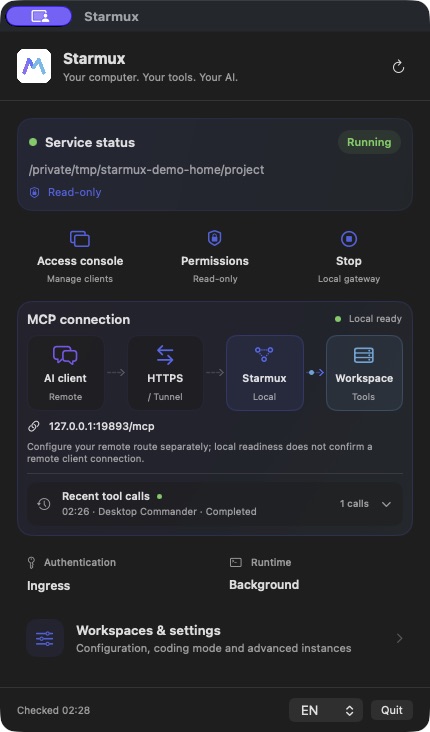
Native macOS Menu Bar App (English & Chinese) · Controls the same instances as the CLI
The App and CLI manage the same underlying instances. Quitting the App stops only instances started by the App; background instances started via CLI keep running.
| Host Platform | Core & CLI (starmux) | Native Menu Bar App |
|---|---|---|
macOS (Apple Silicon / Intel) | ✅ Tested | 🧪 Development Build (App Build Guide) |
Linux (x64 / ARM64 / NVIDIA Jetson) | ✅ Tested | — |
Windows (x64) | ✅ Tested | — |
Documentation & Specialized Guides
Explore the Documentation Index by topic:
- 📦 Installation, Platforms & Network Forwarding — Supported hosts (
macOS,Linux,NVIDIA Jetson,Windows), everyday CLI commands, upgrades, source builds, and Caddy / Tunnel / SSH forwarding. - 🔌 Gateway Services, Upstream OAuth & Programmable Middleware — Adding/importing local
stdioand remote HTTP MCP servers (starmux server), outbound OAuth login, built-in transforms, read caching, and custom ESM middleware plugins. - 🔒 Security, Access Control & Authentication — Global Read-Only vs. Coding permissions, trust boundaries, per-client Bearer API keys (
starmux auth key), private local Web Console, and self-hosted Keycloak OAuth 2.0 + PKCE. - 🤖 AI Client Configuration Guides — End-to-end setup (including 1-step Prompt Auto-Setup) for ChatGPT Web, Claude App / Code, WorkBuddy, Antigravity, Codex, Cursor, DSH-Harness, Kimi Code, Minimax Code, ZCode, and Doubao (豆包).
- ⚙️ Multi-Instance & JSONC Configuration — Running multiple isolated instances (
-i NAME), hot-reloadingconfig.jsonc, mounting extra MCP servers, and managing secrets.
License
Starmux original code is MIT Licensed. Desktop Commander is bundled as a pinned dependency and retains its own license and notices. Starmux is an independent open-source project and is not endorsed by Desktop Commander or AI client vendors.






